Page 250 of 860
250 2-2. Instrument cluster and information display
SIENNA_U (OM45477U)
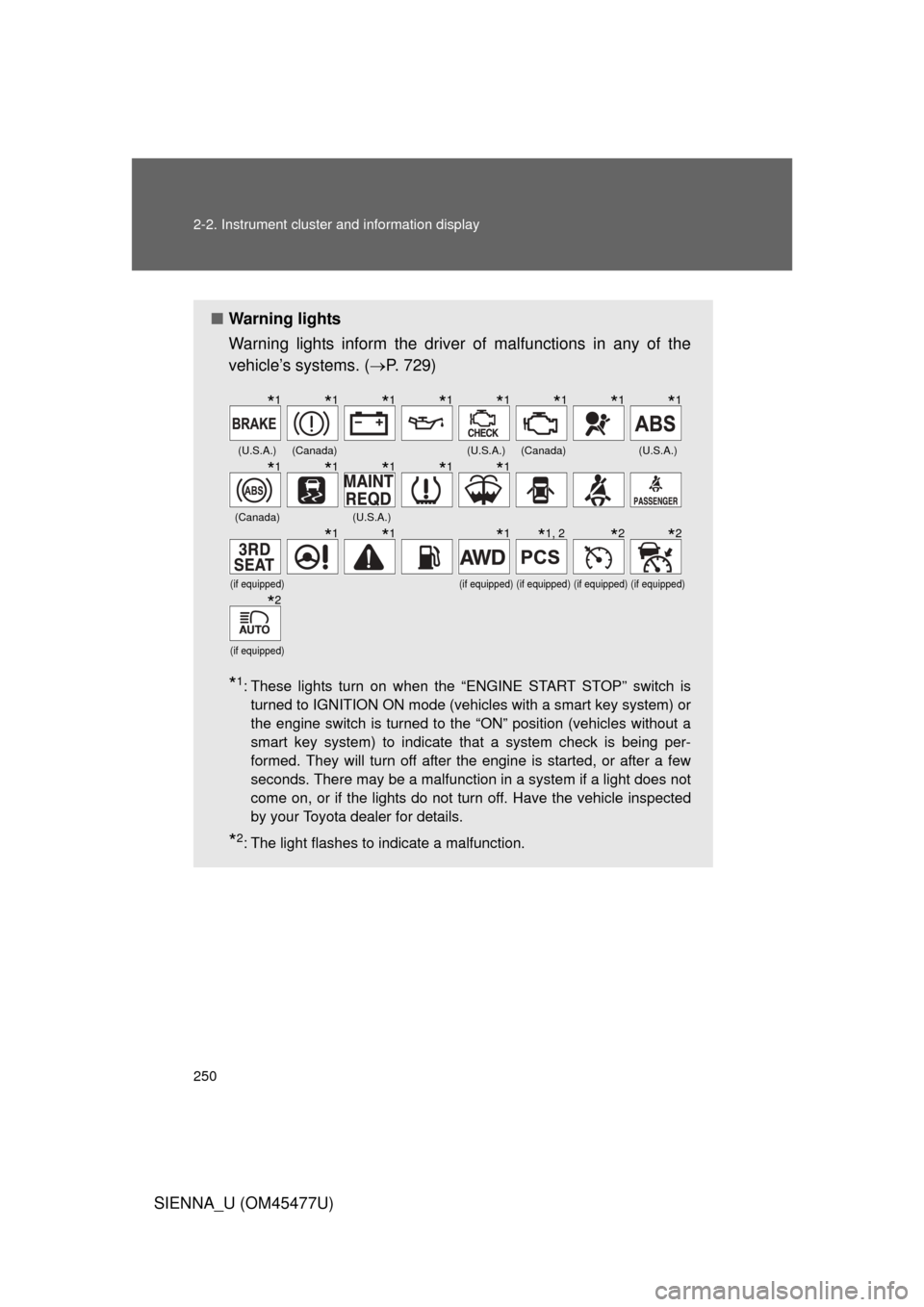
■Warning lights
Warning lights inform the driver of malfunctions in any of the
vehicle’s systems. ( P. 729)
*1: These lights turn on when the “ENGINE START STOP” switch is
turned to IGNITION ON mode (vehicles with a smart key system) or
the engine switch is turned to the “ON” position (vehicles without a
smart key system) to indicate that a system check is being per-
formed. They will turn off after the engine is started, or after a few
seconds. There may be a malfunction in a system if a light does not
come on, or if the lights do not turn off. Have the vehicle inspected
by your Toyota dealer for details.
*2: The light flashes to indicate a malfunction.
(U.S.A.)(Canada)(U.S.A.)(Canada)(U.S.A.)
(Canada)(U.S.A.)
(if equipped)(if equipped)(if equipped)(if equipped)(if equipped)
(if equipped)
*1*1*1*1*1*1*1*1
*1*1*1*1*1
*1*1*1*1, 2*2*2
*2
Page 254 of 860
254 2-2. Instrument cluster and information display
SIENNA_U (OM45477U)■
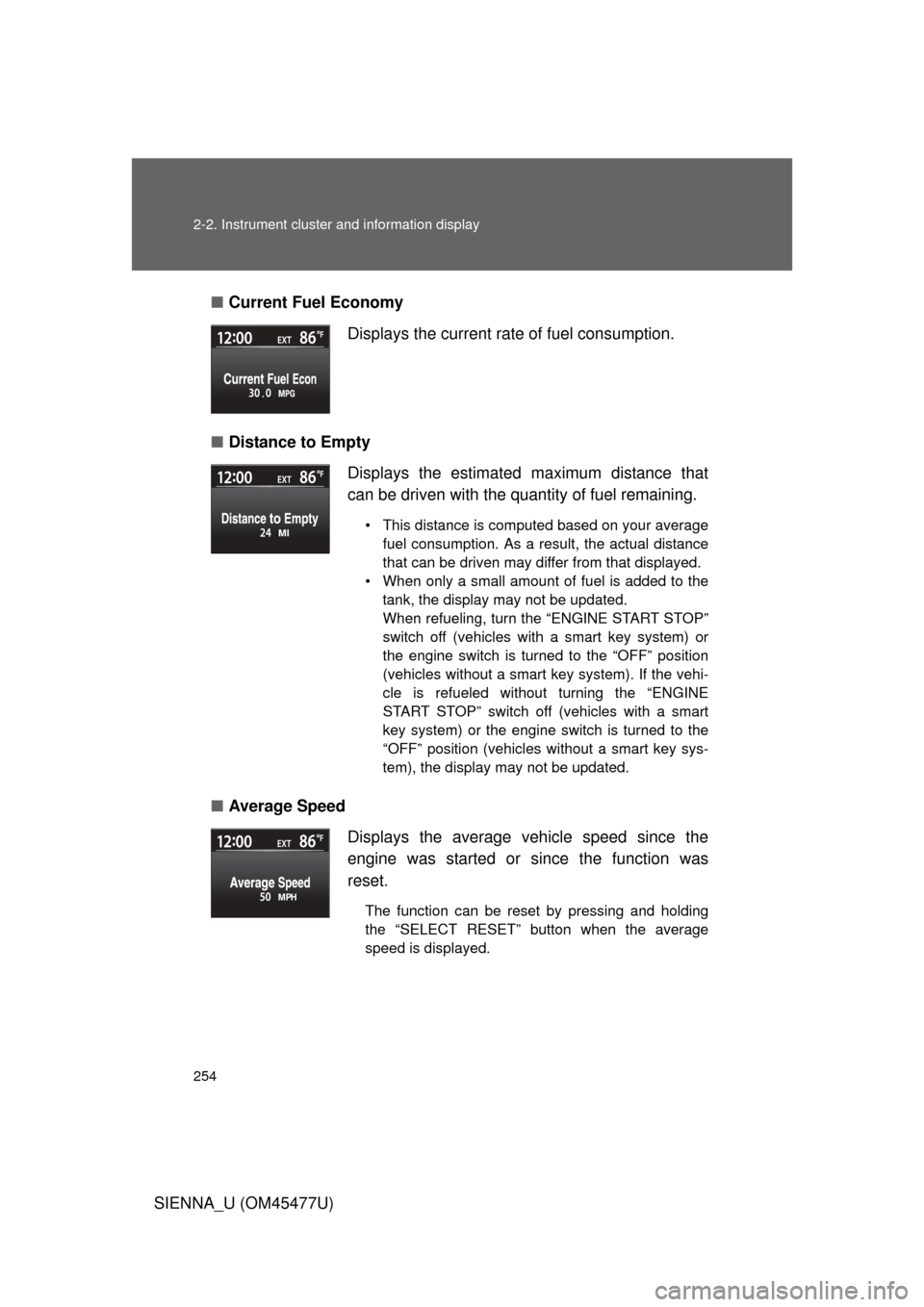
Current Fuel Economy
■ Distance to Empty
■ Average Speed Displays the current rate of fuel consumption.
Displays the estimated maximum distance that
can be driven with the quantity of fuel remaining.
• This distance is computed based on your average
fuel consumption. As a result, the actual distance
that can be driven may differ from that displayed.
• When only a small amount of fuel is added to the tank, the display may not be updated.
When refueling, turn the “ENGINE START STOP”
switch off (vehicles with a smart key system) or
the engine switch is turned to the “OFF” position
(vehicles without a smart key system). If the vehi-
cle is refueled without turning the “ENGINE
START STOP” switch off (vehicles with a smart
key system) or the engine switch is turned to the
“OFF” position (vehicles without a smart key sys-
tem), the display may not be updated.
Displays the average vehicle speed since the
engine was started or since the function was
reset.
The function can be reset by pressing and holding
the “SELECT RESET” button when the average
speed is displayed.
Page 255 of 860
255
2-2. Instrument cluster and information display
2
When driving
SIENNA_U (OM45477U)
■
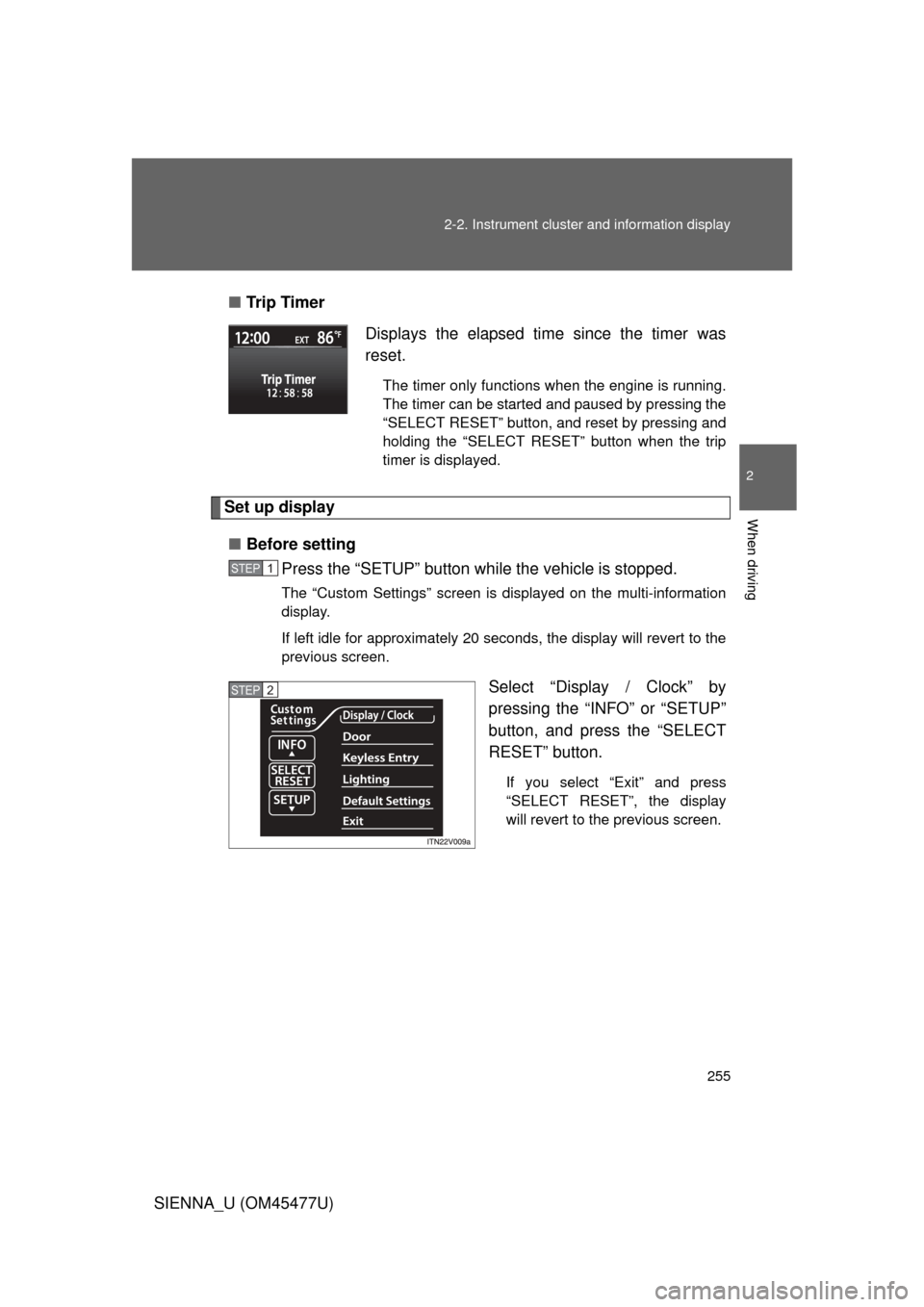
Tr i p Ti m e r
Set up display
■ Before setting
Press the “SETUP” button wh ile the vehicle is stopped.
The “Custom Settings” screen is displayed on the multi-information
display.
If left idle for approximately 20 seconds, the display will revert to the
previous screen.
Select “Display / Clock” by
pressing the “INFO” or “SETUP”
button, and press the “SELECT
RESET” button.
If you select “Exit” and press
“SELECT RESET”, the display
will revert to the previous screen.
Displays the elapsed time since the timer was
reset.
The timer only functions when the engine is running.
The timer can be started and paused by pressing the
“SELECT RESET” button, and reset by pressing and
holding the “SELECT RESET” button when the trip
timer is displayed.
STEP1
STEP2
Page 265 of 860

265
2-2. Instrument cluster and information display
2
When driving
SIENNA_U (OM45477U)
■
System check display
Vehicles without a smart key system
After switching the engine switch to the “ON” position, “SIENNA” is dis-
played while system operation is checked. When the system check is
complete, the normal screen will return.
Vehicles with a smart key system After switching the “ENGINE START STOP” switch to IGNITION ON
mode, “SIENNA” is displayed while system operation is checked. When
the system check is complete, the normal screen will return.
■ When “--”, “E” or “F” is displayed on the outside temperature display
The system may be malfunctioning. Take your vehicle to your Toyota dealer.
■ Outside temperature display
In the following situations, the correct outside temperature may not be dis-
played, or the display may take longer than normal to change.
● When stopped, or driving at low speeds (less than 12 mph [20 km/h])
● When the outside temperature has changed suddenly (at the entrance/
exit of a garage, tunnel, etc.)
NOTICE
■The multi-information disp lay at low temperatures
Allow the interior of the vehicle to warm up before using the liquid crystal
information display. At extremely low temperatures, the information display
monitor may respond slowly, and display changes may be delayed.
Page 266 of 860
266
SIENNA_U (OM45477U)
2-3. Operating the lights and wipers
Headlight switch
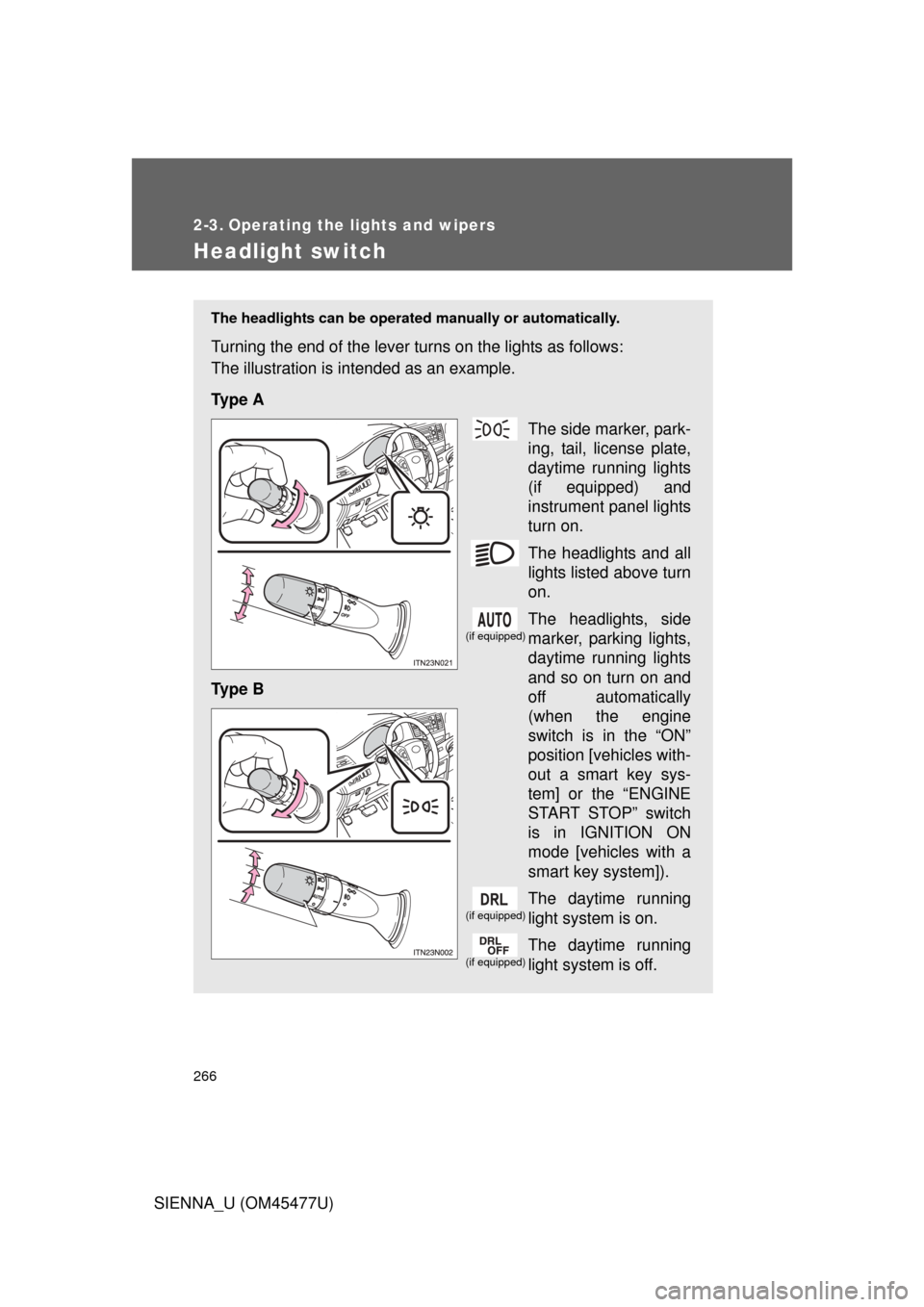
The headlights can be operated manually or automatically.
Turning the end of the lever turns on the lights as follows:
The illustration is intended as an example.
Ty p e A
The side marker, park-
ing, tail, license plate,
daytime running lights
(if equipped) and
instrument panel lights
turn on.
The headlights and all
lights listed above turn
on.
The headlights, side
marker, parking lights,
daytime running lights
and so on turn on and
off automatically
(when the engine
switch is in the “ON”
position [vehicles with-
out a smart key sys-
tem] or the “ENGINE
START STOP” switch
is in IGNITION ON
mode [vehicles with a
smart key system]).
The daytime running
light system is on.
The daytime running
light system is off.
Ty p e B
(if equipped)
(if equipped)
(if equipped)
Page 271 of 860
271
2-3. Operating the lights and wipers
2
When driving
SIENNA_U (OM45477U)
■
Automatic light off system
Vehicles without a smart key system
● When the headlights are on: The headlights and tail lights turn off 30 sec-
onds after a door is opened and closed if the engine switch is turned to
the “ACC” or “LOCK” position. (The lights turn off immediately if
on the key is pressed after all the doors are locked.)
● When only the tail lights are on: The tail lights turn off automatically if the
engine switch is turned to the “ACC” or “LOCK” position and the driver’s
door is opened.
To turn the lights on again, turn the engine switch to the “ON” position, or
turn the light switch off once and then back to the
or .
Vehicles with a smart key system
● When the headlights are on: The headlights and tail lights turn off 30 sec-
onds after a door is opened and closed if the “ENGINE START STOP”
switch is turned to ACCESSORY mode or turned off. (The lights turn off
immediately if on the key is pressed after all the doors are
locked.)
● When only the tail lights are on: The tail lights turn off automatically if the
“ENGINE START STOP” switch is turned to ACCESSORY mode or
turned off and the driver’s door is opened.
To turn the lights on again, turn the “ENGINE START STOP” switch to IGNI-
TION ON mode, or turn the light switch off and then back to or
.
Page 273 of 860
273
2-3. Operating the lights and wipers
2
When driving
SIENNA_U (OM45477U)
Automatic High Beam
: If equipped
The Automatic High Beam uses an in-vehicle camera sensor to
assess the brightness of streetligh ts, the lights of oncoming and
preceding vehicles, etc., and automatically turns high beam on or off
as necessary.
■ Activating the Automatic High Beam system
Push the lever away from you
with the headlight switch in the position when the
“ENGINE START STOP”
switch is in IGNITION ON
mode (vehicles with a smart
key system) or the engine
switch is in the “ON” position
(vehicles without a smart key
system).
The Automatic High Beam indi-
cator will come on when the
headlights are turned on auto-
matically to indicate that the
system is active.
Page 278 of 860
278 2-3. Operating the lights and wipers
SIENNA_U (OM45477U)
■If the Automatic High Beam indicator flashes...
It may indicate a malfunction in the system. Contact your Toyota dealer.
■ Customization that can be configured at Toyota dealer or by the multi-
information display
The Automatic High Beam can be turned off.
(Customizable features P. 815)
■ Temporary lowering sensor sensitivity
The sensitivity of the sensor can be temporarily lowered.
To lower the sensitivity, push and hold on the inside rear view mirror
for 15 to 20 seconds, and release. The indicator light on the inside rear view
mirror will flash to indicate that the sensitivity has been lowered.
Vehicles without a smart key system:
When the engine switch is turned to the “LOCK” position, the sensitivity will
be returned to its normal level.
Vehicles with a smart key system:
When the “ENGINE START STOP” switch is turned off, the sensitivity will be
returned to its normal level.