Page 336 of 860

336
2-4. Using other driving systems
SIENNA_U (OM45477U)
PCS (Pre-Collision System)
: If equipped
When the radar sensor detects that a frontal collision is highly likely
or even unavoidable, the systems such as the brakes and seat
belts are automatically engaged to lessen impact to occupants as
well as vehicle damage.
■ Pre-collision seat belts (front seat belts only)
If the pre-collision s ensor detects that a co llision is unavoidable,
the pre-collision system will retract the seat belt before the colli-
sion occurs. The same will happen if the driver makes an emer-
gency braking or loses co ntrol of the vehicle. (P. 131)
However, when the VSC system is disabled, the system will not
operate in the event of skidding.
■ Pre-collision brake assist
When there is a high possibility of a frontal collision, the system
applies greater braking force in relation to how strongly the
brake pedal is depressed.
■ Pre-collision braking
When there is a high possibility of a frontal collision, the system
warns the driver using a warning light and buzzer. If the system
determines that a collision is un avoidable, the brakes are auto-
matically applied to reduce th e collision speed. Pre-collision
braking can be disabled usi ng the pre-collision braking off
switch.
Page 337 of 860
337
2-4. Using other
driving systems
2
When driving
SIENNA_U (OM45477U)
Disabling pre-collision braking
Pre-collision braking disabled
Pre-collision braking enabled
The “PCS” warning light flashes
when pre-collision braking is dis-
abled.
Radar sensorThe radar sensor detects vehi-
cles or other obstacles on or
near the road ahead and deter-
mines whether a collision is
imminent based on the position,
speed, and heading of the obsta-
cles.
Page 340 of 860

340 2-4. Using other driving systems
SIENNA_U (OM45477U)
■When there is a malfunction in the system
Warning lights will turn on or flash. ( P. 729)
■ Certification
U.S.A.
FCC ID: HYQDNMWR005
This device complies with part 15 of the FCC Rules. Operation is subject to
the following two conditions: (1) This device may not cause harmful interfer-
ence, and (2) this device must accept any interference received, including
interference that may cause undesired operation.
FCC WARNING
Changes or modifications not expressly approved by the party responsible
for compliance could void the user’s authority to operate the equipment.
Radiofrequency radiation exposure Information:
This equipment complies with FCC radiation exposure limits set forth for an
uncontrolled environment.
This equipment should be installed and operated with minimum distance of
20 cm between the radiator (antenna) and your body.
This transmitter must not be co-located or operating in conjunction with any
other antenna or transmitter.
Canada
Operation is subject to the following two conditions: (1) this device may not
cause interference, and (2) this device must accept any interference, includ-
ing interference that may cause undesired operation of the device.
Page 671 of 860
671
4-3. Do-it-yourself maintenance
4
Maintenance and care
SIENNA_U (OM45477U)
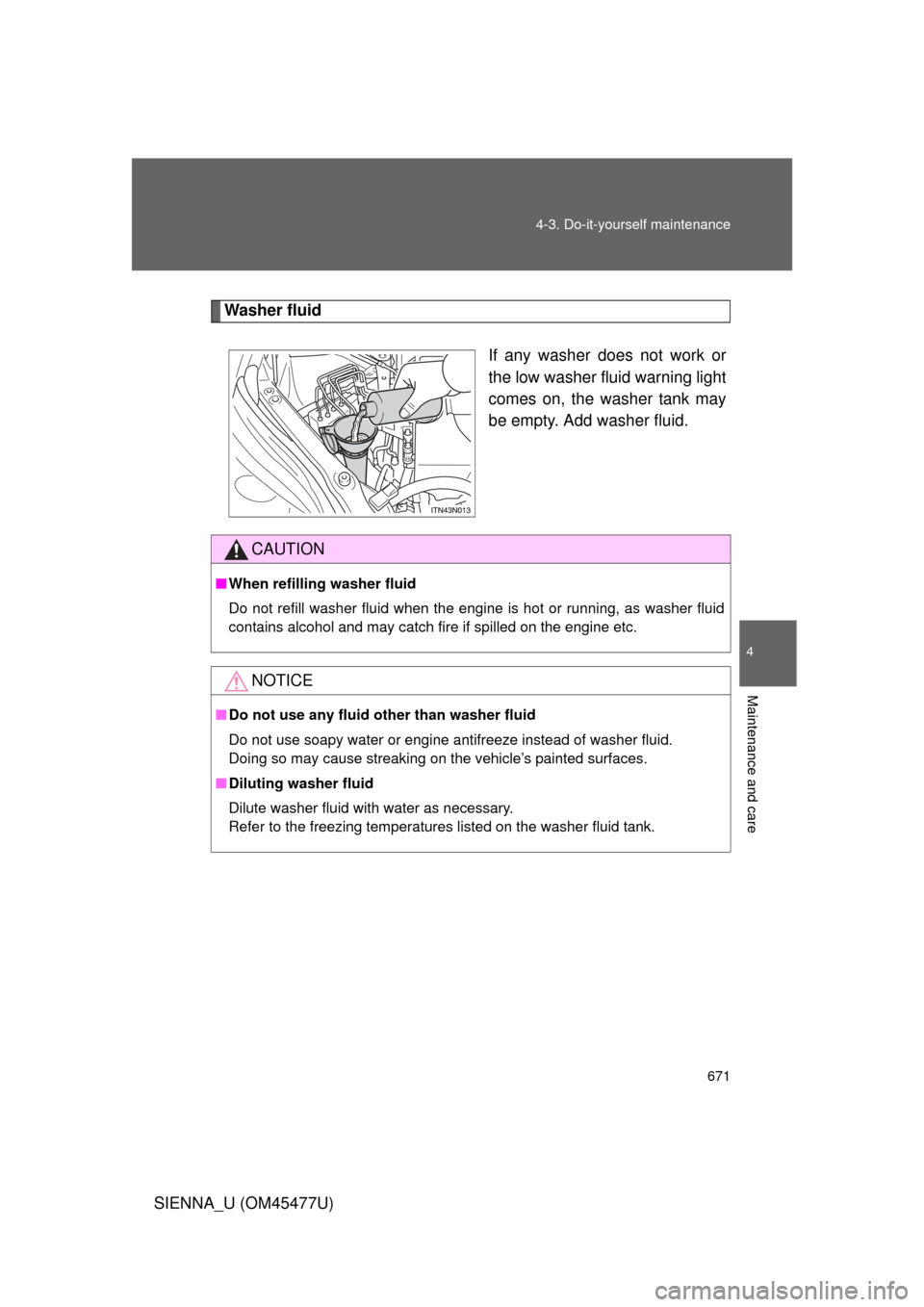
Washer fluid
If any washer does not work or
the low washer fluid warning light
comes on, the washer tank may
be empty. Add washer fluid.
CAUTION
■When refilling washer fluid
Do not refill washer fluid when the engine is hot or running, as washer fluid
contains alcohol and may catch fire if spilled on the engine etc.
NOTICE
■Do not use any fluid other than washer fluid
Do not use soapy water or engine antifreeze instead of washer fluid.
Doing so may cause streaking on the vehicle’s painted surfaces.
■ Diluting washer fluid
Dilute washer fluid with water as necessary.
Refer to the freezing temperatures listed on the washer fluid tank.
Page 675 of 860
675
4-3. Do-it-yourself maintenance
4
Maintenance and care
SIENNA_U (OM45477U)
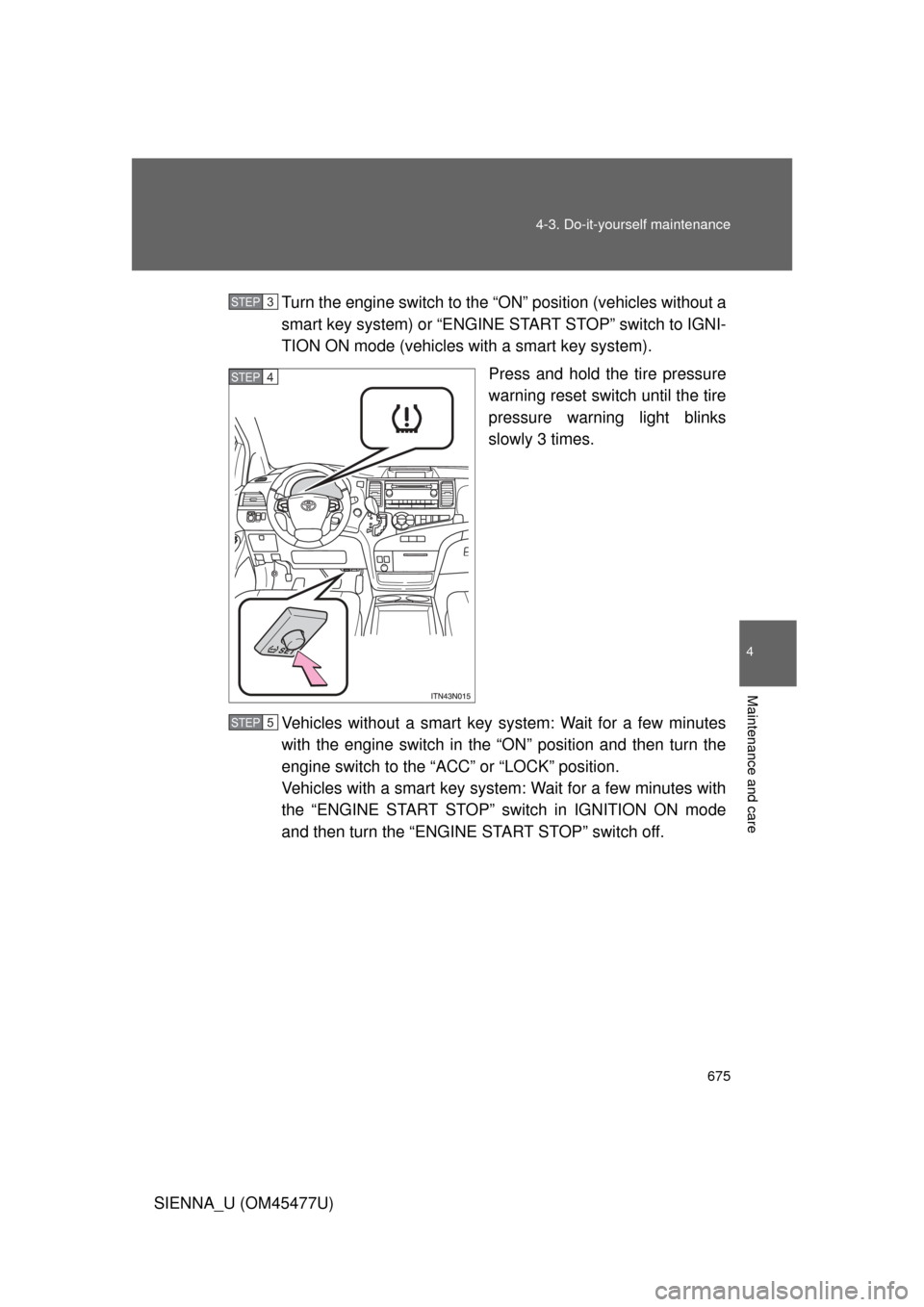
Turn the engine switch to the “O
N” position (vehicles without a
smart key system) or “ENGINE START STOP” switch to IGNI-
TION ON mode (vehicles with a smart key system).
Press and hold the tire pressure
warning reset switch until the tire
pressure warning light blinks
slowly 3 times.
Vehicles without a smart key system: Wait for a few minutes
with the engine switch in the “ON” position and then turn the
engine switch to the “ACC” or “LOCK” position.
Vehicles with a smart key system: Wait for a few minutes with
the “ENGINE START STOP” switch in IGNITION ON mode
and then turn the “ENGINE START STOP” switch off.
STEP3
STEP4
STEP5
Page 676 of 860
676 4-3. Do-it-yourself maintenance
SIENNA_U (OM45477U)
Registering ID codesThe tire pressure warning valve and transmitter is equipped with a
unique ID code. When replacing a tire pressure warning valve and
transmitter, it is necessary to regi ster the ID code. Have the ID code
registered by your Toyota dealer.
■When to replace your vehicle’s tires
Tires should be replaced if:
●You have tire damage such as cuts, splits, cracks deep enough to
expose the fabric, and bulges indicating internal damage
●A tire goes flat repeatedly or c annot be properly repaired due to the
size or location of a cut or other damage
If you are not sure, consult with your Toyota dealer.
■Replacing tires and wheels
If the ID code of the tire pressure warning valve and transmitter is not
registered, the tire pre ssure warning system will not work properly. After
driving for about 20 minutes, the tire pressure warning light blinks for
1 minute and stays on to indicate a system malfunction.
Page 679 of 860

679
4-3. Do-it-yourself maintenance
4
Maintenance and care
SIENNA_U (OM45477U)
■Initializing the tire pressure warning system
Initialize the system with the tire infl
ation pressure adjusted to the speci-
fied level.
■If the tread on snow tires wears down below 0.16 in. (4 mm)
The effectiveness of the tires as snow tires is lost.
■If you press the tire pressure warning reset switch accidentally
If initialization is performed, adjust t he tire inflation pressure to the speci-
fied level and initialize the tire pressure warning system again.
■When the initialization of the tire pressure warning system has
failed
Initialization can be completed in a few minutes. However, in the follow-
ing cases, the settings has not bee n recorded and the system will not
operate properly. If repeated attempts to record tire inflation pressure
settings are unsuccessful, have the vehicle inspected by your Toyota
dealer.
●When operating the tire pressure warning reset switch, the tire pres-
sure warning light doe s not blink 3 times.
●After driving for a certain period of time since the initialization has
been completed, the wa rning light comes on after blinking for 1
minute.
Page 681 of 860
681
4-3. Do-it-yourself maintenance
4
Maintenance and care
SIENNA_U (OM45477U)
CAUTION
■When inspecting or replacing tires
Observe the following precautions to
prevent accidents. Failure to do so
may cause damage to parts of the drive train, as well as dangerous han-
dling characteristics, which may lead to an accident resulting in death or
serious injury.
●Do not mix tires of different ma kes, models or tread patterns.
Also, do not mix tires of remarkably different treadwear.
●Do not use tire sizes other than those recommended by Toyota.
●Do not mix differently constructed ti res (radial, bias-belted or bias-ply
tires).
●Do not mix summer, all season and snow tires.
●Do not use tires that have been used on another vehicle.
Do not use tires if you do not know how they were used previously.
●Do not tow if your vehicle has a compact spare tire installed.
■When initializing the tire pressure warning system
Do not operate the tire pressure wa rning reset switch without first adjust-
ing the tire inflation pr essure to the specified level. Otherwise, the tire
pressure warning light may not come on even if the tire inflation pressure
is low, or it may come on when the ti re inflation pressure is actually nor-
mal.