Page 213 of 636
213
2-1. Driving procedures
2
When driving
Hor n
■After adjusting the steering wheel
Make sure that the steering wheel is securely locked.
The horn may not sound if the steering wheel is not securely locked.
(P. 117)
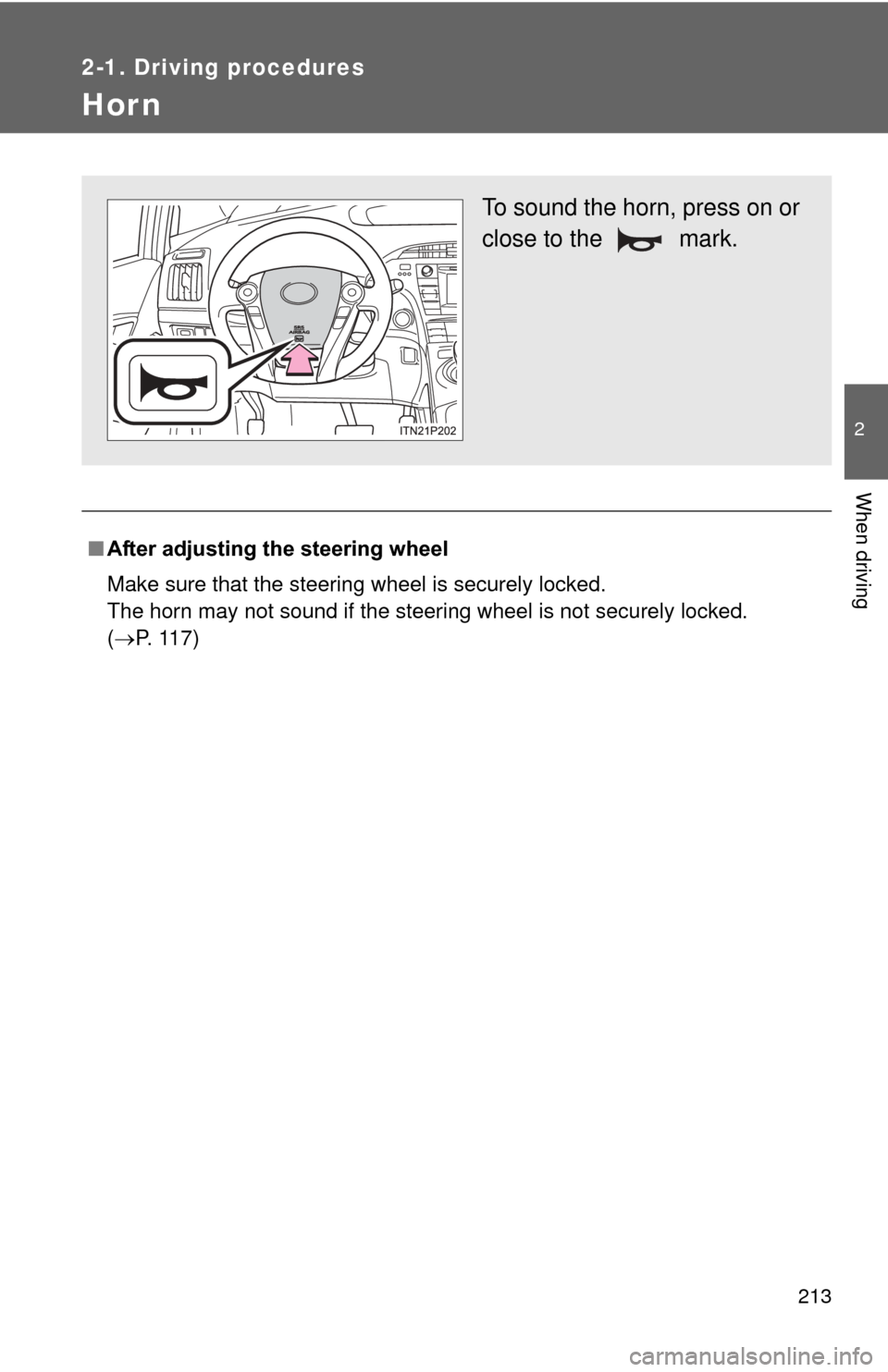
To sound the horn, press on or
close to the mark.
Page 220 of 636
220 2-2. Instrument cluster
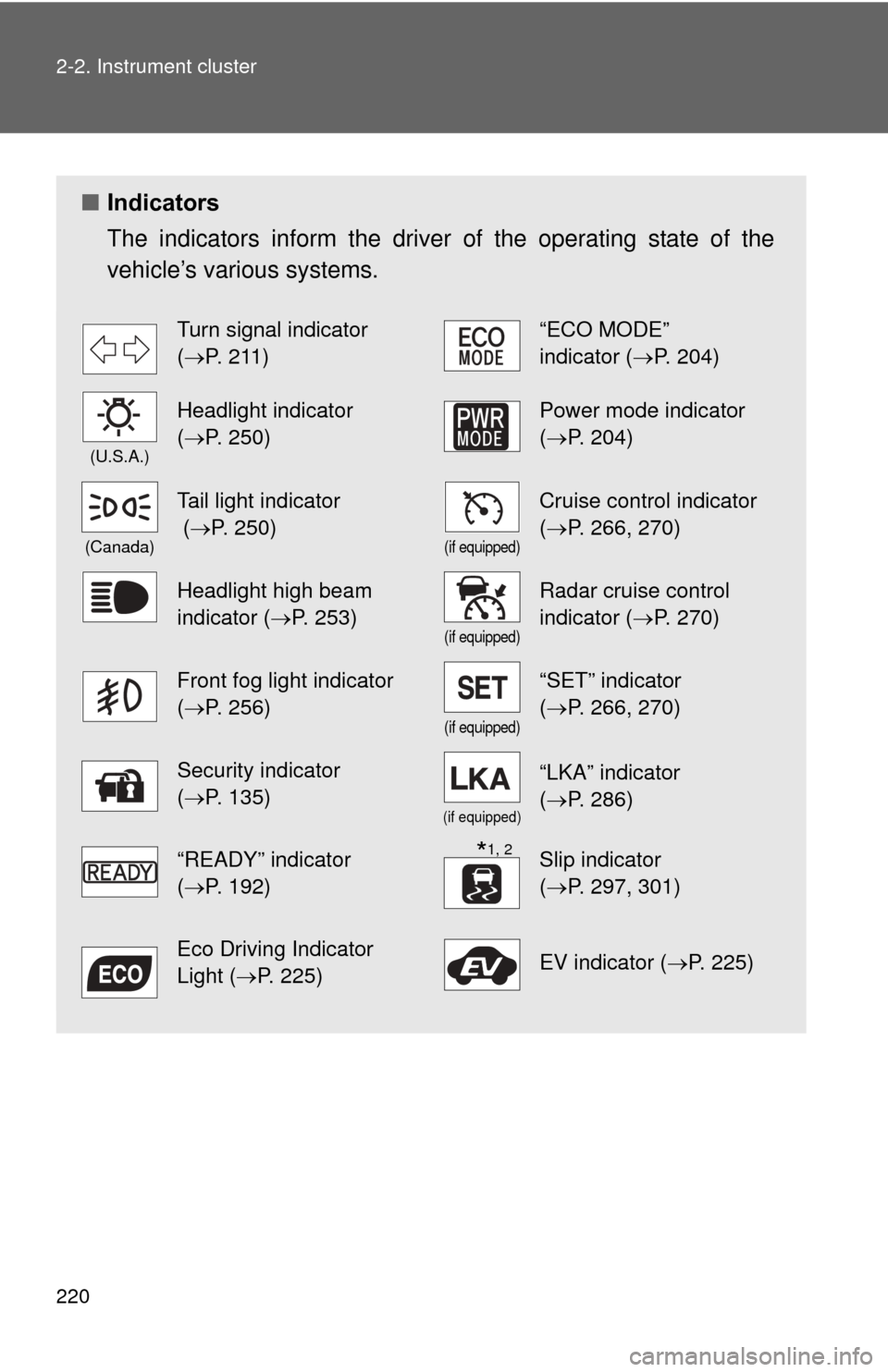
■Indicators
The indicators inform the driver of the operating state of the
vehicle’s various systems.
Turn signal indicator
(P. 211)“ECO MODE”
indicator (P. 204)
(U.S.A.)
Headlight indicator
(P. 250)Power mode indicator
(P. 204)
(Canada)
Tail light indicator
( P. 250)
(if equipped)
Cruise control indicator
(P. 266, 270)
Headlight high beam
indicator ( P. 253)
(if equipped)
Radar cruise control
indicator (P. 270)
Front fog light indicator
(P. 256)
(if equipped)
“SET” indicator
(P. 266, 270)
Security indicator
(P. 135)
(if equipped)
“LKA” indicator
(P. 286)
“READY” indicator
(P. 192)Slip indicator
(P. 297, 301)
Eco Driving Indicator
Light ( P. 225)EV indicator ( P. 225)
*1, 2
Page 256 of 636
256
2-3. Operating the lights and windshield wipers
Fog light switch
: If equipped
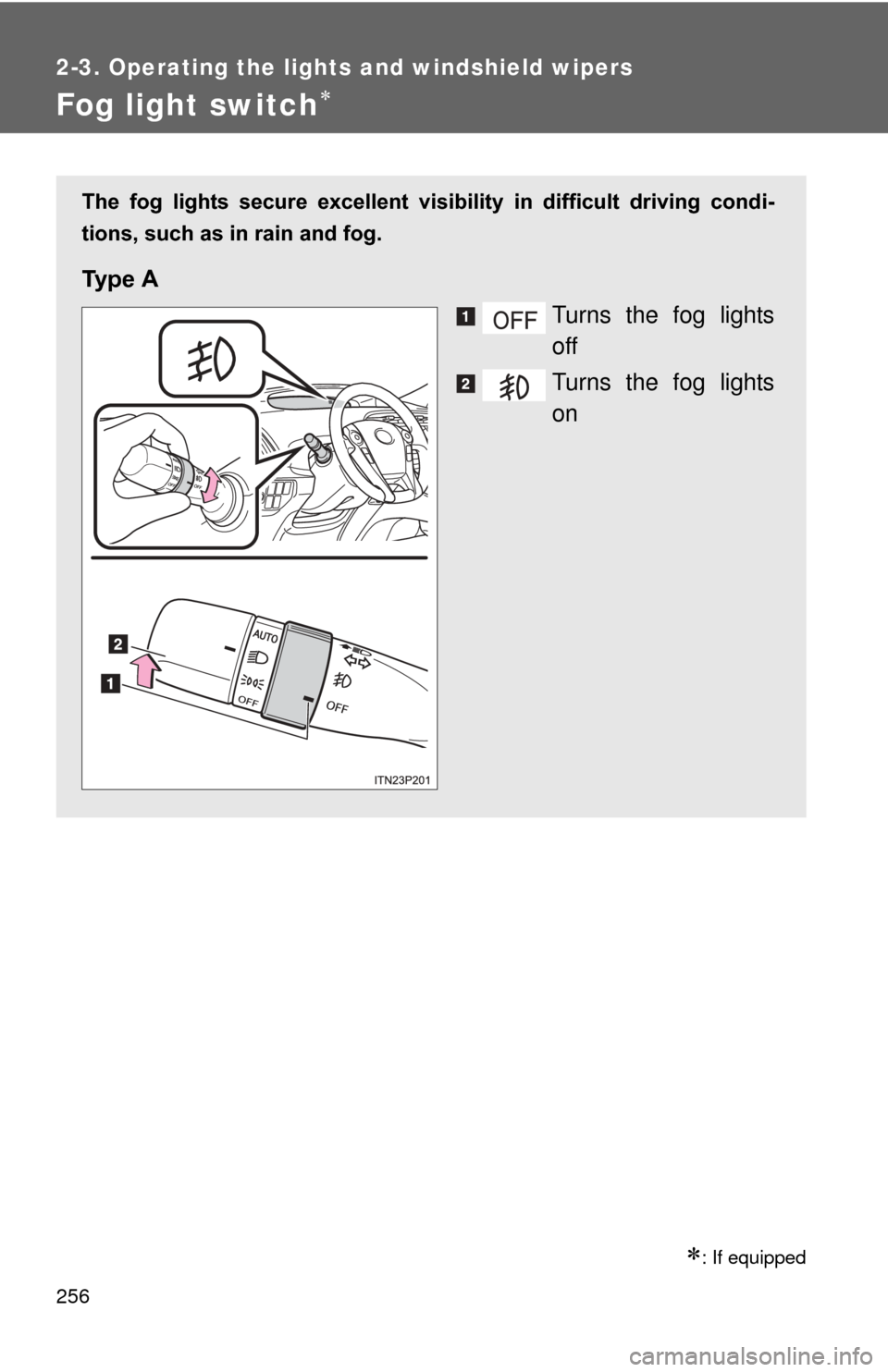
The fog lights secure excellent visibility in difficult driving condi-
tions, such as in rain and fog.
Ty p e A
Turns the fog lights
off
Turns the fog lights
on
Page 311 of 636
311
2
When driving
2-5. Driving information
Cargo and luggage
Take notice of the following information about storage precau-
tions, cargo capacity and load:
●Stow cargo and luggage in the luggage compartment whenever
possible.
● Be sure all items are secured in place.
● To maintain vehicle balance while driving, position luggage
evenly within the luggage compartment.
● For better fuel economy, do no t carry unnecessary weight.
Page 315 of 636
315
2-5. Driving information
2
When driving
CAUTION
●Secure all items in the occupant compartment, as they may shift and
injure someone in the event of an accident or sudden braking.
●When you fold down the rear seats, long items should not be place
directly behind the front seats.
●Never allow anyone to ride in the luggage compartment. It is not
designed for passengers. They should ride in their seats with their seat
belts properly fastened. Otherwise,
they are much more likely to suffer
death or serious bodily injury, in the event of sudden braking or an
accident.
■Capacity and distribution
●Do not exceed the maximum axle weight rating or the total vehicle
weight rating.
●Even if the total load of occupant’s weight and the cargo load is less
than the total load capacity, do no t apply the load unevenly. Improper
loading may cause deterioration of st eering or braking control which
may cause death or serious injury.
Page 344 of 636
344 3-1. Using the air conditioning system and defogger
■Security feature
Any unlocked doors will be automatically locked when the system is operat-
ing. The buzzer will beep and the emergency flashers flash when the doors
have been locked or the system has been turned off.
(The doors locked: Once; The system turned off: Twice)
■ Conditions affecting operation
P. 7 2
■ Electronic key battery depletion
P. 7 6
■ When the electronic key battery is fully depleted
P. 7 6
■ Customization
Setting (e.g. Operation using the on the wireless remote control) can
be changed.
(Customizable features P. 596)
Page 372 of 636
372
3-5. Other interior features
Floor mats
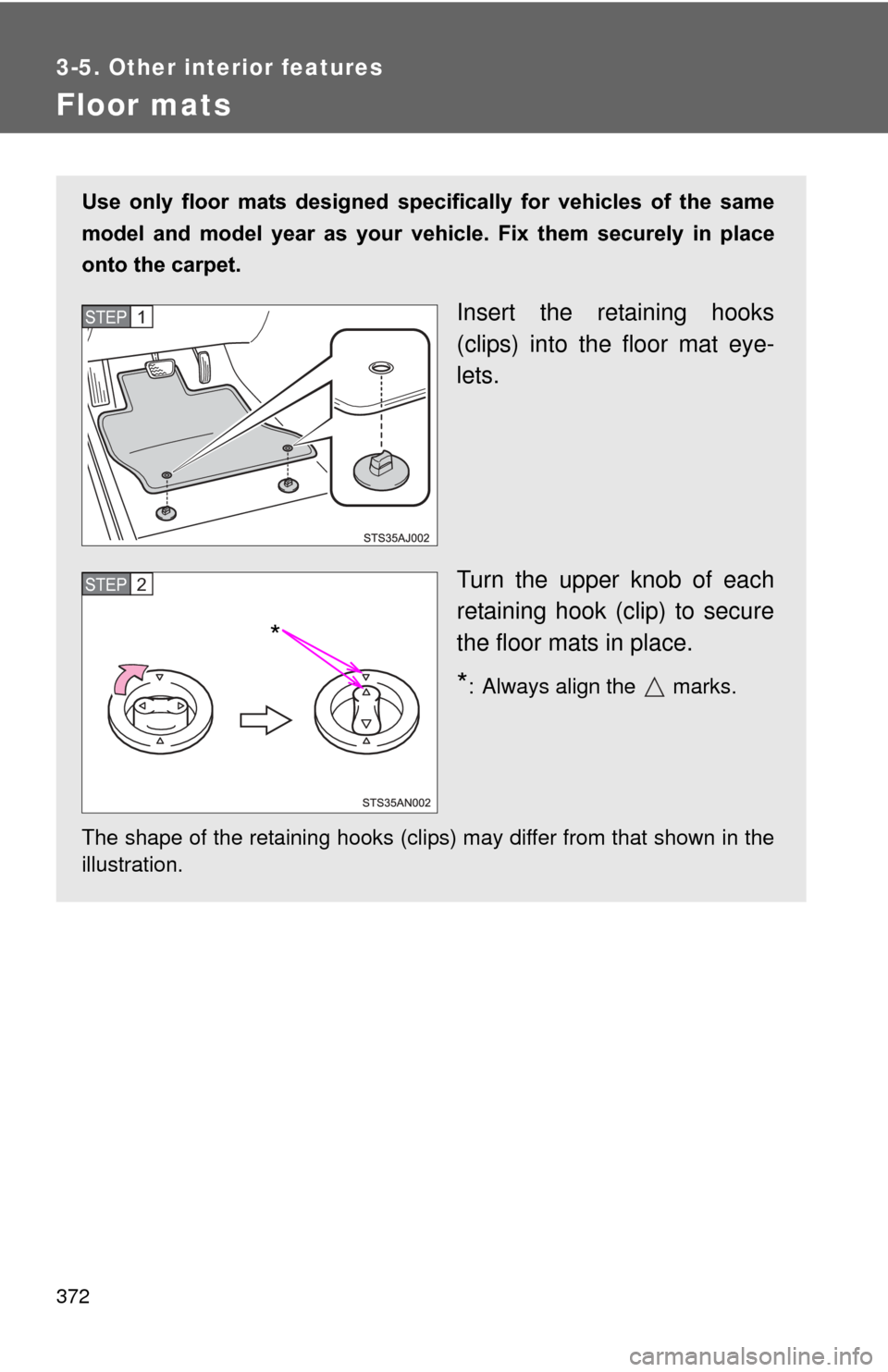
Use only floor mats designed specifically for vehicles of the same
model and model year as your vehicle. Fix them securely in place
onto the carpet.
Insert the retaining hooks
(clips) into the floor mat eye-
lets.
Turn the upper knob of each
retaining hook (clip) to secure
the floor mats in place.
*: Always align the marks.
The shape of the retaining hooks (clips) may differ from that shown in the
illustration.
STEP 1
STEP 2
*
Page 373 of 636
373
3-5. Other interior features
3
Interior features
CAUTION
Observe the following precautions.
Failure to do so may cause the driver’s floor mat to slip, possibly interfering
with the pedals while driving. An unexpectedly high speed may result or it may
become difficult to stop the vehicle, leading to a serious accident.
■
When installing the driver’s floor mat
●Do not use floor mats designed for other models or different model year
vehicles, even if they are Toyota Genuine floor mats.
● Only use floor mats designed for the driver’s seat.
● Always install the floor mat securely using the retaining hooks (clips) pro-
vided.
● Do not use two or more floor mats on top of each other.
● Do not place the floor mat bottom-side up or upside-down.
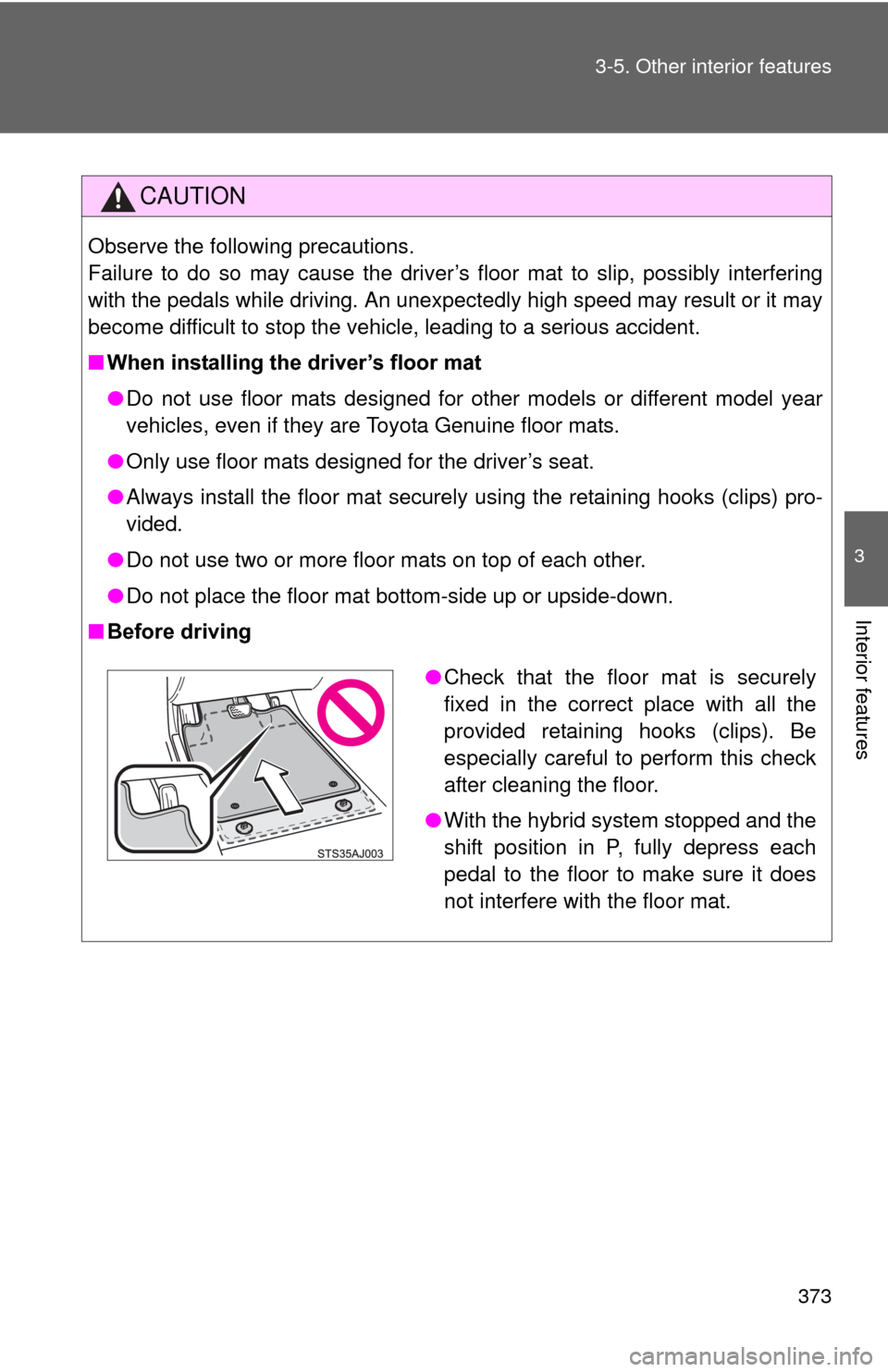
■ Before driving
●Check that the floor mat is securely
fixed in the correct place with all the
provided retaining hooks (clips). Be
especially careful to perform this check
after cleaning the floor.
● With the hybrid system stopped and the
shift position in P, fully depress each
pedal to the floor to make sure it does
not interfere with the floor mat.