Page 238 of 692
238 2-4. Using other driving systems
L/C200_EE (OM60G38E)
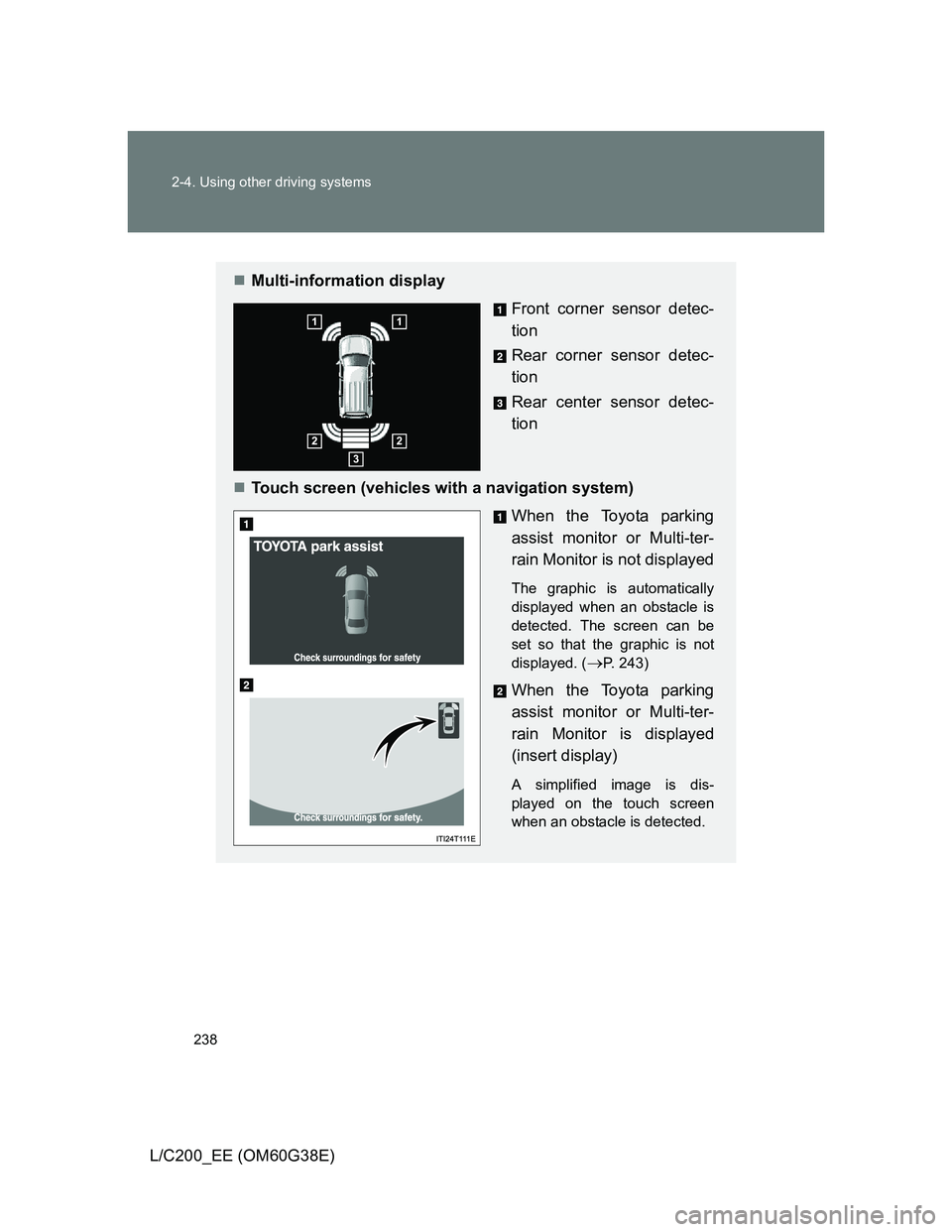
Multi-information display
Front corner sensor detec-
tion
Rear corner sensor detec-
tion
Rear center sensor detec-
tion
Touch screen (vehicles with a navigation system)
When the Toyota parking
assist monitor or Multi-ter-
rain Monitor is not displayed
The graphic is automatically
displayed when an obstacle is
detected. The screen can be
set so that the graphic is not
displayed. (
P. 243)
When the Toyota parking
assist monitor or Multi-ter-
rain Monitor is displayed
(insert display)
A simplified image is dis-
played on the touch screen
when an obstacle is detected.
Page 243 of 692
243 2-4. Using other driving systems
2
When driving
L/C200_EE (OM60G38E)
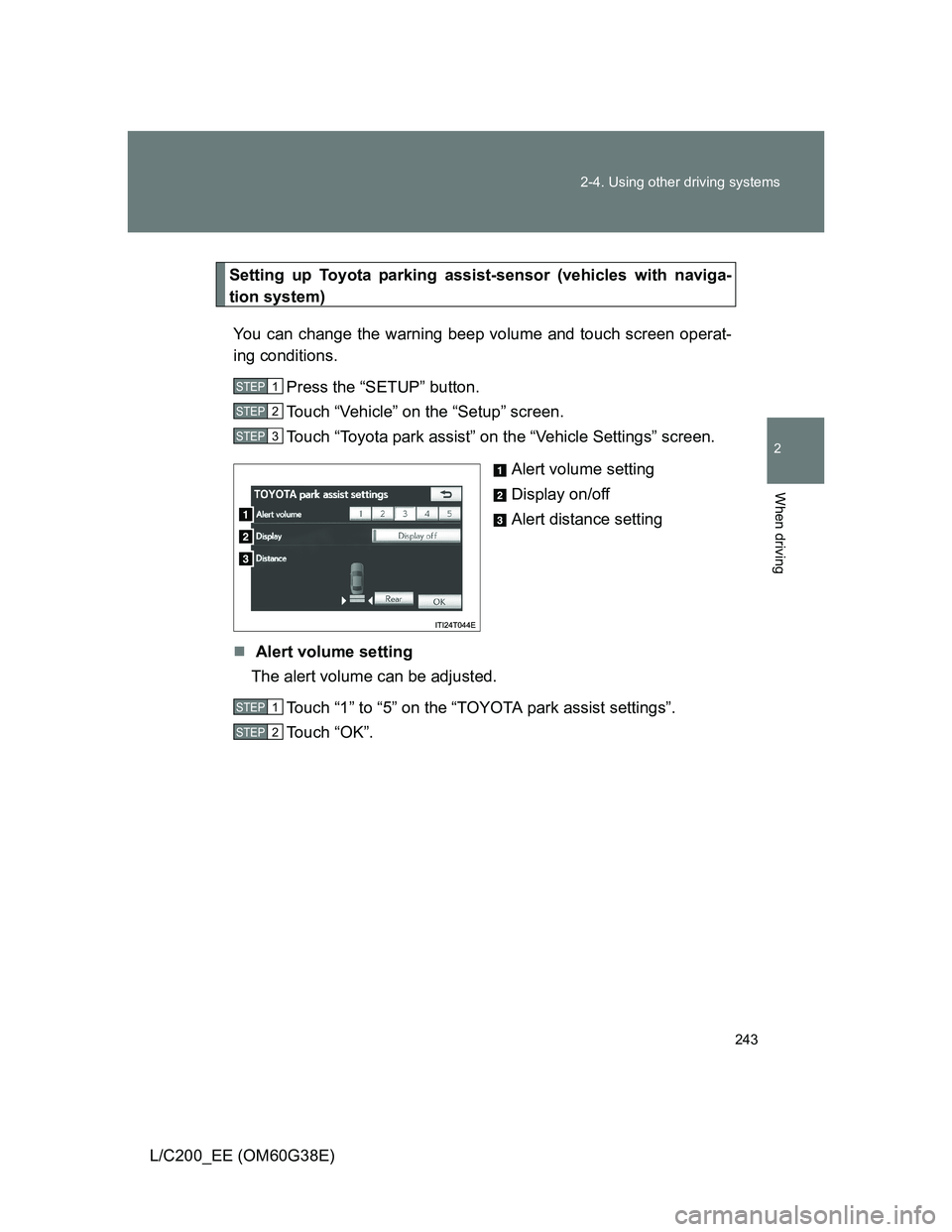
Setting up Toyota parking assist-sensor (vehicles with naviga-
tion system)
You can change the warning beep volume and touch screen operat-
ing conditions.
Press the “SETUP” button.
Touch “Vehicle” on the “Setup” screen.
Touch “Toyota park assist” on the “Vehicle Settings” screen.
Alert volume setting
Display on/off
Alert distance setting
Alert volume setting
The alert volume can be adjusted.
Touch “1” to “5” on the “TOYOTA park assist settings”.
Touch “OK”.
STEP1
STEP2
STEP3
STEP1
STEP2
Page 244 of 692
244 2-4. Using other driving systems
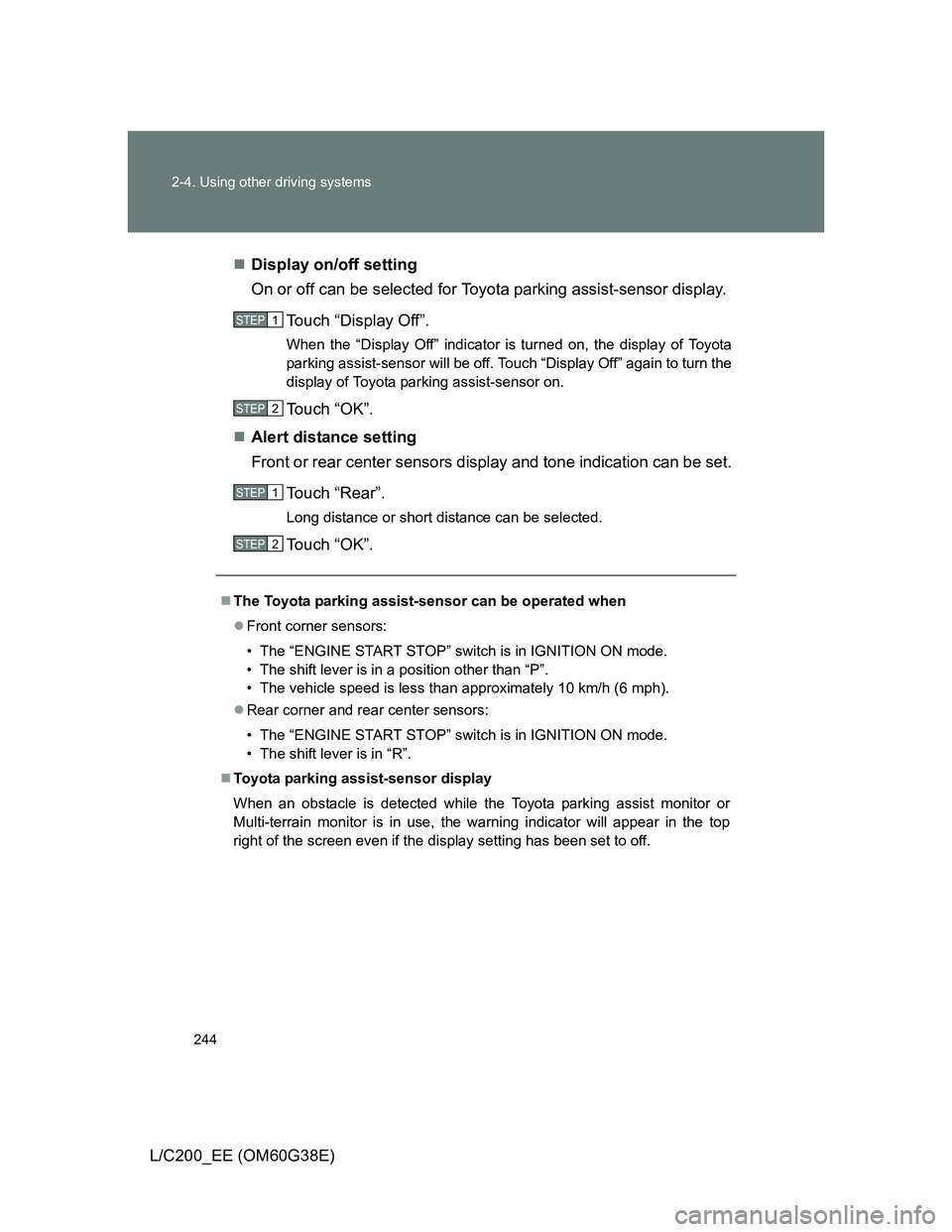
L/C200_EE (OM60G38E)Display on/off setting
On or off can be selected for Toyota parking assist-sensor display.
Touch “Display Off”.
When the “Display Off” indicator is turned on, the display of Toyota
parking assist-sensor will be off. Touch “Display Off” again to turn the
display of Toyota parking assist-sensor on.
Touch “OK”.
Alert distance setting
Front or rear center sensors display and tone indication can be set.
Touch “Rear”.
Long distance or short distance can be selected.
Touch “OK”.
The Toyota parking assist-sensor can be operated when
Front corner sensors:
• The “ENGINE START STOP” switch is in IGNITION ON mode.
• The shift lever is in a position other than “P”.
• The vehicle speed is less than approximately 10 km/h (6 mph).
Rear corner and rear center sensors:
• The “ENGINE START STOP” switch is in IGNITION ON mode.
• The shift lever is in “R”.
Toyota parking assist-sensor display
When an obstacle is detected while the Toyota parking assist monitor or
Multi-terrain monitor is in use, the warning indicator will appear in the top
right of the screen even if the display setting has been set to off.
STEP1
STEP2
STEP1
STEP2
Page 245 of 692
245 2-4. Using other driving systems
2
When driving
L/C200_EE (OM60G38E)
Sensor detection information
The sensor’s detection areas are limited to the areas around the vehi-
cle’s front corner and rear bumpers.
Certain vehicle conditions and the surrounding environment may affect
the ability of the sensor to correctly detect obstacles. Particular instances
where this may occur are listed below.
• There is dirt, snow or ice on the sensor. (Wiping the sensors will
resolve this problem.)
• The sensor is frozen. (Thawing the area will resolve this problem.)
In especially cold weather, if a sensor is frozen the screen may show
an abnormal display, or obstacles may not be detected.
• The sensor is covered in any way.
• The vehicle is leaning considerably to one side.
• On an extremely bumpy road, on an incline, on gravel, or on grass
• The vicinity of the vehicle is noisy due to vehicle horns, motorcycle
engines, air brakes of large vehicles, or other loud noises producing
ultrasonic waves.
• There is another vehicle equipped with parking assist sensors in the
vicinity.
• The sensor is coated with a sheet of spray or heavy rain.
• The vehicle is equipped with a fender pole or wireless antenna.
• Towing eyelets are installed.
• The bumper or sensor receives a strong impact.
• The vehicle is approaching a tall or curved curb.
• In harsh sunlight or intense cold weather
• The area directly under the bumpers is not detected.
• If obstacles draw too close to the sensor.
• A non-genuine Toyota suspension (lowered suspension etc.) is
installed.
• People may not be detected if they are wearing certain types of cloth-
ing.
In addition to the examples above, there are instances in which, because
of their shape, signs and other objects may be judged by the sensor to be
closer than they are.
Page 247 of 692
247 2-4. Using other driving systems
2
When driving
L/C200_EE (OM60G38E)
CAUTION
When using the Toyota parking assist-sensor
Observe the following precautions.
Failing to do so may result in the vehicle being unable to be driven safely
and possibly cause an accident.
Do not use the sensor at speeds in excess of 10 km/h (6 mph).
The sensors’ detection areas and reaction times are limited. When moving
forward or reversing, check the areas surrounding the vehicle (especially
the sides of the vehicle) for safety, and drive slowly, using the brake to
control the vehicle’s speed.
Do not install accessories within the sensors’ detection areas.
NOTICE
When using Toyota parking assist-sensor
In the following situations, the system may not function correctly due to a
sensor malfunction etc. Have the vehicle checked by any authorized Toyota
dealer or repairer, or another duly qualified and equipped professional,
immediately.
A beep does not sound when you turn the main switch on.
The Toyota parking assist-sensor operation display flashes, and a beep
sounds when no obstacles are detected.
If the area around a sensor collides with something, or is subjected to
strong impact.
If the bumper collides with something.
If the display shows continuously without a beep.
If a display error occurs, first check the sensor.
If the error occurs even if there is no ice, snow or mud on the sensor, it is
likely that the sensor is malfunctioning.
Notes when washing the vehicle
Do not apply intensive bursts of water or steam to the sensor area.
Doing so may result in the sensor malfunctioning.
Page 277 of 692
277 2-4. Using other driving systems
2
When driving
L/C200_EE (OM60G38E)
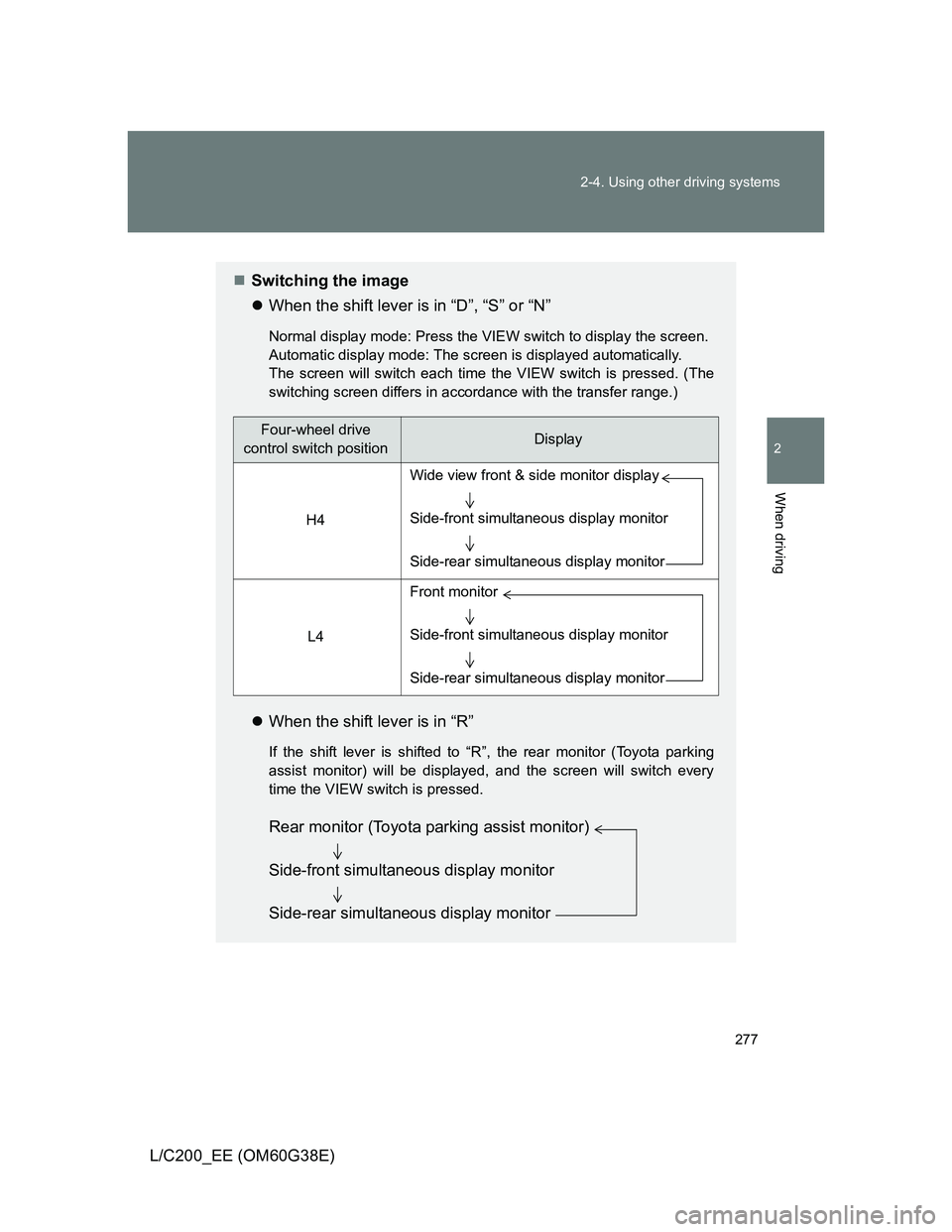
Switching the image
When the shift lever is in “D”, “S” or “N”
Normal display mode: Press the VIEW switch to display the screen.
Automatic display mode: The screen is displayed automatically.
The screen will switch each time the VIEW switch is pressed. (The
switching screen differs in accordance with the transfer range.)
When the shift lever is in “R”
If the shift lever is shifted to “R”, the rear monitor (Toyota parking
assist monitor) will be displayed, and the screen will switch every
time the VIEW switch is pressed.
Four-wheel drive
control switch positionDisplay
H4
L4
Wide view front & side monitor display
Side-front simultaneous display monitor
Side-rear simultaneous display monitor
Front monitor
Side-front simultaneous display monitor
Side-rear simultaneous display monitor
Rear monitor (Toyota parking assist monitor)
Side-front simultaneous display monitor
Side-rear simultaneous display monitor
Page 281 of 692
281 2-4. Using other driving systems
2
When driving
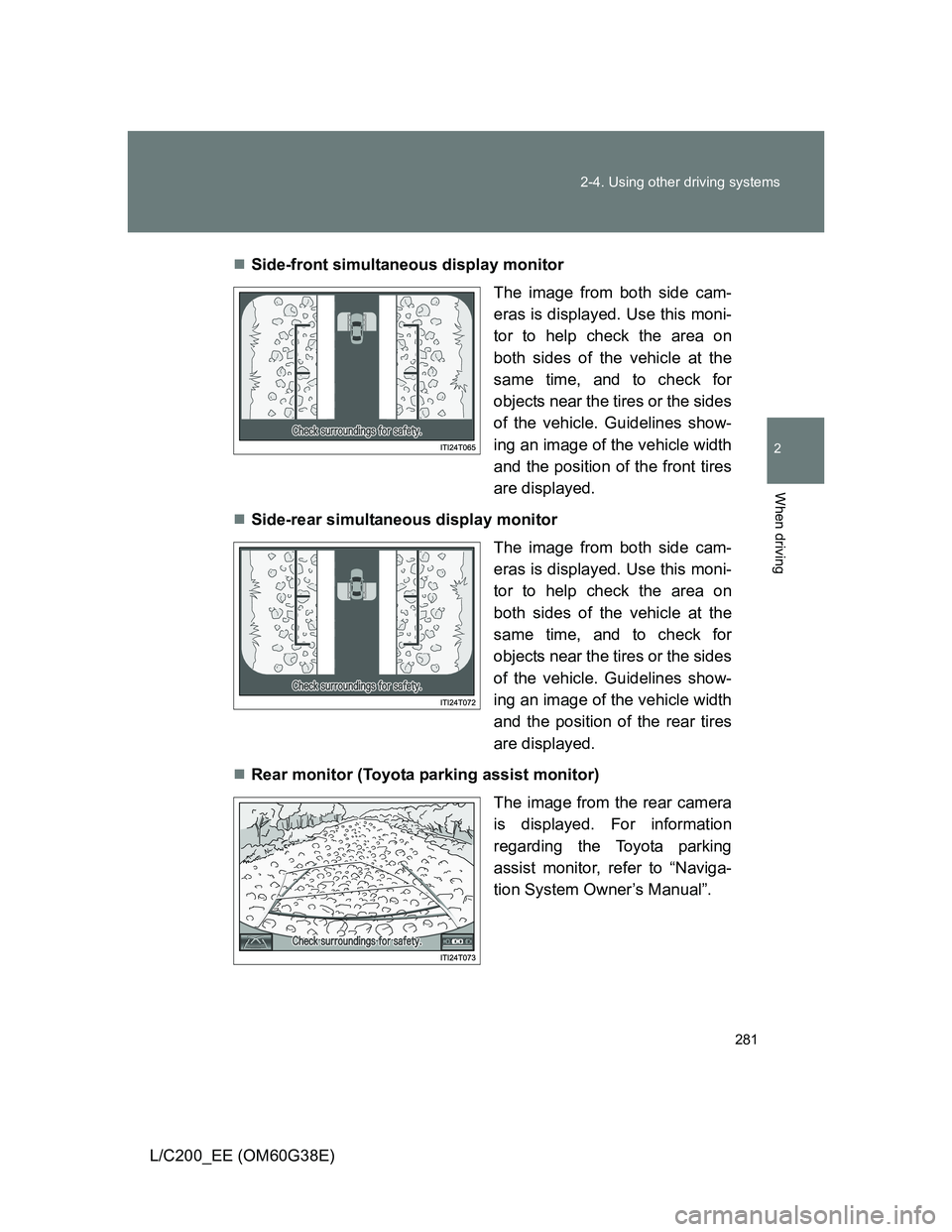
L/C200_EE (OM60G38E)Side-front simultaneous display monitor
The image from both side cam-
eras is displayed. Use this moni-
tor to help check the area on
both sides of the vehicle at the
same time, and to check for
objects near the tires or the sides
of the vehicle. Guidelines show-
ing an image of the vehicle width
and the position of the front tires
are displayed.
Side-rear simultaneous display monitor
The image from both side cam-
eras is displayed. Use this moni-
tor to help check the area on
both sides of the vehicle at the
same time, and to check for
objects near the tires or the sides
of the vehicle. Guidelines show-
ing an image of the vehicle width
and the position of the rear tires
are displayed.
Rear monitor (Toyota parking assist monitor)
The image from the rear camera
is displayed. For information
regarding the Toyota parking
assist monitor, refer to “Naviga-
tion System Owner’s Manual”.
Page 286 of 692
286 2-4. Using other driving systems
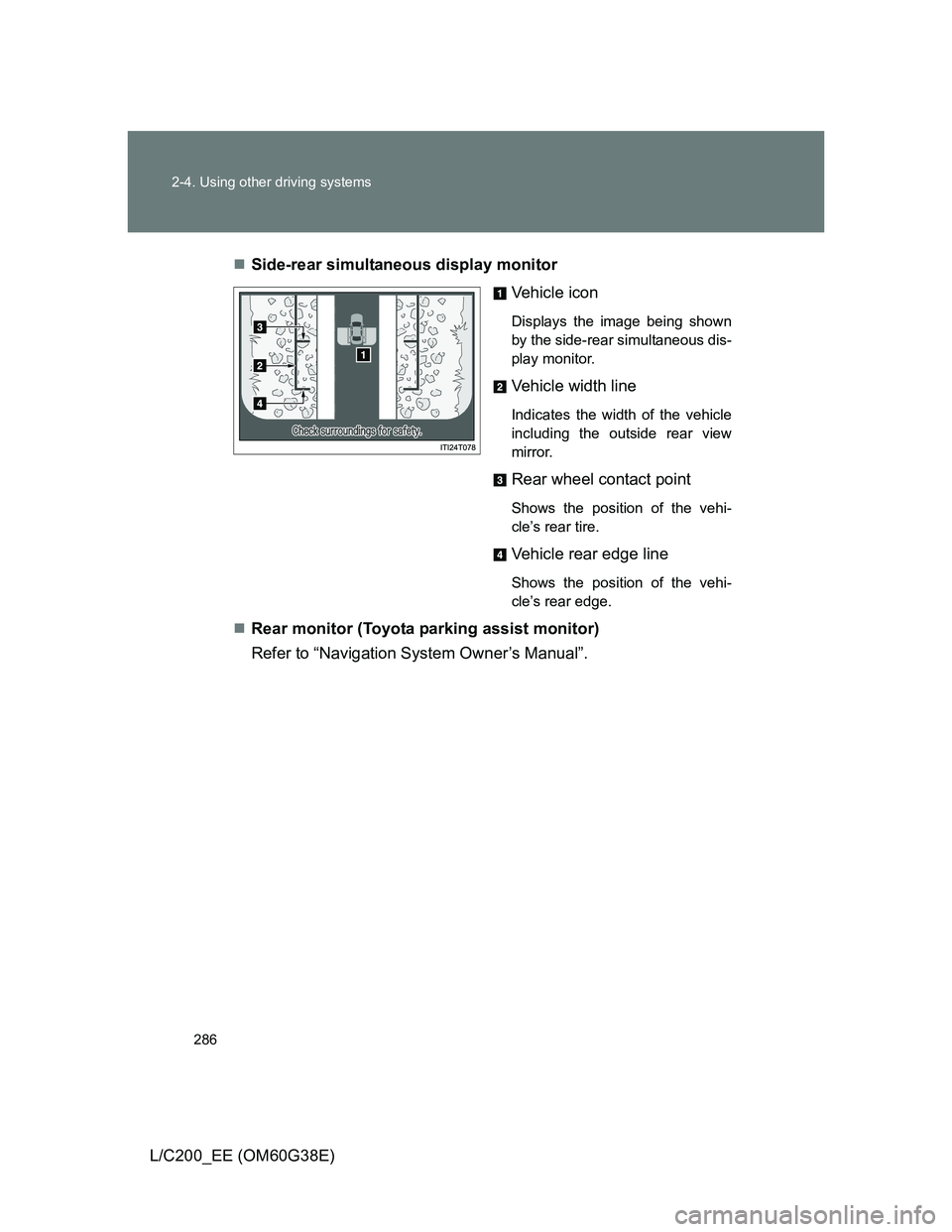
L/C200_EE (OM60G38E)Side-rear simultaneous display monitor
Vehicle icon
Displays the image being shown
by the side-rear simultaneous dis-
play monitor.
Vehicle width line
Indicates the width of the vehicle
including the outside rear view
mirror.
Rear wheel contact point
Shows the position of the vehi-
cle’s rear tire.
Vehicle rear edge line
Shows the position of the vehi-
cle’s rear edge.
Rear monitor (Toyota parking assist monitor)
Refer to “Navigation System Owner’s Manual”.