Page 207 of 476
207 2-2. Instrument cluster
2
When driving
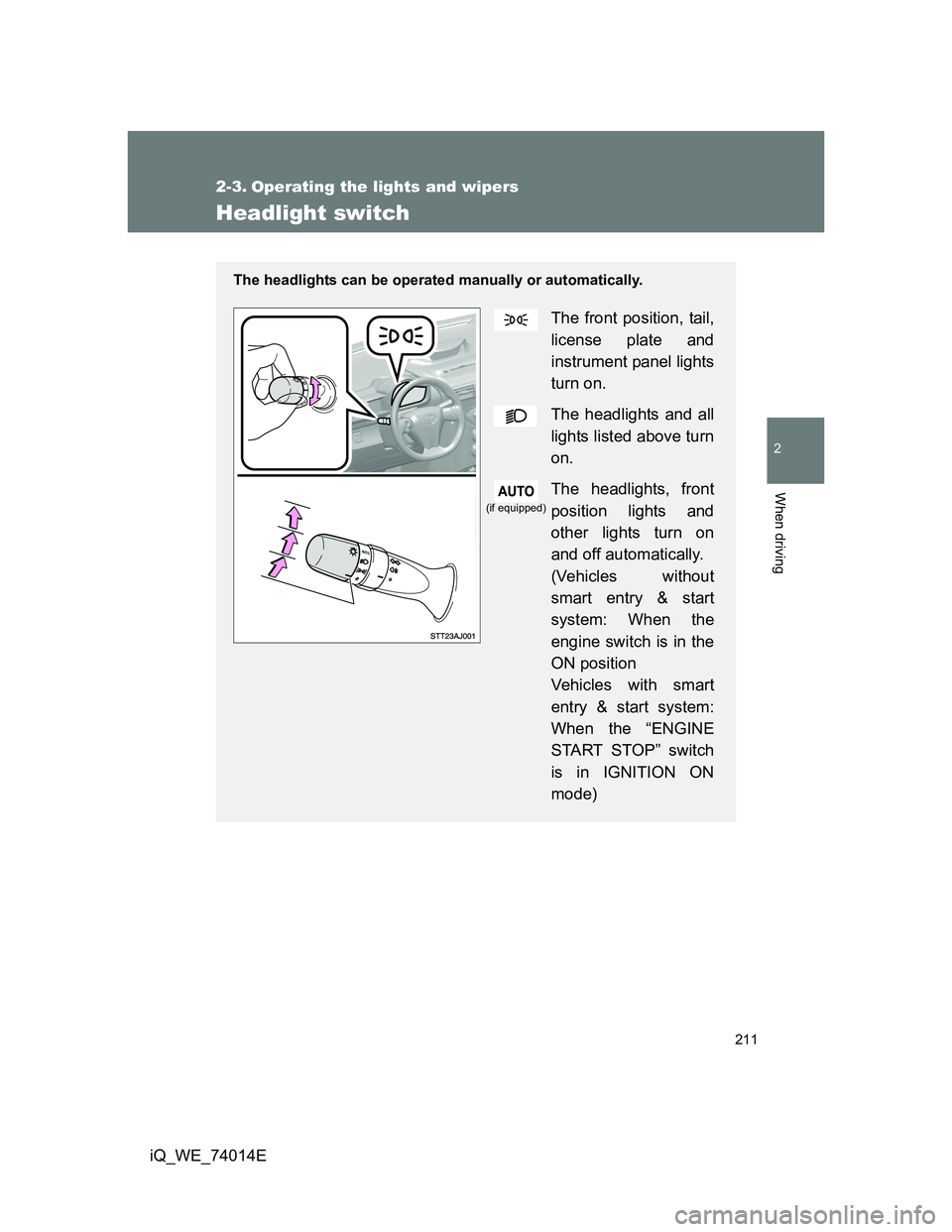
iQ_WE_74014EInstrument panel light control display
Instantaneous fuel consumption
Vehicles with Eco Driving Indicator Zone Display
Vehicles without Eco Driving Indicator Zone Display
Average fuel consumption after refueling
*2
Vehicles with Eco Driving Indicator Zone Display
Vehicles without Eco Driving Indicator Zone Display
*2: When filled with less than 10 L per refueling, the “average fuel
consumption after refueling” may not be displayed accurately.
Displays the instrument panel light control display.
Pushing and holding the button for more than 1 sec-
ond will adjust brightness of the instrument panel light
when the tail lights are on.
Displays the Eco Driving Indicator Zone Display
and instantaneous fuel consumption.
Displays the instantaneous fuel consumption.
Displays Eco Driving Indicator Zone Display and
average fuel consumption since the function was
reset.
Use the displayed average fuel consumption as a ref-
erence.
Displays the average fuel consumption since the
function was reset.
Use the displayed average fuel consumption as a ref-
erence.
Page 211 of 476
211
2
When driving
iQ_WE_74014E
2-3. Operating the lights and wipers
Headlight switch
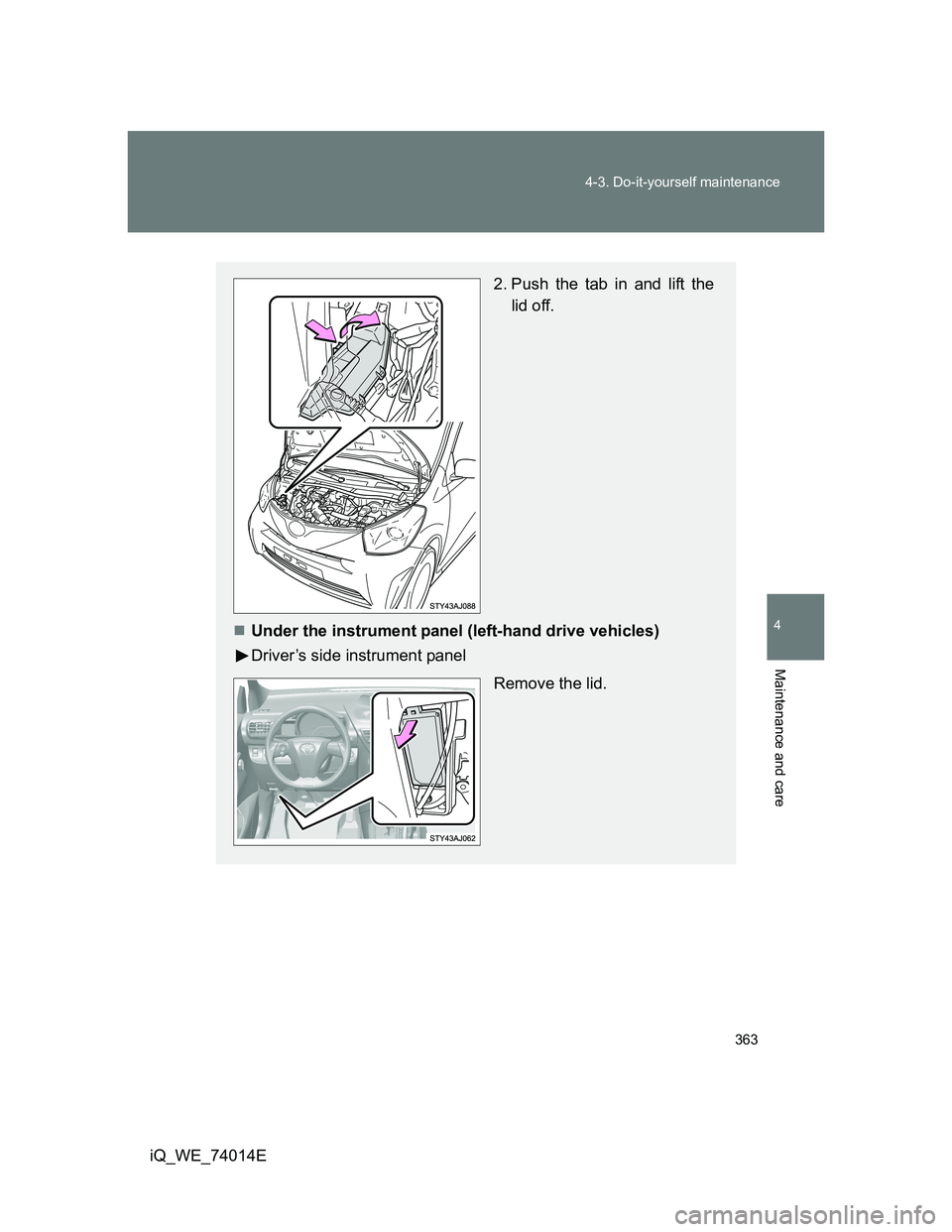
The headlights can be operated manually or automatically.
The front position, tail,
license plate and
instrument panel lights
turn on.
The headlights and all
lights listed above turn
on.
The headlights, front
position lights and
other lights turn on
and off automatically.
(Vehicles without
smart entry & start
system: When the
engine switch is in the
ON position
Vehicles with smart
entry & start system:
When the “ENGINE
START STOP” switch
is in IGNITION ON
mode)
(if equipped)
Page 229 of 476

229
2
When driving
iQ_WE_74014E
2-5. Driving information
Cargo and luggage
CAUTION
Things that must not be carried in the luggage compartment
The following things may cause a fire if loaded in the luggage compartment.
Receptacles containing gasoline
Aerosol cans
Storage precautions
Observe the following precautions.
Failing to do so may result in death or serious injury.
Do not place cargo or luggage in or on the following locations as the item
may get under the brake or accelerator pedal and prevent the pedals from
being depressed properly, block the driver’s vision, or hit the driver or pas-
sengers, causing an accident.
• Driver’s feet
• Front passenger or rear seats (when stacking items)
• Instrument panel
• Dashboard
• Auxiliary box or tray that has no lid
Do not stack anything in the luggage compartment higher than the seat-
backs.
Such items may be thrown about and possibly injure people in the vehicle
during sudden braking or in an accident.
Take notice of the following information about storage precautions,
cargo capacity and load.
Stow cargo and luggage in the luggage compartment whenever
possible.
Be sure all items are secured in place.
Be careful to keep the vehicle level. Placing the weight as far for-
ward as possible helps maintain vehicle balance.
For better fuel economy, do not carry unnecessary weight.
Page 311 of 476
311 4-1. Maintenance and care
4
Maintenance and care
iQ_WE_74014E
Caring for leather areas
Toyota recommends cleaning the interior of the vehicle at least twice a year
to maintain the quality of the vehicle’s interior.
Shampooing the carpets
There are several commercial foaming-type cleaners available. Use a
sponge or brush to apply the foam. Rub in overlapping circles. Do not apply
water. Excellent results are obtained when keeping the carpet as dry as pos-
sible.
Seat belts
Clean with mild soap and lukewarm water using a cloth or sponge. Also
check the belts periodically for excessive wear, fraying or cuts.
CAUTION
Water in the vehicle
Do not splash or spill liquid in the vehicle. Doing so may cause the electri-
cal components etc. to malfunction or catch fire.
Do not get any of the SRS components or wiring in the vehicle interior wet.
(P. 125)
Electrical malfunction may cause the airbags to deploy or not function
properly, resulting in death or severe injury.
Cleaning the interior (especially instrument panel)
Do not use polish wax or polish cleaner. The instrument panel may reflect off
the windshield, obstructing the driver’s view and leading to an accident,
resulting in death or serious injury.
Page 312 of 476

312 4-1. Maintenance and care
iQ_WE_74014E
NOTICE
Cleaning detergents
Do not use organic substances such as benzene or gasoline, acidic or
alkaline solutions, dye, bleach or other detergent. Doing so may discolor
the vehicle interior or cause streaks or damage to painted surfaces.
Do not use polish wax or polish cleaner. The instrument panel’s or other
interior part’s painted surface may be damaged.
Preventing damage to leather surfaces
Observe the following precautions to avoid damage to and deterioration of
leather surfaces.
Remove any dust or dirt on leather surfaces immediately.
Do not expose the vehicle to direct sunlight for extended periods of time.
Park the vehicle in the shade, especially during summer.
Do not place items made of vinyl, plastic, or that contain wax on the uphol-
stery, as they may stick to the leather surface if the vehicle interior heats
up significantly.
Water on the floor
Do not wash the vehicle floor with water.
Vehicle systems such as the audio system may be damaged if water comes
into contact with electrical components under the floor of the vehicle, and
may also cause the body to rust.
Cleaning the inside of the rear window
Do not use glass cleaner to clean the rear window, as this may cause
damage to the rear window defogger heater wires. Use a cloth dampened
with lukewarm water to gently wipe the window clean. Wipe the window in
strokes running parallel to the heater wires.
Be careful not to scratch or damage the heater wires.
Page 363 of 476
363 4-3. Do-it-yourself maintenance
4
Maintenance and care
iQ_WE_74014E
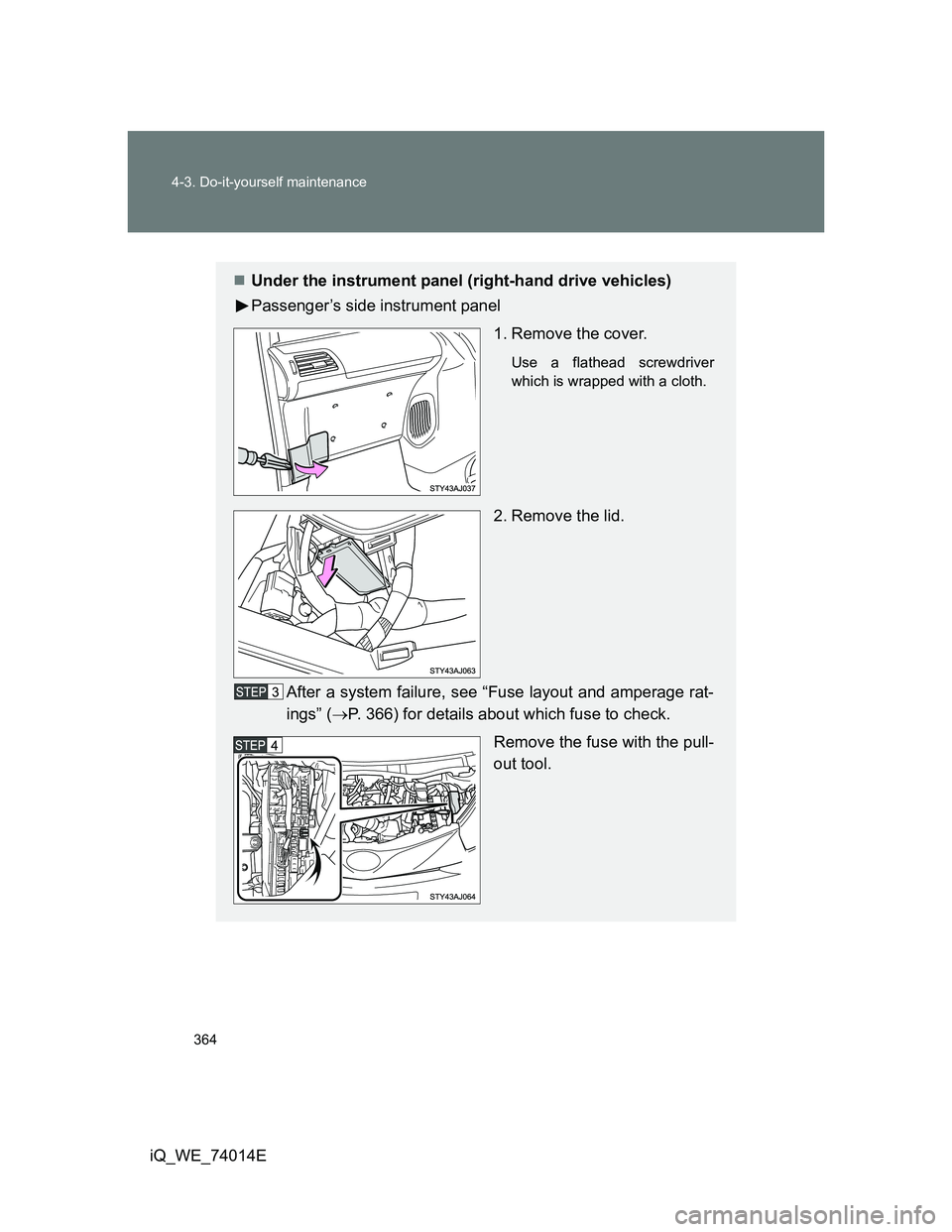
2. Push the tab in and lift the
lid off.
Under the instrument panel (left-hand drive vehicles)
Driver’s side instrument panel
Remove the lid.
Page 364 of 476
364 4-3. Do-it-yourself maintenance
iQ_WE_74014E
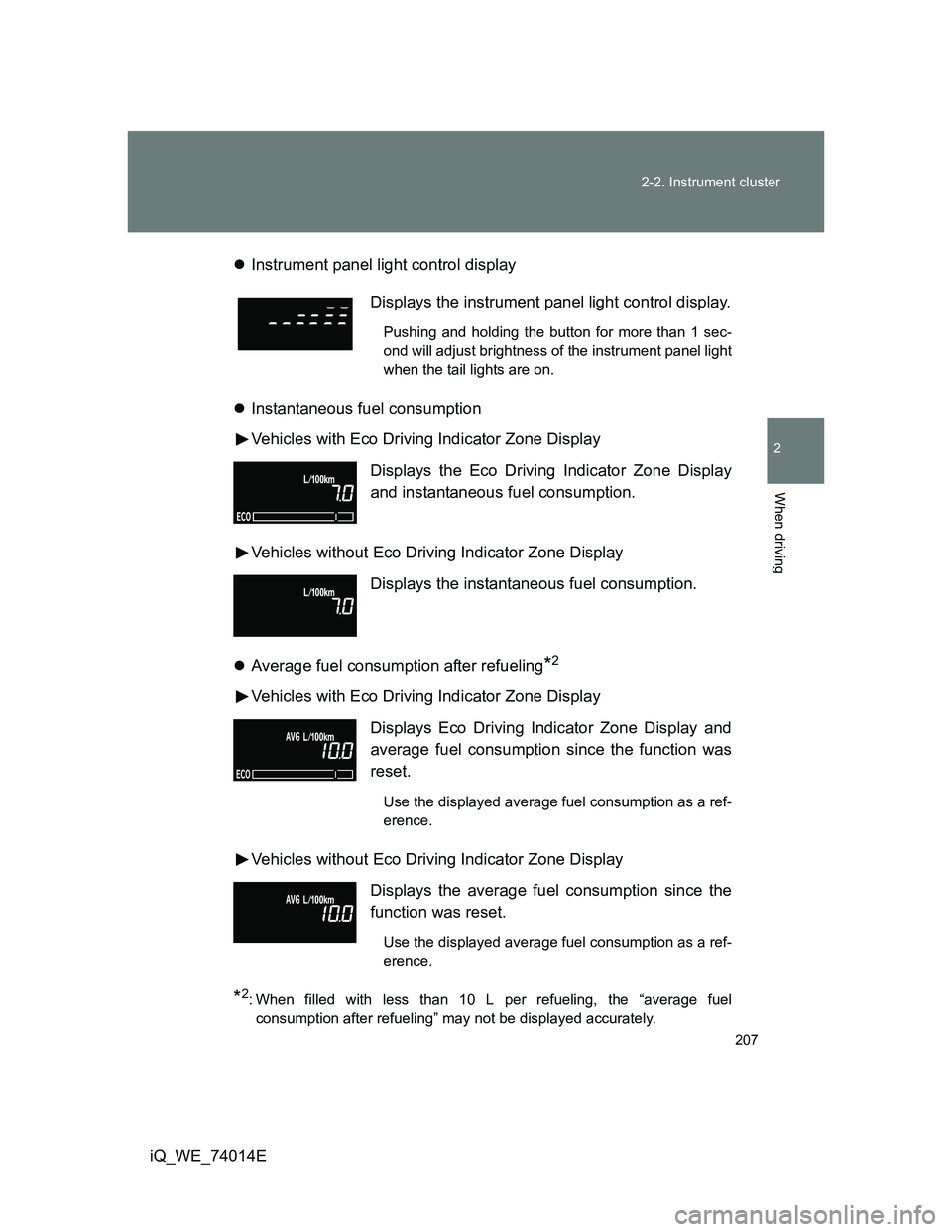
Under the instrument panel (right-hand drive vehicles)
Passenger’s side instrument panel
1. Remove the cover.
Use a flathead screwdriver
which is wrapped with a cloth.
2. Remove the lid.
After a system failure, see “Fuse layout and amperage rat-
ings” (P. 366) for details about which fuse to check.
Remove the fuse with the pull-
out tool.
Page 370 of 476
370 4-3. Do-it-yourself maintenance
iQ_WE_74014EUnder the instrument panel
FuseAmpereCircuit
1 ECU-IG NO.1 7.5 AVehicle stability control system,
shift lock control system, electric
power steering, automatic head-
light, main body ECU
2 GAUGE 10 AElectric cooling fan(s), charging
system, emergency flashers, front
passenger’s seat belt reminder
light, back-up lights, multiport fuel
injection system/sequential multi-
port fuel injection system, wind-
shield wiper ECU, auto anti-glare
inside rear view mirror
3 HTR-IG 10 AAir conditioning system, wiper
deicer, rear window defogger
4 WASHER RR 10 A Windshield washer
5 WIPER RR 10 A Rear window wiper
6 WIPER FR 25 A Windshield wipers
7 WASHER FR 10 A Windshield washer
8 OBD 7.5 A On-board diagnosis system
9 (FOG RR) 7.5 A Rear fog light