Page 255 of 476
255 3-1. Using the air conditioning system and defogger
3
Interior features
iQ_WE_74014E
The rear window and outside rear view mirror defoggers can be oper-
ated when
Vehicles without smart entry & start system
The engine switch is in the ON position.
Vehicles with smart entry & start system
The “ENGINE START STOP” switch is in IGNITION ON mode.
CAUTION
When the outside rear view mirror defoggers are on
Do not touch the rear view mirror surfaces, as they can become very hot and
burn you.
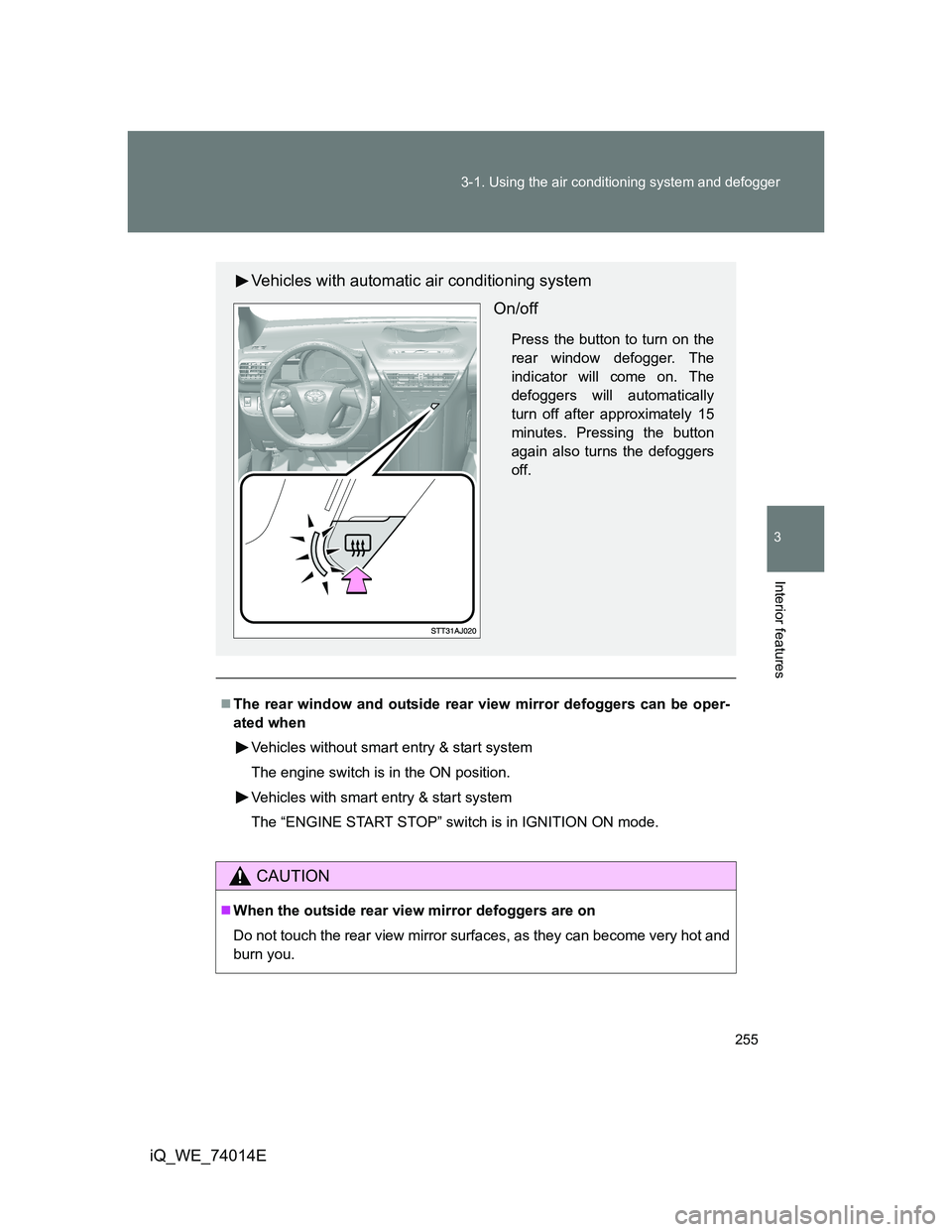
Vehicles with automatic air conditioning system
On/off
Press the button to turn on the
rear window defogger. The
indicator will come on. The
defoggers will automatically
turn off after approximately 15
minutes. Pressing the button
again also turns the defoggers
off.
Page 277 of 476
277 3-2. Using the audio system
3
Interior features
iQ_WE_74014E
MP3 and WMA files
MP3 (MPEG Audio LAYER3) is a standard audio compression format.
Files can be compressed to approximately 1/10 of their original size by using
MP3 compression.
WMA (Windows Media Audio) is a Microsoft audio compression format.
This format compresses audio data to a size smaller than that of the MP3
format.
There is a limit to the MP3 and WMA file standards and to the media/formats
recorded by them that can be used.
MP3 file compatibility
• Compatible standards
MP3 (MPEG1 LAYER3, MPEG2 LSF LAYER3)
• Compatible sampling frequencies
MPEG1 LAYER3: 32, 44.1, 48 (kHz)
MPEG2 LSF LAYER3: 16, 22.05, 24 (kHz)
• Compatible bit rates (compatible with VBR)
MPEG1 LAYER3: 64, 80, 96, 112, 128, 160, 192, 224, 256, 320 (kbps)
MPEG2 LSF LAYER3: 64, 80, 96, 112, 128, 144, 160 (kbps)
• Compatible channel modes: stereo, joint stereo, dual channel and
monaural
WMA file compatibility
• Compatible standards
WMA Ver. 7, 8, 9
• Compatible sampling frequencies
32, 44.1, 48 (kHz)
• Compatible bit rates (only compatible with 2-channel playback)
Ver. 7, 8: CBR 48, 64, 80, 96, 128, 160, 192 (kbps)
Ver. 9: CBR 48, 64, 80, 96, 128, 160, 192, 256, 320 (kbps)
Page 278 of 476
278 3-2. Using the audio system
iQ_WE_74014E
Compatible media
Media that can be used for MP3 and WMA playback are CD-Rs and CD-
RWs.
Playback in some instances may not be possible, depending on the status
of the CD-R or CD-RW. Playback may not be possible or the audio may
jump if the disc is scratched or marked with fingerprints.
Compatible disc formats
The following disc formats can be used.
• Disc formats: CD-ROM Mode 1 and Mode 2
CD-ROM XA Mode 2, Form 1 and Form 2
• File formats: ISO9660 Level 1, Level 2, (Romeo, Joliet)
MP3 and WMA files written in any format other than those listed above
may not play correctly, and their file names and folder names may not
be displayed correctly.
Items related to standards and limitations are as follows.
• Maximum directory hierarchy: 8 levels
• Maximum length of folder names/file names: 32 characters
• Maximum number of folders: 192 (including the root)
• Maximum number of files per disc: 255
File names
The only files that can be recognized as MP3/WMA and played are those
with the extension .mp3 or .wma.
Multi-sessions
As the audio system is compatible with multi-sessions, it is possible to play
discs that contain MP3 and WMA files. However, only the first session can
be played.
ID3 and WMA tags
ID3 tags can be added to MP3 files, making it possible to record the track
title and artist name, etc.
The system is compatible with ID3 Ver. 1.0, 1.1, and Ver. 2.2, 2.3 ID3 tags.
(The number of characters is based on ID3 Ver. 1.0 and 1.1.)
WMA tags can be added to WMA files, making it possible to record the
track title and artist name in the same way as with ID3 tags.
Page 300 of 476

300 3-5. Other interior features
iQ_WE_74014E
CAUTION
Observe the following precautions.
Failure to do so may cause the driver’s floor mat to slip, possibly interfering
with the pedals while driving. An unexpectedly high speed may result or it may
become difficult to stop the vehicle, leading to a serious accident.
When installing the driver’s floor mat
Do not use floor mats designed for other models or different model year
vehicles, even if they are Toyota Genuine floor mats.
Only use floor mats designed for the driver’s seat.
Always install the floor mat securely using the retaining hooks (clips) pro-
vided.
Do not use two or more floor mats on top of each other.
Do not place the floor mat bottom-side up or upside-down.
Before driving
Check that the floor mat is securely
fixed in the correct place with all the
provided retaining hooks (clips). Be
especially careful to perform this check
after cleaning the floor.
With the engine stopped and the shift
lever in P (Multidrive) or N (manual
transmission), fully depress each pedal
to the floor to make sure it does not
interfere with the floor mat.
Page 317 of 476

317 4-3. Do-it-yourself maintenance
4
Maintenance and care
iQ_WE_74014E
CAUTION
The engine compartment contains many mechanisms and fluids that may
move suddenly, become hot, or become electrically energized. To avoid death
or serious injury, observe the following precautions.
When working on the engine compartment
Keep hands, clothing, and tools away from the moving fan and engine
drive belt.
Be careful not to touch the engine, radiator, exhaust manifold, etc. right
after driving as they may be hot. Oil and other fluids may also be hot.
Do not leave anything that may burn easily, such as paper or rags, in the
engine compartment.
Do not smoke, cause sparks or expose an open flame to fuel or the bat-
tery. Fuel and battery fumes are flammable.
Be extremely cautious when working on the battery. It contains poisonous
and corrosive sulfuric acid.
Take care because brake fluid can harm your hands or eyes and damage
painted surfaces.
If fluid gets on your hands or in your eyes, flush the affected area with
clean water immediately.
If you still experience discomfort, see a doctor.
When working near the electric cooling fan or radiator grille
Vehicles without smart entry & start system:
Be sure the engine switch is in the LOCK position.
With the engine switch in the ON position, the electric cooling fan may
automatically start to run if the air conditioning system is on and/or the
coolant temperature is high. (P. 342)
Vehicles with smart entry & start system:
Be sure the “ENGINE START STOP” switch is in the OFF.
With the “ENGINE START STOP” switch in the IGNITION ON mode, the
electric cooling fan may automatically start to run if the air conditioning
system is on and/or the coolant temperature is high. (P. 342)
Safety glasses
Wear safety glasses to prevent flying or falling material, fluid spray, etc. from
getting in the eyes.
Page 348 of 476
348 4-3. Do-it-yourself maintenance
iQ_WE_74014E
When to replace your vehicle’s tires
Tires should be replaced if:
You have tire damage such as cuts, splits, cracks deep enough to
expose the fabric or bulges indicating internal damage
A tire goes flat repeatedly or cannot be properly repaired due to the size
or location of a cut or other damage
If you are not sure, consult with any authorized Toyota dealer or repairer, or
another duly qualified and equipped professional.
Tire life
Any tires over 6 years old must be checked by a qualified technician even if
they have seldom or never been used or damage is not obvious.
If the tread depth wears down to 4 mm (0.16 in.) or more on snow tires
The effectiveness of snow tires is lost.
CAUTION
When inspecting or replacing tires
Observe the following precautions to prevent accidents.
Failure to do so may cause damage to parts of the drive train, as well as
dangerous handling characteristics, which may lead to an accident resulting
in death or serious injury.
Do not mix tires of different makes, models or tread patterns.
Also, do not mix tires of remarkably different treadwear.
Do not use tire sizes other than those recommended by Toyota.
Do not mix differently constructed tires (radial, bias-belted or bias-ply
tires).
Do not mix summer, all season and winter tires.
Do not use tires that have been used on another vehicle.
Do not use tires if you do not know how they were used previously.
Page 393 of 476
5
393 5-1. Essential information
When trouble arises
iQ_WE_74014E
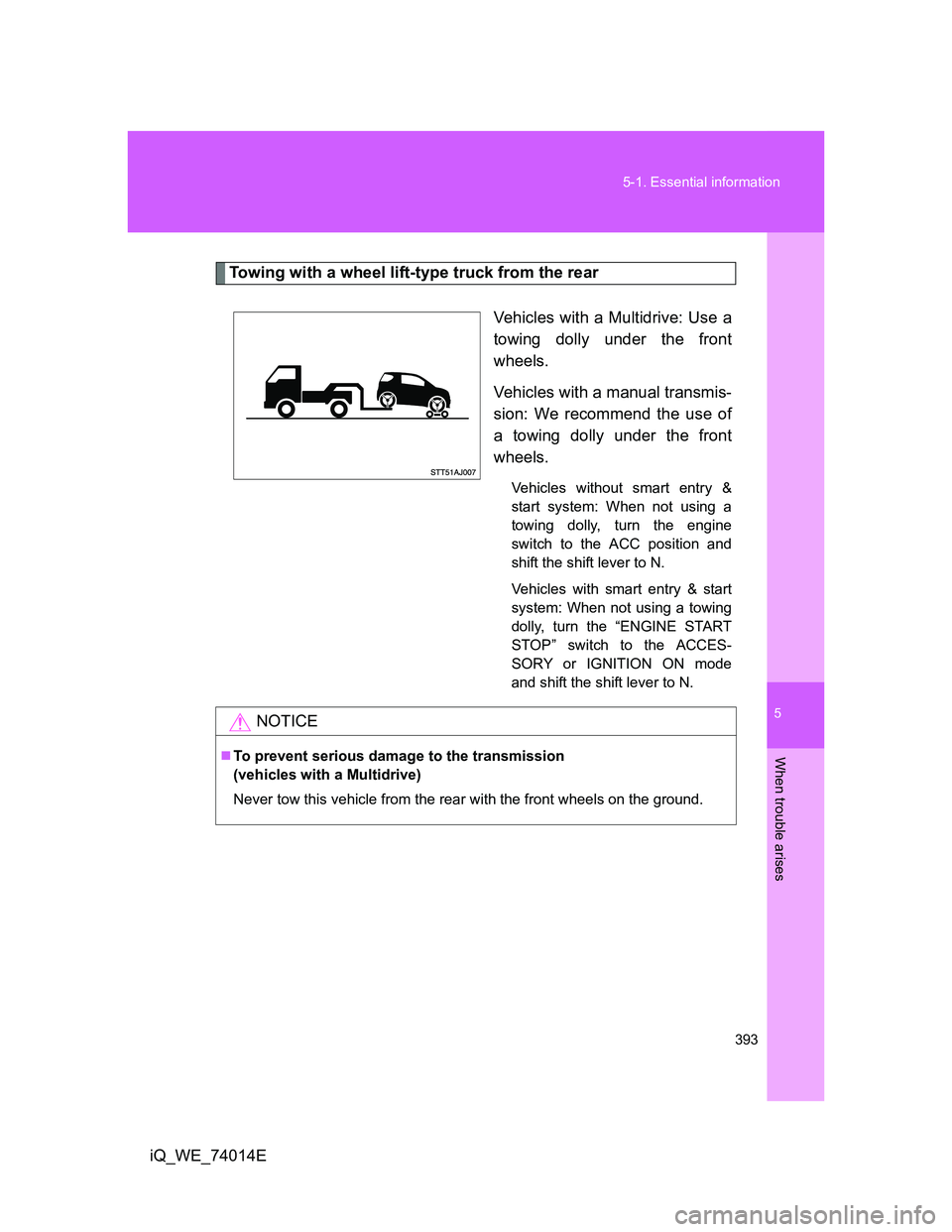
Towing with a wheel lift-type truck from the rear
Vehicles with a Multidrive: Use a
towing dolly under the front
wheels.
Vehicles with a manual transmis-
sion: We recommend the use of
a towing dolly under the front
wheels.
Vehicles without smart entry &
start system: When not using a
towing dolly, turn the engine
switch to the ACC position and
shift the shift lever to N.
Vehicles with smart entry & start
system: When not using a towing
dolly, turn the “ENGINE START
STOP” switch to the ACCES-
SORY or IGNITION ON mode
and shift the shift lever to N.
NOTICE
To prevent serious damage to the transmission
(vehicles with a Multidrive)
Never tow this vehicle from the rear with the front wheels on the ground.
Page 401 of 476

5
401 5-2. Steps to take in an emergency
When trouble arises
iQ_WE_74014E
*3: Rear passenger’s seat belt reminders:
The rear passenger’s seat belt reminder sounds to alert the rear passenger
that his or her seat belt is not fastened. The buzzer sounds for 30 seconds
after the vehicle has reached a speed of at least 20 km/h (12 mph). Then, if
the seat belt is still unfastened, the buzzer will sound in a different tone for
90 more seconds.
*4: Left-hand drive vehicles with audio system
*5: Right-hand drive vehicles with audio system
*6: Vehicles without audio system
Follow the correction procedures. (vehicles with smart entry & start system)
After taking the specified steps to correct the suspected problem,
check that the warning light turns off.
Interior
buzzerExterior
buzzerWarning
lightWarning light/DetailsCorrection
procedure
OnceSmart entry & start
system warning light
Indicates that the elec-
tronic key is not pres-
ent when the “ENGINE
START STOP” switch
is pressed.Confirm the
location of the
electronic key.
Once 3 timesSmart entry & start
system warning light
Indicates that a door
other than the driver’s
door has been opened
and closed with the
“ENGINE START
STOP” switch in any
mode other than OFF
and the electronic key
outside of the detec-
tion area.Confirm the
location of the
electronic key.