Page 23 of 476
23
iQ_WE_74014E
Pictorial indexInstrument panel
(Right-hand drive vehicles)
: If equipped
Gauges and meters P. 197
Multi-information display P. 205
Hood lock release lever P. 319
SRS knee airbag P. 124
Fuel filler door opener P. 103
Airbag manual on-off switch P. 159
Page 27 of 476
27
iQ_WE_74014E
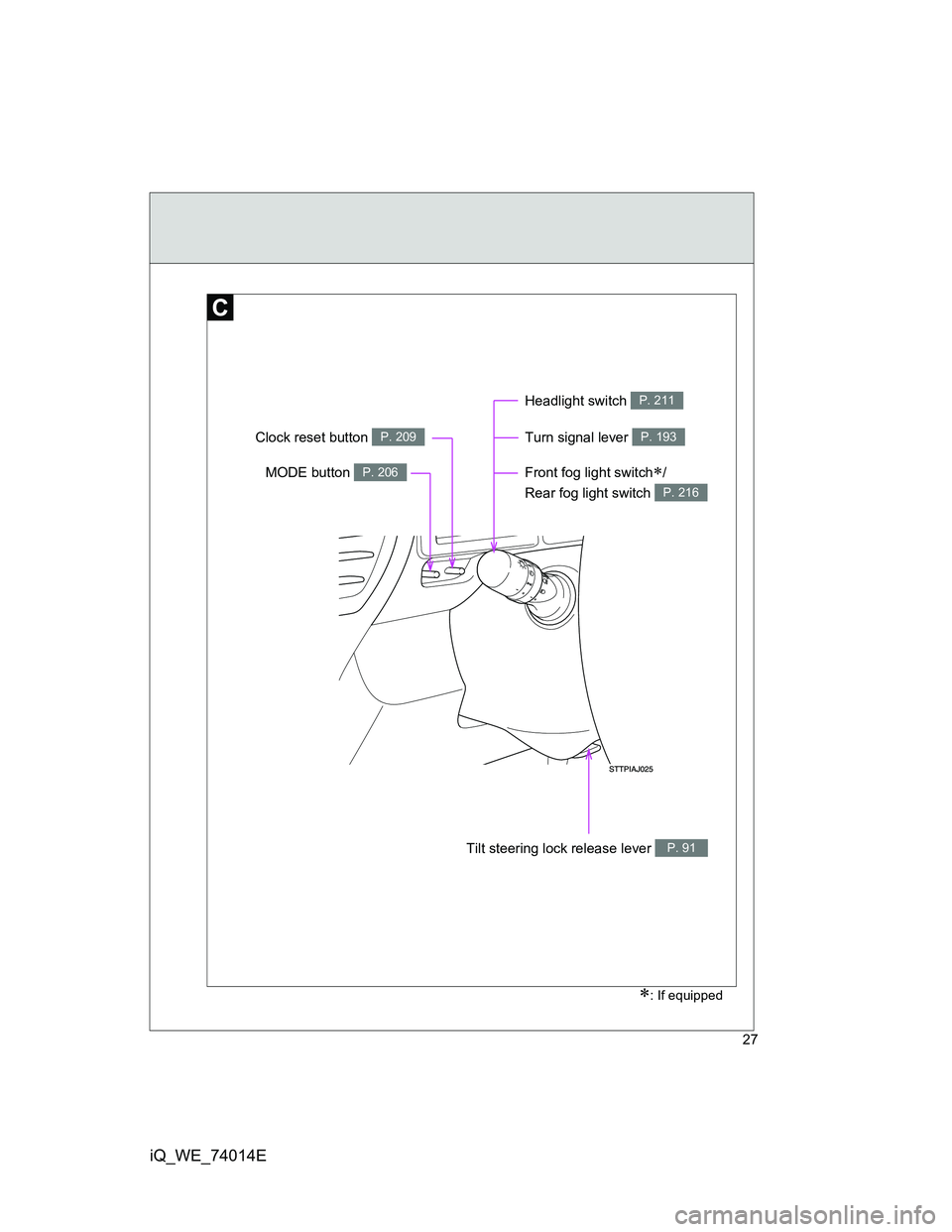
Front fog light switch/
Rear fog light switch
P. 216
: If equipped
Turn signal lever P. 193
Headlight switch P. 211
MODE button P. 206
Clock reset button P. 209
Tilt steering lock release lever P. 91
Page 31 of 476
31
iQ_WE_74014E
To y o t a
Installation of a RF-transmitter system
As the installation of an RF-transmitter system in your vehicle could affect
electronic systems such as the multi-port fuel injection system/sequential
multi-port fuel injection system, anti-lock brake system, SRS airbag system
or seat belt pretensioner system, be sure to check with any authorized
Toyota dealer or repairer, or another duly qualified and equipped
professional for precautionary measures or special instructions regarding
installation.
Further information regarding frequency bands, power levels, antenna posi-
tions and installation provisions for the installation of RF-transmitters, is
available on request at any authorized Toyota dealer or repairer, or another
duly qualified and equipped professional.
Scrapping of your Toyota
The SRS airbag and seat belt pretensioner devices in your Toyota contain
explosive chemicals. If the vehicle is scrapped with the airbags and seat belt
pretensioners left as they are, this may cause an accident such as fire. Be
sure to have the systems of the SRS airbag and seat belt pretensioner
removed and disposed of by a qualified service shop or by any authorized
Toyota dealer or repairer, or another duly qualified and equipped profes-
sional, before you scrap your vehicle.
Page 35 of 476

1Before driving
35
iQ_WE_74014E
1-1. Key information
Keys.................................... 36
1-2. Opening, closing and locking
the doors
Smart entry & start
system .............................. 39
Wireless remote control ...... 62
Side doors .......................... 72
Back door ........................... 75
1-3. Adjustable components
(seats, mirrors, steering
wheel)
Front seats.......................... 79
Rear seats .......................... 82
Seat belts............................ 86
Steering wheel .................... 91
Anti-glare inside rear
view mirror ........................ 92
Outside rear view mirrors ... 95
1-4. Opening and closing
the windows
Power windows................. 1001-5. Refueling
Opening the fuel tank
cap .................................. 103
1-6. Theft deterrent system
Engine immobilizer
system ............................ 108
Double locking
system ............................ 117
Alarm ................................ 119
1-7. Safety information
Correct driving posture ..... 122
SRS airbags...................... 124
Child restraint systems ..... 137
Installing child restraints ... 148
Airbag manual on-off
system ............................ 159
Page 39 of 476
39
1
Before driving
iQ_WE_74014E
1-2. Opening, closing and locking the doors
Smart entr y & start system
: If equipped
The following operations can be performed simply by carrying the
electronic key on your person, for example in your pocket.
(The driver should always carry the electronic key.)
Unlocks and locks the doors (P. 40)
Unlocks and locks the back door (P. 40)
Starts and stops the engine (P. 179)
Electronic
key
Electronic key
Electronic
key
Page 40 of 476
40 1-2. Opening, closing and locking the doors
iQ_WE_74014E
Unlocking and locking the doors
Grip the handle to unlock the
doors.
Make sure to touch the sensor on
the back of the handle.
The door cannot be unlocked for
3 seconds after the door is
locked.
Touch the lock sensor to lock the
doors.
Unlocking and locking the back door
Press the unlock button to
unlock the back door.
Press and hold the button for 1
second to open the back door.
The door cannot be unlocked for
3 seconds after the door is
locked.
Lock the back door again when
you leave the vehicle. The back
door will not lock automatically
after it has been opened and then
closed.
Page 41 of 476
41 1-2. Opening, closing and locking the doors
1
Before driving
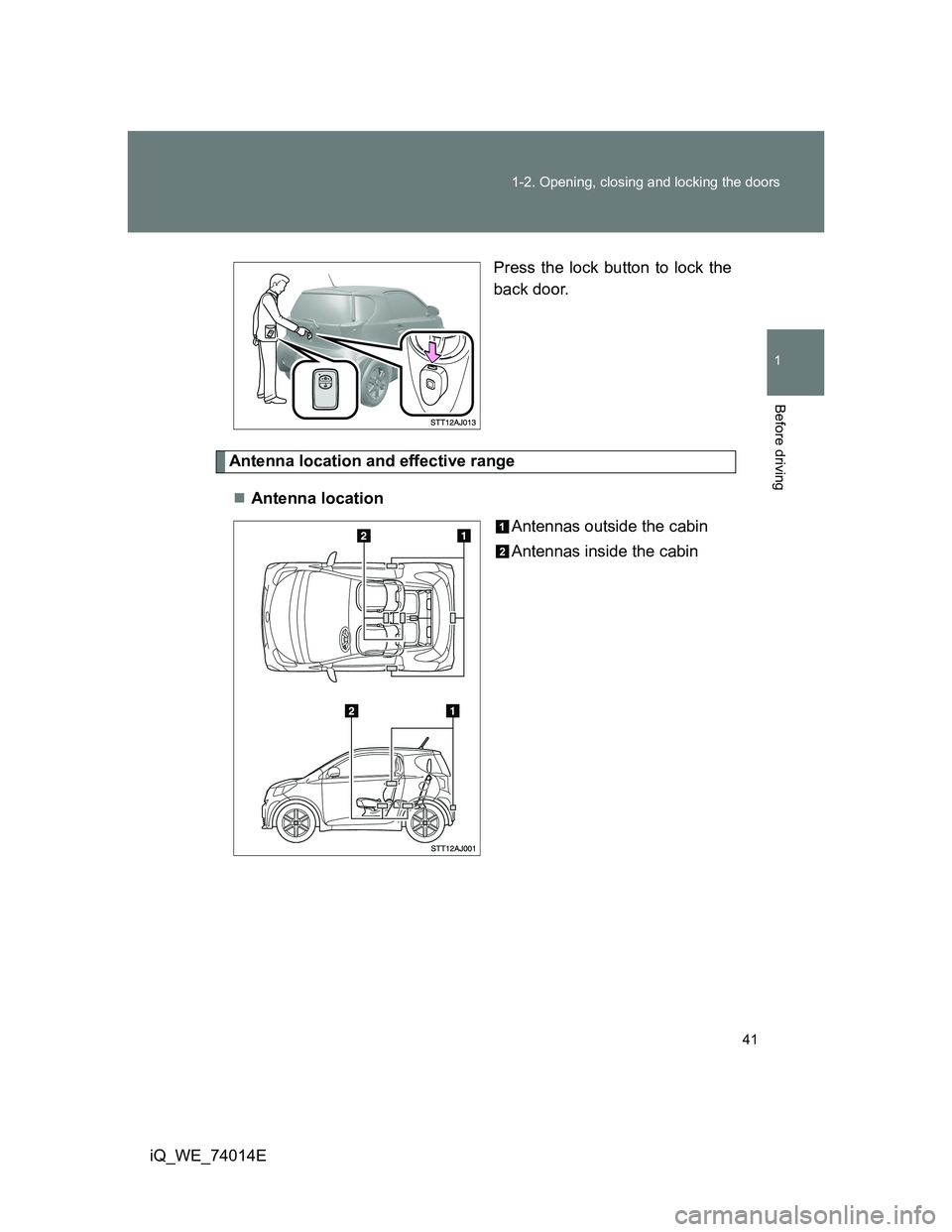
iQ_WE_74014EPress the lock button to lock the
back door.
Antenna location and effective range
Antenna location
Antennas outside the cabin
Antennas inside the cabin
Page 42 of 476
42 1-2. Opening, closing and locking the doors
iQ_WE_74014EEffective range (areas within which the electronic key is
detected)
When locking or unlock-
ing the doors
The system can be oper-
ated when the electronic
key is within about 0.7 m
(2.3 ft.) of an outside door
handle.
When starting the engine
or changing “ENGINE
START STOP” switch
modes
The system can be oper-
ated when the electronic
key is inside the vehicle.
Operation signals
The emergency flashers flash to indicate that the doors have been locked/
unlocked. (Locked: Once; Unlocked: Twice)
If the doors cannot be locked with the upper lock sensor of the door
handle...
If the doors cannot be locked by touching
the lock sensor provided on the upper
edge of a door handle, simultaneously
touch the lock sensors provided on the
upper and lower edges of the door han-
dle.