Page 199 of 636

199
2-2. Instrument cluster
2
When driving
■
Returning to the previous screen
Select “RETURN” on the menu screen. Press and hold the “DISP”
button until the display changes.
■System check display
Vehicles without smart key system
After the engine switch is turned to the “ON” position, “SYSTEM CHECK” is
displayed while system operation is checked. When the system check is
complete, the normal screen will return.
Vehicles with smart key system
After the “ENGINE START STOP” switch is turned to IGNITION ON mode,
“SYSTEM CHECK” is displayed while system operation is checked. When
the system check is complete, the normal screen will return.
■ Liquid crystal display
Small bright spots or dots may appear on the liquid crystal display. This is a
particular characteristic of liquid crystal displays and does not indicate a mal-
function. No action is required.
■ Outside temperature display
When stopped, or driving at low speeds (less than 12 mph [20 km/h]), the
correct outside temperature may not be displayed, or the display may take
longer than normal to change.
■ Customization that can be co nfigured at Toyota dealer
Setting of language selection can be changed.
(Customizable features P. 602)
NOTICE
■The multi-information disp lay at low temperatures
Allow the interior of the vehicle to warm up before using the liquid crystal
information display. At extremely low temperatures, the information display
monitor may respond slowly, and display changes may be delayed.
Page 564 of 636
564
5-2. Steps to take in an emergency
If your vehicle overheats
If your engine overheats:
Stop the vehicle in a safe place and turn off the air condi-
tioning system.
Check to see if steam is coming out from under the hood.
If you see steam: Stop the engine. Carefully lift the hood after the steam
subsides and then restart the engine.
If you do not see steam: Leave the engine running and carefully lift the hood.
Check to see if the cooling fans are operating.
If the fans are operating: Wait until the temperature of the engine (shown on the
instrument cluster) begins to fall and then stop the
engine.
If the fans are not operating: Stop the engine and call your Toyota dealer.
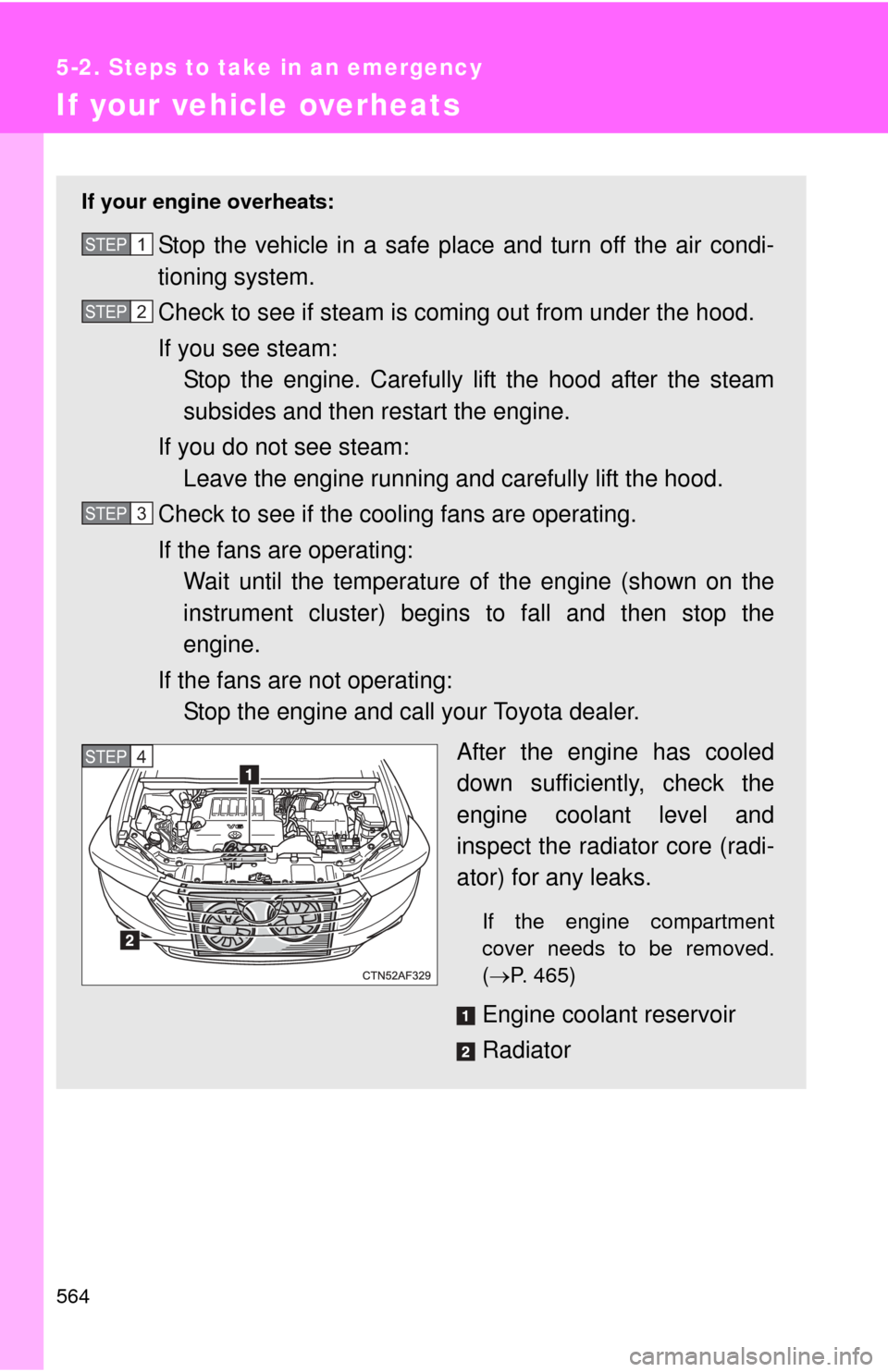
After the engine has cooled
down sufficiently, check the
engine coolant level and
inspect the radiator core (radi-
ator) for any leaks.
If the engine compartment
cover needs to be removed.
(P. 465)
Engine coolant reservoir
Radiator
STEP1
STEP2
STEP3
STEP4
Page 589 of 636

589
6-1. Specifications
6
Vehicle specifications
■
Toyota does not recommend gasoline containing MMT
Some gasoline contains octane enhancing additive called MMT (Methylcy-
clopentadienyl Manganese Tricarbonyl).
Toyota does not recommend the use of gasoline that contains MMT. If fuel
containing MMT is used, your emission control system may be adversely
affected.
The malfunction indicator lamp on the instrument cluster may come on. If
this happens, contact your Toyota dealer for service.
NOTICE
■Notice on fuel quality
●Do not use improper fuels. If improper fuels are used the engine will be
damaged.
● Do not use leaded gasoline.
Leaded gasoline will cause the three-way catalytic converter to lose its
effectiveness and the emission control system to function improperly.
● Do not use gasohol other than that stated here.
Other gasohol may cause fuel system damage or vehicle performance
problems.
■ Fuel-related poor driveability
If after using a different type of fuel, poor driveability is encountered (poor
hot starting, vaporization, engine knocking, etc.), discontinue the use of that
type of fuel.
■ When refueling with gasohol
Take care not to spill gasohol. It can damage your vehicle's paint.
Page:
< prev 1-8 9-16 17-24