Page 50 of 532

50 1-2. Opening, closing and locking the doors and trunk
■Conditions affecting operation
Vehicles without a smart key system
The wireless remote control function may not operate normally in the follow-
ing situations:
●When the wireless key battery is depleted
● Near a TV tower, electric power plant, gas station, radio station, large dis-
play, airport or other facility that generates strong radio waves or electri-
cal noise
● When carrying a portable radio, cell ular phone or other wireless commu-
nication devices
● When the wireless key is in contact with, or is covered by a metallic
object
● When other wireless key (that emit radio waves) is being used nearby
● If window tint with a metallic content or metallic objects are attached to
the rear window
Vehicles with a smart key system
P. 4 0
■ If the wireless remote control does not operate properly (vehicles with
a smart key system)
Locking and unlocking the doors: Use the mechanical key. ( P. 451)
■ Key battery depletion
Vehicles without a smart key system
If the wireless remote control function does not operate, the battery may be
depleted. Replace the battery when necessary. ( P. 384)
Vehicles with a smart key system
P. 4 4
■ When the key battery is fully depleted
P. 384
■ Confirmation of the registered key number (vehicles with a smart key
system)
The number of keys already registered to the vehicle can be confirmed. Ask
your Toyota dealer for details.
Page 51 of 532

51
1-2. Opening, closing and locking the doors and trunk
1
Before driving
■
Customization that can be co nfigured at Toyota dealer
Settings (e.g. wireless remote control system) can be changed.
(Customizable features: P. 493)
■ Certification for wireless remote control
U.S.A. (vehicles without a smart key system)
FCC ID: HYQ23AAC
FCC ID: HYQ12BDM
NOTE:
This device complies with Part 15 of the FCC Rules. Operation is subject to
the following two conditions: (1) this device may not cause harmful interfer-
ence, and (2) this device must accept any interference received, including
interference that may cause undesired operation.
FCC WARNING:
Changes or modifications not expressly approved by the party responsible
for compliance could void the user's authority to operate the equipment.
U.S.A. (vehicles with a smart key system)
FCC ID: NI4TMLF10-4
FCC ID: NI4TMLF10-5
FCC ID: HYQ23AAB
FCC ID: HYQ14FBA
NOTE:
This device complies with Part 15 of the FCC Rules. Operation is subject to
the following two conditions: (1) this device may not cause harmful interfer-
ence, and (2) this device must accept any interference received, including
interference that may cause undesired operation.
FCC WARNING:
Changes or modifications not expressly approved by the party responsible
for compliance could void the user's authority to operate the equipment.
Canada
NOTE:
Operation is subject to the following two conditions: (1) this device may not
cause interference, and (2) this device must accept any interference, includ-
ing interference that may cause undesired operation of the device.
Page 52 of 532
52
1-2. Opening, closing and locking the doors and trunk
Doors
The vehicle can be locked and unlocked using the entry function,
wireless remote control, key or door lock switch.
■Entry function (vehicles with a smart key system)
P. 3 2
■ Wireless remote control (if equipped)
P. 4 6
■ Key
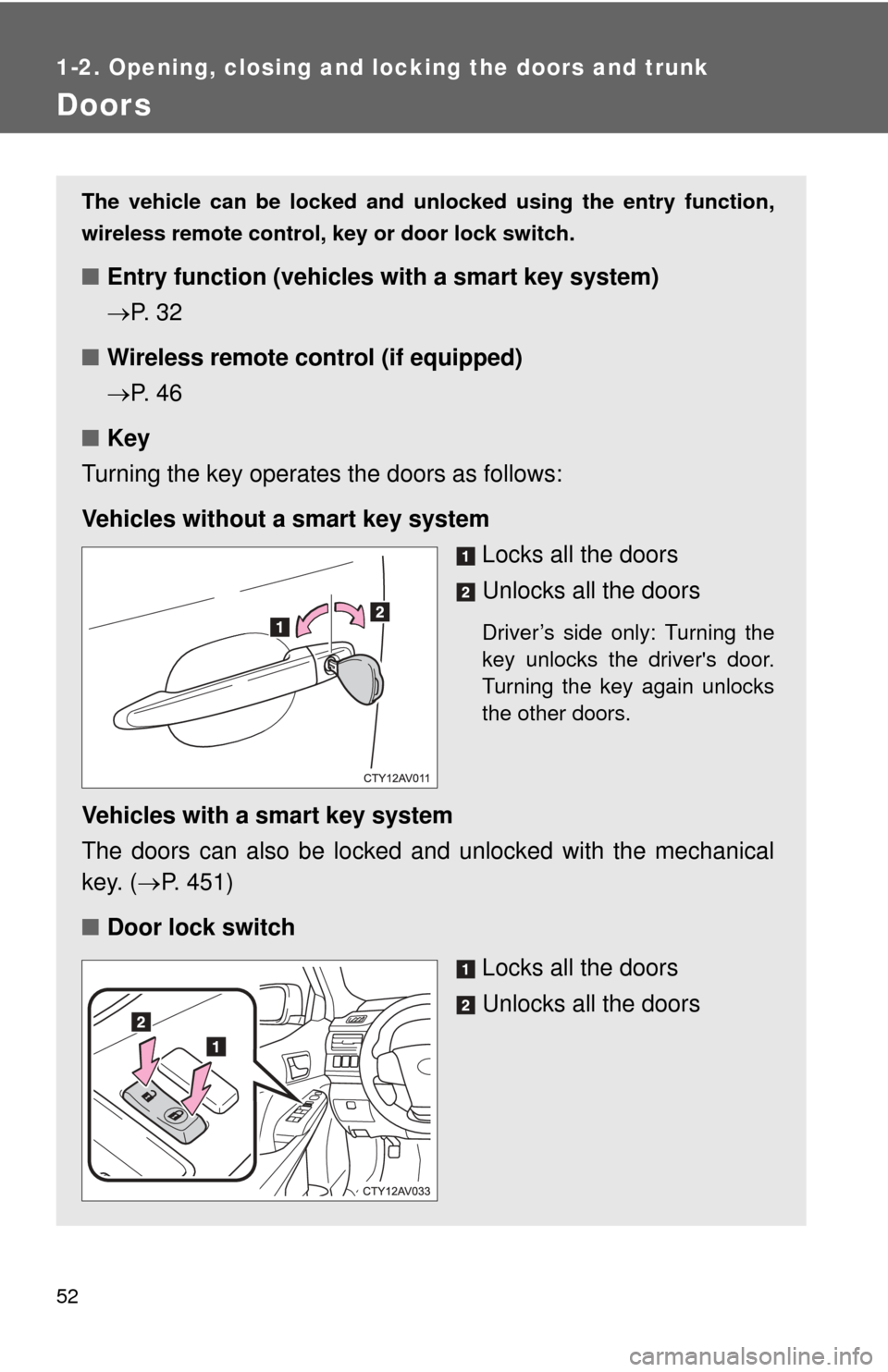
Turning the key operates the doors as follows:
Vehicles without a smart key system Locks all the doors
Unlocks all the doors
Driver’s side only: Turning the
key unlocks the driver's door.
Turning the key again unlocks
the other doors.
Vehicles with a smart key system
The doors can also be locked and unlocked with the mechanical
key. (P. 451)
■ Door lock switch
Locks all the doors
Unlocks all the doors
Page 57 of 532
57
1-2. Opening, closing and locking the doors and trunk
1
Before driving
■
If a wrong key is used (veh icles with a smart key system)
The key cylinder rotates freely to isolate inside mechanism.
■ If the smart key system has been d eactivated in a customized setting
(vehicles with a smart key system)
Use the wireless remote control or mechanical key. ( P. 46, 451)
■ Customization that can be co nfigured at Toyota dealer
Settings (e.g. unlocking function using a key) can be changed.
(Customizable features P. 493)
CAUTION
■To prevent an accident
Observe the following precautions while driving the vehicle.
Failure to do so may result in a door opening and an occupant falling out,
resulting in death or serious injury.
●Always use a seat belt.
● Always lock all the doors.
● Ensure that all doors are properly closed.
● Do not pull the inside handle of the doors while driving.
The doors may be opened and the passengers are thrown out of the vehi-
cle and it may result in serious injury or death.
Be especially careful for the front doors, as the doors may be opened even
if the inside lock buttons are in locked position.
● Set the rear door child-protector locks when children are seated in the rear
seats.
Page 58 of 532
58
1-2. Opening, closing and locking the doors and trunk
Trunk
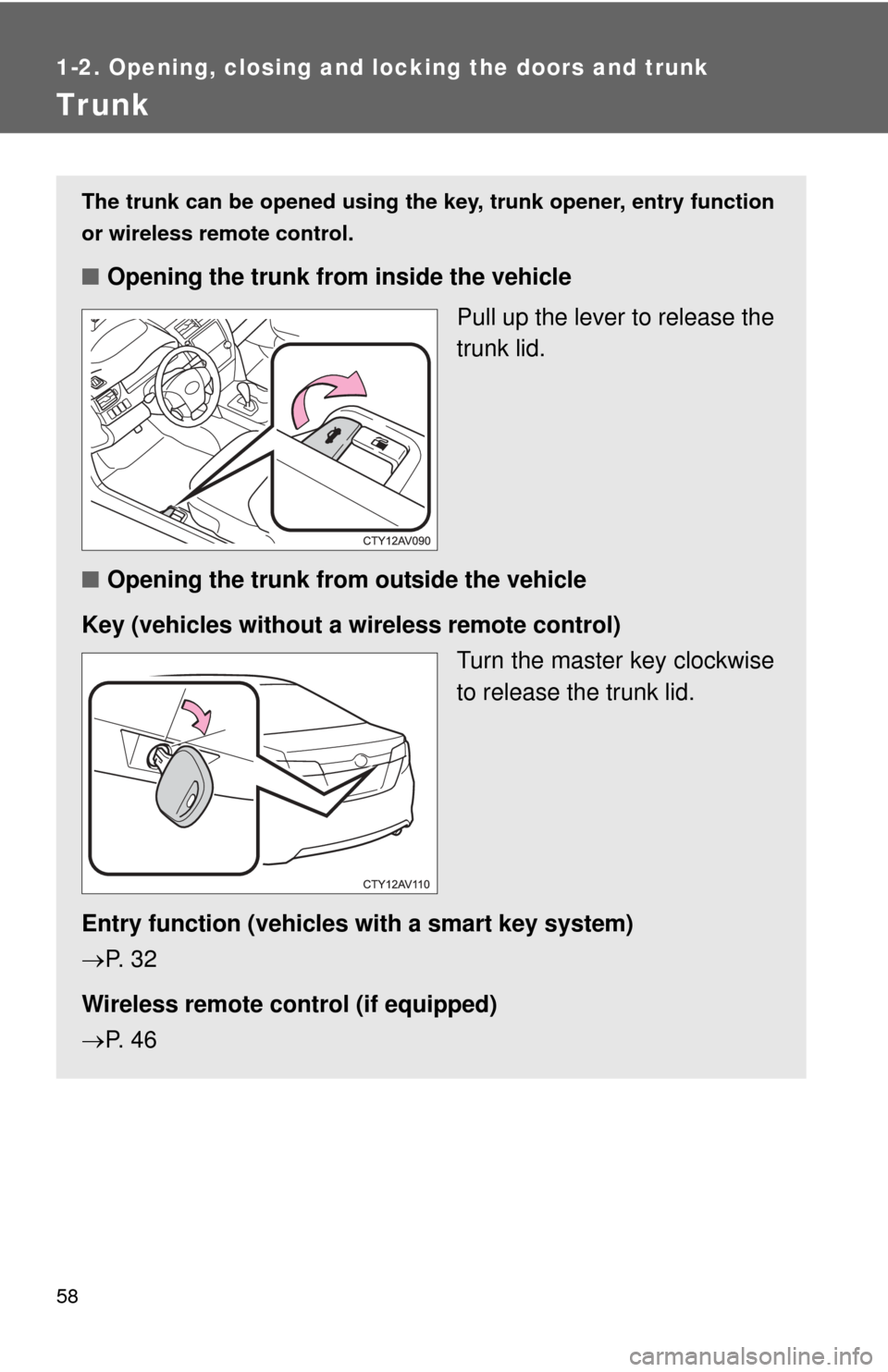
The trunk can be opened using the key, trunk opener, entry function
or wireless remote control.
■ Opening the trunk from inside the vehicle
Pull up the lever to release the
trunk lid.
■ Opening the trunk from outside the vehicle
Key (vehicles without a wi reless remote control)
Turn the master key clockwise
to release the trunk lid.
Entry function (vehicles with a smart key system)
P. 3 2
Wireless remote control (if equipped)
P. 4 6
Page 95 of 532
95
1
1-6. Theft deterrent system
Before driving
Alarm
: If equipped
The system sounds the alarm and flashes the lights when forced
entry is detected.
■ Triggering of the alarm
The alarm is triggered in the fo llowing situations when the alarm
is set:
● A locked door or trunk is unlocked or opened in any way other
than using the entry function, wireless remote control or
mechanical key.
● The hood is opened.
● Some models: The window is tapped or broken.
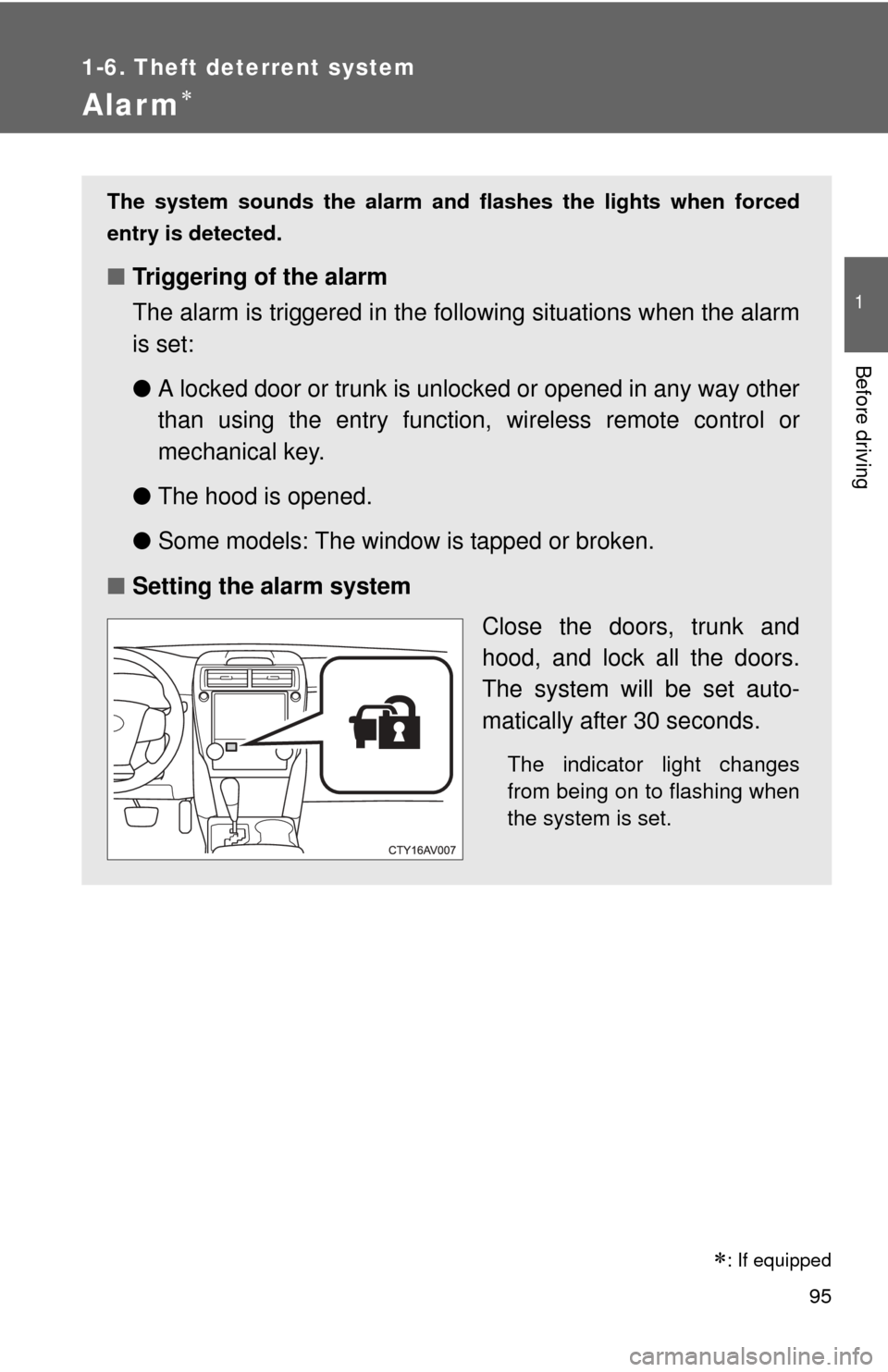
■ Setting the alarm system
Close the doors, trunk and
hood, and lock all the doors.
The system will be set auto-
matically after 30 seconds.
The indicator light changes
from being on to flashing when
the system is set.
Page 190 of 532

190 2-3. Operating the lights and wipers
■Automatic light off system (if equipped)
Vehicles without a smart key system
●When the light switch is in : The headlights and tail lights turn off
30 seconds after the engine switch is turned to the “ACC” or “LOCK”
position and a door is opened and closed. (Vehicles with a wireless
remote control: The lights turn off immediately if on the key is
pressed twice after all the doors are closed.)
To turn the lights on again, turn the engine switch to “ON” position, or turn
the light switch off once and then back to or .
If any of the doors or trunk lid is kept open, the lights automatically turn off
after 20 minutes.
Vehicles with a smart key system
● When the light switch is in : The headlights and tail lights turn off
30 seconds after the “ENGINE START STOP” switch is turned to
ACCESSORY mode or turned off and a door is opened and closed. (The
lights turn off immediately if on the key is pressed twice after all
the doors are closed.)
To turn the lights on again, turn the “ENGINE START STOP” switch to IGNI-
TION ON mode, or turn the light switch off once and then back to
or .
If any of the doors or trunk lid is kept open, the lights automatically turn off
after 20 minutes.
■ Light reminder buzzer
Vehicles without a smart key system
A buzzer sounds when the engine switch is turned “OFF” or to “ACC” posi-
tion and the driver's door is opened with the key removed from the engin\
e
switch while the lights are turned on.
Vehicles with a smart key system
A buzzer sounds when the “ENGINE START STOP” switch is turned off or
turned to ACCESSORY mode and the driver's door is opened while the
lights are turned on.
Page 316 of 532
316 3-5. Other interior features
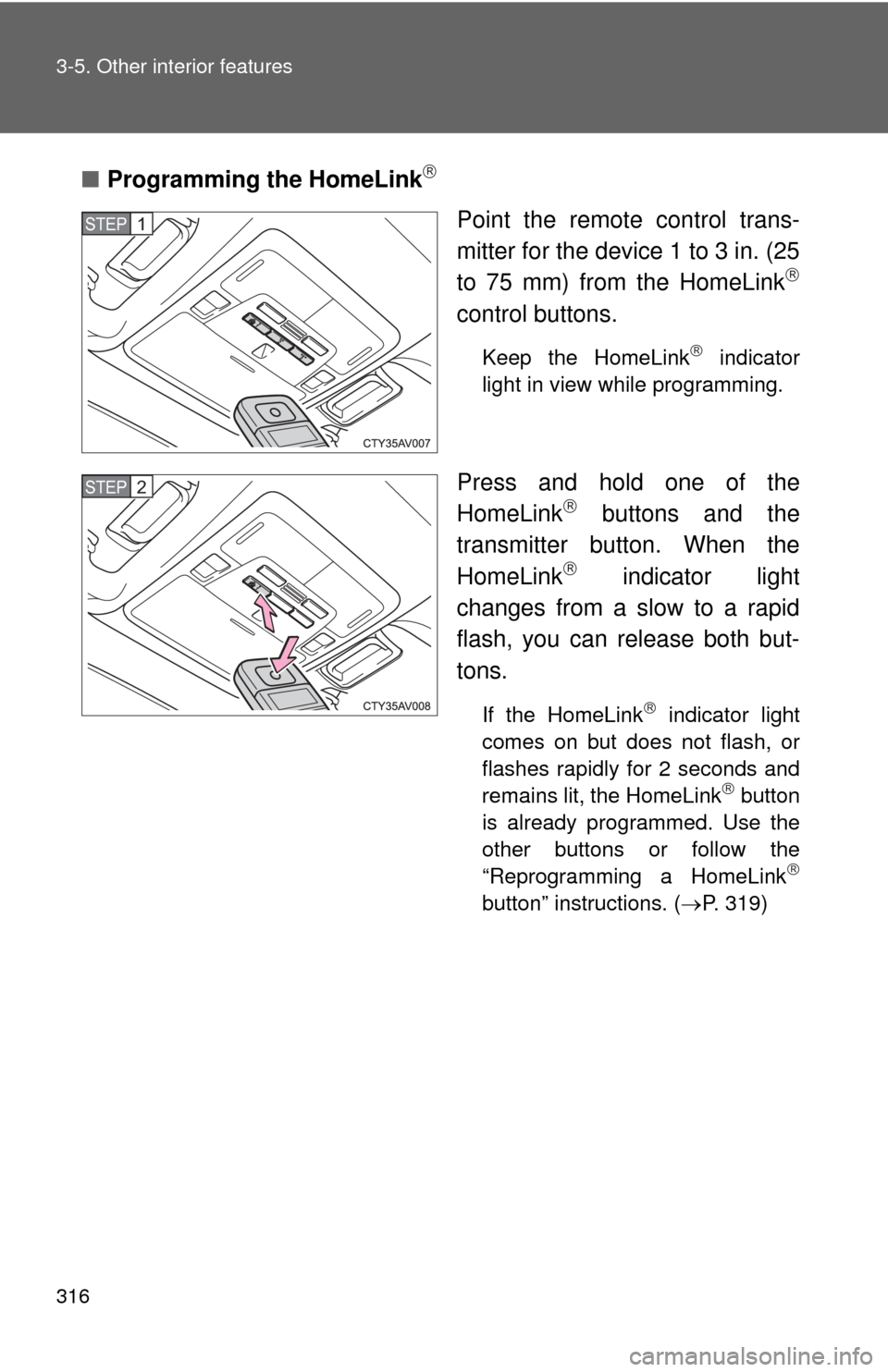
■Programming the HomeLink
Point the remote control trans-
mitter for the device 1 to 3 in. (25
to 75 mm) from the HomeLink
control buttons.
Keep the HomeLink indicator
light in view while programming.
Press and hold one of the
HomeLink buttons and the
transmitter button. When the
HomeLink
indicator light
changes from a slow to a rapid
flash, you can release both but-
tons.
If the HomeLink indicator light
comes on but does not flash, or
flashes rapidly for 2 seconds and
remains lit, the HomeLink
button
is already programmed. Use the
other buttons or follow the
“Reprogramming a HomeLink
button” instructions. ( P. 319)
STEP1
STEP2