Page 197 of 532
197
2-3. Operating the lights and wipers
2
When driving
■
The windshield wiper and washers can be operated when
Vehicles without a smart key system: The engine switch is in the “ON” posi-
tion.
Vehicles with a smart key system: The “ENGINE START STOP” switch is in
IGNITION ON mode.
■ If no windshield washer fluid sprays
Check that the washer nozzles are not blocked if there is washer fluid in the
windshield washer fluid reservoir.
Increases the intermittent
windshield wiper frequency
Decreases the intermittent
windshield wiper frequency
Washer/wiper dual opera-
tion
The wipers will automatically
operate a couple of times after
the washer squirts.
Page 198 of 532
198 2-3. Operating the lights and wipers
NOTICE
■When the windshield is dry
Do not use the wipers, as they may damage the windshield.
■ When the washer fluid tank is empty
Do not operate the switch continually as the washer fluid pump may over-
heat.
■ When a nozzle becomes blocked
In this case, contact your Toyota dealer.
Do not try to clear it with a pin or other object. The nozzle will be damaged.
Page 203 of 532

203
2-4. Using other driving systems
2
When driving
Driving assist systems
When the TRAC/VSC systems are operatingIf the vehicle is in danger of slip-
ping or if any of the drive wheels
spins, the slip indicator light
flashes to indicate that the VSC/
TRAC systems are operating.
To help enhance driving safety and performance, the following sys-
tems operate automatically in res ponse to various driving situations.
Be aware, however, that these systems are supplementary and
should not be relied upon too heavi ly when operating the vehicle.
■ABS (Anti-lock Brake System)
Helps to prevent wheel lock when the brakes are applied suddenly, or if
the brakes are applied while driving on a slippery road surface.
■Brake assist
Generates an increased level of braking force after the brake pedal is
depressed when the system detects a panic stop situation.
■VSC (Vehicle Stability Control)
Helps the driver to control skidding when swerving suddenly or turning
on slippery road surfaces.
■TRAC (Traction Control)
Helps to maintain drive power and prevent the drive wheels from spin-
ning when starting the vehicle or accelerating on slippery roads.
■EPS (Electric Power Steering)
Employs an electric motor to reduce the amount of effort needed to turn
the steering wheel.
■BSM (Blind Spot Monitor) (if equipped)
P. 208
Page 215 of 532

215
2-5. Driving information
2
When driving
CAUTION
■Things that must not be carried in the trunk
The following things may cause a fire if loaded in the trunk:
●Receptacles containing gasoline
●Aerosol cans
■Storage precautions
Observe the following precautions.
Failure to do so may result
in death or serious injury.
●Stow cargo and luggage in the trunk whenever possible.
●To prevent cargo and luggage from sliding forward during braking, do
not stack anything in the enlarged trunk. Keep cargo and luggage low,
as close to the floor as possible.
●When you fold down the rear seats, long items should not be placed
directly behind the front seats.
●Never allow anyone to ride in the enlarged trunk. It is not designed for
passengers. They should ride in their seats with their seat belts prop-
erly fastened. Otherwise, they are much more likely to suffer death or
serious bodily injury, in the event of sudden braking, sudden swerving
or an accident.
●Do not place cargo or luggage in or on the following locations as the
item may get under the brake or accelerator pedal and prevent the
pedals from being depressed properly, block the driver’s vision, or hit
the driver or passengers, causing an accident:
• At the feet of the driver
• On the front passenger or rear seats (when stacking items)
• On the package tray
• On the instrument panel
• On the dashboard
●Secure all items in the occupant compartment, as they may shift and
injure someone during sudden braking, sudden swerving or an acci-
dent.
Page 219 of 532
219
2-5. Driving information
2
When driving
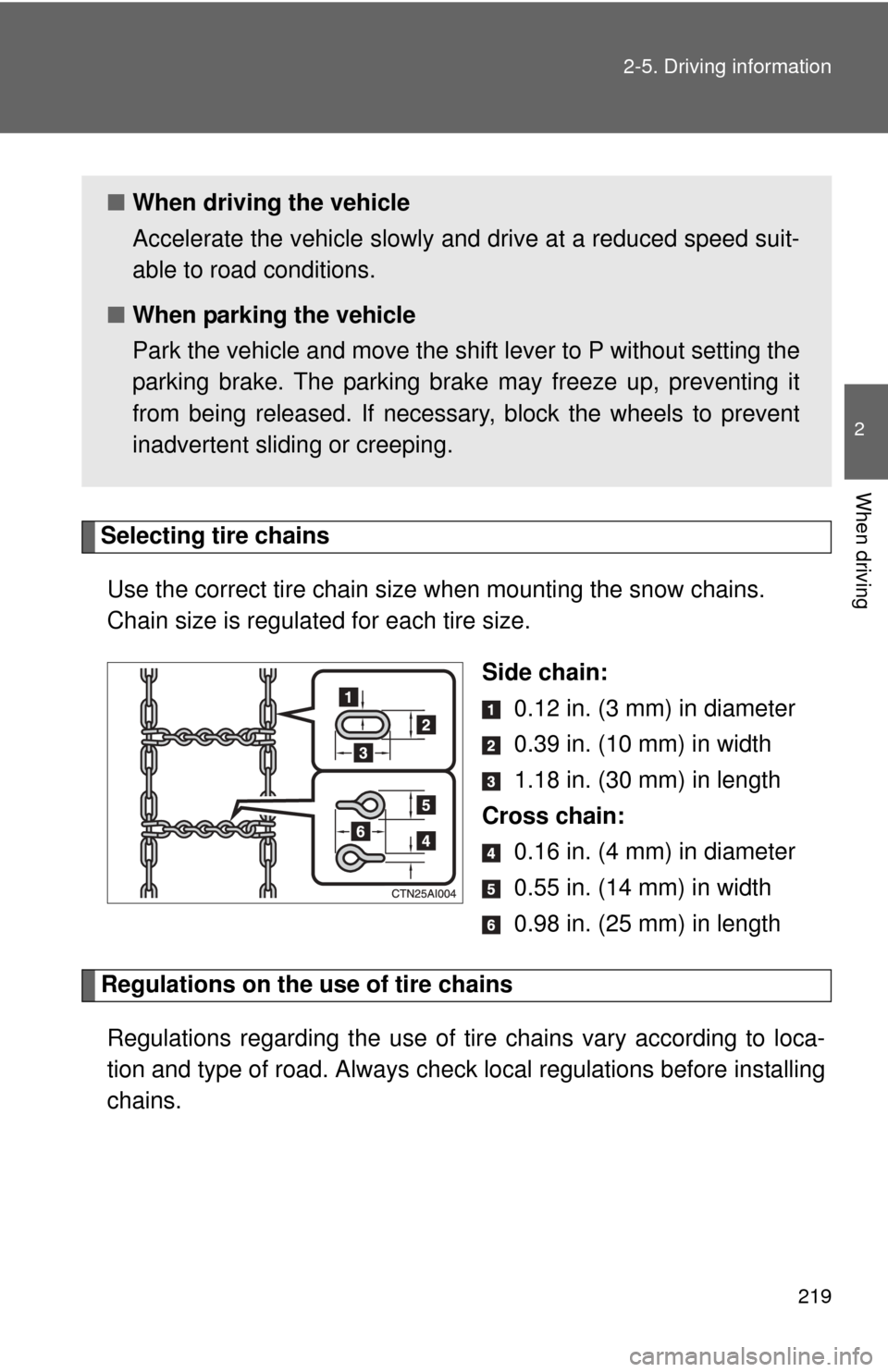
Selecting tire chains
Use the correct tire chain size when mounting the snow chains.
Chain size is regulated for each tire size. Side chain: 0.12 in. (3 mm) in diameter
0.39 in. (10 mm) in width
1.18 in. (30 mm) in length
Cross chain: 0.16 in. (4 mm) in diameter
0.55 in. (14 mm) in width
0.98 in. (25 mm) in length
Regulations on the use of tire chains
Regulations regarding the use of tire chains vary according to loca-
tion and type of road. Always chec k local regulations before installing
chains.
■ When driving the vehicle
Accelerate the vehicle slowly and drive at a reduced speed suit-
able to road conditions.
■ When parking the vehicle
Park the vehicle and move the shift lever to P without setting the
parking brake. The parking brak e may freeze up, preventing it
from being released. If necessary , block the wheels to prevent
inadvertent sliding or creeping.
Page 225 of 532
Interior features3
225
3-1. Using the air conditioning system and defogger
Manual air conditioning system ........................... 226
Automatic air conditioning system ....... 233
Rear window and outside rear view
mirror defoggers ............ 240
3-2. Using the audio system Audio system types .......... 242
Using the radio ................. 248
Using the CD player ......... 251
Playing back MP3 and WMA discs ..................... 257
Operating an iPod ............ 264
Operating a USB memory .......................... 272
Optimal use of the audio system ........................... 280
Using the AUX port .......... 283
3-3. Using the interior lights Interior lights list ............... 285
• Interior lights .................. 286
• Personal lights ............... 287 3-4. Using the storage
features
List of storage features .... 289
• Glove box....................... 290
• Console box ................... 291
• Coin holder .................... 292
• Bottle holders ................. 293
• Cup holders ................... 294
• Auxiliary boxes ............... 296
3-5. Other interior features Sun visors ........................ 298
Vanity mirrors ................... 299
Clock ................................ 300
Outside temperature display............................ 301
Ashtray ............................. 303
Power outlets ................... 304
Seat heaters..................... 307
Armrest ............................ 309
Coat hooks ....................... 310
Floor mat .......................... 311
Trunk features .................. 313
Garage door opener......... 315
Compass .......................... 322
Safety Connect ................ 326
Page 227 of 532
227
3-1. Using the air conditioning system
and defogger
3
Interior features
Adjusting the settings
To adjust the fan speed, turn the fan speed control dial clock-
wise (increase) or count erclockwise (decrease).
Turning the dial to “OFF” turns off the fan.
To adjust the temperature setting, turn the temperature control
dial clockwise (warm) or counterclockwise (cool).
If is not pressed, the system will blow ambient temperature
air or heated air.
For quick cooling, turn the temperature control dial to “MAX A/C”.
The air conditioning will automatically turn on. The air intake mode
button will be set for recirculated air mode when or is
selected. It is not possible to turn to the outside air mode.
To change the air outlets, press , , or
.
Defogging the windshield
Press .
If the recirculated air mode is
used, it will automatically switch
to the outside air mode.
STEP1
STEP2
STEP3
STEP1
Page 232 of 532
232 3-1. Using the air conditioning system and defogger
CAUTION
■To prevent the windshield from fogging up
Do not use during cool air operation in extremely humid weather.
The difference between the temperature of the outside air and that of the
windshield can cause the outer surface of the windshield to fog up, blocking
your vision.
NOTICE
■To prevent battery discharge
Do not leave the air conditioning system on longer than necessary when the
engine is stopped.