Page 336 of 580
336 3-4. Using the hands-free system (for cellular phone)
■Initialization
●The following data in the system can be initialized:
• Phone book
• Outgoing and incoming call history
• Speed dials
• Registered cellular phone data
• Security code
● Once the initialization has been completed, the data cannot be restored
to its original state.
■ When the phone book is locked
The following functions cannot be used:
●Dialing by inputting a name
● Speed dialing
● Dialing a number stored in the call history memory
● Using the phone book
Page 346 of 580
346
3-5. Using the interior lights
Interior lights list
Illuminated entry system: The various lights automatically turn on/
off according to the presence of the key, whether the doors are
locked/unlocked, whether the d oors are open/closed, and the
“ENGINE START STOP” switch mode (vehicles with smart key sys-
tem) or the engine switch posi tion (vehicles without smart key sys-
tem).
Outer foot light
Front personal lights ( P. 348)
Rear personal light ( P. 348)
Interior light ( P. 348)
Engine switch light (if equipped)
Page 350 of 580
350 3-6. Using the storage features
Glove boxOpen
Lock with the mechanical key
or the master key
Unlock with the mechanical
key or the master key
CAUTION
■Items that should not be left in the storage spaces
Do not leave glasses, lighters or spray cans in the storage spaces, as this
may cause the following when cabin temperature becomes high:
● Glasses may be deformed by heat or cracked if they come into contact
with other stored items.
● Lighters or spray cans may explode. If they come into contact with other
stored items, the lighter may catch fire or the spray can may release gas,
causing a fire hazard.
■Glove box light
The glove box light turns on when the instrument panel light switch is on.
Page 359 of 580
359
3-7. Other interior features
3
Interior features
Clock
■The clock is displayed when
Vehicles with smart key system
The “ENGINE START STOP” switch is in ACCESSORY or IGNITION ON
mode. Vehicles without smart key system
The engine switch is in the “ACC” or “ON” position.
■ When the battery is disconnected
The time display will automatically be set to 1:00.
Adjust the hour
Adjust the minutes
Rounds to the nearest hour
Page 363 of 580
363
3-7. Other interior features
3
Interior features
Seat heaters/ventilators
: If equipped
The seat heaters and ventilators heat the seats and maintain good
airflow by blowing air from the seats.
Vehicles with ventilatorPress the knob to release it,
and turn the knob to the
desired temperature setting.
OFF
Press the knob to lock it when
not in use.
Ve n t i l a t i o n
Warm air
Vehicles without ventilator Press the knob to turn the sys-
tem on, and turn the knob to
the desired temperature set-
ting.
The further you turn the knob
clockwise, the warmer the seat
temperature becomes. Press
the knob again to turn the sys-
tem off.
Page 372 of 580
372
3-7. Other interior features
Garage door opener
The garage door opener (HomeLink Universal Transceiver) is manufac-
tured under license from HomeLink.
Programming the HomeLink (for U.S.A. owners)
The HomeLink
compatible transceiver in your vehicle has 3 buttons
which can be programmed to operate 3 different devices. Refer to the
programming method below appropriate for the device.
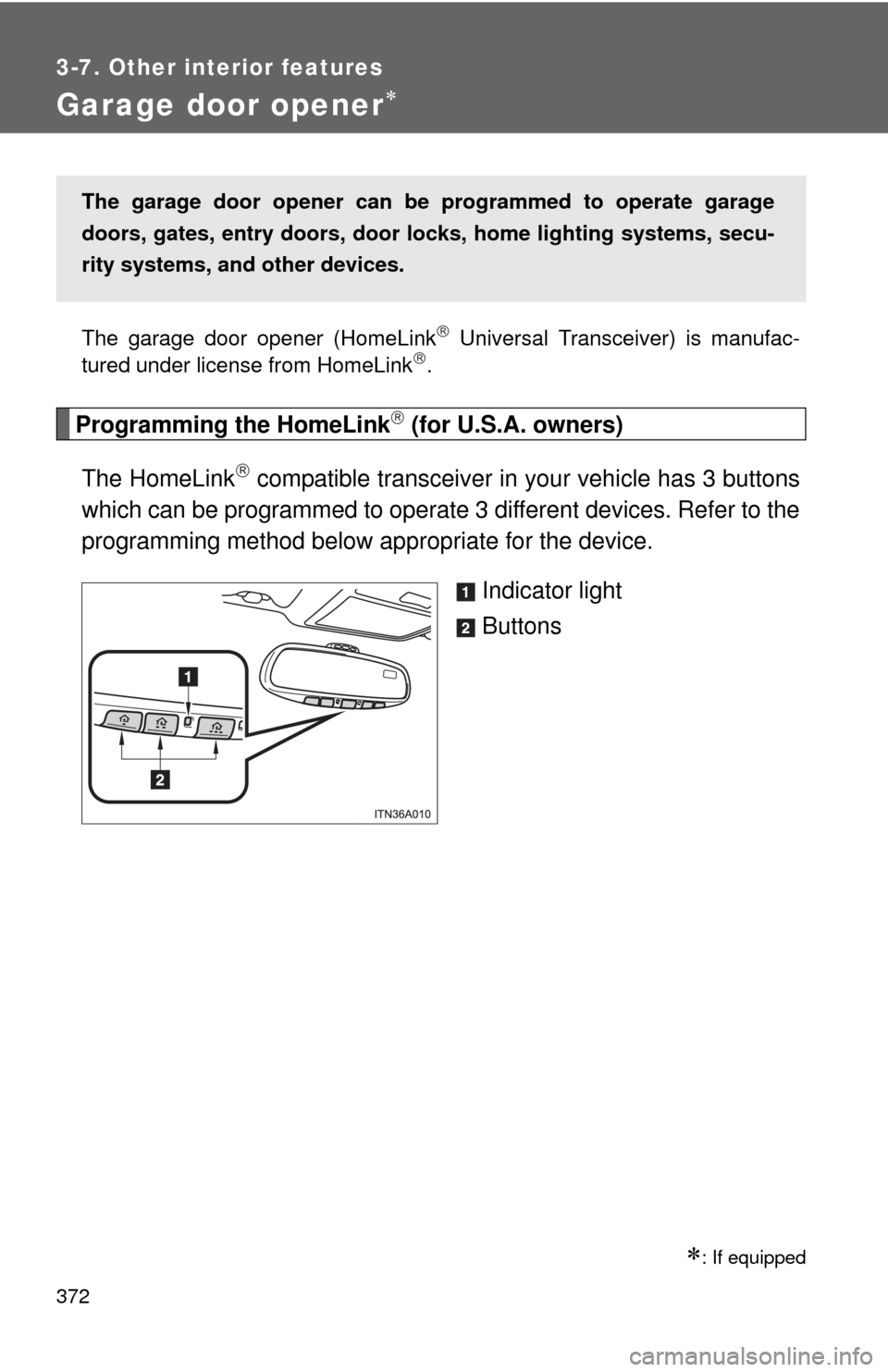
Indicator light
Buttons
: If equipped
The garage door opener can be programmed to operate garage
doors, gates, entry doors, door locks, hom e lighting systems, secu-
rity systems, and other devices.
Page 376 of 580

376 3-7. Other interior features
■Programming an entry gate (f or U.S.A. owners)/Programming
all devices in the Canadian market
Place your transmitter 1 to 3 in. (25 to 75 mm) away from the
surface of the HomeLink
.
Keep the indicator light on the HomeLink in view while program-
ming.
Press and hold the selected HomeLink button.
Repeatedly press and release (cycle) the device’s remote
control button for two seconds each until step 4 is completed.
When the indicator light on the HomeLink
compatible trans-
ceiver starts to flash rapidly, release the buttons.
Test the operation of the HomeLink
by pressing the newly
programmed button. Check to se e if the gate/device operates
correctly.
Repeat the steps above to program another device for each of
the remaining HomeLink
buttons.
■ Programming other devices
To program other devices such as home security systems, home
door locks or lighting, contact your authorized Toyota dealer for
assistance.
■ Reprogramming a button
The individual HomeLink
buttons cannot be erased but can be
reprogrammed. To reprogram a button, follow the “Basic program-
ming” instructions.
STEP1
STEP2
STEP3
STEP4
STEP5
STEP6
Page 382 of 580
382 3-7. Other interior features
■Deviation calibration
Stop the vehicle where it is safe to drive in a circle.
Press the switch until a number
(1 to 15) appears on the com-
pass display.
Press the switch, and referring to the map above, select the
number of the zone where you are.
Wait a few seconds until the compass direction is displayed.
The calibration is complete.
■ Circling calibration
If “CAL” appears on the display,
drive the vehicle at 5 mph (8 km/h)
or less in a circle until a direction
is displayed.
If there is not enough space to
drive in a circle, drive around the
block until the direction is dis-
played.
STEP1
STEP2
STEP3
STEP4