Page 187 of 700
187
2-2. Instrument cluster
2
When driving
4RUNNER_U
Tachometer
Displays the engine speed in revolutions per minute
Speedometer
Displays the vehicle speed
Display change button
P. 188
Engine coolant temperature gauge
Displays the engine coolant temperature
Fuel gauge
Displays the quantity of fuel remaining in the tank
Eco Driving Indicator Zone Display
P. 189
Odometer, trip meter and average fuel consumption display
P. 188
Shift position and shift range indicators
P. 179
Vo l t m e t e r
Displays the charge state
Page 188 of 700
188 2-2. Instrument cluster
4RUNNER_U
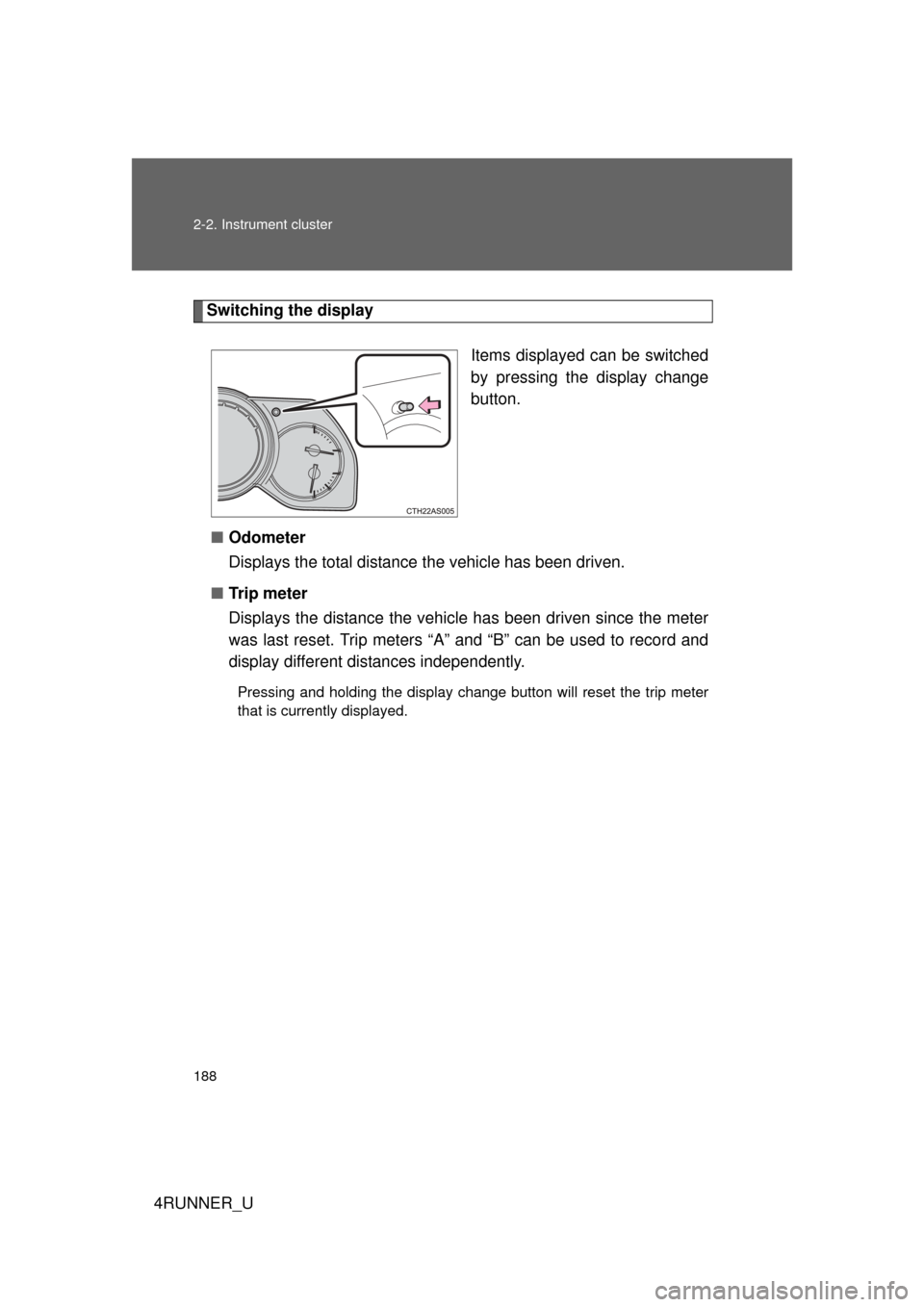
Switching the displayItems displayed can be switched
by pressing the display change
button.
■ Odometer
Displays the total distance the vehicle has been driven.
■ Tr i p m e t e r
Displays the distance the vehicl e has been driven since the meter
was last reset. Trip meters “A” and “B” can be used to record and
display different distances independently.
Pressing and holding the display change button will reset the trip meter
that is currently displayed.
Page 199 of 700
199
2-2. Instrument cluster
2
When driving
4RUNNER_U
Accessor y meter
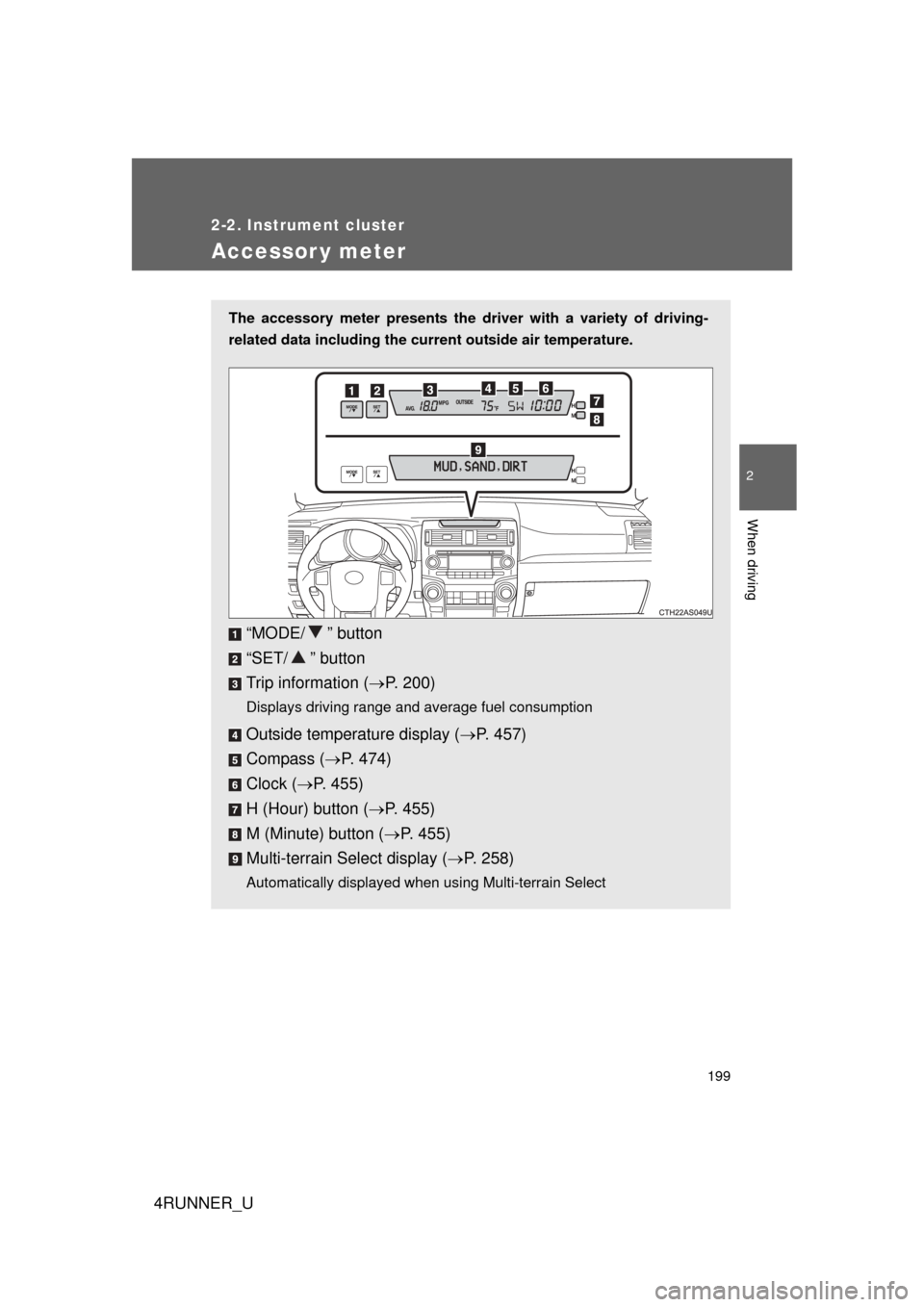
The accessory meter presents the driver with a variety of driving-
related data including the current outside air temperature.
“MODE/ ” button
“SET/ ” button
Trip information (P. 200)
Displays driving range and average fuel consumption
Outside temperature display ( P. 457)
Compass ( P. 474)
Clock ( P. 455)
H (Hour) button ( P. 455)
M (Minute) button ( P. 455)
Multi-terrain Select display ( P. 258)
Automatically displayed when using Multi-terrain Select
Page 202 of 700

202 2-2. Instrument cluster
4RUNNER_U
■When the average fuel consumption is reset
The average fuel consumption displayed on the instrument cluster and “Past
Record” screen of the Display Audio system (if equipped) or the navigation
system (if equipped) will be reset at the same time.
■ Adjusting the brightness of the accessory meter
● If left idle for approximately 6 seconds or more while adjusting, the dis-
play will revert to the trip information display.
● When the parking lights are on, the brightness of the accessory meter
can be adjusted only with the instrument panel light control.
● If the “MODE/ ” button is pressed and held when the accessory meter
light control is displayed, the display will switch to compass calibration.
(P. 474)
■ Liquid crystal display
Small spots or light spots may appear on the display. This phenomenon is
characteristic of liquid crystal displays, and there is no problem with continu-
ing to use the display.
NOTICE
■The accessory meter at low temperatures
Allow the interior of the vehicle to warm up before using the liquid crystal dis-
play. At extremely low temperatures, the display monitor may respond
slowly, and display changes may be delayed.
Page 509 of 700

509
4-2. Maintenance
4
Maintenance and care
4RUNNER_U
■
Reset the maintenance data (U.S.A. only)
After the required maintenance is performed according to the maintenance
schedule, please reset the maintenance data.
To reset the data, follow the procedures described below:
Switch the display to the trip meter A ( P. 188) when the engine is
running.
Vehicles without a smart key system
Turn the engine switch off.
Vehicles with a smart key system
Turn the “ENGINE START STOP” switch off.
Vehicles without a smart key system
While pressing the trip meter reset button ( P. 188), turn the
engine switch to the “ON” position (do not start the engine because
reset mode will be canceled). Continue to press and hold the button
until the trip meter displays “000000”.
Vehicles with a smart key system
While pressing the trip meter reset button ( P. 188), turn the
“ENGINE START STOP” switch to the IGNITION ON mode (do not
start the engine because otherwise the reset mode will be can-
celed). Continue to press and hold the button until the trip meter
displays “000000”.
■ Allow inspection and repairs to be performed by a Toyota dealer
● Toyota technicians are well-trained specialists and are kept up to date
with the latest service information. They are well informed about the
operations of all systems on your vehicle.
● Keep a copy of the repair order. It proves that the maintenance that has
been performed is under warranty coverage. If any problem should arise
while your vehicle is under warranty, your Toyota dealer will promptly
take care of it.
STEP 1
STEP 2
STEP 3
Page 694 of 700

694 Alphabetical index
4RUNNER_U
Storage compartment ..............482
Storage feature.........................441
Storage precautions ................284
StuckIf your vehicle becomes stuck ...................................630
Sun visors.................................453
Sunshade Roof....................................... 105
Switch Emergency flasher switch ..... 578
Engine switch ................170, 173
Fog light switch ..................... 209
Hazard light switch ................578
Ignition switch................170, 173
Light switches........................ 203
Power back window switch ...101
Power door lock switch ...........54
Power window switch ..............98
Rear window wiper and washer switch ..................... 214
Window lock switch ................. 98
Wiper and washer switch ......211 Tachometer
Tachometer ........................... 186
Tail lights
Replacing light bulbs ............. 565
Switch ................................... 203
Wattage................................. 644
Talk switch ............................... 410
Telephone switch..................... 410
Theft deterrent system Alarm..................................... 116
Engine immobilizer system ... 113
Tire inflation pressure ............. 543
Tire information
Glossary ................................ 653
Size ....................................... 650
Tire identification number...... 649
Uniform tire quality grading ... 651
Tires
Chains ................................... 288
Checking ............................... 537
If you have a flat tire.............. 603
Inflation pressure .................. 543
Inflation pressure sensor....... 537
Information ............................ 648
Replacing .............................. 603
Rotating tires ......................... 537
Size ....................................... 643
Snow tires ............................. 288
Spare tire .............................. 603
Tissue pocket ........................... 445
Tools ......................................... 603
Total load capacity .................. 286
Towing Dinghy towing ....................... 311
Emergency towing ................ 579
Trailer towing ........................ 293
TRAC ......................................... 266
Traction control ....................... 266
Trip information ....................... 199
Trip meter ................................. 186T