2012 TOYOTA 4RUNNER power steering
[x] Cancel search: power steeringPage 2 of 700

TABLE OF CONTENTSIndex
4RUNNER_U
2
1-1. Key informationKeys ..................................... 32
1-2. Opening, closing and locking the doors
Smart key system................. 35
Wireless remote control ....... 49
Side doors ............................ 53
Automatic running boards .... 59
Back door ............................. 63
1-3. Adjustable components (seats, mirrors,
steering wheel)
Front seats ........................... 68
Rear seats ............................ 72
Head restraints ..................... 83
Seat belts ............................. 86
Steering wheel ..................... 93
Inside rear view mirror.......... 94
Outside rear view mirrors ..... 96
1-4. Opening and closing the windows and moon roof
Power windows .................... 98
Power back window ........... 101
Moon roof ........................... 105
1-5. Refueling Opening the fuel tank cap ................................... 109 1-6. Theft deterrent system
Engine immobilizer system .............................. 113
Alarm .................................. 116
1-7. Safety information Correct driving posture ....... 119
SRS airbags ....................... 121
Front passenger occupant classification system ......... 136
Child restraint systems ....... 142
Installing child restraints ..... 146
2-1. Driving procedures Driving the vehicle .............. 160
Engine (ignition) switch (vehicles without a
smart key system) ............ 170
Engine (ignition) switch (vehicles with a
smart key system) ............ 173
Automatic transmission ...... 179
Turn signal lever ................. 183
Parking brake ..................... 184
Horn .................................... 185
2-2. Instrument cluster Gauges and meters ............ 186
Indicators and warning lights ................................. 193
Accessory meter ................. 199
1Before driving
2When driving
Page 17 of 700

4RUNNER_U
17
CTHPIAS096
C
Outside rear view mirror switchesP. 96
Instrument panel light control dial
P. 191
Intuitive parking assist switch
P. 221
Tilt and telescopic steering lockrelease lever
P. 93
“RSCA OFF” switch P. 134
Power outlet main switch P. 463
Windshield wiper de-icer switch
P. 330
: If equipped
*1: For vehicles with a navigation system, refer to the “Navigation System Owner’s Manual”.
*2: For vehicles with a Display Audio system, re fer to “Display Audio System Owner’s Manual”.
Automatic running boards switch
P. 59
Page 31 of 700
Before driving1
31
4RUNNER_U
1-1. Key informationKeys ................................... 32
1-2. Opening, closing and locking the doors
Smart key system .............. 35
Wireless remote control ..... 49
Side doors .......................... 53
Automatic running boards .............................. 59
Back door ........................... 63
1-3. Adjustable components (seats, mirrors,
steering wheel)
Front seats ......................... 68
Rear seats.......................... 72
Head restraints................... 83
Seat belts ........................... 86
Steering wheel ................... 93
Inside rear view mirror ....... 94
Outside rear view mirrors.............................. 96
1-4. Opening and closing the windows and moon roof
Power windows .................. 98
Power back window ......... 101
Moon roof ......................... 105
1-5. Refueling Opening the fuel tank cap ................................. 109 1-6. Theft deterrent system
Engine immobilizer system ........................... 113
Alarm................................ 116
1-7. Safety information Correct driving posture..... 119
SRS airbags ..................... 121
Front passenger occupant classification system ...... 136
Child restraint systems..... 142
Installing child restraints ........................ 146
Page 69 of 700
69
1-3. Adjustable components (s
eats, mirrors, steering wheel)
1
Before driving
4RUNNER_U
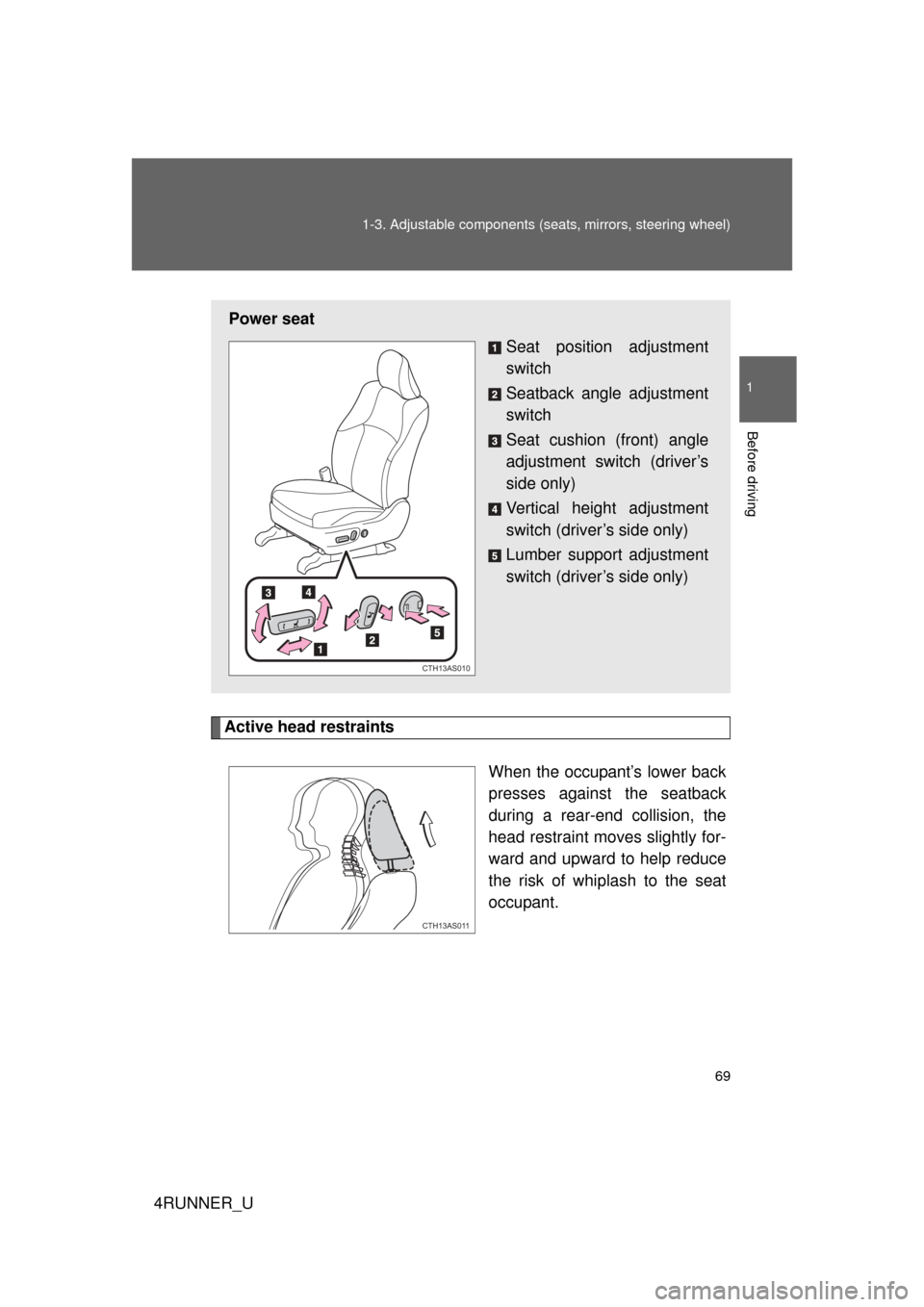
Active head restraints
When the occupant’s lower back
presses against the seatback
during a rear-end collision, the
head restraint moves slightly for-
ward and upward to help reduce
the risk of whiplash to the seat
occupant.
Power seat Seat position adjustment
switch
Seatback angle adjustment
switch
Seat cushion (front) angle
adjustment switch (driver’s
side only)
Vertical height adjustment
switch (driver’s side only)
Lumber support adjustment
switch (driver’s side only)
CTH13AS010
CTH13AS011
Page 123 of 700

123
1-7. Safety information
1
Before driving
4RUNNER_U
Your vehicle is equipped with
ADVANCED AIRBAGS designed based
on the US motor vehicle safety standards (FMVSS208). The airbag
system controls airbag deployment power for the driver and front pas-
senger. The driver airbag system co nsists of the driver’s seat belt
buckle switch etc. The front pass enger’s airbag system consists of
the front passenger occupant classification sensor etc.
The main SRS airbag system components are shown above. The
SRS airbag system is controlled by the airbag sensor assembly. The
airbag sensor assembly consists of a safing sensor and an airbag
sensor.
In certain types of severe frontal or side impacts, the SRS airbag sys-
tem triggers the airbag inflators. A chemical reaction in the inflators
quickly fills the airbags with non-toxic gas to help rest rain the motion
of the occupants.
■ If the SRS airbags deploy (inflate)
● Bruising and slight abrasions may result from contact with a deploying
(inflating) SRS airbag.
● A loud noise and white powder will be emitted.
● Parts of the airbag module (steering wheel hub, airbag cover and inflator)
as well as the front seats, parts of the front and rear pillars, and roof side
rails, may be hot for several minutes. The airbag itself may also be hot.
● The windshield may crack.
● For Safety Connect subscribers, if the SRS airbags deploy or in the event
of a severe rear-end collision, the system is designed to send an emer-
gency call to the response center, notifying them of the vehicle’s location
(without needing to push the “SOS” button) and an agent will attempt to
speak with the occupants to ascertain the level of emergency and assis-
tance required. If the occupants are unable to communicate, the agent
automatically treats the call as an emergency and helps to dispatch the
necessary emergency services. ( P. 493)
Page 163 of 700

163
2-1. Driving procedures
2
When driving
4RUNNER_U
CAUTION
●
Do not shift the shift lever to P while the vehicle is moving.
Doing so can damage the transmission and may result in a loss of vehicle\
control.
● Do not shift the shift lever to R while the vehicle is moving forward.
Doing so can damage the transmission and may result in a loss of vehicle\
control.
● Do not shift the shift lever to D while the vehicle is moving backward.
Doing so can damage the transmission and may result in a loss of vehicle\
control.
● Moving the shift lever to N while the vehicle is moving will disengage the
engine from the transmission. Engine braking is not available when N is
selected.
● During normal driving, do not turn off the engine. Turning the engine off
while driving will not cause loss of steering or braking control, but the
power assist to these systems will be lost. This will make it more difficult to
steer and brake, so you should pull over and stop the vehicle as soon as it
is safe to do so.
However, in the event of an emergency, such as if it becomes impossible
to stop the vehicle in the normal way: P. 631
● Use engine braking (downshift) to maintain a safe speed when driving
down a steep hill.
Using the brakes continuously may cause the brakes to overheat and lose
effectiveness. ( P. 180)
● Do not adjust the positions of the steering wheel, the seat, or the inside or
outside rear view mirrors while driving.
Doing so may result in a loss of vehicle control that can cause accidents,
resulting in death or serious injury.
● Always check that all passengers’ arms, heads or other parts of their body
are not outside the vehicle, as this may result in death or serious injury.
● Do not drive in excess of the speed limit. Even if the legal speed limit per-
mits it, do not drive over 85 mph (140 km/h) unless your vehicle has high-
speed capability tires. Driving over 85 mph (140 km/h) may result in tire
failure, loss of control and possible injury. Be sure to consult a tire dealer
to determine whether the tires on your vehicle are high-speed capability
tires or not before driving at such speeds.
Page 168 of 700

168 2-1. Driving procedures
4RUNNER_U
NOTICE
■When driving the vehicle
● Do not depress the accelerator and brake pedals at the same time during
driving, as this may restrain driving torque.
● Do not use the accelerator pedal or depress the accelerator and brake
pedals at the same time to hold the vehicle on a hill.
■ When parking the vehicle
Always shift the shift lever to P. Failure to do so may cause the vehicle to
move or the vehicle may accelerate suddenly if the accelerator pedal is acci-
dentally depressed.
■ Avoiding damage to vehicle parts
● Do not turn the steering wheel fully in either direction and hold it there for
an extended period of time.
Doing so may damage the power steering pump.
● When driving over bumps in the road, drive as slowly as possible to avoid
damaging the wheels, underside of the vehicle, etc.
■ If you get a flat tire while driving
A flat or damaged tire may cause the following situations. Hold the steering
wheel firmly and gradually depress the br ake pedal to slow down the vehicle.
● It may be difficult to control your vehicle.
● The vehicle will make abnormal sounds or vibrations.
● The vehicle will lean abnormally.
Information on what to do in case of a flat tire ( P. 603)
Page 177 of 700

177
2-1. Driving procedures
2
When driving
4RUNNER_U
CAUTION
■
When starting the engine
Always start the engine while sitting in the driver’s seat. Do not depress the
accelerator pedal while starting the engine under any circumstances.
Doing so may cause an accident resulting in death or serious injury.
■ Caution while driving
If the vehicle begins to slide due to engine failure or other circumstances, do
not lock or open the doors until the vehicle reaches a safe and complete
stop. Activation of the steering lock in this circumstance may lead to an acci-
dent, resulting in death or serious injury.
■ Stopping the engine in an emergency
If you want to stop the engine in an emergency while driving the vehicle,
press and hold the “ENGINE START STOP” switch for more than 3 seconds.
However, do not touch the “ENGINE START STOP” switch while driving
except in an emergency. Turning the engine off while driving will not cause
loss of steering or braking control, but the power assist to these systems will
be lost. This will make it more difficult to steer and brake, so you should pull
over and stop the vehicle as soon as it is safe to do so.