Page 394 of 700
394 3-3. Using the Bluetooth
® audio system
4RUNNER_UInput the passkey into the portable player.
Refer to the manual that comes with the portable player for the oper-
ation of the portable player.
Guidance for registration completion is heard.
If the portable player has a Bluetooth
® phone, the phone can be reg-
istered at the same time. ( P. 4 1 1 )
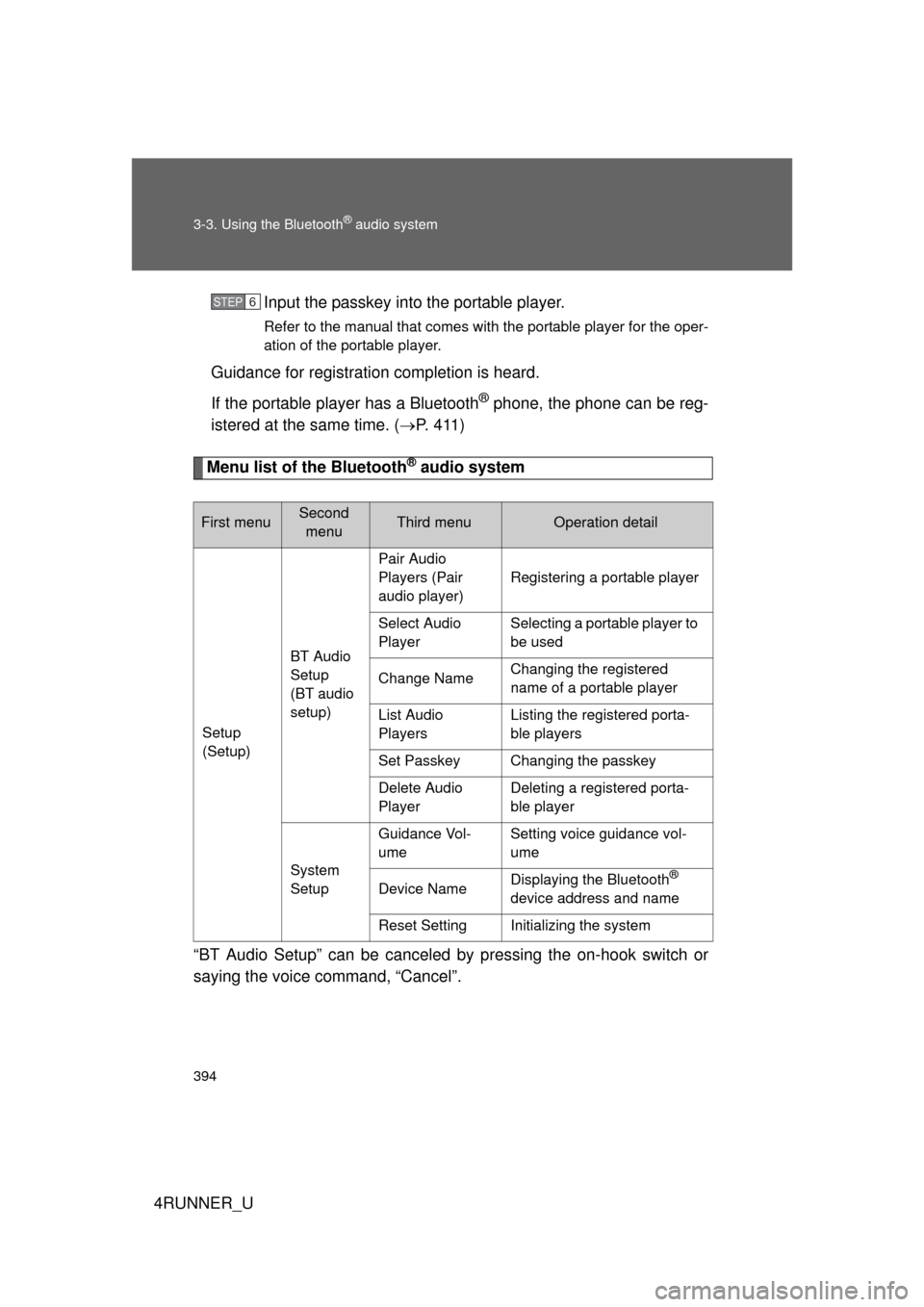
Menu list of the Bluetooth® audio system
“BT Audio Setup” can be canceled by pressing the on-hook switch or
saying the voice command, “Cancel”.
First menuSecond menuThird menuOperation detail
Setup
(Setup) BT Audio
Setup
(BT audio
setup)Pair Audio
Players (Pair
audio player)
Registering a portable player
Select Audio
Player Selecting a portable player to
be used
Change Name Changing the registered
name of a portable player
List Audio
Players Listing the registered porta-
ble players
Set Passkey Changing the passkey
Delete Audio
Player Deleting a registered porta-
ble player
System
Setup Guidance Vol-
ume
Setting voice guidance vol-
ume
Device Name Displaying the Bluetooth
®
device address and name
Reset Setting Initializing the system
STEP 6
Page 397 of 700
397
3-3. Using the Bluetooth
® audio system
3
Interior features
4RUNNER_U
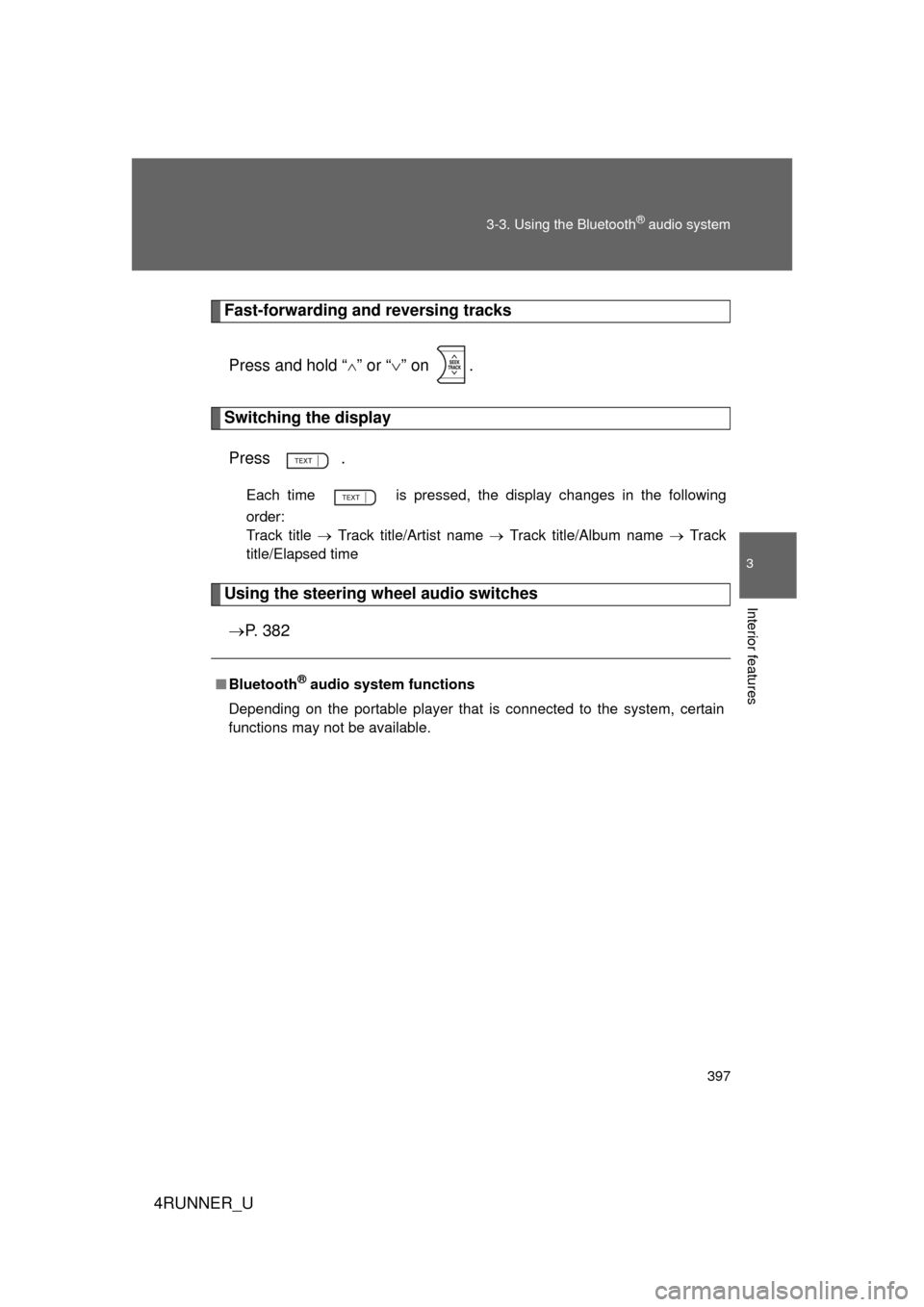
Fast-forwarding and reversing tracks
Press and hold “
” or “ ” on .
Switching the display
Press .
Each time is pressed, the display changes in the following
order:
Track title Track title/Artist name Track title/Album name Track
title/Elapsed time
Using the steering wheel audio switches
P. 3 8 2
■Bluetooth® audio system functions
Depending on the portable player that is connected to the system, certain
functions may not be available.
Page 440 of 700

440 3-5. Using the interior lights
4RUNNER_U
■Illuminated entry system
Vehicles without a smart key system
The lights automatically turn on/off according to the engine switch position,
whether the doors are locked/unlocked, and whether the doors are open/
closed.
Vehicles with a smart key system
The lights automatically turn on/off according to “ENGINE START STOP”
switch mode, the presence of the electronic key, whether the doors are
locked/unlocked, and whether the doors are open/closed.
■ To prevent battery discharge
If the following lights remain on when the door is not fully closed, the lights
will go off automatically after 20 minutes:
● Engine switch light
● Front interior light (when the switch is in the position)
● Rear interior light (when the switch is in the position)
● Footwell lights
● Inside door handle lights
■ Customization that can be co nfigured at Toyota dealer
Settings (e.g. the time elapsed before lights turn off) can be changed.
(Customizable features
P. 660)
Personal lights
Page 465 of 700
465
3-7. Other interior features
3
Interior features
4RUNNER_U
■
The power outlet can be used when
The engine is running.
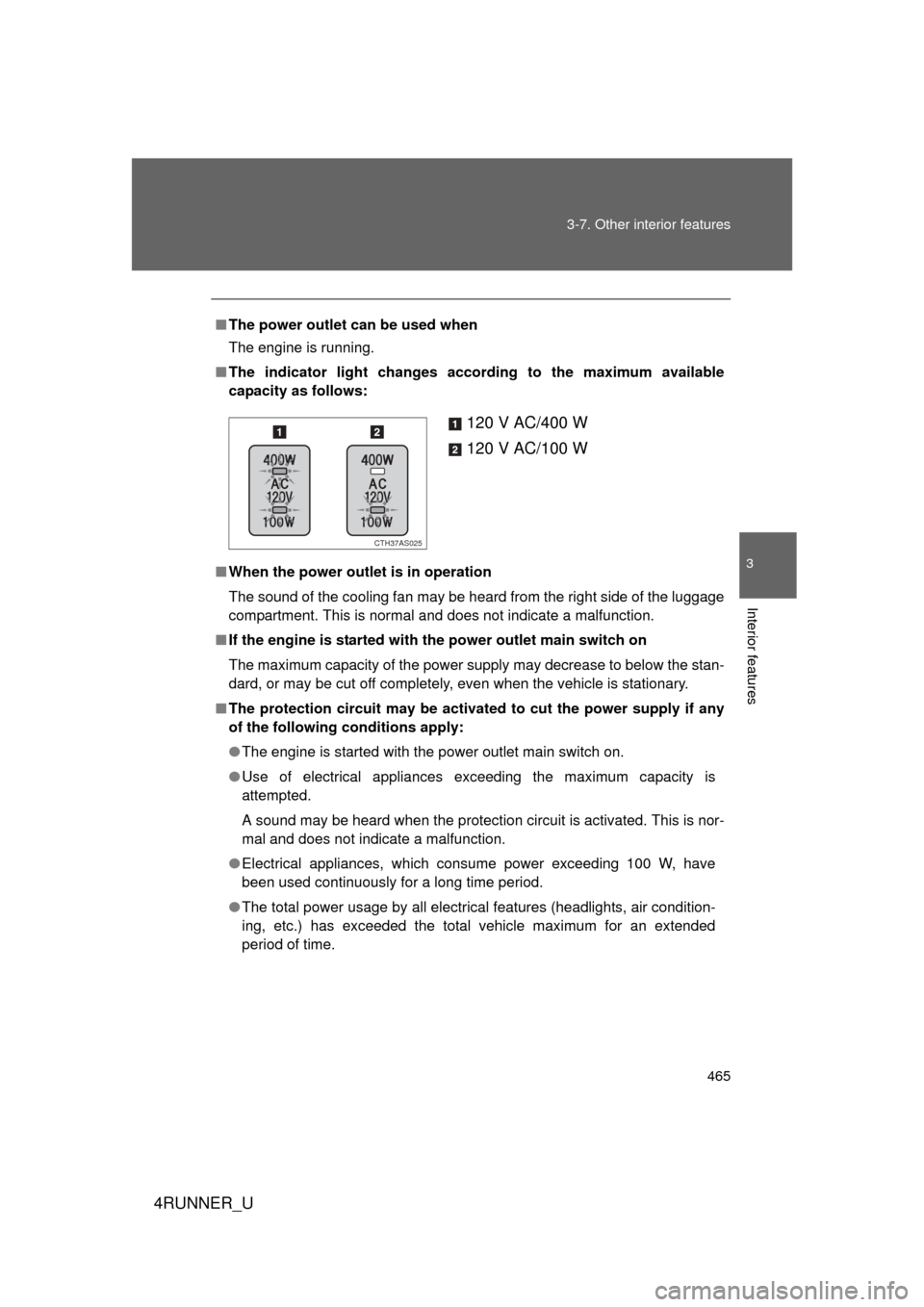
■ The indicator light changes according to the maximum available
capacity as follows:
■ When the power outlet is in operation
The sound of the cooling fan may be heard from the right side of the luggage
compartment. This is normal and does not indicate a malfunction.
■ If the engine is started with the power outlet main switch on
The maximum capacity of the power supply may decrease to below the stan-
dard, or may be cut off completely, even when the vehicle is stationary.
■ The protection circuit may be activated to cut the power supply if any
of the following conditions apply:
● The engine is started with the power outlet main switch on.
● Use of electrical appliances exceeding the maximum capacity is
attempted.
A sound may be heard when the protection circuit is activated. This is nor-
mal and does not indicate a malfunction.
● Electrical appliances, which consume power exceeding 100 W, have
been used continuously for a long time period.
● The total power usage by all electrical features (headlights, air condition-
ing, etc.) has exceeded the total vehicle maximum for an extended
period of time.
120 V AC/400 W
120 V AC/100 W
CTH37AS025
Page 622 of 700

622 5-2. Steps to take in an emergency
4RUNNER_U
Changing “ENGINE START STOP” switch modes and starting the
engine
Ensure that the shift lever is in P and depress the brake pedal. Touch the Toyota emblem side of
the electronic key to the
“ENGINE START STOP” switch.
If any of the doors is opened or
closed while the key is being
touched to the switch, an alarm
will sound to indicate that the start
function cannot detect the key.
To change “ENGINE START STOP” switch modes: Within 10
seconds of the buzzer soundin g, release the brake pedal and
press the “ENGINE START STOP” switch. Modes can be
changed each time the sw itch is pressed. (P. 174)
To start the engine: Press the “ENGINE START STOP” switch
within 10 seconds of the buzzer sounding, keeping the brake
pedal depressed.
In the event that the “ENGINE START STOP” switch cannot be oper-
ated, contact your Toyota dealer.
STEP 1
CTH52AS002
STEP 2
■ Stopping the engine
Shift the shift lever to P and press the “ENGINE START STOP” switch as
you normally do when stopping the engine.
■ Replacing the key battery
As the above procedure is a temporary measure, it is recommended that the
electronic key battery be replaced immediately when the battery is depleted.
(P. 553)
STEP 3
Page 660 of 700
660
4RUNNER_U
6-2. Customization
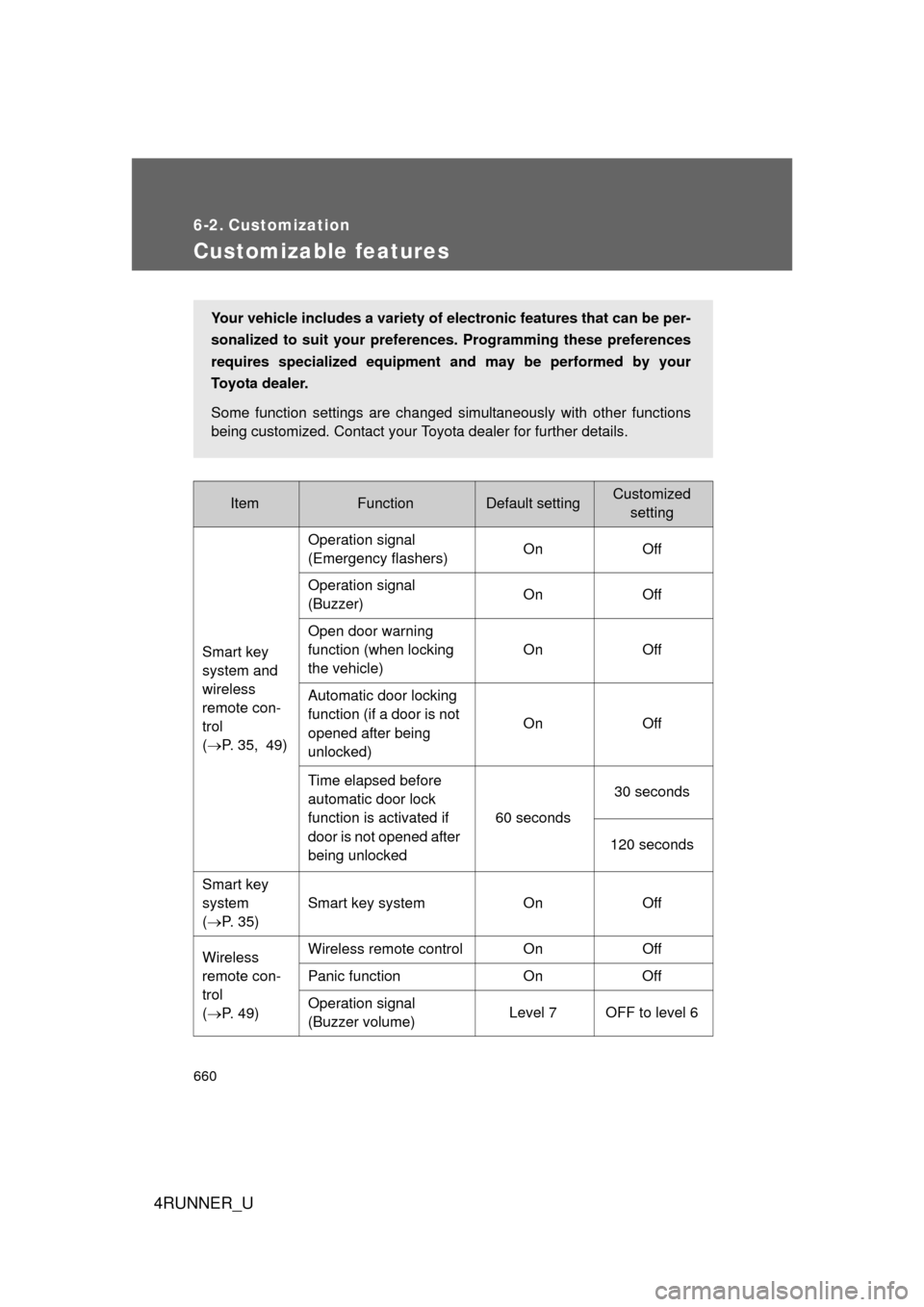
Customizable features
ItemFunctionDefault settingCustomizedsetting
Smart key
system and
wireless
remote con-
trol
( P. 35, 49) Operation signal
(Emergency flashers)
On Off
Operation signal
(Buzzer) On Off
Open door warning
function (when locking
the vehicle) On Off
Automatic door locking
function (if a door is not
opened after being
unlocked) On Off
Time elapsed before
automatic door lock
function is activated if
door is not opened after
being unlocked 60 seconds
30 seconds
120 seconds
Smart key
system
( P. 35) Smart key system On Off
Wireless
remote con-
trol
( P. 49) Wireless remote control On
Off
Panic function OnOff
Operation signal
(Buzzer volume) Level 7 OFF to level 6
Your vehicle includes a variety of electronic features that can be per-
sonalized to suit your prefer
ences. Programming these preferences
requires specialized equipment and may be performed by your
Toyota dealer.
Some function settings are changed simultaneously with other functions
being customized. Contact your Toyota dealer for further details.
Page:
< prev 1-8 9-16 17-24