2012 SUBARU FORESTER USB
[x] Cancel search: USBPage 209 of 438

5-36Audio
to the shuffle playback on the entire iPod
®. It randomly repeats all of the
tracks on the iPod®.
. When an iPod®is connected, the
tracks are played back at random by
the shuffle function of the iPod
®. There-
fore, iPod®operation may be different
depending on the model of the con-
nected iPod
®.
. When an audiobook or a podcast is
playing, the mode does not change
even if you press the “RDM ”button.
To cancel the random playback mode,
press the “RDM ”button and select CAN-
CEL. The “RDM ”indication will turn off
and the normal playback mode will re-sume. & SCAN (only when connecting
USB storage device) (type Caudio)
Scan is operated in the same way as for a
CD. For details, refer to “Scan (type A, B
and C audio) ”F 5-27.
NOTE
When an iPod
®is connected, you
cannot select the SCAN mode. &
Selecting category (only
when connecting iPod
®)
When the
button is pressed briefly,
the iPod®menu is displayed.
Each time you turn the “TUNE/TRACK/
CH ”dial clockwise, the displayed category
changes in the following sequence. Each
time you turn the dial counterclockwise,
the displayed category changes in the
opposite sequence.
To select the category, press the dial. To
close the iPod®menu, press and hold thebutton. To return to the previous
screen, briefly press thebutton.
& Display selection
Refer to “Display selection (type A, B and
C audio) ”F 5-27. !
Page scroll
Refer to “Page (track/folder title) scroll ”
F 5-27.
& Folder selection (only when
connecting USB storage de- vice)
Refer to “Folder selection ”F 5-28.
NOTE
When an iPod
®is connected, you
cannot select a folder. & Setting the playing speed
(only when the audiobook is
playing) (type D audio)
Each time you briefly press
(the
“ RPT ”button) while the audiobook is
playing, the playing speed changes in
the following sequence.
& When the following mes-
sages are displayed
If one of the following messages is
displayed while connecting the USB sto-
rage device/iPod
®, determine the cause
Page 210 of 438
based on the following information. If you
cannot clear those messages, please
contact your SUBARU dealer. !When “CHECK DEVICE ”is dis-
played
This message is displayed under the
following conditions. . When there is a short in the USB bus
. When an unsupported device (for ex-
ample a USB mouse) is connected. When an unsupported iPod
®is con-
nected. When a connected iPod
®is frozen
. When a transmission malfunction oc-
curs. When an iPod
®confirmation malfunc-
tion occurs. When a HUB class USB storage
device is connected
Disconnect the USB storage device/iPod
®
and check it. ! When “NO USB ”is displayed (type
D audio)
This message is displayed under the
following conditions. . No USB storage devices/iPod
®are
connected.. A non-connectable USB storage de-
vice/iPod
®is connected. Connect a connectable USB storage device/iPod
®.
! When “No song ”is displayed (type
D audio)
This message is displayed when there are
no playable audio tracks on the connected
USB storage device/iPod
®. Connect a
USB storage device/iPod®that has play-
able audio tracks stored on it. Audio control buttons (if
equipped)
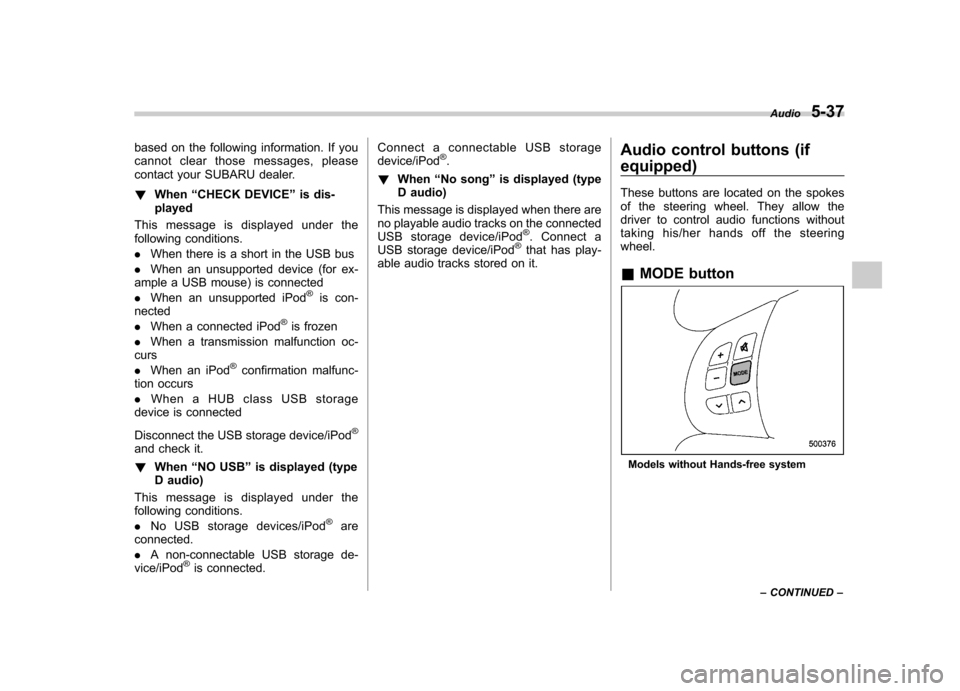
These buttons are located on the spokes
of the steering wheel. They allow the
driver to control audio functions without
taking his/her hands off the steeringwheel. &
MODE button
Models without Hands-free system Audio
5-37
– CONTINUED –
Page 212 of 438
!With radio mode selected
Press the “
”button or “”button briefly.
The radio will seek the next preset station
and stop on it.
Press and hold the “
”button or “”
button. The radio will seek the next
receivable station and stop on it.
That station ’s frequency will be shown on
the audio display. ! With CD mode selected
Press the “
”button to skip forward in the
track order. Press the “”button to skip
backward in the track order. The track
number will be shown on the audio
display.
When the MP3/WMA/AAC format track is
playing, press and hold the “
”button to
select the next folder. Press and hold the “
” button to go back to the previous
folder. ! With USB/iPod
®mode selected
Press the “
”button to skip forward in the
track order. Press the “”button to skip
backward in the track order. The track
number will be shown on the audio
display. ! With SAT mode selected
Press the “
”button to skip forward in the
channel order. Press the “”button to skip backward in the channel order.
The channel will be shown on the audio
display. &
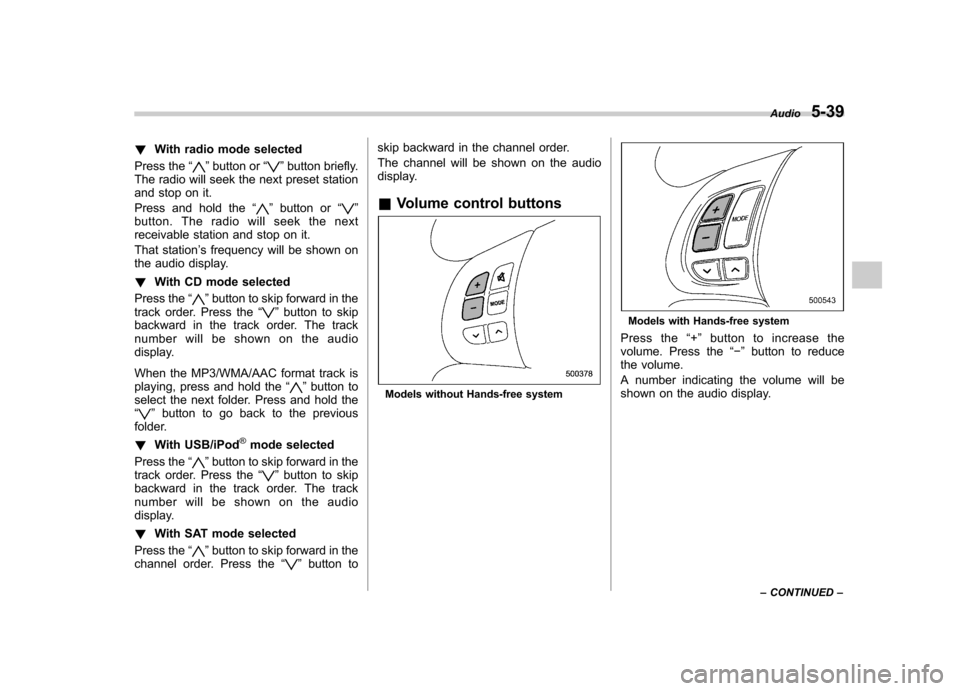
Volume control buttons
Models without Hands-free system
Models with Hands-free system
Press the “+ ” button to increase the
volume. Press the “ ” button to reduce
the volume.
A number indicating the volume will be
shown on the audio display. Audio
5-39
– CONTINUED –
Page 229 of 438

5-56Audio
– Pressing the power switch
. Insert a CD (except reloading a CD)
. Connect a USB storage device or an
iPod
®
NOTE
The screensaver is not displayed under
the following conditions. . While the ignition switch is in the
“ LOCK ”position
. While the audio is OFF
. While the screen is OFF
. While talking on a cell phone regis-
tered in the Hands-free system . While setting the audio
. While seek tuning, PTY group tun-
ing, scan tuning or auto-storing while
the FM/AM radio is on.. While in the category search mode
of the satellite radio. While the rear view camera is being
used & Downloading picture
Perform the following procedure to down-
load a picture to be used as screensaver.
1. Connect a USB storage device. Refer to “Connecting USB storage device /
iPod
®” F 5-33.
2. Select the “Picture Download ”menu
by operating the “TUNE/TRACK/CH ”dial. For details, refer to
“Audio settings (type D
audio) ”F 5-10.
3. Select the preferred JPEG file by
operating the “TUNE/TRACK/CH ”dial.
4. Select “Wide ”or “Normal ”by operating
the “TUNE/TRACK/CH ”dial.
NOTE . JPEG files that are 10 MB or less can
be saved. . If the file name is too long, the file
may not be saved.. Up to two JPEG files can be saved in
the in-vehicle equipment.. If the aspect ratio of the displayed
picture is 16:9, “Wide ”cannot be
selected.. If the aspect ratio of the displayed
picture is 4:3, “Normal ”cannot be
selected.
& Selecting picture
1. Select the “Picture Select ”menu by
operating the “TUNE/TRACK/CH ”dial. For
details, refer to “Audio settings (type D
audio) ”F 5-10. If no pictures are saved,
“ No Data ”is displayed. Press thebutton to return to the “Screen Saver ”
mode.
2. Select the preferred picture by operat-
ing the “TUNE/TRACK/CH ”dial. &
Erasing picture
1. Select the “Picture Erase ”menu by
operating the “TUNE/TRACK/CH ”dial. For
details, refer to “Audio settings (type D
audio) ”F 5-10. If no pictures are saved,
“ No Data ”is displayed. Press the
button to return to the “Screen Saver ”
mode.
2. Select the preferred picture by operat-
ing the “TUNE/TRACK/CH ”dial.
3. Operate the “TUNE/TRACK/CH ”dial
to select “OK ”to erase the picture or
“ Cancel ”to cancel the operation.
Page 427 of 438

14-2Index
A
ABS (Anti-lock Brake System) ..................................... 7-23
Warning light ......................................................... 3-19
Accessories ....................................................... 5-4, 11-45
Accessory power outlet ................................................. 6-9
Active head restraint ..................................................... 1-6
Air cleaner element ................................................... 11-15
Air conditioner Manual climate control system ................................... 4-8
Air filtration system ..................................................... 4-11
Airflow selection Automatic climate control system ............................... 4-6
Manual climate control system ................................... 4-8
Alarm system ............................................................ 2-14
All-Wheel Drive warning light ....................................... 3-21
Aluminum wheel ....................................................... 11-37
Cleaning ............................................................... 10-3
Antenna system ........................................................... 5-3
Anti-lock Brake System (ABS) ..................................... 7-23
Arming the system ..................................................... 2-15
Armrest ....................................................................... 1-8
Ashtray ..................................................................... 6-11
AT OIL TEMP warning light ......................................... 3-18
Audio Antenna system ....................................................... 5-3
Auxiliary input jack ................................................. 5-29
Bluetooth
®audio .................................................... 5-40
CD player operation ............................................... 5-22
Control button ........................................................ 5-37
FM/AM radio operation ........................................... 5-13
iPod
®operations .................................................... 5-32 Satellite radio operations
......................................... 5-18
Set ........................................................................ 5-4
USB storage device operations ................................ 5-32
Auto-dimming mirror/compass .............................. 3-37, 3-38
Automatic climate control system ................................... 4-6
Automatic headlight beam leveler ................................. 3-31
Warning light .......................................................... 3-22
Automatic transmission ............................................... 7-15
Fluid ........................................................... 11-20, 12-9
MANUAL mode ...................................................... 7-19
Oil temperature warning light (AT OIL TEMP) ............. 3-18
Select lever ........................................................... 7-16
Shift lock function ................................................... 7-17
SPORT mode ........................................................ 7-20
Automatic/Emergency Locking Retractor (A/ELR) ........... 1-13
Auxiliary input jack ...................................................... 5-29
BBattery .................................................................... 11-43
Drainage prevention function ..................................... 2-5
Jump starting ......................................................... 9-10
Replacement (remote engine start transmitter) ........... 7-12
Replacement (remote keyless entry system) .............. 2-10
Bluetooth
®audio ........................................................ 5-40
Booster seat .............................................................. 1-28
Bottle holder ............................................................... 6-9
Brake
Assist .................................................................... 7-22
Booster ....................................................... 7-22, 11-25
Fluid ........................................................... 11-23, 12-9
Pad and lining ...................................................... 11-28
Page 435 of 438

14-10Index
Size and pressure ................................................ 12-10
Types .................................................................. 11-29
Tire pressure monitoring system (TPMS). ...... 7-27, 9-9, 11-29
Warning light ......................................................... 3-18
Tires and wheels. ...................................................... 11-29
Tools .......................................................................... 9-4
Top tether anchorages ........................................ 1-29, 1-32
Towing ...................................................................... 9-14
All wheels on the ground ........................................ 9-17
Flat-bed truck ........................................................ 9-17
Hooks ................................................................... 9-14
Weight.................................................................. 8-18
Trailer
Connecting ............................................................ 8-16
Hitch ............................................................ 8-16, 8-21
Towing .................................................................. 8-18
Towing tips ............................................................ 8-23
Trip meter ................................................................... 3-8
Turn signal Indicator lights ....................................................... 3-24
Lever .................................................................... 3-31
U
Under-floor storage compartment ................................. 6-16
USB storage device operations .................................... 5-32
V
Valet mode ................................................................ 2-17
Vanity mirror ................................................................ 6-4
Vehicle
Capacity weight ..................................................... 8-13 Identification
........................................................ 12-18
Symbols .................................................................... 3
Vehicle Dynamics Control
OFF indicator light .................................................. 3-23
OFF switch ............................................................ 7-27
Operation indicator light ........................................... 3-23
System .................................................................. 7-25
Warning light .......................................................... 3-22
W
Warning and indicator lights ......................................... 3-12
Warning chimes Seatbelt. ................................................................ 3-13
Warning light ABS...................................................................... 3-19
All-Wheel Drive ...................................................... 3-21
AT OIL TEMP ......................................................... 3-18
Automatic headlight beam leveler ............................. 3-22
Brake system ......................................................... 3-20
Charge .................................................................. 3-17
CHECK ENGINE .................................................... 3-16
Coolant temperature high ........................................ 3-16
Door open ............................................................. 3-21
Hill start assist ....................................................... 3-21
Low fuel ........................................................ 3-11, 3-21
Low tire pressure .................................................... 3-18
Oil pressure ........................................................... 3-17
Seatbelt. ................................................................ 3-13
SRS airbag system ................................................. 3-15
Vehicle Dynamics Control ........................................ 3-22
Warranties ..................................................................... 1