2012 SKODA SUPERB Time
[x] Cancel search: TimePage 5 of 44

General information
Operating instructions
These operating instructions describe all possible equipment variants without
identifying them as special equipment, model variants or market-dependent
equipment.
Consequently, this vehicle does not need to contain all of the equipment compo-
nents described in these operating instructions.
The scope of equipment for your vehicle is described in the sales documentation
you were given when purchasing the car. For more information, contact your local
ŠKODA retailer. ÐExplanation of symbols
Ð End of a section.
The section is continued on the next page.
→ Transition to next button. ÐImportant information
Safety instructions
WARNING
■ Concentrate fully at all times on your driving! As the driver you are fully re-
sponsible for road safety. Only use the system so that you are in full control of
your vehicle in every traffic situation - risk of accident! ■ Adjust the volume to ensure that acoustic signals from outside, e.g. sirens
from vehicles which have the right of way, such as police, ambulance and fire
brigade vehicles, can be heard at all time. ■ High volumes can cause hearing damage. Ð Warranty
The equipment warranty terms and conditions apply to this unit just like to new
vehicles - see the service schedule. Ð Screen
CAUTION
■ Do not use solvents such as benzine or turpentine, which may damage the
screen surface.
■ Treat the screen with care, as finger pressure or contact with sharp objects may
cause dents and scratches on the surface. Note
The screen can be cleaned with a soft cloth and alcohol if necessary. Ð Signal receipt
Car parks, tunnels, tall buildings or mountains can disrupt the radio and GPS sig-
nal even causing it to fail completely. Ð Anti-theft protection
The anti-theft coding of your radio navigation system prevents an operation of
the system after a voltage interruption, e.g. during a vehicle repair or after theft.
After disconnecting the battery, disconnecting the radio navigation system from
the on-board voltage of the vehicle or after a fuse failure, the code must be en-
tered before the system can be used again. The code number can only be called
up
“online” via the ŠKODA system, as this guarantees even more effective anti-
theft protection. Please contact your authorised ŠKODA Service Partner, if neces-
sary.
Enter code
If a keypad appears after switching on with the command to enter the code, the
unit must be unlocked by entering the correct four-digit code.
› Enter the four-digit code using the function keys
0 to
9 . The digit is accepted
in the entry line.
3
General information
Page 6 of 44

After a four-digit order has been entered, the group of digits will turn grey (inac-
tive) and no further digits can be accepted in the entry line.
› To delete the digits in the entry line from right to left, press the function key
on the screen.
› When the correct code is displayed in the entry line, press the function key
OK .
Incorrect code number
If an incorrect code is confirmed after entry of the code, the procedure can be re-
peated once again . The number of attempts is shown in the bottom screen line.
If the code is entered incorrectly a second time, the unit will be blocked for ap-
prox. one hour. It is possible to enter again the safety code after one hour has ex-
pired, when the unit and the ignition have been switched on.
If two invalid attempts are then made again, the radio navigation system will be
blocked again for one hour. Note
The code is normally saved in the instrument cluster memory. This ensures that it
is automatically decoded (convenience coding). Manual input of the code is nor-
mally not necessary. ÐScreen display
The screen of the unit displays information such as from the Climatronic, the vehi-
cle distance to an obstacle if the
“parking aid” has been activated, etc. ÐProduct Overview
-
Setting up button
› for switching the equipment on and off (press)
› for volume adjustment of audio source currently being played /
voice control (turn) 5
RADIO - Radio operation 13
MEDIA - MEDIA operation 14
PHONE - Phone mode 22
TONE - tone and volume settings 25
MAP - Map display 26
NAV - Navigation operation 291
2
3
4
5
6
7 TMC
- Displaying TMC traffic alerts 37
SETUP - Settings in the individual operating modes 9
and
- buttons for moving forwards/backwards
› RADIO-Mode
- for the selection of the stations from the preset
list.
› MEDIA-Mode - for the selection of the previous or following
track.
› TV-Mode
- for the selection of the TV stations.
CD/DVD case 14
Display 5
- Eject CD/DVD 15
- Switch on voice control 7
Menu button
› RADIO mode
- turn for manual station adjustment; press briefly
to start/stop the automatic play (Scan).
› MEDIA-Mode - turn to change track; press briefly to start/stop
the automatic play (Scan) when in audio mode.
› Turn map display (MAP)
- in order to change the map scale;
press briefly for repeating a navigation announcement during
active route guidance.
› Navigation (NAV) - press briefly to repeat a navigation an-
nouncement during active route guidance.
Memory card case 16
Ð Switching the unit on and off
› To switch the unit on/off, press button 1
.
After switching on the unit, the last audio source that was active before switch-
ing off will be played.
If the key is pulled out of the ignition lock while the unit is switched on, the unit
will switch off automatically.
If your vehicle is fitted with the KESSY system, the unit will switch off automati-
cally after the engine is turned off and the door opened. If you open the door be-
fore turning off the engine, the unit will not switch off until the vehicle is locked.
When the ignition is switched off, the system switches off automatically after ap-
prox. half an hour (discharge protection of the vehicle battery). Ð 8
9
10
11
12
13
14
15
16
4
General information
Page 8 of 44

Input screen with keypad
Fig. 2
Example of an input screen with keypad/input screen with numbers
The input screen with keypad appears when entering a new line, searching for a
point of interest or a telephone number, for instance.
If you press a function key with a character on the keypad, this character appears
in the input line in the upper part of the screen.
You can also delete or change the string in the entry line and add special charac-
ters.
The available characters are context-dependent.
Further input possibilities: - Displaying the entries matching the selection. The function key moves to
the list of entries matching the selection.
- returns from any menu point to the previous menu point
- Displaying the entries matching the selection.
- changes from upper case to lower case and vice versa.
- switches to the input screen for numbers and special characters
A..Z - switches to the input screen for letters
- Enter a space
- switches to the Cyrillic script
ABC - switches to the Latin script
- moves the cursor in the entry line - to the left or right. – deletes characters in the entry line starting from the position of the charac-
ter input mark from right to left
OK - confirms the text entered in the entry line
Selecting letters based on specific characters
In the input screen, some characters are marked with the symbol
“ ”. Pressing
the character identified in this way for a long period of time allows you to choose
special characters for the selected language.
Some specific characters can be “written out”. The radio navigation system will al-
so recognise the character sequence “AE”, “UE” and “OE” instead of the German
specific characters “Ä”, “Ü” and “Ö”. Other specific characters can be ignored, for
example instead of “É”, “Ê” or “È” a normal “E” will be accepted by the navigation
system. Ð6
General information
Page 9 of 44
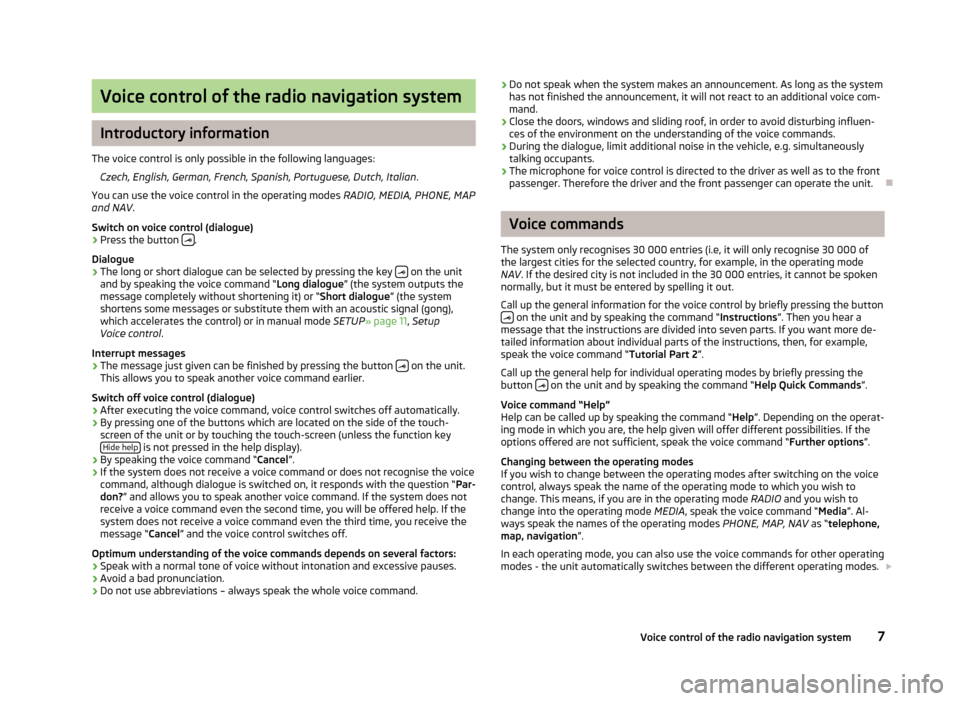
Voice control of the radio navigation system
Introductory information
The voice control is only possible in the following languages: Czech, English, German, French, Spanish, Portuguese, Dutch, Italian .
You can use the voice control in the operating modes RADIO, MEDIA, PHONE, MAP
and NAV .
Switch on voice control (dialogue)
› Press the button
.
Dialogue
› The long or short dialogue can be selected by pressing the key
on the unit
and by speaking the voice command “Long dialogue ”
(the system outputs the
message completely without shortening it) or “Short dialogue ” (the system
shortens some messages or substitute them with an acoustic signal (gong),
which accelerates the control) or in manual mode SETUP» page 11, Setup
Voice control .
Interrupt messages › The message just given can be finished by pressing the button
on the unit.
This allows you to speak another voice command earlier.
Switch off voice control (dialogue)
› After executing the voice command, voice control switches off automatically.
› By pressing one of the buttons which are located on the side of the touch-
screen of the unit or by touching the touch-screen (unless the function key Hide help is not pressed in the help display).
› By speaking the voice command “Cancel
”
.
› If the system does not receive a voice command or does not recognise the voice
command, although dialogue is switched on, it responds with the question “Par-
don? ” and allows you to speak another voice command. If the system does not
receive a voice command even the second time, you will be offered help. If the
system does not receive a voice command even the third time, you receive the
message “Cancel ” and the voice control switches off.
Optimum understanding of the voice commands depends on several factors:
› Speak with a normal tone of voice without intonation and excessive pauses.
› Avoid a bad pronunciation.
› Do not use abbreviations – always speak the whole voice command. ›
Do not speak when the system makes an announcement. As long as the system
has not finished the announcement, it will not react to an additional voice com-
mand.
› Close the doors, windows and sliding roof, in order to avoid disturbing influen-
ces of the environment on the understanding of the voice commands.
› During the dialogue, limit additional noise in the vehicle, e.g. simultaneously
talking occupants.
› The microphone for voice control is directed to the driver as well as to the front
passenger. Therefore the driver and the front passenger can operate the unit. Ð Voice commands
The system only recognises 30
000 entries (i.e, it will only recognise 30 000 of
the largest cities for the selected country, for example, in the operating mode
NAV . If the desired city is not included in the 30 000 entries, it cannot be spoken
normally, but it must be entered by spelling it out.
Call up the general information for the voice control by briefly pressing the button on the unit and by speaking the command “Instructions
”
. Then you hear a
message that the instructions are divided into seven parts. If you want more de-
tailed information about individual parts of the instructions, then, for example,
speak the voice command “Tutorial Part 2 ”.
Call up the general help for individual operating modes by briefly pressing the
button on the unit and by speaking the command “Help Quick Commands”.
Voice command
“Help”
Help can be called up by speaking the command “ Help”. Depending on the operat-
ing mode in which you are, the help given will offer different possibilities. If the
options offered are not sufficient, speak the voice command “Further options”.
Changing between the operating modes
If you wish to change between the operating modes after switching on the voice
control, always speak the name of the operating mode to which you wish to
change. This means, if you are in the operating mode RADIO and you wish to
change into the operating mode MEDIA, speak the voice command “Media”. Al-
ways speak the names of the operating modes PHONE, MAP, NAV as “telephone,
map, navigation ”.
In each operating mode, you can also use the voice commands for other operating
modes - the unit automatically switches between the different operating modes.
7
Voice control of the radio navigation system
Page 12 of 44
■
Update telephone book - loads the phonebook from the mobile phone to the mem-
ory of the radio navigation system. This procedure can take a few minutes.
■ Delete call lists - deletes saved call lists
■ Delete text message - deletes text messages (SMS)
■ Speed dial - edits speed dial keys
■ Deactivate telephone - deactivates the phone
■ Restore factory settings - resets device to factory settings- deletes user profiles
■ Change order of call lists - changes the order in the call list from the oldest to the
most recent calls ÐSetup System
Press the button SETUP →
System .
■ Language - Menu language for the displays and the language messages
■ Automatic - auto-detection of menu language, depends on the setting in the
information display
■ or direct selection of the required language from a list
■ Date format - sets up the date format
■ Time display - displays current time on the touch screen in the operating modes
RADIO, MEDIA and MAP ■ Off - switches off
■ On - switches on
■ Date - Sets up date
■ Factory settings - restores factory settings
■ Select setting to be restored
■ Reset - resets device to factory settings- deletes user profiles
ÐSetup Display
Press the button SETUP →
Display .
■ Brightness - adjust the screen brightness
■ Brightest - brightest level
■ Brighter - brighter level
■ Medium - medium level
■ Darker - darker level
■ Darkest - darkest level ■
Day/Night - switches between the day/night and auto map display modes.
■ Automatic - controlled using the available vehicle sensors
■ Day - Setting for daytime running
■ Night - Setting for nightime running
■ Acoustic feedback - switches acoustic feedback on/off by pressing a button on the
touch-screen
■ On - switches on
■ Off - switches off
■ Switch off display - it is possible to switch the display to energy saving mode; the
current information about the audio source is shown in the bottom row. The
display can be switched on again by touching the screen or any key other than
the operating knob. Ð Setup Map
Press the button SETUP →
Map .
■ Split-screen - Position of the split-screen in the map view
■ Left - left
■ Right - right
■ Dest. guidan. symbol - displays the navigation instructions and compass in the
split-screen in the 2D and 3D view
■ Destination display - displays information about the destination » page 26, Func-
tion keys and symbols during route guidance
■ Destination - destination
■ Next stopover destination - next stopover
■ POI selection - selects points of interest displayed on the map using symbols
■ Show VIP destination symbols - displays destinations saved as favourites in the
map with the symbol from the selected favourite category
■
Show speed limitation - the current speed limitation for the current road section
is displayed in the screen Ð Setup Navigation
Press the button SETUP →
Navigation .
10 SETUP mode
Page 13 of 44
■
Suggest 3 alternative routes - suggests 3 alternative routes for the destina-
tion » page 31, Function key
“Options”
■ Nav. announcements - sets up navigation announcements
■ Off - switches off
■ Dynamic - spoken driving recommendations are only provided when you have
left the calculated route, for example, on the basis of announced traffic dis-
ruptions.
■ On - switches on
■ Time display - setup the time display in the lower part of the map
■ Time of arrival - display time of arrival at the destination
■ Remaining time - displays remaining driving time
■ My points of interest - import your own points of interest from the memory card
■ Define home address - edit “Home address” » page 32
, Function key
“ Home ad-
dress”
■ Destination entry - show screen to enter the destination
» page 32, Function
key “ Address”
■ Current position - saves the current position as a home address
■ Delete - Delete numbers
■ Edit - edits home address
■ Set current position - saves the current position as a home address
■ Advanced navigation settings - advanced navigation settings
■ Demo mode - start a virtual route guidance
■ Enter start location - enter start location for the demo mode
■ Av. speed for time calc. - the time of arrival or the journey time is calculated in the
demo mode based on the configured average speed ■ Fast - high speed
■ Medium - medium speed
■ Low - low speed
ÐTraffic information
Press the button SETUP →
Traffic information .
■ Favourite TMC station - set your preferred TMC station
■ Automatic - automatic TMC station finding
■ select favourite TMC station from a list
■ TMC filter - setup display of the traffic reports
■ All - displays all current traffic reports
■ On Route - only display traffic annoncements which relate to the route being
driven
■ Traffic programme (TP) - switches traffic programme on/off
» page 13, Traffic
Programme TP Ð Setup Voice control
Press the button SETUP →
Voice control .
■ Dialogue style - sets up dialogue style
■ Long - the system outputs the complete message without shortening it
■ Short - the system shortens some message or substitutes them with an
acoustic signal (gong); this accelerated the control
■ Visual voice command help - visual voice command help displays an overview of the
major commands in a pop-up window. The “visual voice command help
” can be
set separately for each operating mode in the system (this means, if you only
set the help display for the operating mode MAP, it is only displayed in this op-
erating mode).
■ Delete voice tags - deletes your voice entries
■ All - deletes all stored entries
■ Telephone book - Phonebook
■ Radio memory - radio memory
■ Navigation memory - navigation memory
Ð Setup Video
Press the button SETUP →
Video .
■ Audio language - sets up the language of the voice output
■ Menu language - sets the language for the DVD menu
■ Subtitles - subtitles
■ DVD format - sets DVD format
■ 4:3 - Format 4:3
■ 16:9 - Format 16:9
Ð Setup TV
Press the button SETUP →
Video .
■ TV search mode - searches for TV stations
■ Station list - select TV station from the list of all TV stations which are currently
available
■ Preset list - displays TV stations saved in the station memory
■ TV Norm - edits TV Norm
11
SETUP mode
Page 16 of 44
MEDIA mode
Main menu MEDIA
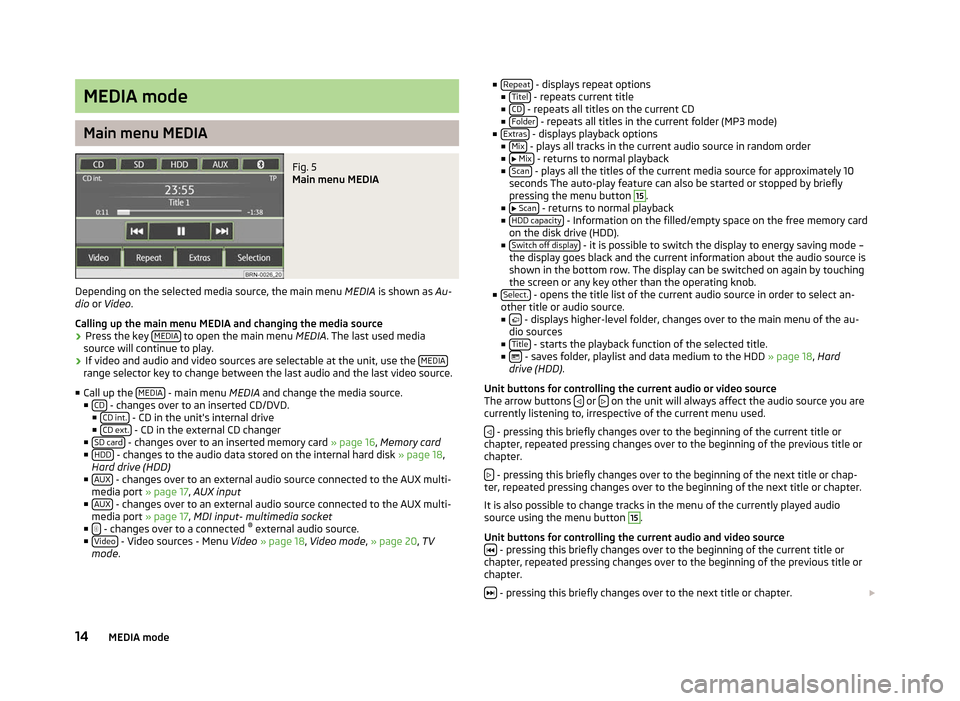
Fig. 5
Main menu MEDIA
Depending on the selected media source, the main menu MEDIA is shown as Au-
dio or Video .
Calling up the main menu MEDIA and changing the media source
› Press the key
MEDIA to open the main menu
MEDIA. The last used media
source will continue to play.
› If video and audio and video sources are selectable at the unit, use the
MEDIArange selector key to change between the last audio and the last video source.
■ Call up the MEDIA - main menu MEDIA and change the media source.
■ CD - changes over to an inserted CD/DVD.
■ CD int. - CD in the unit's internal drive
■ CD ext. - CD in the external CD changer
■ SD card - changes over to an inserted memory card
» page 16, Memory card
■ HDD - changes to the audio data stored on the internal hard disk
» page 18,
Hard drive (HDD)
■ AUX - changes over to an external audio source connected to the AUX multi-
media port » page 17 , AUX input
■ AUX - changes over to an external audio source connected to the AUX multi-
media port » page 17 , MDI input- multimedia socket
■ - changes over to a connected
®
external audio source.
■ Video - Video sources - Menu
Video » page 18, Video mode , » page 20, TV
mode . ■
Repeat - displays repeat options
■ Titel - repeats current title
■ CD - repeats all titles on the current CD
■ Folder - repeats all titles in the current folder (MP3 mode)
■ Extras - displays playback options
■ Mix - plays all tracks in the current audio source in random order
■ Mix - returns to normal playback
■ Scan - plays all the titles of the current media source for approximately 10
seconds The auto-play feature can also be started or stopped by briefly
pressing the menu button 15
.
■ Scan - returns to normal playback
■ HDD capacity - Information on the filled/empty space on the free memory card
on the disk drive (HDD).
■ Switch off display - it is possible to switch the display to energy saving mode –
the display goes black and the current information about the audio source is
shown in the bottom row. The display can be switched on again by touching
the screen or any key other than the operating knob.
■ Select. - opens the title list of the current audio source in order to select an-
other title or audio source.
■ - displays higher-level folder, changes over to the main menu of the au-
dio sources
■ Title - starts the playback function of the selected title.
■ - saves folder, playlist and data medium to the HDD
» page 18, Hard
drive (HDD) .
Unit buttons for controlling the current audio or video source
The arrow buttons or
on the unit will always affect the audio source you are
currently listening to, irrespective of the current menu used.
- pressing this briefly changes over to the beginning of the current title or
chapter, repeated pressing changes over to the beginning of the previous title or
chapter.
- pressing this briefly changes over to the beginning of the next title or chap-
ter, repeated pressing changes over to the beginning of the next title or chapter.
It is also possible to change tracks in the menu of the currently played audio
source using the menu button 15
.
Unit buttons for controlling the current audio and video source - pressing this briefly changes over to the beginning of the current title or
chapter, repeated pressing changes over to the beginning of the previous title or
chapter.
- pressing this briefly changes over to the next title or chapter.
14 MEDIA mode
Page 17 of 44
- Pause: the play function is stopped in the current position and the symbol
changes to - after pressing, the play function will continue in this position.
Note
If the volume is reduced to 0 during playback from a CD, the hard drive or another
audio source, the symbol changes to
and playback is interrupted.
ÐIntroductory information about CD/DVD mode
Insert CD/DVD
› Insert a CD/DVD, with the labelled side facing up, into the CD/DVD slot 11
until
it is automatically drawn in. The play function will start automatically.
Remove CD/DVD
› Press the button
– die CD/DVD is ejected.
If the ejected CD /DVD is not taken out within 10 seconds, it will be retracted
again for safety reasons.
CD not legible
If you insert a CD/DVD which cannot be read by the unit, a pop-up window is dis-
played with a note. The CD/DVD is moved to the eject position again after a few
seconds.
If the CD/DVD is not taken out within 10 seconds, it is drawn in again for safety
reasons.
CD to jump
Uneven road surfaces and strong vibrations may cause the CD to jump.
Formation of condensation
When it is cold and after rain showers, moisture can deposit in the CD/DVD drive
(condensation). This can effect the CD jump or impair the play function. In such
cases, wait until the moisture has dissipated.
Notes for the care of the CD/DVDs
If a CD/DVD is soiled, never clean it in a circular motion but rather from inside to
outside with a soft lint-free cloth. In case of severe layers of dirt we recommend
to clean the CD/DVD with a commercially available CD/DVD cleaner. Also in this
case, do not clean the CD/DVD in a circular motion but rather from inside to out-
side, and then let it dry. MP3 and WMA Data (Windows Media Audio)
Playable MP3 and WMA data can also be stored on the hard disk of the
unit
» page 18, Hard drive (HDD) .
The copyright of audio data compressed by Windows Media Audio, can also be
protected by the DRM procedure ( Digital Rights Management). Such WMA data is
not supported by the unit. WARNING
The CD/DVD player is a 1st class laser product. There is a risk of injury from in-
visible laser beams if you open the CD/DVD player. CAUTION
■ Audio-CDs (CD-A) and Audio-DVDs, MP3-CDs and MP3-DVDs as well as Video-
DVDs can be played in the internal CD/DVD drive.
■ Never insert CDs with the designation “Do not insert in drives without a drawer”
or Eco Disc into the internal drive.
■ Inserting a second CD/DVD while a CD/DVD is being ejected can damage the
CD/DVD drive in the unit. After pressing the Eject button , there is a delay of a
few seconds before the CD is ejected. During this time the lock in front of the CD/
DVD case is open. It is essential that you wait until the CD/DVD has been fully
ejected before you try to insert a new CD/DVD. ■ If the CD/DVD drive becomes mechanically defective or a CD/DVD has been in-
serted incorrectly or not fully, “CD fault will be displayed. Please check CD. ” and
then the “DVD drive fault ” indicated on the touch-screen. Check the CD/DVD
check and insert it again correctly and completely into the drive. If a “CD/DVD
drive fault ” is indicated again, please contact your ŠKODA Service Partner.
■ If the inside temperature of the unit is too high, no CDs/DVDs will be accepted.
The unit switches into the last active operating mode.
■ Never use liquids such as benzine, paint thinner or record cleaner, otherwise
the surface of the CD/DVD may be damaged!
■ Never expose the CD/DVD to direct sun light!
■ Only write on the CD/DVD with appropriate writing tools.
■ Do not affix anything to the CD/DVD! Note
■ If the function key CD is inactive, no new Audio CD/DVD has been inserted or an
inserted Audio CD/DVD is not readable. ■ It is possible that CDs/DVDs protected by copyright and non-original CD-R, CD-
RW and DVD-RWs are not returned at all or only in certain circumstances.
15
MEDIA mode