2012 SKODA SUPERB Time
[x] Cancel search: TimePage 18 of 44
■
WMA audio data (Windows Media Audio) can also be replayed by the unit and
stored on the hard disk (HDD) providing this has not been protected by the DRM
procedure copyright (Digital Rights Management). The operation and behaviour of
the unit complies with MP3 compressed audio files and will not be described here
further.
■ Please also note the additional information for MP3 mode » page 16, Introduc-
tory information about the MP3 mode .
■ The national copyright laws that apply in your country must be observed.
■ The CD/DVD player contains no parts that need servicing or that can be re-
paired. If the CD player is defective, contact a specialist garage.
■ The DVD drive installed into this unit uses a Dolby Digital ®
Audio coding system
and MLP Lossless ®
for highest reproduction quality even with standard Audio
DVDs. “
Dolby ®
”, “MLP Lossless ®
” and the Double-D-Symbol are trademarks of Dol-
by Laboratories ®
.
■ “DTS ®
”
and “DTS 2.0 ®
” transforms the Surround Sound of a DVD and replays it in
best stereo quality. “DTS ®
” and “DTS 2.0 ®
” are registered trademarks of DTS, Inc.
■ Dirt or damage of a CD/DVD can lead to difficulties when “reading” the informa-
tion. The severity of the reading error depends on the dirt or on the severity of
the mechanical damage. Severe scratches cause reading errors which can make
the CD jump or
“get stuck”. All CDs/DVDs must be treated carefully and always be
stored in a protective case. ÐIntroductory information about the MP3 mode
Requirements for the MP3 data and data carrier
› CD-ROM, CD-R, CD-RW with a capacity of 650 MB and 700 MB.
› 4.7 GB DVDs and up to 8.5 GB Double Layer DVDs.
› The CDs/DVDs must correspond to the ISO 9660 Level 2 standard as well as the
Joliet data system (single and multi-session).
› Data names must be no longer than 64 characters.
› The list structure is restricted to a depth of 8 list levels.
› The name of the artist, the album and the title of the played MP3 data can be
displayed if such information is available as so-called ID3 tags. The list and data
name will be displayed if there is no ID3 tag.
› WMA data (Windows Media
Audio) can also be played even if the copyright is
additionally protected by the DRM procedure ( Digital Rights Management). Such
WMA data is not supported by the unit.
› The operation and behaviour of playable WMA files conform to those of the MP3
files and will not be described here further. Bit rate (data flow per time unit)
› The system supports MP3 data with bit rates of 32 to 320 KB/s as well as MP3
data with variable bit rates.
› The indicated playing time data with variable bit rates is not reliable. Ð Memory card
Insert memory card
› Push the memory card into the memory card lose 16
with the trimmed edge to
the front right until it
“locks into place”. The play function will start automatical-
ly.
Remove memory card
› Press the inserted memory card. The memory card “jumps” into the initial posi-
tion.
Memory card empty or data not readable
If a memory card is inserted, on which no data or no legible data has been stored,
it will not be switched over into the memory card mode after the loading proce-
dure.
Requirements of the memory card
› Memory cards measuring 32 mm x 24 mm x 2.1 mm or 1.4 mm can be inserted
into the memory card case.
› SD (Secure Digital Memory Cards) and MMC (Multimedia Cards) memory cards
with a capacity up to 4
GB.
› SDHC (Secure Digital High-Capacity Memory Cards) memory cards with a capaci-
ty up to 32 GB.
› It is possible that some of the files on the memory cards cannot be reproduced
and have limited playback. Due to differing quality requirements from different
card manufacturers, it is not possible to guarantee the playback of memory
cards under all circumstances. Note
■ Only MP3 data and unprotected WMA data can be read from the SD card. All
other data is ignored. ■ Playable MP3 and WMA data can also be stored on the hard disk of the
unit » page 18 , Hard drive (HDD) . Ð
16 MEDIA mode
Page 19 of 44
External sources
AUX and MDI input
AUX input
Press the button MEDIA →
AUX .
External audio sources connected to the AUX socket cannot be operated via the
radio navigation system. Only the volume can be controlled from the radio naviga-
tion system.
Use the standard jack plug 3.5
mm for the AUX jack. If the external audio source
does not have this jack plug, you must use an adapter .
MDI input- multimedia socket
Press the button MEDIA →
MDI .
Audio files in MP3, WMA, OGG Vorbis and AAC format from the external data stick-
ers, connected to the multimedia socket, can be played via the radio navigation
system.
External audio sources connected to the MDI socket can
be operated via the radio
navigation system.
You can select another audio source on the radio at any time. As long as the ex-
ternal audio source is not switched off, it remains always active in the back-
ground.
See the owner's manual of the specific manufacturer for operating the external
audio source.
To connect external audio sources via the MDI input, a special adapter is to be
used.
iPod
If an iPod is connected to the MDI input, a menu opens in which you can select
the folders of the iPod (playlists, artists, albums, titles, etc.).
Adjust the play volume of the external audio source
The play volume of the external audio source can be adjusted via the volume con-
trol on the radio navigation system 1
.
Depending on the connected audio source, the output volume on the external au-
dio source can be changed. You can also change the input sensitivity of the external audio source, in order to
adapt the play volume of the external audio source to that of the other audio
sources or to avoid distortions
» page 9, Media Set-Up.
Conditions for proper connection › Only USB devices with the specification 2.0 can be connected.
› The version of the file allocation table FAT (File Allocation Table) of the connec-
ted device must be FAT16 ( <2
GB) or FAT32 (> 2 GB).
› In order to replay from a unit with a hard disk (HDD) which includes a large data
volume, it can lead to a time delay when reading in the overview of the music
data.
› In order to replay from a unit, which includes a complicated folder structure, it
can lead to a time delay when scanning the audio files.
› The folder structure in the connected unit must not exceed a depth of 8 levels.
One folder must not contain more than 1000°data.
› A USB extension cable or USB distributor (HUB) must not be used to connect
the unit. WARNING
■ On no account place an external audio source on the dash panel. It could be
thrown into the passenger compartment during sudden driving manoeuvres,
injuring the occupants.
■ On no account place an external audio source close to the airbags. It could
be thrown into the passenger compartment when the airbags are deployed,
injuring the occupants.
■ Never hold the external audio source in your hand or on your knees while
driving. You could make sudden manoeuvres in the passenger compartment
and injure the occupants.
■ Always route the connection cable of the external audio source such that is
does not restrict you when driving. CAUTION
The AUX socket must only be used for audio sources! Note
■ The external audio source, which is connected via AUX-IN, can only be used if
no other unit is connected via MDI at the same time. ■ If an external audio source is connected via AUX, which is equipped with an
adapter for external power supply, it can occur that the audio signal is interrup-
ted. This depends on the quality of the adapter which is used. Ð
17
MEDIA mode
Page 20 of 44
Hard drive (HDD)
Store MP3 and WMA data on the hard disk (HDD)
If the unit is switched off during the saving process, the saving process will be
terminated with the last fully saved title.
Select, save and edit title name and folder
On the memory card, choose the title or folder you want to save on the hard drive.
You can also select the complete contents of an installed data carrier in the selec-
tion window of the available audio sources for storing on the hard disk . ■ Press the button MEDIA →
Selection .
■ - open menu for the folder editing
■ Play - automatic playback
■ Copy - saves title or folder to the hard drive
■ Insert file/folder here - saves directly to the current folder of the hard drive
■ New folder - creates a new folder
■ cancel). - cancels save
■ Rename - opens input display for changing the title or folder name
■ Delete - deletes the selected title or folder
A folder can have a max. of 7 sub-folders. Press on the function key to open
the corresponding parent folder.
You can continue listening to this or another audio source while storing other au-
dio data. Note
Saving 100 music titles of average length of time (3 - 5 minutes) will take approxi-
mately 40 minutes. Ð Video mode
Insert Video-DVD and start
Fig. 6
Operating the DVD/Film menu
Insert a Video-DVD into the CD/DVD slot with the printed side facing up until it is
automatically drawn in.
The Video-DVD playback will start automatically. The readout of the data from
the Video-DVD can take a few seconds, during which time the touch-screen turns
dark.
The TV picture will only be displayed when the vehicle is stationary. The touch-
screen is switched off while driving, but the sound can still be heard.
Briefly touch the screen to display the menu DVD. Touch the empty area of the
screen to close the menu DVD. The DVD menu will automatically fade out after
about 15 seconds if not used.
Aspect ratio
The video starts with the preset aspect ratio. The aspect ratio can be changed in
the menu Setup video » page 11, Setup Video.
The Video-DVD menu ■ AV - changes over to a connected external video source
■ TV - changes to the TV mode.
■ DVD - changes to a CD/DVD drive inserted in the Video DVD drive
■ Audio - changes to the
Audio menu
■ Menu - changes to the Film menu
» Fig. 6
■ Display - change the brightness, contrast and colour settings of the display
■ Chapter - changes to the chapter list
18 MEDIA mode
Page 24 of 44
PHONE mode
Main menu TELEPHONE
Fig. 8
Main menu TELEPHONE
Before connecting the mobile phone for the first time, it is necessary to pair the
phone with the radio navigation system – detailed information about this can be
found in your vehicle's Owner's Manual and you phone operating guide.
Press the button TELEPHONE .
■ - Accept a call, dial the entered number. After pressing, the call list is dis-
played in the main menu TELEPHONE.
■ SOS - Emergency
■ Mobile box - set up your mobile box
■ Name - enter name
■ Number - enter phone number
■ Call list - select phone number from a call list
■ Telephone book - select phone number from the telephone book
■ - delete entry
■ OK - saves entry
■ Preset 2 to
Preset 6 - presets
■ - Dial number
■ - delete numbers
■ - Dial number
■ - Telephone book » page 22, Telephone book
■ Call list - call list
■ Missed calls - list of missed calls
■ Dialled numbers - list of dialled numbers
■ Received calls - list of received calls ■
SMS - displays text messages (SMS) menu
» page 23, SMS menu
■ Inbox - displays received text messages
■ Write - writes text messages
■ Extras - opens menu with additional functions
■ Switch off/on micro - switches microphone on/off during a call
■ Switch off/on ring tone - switches on/off ring tone via the vehicle speakers
■ Swit. off hands-free - calls playback over phone only
■ Swit. on hands-free - calls playback over vehicle speakers
■ Conference details - connects/disconnects individual callers during a conference
call » page 23, Conference call WARNING
Concentrate fully at all times on your driving! As the driver you are fully re-
sponsible for road safety. Only use the system so that you are in full control of
your vehicle in every traffic situation - risk of accident! Ð Telephone book
Call a call number from the telephone book
Press the button TELEPHONE - to view further entries
in telephone book,
pull the
slider down.
■ - calls up the telephone book
■ - calls up information about the telephone book entry (pressing the phone
number display dials that number)
■ - calls up the input screen display for number entry
■ - DTMF key tones » page 23
, DTMF key tones
■ Create - creates a voice entry. After saving, the following symbols appears
near the position
■ Delete - deletes voice entry
■ Play - play voice entry
■ Search - searches for an entry in the telephone book
Searching for an entry in the phone book
■ Press the button TELEPHONE .
■ - calls up the telephone book
■ Search – calls up the input screen
■ - Dial number
■ OK - change to the entry selected in the entry line
■ - closes the input screen without accepting the entries
■ - calls up the telephone book
Ð
22 PHONE mode
Page 26 of 44
■
Answer - reply to the text messsage
■ New text - create a new text message
■ Edit text - edit text message
■ Delete - deletes text message
■ Options - select options
■ Read out text - radio the navigation system reads out the text message
■ Return call - calls the sender of the text message
■ Copy - copies the text message to the mobile phone
■ Forward - forwards the text message
Next to each text message in the inbox is the function key . Pressing this key
calls up the following options:
■ Copy - copies the text message to the mobile phone
■ Forward - forwards the text message
■ Delete entry - deletes text message
■ Delete list - deletes all text messages in the list
Writing and sending text messages
In the menu TELEPHONE, press the function key SMS and select the option
Write .
An input screen appears.
If the message has more than 160 characters, it will be split into two or more sep-
arate messages.
To send the text message, press the function key ; a screen for entering the
telephone number of the recipient will appear.
The recipient can also be selected in one of the following menus:
■ Call list - Call list
■ Missed calls - list of missed calls
■ Dialled numbers - list of dialled numbers
■ Received calls - list of received calls
■ Telephone book - Phonebook
After entering a recipient, send the text message using the function key .
The sent text message is neither displayed in the radio navigation system nor in
the mobile phone. Note
The menu SMS only displays the received text messages which were received
during the time the mobile phone was paired with the radio navigation system. Ð24
PHONE mode
Page 28 of 44
MAP mode
Map display
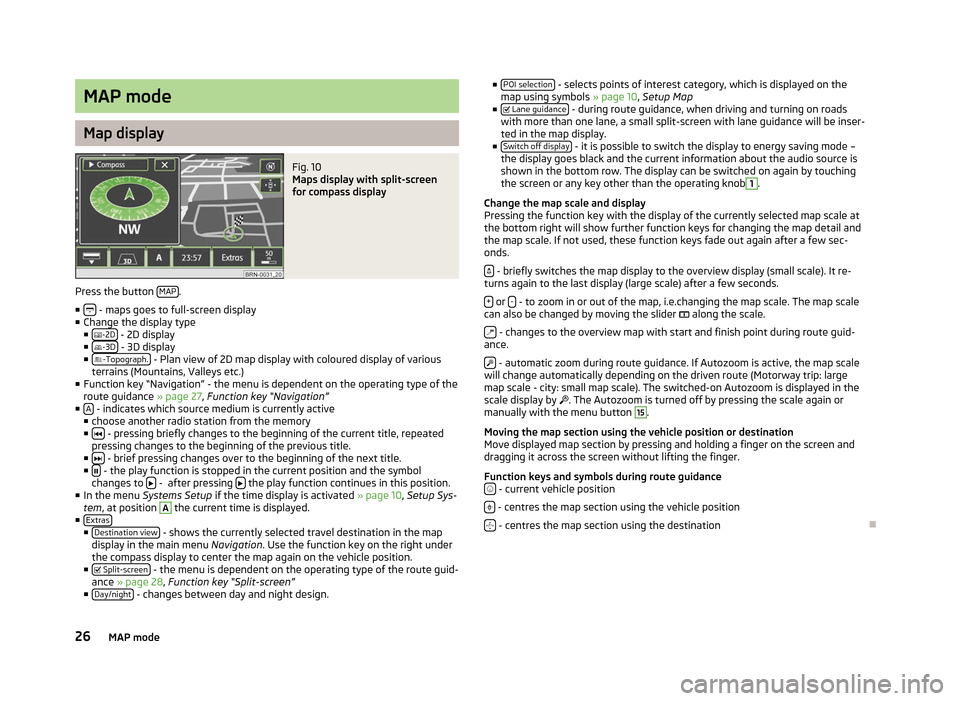
Fig. 10
Maps display with split-screen
for compass display
Press the button MAP .
■ - maps goes to full-screen display
■ Change the display type
■ -2D - 2D display
■ -3D - 3D display
■ -Topograph. - Plan view of 2D map display with coloured display of various
terrains (Mountains, Valleys etc.)
■ Function key
“Navigation” - the menu is dependent on the operating type of the
route guidance » page 27, Function key “Navigation”
■ A - indicates which source medium is currently active
■ choose another radio station from the memory
■ - pressing briefly changes to the beginning of the current title, repeated
pressing changes to the beginning of the previous title.
■ - brief pressing changes over to the beginning of the next title.
■ - the play function is stopped in the current position and the symbol
changes to - after pressing
the play function continues in this position.
■ In the menu Systems Setup if the time display is activated » page 10, Setup Sys-
tem , at position A
the current time is displayed.
■ Extras ■
Destination view - shows the currently selected travel destination in the map
display in the main menu Navigation. Use the function key on the right under
the compass display to center the map again on the vehicle position.
■ Split-screen - the menu is dependent on the operating type of the route guid-
ance » page 28, Function key “
Split-screen”
■ Day/night - changes between day and night design. ■
POI selection - selects points of interest category, which is displayed on the
map using symbols » page 10, Setup Map
■ Lane guidance - during route guidance, when driving and turning on roads
with more than one lane, a small split-screen with lane guidance will be inser-
ted in the map display.
■ Switch off display - it is possible to switch the display to energy saving mode –
the display goes black and the current information about the audio source is
shown in the bottom row. The display can be switched on again by touching
the screen or any key other than the operating knob 1
.
Change the map scale and display
Pressing the function key with the display of the currently selected map scale at
the bottom right will show further function keys for changing the map detail and
the map scale. If not used, these function keys fade out again after a few sec-
onds.
- briefly switches the map display to the overview display (small scale). It re-
turns again to the last display (large scale) after a few seconds.
+ or
- - to zoom in or out of the map, i.e.changing the map scale. The map scale
can also be changed by moving the slider along the scale.
- changes to the overview map with start and finish point during route guid-
ance.
- automatic zoom during route guidance. If Autozoom is active, the map scale
will change automatically depending on the driven route (Motorway trip: large
map scale - city: small map scale). The switched-on Autozoom is displayed in the
scale display by . The Autozoom is turned off by pressing the scale again or
manually with the menu button 15
.
Moving the map section using the vehicle position or destination
Move displayed map section by pressing and holding a finger on the screen and
dragging it across the screen without lifting the finger.
Function keys and symbols during route guidance - current vehicle position
- centres the map section using the vehicle position
- centres the map section using the destination
Ð
26 MAP mode
Page 29 of 44
Function key “Navigation”
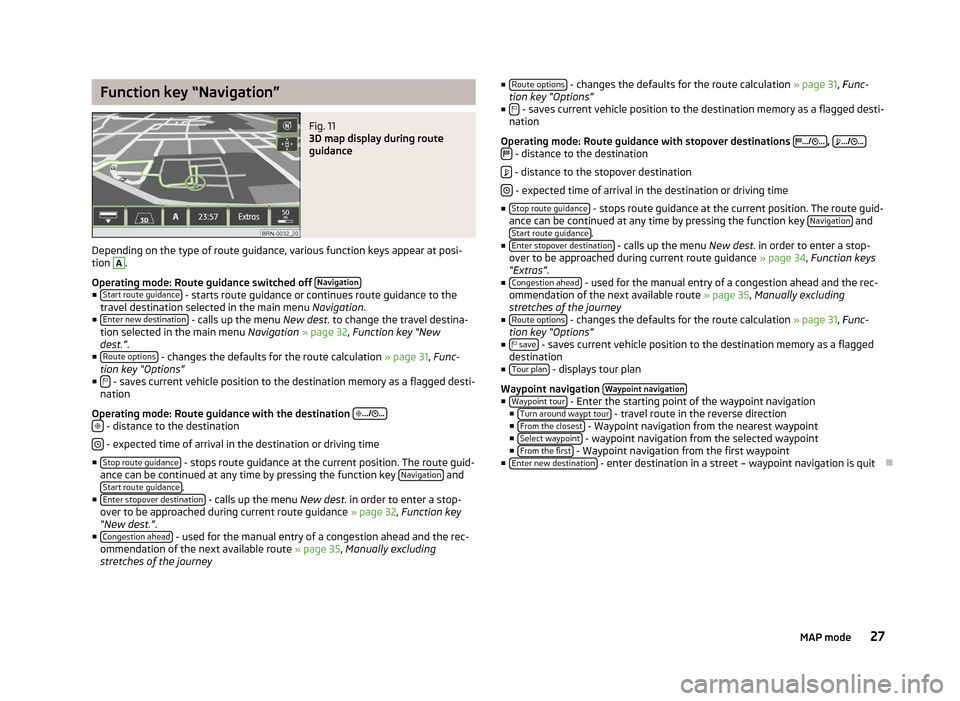
Fig. 11
3D map display during route
guidance
Depending on the type of route guidance, various function keys appear at posi-
tion A
.
Operating mode: Route guidance switched off Navigation■
Start route guidance - starts route guidance or continues route guidance to the
travel destination selected in the main menu Navigation.
■ Enter new destination - calls up the menu
New dest. to change the travel destina-
tion selected in the main menu Navigation » page 32, Function key
“New
dest.”.
■ Route options - changes the defaults for the route calculation
»
page 31, Func-
tion key “Options”
■ - saves current vehicle position to the destination memory as a flagged desti-
nation
Operating mode: Route guidance with the destination
.../ ...
- distance to the destination
- expected time of arrival in the destination or driving time
■ Stop route guidance - stops route guidance at the current position. The route guid-
ance can be continued at any time by pressing the function key Navigation and
Start route guidance .
■ Enter stopover destination - calls up the menu
New dest. in order to enter a stop-
over to be approached during current route guidance » page 32, Function key
“New dest.”.
■ Congestion ahead - used for the manual entry of a congestion ahead and the rec-
ommendation of the next available route » page 35, Manually excluding
stretches of the journey ■
Route options - changes the defaults for the route calculation
» page 31, Func-
tion key
“Options”
■ - saves current vehicle position to the destination memory as a flagged desti-
nation
Operating mode: Route guidance with stopover destinations
.../ ... ,
.../ ...
- distance to the destination
- distance to the stopover destination
- expected time of arrival in the destination or driving time
■ Stop route guidance - stops route guidance at the current position. The route guid-
ance can be continued at any time by pressing the function key Navigation and
Start route guidance .
■ Enter stopover destination - calls up the menu
New dest. in order to enter a stop-
over to be approached during current route guidance » page 34, Function keys
“Extras”.
■ Congestion ahead - used for the manual entry of a congestion ahead and the rec-
ommendation of the next available route » page 35, Manually excluding
stretches of the journey
■ Route options - changes the defaults for the route calculation
» page 31, Func-
tion key
“Options”
■ save - saves current vehicle position to the destination memory as a flagged
destination
■ Tour plan - displays tour plan
Waypoint navigation Waypoint navigation ■
Waypoint tour - Enter the starting point of the waypoint navigation
■ Turn around waypt tour - travel route in the reverse direction
■ From the closest - Waypoint navigation from the nearest waypoint
■ Select waypoint - waypoint navigation from the selected waypoint
■ From the first - Waypoint navigation from the first waypoint
■ Enter new destination - enter destination in a street – waypoint navigation is quit
Ð
27
MAP mode
Page 31 of 44
NAV mode (Navigation)
Introductory information
The route is recalculated each time if you ignore driving recommendations or
change the route. This process takes only a few seconds. Driving recommenda-
tions can only then be re-transmitted.
In regions that are not or only partially digitalised and stored on the navigation
DVD, the radio navigation system will continue to try to provide guidance to the
destination. Please note that under these circumstances the guidance to the des-
tination may not be completely correct if, for example, one-way streets and road
categories (motorway, country road, etc.) are not or only partially included in the
navigation data used.
When entering an address (city, street), only those letters or symbols which make
up a logical entry will be presented. A list of possible names will be shown. Do not
forget to enter the blank space in names made up of more than one word, such
as High Wycombe.
The last voice output can be repeated by pressing the button or the menu button 15
. The volume of a navigation recommendation can be changed whilst it is being
made.
The GPS satellites will not be able to reach the aerial once you are in a tunnel or
underground garage. In these cases, the unit uses only the vehicle's sensors and
an internal gyroscope for navigation. WARNING
■ Please concentrate fully at all times on your driving! Driver inattention can
lead to accidents and injuries. As the driver you are fully responsible for road
safety. Only use the functions of the radio navigation system in such a way
that you are always in full control of your vehicle in all traffic situations!
■ The following must always have priority over the driving recommendations:
■ the road traffic legislation, even if the driving recommendations contradict
the StVO,
■ the actual acknowledgement of traffic signs, light signals or signs placed
by the police at the relevant location,
■ the facts and circumstances prevailing at the relevant location. WARNING (Continued)
■ Please observe the respective traffic regulations when driving.
■ Traffic signs and traffic regulations always have priority over the driving rec-
ommendations provided by the navigation system.
■ Route guidance is subject to constant changes, particularly to information
relating to one-way streets, pedestrian zones etc. stored in the navigation da-
ta. Information on traffic lights, stop and right of way signs, parking and stop-
ping restrictions as well as lane constrictions and speed restrictions is not in-
cluded in the radio navigation system. ■ Adjust your speed to suit weather, road and traffic conditions. Do not allow,
for example, the radio navigation system to make you drive faster in fog - risk
of accident!
■ Only if the traffic situation allows it should you operate the radio navigation
system with its wide range of possibilities.
■ The driving recommendations provided may vary from current situations,
e.g. due to road works or out of date navigation data. In such a case, always
observe the traffic regulations and ignore the driving recommendations. ■ Adjust the volume to ensure that acoustic signals from outside, e.g. sirens
from vehicles which have the right of way, such as police, ambulance and fire
brigade vehicles, can be heard at all time. Note
■ It is not necessary to enter the destinations (country, city, road, point of interest
names) including all country-specific (or language-specific for points of interest)
special characters. ■ Depending on the country, some functions of the radio navigation system can
no longer be selected on the screen at certain speeds. This is not a malfunction,
but corresponds to the legal requirements of the particular country. Ð Navigation data and the navigation DVD
The navigation data are already available after the memory of the radio naviga-
tion system is switched on first and can be used directly for route guidance.
Storing the updated navigation data can take up to one hour. Route guidance will
start via the navigation DVD while the navigation data is being stored. Please
note that route guidance will be interrupted if the navigation DVD is removed.
Route guidance must then be restarted with details supplied from the navigation
system memory of the unit.
29
NAV mode (Navigation)