2012 SKODA ROOMSTER towing
[x] Cancel search: towingPage 5 of 194

Table of Contents
Abbreviations
Using the system
Cockpit 7
Overview 6
Instruments and Indicator Lights 8
Instrument cluster 8
Multifunction display (onboard computer) 12
MAXI DOT (information display) 15
Warning lights 17
Unlocking and locking 25
Vehicle key 25
Locking/unlocking the vehicle without central
locking 26
Central locking system 27
Remote control 29
Anti-theft alarm system 30
Interior monitor and towing protection 31
Emergency locking of the doors 31
Boot lid 32
Electrical power windows 33
Panorama roof 35
Lights and visibility 36
Lights 36
Interior light 41
Visibility 42
Windscreen wipers and washers 42
Rear window 45
Seats and Stowage 47
Front seats 47
Head restraints 48
Rear seats 49Boot 51
Variable loading floor in the boot 55
Bicycle carrier in the luggage compartment 56
Roof rack system 58
Cup holders 59
Ashtray 60
Cigarette lighter, 12-volt power socket 60
Storage compartments 61
Clothes hooks 65
Parking ticket holder 66
Heating and air conditioning system 67
Heating and air conditioning system 67
Air outlet vents 68
Heating 68
Air conditioning system (manual air conditioning
system) 70
Climatronic (automatic air conditioning
system) 73
Starting-off and Driving 76
Starting and stopping the engine 76
Brakes and brake assist systems 78
Shifting (manual gearbox) 82
pedals 82
Parking aid 82
Cruise control system (CCS) 83
START/STOP 85
Automatic gearbox 87
Automatic gearbox 87
Communication 92
Mobile phones and two-way radio systems 92
Universal telephone preinstallation GSM II 92
Voice control 96
Multimedia 97 Safety
Passive Safety 100
General information 100
Correct seated position 101
Seat belts 104
Seat belts 104
Airbag system 109
Description of the airbag system 109
Front airbags 110
Side airbags 111
Head airbags 112
Deactivating airbags 113
Transporting children safely 115
Child seat 115
Driving Tips
Driving and the Environment 119
The first 1 500 km 119
Catalytic converter 119
Economical and environmentally friendly
driving 120
Environmental compatibility 122
Driving abroad 123
Avoiding damage to your vehicle 123
Driving through water on the street 124
Towing a trailer 125
Towing a trailer 125
General Maintenance
Taking care of and cleaning the vehicle 127
Taking care of your vehicle 127
3
Table of Contents
Page 6 of 194

Inspecting and replenishing 134
Fuel 134
Engine compartment 136
Vehicle battery 143
Wheels and Tyres 148
Tyres 148
Accessories, changes and replacement of parts 155
Introductory information 155
Changes and impairments of the airbag
system 155
Do-it-yourself
Do-it-yourself 156
First-aid kit and warning triangle 156
Fire extinguisher 156
Vehicle tool kit 156
Changing a wheel 157
Breakdown kit 160
Jump-starting 163
Towing the vehicle 164
Fuses and light bulbs 166
Fuses 166
Bulbs 169
Praktik
Praktik 174
Rear interior light 174
Lashing eyes 174
Adjustable safety partition behind the front
seats 174
Fixing of the loading floor 175
Adjustment of the safety partition 175
Emergency unlocking of the loading area door 175 Technical data
Technical data 176
Introductory information 176
Data on the vehicle sticker and the type plate 176
Dimensions 178
Specifications and engine oil capacity 179
Vehicle-specific details per engine type 180
Index
4 Table of Contents
Page 29 of 194

Central locking system
Introductory information
When using central locking or unlocking, all doors are locked or unlocked simulta-
neously. The boot lid is unlocked when opening. It can be opened by pressing the
handle above the licence plate » page 32, Opening/closing .
Warning light in the driver's door
After locking the vehicle, the warning light flashes for around 2 seconds in quick
succession, afterwards it begins to flash evenly at longer intervals.
If the vehicle is locked and the safe securing system » page 27 is not operating,
the warning light in the driver door flashes for about 2
seconds fast, goes out and
starts to flash evenly at longer intervals after about 30 seconds.
If the indicator light first flashes fast for about 2 seconds, then lights up for about
30 seconds continuously and then flashes slowly, there is a fault in the central
locking system or in the interior monitor and in the towing protection » page 31.
Seek help from a ŠKODA specialist garage.
Convenience operation of windows
The windows can be opened and closed when unlocking and locking the vehi-
cle » page 35. ÐIndividual settings
Opening a single door
This selection function makes it possible to only unlock the driver's door. The oth-
er doors remain locked and are only unlocked when the command is repeated.
Automatic locking and unlocking
All the doors and the boot lid are locked automatically once the car reaches a
speed of about 15 km/h.
If the ignition key is withdrawn, the car is then automatically unlocked again. In
addition, it is possible for the driver or front passenger to unlock the car by press-
ing the central locking button » page 28.
The doors can be unlocked and opened from the inside by pulling on the opening
lever of the respective door. By the first pull on the opening lever, the door is un-
locked . By the second pull on the opening lever, the door is opened. WARNING
Locked doors prevent unwanted entry into the vehicle from outside, for exam-
ple at road crossings. Locked doors do, however, make it more difficult for res-
cuers to get into the vehicle in an emergency - danger to life! Note
■ Upon request you can have custom settings activated by a
ŠKODA Service Part-
ner. ■ In the event of an accident in which the airbags are deployed, the locked doors
are automatically unlocked in order to enable rescuers to gain access to the vehi-
cle. ■ Only the driver's door can be unlocked or locked using the key if the central
locking system fails » page 28. The other doors and the boot lid can be manually
locked or unlocked. ■ Emergency locking of the door »
page 31.
■ Emergency unlocking of the boot lid » page 33. Ð Safe securing system
The central locking system is equipped with a safe securing system. The door
locks are blocked automatically if the vehicle is locked from the outside. The
warning light flashes for around 2 seconds in quick succession, afterwards it be-
gins to flash evenly at longer intervals. It is not possible to open the doors with
the door handle either from the inside or from the outside. This acts as an effec-
tive deterrent for attempts to break into your vehicle.
The safe securing system can be deactivated within 2
seconds by double locking
the vehicle.
If the safe securing system is not operating, the warning light in the driver door
flashes for about 2 seconds fast, goes out and starts to flash evenly at longer in-
tervals after about 30 seconds.
The safe securing system is activated again the next time the vehicle is unlocked
and locked.
If the vehicle is locked and the safe securing system is deactivated, the door can
be unlocked and opened from the inside by pulling on the opening lever of the
respective door. By the first pull on the opening lever, the door is unlocked. By
the second pull on the opening lever, the door is opened.£
27
Unlocking and locking
Page 33 of 194

›
Vehicle inclination » page 31
;
› Interior of the vehicle
» page 31;
› A drop in voltage of the on-board power supply;
› Socket of the factory-fitted towing device.
An alarm is immediately triggered if either of the two battery terminals is discon-
nected while the anti-theft alarm system is activated.
How is the alarm switched off?
The alarm is switched off by unlocking the vehicle with the radio remote control
or switching on the ignition. Note
■ The working life of the alarm siren is 5 years.
■ Before leaving the vehicle, check that all the doors and windows are closed in
order to ensure that the anti-theft alarm system is fully operational. ■ Coding of the radio remote control and the receiver unit precludes the use of
the radio remote control from other vehicles. ÐInterior monitor and towing protection
Fig. 15
Button for interior monitor and
towing protection
The interior monitor detects movements inside the car and then triggers the
alarm.
Switching off
› Switch off the ignition.
› Open the driver door.
› Press the button
» Fig. 15 in the driver's door.
› Lock the vehicle within 30 seconds. The interior monitor and the towing protection are switched on again automati-
cally the next time the car is locked. Note
■ Switch off the interior monitor and the towing protection if there is a possibility
of the alarm being triggered by movements from (e.g. children or animals) within
the vehicle interior or if the vehicle has to be transported (e.g. by train or ship) or
towed. ■ The opened glasses storage compartment reduces the effectiveness of the in-
terior monitor. To ensure the full functionality of the interior monitor, the glasses
storage compartment must always be closed before locking the vehicle. Ð Emergency locking of the doors
Fig. 16
Rear door: Emergency locking of
the door
An emergency locking mechanism is located on the face side of the doors which
have no locking cylinder, it is only visible after opening the door.
Locking › Remove the panel A
» Fig. 16
.
› Insert the key into the opening under the panel and press the stopping lever B
as far as the stop toward the inside.
› Replace the cover.
After closing the door, it no longer be opened from the outside. The door can be
unlocked from the inside by pulling on the door handle again, and then opened
from the outside. Ð
31
Unlocking and locking
Page 41 of 194

The fog lights with the function CORNER are adjusted according to the steering
angle or after switching on the turn signal light
1)
in the following circumstances:
› the vehicle is stationary and the engine is running or it moves with a speed of
maximum 40 km/h;
› the daytime running lights are not switched on;
› the low beam is switched on;
› the fog lights are not switched on;
› no reverse gear is engaged. ÐRear fog light
First read and observe the introductory information and safety warn-
ings on page 36.
Switching on
› First of all, turn the light switch
» Fig. 22 on page 38 » page 38 to position or
.
› Pull the light switch to position 2
.
If the vehicle is not fitted with fog lights » page 38, the rear fog light is switched
on by turning the light switch to the position or and is pulled out directly to
the position 2
. This switch does not have two positions, but only one position.
The warning light
lights up in the instrument cluster when the rear fog light is
switched on » page 17.
Only the rear fog light on the trailer lights up if the vehicle has a factory-fitted
towing device or a towing device from ŠKODA original accessories and it is driven
with a trailer and the rear fog light switched on. Ð
ä Headlight beam adjustment
Fig. 23
Dash panel: Lights and visibility
First read and observe the introductory information and safety warn-
ings on page 36.
›
Turn the control dial
» Fig. 23 to the desired width of illumination.
Settings
The positions correspond approximately to the following car load. Front seats occupied, boot empty.
All seats occupied, boot empty.
All seats occupied, boot loaded.
Driver seat occupied, boot loaded. CAUTION
Always adjust the headlight range adjustment in such a way that:
■ it does not dazzle other road users, especially oncoming traffic;
■ and the range is sufficient for safe driving. Note
We recommend you adjust the headlight beam when the low beam is switched
on. Ð
ä -
1
2
3
1)
If both switch on versions are conflicting, for example if the steering wheel is turned to the left and
the right turn signal light is switched on, the turn signal light has the higher priority.
39
Lights and visibility
Page 84 of 194

Shifting (manual gearbox)
Fig. 82
Shift pattern of the 5-speed
manual gearbox
Always depress the clutch pedal fully when changing gear, to prevent excessive
wear of the clutch.
The gearshift indicator must be observed when changing gear » page 11, Recom-
mended gear .
Only engage reverse gear when the vehicle is stationary. Depress the clutch pedal
and hold it fully depressed. Wait a moment before reverse gear is engaged to
avoid any shift noises.
The reversing lights will come on once reverse gear is engaged, provided the igni-
tion is on. WARNING
Never engage reverse gear when driving - risk of accident! Note
If not in the process of changing gear, do not leave your hand on the gearshift
lever while driving. The pressure from the hand can cause the gearshift mecha-
nism to wear excessively. Ðpedals
The operation of the pedals must not be hindered under any circumstances!
In the driver's footwell, only a footmat, which is attached to the two correspond-
ing attachment points, may be used. Only use footmats from the range of ŠKODA Original Accessories, which are fitted
to two attachment points. WARNING
No objects are allowed in the driver's footwell – risk of obstruction or limita-
tion in operating the pedal! Ð Parking aid
Fig. 83
Parking aid: Range of sensors
The parking aid determines the distance between the rear bumper and an obsta-
cle with the aid of ultrasound sensors. The sensors are integrated in the rear
bumper.
Range of sensors
The clearance warning begins at a distance of about 160 cm from the obstacle
(area A
» Fig. 83). The interval between the warning signals becomes shorter as
the clearance is reduced.
A continuous tone sounds from a distance of approx. 30 cm (area B
) - danger
area. You should not reverse any further after this signal sounds!
On vehicles with a factory-fitted radio or navigation system, the distance to the
obstacle is simultaneously graphically illustrated on the display, refer to the oper-
ating instructions for the radio or navigation system.
On vehicles with a factory-fitted towing device, the border of the danger area
starts (continuous tone) 5
cm further away from the vehicle. The length of the ve-
hicle can be increased with an installed detachable towing device.
On vehicles with a factory-fitted towing device, the rear sensors are deactivated
when towing a trailer. £
82 Using the system
Page 87 of 194
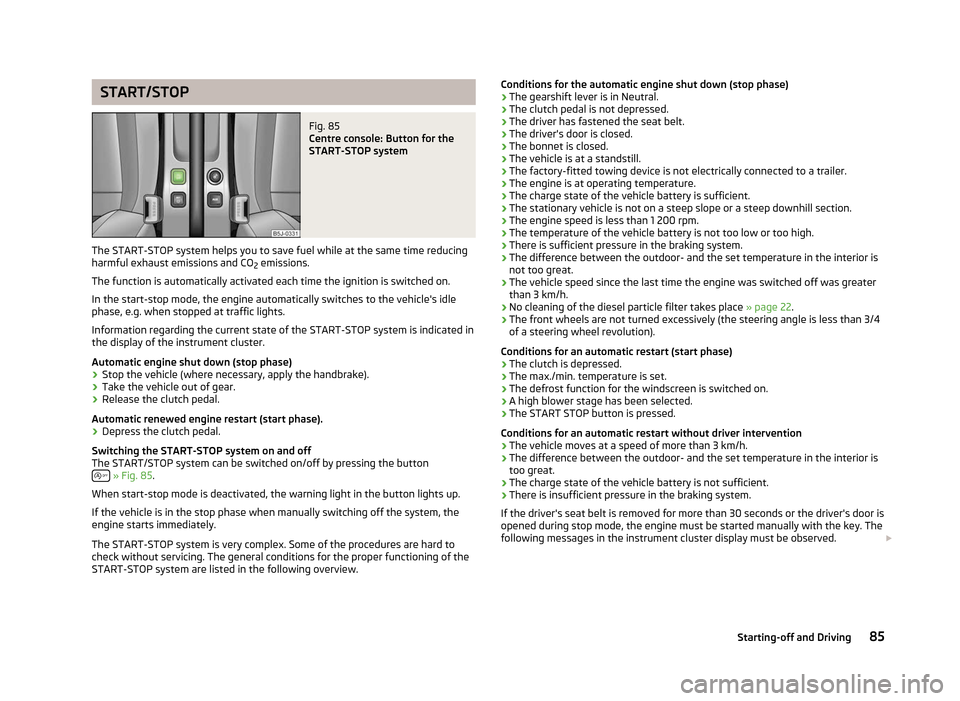
START/STOP
Fig. 85
Centre console: Button for the
START-STOP system
The START-STOP system helps you to save fuel while at the same time reducing
harmful exhaust emissions and CO 2 emissions.
The function is automatically activated each time the ignition is switched on.
In the start-stop mode, the engine automatically switches to the vehicle's idle
phase, e.g. when stopped at traffic lights.
Information regarding the current state of the
START-STOP system is indicated in
the display of the instrument cluster.
Automatic engine shut down (stop phase)
› Stop the vehicle (where necessary, apply the handbrake).
› Take the vehicle out of gear.
› Release the clutch pedal.
Automatic renewed engine restart (start phase).
› Depress the clutch pedal.
Switching the
START-STOP system on and off
The START/STOP system can be switched on/off by pressing the button » Fig. 85.
When start-stop mode is deactivated, the warning light in the button lights up.
If the vehicle is in the stop phase when manually switching off the system, the
engine starts immediately.
The
START-STOP system is very complex. Some of the procedures are hard to
check without servicing. The general conditions for the proper functioning of the
START-STOP system are listed in the following overview. Conditions for the automatic engine shut down (stop phase)
› The gearshift lever is in Neutral.
› The clutch pedal is not depressed.
› The driver has fastened the seat belt.
› The driver's door is closed.
› The bonnet is closed.
› The vehicle is at a standstill.
› The factory-fitted towing device is not electrically connected to a trailer.
› The engine is at operating temperature.
› The charge state of the vehicle battery is sufficient.
› The stationary vehicle is not on a steep slope or a steep downhill section.
› The engine speed is less than 1
200 rpm.
› The temperature of the vehicle battery is not too low or too high.
› There is sufficient pressure in the braking system.
› The difference between the outdoor- and the set temperature in the interior is
not too great.
› The vehicle speed since the last time the engine was switched off was greater
than 3 km/h.
› No cleaning of the diesel particle filter takes place
» page 22.
› The front wheels are not turned excessively (the steering angle is less than 3/4
of a steering wheel revolution).
Conditions for an automatic restart (start phase)
› The clutch is depressed.
› The max./min. temperature is set.
› The defrost function for the windscreen is switched on.
› A high blower stage has been selected.
› The START STOP button is pressed.
Conditions for an automatic restart without driver intervention
› The vehicle moves at a speed of more than 3 km/h.
› The difference between the outdoor- and the set temperature in the interior is
too great.
› The charge state of the vehicle battery is not sufficient.
› There is insufficient pressure in the braking system.
If the driver's seat belt is removed for more than 30 seconds or the driver's door is
opened during stop mode, the engine must be started manually with the key. The
following messages in the instrument cluster display must be observed. £
85
Starting-off and Driving
Page 91 of 194

N
- Neutral
The transmission is in Neutral in this position.
The brake pedal must be depressed to move the selector lever out of the position
N (if the lever is in this position for longer than 2
seconds) into the position D or R
when the vehicle is travelling at less than 5 km/h or the vehicle is stationary and
the ignition is switched on. D
- Position for driving forward (normal programme)
When the selector lever is in this position, the forward gears are automatically
shifted up and down in line with the engine load, vehicle speed and dynamic shift
programme.
The brake pedal must be depressed to move the selector lever into position D
from Nwhen the vehicle is travelling at less than 5
km/h or is stationary.
Under certain circumstances (e.g. when driving in mountainous regions or when
towing a trailer) it may be beneficial to select the manual shift pro-
gramme » page 89 for a short time in order to adapt the gearbox ratios manual-
ly to the driving situations. S
- Position for driving forward (sports programme)
Shifting up later into a higher gear makes it possible to fully exploit the power po-
tential of the engine. The gearbox also then shifts down at higher engine speeds
as in the position D .
The Shiftlock on the selector lever grip must be pressed when moving the selec-
tor lever out of the position D into the position S. ÐManual shifting of gears (Tiptronic)
Fig. 87
Selector lever/information display: Selector lever positions First read and observe the introductory information and safety warn-
ings on page 87.
Tiptronic mode makes it possible to manually shift gears on the selector lever.
Switching to manual shifting
› Push the selector lever to the right out of position
D. The selector lever posi-
tion you have engaged is indicated in the information display of the instrument
cluster together with the engaged gear 1
» Fig. 87 on the right.
Shifting up gears
› Press the selector lever forwards +
» Fig. 87.
Shifting down gears
› Press the selector lever backwards -
» Fig. 87.
It is possible to switch to manual shifting when the car is stationary and when
driving.
When accelerating, the gearbox automatically shifts up into the higher gear just
before the maximum permissible engine speed is reached.
If a lower gear is selected, the gearbox does not shift down until there is no risk
of the engine overrevving.
If you operate the kickdown function, the gearbox shifts into a lower gear in line
with the vehicle speed and engine speed. Note
The kickdown function is also available when manually shifting gears. Ð Selector lever lock
First read and observe the introductory information and safety warn-
ings on page 87.
Automatic selector lever lock
With the ignition on, the selector lever is locked when it is in the positions P and
N. The brake pedal must be depressed to move the selector lever out of this posi-
tion. The indicator light » page 24 illuminates in the instrument cluster as a re-
minder for the driver when the selector lever is in the positions P and N.£
ä
ä
89
Automatic gearbox