2012 SKODA OCTAVIA mirror
[x] Cancel search: mirrorPage 51 of 222

If the vehicle is not fitted with fog lights, the rear fog light is switched on by pull-
ing out the light switch directly to the position 2. This switch only has one posi-
tion.
The warning light lights up in the instrument cluster when the rear fog light is
switched on » page 12.
When the rear fig light is switched on in towing mode, only the rear fog light of the trailer will light up. This is only the case when the trailer is coupled to a facto-
ry-fitted towing device/a towing device from ŠKODA Original accessories.
COMING HOME/LEAVING HOME function
First read and observe the introductory information and safety warn-ings
on page 43.
In poor visibility conditions, this function makes it possible to automatically
switch on the lights for a short time after leaving the vehicle or when approach-
ing the vehicle.
The intensity of the surrounding light for switching on the lights is controlled
with the light sensor in the interior mirror holder.
Switching on the COMING HOME function
›
Turn the light switch into position
» Fig. 27 on page 45.
›
Switch off the ignition.
The light switches on after opening the driver's door.
Switching off the COMING HOME function
›
Close all doors and the luggage compartment lid.
The light switches off after the pre-set time has passed.
If a door or the boot lid remains open, the light goes out after 60 seconds.
Switching on the LEAVING HOME function
›
Before leaving the vehicle, turn the light switch into position
» Fig. 27 on
page 45.
The light switches on after unlocking the vehicle with the remote control.
Switching off the LEAVING HOME function
The light switches off after the pre-set time has passed or before the pre-set
time has lapsed after the ignition is switched on or the vehicle is locked.
The COMING HOME/LEAVING HOME function can be configured in the Infotain-
ment » operating instructions for Infotainment , chapter Setting vehicle systems
(CAR button) .
Depending on the equipment fitted the COMING HOME/LEAVING HOME function switches on the following lights:
› Parking lights;
› Low beam;
› Entry lighting in the exterior mirrors;
› Licence plate light.
CAUTION
Do not affix any stickers or similar objects in front of the light sensor on the wind-
screen, so as not to impair or disable the COMING HOME/LEAVING HOME function.
Note
If the COMING HOME/LEAVING HOME function is switched on continuously, the
battery will be heavily discharged particularly over short distances.
Hazard warning light system
Fig. 30
Dash panel: Button for hazard
warning light system
First read and observe the introductory information and safety warn-
ings on page 43.
Switching on/off
›
Press the button
» Fig. 30 .
49Lights and visibility
Page 54 of 222

Switching the light on/off›Press the button » Fig. 33 - .
Switching the reading light on/off›
Press the button or
» Fig. 33 - .
Front door warning light
Fig. 34
Front door: Warning light
The warning light is located in the lower door trim panel » Fig. 34.
The light switches on/off when the front door is opened or closed.
Note
If the door is open and the ignition switched off, the light will extinguish auto-
matically after around 10 minutes.
Entry lighting
The lighting is positioned on the bottom edge of the exterior mirror and illumi- nates the entry area of the front door.
The light comes on after the vehicle has been unlocked or on opening the front
door. The lighting goes out within around 30 seconds after the front door is
closed or the ignition is switched on.
WARNINGIf the entry light is on, do not touch its cover - risk of burns!NoteIf the door is open and the ignition switched off, the light will extinguish auto-
matically after around 10 minutes.
Visibility
Windscreen and rear window heater
Fig. 35
Buttons for the front and rear window heater/manual air-condition-
ing system, heating
Switching the windscreen heater on/off
›
Press the button
» Fig. 35 .
The indicator light in or underneath the button lights up/goes out.
Switching the rear window heater on/off
›
Press the button
» Fig. 35 .
The indicator light in or underneath the button lights up/goes out.
The windscreen and rear window heater only operates when the engine is run- ning.
The windscreen and rear window heater automatically switches off after approxi-
mately 10 minutes.
52Using the system
Page 55 of 222

For the sake of the environmentThe heating should be switched off as soon as the window is de-iced or free from
mist. The reduced current consumption will have a favourable effect on fuel econ-
omy » page 102 , Convenience consumers .
Note
If the on-board voltage drops, the windscreen and rear window heater switches
off automatically, to provide sufficient electrical energy for the engine con-
trol » page 180 , Automatic load deactivation .
Sun visors
Fig. 36
Sun visor: left/right
The sun visor for the driver or front passenger can be pulled out of the fixture and
swivelled towards the door in the direction of the arrow
1
» Fig. 36 .
The sun visors each have a vanity mirror
B
with a cover. Push the cover in the
direction of the arrow
2
.
The purpose of the note holder
B
is to store small, light objects, such as a note-
pad, etc.
WARNINGThe sun visors must not be swivelled towards the side windows in the deploy-
ment area of the head airbags if any objects, such as ball-point pens, etc. are attached to them. These objects might result in injuries to the occupants if
the head airbag is deployed.
Sun screenFig. 37
Sun screen
The sun screen is located in a housing on the luggage compartment cover.
Pulling out
›
Grab the handle
B
» Fig. 37 .
›
Remove the sun screen and hang it from the brackets
A
.
Folding
›
Grab the handle
B
» Fig. 37 .
›
Remove the sun screen from the brackets
A
and slowly roll it up again into the
housing on the luggage compartment cover.
Windscreen wipers and washers
Introduction
This chapter contains information on the following subjects:
Windscreen wipers and washers
54
Headlight cleaning system
55
Replacing the windscreen wiper blades
56
Replacing the rear window wiper blade
56
The windscreen wipers and the wash system only operate if the ignition is
switched on and the bonnet is closed.
If the intermittent wipe is switched on, the intervals are also controlled depend-
ing on speed.
When automatic wiping in rain is active, the wiper intervals are regulated based
on the intensity of the rain.
53Lights and visibility
Page 58 of 222

Replacing the windscreen wiper bladesFig. 39
Windscreen wiper blade
First read and observe the introductory information and safety warn-ings on page 53.
Before replacing the windscreen wiper blade, put the windscreen wiper arms into
the service position.
Service position for changing wiper blades
›
Closing the bonnet.
›
Switch the ignition off and on again.
›
Within 10 seconds, press the lever in position
4
and keep it held for around 2
seconds » Fig. 38 on page 54.
The windscreen wiper arms move into the service position.
Removing the wiper blade
›
Raise the windscreen wiper arm away from the windscreen » Fig. 39.
›
Tilt the wiper blade as far as it can go in the direction of the windscreen wiper
arm - arrow
A
.
›
Hold the upper part of the windscreen wiper arm and unlock the securing mech-
anism
1
.
›
Remove the wiper blade in the direction of the arrow
B
.
Attaching the wiper blade
›
Push the windscreen wiper blade until the stop and it locks in place.
›
Check that the wiper blade is correctly attached.
›
Fold the wiper arms back to the windscreen.
›
Turn on the ignition and press the lever into position
4
» Fig. 38 on page 54.
The windscreen wiper arms move into the home position.
Replacing the rear window wiper bladeFig. 40
Rear window wiper blade
First read and observe the introductory information and safety warn- ings on page 53.
Removing the wiper blade
›
Raise the windscreen wiper arm away from the windscreen » Fig. 40.
›
Tilt the wiper blade as far as it can go in the direction of the windscreen wiper
arm - arrow
A
.
›
Hold the upper part of the windscreen wiper arm and unlock the securing mech-
anism
1
.
›
Remove the wiper blade in the direction of the arrow
B
.
Attaching the wiper blade
›
Push the windscreen wiper blade until the stop and it locks in place.
›
Check that the wiper blade is correctly attached.
›
Fold the wiper arm back to the windscreen.
Rear mirror
Introduction
This chapter contains information on the following subjects:
Interior mirror
57
Exterior mirror
58
56Using the system
Page 59 of 222
WARNING■Make sure that the mirror is not covered by ice, snow, mist or other objects.■Convex (curved outward) exterior mirrors increase the field of vision. They
do, however, make objects appear smaller in the mirror. These mirrors are
therefore only of limited use for estimating distances to the following vehi-
cles.■
Whenever possible use the interior mirror for estimating the distances to
the following vehicles.
■
Automatic dimming mirrors contain an electrolytic fluid which may leak
should the mirror glass break. The leaking electrolytic fluid can irritate the skin, eyes and breath apparatus. Immediately seek out fresh air and leave thevehicle. If this is not possible, open all windows and doors.
■
If you swallow electrolytic fluid, seek medical assistance immediately.
■
If your eyes or skin come into contact with the electrolytic fluid, immediately
wash the affected area for a few minutes long with a lot of water. Then con-
sult a doctor immediately.
■
The illuminated display of an external navigation unit can lead to operation-
al faults to the automatic dimming interior mirror- risk of accident.
CAUTION
Never mechanically fold in or fold back the exterior mirrors with the fold-in func-
tion by hand as this will damage the electric drive.
Note
■
Automatic mirror dimming operates only properly if the sun screen for the rear
window in the housing on the boot cover is not in use or the light striking the in- terior rear-view mirror is not affected by other objects.■
If the automatic interior mirror dimming is switched off, the exterior mirror dim-
ming is also switched off.
■
Do not touch the surface of the exterior mirrors if the exterior mirror heater is
switched on.
■
If the the electrical exterior mirror setting fails at any time, the two mirrors can
be adjusted by hand by pressing on the edge of the mirror surface.
■
Contact your ŠKODA specialist garage if there is a fault with the power setting
of the exterior mirrors.
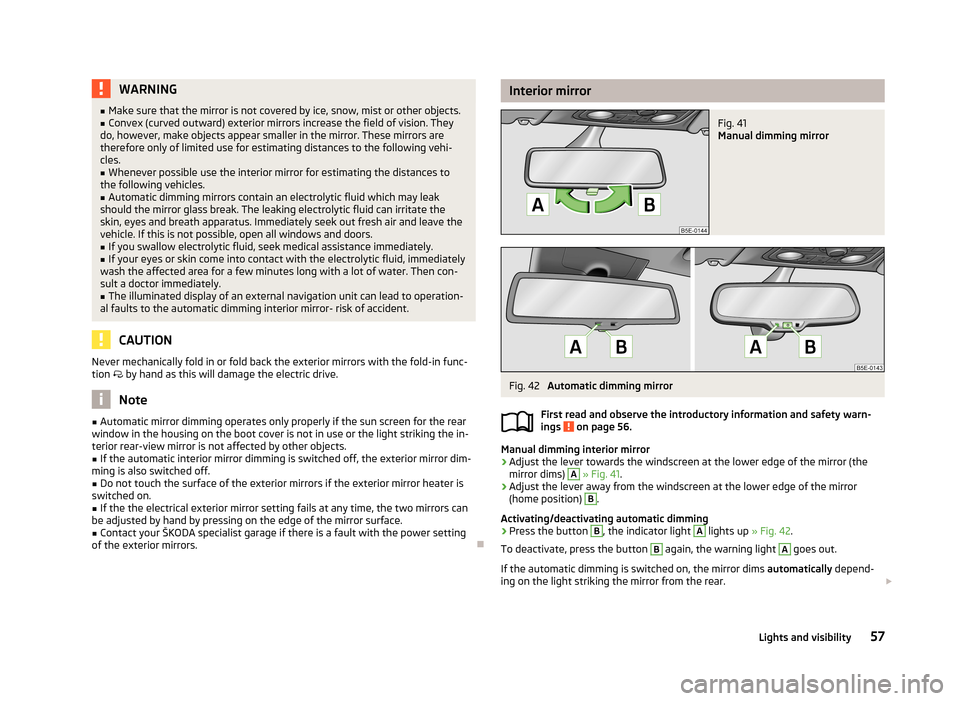
Interior mirrorFig. 41
Manual dimming mirror
Fig. 42
Automatic dimming mirror
First read and observe the introductory information and safety warn-
ings
on page 56.
Manual dimming interior mirror
›
Adjust the lever towards the windscreen at the lower edge of the mirror (the mirror dims)
A
» Fig. 41 .
›
Adjust the lever away from the windscreen at the lower edge of the mirror
(home position)
B
.
Activating/deactivating automatic dimming
›
Press the button
B
, the indicator light
A
lights up » Fig. 42.
To deactivate, press the button
B
again, the warning light
A
goes out.
If the automatic dimming is switched on, the mirror dims automatically depend-
ing on the light striking the mirror from the rear.
57Lights and visibility
Page 60 of 222

When the interior lights are switched on or the reverse gear is engaged, the mir-
ror always moves back into the basic position (not dimmed).
Do not attach external navigation devices on to the windscreen or in the vicinity
of the automatic dimming interior mirror » page 57,
in section Introduction .
Exterior mirror
Fig. 43
Inner part of door: Rotary knob
First read and observe the introductory information and safety warn-
ings on page 56.
Mirror heater
›
Set the rotary knob into the position
» Fig. 43 .
The mirror heater only operates when the engine is running and up to an outside temperature of +35 ℃.
Adjusting both mirrors in sync
›
Set the rotary dial into position
or, on right-hand drive vehicles, into position
» Fig. 43 . The movement of the mirror surface is identical to the movement of
the rotary knob.
The synchronous setting of both mirrors can be activated/deactivated in the Info-
tainment » operating instructions for Infotainment , chapter Setting vehicle sys-
tems (CAR button) .
Adjusting the front passenger's mirror
›
Set the rotary dial into position
or, on right-hand drive vehicles, into position
» Fig. 43 . The movement of the mirror surface is identical to the movement of
the rotary knob.
Switching off operating control
›
Set the rotary knob into the position
» Fig. 43 .
Folding-in both of the exterior mirrors with the rotary knob›Set the rotary knob into the position » Fig. 43 .
It is only possible to fold in both exterior mirrors when the ignition is switched on and at a speed of up to 50 km/h.
The mirrors are folded back into the driving position after the rotary knob is
turned from the position to a different one.
Folding-in both of the exterior mirrors using the remote control key›
Hold down the lock button on the remote control key, or when using the
KESSY system, keep your finger on the sensor
1
» Fig. 15 on page 33.
Folding in requires that all electrical power windows are working » page 41, Op-
erational faults in the automatic power windows .
The exterior mirror is folded back into the driving position when the ignition is
switched on.
Folding in of both mirrors can be activated/deactivated in the Infotainment » op-
erating instructions for Infotainment , chapter Setting vehicle systems (CAR but-
ton) .
Automatic dimming mirror
The exterior mirrors are dimmed together with the automatic dimming interior
mirror » page 57 .
Tilting surface of front passenger mirror
On vehicles fitted with the memory function for the driver seat » page 61, the
surface of the mirror tilts down slightly when the reverse gear is engaged and the rotary knob is in the position
or in position
on vehicles with right-hand
drive » Fig. 43 . This provides an aid in seeing the kerb of the pavement when
parking the car.
The mirror returns into its initial position, after the rotary knob is moved out of
the position
or position
on vehicles with right-hand drive, and put into another
position or if the speed is more than 15 km/h.
Tilting the surface of the front passenger mirror can be activated/deactivated in the Infotainment » operating instructions for Infotainment , chapter Setting vehi-
cle systems (CAR button) .
Memory function for mirrors
On vehicles fitted with the memory function for the driver seat » page 61 or the
memory function for the remote control key » page 61 it is possible to save the
position of the exterior mirror when saving the driver seat position.
58Using the system
Page 61 of 222

Seats and Stowage
Front seats
Introduction
This chapter contains information on the following subjects:
Manually adjusting the front seats
60
Electrically adjusting the front seats
60
Memory function of the power seat
61
Memory function of the remote control key
61
The driver's seat should be adjusted in such a way that the pedals can be fully
pressed to the floor with slightly bent legs.
The seat backrest on the driver's seat should be adjusted in such a way that the
upper point of the steering wheel can be easily reached with slightly bent arms.
Correct adjustment of the seats is particularly important for:
› safely and quickly reaching the controls;
› a relaxed, fatigue-free body position;
› achieving the maximum protection offered by the seat belts and the airbag
system.
WARNING■ Only adjust the driver's seat when the vehicle is stationary – risk of accident!■Caution when adjusting the seat! You may suffer injuries or bruises as a re-
sult of adjusting the seat without paying proper attention.■
As the electric front seats can also be adjusted when the ignition is switch-
ed off (even when the ignition key is withdrawn), never leave children unat-
tended in the car.
■
The seat backrests must not be angled too far back when driving otherwise
this will affect proper operation of the seat belts and of the airbag system –
risk of injury!
■
Never carry more people than the number of seats in the vehicle.
WARNING (Continued)■ Each occupant must correctly fasten the seat belt belonging to the seat.
Children must be fastened » page 154, Transporting children safely with a
suitable restraint system.■
At all times, the front seats and head restraints must be adjusted to match
the person's body size and the seat belt must be attached properly to provide
the most effective levels of protection to passengers.
■
Always keep your feet in the footwell when the car is being driven – never
place your feet on the instrument panel, out of the window or on the surfaces
of the seats. This is particularly important for the front seat passenger. You
will be exposed to increased risk of injury if it becomes necessary to apply the
brake or in the event of an accident. If an airbag is deployed, you may suffer
fatal injuries when adopting an incorrect seated position!
■
The driver must maintain a distance of at least 25 cm from the steering
wheel, and a distance of at least 10 cm between the legs and the dash panel at the height of the knee airbag. The front passenger must maintain a dis-
tance of at least 25 cm to the dash panel. Not maintaining this minimum dis-
tance will mean that the airbag system will not be able to properly protect you
– hazard!
■
Ensure that there are no objects in the driver's footwell as they may get
caught behind the pedals when driving or applying the braking. You would
then no longer be able to operate the clutch, brake or accelerate.
■
Do not transport any objects on the front passenger seat except objects
(e.g. child safety seat) provided for this purpose – risk of accident!
Note
■ After a certain time, play can develop within the adjustment mechanism of the
backrest angle.■
For safety reasons, it is not possible to store the seated position in the seat
memory and remote control key memory if the inclination angle of the seat back-
rest is more than 102° in relation to the seat cushion.
■
Each new driver seat and external mirror position that is saved will overwrite
the existing setting.
59Seats and Stowage
Page 63 of 222

Reducing or increasing the curvature of the lumbar support›Push the switch A » Fig. 45 in the region of one of the arrows 2.
Raising or lowering the curvature of the lumbar support›
Push the switch
A
» Fig. 45 in the region of one of the arrows 1.
The adjusted driver's seat position can be set in the memory of the
seat » page 61 or the remote control key » page 61.
Note
If the setting procedure is interrupted, you will need to press the button again.
Memory function of the power seat
Fig. 47
Memory buttons and SET button
First read and observe the introductory information and safety warn-
ings on page 59.
The memory function for the driver's seat provides the option to store the posi- tions of the driver's seat and the external mirrors. Each of the three memory but-
tons
B
» Fig. 47 can be assigned a set position.
Storing seat and exterior mirror settings for driving forward
›
Switch on the ignition.
›
Adjust the seat to the desired position.
›
Adjust both of the exterior mirrors » page 58.
›
Press the button SET
A
» Fig. 47 .
›
Within 10 seconds after pressing the SET button, press the desired memory
button
B
.
An acknowledgment sound confirms the storage.
Saving front passenger mirror settings when reversing›Switch on the ignition.›
Press the required memory button
B
» Fig. 47 .
›
Move the rotary knob for the exterior mirror control into position » page 58 .
›
Engage reverse gear.
›
Move the right exterior mirror into the desired position » page 58.
›
Take the vehicle out of gear.
The set position of the exterior mirror is stored.
Retrieving the saved setting
›
Tap the desired memory button
B
» Fig. 47 when the ignition is switched off
and the driver's door is opened.
›
Press down on the desired memory button
B
when the ignition is switched on
and the driver's door is closed.
Stopping the ongoing adjustment
›
Press any button on the driver's seat or the button on the remote control
key.
Note
Each time you store the seat and exterior mirror settings for driving forward you
also have to re-store the setting of the exterior mirror on the passenger side for
reversing.
Memory function of the remote control key
First read and observe the introductory information and safety warn-ings
on page 59.
The automatic storage function of the driver's seat and exterior mirrors position
when locking the vehicle can be activated in the memory of the remote control
key.
When this function is activated, each time the vehicle is locked, the current posi-
tions of the driver's seat and the external mirrors are saved in the memory of the remote control key. After subsequently unlocking the vehicle with the same key,the driver's seat and the exterior mirrors assume the positions stored in the
memory of this key.
This function can also be activated/deactivated in the Infotainment » Bedienung-
sanleitung Infotainment, chapter operating instructions for Infotainment Setting
vehicle systems (CAR button).
61Seats and Stowage