2012 SKODA OCTAVIA interior lights
[x] Cancel search: interior lightsPage 53 of 222

Interior light
Interior lights at the front
Fig. 31
Interior lights at the front
Fig. 32
Reading lights
Switching on the light
›
Press the button in the area of the symbol
» Fig. 31 .
Switching off the light
›
Press the button in the area of the symbol O » Fig. 31 .
Operating with the door contact switch
›
Place the button in the middle position.
On vehicles without an interior monitor, the middle position is marked with the symbol
» Fig. 31 -
.
Switching the reading light on/off›Press the button
or » Fig. 32 .
If operating lights with the door contact switch is enabled, the light will come on
when:
› the vehicle is unlocked;
› one of the doors is opened;
› or the ignition key is removed.
If operating lights with the door contact switch is enabled, the light will go off
when:
› the vehicle is locked;
› the ignition is switched on;
› about 30 seconds after all the doors have been closed.
Note
■
If the interior light remains switched on when the ignition is switched off or if
one of the doors is open, the light will automatically go out after around 10 mi- nutes.■
Two diffuse lights are integrated in the front interior lighting, that illuminate
the gearshift lever and the middle of the dash panel. These are switched on auto-
matically when the parking light is activated. Also, after switching on the ignition when the parking lights are switched on, the door handle lighting comes on.
Interior lights at the rear
Fig. 33
Interior light/interior light with reading lights
The rear interior light is operated together with the front interior light » Fig. 31 on
page 51.
51Lights and visibility
Page 59 of 222
WARNING■Make sure that the mirror is not covered by ice, snow, mist or other objects.■Convex (curved outward) exterior mirrors increase the field of vision. They
do, however, make objects appear smaller in the mirror. These mirrors are
therefore only of limited use for estimating distances to the following vehi-
cles.■
Whenever possible use the interior mirror for estimating the distances to
the following vehicles.
■
Automatic dimming mirrors contain an electrolytic fluid which may leak
should the mirror glass break. The leaking electrolytic fluid can irritate the skin, eyes and breath apparatus. Immediately seek out fresh air and leave thevehicle. If this is not possible, open all windows and doors.
■
If you swallow electrolytic fluid, seek medical assistance immediately.
■
If your eyes or skin come into contact with the electrolytic fluid, immediately
wash the affected area for a few minutes long with a lot of water. Then con-
sult a doctor immediately.
■
The illuminated display of an external navigation unit can lead to operation-
al faults to the automatic dimming interior mirror- risk of accident.
CAUTION
Never mechanically fold in or fold back the exterior mirrors with the fold-in func-
tion by hand as this will damage the electric drive.
Note
■
Automatic mirror dimming operates only properly if the sun screen for the rear
window in the housing on the boot cover is not in use or the light striking the in- terior rear-view mirror is not affected by other objects.■
If the automatic interior mirror dimming is switched off, the exterior mirror dim-
ming is also switched off.
■
Do not touch the surface of the exterior mirrors if the exterior mirror heater is
switched on.
■
If the the electrical exterior mirror setting fails at any time, the two mirrors can
be adjusted by hand by pressing on the edge of the mirror surface.
■
Contact your ŠKODA specialist garage if there is a fault with the power setting
of the exterior mirrors.
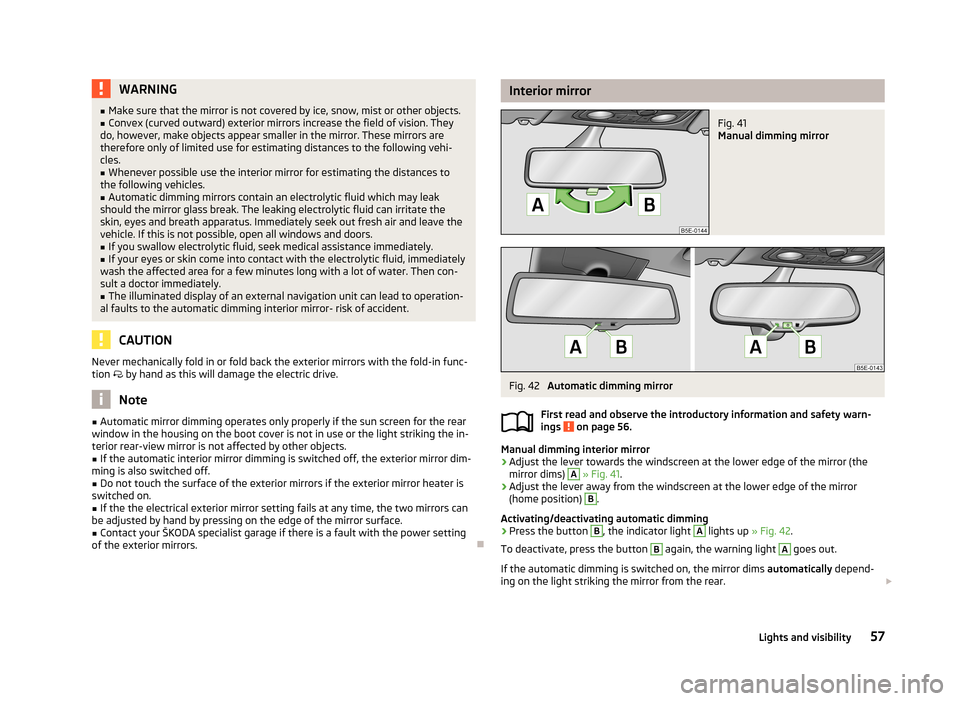
Interior mirrorFig. 41
Manual dimming mirror
Fig. 42
Automatic dimming mirror
First read and observe the introductory information and safety warn-
ings
on page 56.
Manual dimming interior mirror
›
Adjust the lever towards the windscreen at the lower edge of the mirror (the mirror dims)
A
» Fig. 41 .
›
Adjust the lever away from the windscreen at the lower edge of the mirror
(home position)
B
.
Activating/deactivating automatic dimming
›
Press the button
B
, the indicator light
A
lights up » Fig. 42.
To deactivate, press the button
B
again, the warning light
A
goes out.
If the automatic dimming is switched on, the mirror dims automatically depend-
ing on the light striking the mirror from the rear.
57Lights and visibility
Page 60 of 222

When the interior lights are switched on or the reverse gear is engaged, the mir-
ror always moves back into the basic position (not dimmed).
Do not attach external navigation devices on to the windscreen or in the vicinity
of the automatic dimming interior mirror » page 57,
in section Introduction .
Exterior mirror
Fig. 43
Inner part of door: Rotary knob
First read and observe the introductory information and safety warn-
ings on page 56.
Mirror heater
›
Set the rotary knob into the position
» Fig. 43 .
The mirror heater only operates when the engine is running and up to an outside temperature of +35 ℃.
Adjusting both mirrors in sync
›
Set the rotary dial into position
or, on right-hand drive vehicles, into position
» Fig. 43 . The movement of the mirror surface is identical to the movement of
the rotary knob.
The synchronous setting of both mirrors can be activated/deactivated in the Info-
tainment » operating instructions for Infotainment , chapter Setting vehicle sys-
tems (CAR button) .
Adjusting the front passenger's mirror
›
Set the rotary dial into position
or, on right-hand drive vehicles, into position
» Fig. 43 . The movement of the mirror surface is identical to the movement of
the rotary knob.
Switching off operating control
›
Set the rotary knob into the position
» Fig. 43 .
Folding-in both of the exterior mirrors with the rotary knob›Set the rotary knob into the position » Fig. 43 .
It is only possible to fold in both exterior mirrors when the ignition is switched on and at a speed of up to 50 km/h.
The mirrors are folded back into the driving position after the rotary knob is
turned from the position to a different one.
Folding-in both of the exterior mirrors using the remote control key›
Hold down the lock button on the remote control key, or when using the
KESSY system, keep your finger on the sensor
1
» Fig. 15 on page 33.
Folding in requires that all electrical power windows are working » page 41, Op-
erational faults in the automatic power windows .
The exterior mirror is folded back into the driving position when the ignition is
switched on.
Folding in of both mirrors can be activated/deactivated in the Infotainment » op-
erating instructions for Infotainment , chapter Setting vehicle systems (CAR but-
ton) .
Automatic dimming mirror
The exterior mirrors are dimmed together with the automatic dimming interior
mirror » page 57 .
Tilting surface of front passenger mirror
On vehicles fitted with the memory function for the driver seat » page 61, the
surface of the mirror tilts down slightly when the reverse gear is engaged and the rotary knob is in the position
or in position
on vehicles with right-hand
drive » Fig. 43 . This provides an aid in seeing the kerb of the pavement when
parking the car.
The mirror returns into its initial position, after the rotary knob is moved out of
the position
or position
on vehicles with right-hand drive, and put into another
position or if the speed is more than 15 km/h.
Tilting the surface of the front passenger mirror can be activated/deactivated in the Infotainment » operating instructions for Infotainment , chapter Setting vehi-
cle systems (CAR button) .
Memory function for mirrors
On vehicles fitted with the memory function for the driver seat » page 61 or the
memory function for the remote control key » page 61 it is possible to save the
position of the exterior mirror when saving the driver seat position.
58Using the system
Page 86 of 222

We recommend that you leave the air outlet vents 3 » Fig. 82 on page 82 in the
opened position.
Recirculated air mode
Recirculated air mode prevents polluted air outside the vehicle from getting into the vehicle, for example when driving through a tunnel or when standing in a
traffic jam.
Switching on/off
›
Press the button and the warning light underneath the button illuminates.
›
Press the button again, the warning light underneath the button goes out.
Recirculated air mode is switched off automatically if the air distribution control
C
» Fig. 84 on page 83 is turned to position
. Recirculated air mode can be
switched on again from this setting by repeatedly pressing the button .
WARNINGDo not leave recirculated air mode on over a longer period of time, as “stale”
air can cause fatigue of the driver and passengers, reduce attention levels andalso cause the windows to mist up. The risk of having an accident increases.
Switch off recirculated air mode as soon as the windows start to mist up.
Air conditioning system (manual air conditioning
system)
Introductory information
The cooling system only operates if the button
» Fig. 85 on page 84 is press-
ed, and the following conditions are met:
› engine running;
› outside temperature above approx. 2
℃;
› blower switch switched on (positions 1-6).
Under certain circumstances, air at a temperature of about 5 °C can flow out of
the vents when the cooling system is switched on. Lengthy and uneven distribu-
tion of the air flow out of the vents and large differences in temperature, for ex-
ample when getting out of the vehicle, can result in chills in sensitive persons.
If the desired interior temperature can also be achieved without activating the
cooling system, fresh air mode should be selected.
Note
We recommend that you have the air conditioning system cleaned by a ŠKODA
specialist garage once every year.
Control elements
Fig. 85
Air conditioning: Control elements
Functions of the individual controls » Fig. 85 :
Set the temperature (turn to the left: Turn to the right to reduce the tem-
perature: increase temperature)
Set the blower stage (stage 0: Blower off, stage 6: the highest blower stage)
Set the direction of the air outlet » page 82
Depending on equipment:
Switch the windscreen heater on/off
» page 52
Switch the auxiliary heating on/off
» page 89
Switch the cooling system on/off (The indicator light in or underneath the
button lights up/goes out)
Switch the rear window heater on/off » page 52
Open/close the fresh air supply » page 85
ABC184Using the system
Page 89 of 222

Switch automatic mode on/off » page 87
Switch the cooling system on/off » page 87
Note
The interior temperature sensor is located between the buttons and SETUP.
Do not stick anything on or cover the sensor, otherwise it could have an unfav-
ourable effect on the Climatronic.
Automatic mode
Automatic mode works in three modes - weak, medium, and intensive.
Information on the setting » Bedienungsanleitung Infotainment, chapter Addi-
tional functions (CAR button) .
Switching on
›
Set the temperature between +16 °C and +29 °C using the control dials
A
and
C
» Fig. 86 on page 86.
›
Press the button AUTO and the indicator light in the button illuminates.
Switching off
›
Press any button for the air distribution or increase/reduce the blower speed.
After the Climatronic is switched on, it works in the last selected mode. The currently selected mode is displayed in the Infotainment display.Climatronic is set to the medium setting by default.
Note
We recommend that you adjust the air outlet vents 3 and 4 » Fig. 82 on page 82,
so that the air flow is directed slightly upwards.
Switch cooling system on/off
›
Press the button and the indicator light in the button illuminates.
›
Pressing the button
again switches off the cooling system - the indicator
light in the button goes out.
After the cooling system is switched off, only the ventilation function remains ac-
tive whereby the minimum temperature that can be reached is the outside tem-
perature.
AUTOSetting temperature
The interior temperature for the left and right side can be set separately or to-
gether.
For both sides›
Turn the control dial
A
» Fig. 86 on page 86 to the left or right to increase or
decrease the temperature.
The warning light in the button DUAL
goes out.
For the right side
›
Turn the control dial
C
» Fig. 86 on page 86 to the left or right to increase or
decrease the temperature.
The indicator light lights up in the DUAL
button.
If the indicator light in the button DUAL
is illuminated, the temperature for both
sides cannot be set with the control dial
A
. This function can be restored by
pressing the button DUAL. The warning light in the button goes out.
The interior temperature can be set between +16 ℃ and +29 ℃. The interior tem-
perature is regulated automatically within this range.
If a temperature lower than +16 ℃ is selected, a blue symbol lights up on the con-
trol dial.
If a temperature higher than +29 ℃ is selected, a red symbol lights up on the con-
trol dial.
At both end positions, Climatronic runs at maximum cooling/heating output and
the temperature is automatically not regulated.
CAUTION
Lengthy and uneven distribution of the air flow out of the vents (especially
around the feet) and large differences in temperature, for example, when getting
out of the vehicle, can cause susceptible individuals to catch a cold.
Automatic recirculated air mode
Recirculated air mode largely prevents polluted air from outside the vehicle get- ting into the vehicle, for example, when driving through a tunnel or when stand-
ing in a traffic jam.
87Heating and air conditioning system
Page 90 of 222

If a considerable increase in concentration of pollutants is recognised by the air
quality sensor, recirculated air mode will temporarily be switched off.
If the concentration of pollutants decreases to the normal level, the air distribu-
tion control is automatically switched off so that fresh air can be guided into the
vehicle interior.
In recirculated air mode air is sucked out of the interior of the vehicle and then
fed back into the interior. When the automatic air distribution control is switched on, an air quality sensor measures the concentration of pollutants in the drawn inair.
If the air quality sensor does not switch on automatic recirculated air mode when there is an unpleasant smell, you can switch in on manually.
Switching on/off›
Press the button and the warning light underneath the button illuminates.
›
Press the button again, the warning light underneath the button goes out,
where necessary press the button AUTO.
You can also switch the system on/off in he Infotainment » Bedienungsanleitung
Infotainment, chapter Setting vehicle systems (CAR button) .
WARNINGDo not leave recirculated air mode on over a longer period of time, as “stale”
air can cause fatigue of the driver and passengers, reduce attention levels and
also cause the windows to mist up. The risk of having an accident increases.
Switch off recirculated air mode as soon as the windows start to mist up.
Note
■ If the windscreen mists up, press the button . Press the button AUTO when
the windscreen is demisted.■
The automatic air distribution control operates only if the outside temperature
is higher than approx. 2 °C.
Controlling blower
The blower stage can be manually adapted to suit your particular needs.
›
Turn the control dial
B
» Fig. 86 on page 86 to the left or right to increase or
decrease the blower speed.
If the blower speed is reduced to a minimum, Climatronic is switched off.
The set blower speed is displayed in the control dial B when the respective num-
ber of warning lights come on.WARNING■ “Stale air” may result in fatigue in the driver and occupants, reduce attention
levels and also cause the windows to mist up. The risk of having an accident
increases.■
Do not switch off the Climatronic system for longer than necessary.
■
Switch on the Climatronic system as soon as the windows mist up.
Defrosting windscreen
Switching on/off
›
Press the button
» Fig. 86 on page 86.
›
Press the button or the button
AUTO again.
More air flows out of the air outlet vents 1 » Fig. 82 on page 82. The temperature
control is controlled automatically.
Auxiliary heating (auxiliary heating and ventilation)
Introduction
This chapter contains information on the following subjects:
Switching on/off
89
setting
90
Remote control
90
Replacing the battery in the remote control
91
Function prerequisites when switching on:
› Comfort temperature has been set;
› The blower is switched on;
› the air outlet vents are opened;
› The air outlet is set to position
or
.
Auxiliary heating (parking heating) › It can be used when stationary, when the engine is switched off to preheat the
vehicle and while driving (e.g. during the heating phase of the engine);
› It works in tandem with the hearer, air-conditioning system or Climatronic;
88Using the system
Page 91 of 222

›The engine is also preheated when the vehicle is stationary and the engine is
not running;
› It warms up the coolant by burning fuel from the vehicle tank. The coolant
warms up the air, which (if the blower speed is not set to zero) flows into the passenger compartment.
Auxiliary ventilation
The auxiliary ventilation enables fresh air to flow into the vehicle interior by
switching off the engine, whereby the interior temperature is effectively de-
creased (e.g. with the vehicle parked in the sun).WARNING■ The auxiliary heating must never be operated in closed rooms - risk of poi-
soning!■
The auxiliary heating must not be running during refuelling - risk of fire.
■
The exhaust pipe of the auxiliary heating is located on the underside of the
vehicle. Therefore, if you wish to operate the auxiliary heating, do not park the vehicle in such a way that the exhaust gases can come into contact with high-
ly flammable materials (e.g. dry grass) or easily inflammable substances (e.g.
spilt fuel).
CAUTION
■ The running auxiliary heater consumes fuel from the vehicle tank and automati-
cally controls the filling level. If only a low quantity of fuel is present in the fuel
tank, the function of the auxiliary heating is blocked.■
The exhaust pipe of the auxiliary heating, which is located on the underside of
the vehicle, must not be clogged and the exhaust flow must not be blocked.
■
If the auxiliary heating and ventilation is running, the vehicle battery discharges.
If the auxiliary heating and ventilation has been operated several times over a
longer period, the vehicle must be driven a few kilometres in order to recharge
the vehicle battery.
Note
■ The auxiliary heating only switches the blower on, if it has achieved a coolant
temperature of approx. 50 °C.■
At low outside temperatures, this can result in a formation of water vapour in
the area of the engine compartment. This is quite normal and is not an operating problem.
■
The air inlet in front of the windscreen must be free of e.g. ice, snow or leaves
to ensure that the auxiliary heating and cooling system operates properly.
Switching on/offFig. 87
Button for switching on/off the system directly on the operating
part of the air conditioning/Climatronic
First read and observe the introductory information and safety warn-ings
on page 88.
Switching on
Manually using the button on the operating part of
the air conditioning/Climatronic. The warning light in the button lights up.» Fig. 87Manually using the radio remote control.» page 90 Automatically through the configured and activated
departure time.» page 90
Switching off
Manually using the button on the operating part of
the air conditioning/Climatronic. The warning light in the button goes out.» Fig. 87Manually using the radio remote control.» page 90 Automatically when the pre-set departure time is
reached or when the pre-set run time has elapsed.» page 90 Automatically when the indicator light lights up .» page 10 Automatically when the charge state of the vehicle
battery dropped too far.» page 176
After switching the system off, the auxiliary heating will continue running a little
while longer in order to burn the remaining fuel in the auxiliary heater. Exhaust
fumes from the system will thus be directed outside.
89Heating and air conditioning system
Page 92 of 222

After switching off the auxiliary heating, the coolant pump runs for a short period.
The auxiliary heater does not switch on: › when the following appears in the instrument cluster display, or the the follow-
ing was displayed before the ignition was turned off: Please refuel. Range: ...
km or PLEASE REFUEL ;
› when the charge state of the vehicle battery is too low;
› when no pre-set time is activated.
setting
First read and observe the introductory information and safety warn-
ings
on page 88.
Information on the setting » Bedienungsanleitung Infotainment, chapter Setting
vehicle systems (CAR button) .
Before the setting is started, check the correct time and date settings.
Checking the settings
When the departure time is activated, the indicator light in the button
lights up
for around 10 seconds after the ignition is turned off.
Remote control
Fig. 88
Auxiliary heater: Radio remote control
First read and observe the introductory information and safety warn-
ings
on page 88.
Explanation of graphicAAerialBBattery coverCWarning lightSwitch on the auxiliary heatingSwitch off the auxiliary heating
The transmitter and the battery are housed in the housing of the remote control.
The receiver is located in the interior of the vehicle.
When the battery is fully charged, the range of the remote control is a few hun-
dred metres. Obstacles between the radio remote control and the vehicle, bad
weather conditions and a weaker battery can clearly reduce the range.
To switch the auxiliary heating on or off, hold the remote control vertical, with the
aerial pointing upwards. The antenna must not be covered with the fingers or the palm of the hand during this process.
The auxiliary heating can only be switched on/off safely using the radio remote control, if the distance between the radio remote control and the vehicle is at
least 2 m.
After pressing the button, the warning light in the remote control gives the
user different kinds of feedback:
Display warning light C » Fig. 88DescriptionLights up green for around 2 seconds.The auxiliary heating was switched on.Lights up red for around 2 seconds.The auxiliary heating was switched off.Slowly flashes green for around 2 sec-
onds.The ignition signal was not received.Quickly flashes green for around 2 sec-
onds.The auxiliary heating is blocked, e. g
because the tank is nearly empty or
there is a fault in the auxiliary heating.Flashes red for around 2 seconds.The switch off signal was not received.Lights up orange for around 2 seconds,
then green or red.The battery is weak, however the
switching on or off signal was received.Lights up orange for around 2 seconds,
then flashes green or red.The battery is weak, however the
switching on or off signal was not re-
ceived.Flashes orange for around 5 seconds.The battery is discharged, however the
switching on or off signal was not re-
ceived. 90Using the system