2012 Seat Ibiza 5D tow
[x] Cancel search: towPage 105 of 280

103
Lights and visibility
For the sake of the environment
The heated rear window should be switched off as soon as the glass is dem-
isted. By saving electrical power you can also save fuel.
Note
To avoid possible damage to the battery, an automatic temporary discon-
nection of this function is possible, coming back on when normal operating
conditions are re-established.
Hazard warning lights
The hazard warning lights are used to draw the attention of
other road users to your vehicle in emergencies.
Fig. 59 Dash panel: switch for hazard warning lights
If your vehicle breaks down:
1. Park your vehicle at a safe distance from moving traffic.
2. Press the button to switch on the hazard warning lights ⇒
.3. Switch the ignition off.
4. Apply the handbrake.
5. On a manual gearbox engage 1st gear. On an automatic gear-
box, move the selector lever to P.
6. Use the warning triangle to draw the attention of other road users to your vehicle.
7. Always take the vehicle key with you when you leave the vehi- cle.
Switch on the hazard warning lights to warn other road users, for example:
● reaching the tail end of a traffic jam,
● there is an emergency
● your vehicle breaks down due to a technical fault,
● you are towing another vehicle or your vehicle is being towed.
All turn signals flash simultaneously when the hazard warning lights are
switched on. The two turn signal turn signal lamps and the turn signal
lamp in the switch will flash at the same time. The hazard warning lights
also work when the ignition is switched off.
WARNING
● The risk of an accident increases if your vehicle breaks down. Always
use the hazard warning lights and a warning triangle to draw the atten-
tion of other road users to your stationary vehicle.
● Never park where the catalytic converter could come into contact with
inflammable materials under the vehicle, for example dry grass or spilt
petrol. This could start a fire!
Safety FirstOperating InstructionsPractical TipsTechnical Specifications
Page 106 of 280
104Lights and visibility
Note
● The battery will run down if the hazard warning lights are left on for a
long time, even if the ignition is switched off.
● The use of the hazard warning lights described here is subject to the rel-
evant statutory requirements.
Turn signal and main beam headlight lever
The turn signal and main beam lever also operates the park-
ing lights and the headlight flasher.
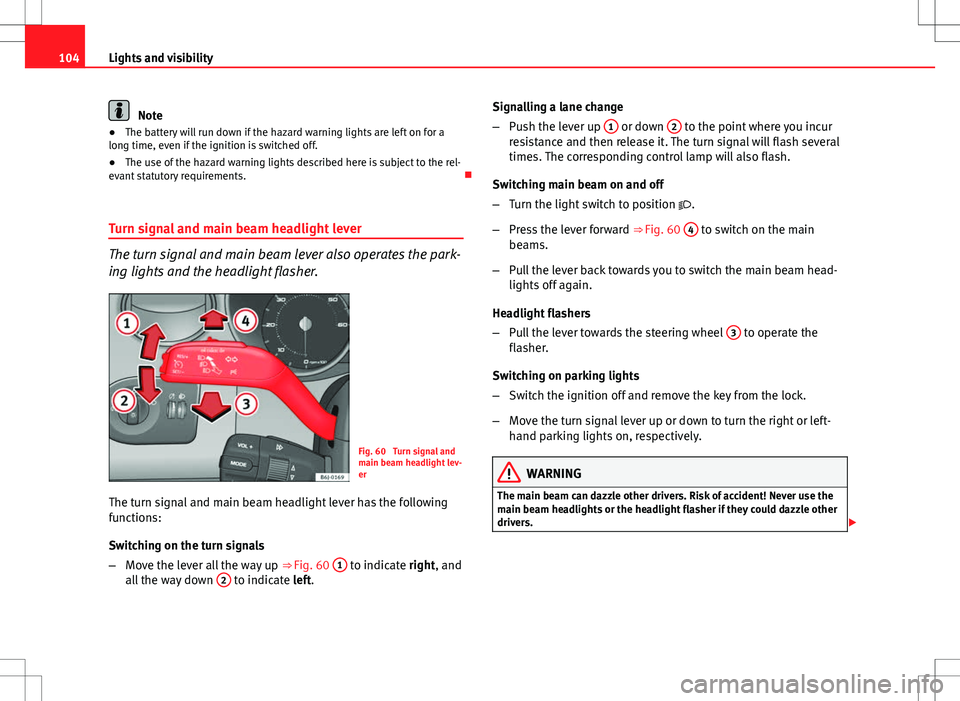
Fig. 60 Turn signal and
main beam headlight lev-
er
The turn signal and main beam headlight lever has the following
functions:
Switching on the turn signals
– Move the lever all the way up ⇒
Fig. 60 1
to indicate right, and
all the way down 2 to indicate left. Signalling a lane change
–
Push the lever up 1
or down 2 to the point where you incur
resistance and then release it. The turn signal will flash several
times. The corresponding control lamp will also flash.
Switching main beam on and off
– Turn the light switch to position .
– Press the lever forward ⇒ Fig. 60 4
to switch on the main
beams.
– Pull the lever back towards you to switch the main beam head-
lights off again.
Headlight flashers
– Pull the lever towards the steering wheel 3
to operate the
flasher.
Switching on parking lights
– Switch the ignition off and remove the key from the lock.
– Move the turn signal lever up or down to turn the right or left-
hand parking lights on, respectively.
WARNING
The main beam can dazzle other drivers. Risk of accident! Never use the
main beam headlights or the headlight flasher if they could dazzle other
drivers.
Page 109 of 280
107
Lights and visibility
The sun visors for the driver and the front passenger can be pulled out of
their central supports and turned towards the doors in the direction of the
arrow ⇒ Fig. 63. Never pull them downwards.
The driver sun visor has compartments for cards, and the passenger sun vi-
sor has a vanity mirror with a cover*.
Note
Incorrect use of the sun visors (e.g. pulling them downwards once they are
open) may result in broken hinges. This damage is not covered by the vehi-
cle warranty.
Windscreen wipers
Front windscreen wipers
The window wiper lever controls the windscreen wipers and
the automatic wash and wipe.
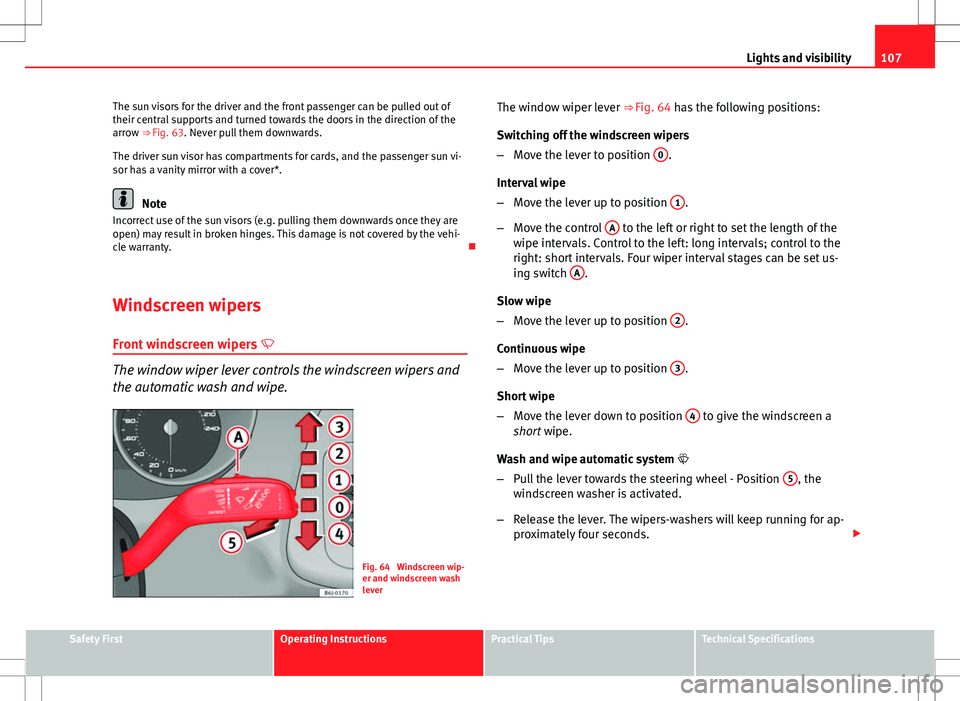
Fig. 64 Windscreen wip-
er and windscreen wash
leverThe window wiper lever ⇒ Fig. 64 has the following positions:
Switching off the windscreen wipers
–
Move the lever to position 0
.
Interval wipe
– Move the lever up to position 1
.
– Move the control A
to the left or right to set the length of the
wipe intervals. Control to the left: long intervals; control to the
right: short intervals. Four wiper interval stages can be set us-
ing switch A
.
Slow wipe
– Move the lever up to position 2
.
Continuous wipe
– Move the lever up to position 3
.
Short wipe
– Move the lever down to position 4
to give the windscreen a
short wipe.
Wash and wipe automatic system
– Pull the lever towards the steering wheel - Position 5
, the
windscreen washer is activated.
– Release the lever. The wipers-washers will keep running for ap-
proximately four seconds.
Safety FirstOperating InstructionsPractical TipsTechnical Specifications
Page 111 of 280
109
Lights and visibility
Note
● Do not put stickers on the windscreen in front of the rain sensor. This
may cause sensor disruption or faults.
Rear window wiper
The window wiper lever operates the windscreen wiper and
the wash and wipe system for the rear window.
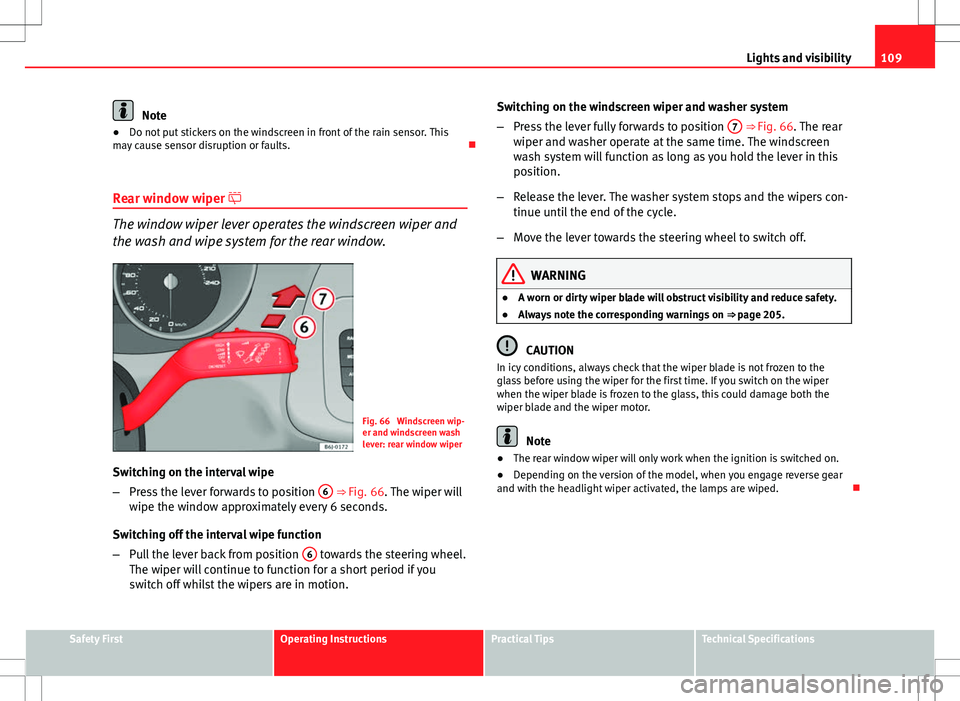
Fig. 66 Windscreen wip-
er and windscreen wash
lever: rear window wiper
Switching on the interval wipe
– Press the lever forwards to position 6
⇒
Fig. 66. The wiper will
wipe the window approximately every 6 seconds.
Switching off the interval wipe function
– Pull the lever back from position 6
towards the steering wheel.
The wiper will continue to function for a short period if you
switch off whilst the wipers are in motion. Switching on the windscreen wiper and washer system
–
Press the lever fully forwards to position 7
⇒ Fig. 66. The rear
wiper and washer operate at the same time. The windscreen
wash system will function as long as you hold the lever in this
position.
– Release the lever. The washer system stops and the wipers con-
tinue until the end of the cycle.
– Move the lever towards the steering wheel to switch off.
WARNING
● A worn or dirty wiper blade will obstruct visibility and reduce safety.
● Always note the corresponding warnings on ⇒ page 205.
CAUTION
In icy conditions, always check that the wiper blade is not frozen to the
glass before using the wiper for the first time. If you switch on the wiper
when the wiper blade is frozen to the glass, this could damage both the
wiper blade and the wiper motor.
Note
● The rear window wiper will only work when the ignition is switched on.
● Depending on the version of the model, when you engage reverse gear
and with the headlight wiper activated, the lamps are wiped.
Safety FirstOperating InstructionsPractical TipsTechnical Specifications
Page 112 of 280
110Lights and visibility
Headlight washer*
The headlight washers clean the headlight lenses.
The headlight washers are activated automatically when the windscreen
washer is used and the window wiper lever is pulled towards the steering
wheel for at least 1.5 seconds – provided the dipped beam headlights or
main beams are switched on. Clean off stubborn dirt (insects, etc.) from the
headlights at regular intervals, for instance when filling the fuel tank.
Note
● To ensure that the headlight washers work properly in winter, keep the
nozzle holders in the bumper free of snow and remove any ice with a de-icer
spray.
● To remove water, the windscreen wipers will be activated from time to
time, the headlight washers will be activated every three cycles.
Rear view mirrors
Adjusting the rear view mirrors
Before beginning any journey, adjust the rear view mirrors for correct visibil-
ity. Interior rear vision mirror
It is dangerous to drive if you cannot see clearly through the
rear window.
Manual anti-dazzle function for interior rear vision mirror
In the basic mirror position, the lever at the bottom edge of the rear vision
mirror should be at the front. Pull the lever to the back to select the anti-
dazzle function.
Automatic anti-dazzle interior rear vision mirror*
The automatic anti-dazzle function can be switched on and
off as desired.
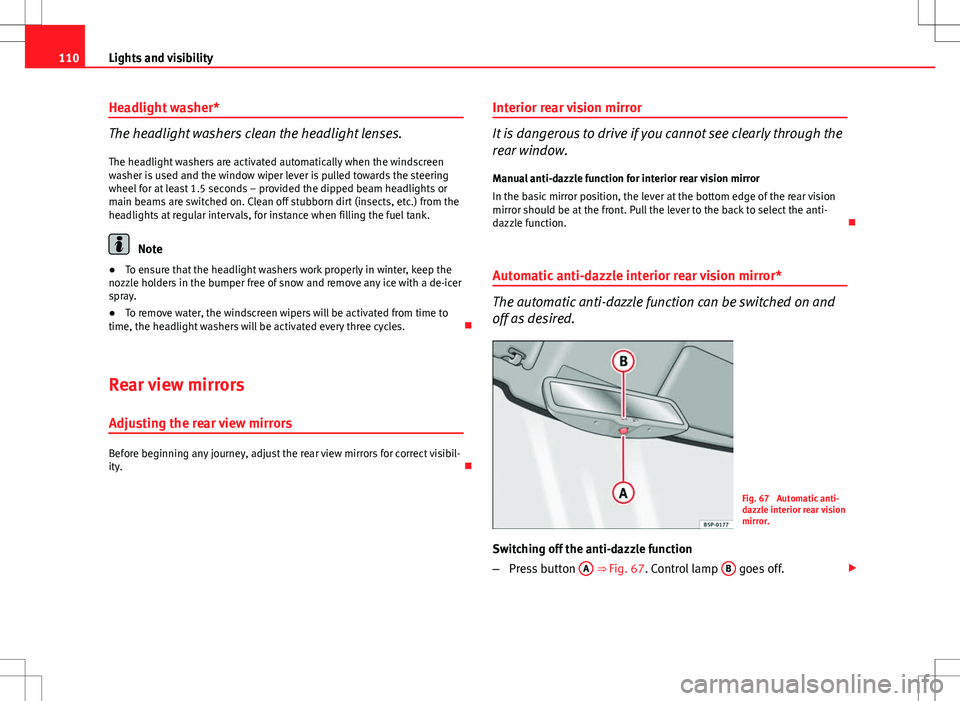
Fig. 67 Automatic anti-
dazzle interior rear vision
mirror.
Switching off the anti-dazzle function
– Press button A
⇒ Fig. 67. Control lamp B goes off.
Page 113 of 280
111
Lights and visibility
Switching on the anti-dazzle function
– Press button A
⇒ Fig. 67. Control lamp is lit.
Anti-dazzle function
The anti-dazzle function is activated every time the ignition is switched on.
The green indicator lamp lights up in the rear vision mirror housing.
When the anti-dazzle function is enabled, the interior rear vision mirror will
darken automatically according to the amount of light it receives. The anti-
dazzle function is cancelled if reverse gear is engaged.
Note
● The automatic anti-dazzle function will only work properly if the sun
blind* for the rear window is retracted and there are no other objects pre-
venting light from reaching the interior rear vision mirror.
● If you have to stick any type of sticker on the windscreen, do not do so in
front of the sensors. Doing so could prevent the anti-dazzle function from
working well or even from working at all.
Folding in the exterior mirrors
The exterior mirrors of the vehicle may be folded in. For this, press the mir-
ror housing towards the vehicle.
Note
Before washing the vehicle with an automatic car wash, fold in the exterior
mirrors to avoid damage. Electric exterior mirrors*
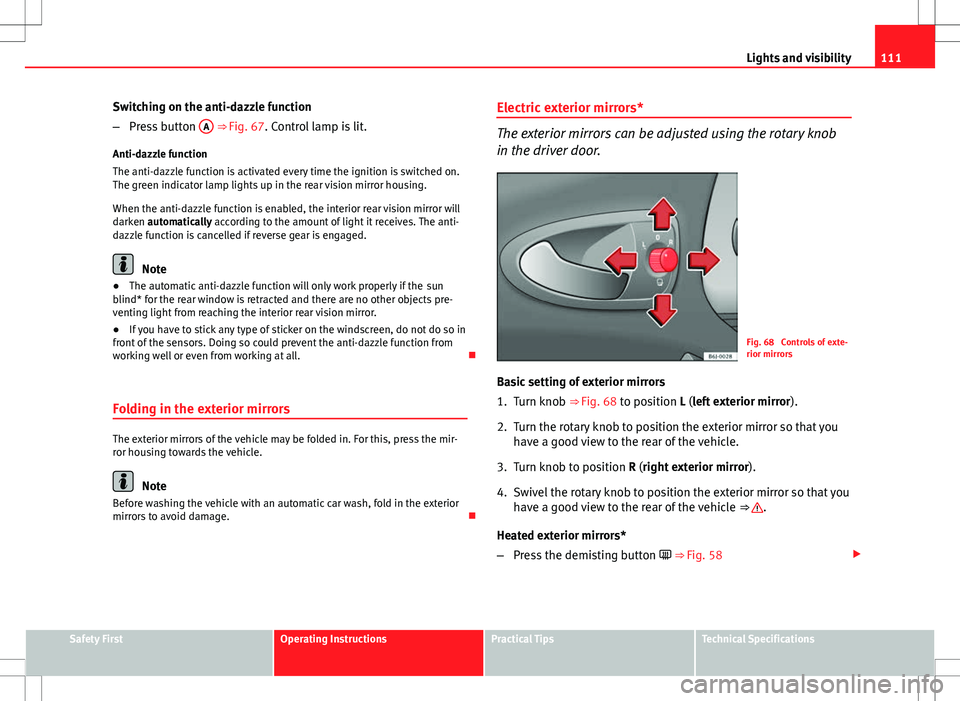
The exterior mirrors can be adjusted using the rotary knob
in the driver door.
Fig. 68 Controls of exte-
rior mirrors
Basic setting of exterior mirrors
1. Turn knob ⇒ Fig. 68 to position L (left exterior mirror ).
2. Turn the rotary knob to position the exterior mirror so that you have a good view to the rear of the vehicle.
3. Turn knob to position R (right exterior mirror ).
4. Swivel the rotary knob to position the exterior mirror so that you have a good view to the rear of the vehicle ⇒
.
Heated exterior mirrors*
– Press the demisting button ⇒ Fig. 58
Safety FirstOperating InstructionsPractical TipsTechnical Specifications
Page 128 of 280
126Seats and storage compartments
Luggage compartment
Storing objects
All luggage must be securely stowed. Please observe the following points to ensure the vehicle handles
well at all times:
– Distribute the load as evenly as possible.
– Place heavy objects as far forward in the luggage compartment
as possible.
WARNING
● Loose luggage and other loose items in the vehicle may cause serious
injuries.
● Loose objects in the luggage compartment can suddenly move and
change the way the vehicle handles.
● In case of sudden manoeuvres or accidents, loose objects in the inte-
rior can be flung forward, injuring passengers.
● Always put objects in the luggage compartment.
● When you transport heavy objects, always take into account that a
change in the centre of gravity can also cause changes in vehicle han-
dling.
● Please observe information on safe driving ⇒ page 7, Safe driving.
CAUTION
Hard objects on the rear shelf could chafe against the wires of the heating
element in the heated rear window and cause damage.
Note
The ventilation slots in front of the rear side windows must not be covered
as this would prevent stale air being extracted from the vehicle.
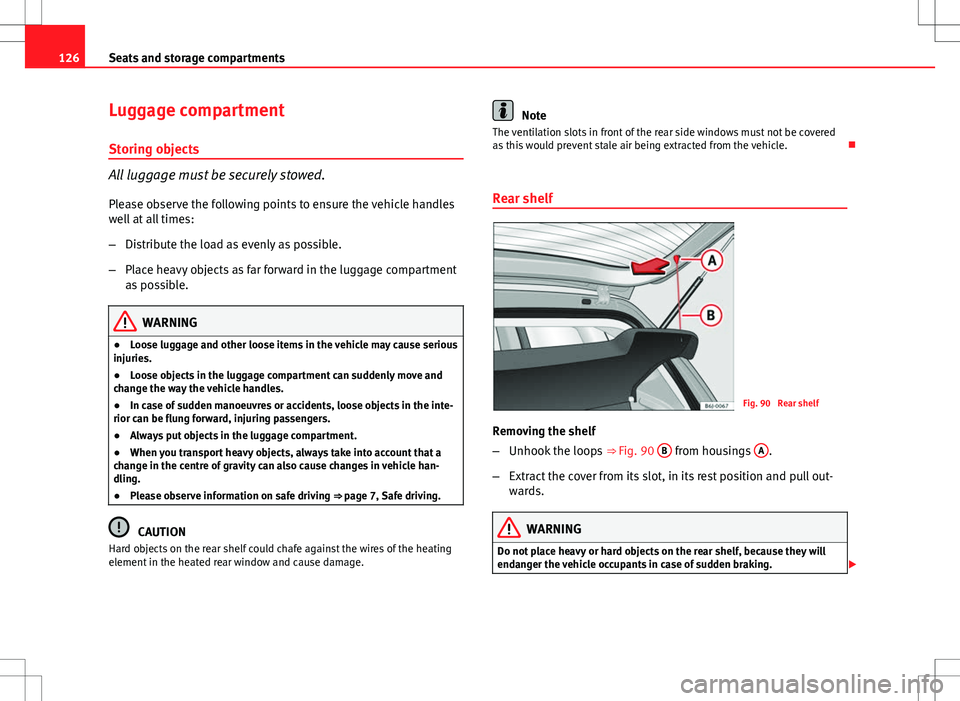
Rear shelf
Fig. 90 Rear shelf
Removing the shelf
– Unhook the loops ⇒
Fig. 90 B
from housings A.
– Extract the cover from its slot, in its rest position and pull out-
wards.
WARNING
Do not place heavy or hard objects on the rear shelf, because they will
endanger the vehicle occupants in case of sudden braking.
Page 130 of 280
128Air conditioning
Air conditioning
Heating
Controls
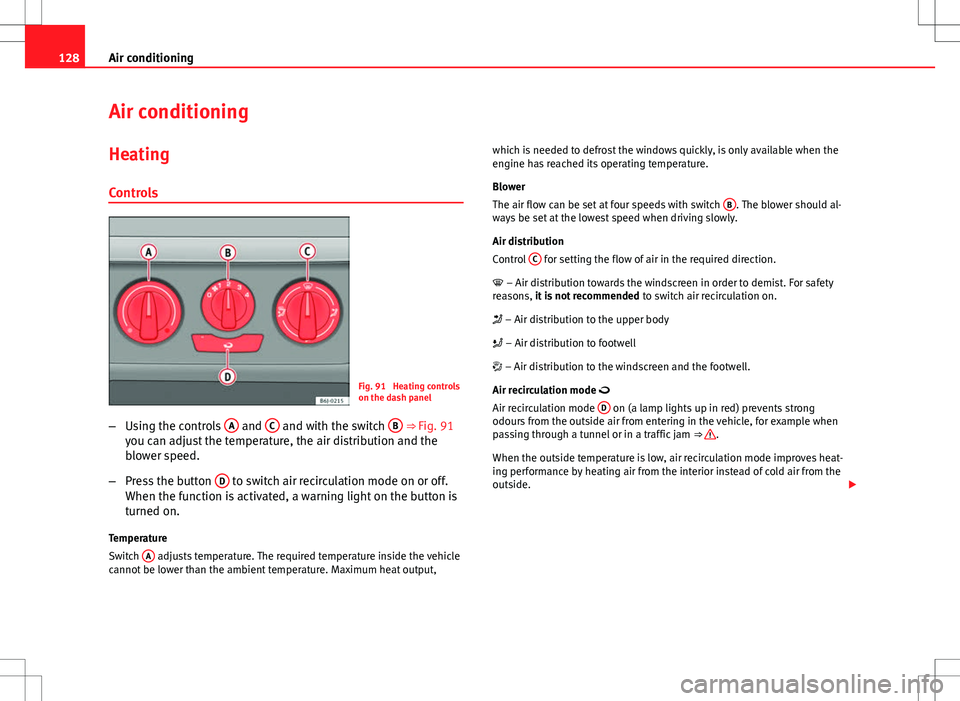
Fig. 91 Heating controls
on the dash panel
– Using the controls A
and C and with the switch B ⇒ Fig. 91
you can adjust the temperature, the air distribution and the
blower speed.
– Press the button D
to switch air recirculation mode on or off.
When the function is activated, a warning light on the button is
turned on.
Temperature
Switch A
adjusts temperature. The required temperature inside the vehicle
cannot be lower than the ambient temperature. Maximum heat output, which is needed to defrost the windows quickly, is only available when the
engine has reached its operating temperature.
Blower
The air flow can be set at four speeds with switch
B
. The blower should al-
ways be set at the lowest speed when driving slowly.
Air distribution
Control C
for setting the flow of air in the required direction.
– Air distribution towards the windscreen in order to demist. For safety
reasons, it is not recommended to switch air recirculation on.
– Air distribution to the upper body
– Air distribution to footwell
– Air distribution to the windscreen and the footwell.
Air recirculation mode
Air recirculation mode D
on (a lamp lights up in red) prevents strong
odours from the outside air from entering in the vehicle, for example when
passing through a tunnel or in a traffic jam ⇒
.
When the outside temperature is low, air recirculation mode improves heat-
ing performance by heating air from the interior instead of cold air from the
outside.