2012 RENAULT KOLEOS lock
[x] Cancel search: lockPage 118 of 233

2.40
ENG_UD27292_7
Bo tes de vitesses automatiques ou variation continue (X45 - H45 - Renault)
ENG_NU_977-2_H45_Ph2_Renault_2
Jaune NoirNoir texte
AUTOMATIC OR CONTINUOUSLY vARIABLE TRANSMISSION (2/3)
Driving in manual mode
With the selector lever in position D,
move the lever to the left. Shifting the
lever repeatedly allows you to change
gears manually:
– backwards to shift down the gears;
– forwards to shift up the gears.
The gear selected is displayed on the
instrument panel.
Special cases
Under certain driving conditions (e.g.
engine protection, or electronic stability
control (ESC) operational etc.) the au -
tomatic system may change gear auto-
matically.
Likewise, to prevent incorrect manoeu -
vres, a gear change may be refused by
the automatic system: in this case the
gear display flashes for a few seconds
as a warning.
Special circumstances
– If the bends and road surface do
not allow you to stay in automatic
mode (e.g. in the mountains), we
recommend that you change to
manual mode.
This will prevent repeated gear
changes when climbing and will
enable engine braking on long de -
scents.
– In very cold weather, to avoid stall-
ing the engine, start the engine and
wait a few seconds before moving
the lever from position P or N to po-
sition D or R.
– v ehicles not fitted with traction
control: to avoid wheelspin when
starting on a slippery or low grip sur-
face, change to manual mode and
select second gear before moving
off.
Parking the vehicle
When the vehicle is stopped, move the
lever to position P while keeping your
foot on the brake pedal: the gearbox is
in neutral and the drive wheels are me-
chanically locked by the driveshaft.
Depending on the vehicle, apply the
handbrake or check that the elec -
tronic parking brake is on (refer to
the information on the Parking brake in
Section 2).
In very cold weather, the system may prevent the gears from being shifted in
manual mode until the gearbox reaches the right temperature.
An impact to the under -
side of the vehicle while
manoeuvring (e.g.: strik -
ing a post, raised kerb or
other street furniture) may result in
damage to the vehicle (e.g.: defor -
mation of an axle).
To avoid any risk of accident, have
your vehicle checked by an ap -
proved Dealer.
Page 119 of 233

JauneNoirNoir texte
2.41
ENG_UD27292_7
Bo tes de vitesses automatiques ou variation continue (X45 - H45 - Renault)
ENG_NU_977-2_H45_Ph2_Renault_2
AUTOMATIC OR CONTINUOUSLY vARIABLE TRANSMISSION (3/3)
Operating faults
– when driving, if the “Check auto
gearbox ” message appears on the
instrument panel, it indicates a fault.
Contact your approved Dealer as
soon as possible.
– when driving , if the message “Auto
gearbox overheating ” appears on
the instrument panel, shift the gear
lever into position N, as soon as pos-
sible.
Contact your approved dealer as
soon as possible.
– If a vehicle with an automatic
gearbox breaks down , refer to the
information on “Towing” in Section 5.
Special note for vehicles equipped
with continuously variable
transmissions:
Under certain driving conditions at high
speeds, the gearbox may temporarily
limit the maximum engine speed. This
is normal. when setting off, if the lever is locked
in position
P even though you are de -
pressing the brake pedal and pressing
unlocking button 1, the lever can be re-
leased manually. To do this, unclip the
cover 9 at the base of the lever. Then,
simultaneously press:
– press the button located under
cover 5 (using a flat-blade screw -
driver or similar tool);
– depress the brake pedal;
– press button 1.
Then shift the lever.
9
1
Page 125 of 233

JauneNoirNoir texte
3.5
ENG_UD16310_4
Chauffage/air conditionné manuel (X45 - H45 - Renault)
ENG_NU_977-2_H45_Ph2_Renault_3
MANuAl AIR coNDITIoNINg/hEATINg SySTEM (2/3)
Adjusting the ventilation
speed
Normal use
Turn control C to one of the four posi-
tions to start the ventilation system and
adjust the power.
Select position 1 for minimum ventila -
tion and position 4 for maximum ven -
tilation. Position 0
In this case:
–
the air conditioning stops automati -
cally even if button F is activated (the
indicator light on the button remains
lit).
– the ventilation speed is zero.
– you will, however, feel a slight flow of
air when the vehicle is moving.
Switching air conditioning on
or off
The air conditioning is switched on (in-
dicator light illuminated) or off (indicator
light extinguished) using button F.
The air conditioning system is used
for:
– lowering the temperature inside the
passenger compartment;
– quickly eliminating humidity.
The air conditioning does not operate
when the exterior temperature is low.
When the air conditioning system is
used for long periods, it may begin to
feel cold.
If it does, increase the temperature
(turn control A clockwise).
ABcDE
F
Page 134 of 233

windows ................................................ (up to the end of the DU)
electric windows ................................... (up to the end of the DU)
child safety ............................................ (up to the end of the DU)
children (safety) .................................... (up to the end of the DU)
3.14
ENG_UD20985_3
L ves-vitres lectriques (X45 - H45 - Renault)
ENG_NU_977-2_H45_Ph2_Renault_3
Jaune NoirNoir texte
Electric windows
ElEcTRIc wINDowS (1/2)
with the ignition on, press the switch
to lower the window to the required
level;
Lift the switch to raise the window to the
desired height.
From the driver’s seat
Operate the switches as follows:
– 1 for the driver’s side;
– 2 for the front passenger’s side;
– 3 and 5 for the rear passenger win-
dows.
Front and rear passenger
seats
Press switch 6. Special note: the electric windows op-
erate up to approximately 45 seconds
after the engine is switched off or until
the driver’s door is opened.
Driver’s responsibility
Never leave your vehicle
with the RENAULT card
inside and never leave a
child (or a pet) unsupervised, even
for a short period of time.
They may pose a risk to themselves
or to others by starting the engine,
activating equipment such as the
electric windows or by locking the
doors.
If something gets trapped, reverse
the direction of travel as soon as
possible by pressing the relevant
switch.
Risk of serious injury.
Safety of rear occupants
The driver can inhibit opera -
tion of the rear electric win-
dows by pressing switch 4.
51
432
6
Page 135 of 233

JauneNoirNoir texte
3.15
ENG_UD20985_3
L ves-vitres lectriques (X45 - H45 - Renault)
ENG_NU_977-2_H45_Ph2_Renault_3
ElEcTRIc wINDowS (2/2)
one-touch windows
When the vehicle is equipped with this
function, the one-touch mode works in
addition to the operation of the electric
windows described previously.
– Fully and briefly press down on the
relevant switch down: the window
will open completely.
– Fully and briefly lift the relevant
switch: the window will close com -
pletely.
Pressing the switch again while the
window is moving will stop its move -
ment.
This mode can be fitted to the driver’s
window only or to all of the windows:
press switches 1, 2, 3, 5, or 6.
Special features
If the window detects resistance when
closing (e.g.: fingers, branch of a tree,
etc.) it stops and then lowers again by a
few centimetres.
If you use the switch while the window
is moving, it stops working.
Remote control window
closing
(for vehicles with one-touch windows
on all windows).
When you lock the doors from the out-
side, press the locking button on
the RENA ulT card or , in hands-free
mode, the door or tailgate button,
twice in quick succession , and the
windows will close automatically.
It is recommended that the user only
operates the system when the vehi -
cle can be seen clearly and no one is
inside.
Special note: for vehicles fitted with
the deadlocking function, refer to infor-
mation on the “RENAULT card: dead -
locking" in section 1.
Note: closing the windows with the
RENAULT card deactivates hands-free
mode.
operating faults
In case of a fault when closing a window,
the system reverts to normal mode: pull
the switch concerned up to fully close
the window, then hold the switch (still
on the closure side) for three seconds
then lower and raise the window fully to
reinitialise the system.
If necessary, contact an approved
Dealer.
Closing windows can cause
serious injury.
Avoid resting any objects against
a half-open window: there is a risk
that the electric window could be
damaged.
Page 136 of 233

sunroof.................................................. (up to the end of the DU)
child safety ............................................ (up to the end of the DU)
children (safety) .................................... (up to the end of the DU)
3.16
ENG_UD20986_3
Toit ouvrant à commande électrique (X45 - H45 - Renault)
ENG_NU_977-2_H45_Ph2_Renault_3
Jaune NoirNoir texte
Electric sunroof
ElEcTRIc SuNRooF (1/2)
The system operates:
– when the ignition is switched on,
– when the ignition is switched off until
the driver ’s door is opened/closed
(limited to approximately 45 sec -
onds).
Tilting the sunroofopening: open the sunroof blind, then
press button 2 (side A): the sunroof tilts
open.
closing: press 2 (side B).
Sliding the sunroofopening: open the sunroof blind then
briefly press button 2 (side A)
Using button 2 stops the sunroof
moving.
closing: briefly press 2 (side B).
Sunroof blind
Move handles 1 forwards or backwards
to open the blind as required.
– Never operate the sunroof with
the blind closed.
– Never drive with the sunroof open
and the sun blind closed.
2
A
B
Driver’s responsibility
Never leave your vehicle
with the RENAULT card
inside and never leave a
child (or a pet) unsupervised, even
for a short period of time.
They may pose a risk to themselves
or to others by starting the engine,
activating equipment such as the
electric windows or by locking the
doors.
If something gets trapped, reverse
the direction of travel as soon as
possible by pressing the rear of
button 2 (on the side marked A).
Risk of serious injury.
1
Page 137 of 233

JauneNoirNoir texte
3.17
ENG_UD20986_3
Toit ouvrant à commande électrique (X45 - H45 - Renault)
ENG_NU_977-2_H45_Ph2_Renault_3
ElEcTRIc SuNRooF (2/2)
closing the sunroof by
remote control
(for vehicles equipped with one-touch
windows on all windows).
When you lock the doors from the out-
side, press the locking button on
the RENAul T card or, in hands-free
mode, the door or tailgate button
twice in quick succession and the
windows and sunroof will close auto -
matically.
Special note
Your vehicle is equipped with an anti -
pinch facility: when the sunroof encoun -
ters resistance whilst closing, (some -
body’s fingers, etc.) it stops and then
moves back several centimetres.
It is recommended that the user only
operates the system when the vehi -
cle can be seen clearly and no one is
inside.
Note: for vehicles fitted with the dead -
locking function, refer to information on
the “RENAULT card: deadlocking" in
section 1.
Sunroof operating fault
In this case, check that there are no
obstacles, then move button 2 to posi-
tion B until the sunroof is fully closed.
Precautions during use
– check that the sunroof is properly
closed before leaving your vehicle;
– clean the seal every three months
using products recommended by our
Technical Department;
– do not open the sunroof immedi -
ately after the vehicle has been in
the rain or after your car has been
washed.
– Vehicle with roof bars
As a general rule, if there is a load
on the roof, use of the sunroof is not
recommended.
Before using the sunroof, check the
objects and/or accessories (bike
racks, roof boxes, etc.) attached to
the roof bars: they should be prop -
erly arranged and secured and
should not interfere with the opera -
tion of the sunroof.
Contact your approved Dealer for
details of possible conversions.
Closing the sunroof can
cause severe injuries.
2
A
B
Important: during this operation,
the sunroof anti-pinch facility is de-
activated. Contact your approved
dealer as soon as possible.
Page 139 of 233
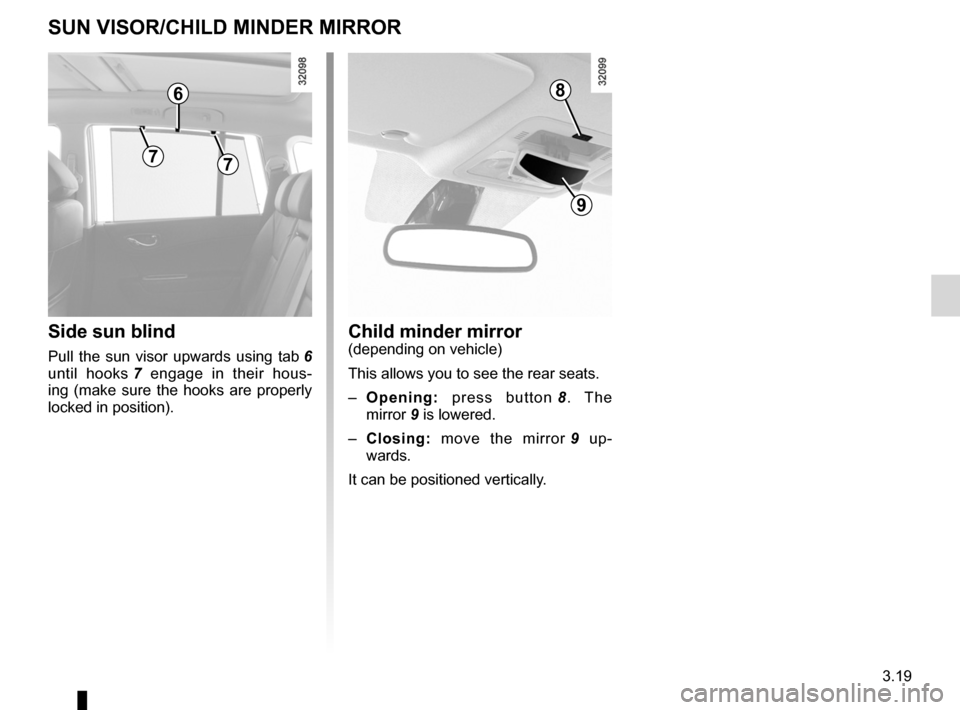
child minder mirror ................................................. (current page)
3.19
ENG_UD20988_4
Pare-soleil/Miroir de communication (X45 - H45 - Renault)
ENG_NU_977-2_H45_Ph2_Renault_3
Child minder mirror
SuN VISoR/chIlD MINDER MIRRoR
child minder mirror(depending on vehicle)
This allows you to see the rear seats.
– opening: press button 8 . The
mirror 9 is lowered.
– closing: move the mirror 9 up -
wards.
It can be positioned vertically.Side sun blind
Pull the sun visor upwards using tab 6
until hooks 7 engage in their hous -
ing (make sure the hooks are properly
locked in position).
8
9
6
77