2012 RENAULT ESPACE lights
[x] Cancel search: lightsPage 74 of 267

warning buzzer ...................................................... (current page)
lights: fog lights .......................................................... (current page)
lights: main beam headlights ...................................... (current page)
1.68
ENG_UD20353_1
Eclairage et signalisation extérieure (X81 - J81 - Renault)
ENG_NU_932-3_X81ph3_Renault_1
Jaune NoirNoir texte
eXTerIOr LIGHTInG and sIGnaLs (2/3)
áMain beam headlights
With the dipped beam head -
lights lit, pull the switch stalk towards
you.
When the main beam headlights are
lit, an indicator light on the instrument
panel comes on.
To return to the dipped beam headlight
position, pull the stalk towards you.
eswitching off the lights
Return stalk 1 to its original po-
sition.
see-me-home lighting
function
This function (useful, for example, for
opening a gate, a garage, etc.) ena -
bles you briefly to switch on the dipped
beam headlights momentarily.
With the ignition off and the RENAULT
card removed from the reader , pull
stalk 1 towards you: the dipped beam
headlights come on for approximately
thirty seconds.
This action may be carried out no more
than four times for a maximum lighting
period of two minutes.
switching off the function
To switch the function off, press
button 4.
Lights-on warning buzzer
A warning buzzer will sound when the
driver’s door is opened and the lights
are left on after the ignition has been
switched off (to prevent discharge of
the battery etc.).
Before driving at night:
check the electrical equip -
ment is operating correctly,
and depending on the ve -
hicle, adjust your headlights (if your
vehicle is not carrying its normal
load).
As a general precaution, check that
the lights are not obscured (by dirt,
mud, snow or objects which could
cover them).
1
4
Page 75 of 267

fog lights ................................................................ (current page)
JauneNoirNoir texte
1.69
ENG_UD20353_1
Eclairage et signalisation extérieure (X81 - J81 - Renault)
ENG_NU_932-3_X81ph3_Renault_1
eXTerIOr LIGHTInG and sIGnaLs (3/3)
gfront fog lights
With the lights on, turn centre
ring 5 on the stalk until the symbol
faces mark 6.
An indicator light on the instrument
panel then lights up.hrear fog lights
With the lights on, turn
centre ring 5 on the stalk until the
symbol faces mark 6.
An indicator light on the instrument
panel then lights up.
To avoid inconveniencing other road
users, remember to switch off the rear
fog light when it is no longer needed.
The front and rear fog lights switch off
when the exterior lights are switched
off.
special case
Using the front and/or rear fog
lights when automatic operation
of dipped headlights is activated.
Turning on the fog lights
It is necessary to select the dipped
headlights position before setting
centre ring 6 in fog lights position.
Turning off the fog lights
Bring the centre ring 6 back to posi-
tion 0 and turn the end of the stalk 1
from the dipped beam headlight po-
sition to position 0 to switch auto -
matic operation of the dipped beam
headlights back on.
5
56
Page 76 of 267

lights:adjusting ......................................... (up to the end of the DU)
lights adjustment ...................................... (up to the end of the DU)
headlight beam adjustment .................. (up to the end of the DU)
signals and lights .................................. (up to the end of the DU)
1.70
ENG_UD1771_1
Réglage électrique de la hauteur des faisceaux (X81 - Renault)
ENG_NU_932-3_X81ph3_Renault_1
Réglage des projecteurs
eLecTrIc BeaM HeIGHT adJUsTMenT
On equipped vehicles, control A allows
you to adjust the height of the beams
according to the load.
Turn control A downwards to lower the
headlights and upwards to raise them.
Adjustment is automatic on other ver -
sions.
examples of the adjustment position of control A
standard chassis Long chassis
5 seater 7 seater5 seater7 seater
driver alone or with front
passenger 0
000
driver with a front passenger
and passengers in the rear 1
111
driver with a front passenger,
all rear passengers 2
222
driver with a front passenger,
all rear passengers and
luggage 3
333
driver with luggage or load
reaching the maximum
permissible all-up weight 4
444
a
Page 78 of 267

1.72
ENG_UD20355_1
Essuie-vitre/lave-vitre avant (X81 - J81 - Renault)
ENG_NU_932-3_X81ph3_Renault_1
WIndscreen W asH/WIPe (2/2)
Windscreen washer,
headlight washers
With the ignition on, pull stalk 1 towards
you.
– Headlights off
The windscreen washer will be acti-
vated.
– Headlights on
The headlight washers will be acti -
vated at the same time.
1
a
Before washing the vehicle,
bring the stalk to position A
(park) to avoid the risk of
damage to the blades when
automatic wiping is activated.Before any action involving
the windscreen (washing
the vehicle, de-icing, clean -
ing the windscreen, etc.)
return stalk 1 to position a (park).
Risk of injury and/or damage.
When working in the engine
compartment, ensure that
the windscreen wiper stalk
is in the park position.
Risk of injury.
In frosty weather, make sure that
the wiper blades are not stuck by ice
(risk of motor overheating).
If the wipers do not work, contact an
approved dealer.
Keep an eye on the condition of the
blades. Replace the wiper blades as
soon as they begin to lose efficiency
(approximately once a year).
Page 81 of 267

JauneNoirNoir texte
1.75
ENG_UD24089_2
Réservoir à carburant (X81 - J81 - Renault)
ENG_NU_932-3_X81ph3_Renault_1
Vehicles running on ethanol -
based fuel
It is essential to use unleaded petrol or
fuel containing a maximum of 85% eth-
anol (E85).
In very cold conditions, it may be very
difficult or even impossible to start the
engine. To avoid this problem, use un-
leaded petrol or, on equipped vehicles,
use the heater integrated in the engine:
connect the special end of the exten -
sion piece supplied into the socket in -
tegrated into the radiator grille and the
other end into a 220V socket for at least
6 hours before starting.
nB: you may notice an increase in fuel
consumption with this type of fuel.
fUeL T anK (2/3)
filling with fuel
Insert the nozzle to open valve B and
insert it fully before turning it on to fill
the fuel tank (risk of splashing).
Keep the nozzle in this position through -
out the entire filling operation.
When the pump cuts out automatically
at the end of the filling procedure, a
maximum of two further filling attempts
may be made, as there must be suffi -
cient space in the fuel tank to allow for
expansion.
Make sure that no water enters the fuel
tank during filling. Valve B and its sur-
round must remain clean.
Petrol versions
Using leaded petrol will damage the
antipollution system and may lead to a
loss of warranty.
To ensure that the fuel tank is not filled
with leaded petrol, the fuel tank filler
neck contains a restrictor fitted with a
foolproof system which only allows
the nozzle for unleaded petrol to be
used (at the pump).
No modifications what -
soever are permitted on
any part of the fuel supply
system (electronic unit,
wiring, fuel circuit, injector, protec -
tive covers, etc.) as this may be
dangerous (unless undertaken by
qualified Network personnel).
Persistent smell of
fuel
If you notice a persistent
smell of fuel you should:
– stop the vehicle as soon as traf-
fic conditions allow and switch off
the ignition;
– switch on the hazard warning
lights and ask your passengers
to leave the vehicle and to keep
away from traffic;
– contact an approved Dealer.
Do not mix even small
amounts of petrol (un -
leaded or E85) with diesel.
Do not use ethanol-based
fuel if your vehicle is not compatible
with this fuel.
Do not add any additives to the fuel,
you risk damaging the engine.
Page 86 of 267

2.4
ENG_UD25550_3
Démarrage/arrêt moteur avec carte RENAULT mains libres (X81 - J81 - Renault)
ENG_NU_932-3_X81ph3_Renault_2
Jaune NoirNoir texte
STARTING/STOPPING THE ENGINE (2/3)
Limited use
– When the engine is running, a ve -
hicle door is open and the card is
outside the vehicle (for example
when the driver gets out to open the
garage door): the engine continues
to run.
– When the engine is running, the ve-
hicle doors are closed and the card
is outside the vehicle (for example
when a passenger leaves the ve -
hicle and takes the RENAULT card
with them): the message “card not
detected” appears on the instrument
panel. The warning light flashes on
emergency card reader 3 and a beep
sounds when the vehicle is restarted
to warn you.
– The RENAULT card's operation
may be affected by interference
from nearby devices, such as exte -
rior installations or equipment oper -
ating on the same frequency as the
RENAULT card.
When you leave your vehi -
cle, especially if you have
your RENAULT card with
you, check that the engine
is completely switched off.
Hands-Free mode operating
fault
Warning light 2 and card reader 3 flash.
With the RENAULT card fully inserted in
card reader 3 (until the steering column
is heard to unlock), button 1 lights up
to confirm the engine is authorised to
start: press button 1 briefly to start the
vehicle. Note: button
1 is off if you are not in a
position to start (e.g. diesel preheating,
gear selected etc.).
In both cases, the pedal must be de -
pressed throughout the engine starting
phase.
Special circumstances
In some cases it will be necessary to
move the steering wheel while pressing
button 1 to unlock the steering column.
23
1
Page 90 of 267

parking brake ........................................ (up to the end of the DU)
driving ................................................... (up to the end of the DU)
2.8
ENG_UD20366_1
Frein de parking assisté (X81 - J81 - Renault)
ENG_NU_932-3_X81ph3_Renault_2
Jaune NoirNoir texte
Electronic parking brake
ASSISTED PARKING BRAKE
Applying the assisted
parking brake
Manual mode
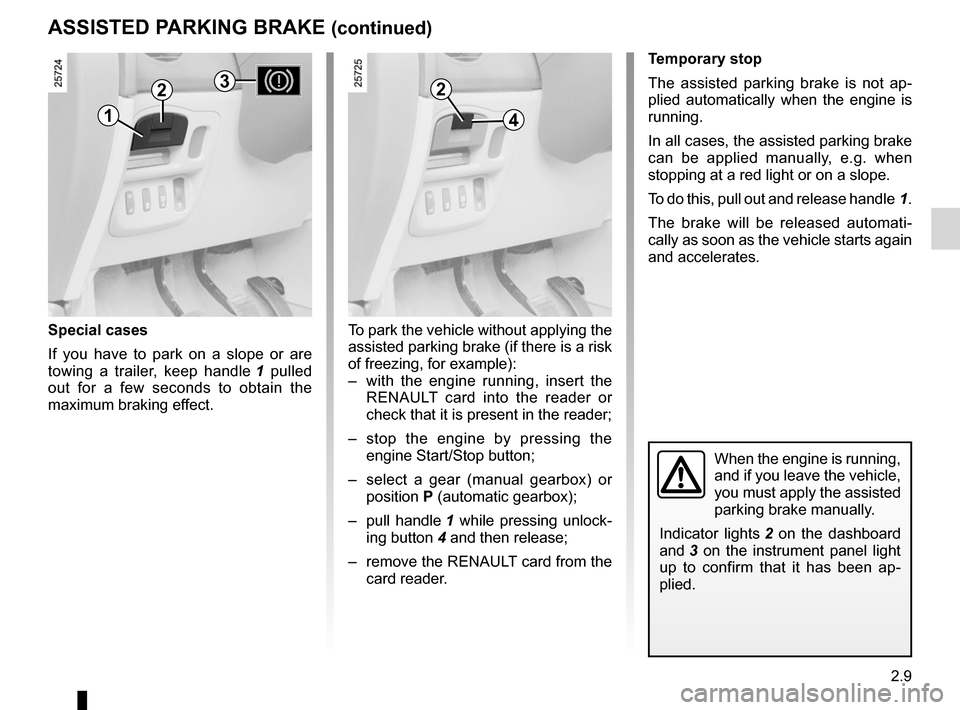
Pull out and release handle 1.
Automatic mode
(depending on country)
The electronic parking brake ensures
automatic vehicle immobilisation when
the engine is stopped by pressing
the engine start/stop button.
In all other instances, e.g. engine stall-
ing, the assisted parking brake is not
applied automatically. Manual mode
must be used.
Indicator light 2 on the dashboard and
indicator light 3 on the instrument panel
light up to confirm that the assisted
parking brake is applied. Indicator
lights 3 and 2 go out when the doors
are locked. Depending on the vehicle,
the “parking brake applied” message
may appear on the instrument panel.
Note:
When the driver’s door is opened, if the
assisted parking brake is not applied,
a beep will sound and, depending on
the vehicle, the message “apply park -
ing brake” appears on the instrument
panel, in this case, to immobilise the ve-
hicle; you must then release handle 1.
For some country-specific versions, the
automatic application function is not
activated. Refer to the information on
“manual mode”.
Releasing the assisted
parking brake
Manual mode
To release the assisted parking brake:
with the engine running, pull handle 1
while pressing unlocking button 4 and
release. Indicator lights 3 and 2 go out.
Automatic mode
The brake will be released automati -
cally as soon as the vehicle starts and
accelerates.
Before leaving the vehi -
cle, check that the assisted
parking brake is fully ap -
plied.
Indicator lights 2 on the dashboard
and 3 on the instrument panel light
up to confirm that it has been ap -
plied.
1
22
4
3
Page 91 of 267
JauneNoirNoir texte
2.9
ENG_UD20366_1
Frein de parking assisté (X81 - J81 - Renault)
ENG_NU_932-3_X81ph3_Renault_2
ASSISTED PARKING BRAKE (continued)
Special cases
If you have to park on a slope or are
towing a trailer, keep handle 1 pulled
out for a few seconds to obtain the
maximum braking effect.
Temporary stop
The assisted parking brake is not ap -
plied automatically when the engine is
running.
In all cases, the assisted parking brake
can be applied manually, e.g. when
stopping at a red light or on a slope.
To do this, pull out and release handle 1.
The brake will be released automati -
cally as soon as the vehicle starts again
and accelerates.
When the engine is running,
and if you leave the vehicle,
you must apply the assisted
parking brake manually.
Indicator lights 2 on the dashboard
and 3 on the instrument panel light
up to confirm that it has been ap -
plied.
To park the vehicle without applying the
assisted parking brake (if there is a risk
of freezing, for example):
– with the engine running, insert the
RENAULT card into the reader or
check that it is present in the reader;
– stop the engine by pressing the
engine Start/Stop button;
– select a gear (manual gearbox) or
position P (automatic gearbox);
– pull handle 1 while pressing unlock-
ing button 4 and then release;
– remove the RENAULT card from the
card reader.
2
41
23