Page 36 of 336
34
Oil level correct
This is indicated by the fl ashing of "OIL"
or an alert message in the
instrument panel, accompanied by illumination of the service warning
lamp and an audible signal.
If the lack of oil is confi rmed by a check using the dipstick, it is essential
that the level is topped up to prevent damage to the engine.
This is indicated by the fl ashing of "OIL--"
or the appearance of an alert
message in the instrument panel. Contact a PEUGEOT dealer or a
qualifi ed workshop.
Lack of oil
Oil level indicator fault
Dipstick
Refer to the "Checks" section to locate the dipstick and the oil fi ller cap
on your engine.
There are 2 marks on the dipstick:
- A
= max; never exceed this level (risk of damage
to the engine),
- B
= min; top up the level via the oil fi ller cap, using
the correct grade of oil for your engine.
Page 39 of 336

1/
INSTRUMENTS and CONTROLS
MANUAL CHECK
This function allows you to check the status of the vehicle (reminder of
the active alert warnings) and the service information.
)
With the engine running, to start a manual check, briefl y press the
"CHECK/000"
button on the instrument panel.
If no faults have been detected, "CHECK OK"
appears in the
instrument panel central screen.
If a "minor" fault has been detected, the warning lamp concerned then
"CHECK OK"
appear in the instrument panel central screen. Contact a
PEUGEOT or a qualifi ed workshop.
If a "major" fault has been detected, only the warning lamps concerned
appear in the instrument panel central screen. Have it checked by a
PEUGEOT dealer or a qualifi ed workshop.
DISTANCE RECORDERS
The total and trip distances are displayed for thirty seconds when the
ignition is switched off, when the driver's door is opened and when the
vehicle is locked or unlocked.
Measures the total distance travelled by the vehicle since its fi rst
registration.
Total distance recorder
)
With the ignition on, press and hold this button until zeros appear.
Trip distance recorder
Measures the distance travelled since it was last reset to zero by the
driver.
Page 44 of 336

42
MONOCHROME SCREEN C (WITH
PEUGEOT CONNECT SOUND (RD5))
DISPLAYS IN THE SCREEN
This displays the following information:
- time,
- date,
- ambient temperature (this fl ashes if there is a risk of ice),
- state of the openings (doors, boot...),
- visual parking sensors.
- audio functions,
- telephone information and directories.
Warning messages (e.g.: "Emission control system faulty") or
information messages (e.g.: "Automatic lighting of headlamps
activated") may appear temporarily. These can be cleared by pressing
the "Back"
button.
CONTROLS
From the control panel of your Peugeot Connect Sound (RD5), you can:
)
press the "MENU"
button for access to the main menu
,
)
press the " �
" or " �
" buttons to scroll through the items on the
screen,
)
press the "MODE"
button to change the permanent application
(audio source, telephone...),
)
press the " �
" or " �
" buttons to change a setting value,
)
press the "OK"
button to confi rm,
or
)
press the "Back"
button to abandon the operation in progress.
Page 45 of 336

1/
INSTRUMENTS and CONTROLS
MAIN MENU
)
Press the "MENU"
button to gain access to the main menu
:
- audio functions,
- vehicle diagnostics,
- personalisation-confi guration,
- telephone (Bluetooth system).
)
Press the " �
" or " �
" buttons to select the menu required, then
confi rm by pressing the "OK"
button.
"AUDIO FUNCTIONS" MENU
With the Peugeot Connect Sound (RD5) switched on, once this menu
has been selected you can activate or deactivate the functions linked
with use of the radio (RDS, REG, RadioText) or the CD (introscan,
shuffl e, CD repeat).
For more information on the "Audio functions" application, refer to the
Peugeot Connect Sound (RD5) section.
"DIAGNOSIS VEHICLE" MENU
Once this menu has been selected, you can consult information
concerning the status of the vehicle.
Alert log
This summarises the active warning messages, displaying them in
succession on the multifunction screen.
)
On the " Diagnosis vehicle
" menu, select the following application:
)
Press the "MENU"
button to gain access to the main menu.
)
Press the arrows, then the "OK"
button to select the " Diagnosis
vehicle
" menu.
Page 52 of 336
50
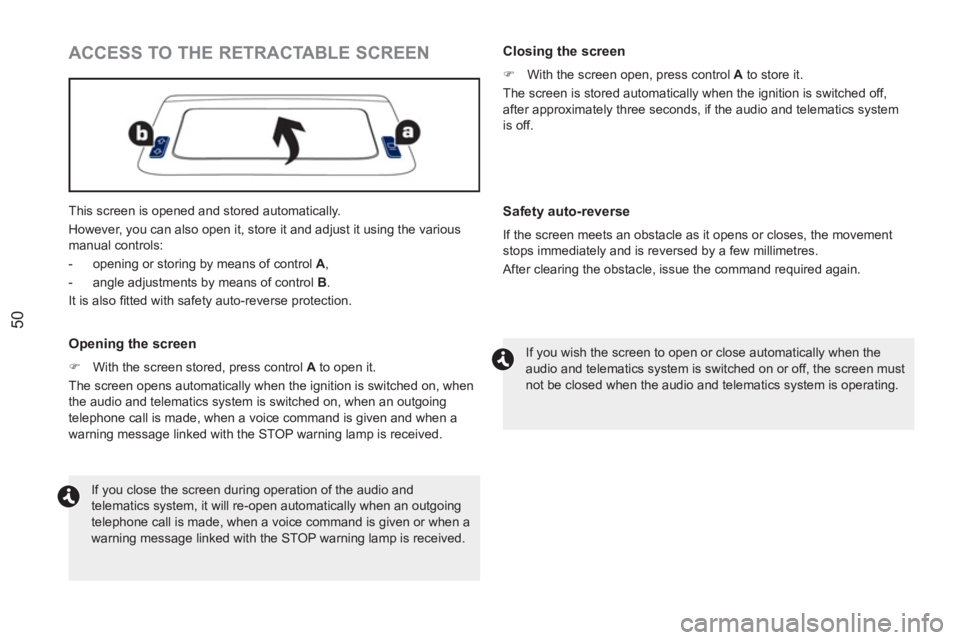
This screen is opened and stored automatically.
However, you can also open it, store it and adjust it using the various
manual controls:
- opening or storing by means of control A
,
- angle adjustments by means of control B
.
It is also fi tted with safety auto-reverse protection.
ACCESS TO THE RETRACTABLE SCREEN
Opening the screen
)
With the screen stored, press control A
to open it.
The screen opens automatically when the ignition is switched on, when
the audio and telematics system is switched on, when an outgoing
telephone call is made, when a voice command is given and when a
warning message linked with the STOP warning lamp is received.
Closing the screen
)
With the screen open, press control A
to store it.
The screen is stored automatically when the ignition is switched off,
after approximately three seconds, if the audio and telematics system
is off.
If you close the screen during operation of the audio and
telematics system, it will re-open automatically when an outgoing
telephone call is made, when a voice command is given or when a
warning message linked with the STOP warning lamp is received. If you wish the screen to open or close automatically when the
audio and telematics system is switched on or off, the screen must
not be closed when the audio and telematics system is operating.
Safety auto-reverse
If the screen meets an obstacle as it opens or closes, the movement
stops immediately and is reversed by a few millimetres.
After clearing the obstacle, issue the command required again.
Page 56 of 336

54
Folding the key
)
First press this button to fold the key.
LOCATING YOUR VEHICLE
REMOTE CONTROL PROBLEM
Following disconnection of the vehicle battery, replacement of the
remote control battery or in the event of a remote control malfunction,
you can no longer unlock, lock or locate your vehicle.
)
First of all, use the key in the lock to unlock or lock your vehicle.
)
Then, reinitialise the remote control.
If the problem persists, contact a PEUGEOT dealer as soon as
possible.
Reinitialisation
)
Switch off the ignition.
)
Turn the key to position 2 (Ignition on)
.
)
Press the closed padlock immediately for a few seconds.
)
Switch off the ignition and remove the key from the ignition switch.
The remote control is fully operational again.
Changing the battery
Battery ref.: CR1620 / 3 volts.
If the battery is fl at, you are informed by illumination of this
warning lamp, accompanied by an audible signal and an alert
message in the screen.
)
Unclip the casing using a coin at the notch.
)
Slide the fl at battery out of its location.
)
Slide the new battery into its location observing the original
direction.
)
Clip the casing.
)
Reinitialise the remote control.
This function allows you to identify your vehicle from a
distance, particularly in poor light. Your vehicle must be
locked.
)
Press the closed padlock on the remote control.
This will switch on the courtesy lamps and the direction indicators will
fl ash for a few seconds.
Page 64 of 336
62
CLOSING
The window rises automatically after a few seconds and adjusts to
provide perfect sealing when closed.
- when the engine is running
, this warning lamp comes on,
accompanied by a message in the screen for a few seconds,
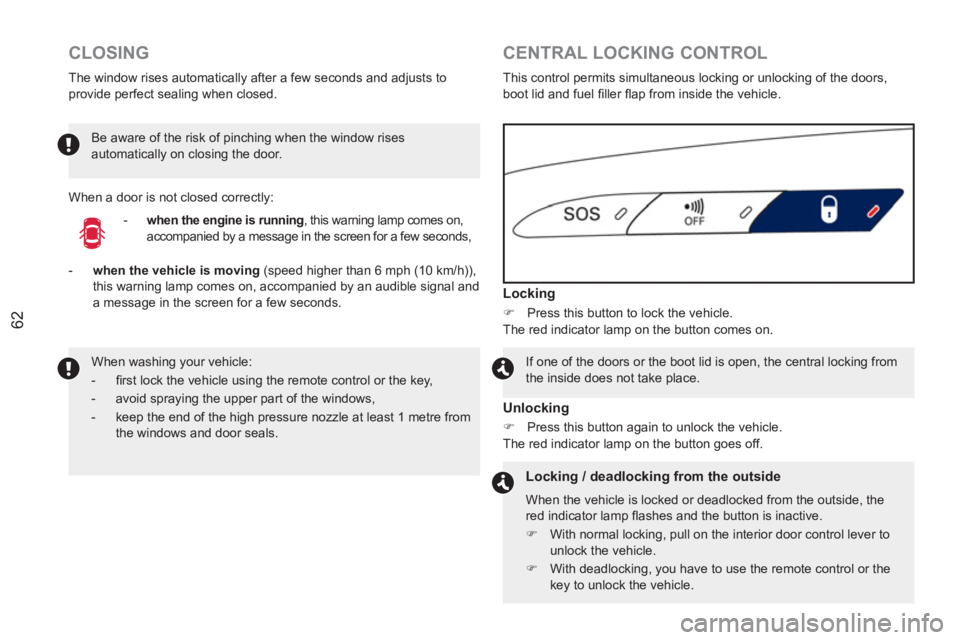
CENTRAL LOCKING CONTROL
This control permits simultaneous locking or unlocking of the doors,
boot lid and fuel fi ller fl ap from inside the vehicle.
Locking
)
Press this button to lock the vehicle.
The red indicator lamp on the button comes on.
If one of the doors or the boot lid is open, the central locking from
the inside does not take place.
Unlocking
)
Press this button again to unlock the vehicle.
The red indicator lamp on the button goes off.
Locking / deadlocking from the outside
When the vehicle is locked or deadlocked from the outside, the
red indicator lamp fl ashes and the button is inactive.
)
With normal locking, pull on the interior door control lever to
unlock the vehicle.
)
With deadlocking, you have to use the remote control or the
key to unlock the vehicle.
When washing your vehicle:
- fi rst lock the vehicle using the remote control or the key,
- avoid spraying the upper part of the windows,
- keep the end of the high pressure nozzle at least 1 metre from
the windows and door seals.
When a door is not closed correctly: Be aware of the risk of pinching when the window rises
automatically on closing the door.
- when the vehicle is moving
(speed higher than 6 mph (10 km/h)),
this warning lamp comes on, accompanied by an audible signal and
a message in the screen for a few seconds.
Page 66 of 336
64
BOOT
OPENING
)
Press this button for more than two seconds to unlock
the boot lid. The boot lid opens slightly.
)
Lift the boot lid.
This action also unlocks the doors and the fuel fi ller fl ap.
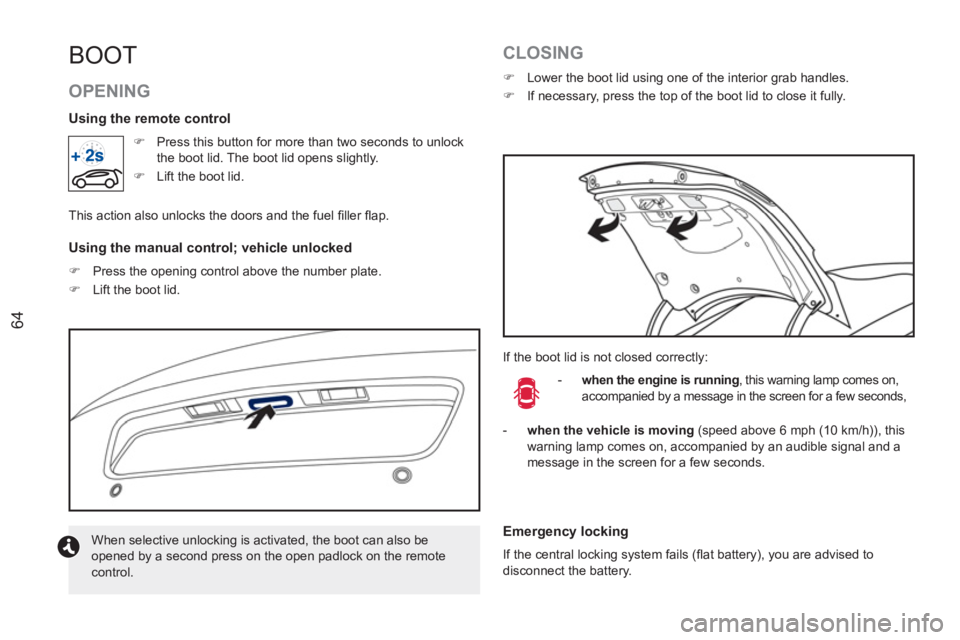
Using the manual control; vehicle unlocked
)
Press the opening control above the number plate.
)
Lift the boot lid.
CLOSING
)
Lower the boot lid using one of the interior grab handles.
)
If necessary, press the top of the boot lid to close it fully.
If the boot lid is not closed correctly:
- when the engine is running
, this warning lamp comes on,
accompanied by a message in the screen for a few seconds,
When selective unlocking is activated, the boot can also be
opened by a second press on the open padlock on the remote
control.
Using the remote control
Emergency locking
If the central locking system fails (fl at battery), you are advised to
disconnect the battery.
- when the vehicle is moving
(speed above 6 mph (10 km/h)), this
warning lamp comes on, accompanied by an audible signal and a
message in the screen for a few seconds.
