Page 4 of 208

2
Contents
Key 17
Remote control 17
Doors 20
Rear roof fl ap 24
Tailgate 25
Central locking 26
Instrument panel 27
Adjusting the time 28
Warning lamps 29
Fuel gauge 35
Coolant 35
Tyre under-infl ation
detection 36
Service indicator 37
Lighting rheostat 38
Gearbox 39
Gear shift indicator 39
6-speed electronic
gearbox system 40
Steering wheel
adjustment 42
Stop & Start 43
Starting and stopping 46
Hill start assist 47
Lighting
control 48
wipers 51
Cruise control 53
Speed limiter 56
Heating/Manual
air conditioning 59
automatic 61
De-icing and demisting 63
Front seats 65
Individual passenger
seat 66
Multi-Flex bench seat 67
Confi gurations 69
Front fi ttings 70
Courtesy lights 72
Crew cab 73
Load space 75
Roof bars 77
Mirrors 78
Toll cards/car park
tickets 79
Electric windows 80
Presentation4
Exterior 6
Instruments and controls8
Centre console9
Sitting comfortably 10
Seeing clearly 11
Driving safely 11
Cab space 12
Load space 13
Ventilation 14
Eco-driving 15
Hazard warning lamps 81
Parking brake 81
Parking sensors 82
Anti-lock braking
system (ABS) 84
Emergency braking
assistance 84
Traction control (ASR) and
stability control (ESP)85
"Grip control" 86
Seat belts 89
Airbags 91
Passenger airbag
deactivation 94
Child seats 95
Recommended seats 97
Installing child seats
using the seat belt 98
2. READY TO SET OFF
17-47
4. SAFETY
81-99
1. FAMILIARISATION
4-16
3. EASE OF USE and
COMFORT 48-80
Page 11 of 208
4
2
9
9
1
FAMILIARISATION
Interior
CENTRE CONSOLE
1.
Switch panel: electric
windows.
2.
Switch panel: hazard warning
lamps, central locking
(passenger compartment, load
space).
3.
Cigarette lighter.
4.
Heating-ventilation
controls.
5.
Storage compartment.
86
6.
Grip Control.
7.
Audio system.
8.
Screen.
40
9.1
10.
Emergency or
assistance call.
9.
Electronic
gearbox gear
selector
Page 14 of 208
33
3
3
12
Interior
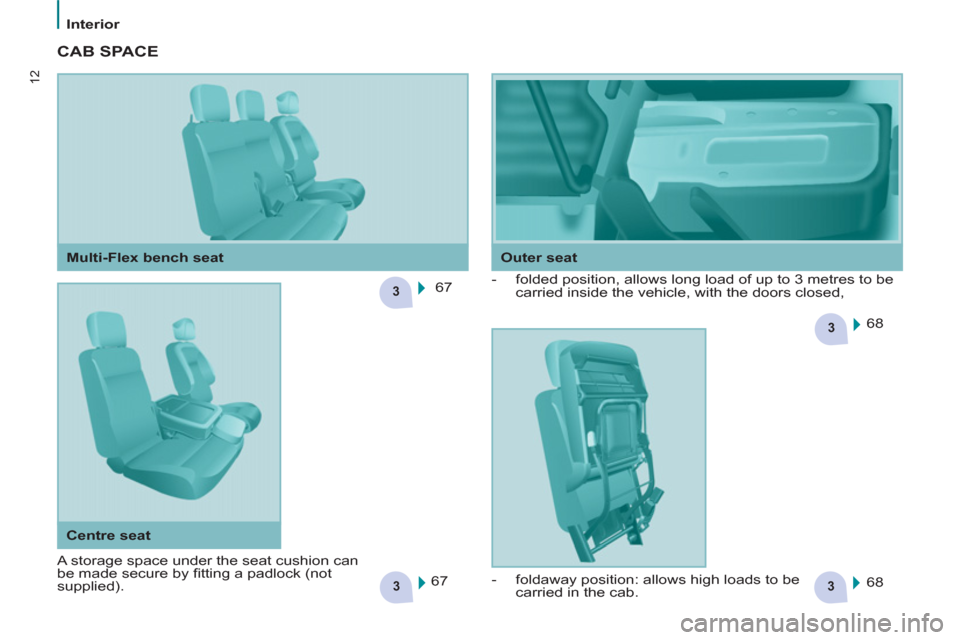
CAB SPACE
67
68
68
- folded position, allows long load of up to 3 metres to be
carried inside the vehicle, with the doors closed,
67
Outer seat
Multi-Flex bench seat
Centre seat
A storage space under the seat cushion can
be made secure by fi tting a padlock (not
supplied).
- foldaway position: allows high loads to be
carried in the cab.
Page 19 of 208

17
READY TO SET OFF
2
Access
KEY
This locks and unlocks the doors on
the vehicle, opens and closes the
fuel fi ller cap, as well as starting and
stopping the engine.
ACCESS
Security of use
REMOTE CONTROL
Unlocking
Unlocking the load space
Central locking
Press this button to lock the
vehicle completely.
The direction indicators fl ash once.
If one of the doors is open
(transportation of long loads) or is not
closed correctly, the central locking will
not work.
Deadlocking
A second press
on the closed
padlock on the remote control within
fi ve seconds after locking changes the
locking to deadlocking.
This is confi rmed by fi xed lighting
of the direction indicators for
approximately two seconds.
Deadlocking renders the exterior
and interior door opening handles
inoperative: do not leave anyone inside
the vehicle when it is deadlocked.
If deadlocking is activated from inside
the vehicle using the remote control,
it will change to normal locking when
the vehicle is started. To unlock the load space only:
Press this control to unlock
the load space, the front
doors alone remain locked. Press this control to lock the
vehicle completely. Press this button to unlock all
of the rear doors.
Press this button once to
unlock the front doors.
Press this button again
to unlock your vehicle
completely.
The direction indicators fl ash twice.
Page 20 of 208

18
Access
Good practice
Take care not to allow the remote
control to come into contact with
grease, dust, rain or a damp
environment.
A heavy object attached to the key
(keyring, ...) weighing on the shaft of
the key in the switch, may cause a
malfunction.
REMOTE CONTROL
Reinitialising the remote control
Following changing of the remote
control battery or disconnection of the
vehicle battery, the remote control may
have to be reinitialised.
Wait at least one minute before using
the remote control.
Insert the key in the ignition switch with
the buttons (padlocks) of the remote
control facing you.
Switch on the ignition.
Press the locking padlock for at
least fi ve seconds within the next
ten seconds.
Switch off the ignition.
Wait at least one minute before using
the remote control.
The remote control is now working
again. Use only identical batteries or
batteries of an equivalent type to those
recommended by PEUGEOT dealers.
Do not discard the remote control
batteries, they contain metals which
are harmful to the environment.
Deposit them at a PEUGEOT
dealership, or at an authorised
collection point.
Folding/unfolding the key
Changing the battery
Battery ref.: CR1620 / 3 volts.
The "battery fl at" information is given
by an audible signal, accompanied by
a message in the screen.
To replace the battery, unclip the
casing using a coin at the ring.
If the remote control does not work
after the battery has been changed,
reinitialise the remote control.
There is a risk of damage if the
replacement battery is not the
correct type Press this button to release
the key from its housing.
To fold the key, press this
chromed button then fold
the key into the housing.
If you do not press the button, the
mechanism may be damaged.
Page 21 of 208

19
READY TO SET OFF
2
Access
When purchasing a second-hand
vehicle:
- have the keys memorised by a
PEUGEOT dealer to ensure that
the keys in your possession are
the only ones which can start the
vehicle.
ELECTRONIC
IMMOBILISER
All of the keys contain an electronic
immobiliser device.
This device locks the engine supply
system. It is activated automatically
when the key is removed from the
ignition.
After the ignition is switched on, a
dialogue is established between the key
and the electronic immobiliser system.
The metal part of the key must be
unfolded correctly for correct dialogue
to take place.
If you lose your keys
Visit a PEUGEOT dealer with the
vehicle's V5 registration document and
your identifi cation document.
A PEUGEOT dealer will be able
to retrieve the key code and
the transponder code so that a
replacement key can be ordered.
Good practice
Do not make any modifi cations to the
electronic immobiliser system.
Operating the remote control, even
when it is in your pocket, may result in
involuntary unlocking of the doors.
The simultaneous use of other
high frequency equipment (mobile
telephones, domestic alarms…), may
interfere with the operation of the
remote control temporarily.
The remote control does not operate
while the key is in the ignition, even if
the ignition is off.
When leaving the vehicle, check that
the lamps are off and nothing of value
is visible.
As a safety precaution (with children
on board), remove the key from the
ignition when leaving the vehicle, even
for a short time.
Page 22 of 208
20
Access
FRONT DOORS
From the inside
Use the door opening control to unlock
and open the door concerned.
From the outside
Use the remote control to lock/unlock
the vehicle.
Insert the metal part of the key in the
lock on the driver's side if the remote
control does not work.
Page 23 of 208

21
READY TO SET OFF
2
Access
From the inside
Unlock and open the side door using
this handle, guiding the rearward
sliding to the point of resistance. Pass
this point to hold the door open.
Good practice
Take care not to block the guide space
on the fl oor to allow the door to slide
correctly.
If your vehicle is parked on a slope,
guide the sliding of the side door. In
fact, the door could open or close more
rapidly due to the slope of the ground
and could cause injury.
For safety and operation reasons, do
not drive with the sliding side door open.
From the outside
Pull the handle towards you then
towards the rear and open the side
door, guiding the rearward sliding to
beyond the point of resistance to hold
it open.
Operation in the event of a
battery failure
Front and side passenger doors
In the event of a battery or of the
central locking fault, use the lock to
lock the doors mechanically.
- To open the door and get out of the
vehicle, pull the interior control.
- To lock the door, insert the key in
the lock, located on the edge of the
door, then turn it one eighth of a
turn
.
Driver's door
- Insert the key in the lock, then turn
it to the right to lock or to the left to
unlock.