2012 Peugeot Partner set time
[x] Cancel search: set timePage 39 of 208

Instruments and controls
37
READY TO SET OFF
22
SERVICE INDICATOR
This programmes service intervals
according to the use of the vehicle.
More than 1 000 miles/km before the
next service is due
Example:
4 800 miles/km remain
before the next service is due. When
the ignition is switched on and for a
few seconds, the screen shows:
A few seconds after the ignition is
switched on, the oil level is displayed,
then the total distance recorder
resumes normal operation showing the
total and trip distances.
Less than 1 000 miles/km before the
next service is due
Each time the ignition is switched on
and for a few seconds, the spanner
fl ashes and the number of miles/
kilometres remaining is displayed: A few seconds after the ignition is
switched on, the oil level is displayed,
then the total distance recorder
resumes normal operation and the
spanner remains on. This indicates that
a service should be carried out shortly.
Service overdue
First of the two terms reached: the
spanner also comes on if the two-year
interval has elapsed.
Operation
A few moments after the ignition
has been switched on, the spanner
indicating a service operation comes
on; the display for the total distance
recorder gives (in round fi gures) the
distance remaining before the next
service.
The points at which a service is due
are calculated from the last indicator
zero reset.
The point at which a service is due is
determined by two parameters:
- the distance travelled,
- the time which has elapsed since
the last service.
The distance remaining before the
next service may be weighted by
the time factor, depending on the
type of driving. With the engine running the
spanner remains on until the
service has been carried out. Each time the ignition is
switched on and for a few
seconds, the spanner
fl ashes and the excess
distance is displayed.
Page 41 of 208

Gearbox and steering wheel
39
READY TO SET OFF
22
GEARBOX
5-speed gearbox
To change gear easily, always press
the clutch pedal fully.
To prevent the mat from becoming
caught under the pedal:
- ensure that the mat and its fi xings
on the fl oor are positioned correctly,
- never fi t one mat on top of another.
When driving, avoid leaving your hand
on the gear knob as the force exerted,
even if slight, may wear the internal
components of the gearbox over time.
Engaging 5 th
gear.
Push the gear lever fully to the right to
engage 5 th gear.
Gear shift indicator
In order to drive as fuel
effi ciently as possible with a
manual gearbox, this indicator
lamp indicates to the driver
when to change up.
The driver remains responsible for
deciding whether or not to follow this
indication, since the indicator lamp
comes on without taking into account
the confi guration of the road, the
amount of traffi c and safety factors.
The system cannot be deactivated.
When reverse gear is engaged
and when changing down whilst
decelerating, the function is not active.
Engaging reverse
To engage reverse gear, wait until the
vehicle is stationary then push the gear
lever to the right then back.
The lever should be moved slowly to
reduce the noise on engaging reverse
gear.
Page 45 of 208

43
Stop & Start
READY TO SET OFF
2
STOP & START
The Stop & Start system puts the
engine temporarily on standby - STOP
mode - during stops in the traffi c (red
lights, traffi c jams, or other...). The
engine restarts automatically - START
mode - as soon as you want to move
off. The restart takes place instantly,
quickly and silently.
Perfect for urban use, the Stop & Start
system reduces fuel consumption and
exhaust emissions as well as the noise
level when stationary.
Operation
Going into engine STOP mode
The "ECO"
warning lamp comes
on in the instrument panel and
the engine goes into standby:
- with a manual gearbox
, at speeds
below 12 mph (20 km/h), when you
put the gear lever into neutral and
release the clutch pedal,
- with the 6-speed electronic
gearbox
, at a speed below 5 mph
(8 km/h), when you press the brake
pedal or put the gear selector into
position N
. If your vehicle is fi tted with the system,
a time counter calculates the sum of
the periods in STOP mode during a
journey. It rests itself to zero every time
the ignition is switched on with the key.
With the automatic gearbox
system, for your comfort during
parking maoeuvres, STOP mode
is not available for a few seconds after
coming out of reverse gear.
STOP mode does not affect the
functionality of the vehicle, such as
braking, power steering, for example.
Never refuel with the engine in
STOP mode; you must switch off
the ignition with the key.
Special cases: STOP mode
unavailable
STOP mode is not invoked when:
- the driver's door is open,
- the driver's seat belt is not
fastened,
- the vehicle has not exceeded 6 mph
(10 km/h) since the last engine start
using the key,
- the parking brake is applied or
being applied,
- the engine is needed to maintain
a comfortable temperature in the
passenger compartment,
- demisting is active,
- some special conditions (battery
charge, engine temperature, braking
assistance, ambient temperature...)
where the engine is needed to
assure control of a system.
In this case, the "ECO"
warning lamp fl ashes for a
few seconds, then goes off.
This operation is perfectly normal.
Page 49 of 208

Starting and stopping
47
READY TO SET OFF
22
HILL START ASSIST
Operation
With the brake pedal and clutch pedal
pressed, from the time you release the
brake pedal you have approximately
2 seconds before the vehicle starts to
roll back and without using the parking
brake within which to move off.
During the moving off phase, the
function is deactivated automatically,
gradually releasing the braking
pressure. During this phase, the
characteristic noise of mechanical
release of the brakes may be heard,
indicating the imminent movement of
the vehicle.
Operating fault
Hill start assist is deactivated in the
following situations:
- when the clutch pedal is released,
- when the parking brake is applied,
- when the engine is switched off,
- when the engine stalls.
If a malfunction of the system
occurs, this warning lamp
comes on accompanied
by an audible signal and
confi rmed by a message
in the screen. Contact a PEUGEOT
dealer or a qualifi ed workshop to have
the system checked. This function, linked with the ESP,
makes hill starts easier and is activated
in the following conditions:
- the vehicle must be stationary,
engine running, foot on the brake,
- the gradient of the road must be
steeper than 5%,
- uphill, the gearbox must be in
neutral or in a gear other than
reverse,
- downhill, reverse gear must be
engaged.
The HHC (Hill Holder Control) or Hill
Start Assist function is a driving comfort
system. It is not an automatic vehicle
parking function or an automatic
parking brake.
Page 52 of 208

50
Steering mounted controls
If the sunshine sensor
does not function correctly
,
the lighting comes on
accompanied by the service
warning lamp, an audible
signal and a message in the screen.
Contact a PEUGEOT dealer or a
qualifi ed workshop.
Guide-me-home lighting
Keeping the dipped beam headlamps
on temporarily with the ignition off,
makes the driver's exit easier when the
light is poor.
HEADLAMP BEAM
Depending on the load in your vehicle,
the beam setting must be adjusted.
0 -
No load.
1 -
Partial load.
2 -
Average load.
3 -
Maximum authorised load.
Manual operation
- With the ignition off, "fl ash" the
headlamps within one minute after
switching off the ignition.
The guide-me-home lighting switches
off automatically after a set time.
Automatic operation
Refer to the "Screen menu map"
section of chapter 9.
Activate the function via the
vehicle confi guration menu.
Initial setting is position 0.
Cornering lighting
With dipped or main beam headlamps,
this function makes use of the beam
from a front foglamp to illuminate the
inside of a bend, when the vehicle
speed is below 25 mph (approximately
40 km/h) (urban driving, winding road,
intersections, parking manouevres...).
Switching on
This function starts:
- when the corresponding direction
indicator is switched on,
or
- from a certain angle of rotation of
the steering wheel.
Switching off
The system does not operate:
- below a certain angle of rotation of
the steering wheel,
- above 25 mph (40 km/h),
- when reverse gear is engaged,
Programming
The system is activated or deactivated
in the vehicle confi guration menu.
The system is activated by default.
Page 63 of 208
Ventilation
61
EASE OF USE and COMFOR
T
33
Good practice
For maximum cooling or heating of the
passenger compartment, it is possible
to exceed the value 15 by turning until
LO is displayed or the value 27 by
turning until HI is displayed.
On entering the vehicle, the inside
temperature may be much colder (or
warmer) than is comfortable. There is
no advantage in changing the value
displayed in order to quickly reach the
level of comfort required. The system
will use its maximum performance to
reach the comfort value set.
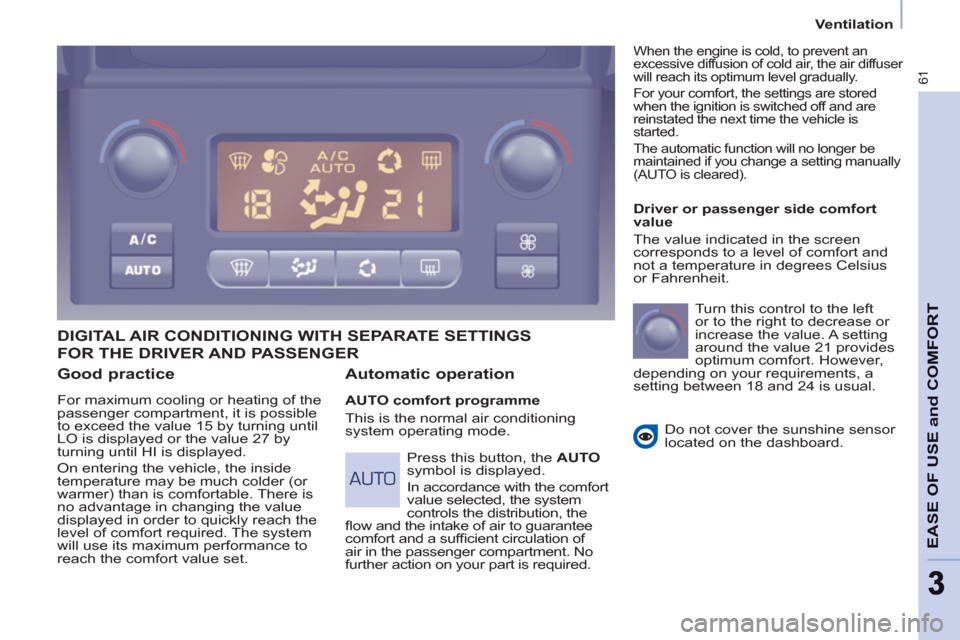
DIGITAL AIR CONDITIONING WITH SEPARATE SETTINGS
Automatic operation
AUTO comfort programme
This is the normal air conditioning
system operating mode.
Driver or passenger side comfort
value
The value indicated in the screen
corresponds to a level of comfort and
not a temperature in degrees Celsius
or Fahrenheit.
Turn this control to the left
or to the right to decrease or
increase the value. A setting
around the value 21 provides
optimum comfort. However,
depending on your requirements, a
setting between 18 and 24 is usual.
Do not cover the sunshine sensor
located on the dashboard.
Press this button, the AUTO
symbol is displayed.
In accordance with the comfort
value selected, the system
controls the distribution, the
fl ow and the intake of air to guarantee
comfort and a suffi cient circulation of
air in the passenger compartment. No
further action on your part is required.
When the engine is cold, to prevent an
excessive diffusion of cold air, the air diffuser
will reach its optimum level gradually.
For your comfort, the settings are stored
when the ignition is switched off and are
reinstated the next time the vehicle is
started.
The automatic function will no longer be
maintained if you change a setting manually
(AUTO is cleared).
FOR THE DRIVER AND PASSENGER
Page 64 of 208

Ventilation
62
Manual operation
You can, according to your
requirements, make a different selection
from that offered by the system by
changing a setting. The other functions
will still be controlled automatically.
Pressing the AUTO
button restores fully
automatic operation.
Air distribution
Pressing this button several
times in succession directs
the air fl ow towards:
- the windscreen,
- the windscreen and footwells,
- the footwells,
- the side vents, central vents and
footwells,
- the side vents and central vents.
Air fl ow
Press the small fan
button to
reduce the fl ow or the large
fan
button to increase the
fl ow.
On the display, the blades of the fan fi ll
when the fl ow is increased.
Switching the air
conditioning On/Off
Press this button, the A/C
symbol is displayed and the
air conditioning is activated.
Deactivating the system
Press the air fl ow small fan
button until the fan symbol
disappears from the display.
This action deactivates all of the
system's functions, with the exception
of the air recirculation and rear screen
demisting (if fi tted on your vehicle).
Your comfort setting is no longer
maintained and is switched off.
Intake of exterior air/
Recirculation of interior air
Press this button to
recirculate the interior air.
The recirculation symbol is
displayed.
For your comfort, do not
deactivate the system for
long periods. Pressing the
large fan
button or the AUTO
button reactivates the system
with the values set before it was
deactivated. Recirculation prevents exterior odours
and smoke from entering the passenger
compartment. Avoid prolonged operation
in interior air recirculation mode (risk of
condensation, odour and humidity).
Pressing this button again activates the
intake of exterior air.
Pressing this button again switches off
the air conditioning.
The ventilation outlet, located in
the glove box, diffuses cool air
(if the air conditioning is on)
regardless of the reference
temperature requested in the
passenger compartment and
regardless of the exterior temperature.
Page 146 of 208

03
9.6
GENERAL OPERATION
For a detailed global view of the menus available, refer to the"Screen menu map" section.
Press the M
ODE button several times in succession for access to the following menus:
For cleaning the screen, the use of a soft, non-abrasive cloth (spectacles cloth) is recommended, with no additional product.
RADIO/ MUSIC MEDIA PLAYERS
TELEPHONE
(If a conversation is in progress)
FULL SCREEN MA
P
NAVIGATION
(If guidance is in progress)
SETUP:
system language *
, date and time *
, display,
vehicle settings
* , unit and system settings, "Demo mode".
TRAFFIC:
TMC information and messages.
* Available accordin
g to model.
TRIP COMPUTER