2012 NISSAN NOTE automatic
[x] Cancel search: automaticPage 59 of 235

ward you once will activate the headlight for ap-
proximately 30 seconds. After that period of time, it
will automatically switch off.
It is possible to pull the headlight switch up to four
times to increase the lighting period up to 2 minutes.
NOTE
The “Friendly Lighting” function can be cancelled
by switching the ignition switch to the Acc or ON
position again.
Battery save function
The battery save feature prevents your vehicle from
discharging the battery after you have left the exter-
nal lights, map lamps or room lamps on (combina-
tion switch in the
orposition) when exiting
the vehicle. This occurs when the ignition switch or
ignition knob is in the “OFF” or LOCK position.
NOTE
The next time the engine is started the external
lights, map lamps or room lamp will come on
again
Battery save function for external lights:
If the ignition switch is turned to the “OFF” position
but the external lights are accidentally left on, the
external lights will automatically be switched off as
soon as the driver’s door is opened.
It is possible to leave the external lights on perma-
nently by switching them back on using the head-
light switch while the ignition switch is still in theLOCK or “OFF” position. In this case, the light re-
minder chime will sound when the driver’s door is
opened.
Battery save function for interior light:
The interior light will automatically be switched off
after approximately 15 minutes if it has been acci-
dentally left on.
TURN SIGNAL SWITCH
Lane change signal
To signal a lane change, move the lever up or downj1 to the point where lights begin flashing.
Direction indicator
Move the lever up or downj2 to indicate right or
left. When the turn is completed, the turn signal is
automatically cancelled.
FRONT FOG LIGHT (where fitted)
The front fog lights should only be used when visibil-
ity is seriously reduced – generally, to less than 100
m (328 ft).
Turn the headlight switch to the
orposi-
tion and turn the fog light switch to thepositionj1 . The front fog lights and indicator light will come
on. For additional information, see “Warning/indica-
tor lights and audible reminders” earlier in this sec-
tion.
To turn the front fog lights off, turn the fog light
switch to the OFF position.NIC1071Z
NIC1058Z
FOG LIGHT SWITCH
Instruments and controls2-17
Page 61 of 235

Push the switch on to warn other drivers when you
must stop or park under emergency conditions. All
direction indicator lights will flash.
The flasher can be actuated with the ignition switch
either in the “OFF” or ON position.To sound the horn, push the centre pad areaj1of
the steering wheel.The front seats are warmed by built-in heaters.
The switches are located on the centre console and
can be operated independently from each other (
jA
for the left-hand side seat,jB for the right-hand side
seat).
1. Turn the ignition switch to the ON position.
NOTE
The seat heater can only be activated when
the ignition switch is in the ON position.
2. Start the engine.
3. Push the
(Low/j1)or(High/j2)po-
sition of the switch, as desired, depending on the
temperature. The indicator light
j3 in the switch
will illuminate.
4. The seat heater is controlled by a thermostat,
automatically turning the heater on and off. The
indicator light
j2 will remain on as long as the
switch is on.
NIC1081ZNIC1074ZNIC1319Z
HAZARD WARNING FLASHER
SWITCHHORN SEAT HEATING (where fitted)
Instruments and controls2-19
Page 68 of 235
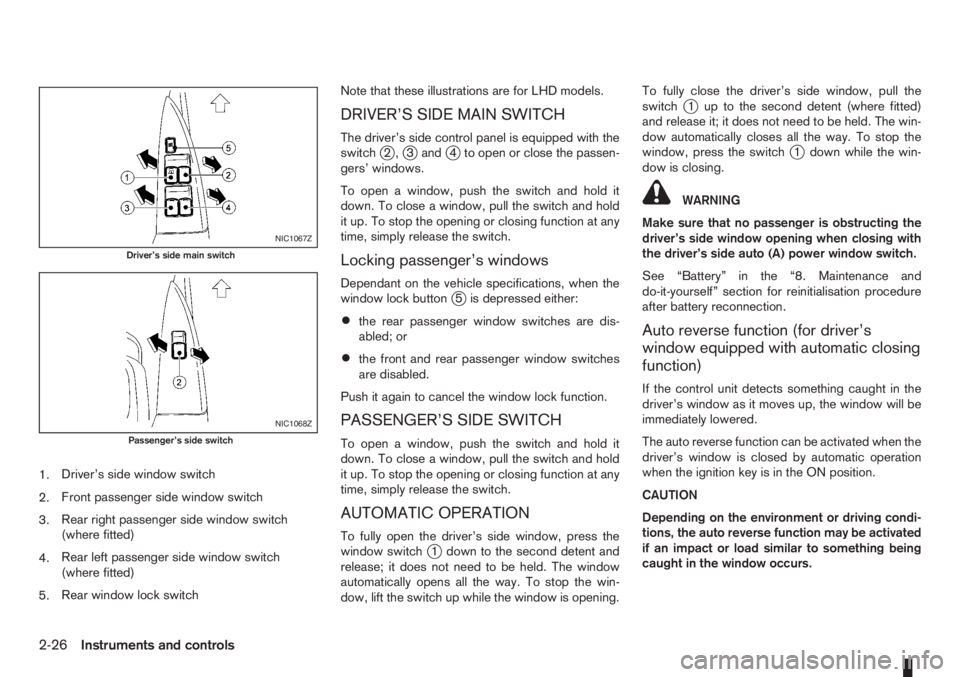
1.Driver’s side window switch
2.Front passenger side window switch
3.Rear right passenger side window switch
(where fitted)
4.Rear left passenger side window switch
(where fitted)
5.Rear window lock switchNote that these illustrations are for LHD models.
DRIVER’S SIDE MAIN SWITCH
The driver’s side control panel is equipped with the
switchj2,j3andj4 to open or close the passen-
gers’ windows.
To open a window, push the switch and hold it
down. To close a window, pull the switch and hold
it up. To stop the opening or closing function at any
time, simply release the switch.
Locking passenger’s windows
Dependant on the vehicle specifications, when the
window lock buttonj5 is depressed either:
•the rear passenger window switches are dis-
abled; or
•the front and rear passenger window switches
are disabled.
Push it again to cancel the window lock function.
PASSENGER’S SIDE SWITCH
To open a window, push the switch and hold it
down. To close a window, pull the switch and hold
it up. To stop the opening or closing function at any
time, simply release the switch.
AUTOMATIC OPERATION
To fully open the driver’s side window, press the
window switchj1 down to the second detent and
release; it does not need to be held. The window
automatically opens all the way. To stop the win-
dow, lift the switch up while the window is opening.To fully close the driver’s side window, pull the
switch
j1 up to the second detent (where fitted)
and release it; it does not need to be held. The win-
dow automatically closes all the way. To stop the
window, press the switch
j1 down while the win-
dow is closing.
WARNING
Make sure that no passenger is obstructing the
driver’s side window opening when closing with
the driver’s side auto (A) power window switch.
See “Battery” in the “8. Maintenance and
do-it-yourself” section for reinitialisation procedure
after battery reconnection.
Auto reverse function (for driver’s
window equipped with automatic closing
function)
If the control unit detects something caught in the
driver’s window as it moves up, the window will be
immediately lowered.
The auto reverse function can be activated when the
driver’s window is closed by automatic operation
when the ignition key is in the ON position.
CAUTION
Depending on the environment or driving condi-
tions, the auto reverse function may be activated
if an impact or load similar to something being
caught in the window occurs.
NIC1067Z
Driver’s side main switch
NIC1068Z
Passenger’s side switch
2-26Instruments and controls
Page 85 of 235

4Heater and air conditioner, and audio systemHeater and air conditioner, and audio system
Vents ....................................................................... 4-2
Side vents .......................................................... 4-2
Centre vents ....................................................... 4-2
Heater and air conditioner operation ........................ 4-2
Manual air conditioner......................................... 4-3
Automatic air conditioner (where fitted) ............... 4-8
Audio system ........................................................... 4-10
Audio operation precautions ............................... 4-10
Antenna .............................................................. 4-16
LW-MW-FM radio with CD player (where fitted) ...... 4-16
Anti-theft system ................................................. 4-16
Audio main operation .......................................... 4-17
Radio operation .................................................. 4-19
User set up menu ............................................... 4-21
Compact disc (CD) player operation ................... 4-22
FM AM radio with CD player (where fitted) .............. 4-23
Anti-theft system ................................................. 4-23
Audio main operation .......................................... 4-24
Radio operation .................................................. 4-25SETUP button .................................................... 4-26
Compact Disc (CD) operation ............................ 4-27
AUX socket ........................................................ 4-29
USB Memory operation ...................................... 4-29
iPod® player operation ....................................... 4-30
Bluetooth® operation.......................................... 4-31
Bluetooth® mobile phone feature ........................ 4-33
AM-FM radio with CD player and navigation
(where fitted) ........................................................... 4-34
Audio jack socket (AUX) (where fitted) ..................... 4-34
Mobile phone integration (where fitted) .................... 4-34
Bluetooth® mobile phone feature ........................ 4-34
Hands-free telephone control .............................. 4-36
Steering wheel switches (where fitted) ................ 4-38
Steering wheel switches for audio control (where
fitted) ....................................................................... 4-38
Main operation .................................................... 4-38
Car phone or CB radio ............................................ 4-39
Page 92 of 235
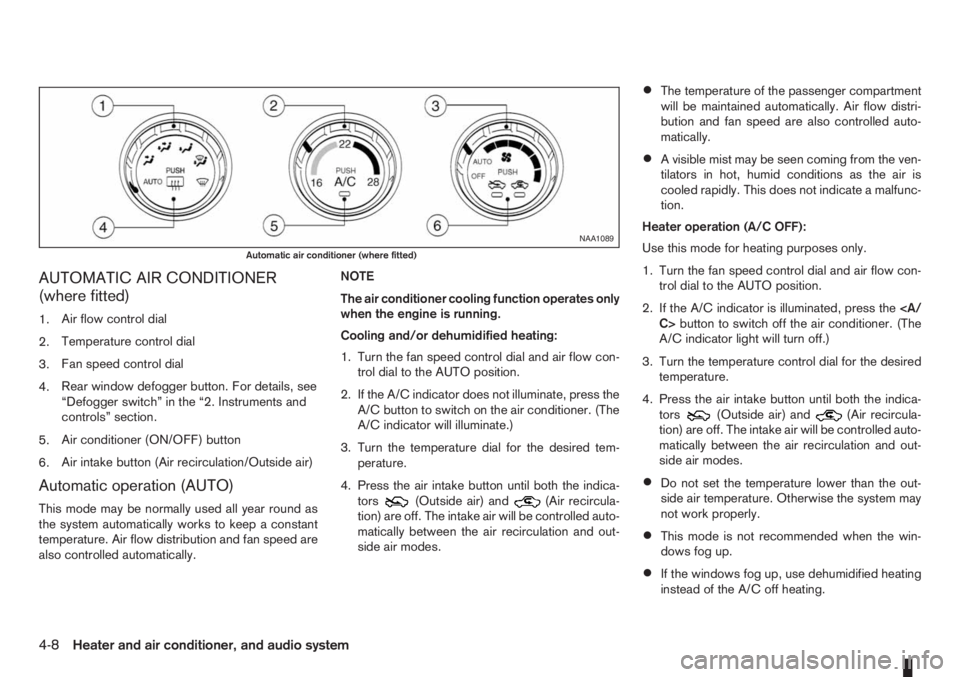
AUTOMATIC AIR CONDITIONER
(where fitted)
1.Air flow control dial
2.Temperature control dial
3.Fan speed control dial
4.Rear window defogger button. For details, see
“Defogger switch” in the “2. Instruments and
controls” section.
5.Air conditioner (ON/OFF) button
6.Air intake button (Air recirculation/Outside air)
Automatic operation (AUTO)
This mode may be normally used all year round as
the system automatically works to keep a constant
temperature. Air flow distribution and fan speed are
also controlled automatically.NOTE
The air conditioner cooling function operates only
when the engine is running.
Cooling and/or dehumidified heating:
1. Turn the fan speed control dial and air flow con-
trol dial to the AUTO position.
2. If the A/C indicator does not illuminate, press the
A/C button to switch on the air conditioner. (The
A/C indicator will illuminate.)
3. Turn the temperature dial for the desired tem-
perature.
4. Press the air intake button until both the indica-
tors(Outside air) and(Air recircula-
tion) are off. The intake air will be controlled auto-
matically between the air recirculation and out-
side air modes.
•The temperature of the passenger compartment
will be maintained automatically. Air flow distri-
bution and fan speed are also controlled auto-
matically.
•A visible mist may be seen coming from the ven-
tilators in hot, humid conditions as the air is
cooled rapidly. This does not indicate a malfunc-
tion.
Heater operation (A/C OFF):
Use this mode for heating purposes only.
1. Turn the fan speed control dial and air flow con-
trol dial to the AUTO position.
2. If the A/C indicator is illuminated, press the
C>button to switch off the air conditioner. (The
A/C indicator light will turn off.)
3. Turn the temperature control dial for the desired
temperature.
4. Press the air intake button until both the indica-
tors
(Outside air) and(Air recircula-
tion) are off. The intake air will be controlled auto-
matically between the air recirculation and out-
side air modes.
•Do not set the temperature lower than the out-
side air temperature. Otherwise the system may
not work properly.
•This mode is not recommended when the win-
dows fog up.
•If the windows fog up, use dehumidified heating
instead of the A/C off heating.
NAA1089
Automatic air conditioner (where fitted)
4-8Heater and air conditioner, and audio system
Page 93 of 235

Dehumidified defrosting or defogging:
1. Turn the air flow control dial to the
position.
2. Turn the fan speed control dial to the desired
position.
3. Turn the temperature control dial for the desired
temperature.
•To quickly remove ice from the outside of the
windscreen, turn the fan speed control dial to
the maximum position.
•As soon as possible after the windscreen has
been cleared of ice, turn the fan speed control
dial to the AUTO position for the automatic mode.
•When the air flow control dial is turned to theorposition, the outside air mode and
the air conditioner will automatically switch on
(except when the fan speed control dial is in the
OFF position) when the outside temperatures is
above −5°C (23°F) to defog the windscreen.
Outside air is drawn into the passenger com-
partment to improve the defogging performance.
Manual operation
Fan speed controlm:
Turn the fan speed control dial:
– to the OFF position to switch off the heater and
air conditioner system.
– to the AUTO position for automatic control of the
fan speed.
– to adjust the fan speed.Temperature control:
Turn temperature dial to set the desired air tempera-
ture.
Air flow control:
Turn the air flow control dial to one of following air
mode.
m
Air flows from centre and side vents.
m
Air flows from centre, side vents and
floor outlets.
mAir flows mainly from floor outlets.
m
Air flows from the defogger outlets and
floor outlets.
mAir flows mainly from defogger outlets.
Air recirculation
m:
Press the air intake button until the air recirculation
indicator light (
) comes on. When selected,
interior air will be recirculated inside the vehicle and
the air conditioner will switch on.
Use this mode to recirculate interior air inside the
passenger compartment in situations such as: driv-
ing on a dust raised road, avoiding traffic fumes or
having maximum cooling from the air conditioner.Outside air circulation
m:
Press the air intake button until outside air indicator
light (
) comes on. When selected, outside air
will be drawn into the vehicle.
Use this mode to draw outside air into the passen-
ger compartment for normal heating, ventilation or
air conditioner operation.
Operating tips
•In order to improve the heater operation, clear
the snow and ice from the wiper blade and air
inlet in front of the windscreen.
•When the engine coolant temperature and out-
side air temperature are low, the air flow from
the floor outlets may not operate for a maximum
of approximately 150 seconds. However, this is
not a malfunction. After the coolant temperature
has warmed up, the air flow from the floor outlets
will operate normally.
•After parking in the sun, drive for two or three
minutes with the windows open to vent hot air
from the passenger compartment. Then, close
the windows. This will allow the acceleration of
the air conditioner’s cooling operation.
•Keep the windows closed while the air condi-
tioner is operating.
•The air conditioning system should be operated
for approximately 10 minutes at least once a
month. This helps prevent damage to the system
due to lack of lubrication.
Heater and air conditioner, and audio system4-9
Page 96 of 235

•The USB player sometimes cannot function
when the passenger compartment temperature
is extremely high. Decrease the temperature be-
fore use.
•Do not leave USB memory in a place prone to
static electricity or where the air conditioner
blows directly. The data in the USB memory may
be damaged.
•The vehicle is not equipped with a USB memory
stick.
•A USB device cannot be formatted with this sys-
tem. To format a USB device, use a personal
computer.
•Partitioned USB devices may not be played cor-
rectly.
•Some characters used in other languages (Chi-
nese, Japanese, etc.) are not displayed properly
on the vehicle centre screen. Using English lan-
guage characters with a USB device is recom-
mended.
•Do not connect a USB device if a connector or
cable is wet. Allow the cable and/or connectors
to dry completely before connecting the USB
device. If the connector is exposed to fluids other
than water, evaporative residue may cause a
short between the connector pins.
•Large video podcast files cause slow responses
in an iPod®. The display of the audio system
may momentarily black out, but it will soon re-
cover.
•If an iPod® automatically selects large video
podcast files while in the shuffle mode. The dis-
play of the audio system may momentarily black
out, but it will soon recover.
•Some iPod® operations may not be available
with this system.
•At the time of publication, this audio system was
tested with the latest iPod® players available.
Due to the frequent update of consumer devices
like MP3 players, NISSAN cannot guarantee that
all new iPods launched will be compatible with
this audio system.
•Make sure that the iPod® is updated with the lat-
est firmware.
•iPod® is trademarks of Apple Inc., registered in
the U.S. and other countries.
Bluetooth® audio player (where fitted)
•Some Bluetooth® audio devices may not be
used with this system. For detailed information
about Bluetooth® audio devices that are avail-
able for use with this system, contact a NISSAN
dealer or qualified workshop.
•Before using a Bluetooth® audio system, the ini-
tial registration process for the audio device is
necessary.
•Operation of the Bluetooth® audio system may
vary depending on the audio device that is con-
nected. Confirm the operation procedure before
use.
•The playback of Bluetooth® audio will be paused
under the following conditions. The playback will
be resumed after the following conditions are
completed:
– while using a mobile phone.
– while checking a connection with a mobile
phone.
•The in-vehicle antenna for Bluetooth® communi-
cation is built in the audio system. Do not place
the Bluetooth audio device in an area surrounded
by metal, far away from the system, or in a nar-
row space where the device closely contacts the
body or the seat. Otherwise, sound degradation
or connection interference may occur.
•While a Bluetooth® audio device is connected
through the Bluetooth wireless connection, the
battery power of the device may discharge
quicker than usual.
•This system is compatible with the Bluetooth®
AV profile (A2DP and AVRCP ver. 1.3, 1.0 or
earlier).
m
Bluetooth® is a trademark
owned by Bluetooth SIG, Inc.,
and licensed to Daewoo IS
Corp.
4-12Heater and air conditioner, and audio system
Page 100 of 235

ANTENNA
Removing the antenna
To remove the antenna, hold the lower part of the
antenna and turn it anticlockwise.
CAUTION
Make sure to remove the antenna before the ve-
hicle enters a garage with a low ceiling or an
automatic car wash otherwise the antenna can
be damaged.1.Power ON/OFF button
2.Traffic announcement (TA) button
3.CD slot
4.Eject button
5.Audio set-up mode (MOD) button
6.Radio mode: Manual (up/down) tuning Audio
selection mode
7.Radio mode: Seek up/down
CD mode: Track up/down or Fast forward/
Fast reverse
8.NEWS button
9.Preset station button
10.Radio mode: Preset station button
CD mode: Mix mode button
11.Display
12.Radio mode: Preset station button
CD mode: Repeat (RPT) mode button13.Preset station buttons
14.LW, MW or FM Band selection/FM Travel
store button
15.Source (SRC) select button
16.Volume control button
This unit is an electronic LW-MW-FM radio with CD
player, an anti-theft system and traffic announce-
ment function.
ANTI-THEFT SYSTEM
By using a 4-digit radio code known only to the
vehicle owner, the possibility of the audio unit being
stolen is effectively reduced because without the
code, the audio unit cannot be activated. When used
normally, the audio unit is unlocked and accessible
in the usual way.
If force is used to try and remove the audio unit, the
Anti-Theft system activates and the audio unit locks.
NAA1031Z
NAA1021Z
LW-MW-FM RADIO WITH CD PLAYER (where fitted)
4-16Heater and air conditioner, and audio system