Page 302 of 453
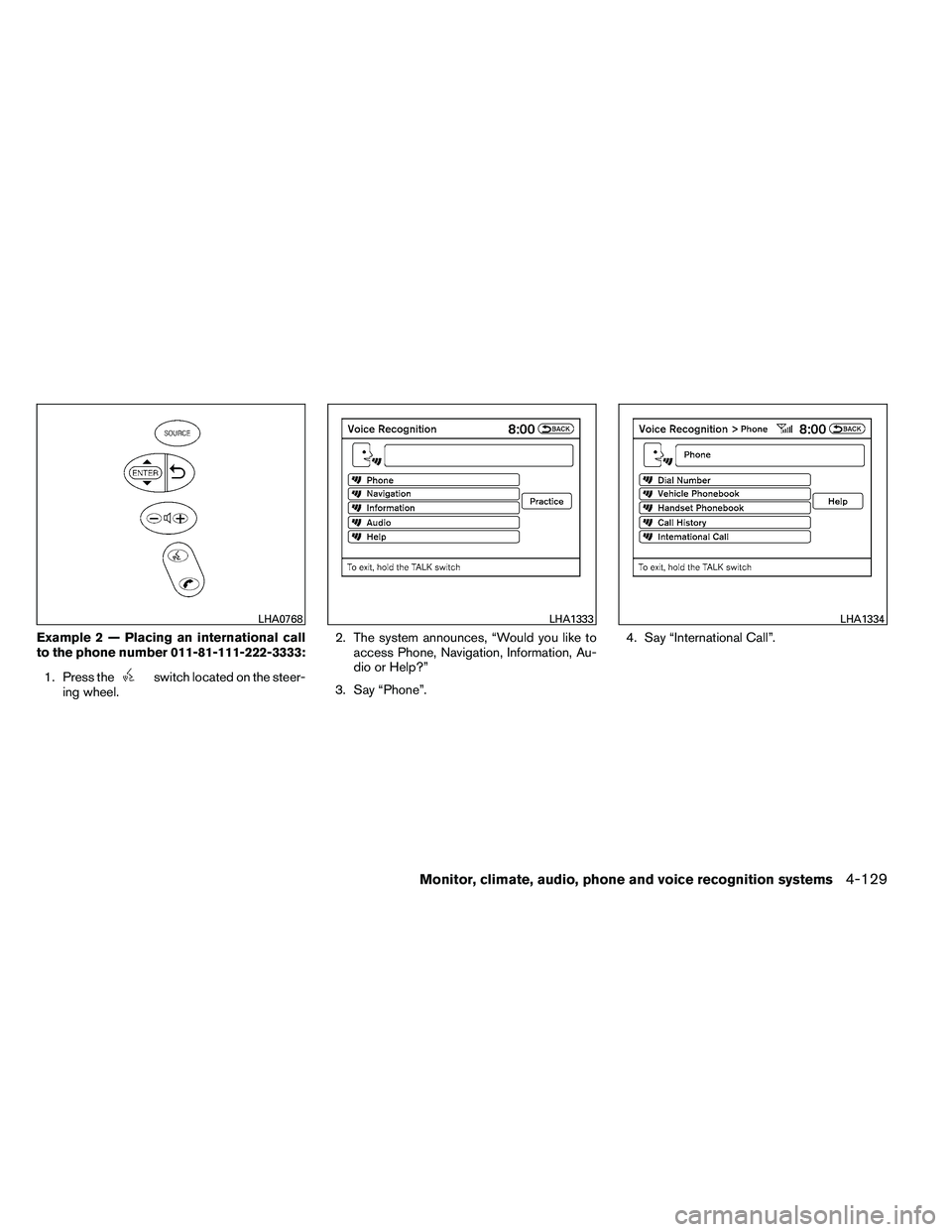
Example 2 — Placing an international call
to the phone number 011-81-111-222-3333:1. Press the
Page 303 of 453
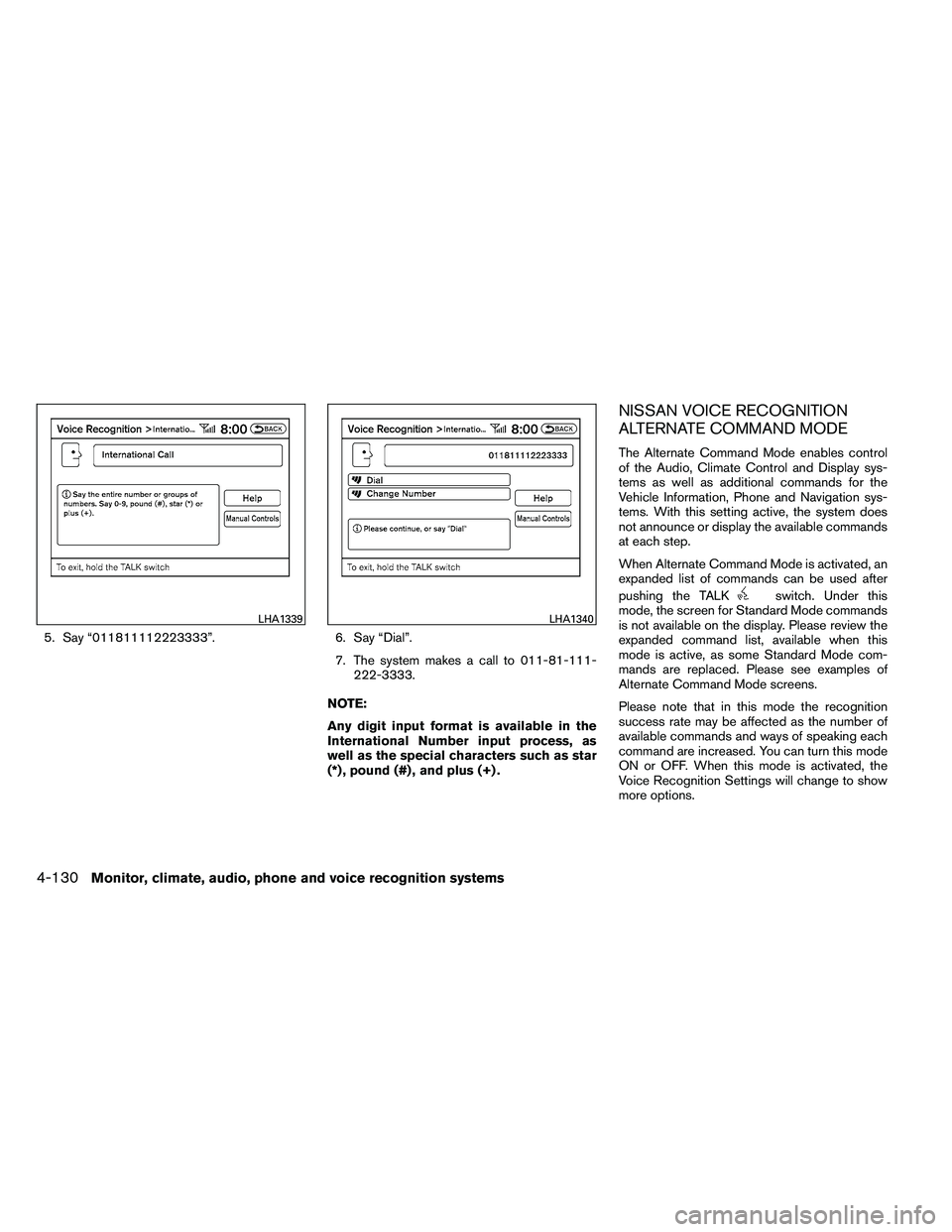
5. Say “011811112223333”.6. Say “Dial”.
7. The system makes a call to 011-81-111- 222-3333.
NOTE:
Any digit input format is available in the
International Number input process, as
well as the special characters such as star
(*) , pound (#) , and plus (+) .
NISSAN VOICE RECOGNITION
ALTERNATE COMMAND MODE
The Alternate Command Mode enables control
of the Audio, Climate Control and Display sys-
tems as well as additional commands for the
Vehicle Information, Phone and Navigation sys-
tems. With this setting active, the system does
not announce or display the available commands
at each step.
When Alternate Command Mode is activated, an
expanded list of commands can be used after
pushing the TALK
Page 306 of 453
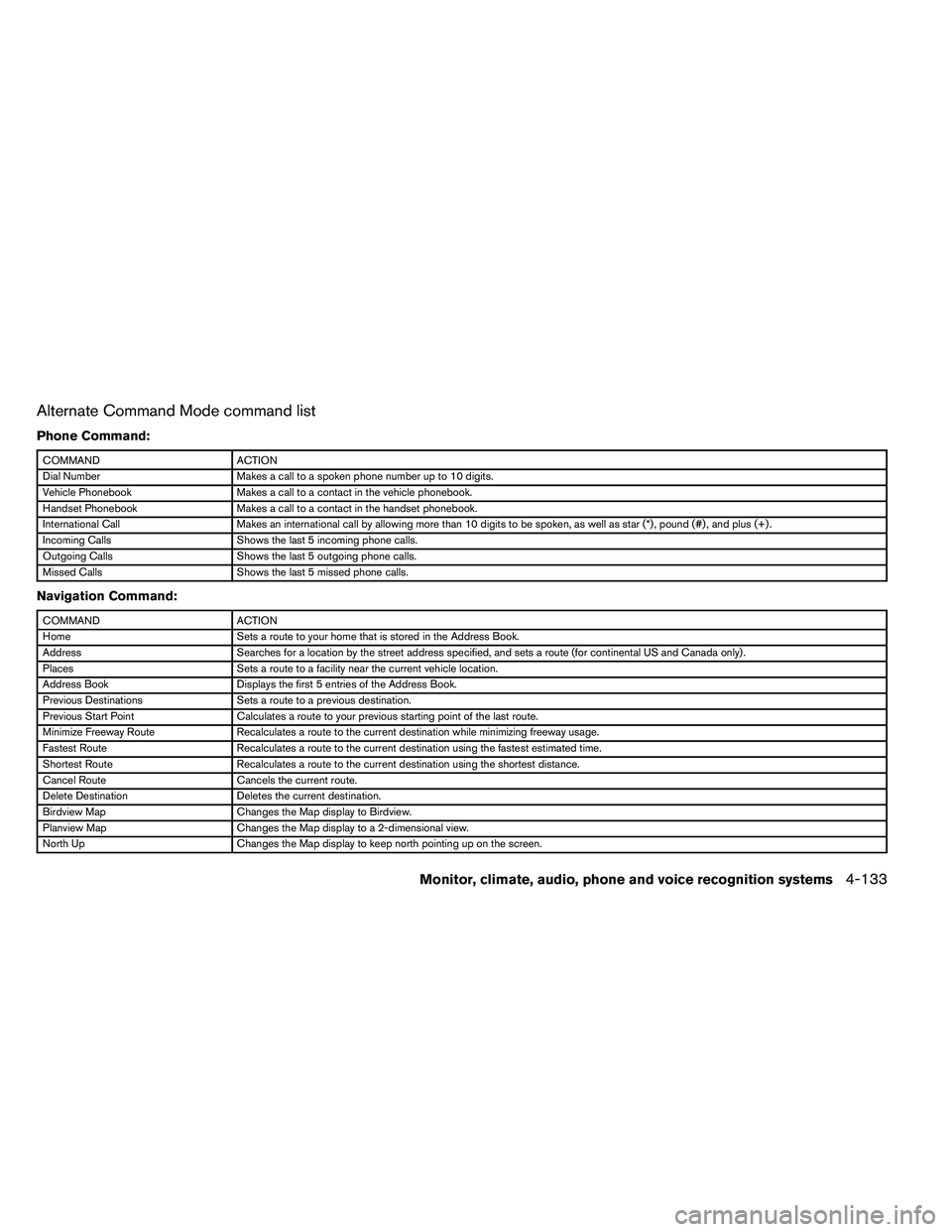
Alternate Command Mode command list
Phone Command:
Page 308 of 453
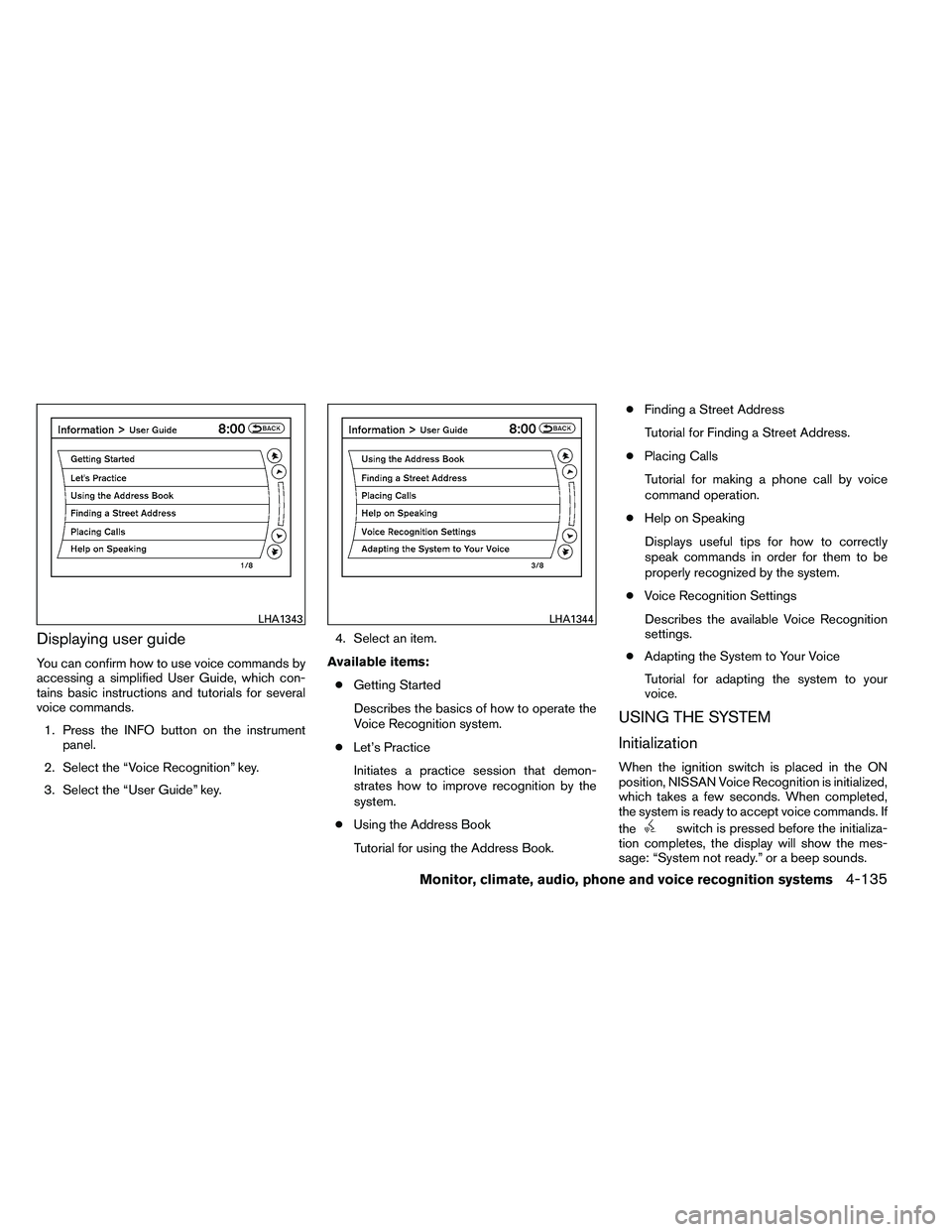
Displaying user guide
You can confirm how to use voice commands by
accessing a simplified User Guide, which con-
tains basic instructions and tutorials for several
voice commands.1. Press the INFO button on the instrument panel.
2. Select the “Voice Recognition” key.
3. Select the “User Guide” key. 4. Select an item.
Available items: ● Getting Started
Describes the basics of how to operate the
Voice Recognition system.
● Let’s Practice
Initiates a practice session that demon-
strates how to improve recognition by the
system.
● Using the Address Book
Tutorial for using the Address Book. ●
Finding a Street Address
Tutorial for Finding a Street Address.
● Placing Calls
Tutorial for making a phone call by voice
command operation.
● Help on Speaking
Displays useful tips for how to correctly
speak commands in order for them to be
properly recognized by the system.
● Voice Recognition Settings
Describes the available Voice Recognition
settings.
● Adapting the System to Your Voice
Tutorial for adapting the system to your
voice.
USING THE SYSTEM
Initialization
When the ignition switch is placed in the ON
position, NISSAN Voice Recognition is initialized,
which takes a few seconds. When completed,
the system is ready to accept voice commands. If
the
Page 311 of 453
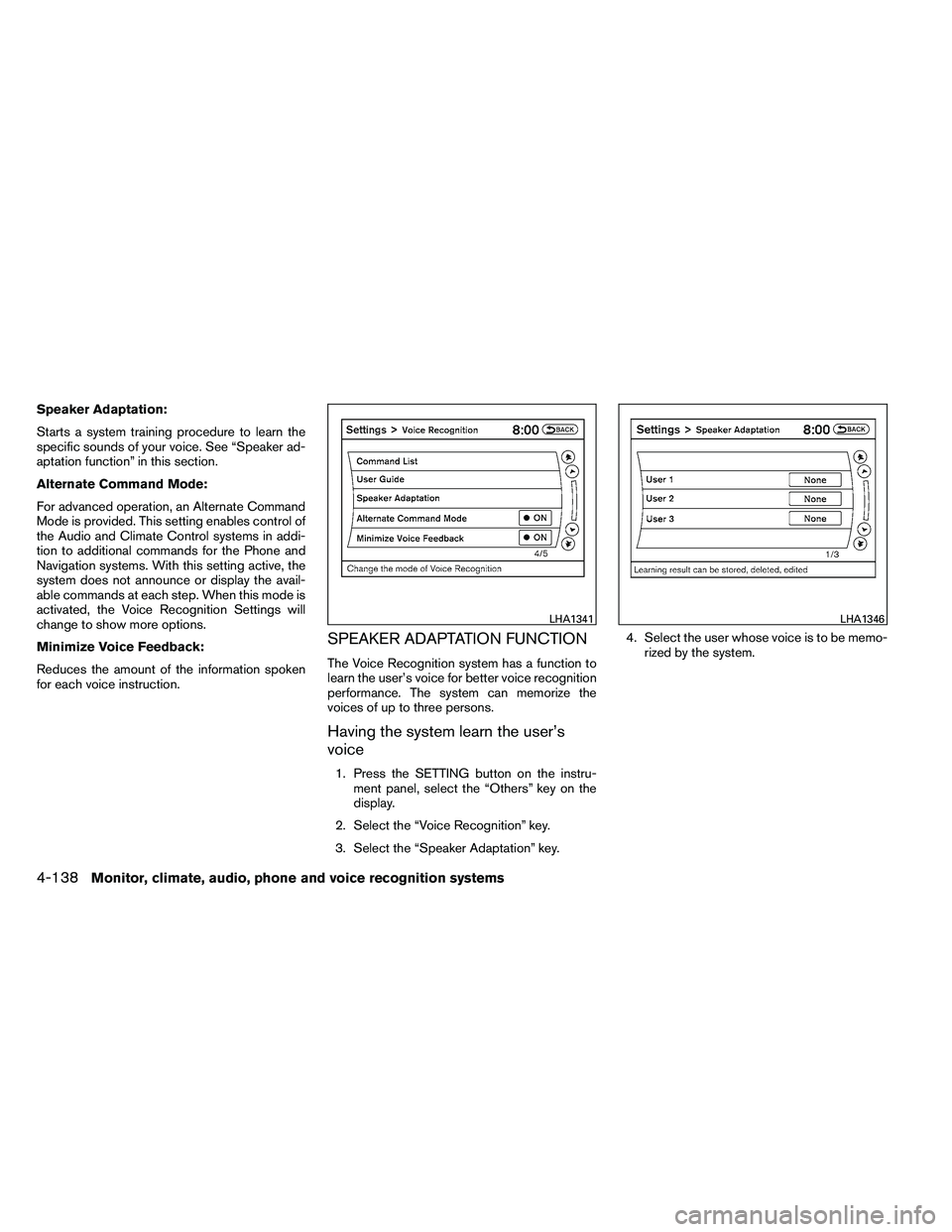
Speaker Adaptation:
Starts a system training procedure to learn the
specific sounds of your voice. See “Speaker ad-
aptation function” in this section.
Alternate Command Mode:
For advanced operation, an Alternate Command
Mode is provided. This setting enables control of
the Audio and Climate Control systems in addi-
tion to additional commands for the Phone and
Navigation systems. With this setting active, the
system does not announce or display the avail-
able commands at each step. When this mode is
activated, the Voice Recognition Settings will
change to show more options.
Minimize Voice Feedback:
Reduces the amount of the information spoken
for each voice instruction.
SPEAKER ADAPTATION FUNCTION
The Voice Recognition system has a function to
learn the user’s voice for better voice recognition
performance. The system can memorize the
voices of up to three persons.
Having the system learn the user’s
voice
1. Press the SETTING button on the instru-ment panel, select the “Others” key on the
display.
2. Select the “Voice Recognition” key.
3. Select the “Speaker Adaptation” key. 4. Select the user whose voice is to be memo-
rized by the system.
Page 312 of 453
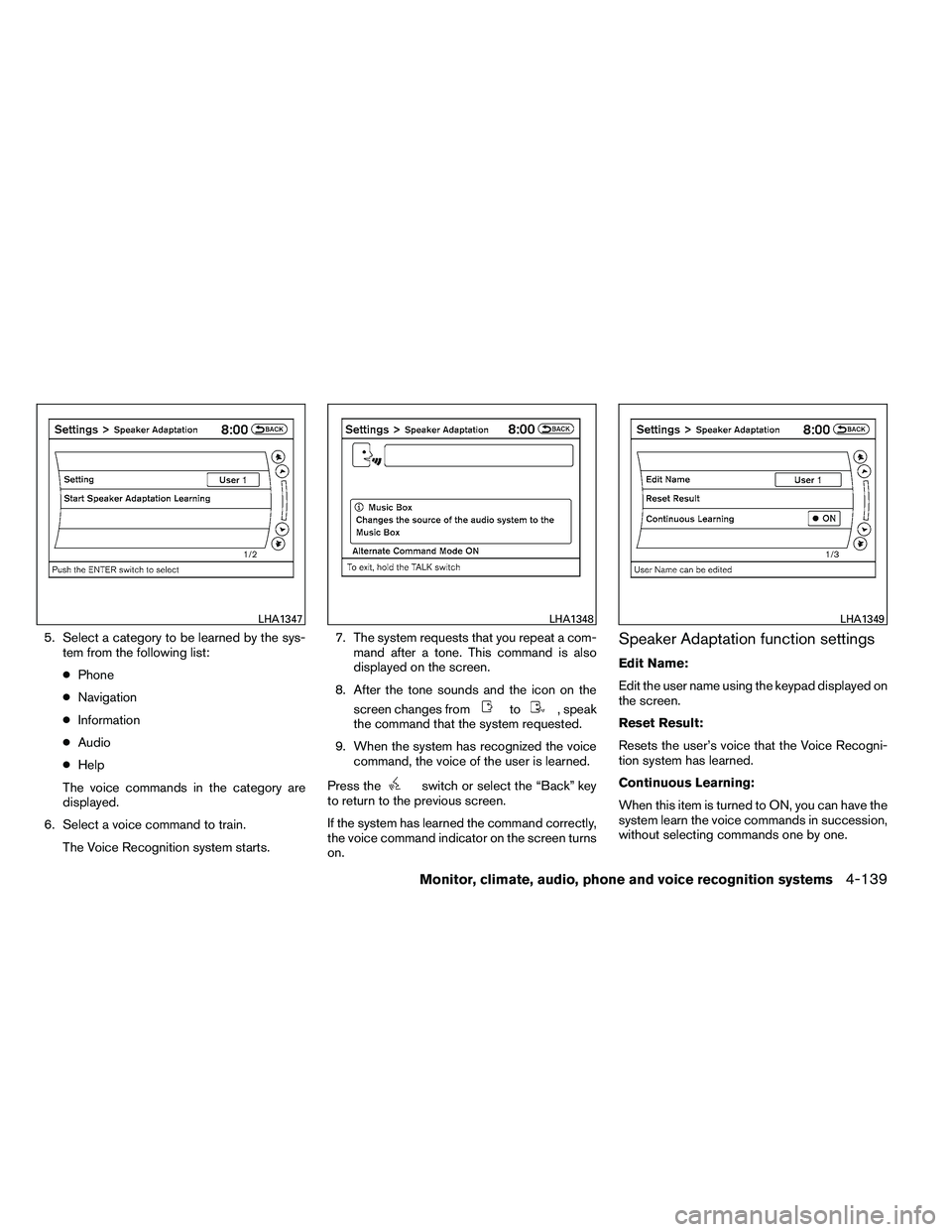
5. Select a category to be learned by the sys-tem from the following list:
● Phone
● Navigation
● Information
● Audio
● Help
The voice commands in the category are
displayed.
6. Select a voice command to train. The Voice Recognition system starts. 7. The system requests that you repeat a com-
mand after a tone. This command is also
displayed on the screen.
8. After the tone sounds and the icon on the screen changes from
Page 442 of 453
the type of personally identifying data routinely
acquired during a crash investigation.
To read data recorded by an EDR, special equip-
ment is required and access to the vehicle or the
EDR is needed. In addition to the vehicle manu-
facturer and NISSAN dealer, other parties, such
as law enforcement, that have the special equip-
ment, can read the information if they have ac-
cess to the vehicle or the EDR. EDR data will only
be accessed with the consent of the vehicle
owner or lessee or as otherwise required or per-
mitted by law.A genuine NISSAN Service Manual is the best
source of service and repair information for your
vehicle. Filled with wiring diagrams, illustrations
and step-by-step diagnostic and adjustment pro-
cedures, this manual is the same one used by the
factory-trained technicians working at NISSAN
dealerships. Also available are genuine NISSAN
Owner’s Manuals, and genuine NISSAN Service
and Owner’s Manuals for older NISSAN models.
For USA
For current pricing and availability of genuine
NISSAN Service Manuals
for the 2000 model
year and later contact:
1-800-450-9491
www.nissan-techinfo.com
For current pricing and availability of genuine
NISSAN Service Manuals for the 1999 model
year and prior, see a NISSAN dealer, or contact:
1-800-247-5321
For current pricing and availability of genuine
NISSAN Owner’s Manuals for this model year
and prior, see a NISSAN dealer, or contact:
1-800-247-5321 For Canada
To purchase a copy of a genuine NISSAN Ser-
vice Manual or Owner’s Manual please contact
your nearest NISSAN dealer. For the phone num-
ber and location of a NISSAN dealer in your area
call the NISSAN Information Center at 1-800-
387-0122 and a bilingual NISSAN representa-
tive will assist you.
Also available are genuine NISSAN Service and
Owner’s Manuals for older NISSAN models.
OWNER’S MANUAL/SERVICE
MANUAL ORDER INFORMATION
Technical and consumer information9-27
Page 446 of 453
Continuously Variable Transmission
(CVT) fluid..................8-13
Engine coolant .................8-8
Engine oil ...................8-10
Power steering fluid .............8-14
F.M.V.S.S. certification label ...........9-10
Fog light switch .................2-34
Front air bag system
(See supplemental restraint system) ......1-50
Front seats .....................1-2
Fuel Capacities and recommended
fuel/lubricants .................9-2
Fuel economy ................5-22
Fuel-filler door and cap ...........3-25
Fuel-filler door lock opener lever ......3-25
Fuel gauge ...................2-6
Fuel octane rating ...............9-4
Fuel recommendation .............9-3
Loose fuel cap warning ........2-25, 3-25
Fuses .......................8-23
Fusible links ...................8-25
G
Garage door opener, HomeLink� Universal
Transceiver ....................2-51
Gascap .....................3-25
Gauge Engine coolant temperature gauge .....2-5
Fuel gauge ...................2-6
Odometer ...................2-4
Speedometer .................2-4
Tachometer ..................2-5
Trip odometer .................2-4 General maintenance
...............8-2
Glove box .....................2-41
Glove box lock ..................2-41
Grocery hooks ..................2-42
H
Hands-free phone system, Bluetooth� . . . .4-92,
4-106
Hazard warning flasher switch .........2-34
Headlight
and turn signal switch ........2-29
Headlight control switch ............2-31
Headlights ....................8-29
Heated seats ...................2-35
Heater Heater and air conditioner
controls ................4-19, 4-26
Heater operation ...........4-20, 4-27
HomeLink� Universal Transceiver ........2-51
Hood release ...................3-23
Horn .......................2-35
I
Ignition Switch Push-Button Ignition Switch .........5-7
Immobilizer system .........2-27, 3-3, 5-10
Important vehicle information label .......9-10
In-cabin microfilter ................8-21
Increasing fuel economy .............5-22
Indicator lights and audible reminders
(See warning/indicator lights and audible
reminders) ....................2-10
Inside automatic anti-glare mirror ........3-30Inside mirror
...................3-29
Instrument brightness control ..........2-33
Instrument panel ...............0-8, 2-2
Instrument panel dimmer switch ........2-33
Intelligent Key system Key operating range ..........3-8, 3-18
Key operation .................3-9
Mechanical key ................3-3
Remote keyless entry operation . . .3-12, 3-18
Troubleshooting guide ........3-16, 3-22
Warning signals ............3-16, 3-22
Interior light ....................2-48
Interior trunk lid release .............3-24
iPod� Player................4-72, 4-74
ISOFIX child restraints .............1-24
J
Jump starting .................. .6-8
K
K
eyfob battery replacement ...........8-27
Keyless entry With Intelligent Key system
(See Intelligent Key system) .....3-12, 3-18
Keys, For Intelligent Key system .........3-2
L
Labels Air conditioner specification label .....9-12
C.M.V.S.S. certification label ........9-10
10-3