Page 278 of 453
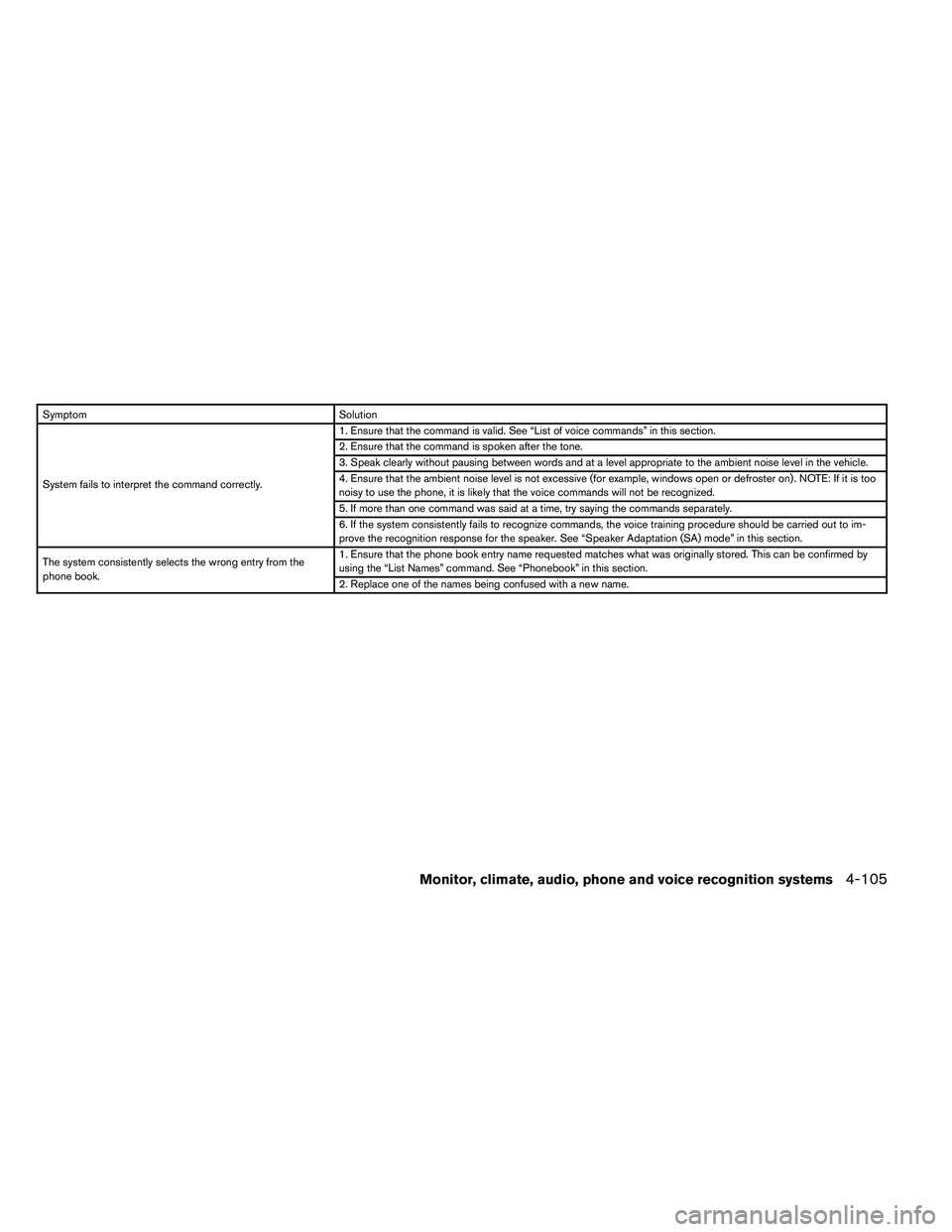
SymptomSolution
System fails to interpret the command correctly. 1. Ensure that the command is valid. See “List of voice commands” in this section.
2. Ensure that the command is spoken after the tone.
3. Speak clearly without pausing between words and at a level appropriate to the ambient noise level in the vehicle.
4. Ensure that the ambient noise level is not excessive (for example, windows open or defroster on) . NOTE: If it is too
noisy to use the phone, it is likely that the voice commands will not be recognized.
5. If more than one command was said at a time, try saying the commands separately.
6. If the system consistently fails to recognize commands, the voice training procedure should be carried out to im-
prove the recognition response for the speaker. See “Speaker Adaptation (SA) mode” in this section.
The system consistently selects the wrong entry from the
phone book. 1. Ensure that the phone book entry name requested matches what was originally stored. This can be confirmed by
using the “List Names” command. See “Phonebook” in this section.
2. Replace one of the names being confused with a new name.
Monitor, climate, audio, phone and voice recognition systems4-105
Page 279 of 453
WARNING
●Use a phone after stopping your vehicle
in a safe location. If you have to use a
phone while driving, exercise extreme
caution at all times so full attention may
be given to vehicle operation.
● If you are unable to devote full attention
to vehicle operation while talking on
the phone, pull off the road to a safe
location and stop your vehicle.
Page 280 of 453
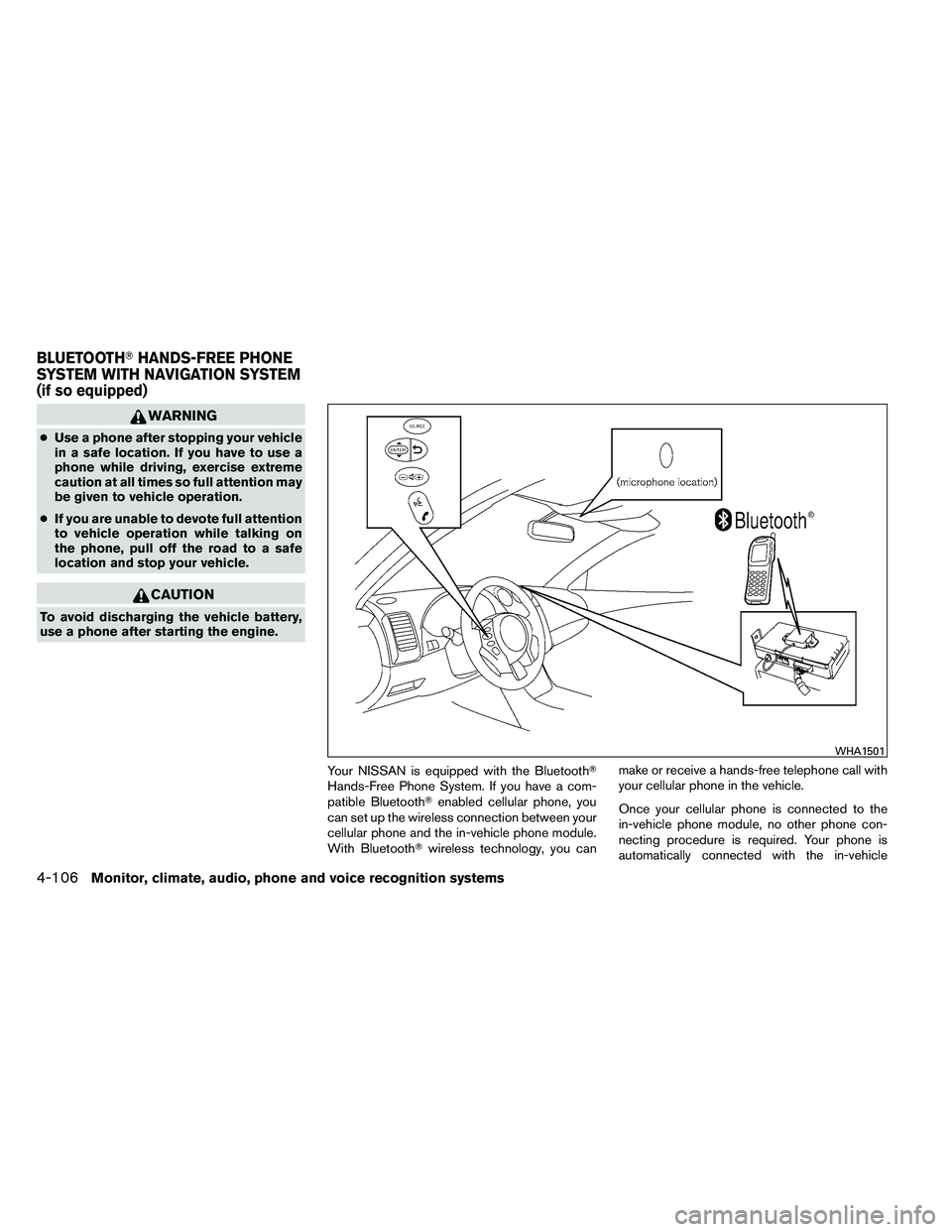
phone module when the ignition switch is placed
in the ON position with the connected cellular
phone turned on and carried in the vehicle.
You can register up to 5 different Bluetooth�
cellular phones to the in-vehicle phone module.
However, you can talk on only one cellular phone
at a time.
NISSAN Voice Recognition system supports the
phone commands, so dialing a phone number
using your voice is possible. For more details, see
“NISSAN Voice Recognition System” in this sec-
tion.
Before using the Bluetooth�Hands-Free Phone
System, refer to the following notes.
● Set up the wireless connection between a
cellular phone and the in-vehicle phone
module before using the hands-free phone
system.
● Some Bluetooth� enabled cellular phones
may not be recognized by the in-vehicle
phone module. Please visit
www.nissanusa.com/bluetooth for a recom-
mended phone list and connecting.
● You will not be able to use a hands-free
phone under the following conditions:
– Your vehicle is outside of the cellular ser- vice area. – Your vehicle is in an area where it is
difficult to receive cellular signal; such as
in a tunnel, in an underground parking
garage, near a tall building or in a moun-
tainous area.
– Your cellular phone is locked to prevent it from being dialed.
● When the radio wave condition is not ideal
or ambient sound is too loud, it may be
difficult to hear the other person’s voice dur-
ing a call.
● Immediately after the ignition switch is
placed in the ON position, it may be impos-
sible to receive a call for a short period of
time.
● Do not place the cellular phone in an area
surrounded by metal or far away from the
in-vehicle phone module to prevent tone
quality degradation and wireless connection
disruption.
● While a cellular phone is connected through
the Bluetooth� wireless connection, the bat-
tery power of the cellular phone may dis-
charge quicker than usual. The Bluetooth�
Hands-Free Phone System cannot charge
cellular phones. ●
If the hands-free phone system seems to be
malfunctioning, see “Troubleshooting guide”
in this section. You can also visit
www.nissanusa.com/bluetooth for trouble-
shooting help.
● Some cellular phones or other devices may
cause interference or a buzzing noise to
come from the audio system speakers. Stor-
ing the device in a different location may
reduce or eliminate the noise.
● Refer to the cellular phone owner’s manual
regarding the telephone charges, cellular
phone antenna and body, etc.
● The signal strength display on the monitor
will not coincide with the signal strength
display of some cellular phones.
● If reception between callers is unclear, ad-
justing the incoming or outgoing call volume
may improve the clarity. See “Call volume” in
this section.
Monitor, climate, audio, phone and voice recognition systems4-107
Page 282 of 453
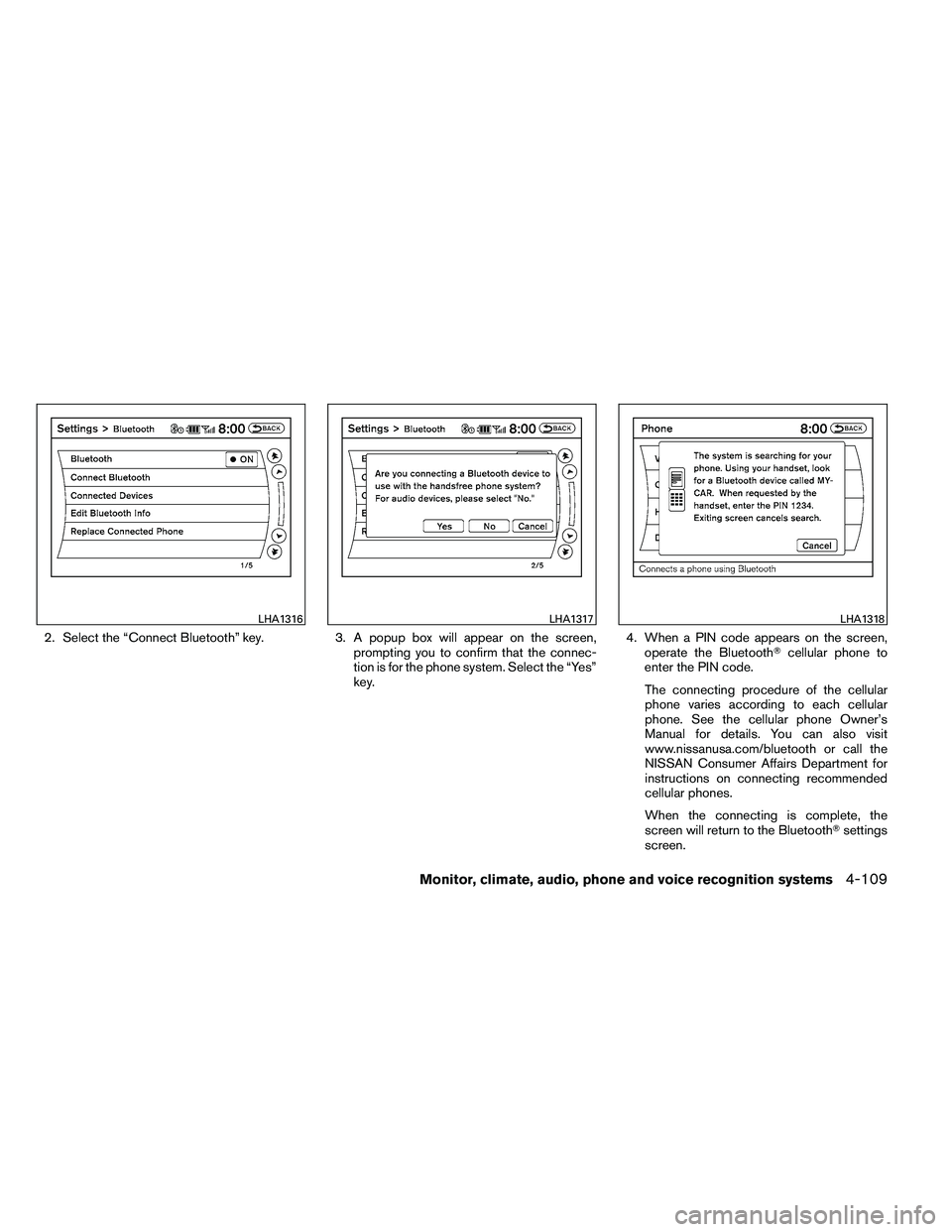
2. Select the “Connect Bluetooth” key.3. A popup box will appear on the screen,
prompting you to confirm that the connec-
tion is for the phone system. Select the “Yes”
key. 4. When a PIN code appears on the screen,
operate the Bluetooth� cellular phone to
enter the PIN code.
The connecting procedure of the cellular
phone varies according to each cellular
phone. See the cellular phone Owner’s
Manual for details. You can also visit
www.nissanusa.com/bluetooth or call the
NISSAN Consumer Affairs Department for
instructions on connecting recommended
cellular phones.
When the connecting is complete, the
screen will return to the Bluetooth� settings
screen.
Page 283 of 453
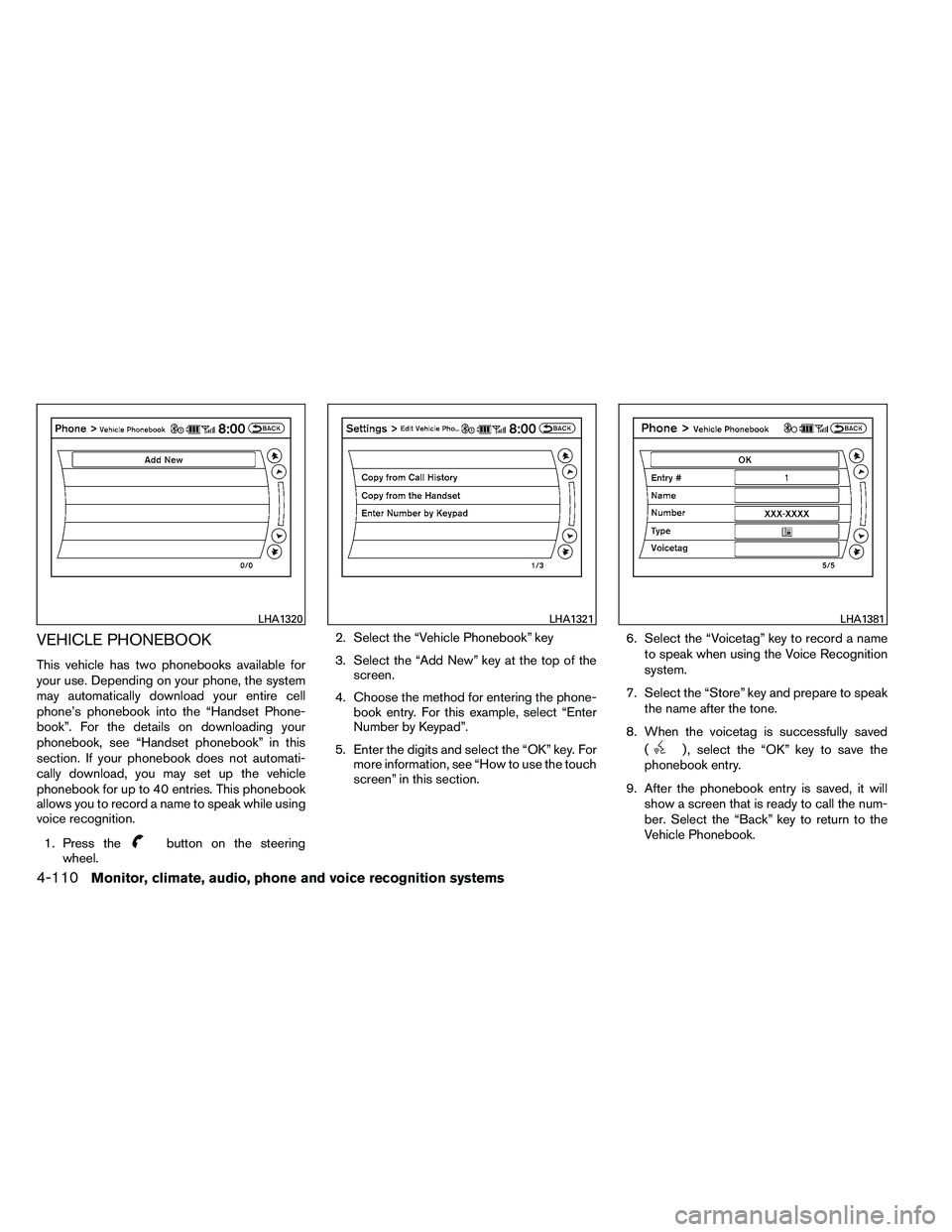
VEHICLE PHONEBOOK
This vehicle has two phonebooks available for
your use. Depending on your phone, the system
may automatically download your entire cell
phone’s phonebook into the “Handset Phone-
book”. For the details on downloading your
phonebook, see “Handset phonebook” in this
section. If your phonebook does not automati-
cally download, you may set up the vehicle
phonebook for up to 40 entries. This phonebook
allows you to record a name to speak while using
voice recognition.1. Press the
Page 284 of 453
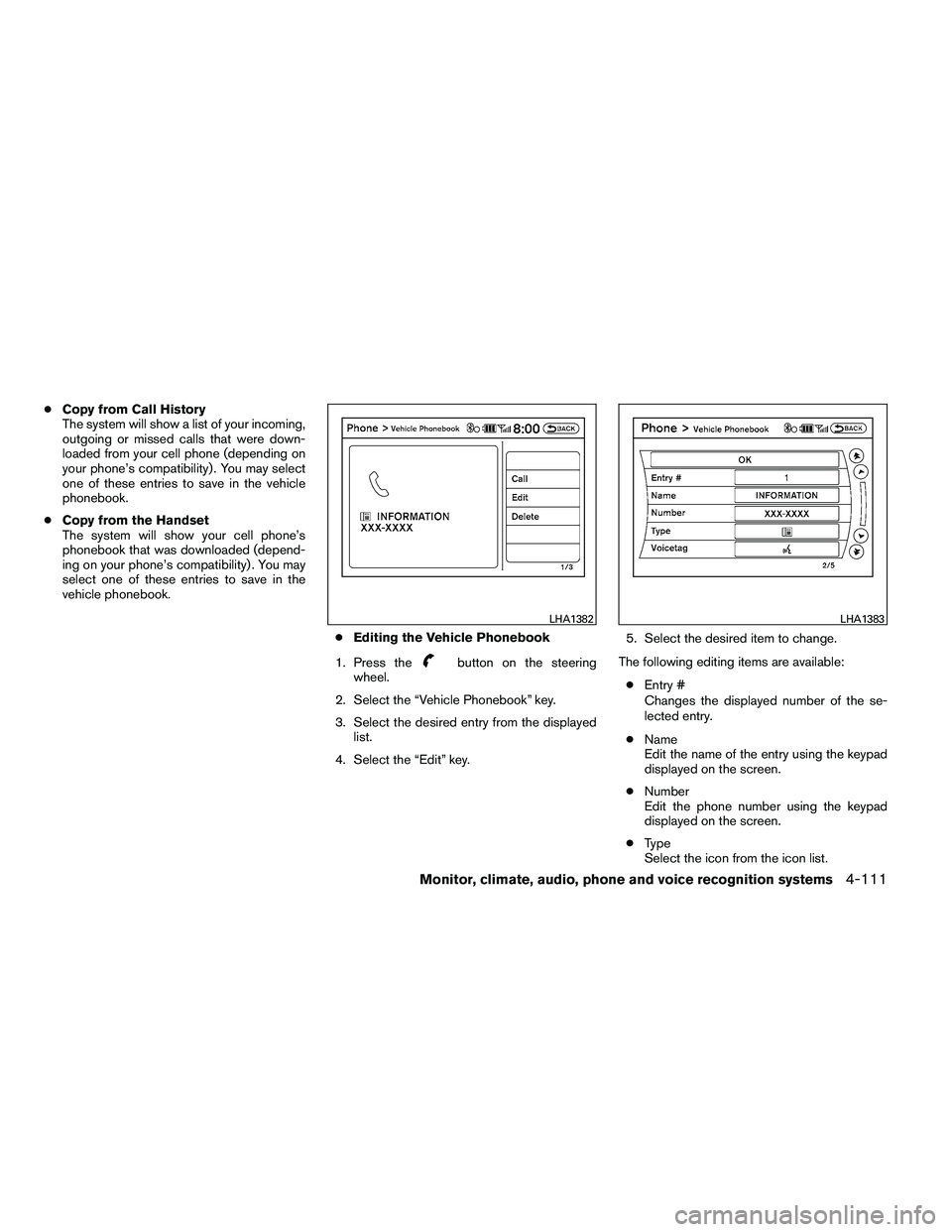
●Copy from Call History
The system will show a list of your incoming,
outgoing or missed calls that were down-
loaded from your cell phone (depending on
your phone’s compatibility) . You may select
one of these entries to save in the vehicle
phonebook.
● Copy from the Handset
The system will show your cell phone’s
phonebook that was downloaded (depend-
ing on your phone’s compatibility) . You may
select one of these entries to save in the
vehicle phonebook.
●Editing the Vehicle Phonebook
1. Press the
Page 285 of 453
●Voicetag
Confirm and store the voicetag. Voicetags
allow easy dialing using the NISSAN Voice
Recognition system. For more information,
see “NISSAN Voice Recognition System” in
this section.
To delete an entry, select the “Delete” key at step
3.
HANDSET PHONEBOOK
Many phones will support an automatic down-
load of the cellular phone’s phonebook. Since
this method allows for up to 1000 numbers to be
stored and entries are automatically assigned
voice tags by the system, this is a useful function
for easy dialing supported by the Voice Recogni-
tion system.
Transferring the handset phonebook
If your cellular phone supports automatic down-
loading, the system transfers the handset phone-
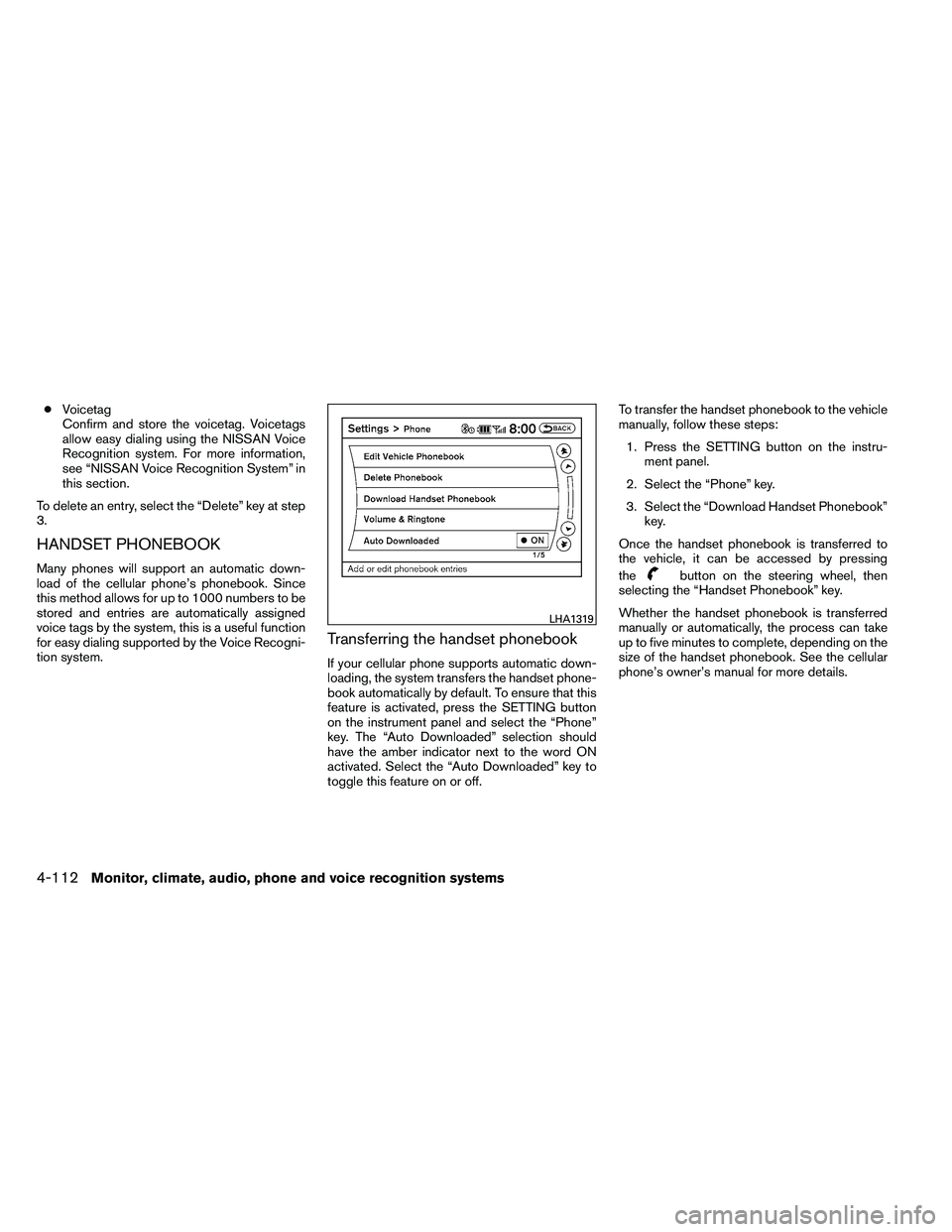
book automatically by default. To ensure that this
feature is activated, press the SETTING button
on the instrument panel and select the “Phone”
key. The “Auto Downloaded” selection should
have the amber indicator next to the word ON
activated. Select the “Auto Downloaded” key to
toggle this feature on or off. To transfer the handset phonebook to the vehicle
manually, follow these steps:
1. Press the SETTING button on the instru- ment panel.
2. Select the “Phone” key.
3. Select the “Download Handset Phonebook” key.
Once the handset phonebook is transferred to
the vehicle, it can be accessed by pressing
the
Page 287 of 453
Hold Call:
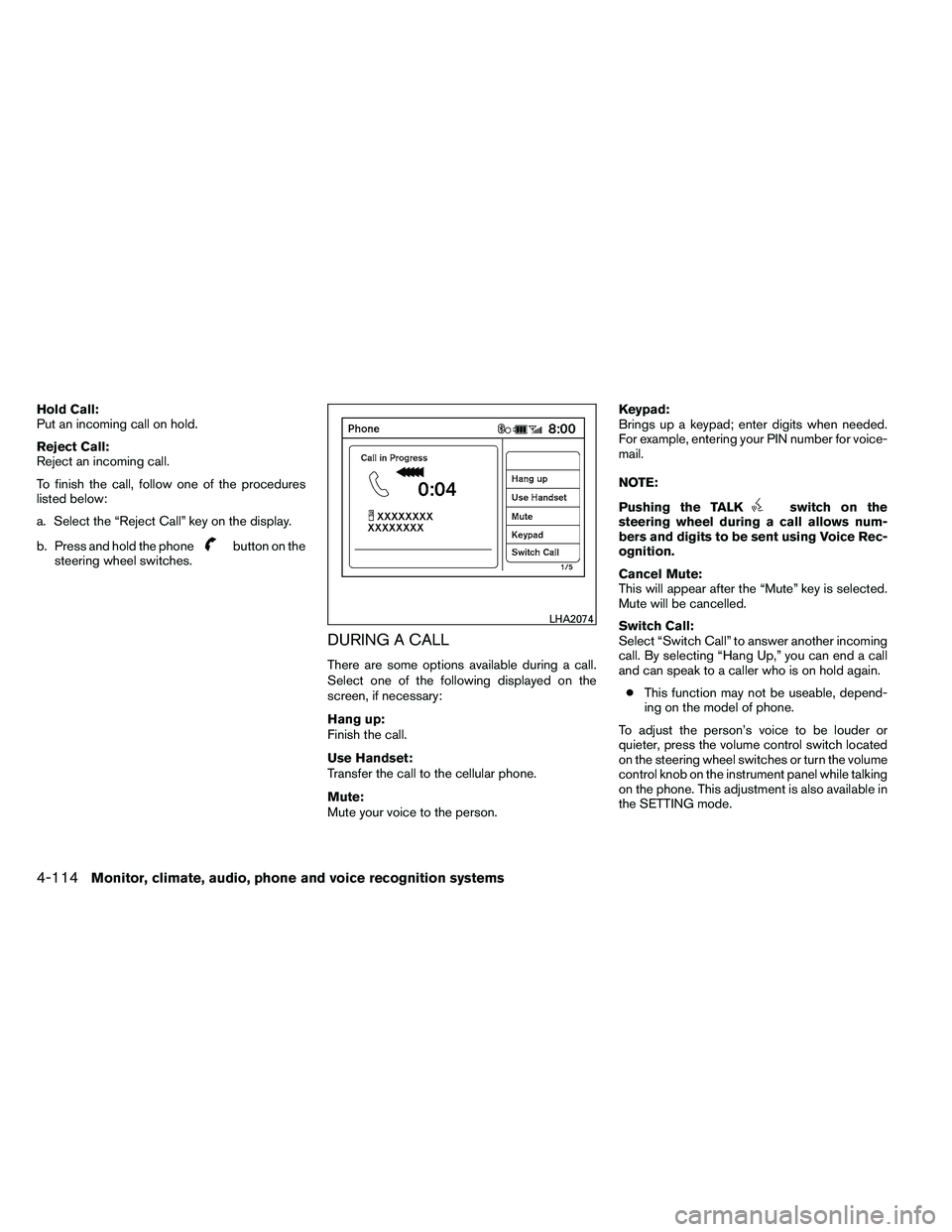
Put an incoming call on hold.
Reject Call:
Reject an incoming call.
To finish the call, follow one of the procedures
listed below:
a. Select the “Reject Call” key on the display.
b. Press and hold the phone