Page 232 of 610
Features and controls
3-135
3
Odometer/Trip odometer
N00555400113
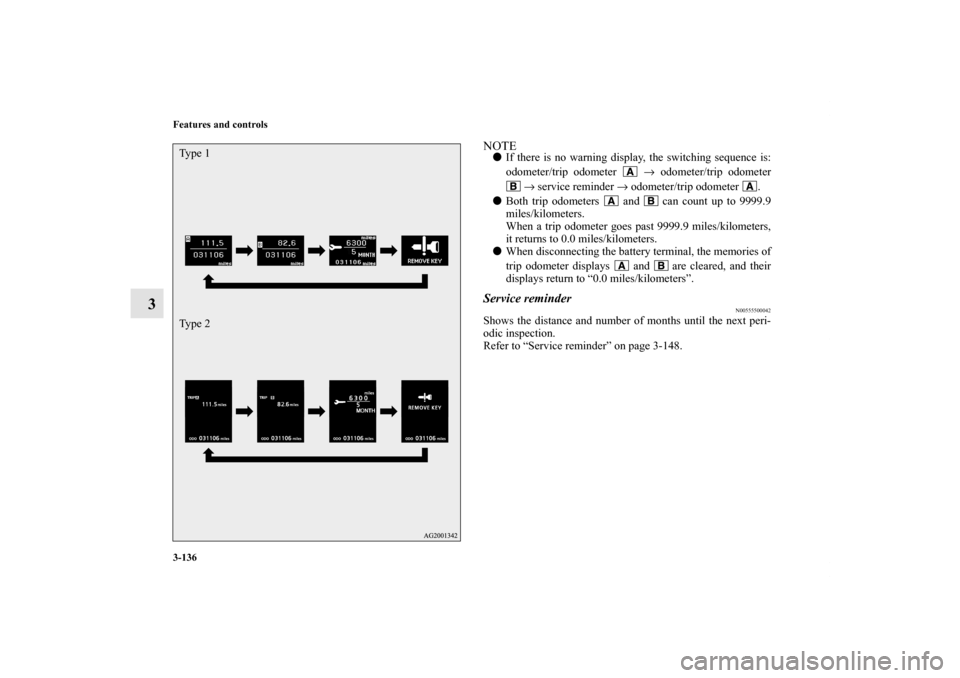
Each time you lightly press the multi-information meter
switch, the display screen switches.
Odometer/trip odometer → Odometer/trip odometer →
Service reminder → Redisplay of a warning display screen →
Odometer/trip odometer .
Odometer
Shows the total distance traveled.
Trip odometer
Shows the distance traveled between two points.
To reset the trip odometer
To return the display to 0, hold down the multi-information
meter switch for about 2 seconds or more. Only the currently
displayed value will be reset.
Example
If trip odometer is displayed, only trip odometer will
be reset.
When there is no
warning display
When there is a
warning display Ty p e 1
Ty p e 2
When there is no
warning display
When there is a
warning display
1-
Odometer (Type1)/Trip odometer
2-
Odometer (Type1)/Trip odometer
3- Service reminder
4- Redisplay of a warning display screen
Usage examples for trip odometer , trip odometer
It is possible to measure two currently traveled distances,
from home using trip odometer and from a particular
point on the way using trip odometer .
BK0140300US.book 135 ページ 2011年6月28日 火曜日 午後5時18分
Page 233 of 610
3-136 Features and controls
3
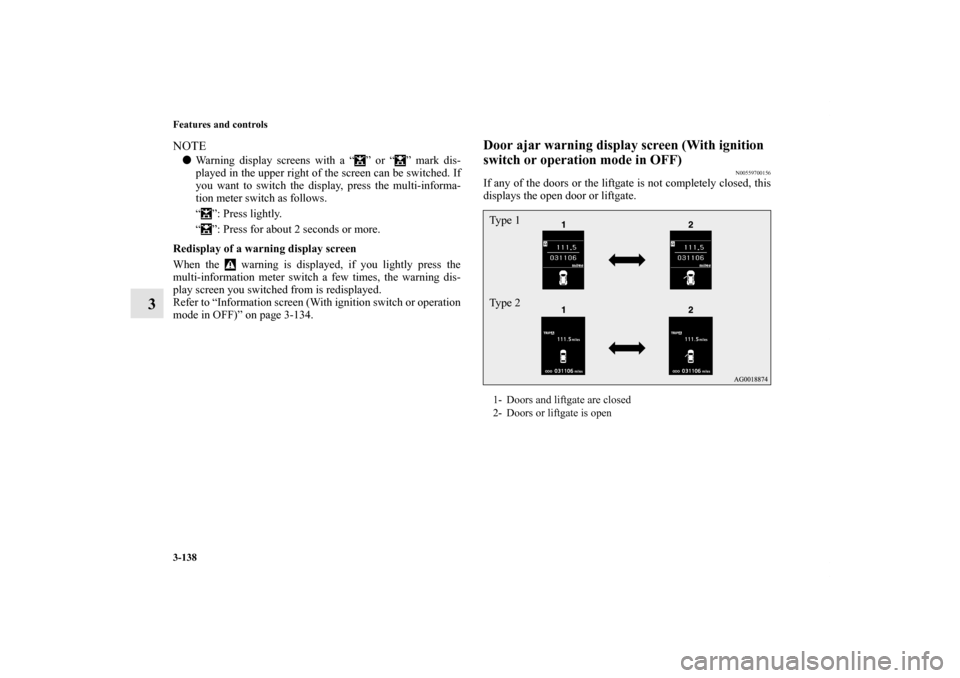
NOTE�If there is no warning display, the switching sequence is:
odometer/trip odometer → odometer/trip odometer
→ service reminder → odometer/trip odometer .
�Both trip odometers and can count up to 9999.9
miles/kilometers.
When a trip odometer goes past 9999.9 miles/kilometers,
it returns to 0.0 miles/kilometers.
�When disconnecting the battery terminal, the memories of
trip odometer displays and are cleared, and their
displays return to “0.0 miles/kilometers”.Service reminder
N00555500042
Shows the distance and number of months until the next peri-
odic inspection.
Refer to “Service reminder” on page 3-148.
Ty p e 1
Ty p e 2BK0140300US.book 136 ページ 2011年6月28日 火曜日 午後5時18分
Page 234 of 610
Features and controls
3-137
3
Interrupt display screen (With ignition switch or
operation mode in OFF)
N00559600201
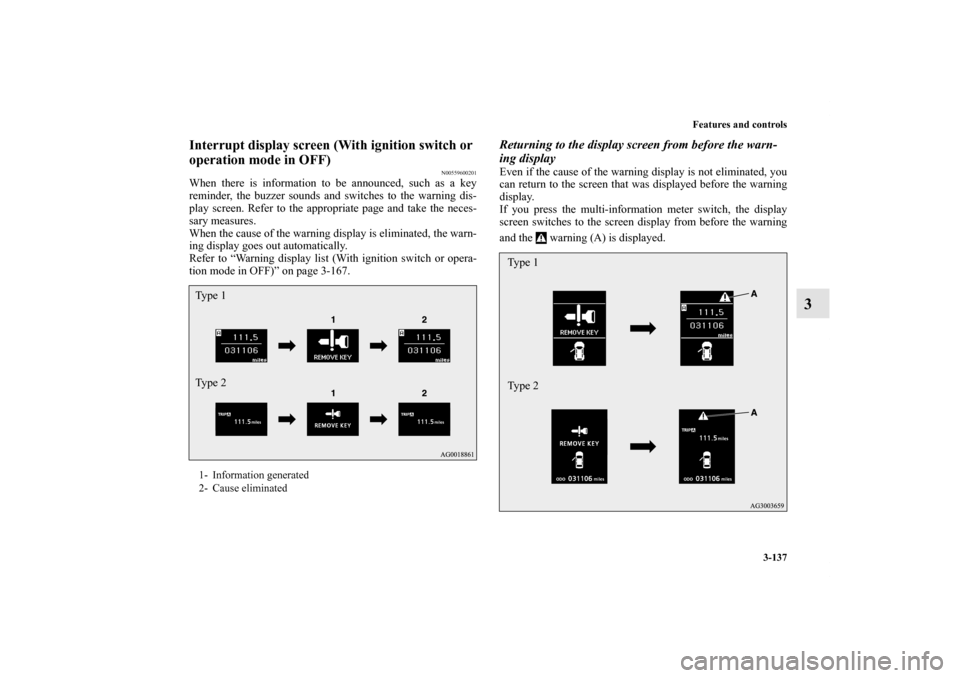
When there is information to be announced, such as a key
reminder, the buzzer sounds and switches to the warning dis-
play screen. Refer to the appropriate page and take the neces-
sary measures.
When the cause of the warning display is eliminated, the warn-
ing display goes out automatically.
Refer to “Warning display list (With ignition switch or opera-
tion mode in OFF)” on page 3-167.
Returning to the display screen from before the warn-
ing displayEven if the cause of the warning display is not eliminated, you
can return to the screen that was displayed before the warning
display.
If you press the multi-information meter switch, the display
screen switches to the screen display from before the warning
and the warning (A) is displayed.
1- Information generated
2- Cause eliminatedTy p e 1
Ty p e 2
Type 1
Type 2
BK0140300US.book 137 ページ 2011年6月28日 火曜日 午後5時18分
Page 235 of 610
3-138 Features and controls
3
NOTE�Warning display screens with a “ ” or “ ” mark dis-
played in the upper right of the screen can be switched. If
you want to switch the display, press the multi-informa-
tion meter switch as follows.
“ ”: Press lightly.
“ ”: Press for about 2 seconds or more.
Redisplay of a warning display screen
When the warning is displayed, if you lightly press the
multi-information meter switch a few times, the warning dis-
play screen you switched from is redisplayed.
Refer to “Information screen (With ignition switch or operation
mode in OFF)” on page 3-134.
Door ajar warning display screen (With ignition
switch or operation mode in OFF)
N00559700156
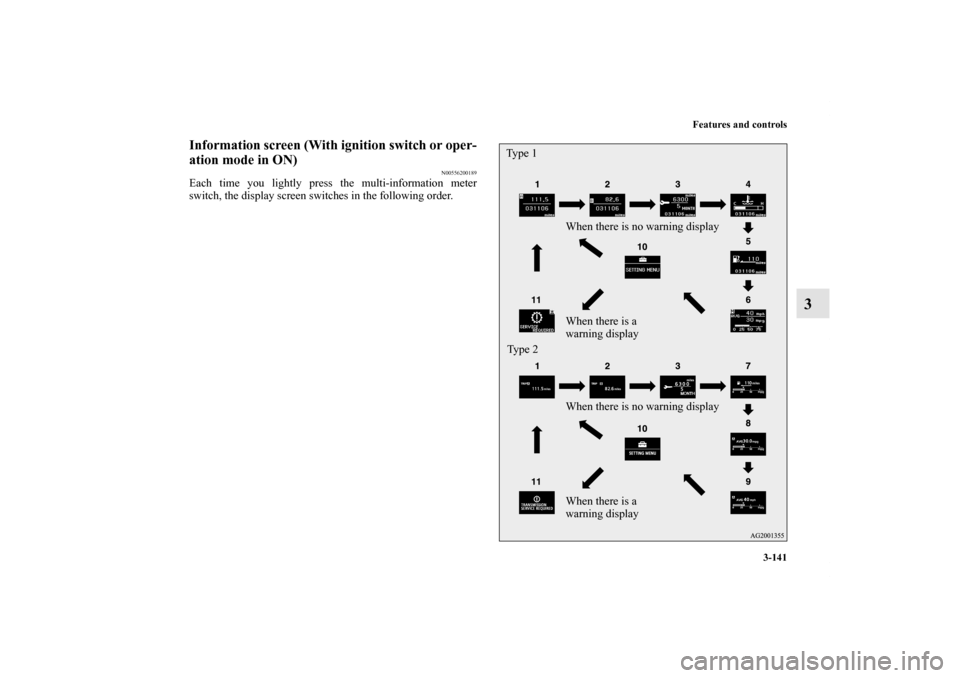
If any of the doors or the liftgate is not completely closed, this
displays the open door or liftgate.1- Doors and liftgate are closed
2- Doors or liftgate is openTy p e 1
Ty p e 2
BK0140300US.book 138 ページ 2011年6月28日 火曜日 午後5時18分
Page 236 of 610
Features and controls
3-139
3
Information screen (With the ignition switch is
turned from the “LOCK” position to the “ON”
position or the operation mode is changed from
OFF to ON)
N00555800146
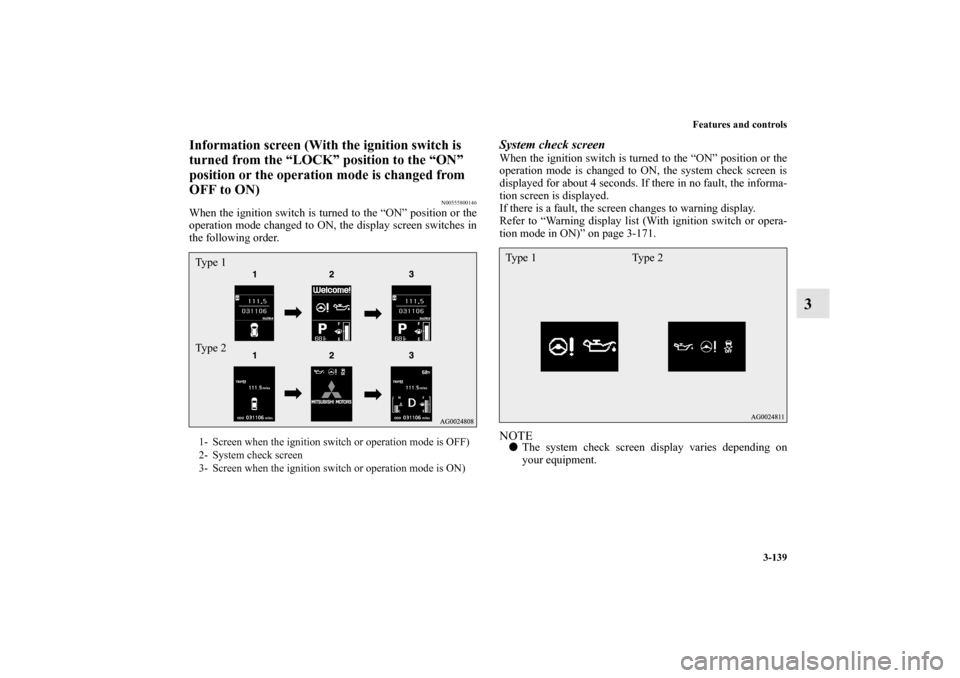
When the ignition switch is turned to the “ON” position or the
operation mode changed to ON, the display screen switches in
the following order.
System check screenWhen the ignition switch is turned to the “ON” position or the
operation mode is changed to ON, the system check screen is
displayed for about 4 seconds. If there in no fault, the informa-
tion screen is displayed.
If there is a fault, the screen changes to warning display.
Refer to “Warning display list (With ignition switch or opera-
tion mode in ON)” on page 3-171.NOTE�The system check screen display varies depending on
your equipment.
1- Screen when the ignition switch or operation mode is OFF)
2- System check screen
3- Screen when the ignition switch or operation mode is ON)Ty p e 1
Ty p e 2
Ty p e 1 Ty p e 2
BK0140300US.book 139 ページ 2011年6月28日 火曜日 午後5時18分
Page 237 of 610
3-140 Features and controls
3
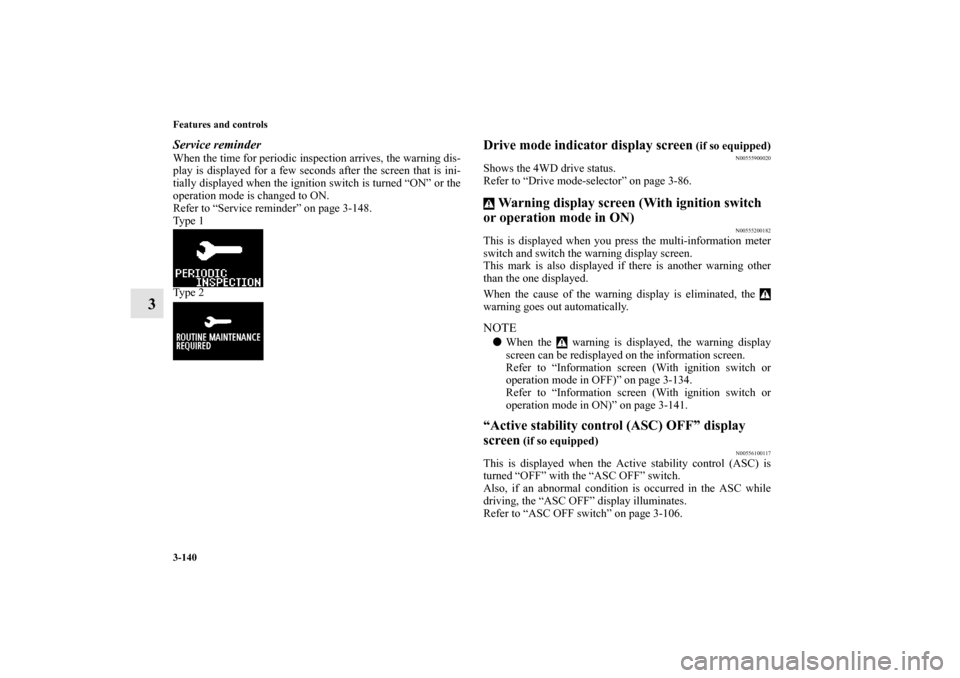
Service reminderWhen the time for periodic inspection arrives, the warning dis-
play is displayed for a few seconds after the screen that is ini-
tially displayed when the ignition switch is turned “ON” or the
operation mode is changed to ON.
Refer to “Service reminder” on page 3-148.
Ty p e 1
Ty p e 2
Drive mode indicator display screen
(if so equipped)
N00555900020
Shows the 4WD drive status.
Refer to “Drive mode-selector” on page 3-86. Warning display screen (With ignition switch
or operation mode in ON)
N00555200182
This is displayed when you press the multi-information meter
switch and switch the warning display screen.
This mark is also displayed if there is another warning other
than the one displayed.
When the cause of the warning display is eliminated, the
warning goes out automatically.NOTE�When the warning is displayed, the warning display
screen can be redisplayed on the information screen.
Refer to “Information screen (With ignition switch or
operation mode in OFF)” on page 3-134.
Refer to “Information screen (With ignition switch or
operation mode in ON)” on page 3-141.“Active stability control (ASC) OFF” display
screen
(if so equipped)
N00556100117
This is displayed when the Active stability control (ASC) is
turned “OFF” with the “ASC OFF” switch.
Also, if an abnormal condition is occurred in the ASC while
driving, the “ASC OFF” display illuminates.
Refer to “ASC OFF switch” on page 3-106.
BK0140300US.book 140 ページ 2011年6月28日 火曜日 午後5時18分
Page 238 of 610
Features and controls
3-141
3
Information screen (With ignition switch or oper-
ation mode in ON)
N00556200189
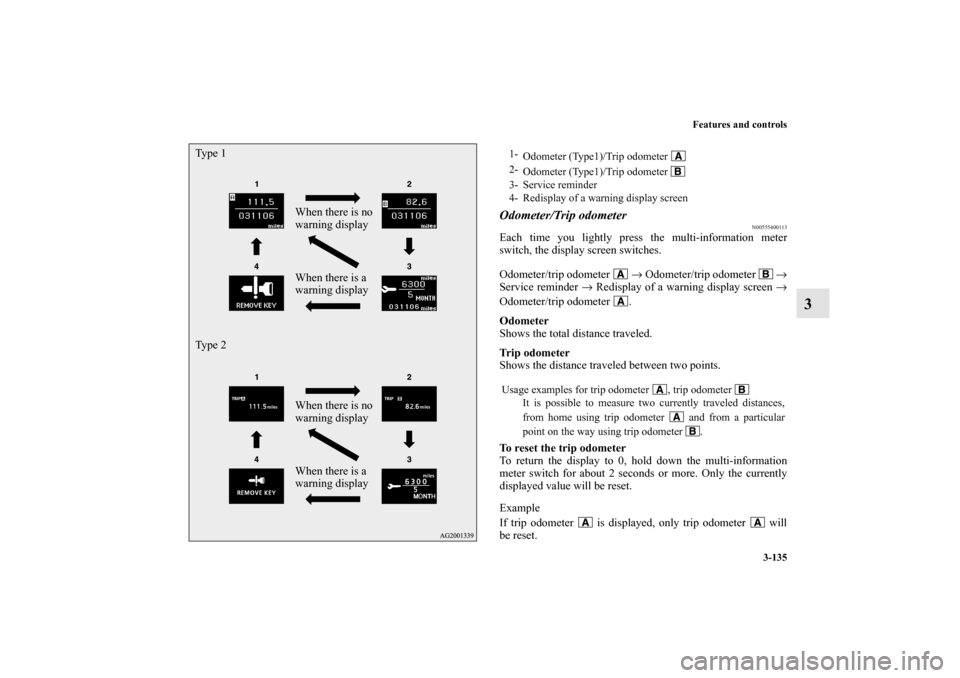
Each time you lightly press the multi-information meter
switch, the display screen switches in the following order.
When there is no warning display
When there is a
warning display
When there is no warning display
When there is a
warning display Type 1
Ty p e 2
BK0140300US.book 141 ページ 2011年6月28日 火曜日 午後5時18分
Page 239 of 610
3-142 Features and controls
3
NOTE�While driving, the function setting screen is not displayed
even if you operate the multi-information meter switch.
Always park the vehicle in a safe place before operating.
Refer to “Changing the function settings (With ignition
switch or operation mode in ON)” on page 3-151.
�When there is information to be announced, such as a sys-
tem fault, the tone sounds and the screen display is
switched.
Refer to “Interrupt display screen (With ignition switch or
operation mode in ON)” on page 3-145.
Odometer/Trip odometerThe operation method is the same as when the ignition switch
or the operation mode is in OFF.
For further details, refer to “Odometer/Trip odometer” on page
3-135.Service reminderShows the distance and number of months until the next peri-
odic inspection.
Refer to “Service reminder” on page 3-148.Engine coolant temperature displayShows the engine coolant temperature.
If the coolant becomes hot, “ ” will blink.
Pay careful attention to the engine coolant temperature display
while you are driving.
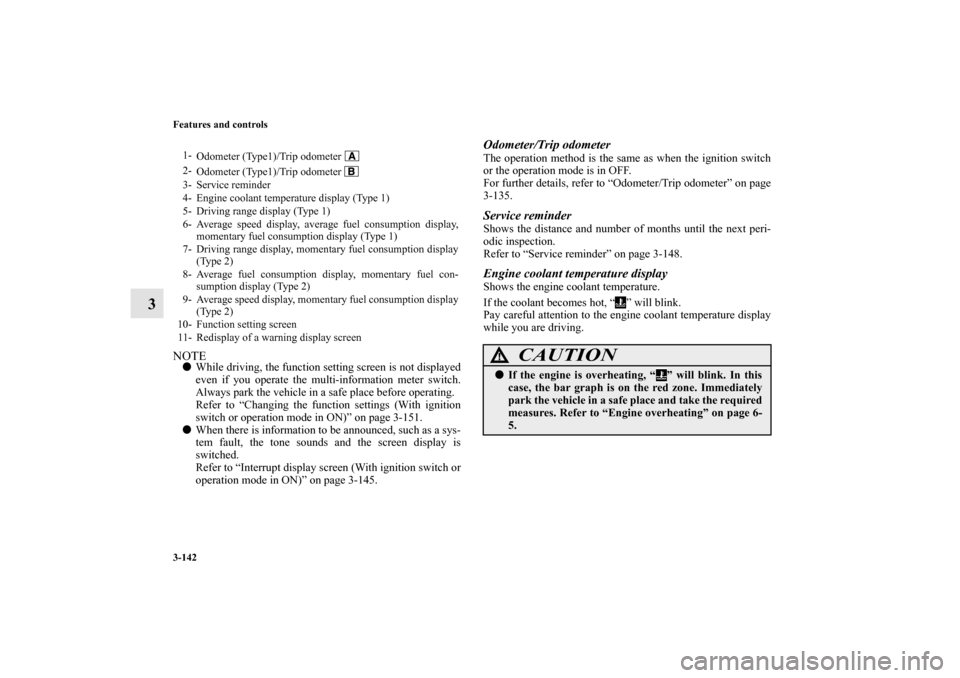
1-
Odometer (Type1)/Trip odometer
2-
Odometer (Type1)/Trip odometer
3- Service reminder
4- Engine coolant temperature display (Type 1)
5- Driving range display (Type 1)
6- Average speed display, average fuel consumption display,
momentary fuel consumption display (Type 1)
7- Driving range display, momentary fuel consumption display
(Type 2)
8- Average fuel consumption display, momentary fuel con-
sumption display (Type 2)
9- Average speed display, momentary fuel consumption display
(Type 2)
10- Function setting screen
11- Redisplay of a warning display screen
CAUTION
!�If the engine is overheating, “ ” will blink. In this
case, the bar graph is on the red zone. Immediately
park the vehicle in a safe place and take the required
measures. Refer to “Engine overheating” on page 6-
5.
BK0140300US.book 142 ページ 2011年6月28日 火曜日 午後5時18分