Page 197 of 618
3-110 Features and controls
3
Shifting down
Each time the - (SHIFT DOWN) sportronic steering wheel
shifter is pulled, the transmission shifts down 1 gear.NOTE�After manual shifting is selected using the sportronic
steering wheel shifters, shifting up and down can also be
performed using the gearshift lever.Returning to “D” range operation
When the gearshift lever is in the “D” (DRIVE) position, pull
the + (SHIFT UP) sportronic steering wheel shifter toward you
for 2 seconds or more to return to “D” range operation.
BK0142300US.book 110 ページ 2011年8月7日 日曜日 午前10時44分
Page 204 of 618

Features and controls
3-117
3 Cautions on handling of all-wheel drive
vehicles
N00530800174
Tires and wheelsSince driving torque can be applied to all four wheels, the per-
formance of the vehicle when operating in all-wheel drive is
greatly affected by the condition of the tires.
Pay close attention to the tires.
�Install specified tires on all wheels. Refer to “Tires and
wheels” on page 9-8.
�Be sure to fit all four tires and wheels of the same size and
type.
When replacement of any of the tires or wheels is neces-
sary, replace all of them.
�All tires should be rotated whenever the wear difference
between the front and rear tires is recognizable.
Good vehicle performance cannot be expected if there is a dif-
ference in wear between tires. Refer to “Tire rotation” on page
7-26.
�Check the tire inflation pressure regularly.
CAUTION
!�Always use tires of the same size, same type, and
same brand, and which have no wear differences.
Using tires that differ in size, type, brands or the
degree of wear, will increase the differential oil tem-
perature, resulting in possible damage to the driving
system. Further, the drive train will be subjected to
excessive loading, possibly leading to oil leakage,
component seizure, or other serious problems.
BK0142300US.book 117 ページ 2011年8月7日 日曜日 午前10時44分
Page 209 of 618
3-122 Features and controls
3
S-AWC control mode displayThe currently selected control mode is displayed on the multi-
information display.
In addition, when the control mode is changed, the selected
mode appears on the interrupt display screen of the information
screen in the multi-information display.
The control mode display will appear on the information
screen for a few seconds, and then the original screen will
return.Example: “TARMAC” mode is selected.
CAUTION
!�The S-AWC control mode display may flash under
aggressive driving conditions.
At this time, S-AWC control is temporarily sus-
pended in order to protect the S-AWC device, but
this will not affect normal driving.
After the vehicle is driven for a while, if the S-AWC
control mode display remains on, the S-AWC con-
trol will start operating again.
BK0142300US.book 122 ページ 2011年8月7日 日曜日 午前10時44分
Page 211 of 618

3-124 Features and controls
3
S-AWC warning display
N00542600049
When there is a malfunction in the system, the warning dis-
play will appear on the information screen in the multi-infor-
mation display.
In addition, the S-AWC control mode display in section A will
go out at the same time.
NOTE�If the ambient temperature drops and the viscosity of the
AWC control fluid increases, the warning may be dis-
played.
At this time, S-AWC control is temporarily suspended,
but this will not affect normal driving.
After the vehicle is driven for a while, if the engine is
restarted after the AWC control fluid warms up or the
ambient temperature increases, the S-AWC control will
start operating again if the warning display goes out.
WA R N I N G
!�Always concentrate on your driving first. Keep your
eyes and mind on the road. Distractions while driv-
ing can lead to an accident.
CAUTION
!�The system may be malfunctioning.
Park your vehicle in a safe place and stop the engine.
Restart the engine and check whether the warn-
ing display and “SERVICE REQUIRED” go out.
If the warning display and “SERVICE
REQUIRED” go out, there is no abnormal condi-
tion. If the warning display and “SERVICE
REQUIRED” do not go out or appear frequently, it
is not necessary to stop the vehicle immediately, but
we recommend that you have your vehicle inspected.
BK0142300US.book 124 ページ 2011年8月7日 日曜日 午前10時44分
Page 213 of 618

3-126 Features and controls
3
Anti-lock braking system warning light / display
N00531600632
Warning light
Warning display
If there is a malfunction in the system, the anti-lock braking
system warning light will come on and the warning display
will appear on the information screen in the multi-information
display.
Under normal conditions, the anti-lock braking system warning
light only comes on when the ignition switch is turned to the
“ON” position and goes off a few seconds later.
CAUTION
!�Any of the following indicates that the anti-lock
braking system is not functioning and only the stan-
dard brake system is working. (The standard brake
system is functioning normally.) If this happens,
take your vehicle to an authorized Mitsubishi
Motors dealer or a repair facility of your choice.
• When the ignition switch is in the “ON” position,
the warning light does not come on or it remains
on and does not go off.
• The warning light comes on while driving.
• The warning display appears while driving.
BK0142300US.book 126 ページ 2011年8月7日 日曜日 午前10時44分
Page 218 of 618

Features and controls
3-131
3
NOTE�When moving out of mud, sand or fresh snow, pressing
the accelerator pedal may not allow the engine speed to
increase. In such situations, temporarily turning off the
ASC with the “ASC OFF” switch will make it easier to
move out your vehicle.
�By pressing the ASC OFF switch, both the skid control
function and the traction control function are turned OFF.
�By pressing down the “ASC OFF” switch for 3 seconds or
longer, you can deactivate the ASC and the braking con-
trol of the AYC.
At this time, the display will appear for a few sec-
onds.
Then, the previous screen will return and the “!” mark will
come on.
Press the ASC OFF switch again to turn ON the ASC.
�If the ASC OFF switch is continuously pressed after the
ASC has been turned OFF or the ASC and the braking
control of AYC have been turned off, an erroneous opera-
tion prevention function operates and the ASC is automat-
ically turned ON.
ASC operation display or ASC OFF display
N00546500091
NOTE�The display may come on when you start the engine.
This means that the battery voltage momentarily dropped
when the engine was started. It does not indicate a mal-
function, provided that the display goes out immediately.
�When a compact spare tire has been put on your vehicle,
the gripping ability of the tire will be lower, making it
more likely that the display/indicator will blink.
- ASC operation display/ASC indicator
The display/indicator will blink when the ASC is operat-
ing.
-ASC OFF display
The display is displayed when the ASC has been deac-
tivated with the “ASC OFF” switch.
CAUTION
!�When display/indicator blinks, ASC is operating,
which means that the road is slippery or that your
vehicle’s wheels are beginning to slip. If this hap-
pens, drive slower.
BK0142300US.book 131 ページ 2011年8月7日 日曜日 午前10時44分
Page 222 of 618

Features and controls
3-135
3
NOTE�Once the brake assist system is operational, it maintains
great braking force even if the brake pedal is lightly
released.
To stop its operation, completely remove your foot from
the brake pedal.
�The brake assist system may become operational when the
brake pedal is fully depressed even if it has not been
depressed suddenly.
�When the brake assist system is in use while driving, you
may feel as if the depressed brake pedal is soft, the pedal
moves in small motions in conjunction with the operation
noise, or the vehicle body and the steering wheel vibrate.
This occurs when the brake assist system is operating nor-
mally and does not indicate faulty operation. Continue to
depress the brake pedal.
�You may hear an operation noise when the brake pedal is
depressed suddenly while stationary. This does not indi-
cate a malfunction and the brake assist system is operating
normally.
Power steering system
N00518000293
The power steering system operates while the engine is run-
ning. It helps reduce the effort needed to turn the steering
wheel.
The power steering system has mechanical steering capability
in case the power assist is lost. If the power assist is lost for
some reason, you will still be able to steer your vehicle. If the
power assist is lost, you will notice it takes much more effort to
steer and that there is much more “free play” in the steering
wheel. If this happens, take your vehicle to an authorized
Mitsubishi Motors dealer or a repair facility of your choice.
WA R N I N G
!�Do not stop the engine while the vehicle is moving.
Stopping the engine would make the steering wheel
extremely hard to turn, possibly resulting in an acci-
dent.
CAUTION
!�Do not leave the steering wheel turned all the way in
one direction. This can cause damage to the power
steering system.
BK0142300US.book 135 ページ 2011年8月7日 日曜日 午前10時44分
Page 226 of 618
Features and controls
3-139
3
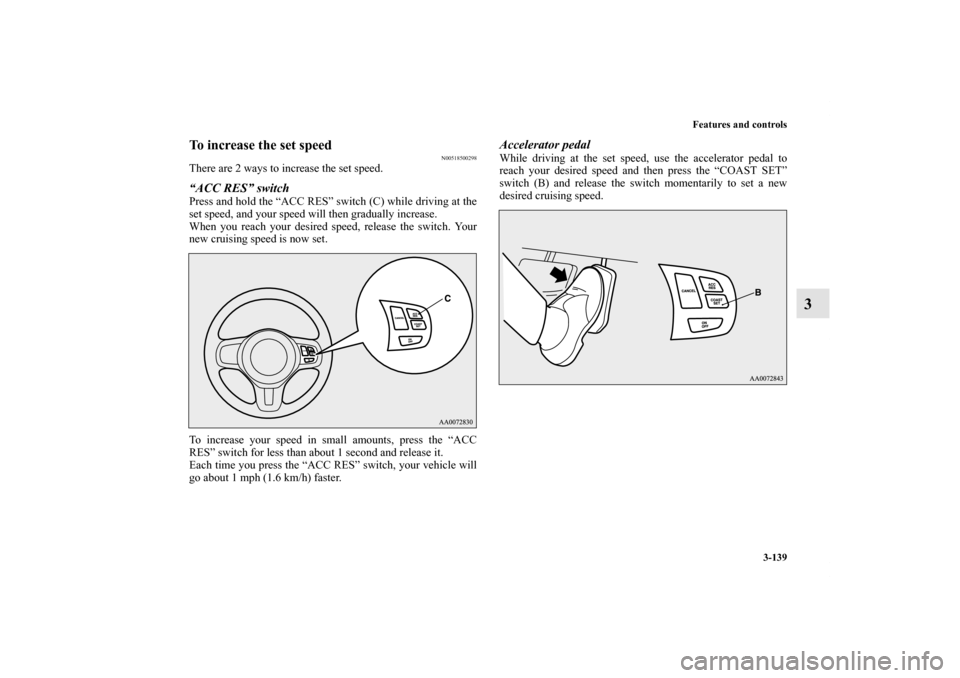
To increase the set speed
N00518500298
There are 2 ways to increase the set speed.“ACC RES” switchPress and hold the “ACC RES” switch (C) while driving at the
set speed, and your speed will then gradually increase.
When you reach your desired speed, release the switch. Your
new cruising speed is now set.
To increase your speed in small amounts, press the “ACC
RES” switch for less than about 1 second and release it.
Each time you press the “ACC RES” switch, your vehicle will
go about 1 mph (1.6 km/h) faster.
Accelerator pedalWhile driving at the set speed, use the accelerator pedal to
reach your desired speed and then press the “COAST SET”
switch (B) and release the switch momentarily to set a new
desired cruising speed.
BK0142300US.book 139 ページ 2011年8月7日 日曜日 午前10時44分