2012 MINI COUPE ROADSTER CONVERTIBLE audio
[x] Cancel search: audioPage 186 of 283
Mobile phone preparation BluetoothCOMMUNICATIONS
185
>The data volume of the phone book entry is
too great, e.g. due to additionally stored
information such as notes? Reduce the data
volume.
> Is the mobile phone connected as an audio
source or auxiliary phone? The mobile
phone must be connected as a telephone.
The telephone connection quality is low.
> Depending on the mobile phone, it is possi-
ble to adjust the strength of the Bluetooth
signal.
> Insert the mobile phone into the snap-in
adapter or place it in the vicinity of the
center console.
> Adjust the volume of the microphone and
speaker separately.
If you have gone through all items in the list and
still cannot activate the desired function please
contact the Hotline or your MINI dealer.
Operation
Adjusting volume
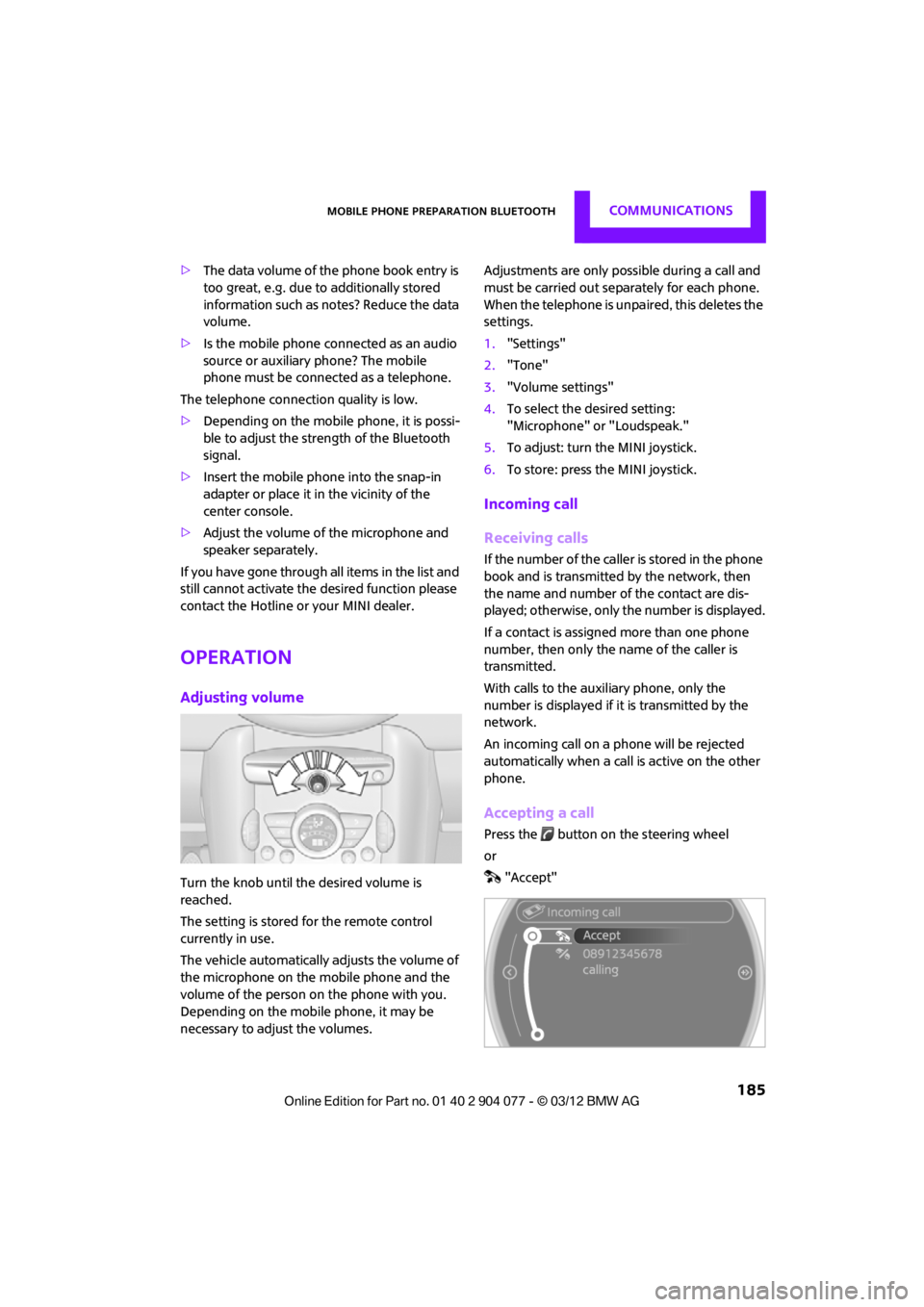
Turn the knob until the desired volume is
reached.
The setting is stored for the remote control
currently in use.
The vehicle automatically adjusts the volume of
the microphone on the mobile phone and the
volume of the person on the phone with you.
Depending on the mobile phone, it may be
necessary to adjust the volumes. Adjustments are only possible during a call and
must be carried out separately for each phone.
When the telephone is unpaired, this deletes the
settings.
1.
"Settings"
2. "Tone"
3. "Volume settings"
4. To select the desired setting:
"Microphone" or "Loudspeak."
5. To adjust: turn the MINI joystick.
6. To store: press the MINI joystick.
Incoming call
Receiving calls
If the number of the caller is stored in the phone
book and is transmitted by the network, then
the name and number of the contact are dis-
played; otherwise, only the number is displayed.
If a contact is assigned more than one phone
number, then only the name of the caller is
transmitted.
With calls to the auxiliary phone, only the
number is displayed if it is transmitted by the
network.
An incoming call on a phone will be rejected
automatically when a call is active on the other
phone.
Accepting a call
Press the button on the steering wheel
or
"Accept"
00320051004F004C00510048000300280047004C0057004C005200510003
Page 192 of 283
Mobile phone preparation BluetoothCOMMUNICATIONS
191
Selecting an entry
Adjusting volume
Turn knob during announcement.
>The volume remains the same, even if the
volume of other audio sources is changed.
> The volume is stored for the remote control
currently in use.
Notes
Do not use the voice operation system to initiate
an emergency call. In st ressful situations, the
voice and vocal pitch can change. This can
unnecessarily delay the establishment of a tele-
phone connection.
Ambient conditions
> Say the commands, numbers and letters
smoothly and with normal volume, empha-
sis and speed.
> Always say the commands in the language
of the system. The language for voice oper-
ation system is preset and can not be
changed via the Control Display.
> Keep doors, windows, glass sunroof/pan-
oramic sunroof, or convertible top closed to
avoid noise interference.
> Avoid ambient noise in the vehicle while
speaking.
Snap-in adapter
General information
Detailed information on snap-in adapters that
compatibly support mobile phone functions can
be found at your MINI dealer.
Do not expose your mobile phone to extreme
ambient conditions, for example, very high tem-
peratures; otherwise, functions on your mobile
phone may not work. Follow the operating
instructions for your mobile phone.
Installation location
In the center armrest.
Inserting snap-in adapter
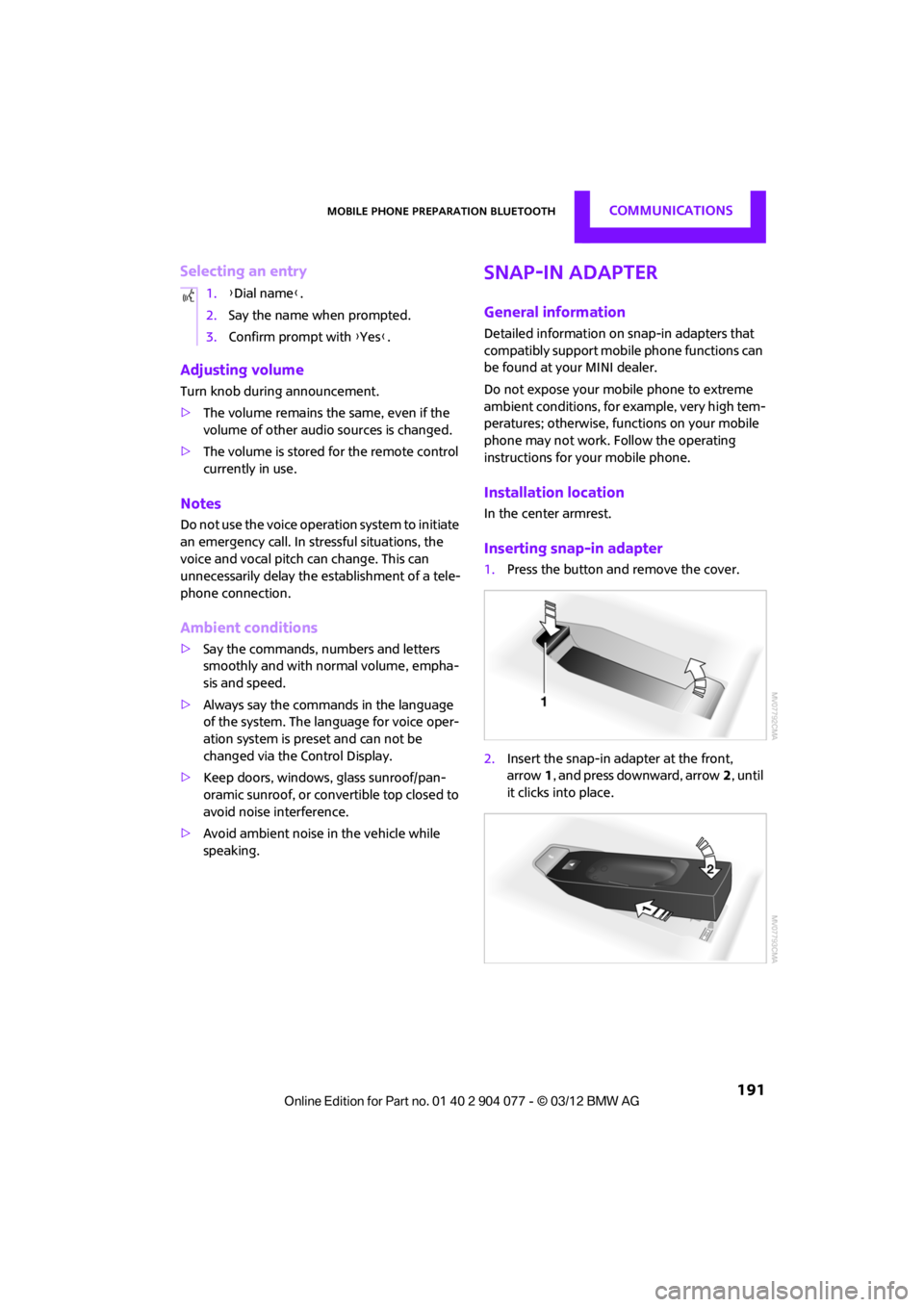
1.Press the button an d remove the cover.
2. Insert the snap-in adapter at the front,
arrow 1, and press downward, arrow 2, until
it clicks into place.
1.
{Dial name }.
2. Say the name when prompted.
3. Confirm prompt with {Yes }.
00320051004F004C00510048000300280047004C0057004C005200510003
Page 202 of 283
MINI ConnectedCOMMUNICATIONS
201
MINI Connected
Vehicle equipment
In this chapter, all production, country, and
optional equipment that is offered in the model
range is described. Equipment is also described
that is not available because of, for example,
selected options or count ry version. This also
applies to safety related functions and systems.
Overview
The concept
You can use MINI Connected to integrate certain
software applications of a suitable mobile phone
into your MINI. These software applications are
displayed on the Control Display. They are oper-
ated using the MINI joystick.
The range of software applications can be
country-specific.
Requirements
The following requirements must be met for the
function of MINI Connected:
> The operating system of the mobile phone
must support the software applications of
MINI Connected.
> The software applications are installed on
the mobile phone and are operational.
> Suitable mobile phone.
> Appropriate mobile phone contract.
Possible additional costs incurred are not
included with MINI Connected.
Only make entries when the traffic
situation allows you to do so. If you do not
observe this precaution, your being distracted
can endanger vehicle occupants and other road
users.
For safety reasons, some software applications
can only be used when the vehicle is stopped.
wise, malfunctions may result. <
Notes
For information on suitable mobile phones,
available software applications, and their
installation:
> At: www.mini.com/connectivity
> At your MINI dealer.
Connecting a mobile
phone
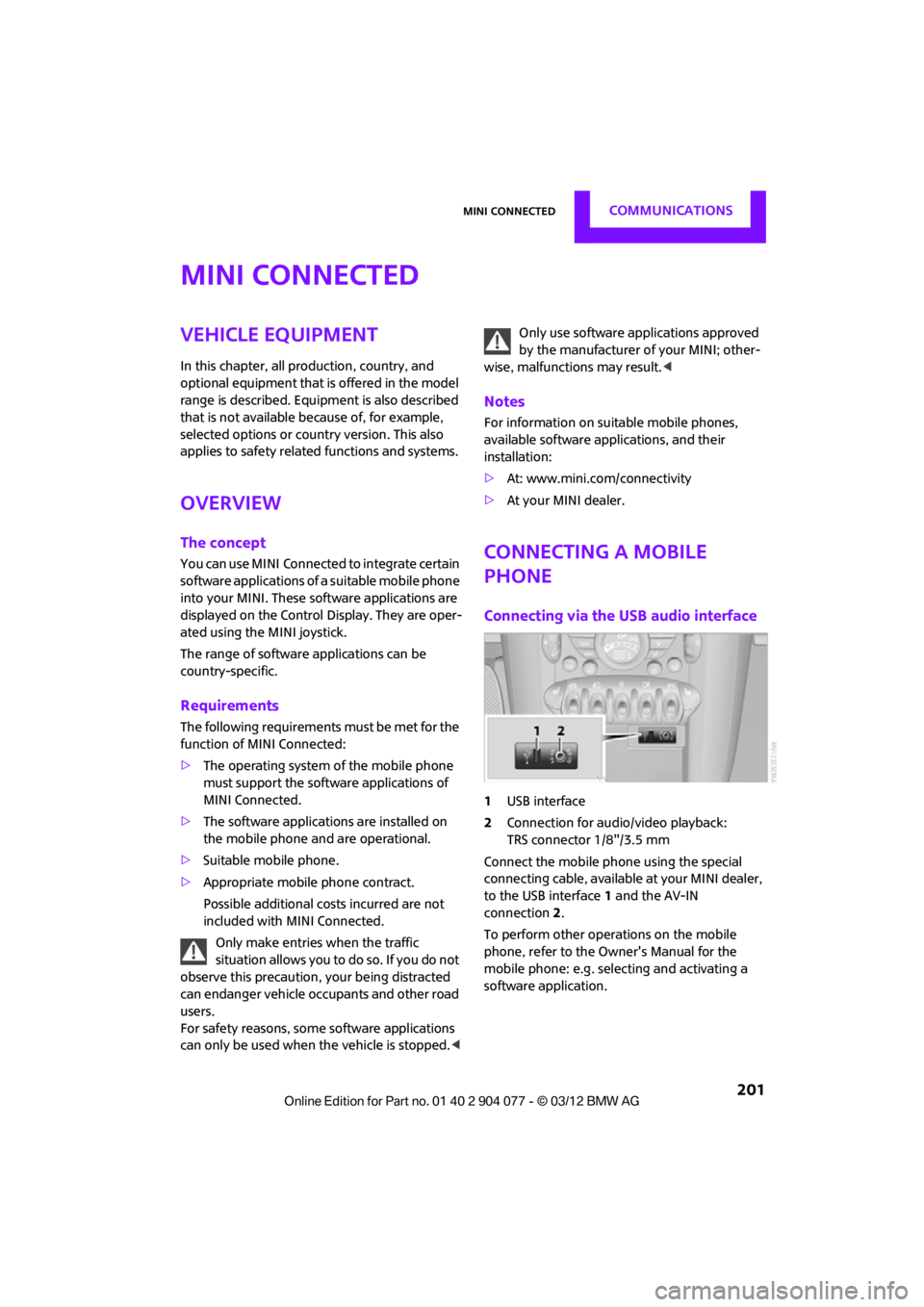
Connecting via the USB audio interface
1USB interface
2 Connection for audi o/video playback:
TRS connector 1/8"/3.5 mm
Connect the mobile phone using the special
connecting cable, available at your MINI dealer,
to the USB interface 1 and the AV-IN
connection 2.
To perform other operations on the mobile
phone, refer to the Owner's Manual for the
mobile phone: e.g. selecting and activating a
software application.
00320051004F004C00510048000300280047004C0057004C005200510003
Page 203 of 283
COMMUNICATIONSMINI Connected
202
Connecting via the snap-in adapter
The mobile phone can also be connected using
the snap-in adapter, refer to page191.
Using MINI Connected
After successful connection of the mobile phone
to the vehicle and activation of MINI Connected,
the applications are di splayed on the Control
Display and can be operated using the MINI
joystick.
Volume adjustments can be made using the
buttons on the steering wheel, refer to page 10,
or using the volume control knob on the radio,
refer to page 147.
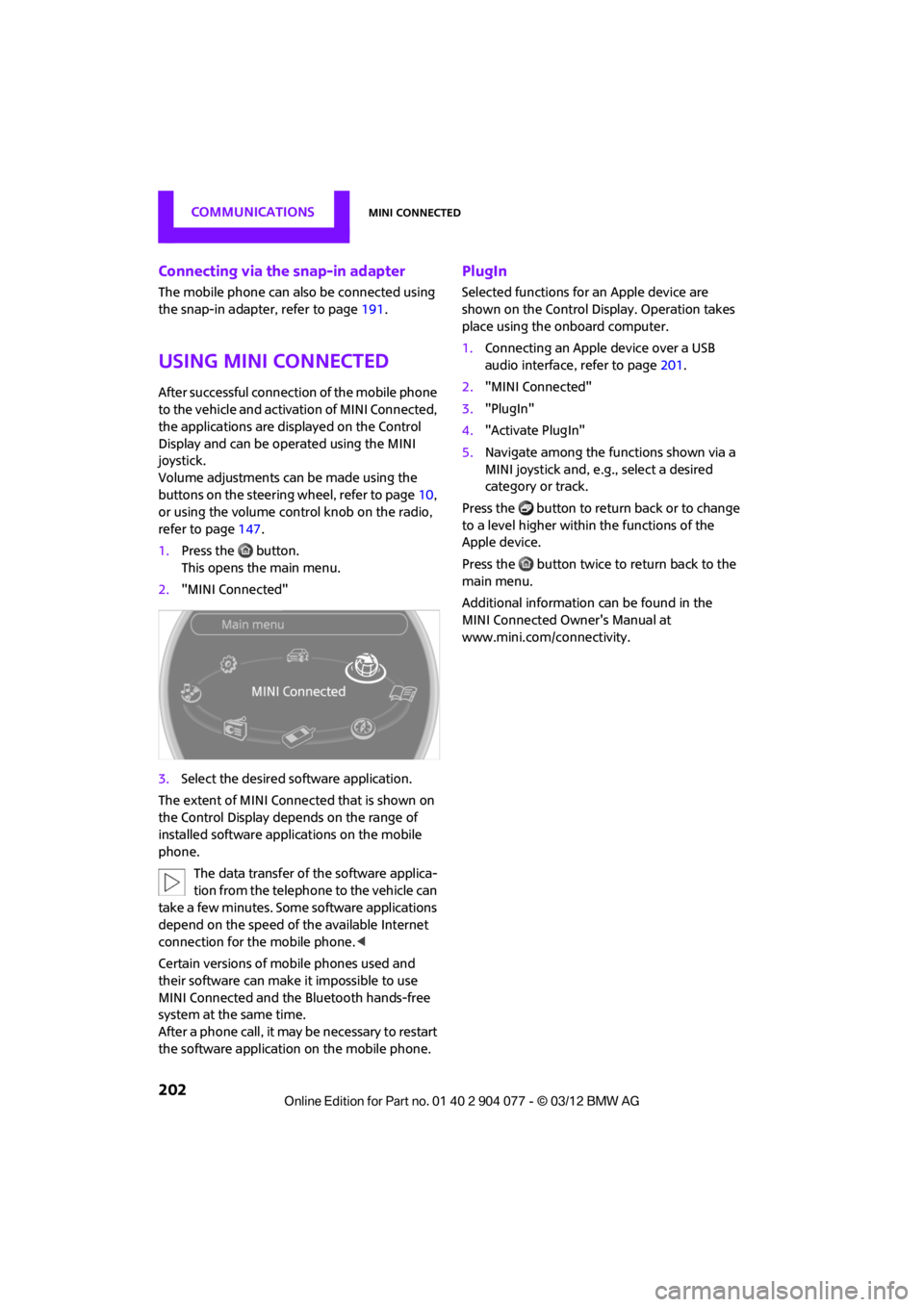
1. Press the button.
This opens the main menu.
2. "MINI Connected"
3. Select the desired so ftware application.
The extent of MINI Connected that is shown on
the Control Display depends on the range of
installed software applic ations on the mobile
phone.
The data transfer of the software applica-
tion from the telephone to the vehicle can
take a few minutes. Some software applications
depend on the speed of the available Internet
connection for the mobile phone. <
Certain versions of mobile phones used and
their software can make it impossible to use
MINI Connected and the Bluetooth hands-free
system at the same time.
After a phone call, it may be necessary to restart
the software application on the mobile phone.
PlugIn
Selected functions for an Apple device are
shown on the Control Display. Operation takes
place using the onboard computer.
1. Connecting an Apple device over a USB
audio interface, refer to page 201.
2. "MINI Connected"
3. "PlugIn"
4. "Activate PlugIn"
5. Navigate among the functions shown via a
MINI joystick and, e. g., select a desired
category or track.
Press the button to return back or to change
to a level higher within the functions of the
Apple device.
Press the button twice to return back to the
main menu.
Additional information can be found in the
MINI Connected Owner's Manual at
www.mini.com/c onnectivity.
00320051004F004C00510048000300280047004C0057004C005200510003
Page 269 of 283

268
REFERENCEEverything from A to Z
Everything from A to Z
Index
A
ABS Antilock Brake System83
Accessories, see Vehicle equipment 4
Acknowledgment signals for
locking/unlocking vehicle 30
Activated-charcoa l filter for
automatic climate
control 105
Adaptive Light Control 97
Adding engine oil 223
Additives
– coolant 224
– engine oil 223
Address, entering 132
Address for navigation
– entering 126,132
Adjusting temperature inside the car, refer to Air
conditioner 102
Adjusting temperature inside the car, refer to Automatic
climate control 103
Adjusting the tone during audio operation, refer to
Tone control 147
Airbags 93
– sitting safely 50
– warning lamp 94
Air conditioner 101
Air conditioning mode
– air conditioner 102
– automatic climate control 103
– ventilation 106
Air distribution
– automatic 104
– individual 103
– manual 103 Air flow rate
102,104
– air conditioning system 102
– automatic climate
control 104
– heating, ventilation 102
Airing, refer to Ventilation106
Air outlets, refer to Air vents 101
Air pressure, checking, refer to
Tire inflation pressure 209
Air recirculation, refer to Recirculated-air
mode 102,104
Air supply
– air conditioner 102
– automatic climate control 103
– ventilation 106
Air vents 101
AKI, refer to Fuel grade 207
Alarm system 34
All-season tires, refer to Winter
tire
s220
Always Open Timer 72
AM, wa
veband 149
Ambient air, refer to
Recirculated-air
mode 102,104
Ambient lighting 100
Antenna, care 227
Antifreeze
– coolant 224
– washer fluid 67
Antilock Brake System ABS 83
Anti-theft alarm system, refer
to Alarm system 34
Anti-theft system 29
Approved axle loads, refer to
Weights 257 Approved engine oils
223
Approved gross vehicle weight, refer to Weights257
Armrest, refer to Center armrest 108
Arrival time
– computer 73
– route guidance 135
Ashtray 109
Assistant systems, refer to
– Dynamic Stability Control DSC 83
Audio 146
– controls 146
– switching on/off 146
– tone control 147
– volume 147
Audio device, external 108
Automatic
– air distribution 104
– air flow rate 104
– cruise control 68
– headlamp control 96
Automatic climate control 101
– automatic air distribution 104
Automatic rear spoiler 85
Automatic transmission with Steptronic 62
– Interlock 63
– overriding selector lever lock 64
– Shiftlock 63
– sport program 64
AUTO program for automatic
climate control 104
Auxiliary phone 182
AUX-In, refer to External audio
device 108
AUX-In connection 159
00320051004F004C00510048000300280047004C0057004C005200510003
Page 270 of 283

Everything from A to ZREFERENCE
269
Average fuel consumption72
– setting the units 74
Average speed 72
Avoiding highways for
navigation 135
Axle loads, refer to Weights 257
B
Background ligh ting, refer to
Ambient lighting 100
Backrests, refer to Seats 51
Backup lamps
– replacing bulb 235
Band-aids, refer to First aid
pouch 243
Bar, refer to Tow-starting, towing away 245
Base plate for telephone or mobile phone
– refer to Snap-in adapter 191
Bass sounds, refer to Tone control 147
Battery 241
– disposal 38,242
– jump-starting 243
– temporary power failure 242
Battery renewal
– remote control 38
Being towed 245
Belts, refer to Safety belts 53
Belt tensioner, refer to Safety
belts 53
Beverage holders, refer to Cupholders 109
Black ice, refer to External temperature warning 71
Blower, refer to Air flow
rate 102,104
Bluetooth, activating/ deactivating 171,181 Bluetooth audio
163
– device pairing 163
– disconnecting an audio connection 165
– playback 164
– unpairing device 165
– what to do if... 166
Bottle holders, refer to Cupholders 109
Brake Assist 83
Brake fluid, refer to Service requirements 75
Brake lamps
– replacing bulbs 235
Brake pads, breaking in 114
Brake rotors 116
– brakes 114
– breaking in 114
Brakes
– ABS 83
– breaking in 114
– MINI Maintenance
System 225
– parking brake 62
– service requirements 75
Br akes,
refer to Braking
safely 115
Brake system 114
– breaking in 114
– disc brakes 116
– MINI Maintenance System 225
Breakdown service, refer to
Roadside Assistance 243
Breaking in the clutch 114
Break-in period 114
Bulb changing, refer to Lamps and bulbs 232
Button for starting the
engine 60
Buttons on the steering wheel 11
C
Calendar 197
– displaying appointment 197
– selecting calendar day 197
California Proposition 65 warning 5
Call
– accepting 173,185
– ending 174,186
– muting the microphone 187
Calling, refer to Phone numbers, dialing 174,186
Calling, refer to Telephone 108
Can holders, refer to Cupholders 109
Capacities 259
Car battery, refer to Vehicle battery 241
Car care 227
Care 227
– car-care products 227
– car washes 227
– CD/DVD drives 230
– high-pressure washers 228
– leather 230
– manual washing 228
– upholstery and fabrics 229
– windows 228
– wiper blades 228
Cargo, securing 119
Cargo area 116
– capacity 257
– Comfort Access 37
– lamp 99
– opening from outside 33
Cargo area lamp 99
Cargo area lid, refer to Tailgate 33
Cargo loading 118
– securing cargo 119
– stowing cargo 119
– vehicle 116
Car key, refer to Keys/remote controls 28
00320051004F004C00510048000300280047004C0057004C005200510003
Page 271 of 283

REFERENCEEverything from A to Z
270
Carpets, care230
Car phone
– installation location, refer to Center armrest 108
– refer to Telephone 108
Car phone, refer to Telephone 170,180
Car radio, refer to Radio 149
Car wash, care 227
Car washes 227
Catalytic conver ter, refer to
Hot exhaust system 115
CD, audio playback 157
CD player 157
– controls 146
– fast forward/reverse 158
– random order 158
– selecting a track 157
– switching on/off 146
– tone control 147
– volume 147
Center armrest 108
Center brake lamp 236
Center console, refer to Around the center
console 14
Central locking system 29
– Comfort Access 36
– from inside 32
– from outside 29
Changing bulbs 232
Changing the language on the Control Display 80
Changing the measurement units on the Control
Display 74
Changing wheels 239
Charging the battery 241
Chassis number, refer to
Engine compartment 221
Check Control 77
Child restraint fixing system
LATCH 57
Child restraint systems 56
Child seats 56 Chrome parts, care
229
Chrome parts, refer to Care 227
Cigarette lighter 109
Cleaning headlamps 67
– washer fluid 67
Clock
– setting time 76
– 12 h/24 h mode 76
Closing
– from inside 32
– from outside 29
Cl ot
hes hooks 108
Cockpit 10
Cold start, refer to Starting the engine 61
Comfort Access 36
– replacing the battery 38
– what to observe before
entering a car wash 37
Comfort area, refer to Around the center console 14
Compartment for remote control, refer to Ignition
lock 60
Computer 71
– displays on Control Display 73
Condensation, refer to When the vehicle is parked 116
Condition Based Service CBS 225
Configuring settings, refer to
Personal Profile 28
Connecting vacuum cleaner, refer to Connecting electrical
appliances 110
Consumption, refer to Average fuel consumption 72
Contact editing 178
Contacts 177,194
– new contact 195
Continuing route guidance 135
Control Display
– settings 73 Control Display, refer to iDrive
– switching on/off
17
Control Display, refer to Onboard computer 17
Controls and displays 10
Control stick, refer to Onboard computer 17
Control unit, refer to Onboard computer 17
Convenience operation
– convertible top 32
– windows 30
Convenient access, refer to
Comfort Access 36
Convenient star t, refer to
Starting the engine 61
Convertible top 39
– manual 44
– mechanical 44
Coolant 224
– checking level 224
– filling 224
Coolant temperature 224
Cooling, maximum 104
Cooling fluid, refer to
Coolant 224
Copyright 2
Corneri n
g li
ght, refer to
Adaptive Light Control 97
Criteria for route 135
Cruise control
– indicator lamp 13
Cruising range 71
Cupholders 109
Curb weight, refer to Weights 257
Current fuel consumption 72
Current playback
– external devices 162
D
Dashboard, refer to Cockpit 10
Dashboard instruments, refer to Displays 12
Dashboard lighting, refer to Instrument lighting 99
00320051004F004C00510048000300280047004C0057004C005200510003
Page 273 of 283

REFERENCEEverything from A to Z
272
Emergency services, refer to Roadside Assistance 243
Emergency unlocking 34
Ending a call 174,186
Engine
– breaking in 114
– data 250
– overheated, refer to Coolant temperature 224
– speed 250
– starting, Comfort Access 36
Engine compartment 221
Engine coolant, refer to
Coolant 224
Engine malfunction
– indicator lamp 13
Engine oil
– additives, refer to Approved engine oils 223
– alternative oil types 223
– approved engine oils 223
– capacity 223
– checking level 222
– dipstick 222
– intervals between changes,
refer to Service
requirements 75
– MINI Maintenance
System 225
Engine oil level, checking 222
Engine output, refer to Engine data 250
Engine starti ng, refer to
Starting the engine 61
Entering destination 126
Entering intersection 127
Entertainment sound output on/off 146
Entry map for destination 131
ESP Electronic Stability Program, refer to Dynamic
Stability Control DSC 83
Exhaust system, refer to Hot exhaust system 115 Exterior mirrors
54
– adjusting 54
– automatic heating 54
– folding in and out 54
External audio device 108
External audio de vice, refer to
AUX-In connection 159
External care 227
External devices
– random play sequence 162
– software update 166
External temperature display
– change units of measure 74
– in the onboard computer 74
Eyes
– for tow-starting and towing
away 245
– for tying down loads 119
F
Failure messages, refer to
Check Control 77
Failure of an electrical consumer 242
Fastening safety belts, refer to Safety belts 53
Fastest route for
navigation 135
Fast forward
– CD player 158
Fault messages, refer to Check Control 77
Filter
– microfilter/activated- charcoal filter for automatic
climate control 105
– microfilter for air conditioner 103
Fine wood, care 230
First aid pouch 243
Fixture for remote control,
refer to Ignition lock 60
Flash when locking/ unlocking 30 Flat tire
– run-flat tires
218
– Tire Pressure Monitor TPM 89
Flat Tire Monitor FTM 87
– indicating a flat tire 88
– initializing the system 87
– snow chains 87
– system limits 87
Flat tires, refer to Tire condition 217
Floor mats, care 230
FM, waveband 149
Fog lamps
– replacing bulb 234,236
Folding roof, refer to Convertible top with
integrated sliding sunroof 39
Footbrake, refer to Braking safely 115
Footwell lamps 99
For your own safety 5
Front airbags 93
Front fog lamps 98,99
– replacing bulb 234
Front seat adjustment 51
Frost on windows, refer to Defrosting
windows 103,105
FTM, refer to Flat Tire Monitor 87
Fuel 207
– gauge 70
– high-quality brands 207
– quality 207
– specifications 207
– tank
capaci
ty 259
Fuel clock, refer to Fuel gauge 70
Fuel consumption display
– average fuel consumption 72
Fuel display, refer to Fuel gauge 70
Fuel filler flap 206
– releasing in the event of electrical malfunction 206
Fuses 242
00320051004F004C00510048000300280047004C0057004C005200510003