2012 MINI COUPE ROADSTER CONVERTIBLE inflation pressure
[x] Cancel search: inflation pressurePage 238 of 283
Replacing componentsMOBILITY
237
Repairing a flat tire
Safety measures in the event of a
breakdown:
Park the vehicle as far as possible from moving
traffic and switch on the hazard warning
flashers.
Turn the steering wheel until the front wheels
are in the straight-ahead position and engage
the steering wheel lock. Engage the parking
brake and shift into 1st or reverse gear or place
the selector lever in position P.
All passengers should be outside the vehicle and
in a safe place, e.g. behind a guardrail.
Erect a warning triangle or warning flasher at the
appropriate distance if necessary. Comply with
all safety guidelines and regulations. <
In the event of a flat tire, different procedures
should be followed depending on the equip-
ment included in your vehicle:
> MINI Mobility Kit, refer to the following
section
> Run-flat tires, page 239
> Tire change with space-saver spare tire,
page 239
MINI Mobility Kit
Preparations
Use of the MINI Mobility Kit may be ineffective if
the tire puncture meas ures approx. 1/8 in/4 mm
or more. Contact the nearest MINI dealer if
the tire cannot be made drivable with the
Mobility Kit.
Do not remove foreign bodies which have
penetrated the tire if possible.
Follow the instructions on using the
Mobility Kit found on the compressor and
the sealant bottle. <
Remove the adhesive label for the speed limit
from the sealant bottle and affix it to the steer-
ing wheel.
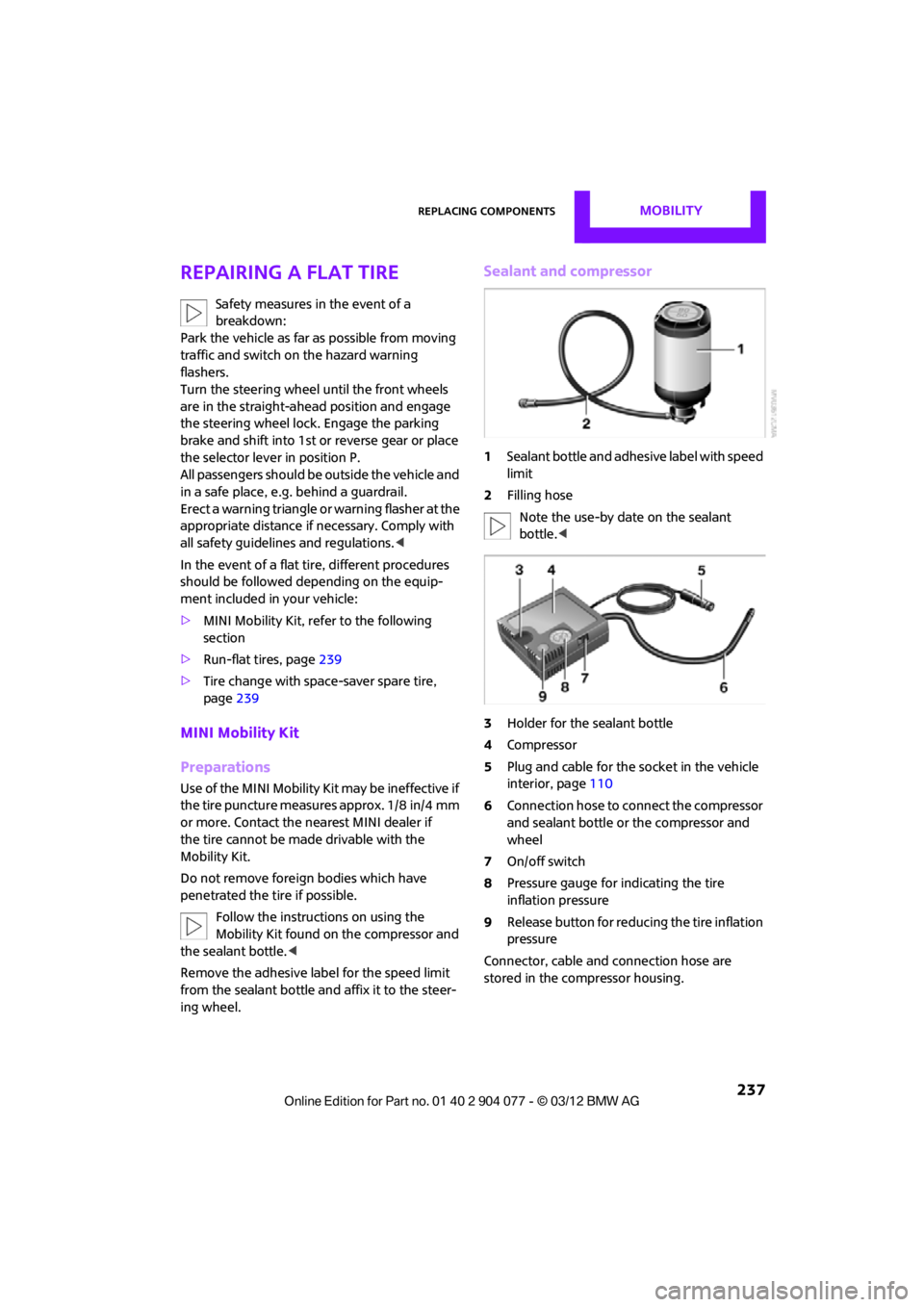
Sealant and compressor
1 Sealant bottle and adhesi ve label with speed
limit
2 Filling hose
Note the use-by date on the sealant
bottle. <
3 Holder for the sealant bottle
4 Compressor
5 Plug and cable for the socket in the vehicle
interior, page 110
6 Connection hose to connect the compressor
and sealant bottle or the compressor and
wheel
7 On/off switch
8 Pressure gauge for indicating the tire
inflation pressure
9 Release button for reduci ng the tire inflation
pressure
Connector, cable and connection hose are
stored in the compressor housing.
00320051004F004C00510048000300280047004C0057004C005200510003
Page 239 of 283
MOBILITYReplacing components
238
Using the Mobility Kit
To repair a tire puncture with the Mobility Kit,
proceed as follows:
>Fill the tire with sealant.
> Distribute the sealant.
> Correct the tire inflation pressure.
Filling the tire with sealant
Proceed in the specified order; otherwise,
sealant may emerge under high
pressure. <
1. Shake the sealant bottle.
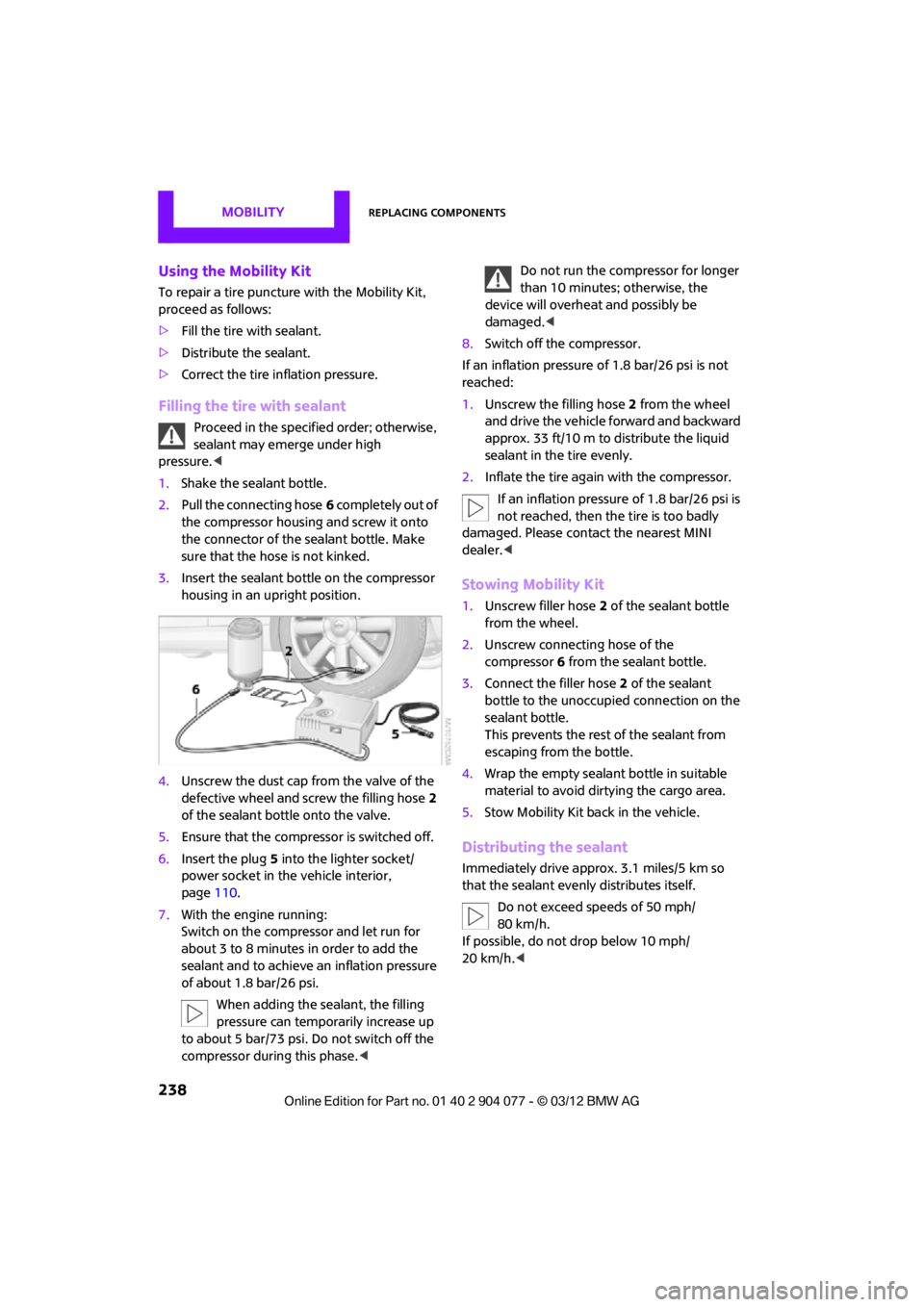
2. Pull the connecting hose 6 completely out of
the compressor housing and screw it onto
the connector of the sealant bottle. Make
sure that the hose is not kinked.
3. Insert the sealant bo ttle on the compressor
housing in an upright position.
4. Unscrew the dust cap from the valve of the
defective wheel and screw the filling hose 2
of the sealant bottle onto the valve.
5. Ensure that the compressor is switched off.
6. Insert the plug 5 into the lighter socket/
power socket in the vehicle interior,
page 110.
7. With the engine running:
Switch on the compressor and let run for
about 3 to 8 minutes in order to add the
sealant and to achieve an inflation pressure
of about 1.8 bar/26 psi.
When adding the sealant, the filling
pressure can temporarily increase up
to about 5 bar/73 psi. Do not switch off the
compressor during this phase.
device will overheat and possibly be
damaged. <
8. Switch off the compressor.
If an inflation pressure of 1.8 bar/26 psi is not
reached:
1. Unscrew the filling hose 2 from the wheel
and drive the vehicle forward and backward
approx. 33 ft/10 m to distribute the liquid
sealant in the tire evenly.
2. Inflate the tire again with the compressor.
If an inflation pressure of 1.8 bar/26 psi is
not reached, then the tire is too badly
damaged. Please contact the nearest MINI
dealer. <
Stowing Mobility Kit
1.Unscrew filler hose 2 of the sealant bottle
from the wheel.
2. Unscrew connecting hose of the
compressor 6 from the sealant bottle.
3. Connect the filler hose 2 of the sealant
bottle to the unoccupied connection on the
sealant bottle.
This prevents the rest of the sealant from
escaping from the bottle.
4. Wrap the empty sealant bottle in suitable
material to avoid dirtying the cargo area.
5. Stow Mobility Kit back in the vehicle.
Distributing the sealant
Immediately drive appr ox. 3.1 miles/5 km so
that the sealant evenly distributes itself.
Do not exceed speeds of 50 mph/
80 km/h.
If possible, do not drop below 10 mph/
20 km/h. <
00320051004F004C00510048000300280047004C0057004C005200510003
Page 240 of 283
Replacing componentsMOBILITY
239
Adjusting the tire pressure
1.After driving approx. 3.1 miles/5 km or
10 minutes, stop at a suitable location.
2. Screw the connection hose 6 of the
compressor directly onto the tire valve.
3. Insert the plug 5 into the power socket in
the vehicle interior.
4. Adjust tire pressure to 1.8 bar/26 psi. With
the engine running:
> To increase the inflatio n pressure: switch on
the compressor. To check the current infla-
tion pressure, switch off the compressor.
Do not run the compressor for longer
than 10 minutes; otherwise, the
device will overheat and possibly be
damaged. <
> To decrease the inflation pressure: press the
release button 9.
If the tire cannot ma intain the inflation
pressure, drive the vehicle again, refer to
Distributing the sealan t. Then repeat steps
1to4.
If an inflation pressure of 1.8 bar/26 psi still
cannot be reached, then the tire is too heavily
damaged. Contact your nearest MINI dealer. <
Driving on
Do not exceed the permitted maximum
speed of 50 mph/80 km/h; doing so may
result in an accident. <
Replace the defective tire as soon as possible
and have the new wheel/tire assembly
balanced.
Have the Mobility Kit refilled.
Changing wheels
Run-flat tires
Tire change for run-flat tires:
> Prepare for tire change, page 240
> Jack up vehicle, page 241
> Tighten lug bolts, page 241
Space-saver spare tire
Tire change with space-saver spare tire:
>Remove the space-saver spare tire,
page 239
> Prepare for tire change, page 240
> Jack up vehicle, page 241
> Mount space-saver spare tire, page 241
> Tighten lug bolts, page 241
> Drive with space-saver spare tire, page 240
Removing the space-saver spare tire
The screw connection of the space-saver spare
tire is under the floor mat in the cargo area, on
the base of the storage compartment for the tire
change set.
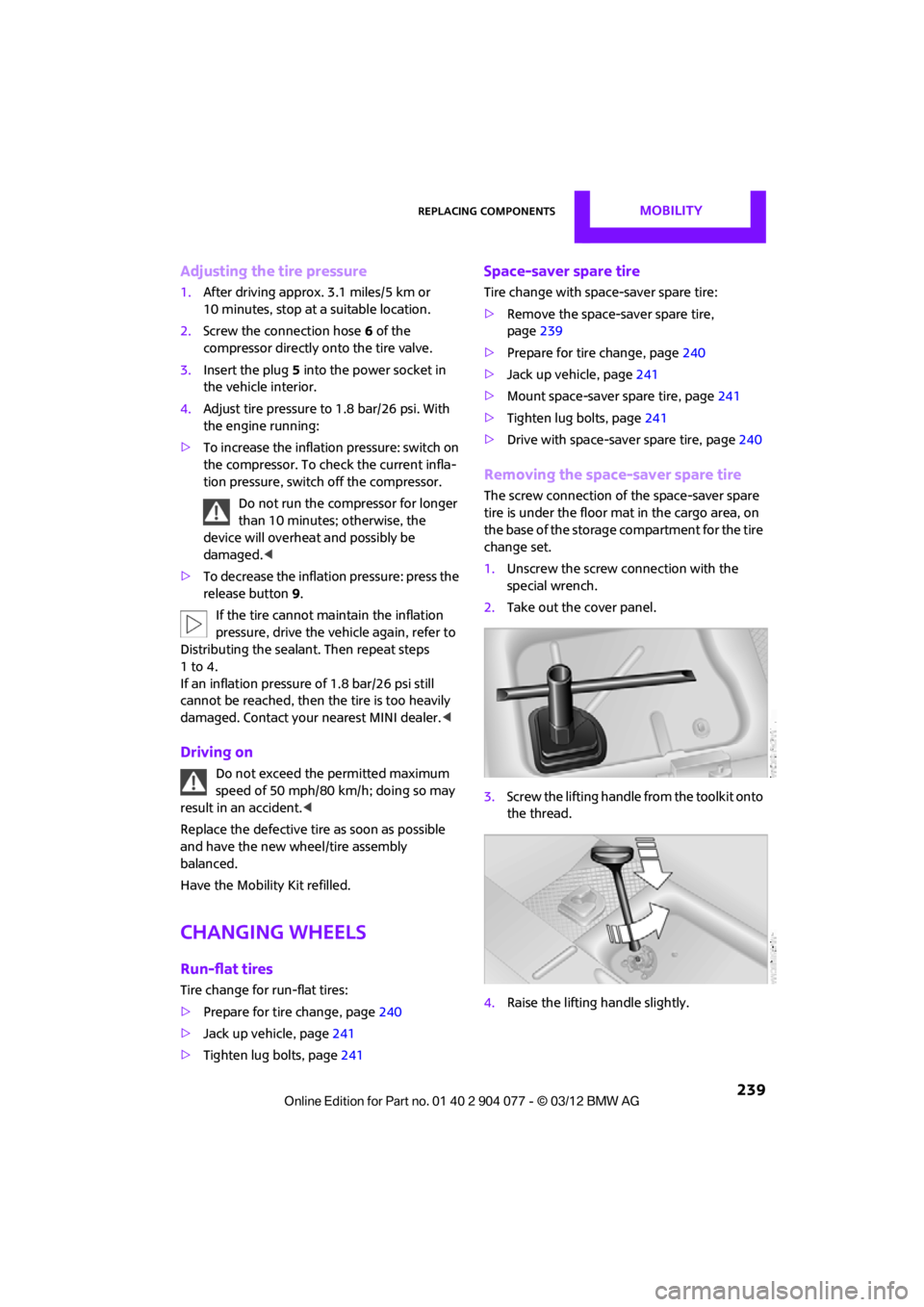
1. Unscrew the screw connection with the
special wrench.
2. Take out the cover panel.
3. Screw the lifting handle from the toolkit onto
the thread.
4. Raise the lifting handle slightly.
00320051004F004C00510048000300280047004C0057004C005200510003
Page 241 of 283
MOBILITYReplacing components
240
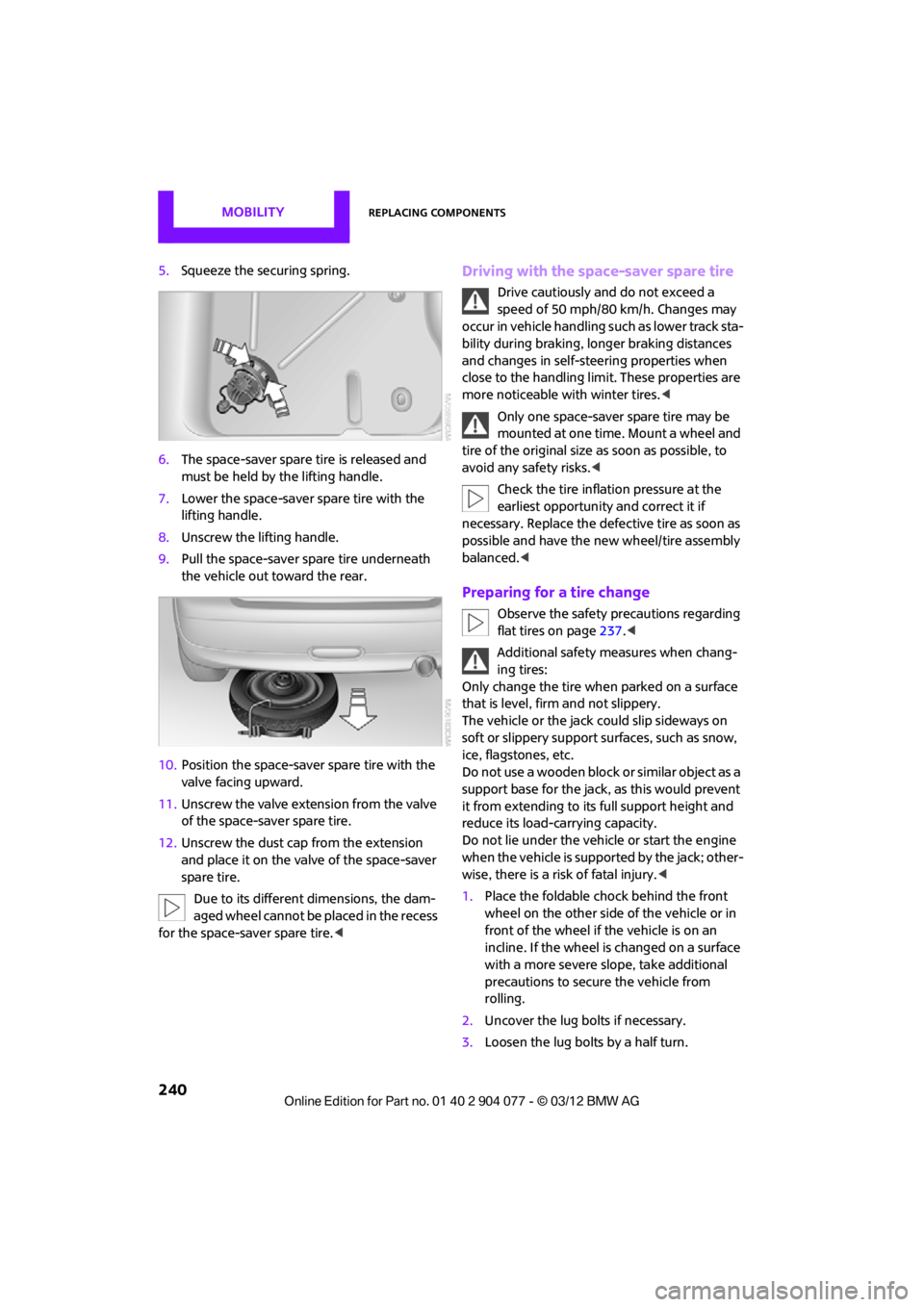
5.Squeeze the securing spring.
6. The space-saver spare tire is released and
must be held by the lifting handle.
7. Lower the space-saver spare tire with the
lifting handle.
8. Unscrew the lifting handle.
9. Pull the space-saver spare tire underneath
the vehicle out toward the rear.
10. Position the space-save r spare tire with the
valve facing upward.
11. Unscrew the valve extension from the valve
of the space-saver spare tire.
12. Unscrew the dust cap from the extension
and place it on the valve of the space-saver
spare tire.
Due to its different dimensions, the dam-
aged wheel cannot be placed in the recess
for the space-saver spare tire.
speed of 50 mph/80 km/h. Changes may
occur in vehicle handling such as lower track sta-
bility during braking, longer braking distances
and changes in self-steering properties when
close to the handling limit. These properties are
more noticeable with winter tires. <
Only one space-saver spare tire may be
mounted at one time. Mount a wheel and
tire of the original size as soon as possible, to
avoid any safety risks. <
Check the tire inflation pressure at the
earliest opportunity and correct it if
necessary. Replace the defe ctive tire as soon as
possible and have the ne w wheel/tire assembly
balanced. <
Preparing for a tire change
Observe the safety precautions regarding
flat tires on page 237.<
Additional safety measures when chang-
ing tires:
Only change the tire wh en parked on a surface
that is level, firm and not slippery.
The vehicle or the jack could slip sideways on
soft or slippery support surfaces, such as snow,
ice, flagstones, etc.
Do not use a wooden block or similar object as a
support base for the jack, as this would prevent
it from extending to its full support height and
reduce its load-carrying capacity.
Do not lie under the vehicle or start the engine
when the vehicle is supported by the jack; other-
wise, there is a risk of fatal injury. <
1. Place the foldable chock behind the front
wheel on the other side of the vehicle or in
front of the wheel if the vehicle is on an
incline. If the wheel is changed on a surface
with a more severe sl ope, take additional
precautions to secure the vehicle from
rolling.
2. Uncover the lug bolts if necessary.
3. Loosen the lug bolts by a half turn.
00320051004F004C00510048000300280047004C0057004C005200510003
Page 269 of 283

268
REFERENCEEverything from A to Z
Everything from A to Z
Index
A
ABS Antilock Brake System83
Accessories, see Vehicle equipment 4
Acknowledgment signals for
locking/unlocking vehicle 30
Activated-charcoa l filter for
automatic climate
control 105
Adaptive Light Control 97
Adding engine oil 223
Additives
– coolant 224
– engine oil 223
Address, entering 132
Address for navigation
– entering 126,132
Adjusting temperature inside the car, refer to Air
conditioner 102
Adjusting temperature inside the car, refer to Automatic
climate control 103
Adjusting the tone during audio operation, refer to
Tone control 147
Airbags 93
– sitting safely 50
– warning lamp 94
Air conditioner 101
Air conditioning mode
– air conditioner 102
– automatic climate control 103
– ventilation 106
Air distribution
– automatic 104
– individual 103
– manual 103 Air flow rate
102,104
– air conditioning system 102
– automatic climate
control 104
– heating, ventilation 102
Airing, refer to Ventilation106
Air outlets, refer to Air vents 101
Air pressure, checking, refer to
Tire inflation pressure 209
Air recirculation, refer to Recirculated-air
mode 102,104
Air supply
– air conditioner 102
– automatic climate control 103
– ventilation 106
Air vents 101
AKI, refer to Fuel grade 207
Alarm system 34
All-season tires, refer to Winter
tire
s220
Always Open Timer 72
AM, wa
veband 149
Ambient air, refer to
Recirculated-air
mode 102,104
Ambient lighting 100
Antenna, care 227
Antifreeze
– coolant 224
– washer fluid 67
Antilock Brake System ABS 83
Anti-theft alarm system, refer
to Alarm system 34
Anti-theft system 29
Approved axle loads, refer to
Weights 257 Approved engine oils
223
Approved gross vehicle weight, refer to Weights257
Armrest, refer to Center armrest 108
Arrival time
– computer 73
– route guidance 135
Ashtray 109
Assistant systems, refer to
– Dynamic Stability Control DSC 83
Audio 146
– controls 146
– switching on/off 146
– tone control 147
– volume 147
Audio device, external 108
Automatic
– air distribution 104
– air flow rate 104
– cruise control 68
– headlamp control 96
Automatic climate control 101
– automatic air distribution 104
Automatic rear spoiler 85
Automatic transmission with Steptronic 62
– Interlock 63
– overriding selector lever lock 64
– Shiftlock 63
– sport program 64
AUTO program for automatic
climate control 104
Auxiliary phone 182
AUX-In, refer to External audio
device 108
AUX-In connection 159
00320051004F004C00510048000300280047004C0057004C005200510003
Page 274 of 283

Everything from A to ZREFERENCE
273
G
Gasoline
– refer to Average fuel consumption 72
Gasoline, refer to Required
fuel 207
Gasoline display, refer to Fuel gauge 70
Gear indicator
– automatic transmission with Steptronic 63
Gear shifting
– automatic transmission 63
– manual transmission 62
Gearshift lever
– automatic transmission with Steptronic 63
– manual transmission 62
General driving notes 114
Glass roof, electric
– convenience
operation 30,32
– remote control 30
Glove compartment 107
GPS navigation, refer to Navigation system 124
Grills, refer to Air vents 101
Gross vehicle weight, refer to Weights 257
H
Halogen lamps
– replacing bulb 233
Handbrake, refer to Parking
brake 62
Hands-free device Bluetooth 170
Hands-free system 14,177 ,189
Hazard warning flashers 14
HD Radio 150
Head airbags 93 Headlamp control,
automatic 96
Headlamp flasher 65
– indicator
lamp 11,13, 102, 105
Headlamp glass lens 233
Headlamps
– replacing bulb 233
Headlamps, care 228
Head Light, refer to Adaptive
Light Control 97
Head restraints 52
– sitting safely 50
Heated
– mirrors 54
– rear window 103,105
– seats 53
Heating 101
– mirrors 54
– rear window 103,105
– seats 53
Heavy loads, refer to Stowing
cargo 119
Height, refer to Dimensions 251
Height adjustment
– seats 51
– steering wheel 55
High beams 98
– headlamp flasher 98
– indicator lamp 13,102 ,105
– replacing bulb 233
High water, refer to Driving
through water 115
Highway, refer to Route criteria 135
Hill Assist 85
Hills 115
Hol ders for cu
ps109
Hom
epage 4
Hood 222
Horn 10
Hot exhaust system 115
Hydroplaning 115
I
IBOC, refer to HD Radio 150
iDrive
– status information 21
Ignition 60
– switched off 61
– switched on 60
Ignition key, refer to Integrated key/remote
control 28
Ignition key position 1, refer to Radio readiness 60
Ignition key position 2, refer to Ignition on 60
Ignition lock 60
Imprint 2
Incoming call 173,185
Indicator and warning
lamps 13
– Tire Pressure Monitor TPM 90
Indicator lighting, refer to
Instrument lighting 99
Individual air distribution 103
Individual settings, refer to
Personal Profile 28
Inflation pressure monitoring, refer to Tire Pressure Monitor
TPM 89
Information
– on another location 130
– on current position 130
– on destination location 130
Initializing
– Flat Tire Monitor FTM 87
– radio, refer to Station,
storing 150
Instructions for navigation system, refer to Voice
instructions 139
Instrument cluster, refer to Displays 12
Instrument lighting 99
Instrument pane l, refer to
Cockpit 10
00320051004F004C00510048000300280047004C0057004C005200510003
Page 278 of 283

Everything from A to ZREFERENCE
277
Reserve warning, refer to Fuel gauge 70
Reservoir for washer systems 67
Reset, refer to Resetting tone settings 148
Restraint systems
– for children 56
– refer to Safety belts 53
Reverse
– CD player 158
Reverse gear
– automatic transmission with
Steptronic 63
– manual transmission 62
Road map 137
Roadside Assistance 243
Roadside parking lamps 98
– replacing bulb 234
Road worthiness test, refer to Service requirements 75
Roof load capacity 257
Rope, refer to Tow-starting, towing away 246
Route 135,136
– bypassing sections 136
– changing 135,136
– changing criteria 135
– displaying arrow view 136
– displaying map view 137
– displaying streets or towns/ cities 136
– selecting 135
Route guidance 135
– bypassing a route section 136
– changing specified route 135
– distance and arrival 135
– voice instructions 139
– volume of voice instructions 139
Route section, changing 136
Route selection 135
RSC Run-flat System Component, refer to Run-flat
tires 218 Rubber parts, care
229
Run-flat System Component RSC, refer to Run-flat
tires 218
Run-flat tires 218
– flat tire 88
– tire inflation pressure 209
– tire replacement 219
– winter tires 220
S
Safety belt
– number50
Safety Belt Reminder 54
Safety belts 53
– damage 54
– indicator lamp 54
– reminder 54
– sitting safely 50
Safety belts, care 230
Safety systems
– airbags 93
– Antilock Brake System ABS 83
– Dynamic Stability Control DSC 83
– safety belts 53
Safety tires, refer to Run-flat tires 218
Satellite radio 151
– channel, activating or deactivating 152
– channel, selecting 152
– channel, storing 153
– favorites 154
– time shift 153
– Traffic Jump 155
Screen, refer to Onboard
computer controls 17
Screw thread for tow fitting 245
SDARS, refer to Satellite radio 151
Seat adjustment
– mechanical 51 Seats
51
– adjusting the seats 51
– heating 53
– sitting safely 50
Securing the vehicle
– from inside 32
– from outside 29
Selecting navigation system 124
Selecting new scale for
navigation 138
Selector lever
– automatic transmission with
Steptronic 63
Selector lever lock
– automatic transmission with
Steptronic, refer to
Shiftlock 63
– overriding manually 64
Selector lever positions
– automatic transmission with Steptronic 63
Service, refer to Roadside Assistance 243
Service car, refer to Roadside
Assistance 243
Service data in the remote control 225
Service Interval Display, refer to Condition Based Service
CBS 225
Service requ irem
ent
display,
refer to Condition Based
Service CBS 225
Service requirements 75
Settings
– clock, 12 h/24 h mode 76
– date format 77
Setting time and date 77
Setting time zone, time, and date 77
Shifting gears
– automatic transmission with Steptronic 64
– manual transmission 62
00320051004F004C00510048000300280047004C0057004C005200510003
Page 279 of 283

REFERENCEEverything from A to Z
278
Shiftlock
– automatic transmission, refer to Changing selector lever
positions 63
Short commands for the voice activation system 260
Short route in navigation, refer
to Selecting route 135
Shuffled, refer to Random
– CD player 158
Side airbags 93
Side turn signal
– replacing bulb 235
Side windows, refer to Windows 38
Signal horn, refer to Horn 10
Sitting safely 50
– airbags 50
– safety belts 50
– with head restraint 50
Size, refer to Dimensions 251
Slipstream deflector, refer to
Wind deflector 43,48
Slot for remote control 60
Smokers' package, refer to
Ashtray 109
Snap-in adapter
– inserting/removing 191
– use 180
Snap-in adapter, refer to
Center armrest storage
compartment 108
Snow chains 220
Socket, refer to Connecting electrical appliances 110
Socket for On-Board Diagnosis
OBD 226
Software update 166
Space-saver spare tire
– changing tires 239
– inflation pressure 209
Spare wheel, refer to Space-
saver spare tire 239 Speaking, refer to Voice
instructions from navigation
system 139
Special destinations 130
Special oils, refer to Approved engine oils 223
Speed 250
– with winter tires 220
Speed limit 79
– setting 79
Speed limit warning, refer to Speed limit 79
Speedo, refer to
Speedometer 12
Speedometer 12
Speed volume 147
Split-folding rear seats 118
Split rear backrest, refer to Split-folding rear seats 118
Sport button 85
Stability contro l, refer to
Dri v
ing
stability control
systems 83
Start/Stop button 60
– starting the engine 61
– switching off the engine 61
Starting, refer to Starting the engine 61
Starting assistance, refer to Jump-starting 243
Starting route guidance 135
Starting the engine 61
– Start/Stop button 60
Start-off assistance, refer to
– DSC 83
– Hill Assist 85
State/province, for navigation 126
Station, selecting
– radio 149
Status information on the Control Display 21
Status of this Owner's Manual at time of printing 4Steering wheel
55
– adjustment 55
– buttons on steering wheel 11
– lock 60
– shift paddles 64
Steptronic, refer to Automatic transmission with
Steptronic 62
Storage area
– cargo area 116
Storage compartment, front passenger side 108
Storage compartments 108
Storage space
– storage compartments 108
Storage space, refer to
– luggage compartment in the MINI Convertible 117
Storing a destination in the
address book 128
Storing the vehicle 230
Storing tires 220
Stowage, refer to Storage compartments 108
Summer tires, refer to Wheels
and tires 209
SW, waveband 149
Switches, refer to Cockpit 10
Switching off
– engine 61
Switching off the engine 61
– Start/Stop button 60
Switching on
– audio 146
– CD player 146
– radio 146
Switching the cooling function on and off 105
Symb ols4
–
status information 21
00320051004F004C00510048000300280047004C0057004C005200510003