2012 MERCEDES-BENZ SPRINTER lights
[x] Cancel search: lightsPage 65 of 292

mirror or on the grab handles on the
headliner. This will prevent a false alarm.
Deactivating the interior
motion sensorDeactivate the interior motion sensor if
people or
animals
remain in the vehicle or you
are having the vehicle transported, e.g. by
ferry. This will prevent a false alarm. X
Turn the key to position 0 or 1
in the ignition
lock or remove the key.
X Press button 0046.
Indicator lamp 0047 lights up for
approximately five seconds after the
button is released.
X Lock the vehicle with the key.
The interior motion sensor remains
deactivated until
you
lock the vehicle again.Seats
Driver's and co-driver's seat
Standard/luxury/suspension seat G
Warning
If you adjust the driver's seat while the vehicle
is in motion, your attention will be distracted
from the traffic conditions. You could lose
control of the vehicle as a result of sudden
seat movements and, thereby, cause an
accident.
Therefore, only adjust the driver's seat when
the vehicle is
stationary and the parking brake
is applied. G
Warning
Make sure that nobody can become trapped
as you adjust the seat. Never place your
hands under the seat or in the vicinity of
moving parts.
Your seat must
be adjusted in such a way that
you can wear the seat belt correctly.
Observe the following points:
R Position the backrest in an almost vertical
position so that you are sitting virtually
upright.
R Avoid seat positions that prevent the seat
belt from being routed correctly. The
shoulder section of the belt must be routed
over the middle of your shoulder and be
pulled tight against your upper body. The
lap belt must always pass across your lap
as low down as possible, i.e. over your hip
joints. Do not drive or ride with the backrest
reclined too far back.
R Your arms should be slightly bent when you
are holding the steering wheel.
R The distance from the pedals should be
such that you can depress them fully.
R Adjust your head restraint so that its upper
edge is at the same level as the top of your
head.
R Make sure that you hear the seat engage.
Otherwise, the seat is not correctly locked
in place.
Failing to observe these instructions may lead
to injury. Seats
63
Controls Z
Page 73 of 292

The display in the instrument cluster is
activated when you:
R
open the driver's door
R turn the key
to position 2 in the ignition lock
R press the 0048 reset button
R switch on the lights
The display switches off automatically after
approximately 30 seconds if:
R the vehicle lighting is not switched on.
R the key is in position 0 in the ignition lock.G
Warning
No messages can be displayed if the
instrument cluster and/or the display fails.
You will then not be able to see information
about the vehicle status, such as speed and
outside temperature, warning/indicator
lamps and display messages or the failure of
systems. Handling characteristics may be
affected. Adapt your speed and driving style
accordingly.
Immediately consult a qualified specialist
workshop. The qualified specialist workshop
must have the necessary specialist
knowledge and tools to carry out the work
required. We recommend an authorized
Sprinter Dealer for
this purpose. In particular,
all work relevant to safety or on safety-related
systems must be carried out at a qualified
specialist workshop. G
Warning
Only use the adjustment buttons on the
instrument cluster when
the traffic conditions
permit. You would otherwise be too distracted
and could cause an accident.
Do not reach through the steering wheel to
operate the adjustment buttons. The
movement of the steering wheel would be
significantly impeded. Your attention would
also be diverted from road and traffic
conditions. This could cause you to lose
control of the vehicle, and lead to an accident. Do not rest your head or chest on the steering
wheel or dashboard when operating the
adjustment buttons.
You will find page references for further
information in the index under "Air bag".
Speedometer
i In some countries, a warning sounds
when the vehicle reaches the maximum
speed limit, e.g. at 75 mph (120 km/h).
The speed can also be shown in the display.
You can find information on the digital
speedometer for vehicles without steering
wheel buttons under ( Y page 73) and for
vehicles with steering wheel buttons under
(Y page 77). Tachometer
The red band
in the tachometer indicates the
engine's overrevving range.
To protect the engine, the fuel supply is
interrupted when the red band is reached.
! Do not drive in the overrevving range, as
this could damage the engine.
0040Environmental information
Avoid driving at high engine revs. This driving
style causes an unnecessary increase in
vehicle fuel consumption and, therefore,
damage to the
environment due to increased
emission of pollution. Instrument cluster
71
Controls Z
Page 74 of 292

Fuel gauge
0046
Fuel gauge on vehicles without steering
wheel buttons
0047 Fuel gauge on vehicles with steering
wheel buttons
008A Fuel filler flap location indicator
0081: the
fuel filler
cap is on the left-hand side Fuel
filler flap location indicator 0082: the fuel
filler cap is on the right-hand side
0088 Reserve fuel warning lamp ( Y page 193)
Information on the Diesel Exhaust Fluid (DEF)
gauge can be found in the "Driving" section
(Y page 116). Trip odometer
Resetting X
On vehicles with steering wheel buttons:
make sure that the display is showing the
trip odometer (Y
page 77).
X Press and hold the 0048 reset button
until the
trip odometer is reset to 0.0.Instrument lighting
With the lights switched on, you can adjust
the brightness of the instrument lighting
using the 0069
and 006A buttons.
X Brighter: press the 0069 button.
X Dimmer: press the 006A button. i
Vehicles with automatic
headlamp mode:
the instrument lighting also adapts to
automatic headlamp mode. On-board computer without steering
wheel buttons
Layout and controls
The on-board computer is activated as soon
as you turn
the key to position 1 in the ignition
lock. G
Warning
Only use the adjustment buttons on the
instrument cluster when
the traffic conditions
permit. You would otherwise be too distracted
and could cause an accident.
Do not reach through the steering wheel to
operate the adjustment buttons. The
movement of the steering wheel would be
significantly impeded. Your attention would
also be diverted from road and traffic
conditions. This could cause you to lose
control of the vehicle, and lead to an accident.
Do not rest your head or chest on the steering
wheel or dashboard when operating the
adjustment buttons.
You will find page references for further
information in the index under "Air bag".
The on-board computer shows vehicle
information and settings in the display.
You can control the display and the settings
in the on-board computer using the
adjustment buttons on the instrument
cluster. 72
On-board computer without steering wheel buttons
Controls
Page 91 of 292

Lamp failure indicator
The bulb failure indicator monitors all lamps
of the exterior lighting with the exception of
the front position lamps and the trailer
lighting. If a bulb fails, either the
0055( Y page
197)
indicator lamp lights up or
a corresponding message is shown in the
display ( Y page 209).
i Depending on the equipment, the bulb
failure indicator can be omitted for all
lamps with the exception of the turn signal
lamps. G
Warning
The bulb failure indicator is only an aid. You
are responsible for the proper functioning of
the vehicle lighting. Insufficient or non-
functioning vehicle lighting
puts the operating
safety of the vehicle at risk. You could cause
an accident and injure yourself or others.
Therefore, check the lighting equipment of
the vehicle before each journey and, if
necessary, check the operation and condition
of the trailer lighting equipment. Light switch
Configuration You can switch the vehicle lighting on or off
using the light switch.
The light switch is located between the
driver's door and the steering wheel.
0046
Light switch The symbols on the light switch have the
following meanings:
005A
Automatic headlamp mode
0027 Lights off/daytime
running lamp mode
006C Parking lamps, license plate lamp and
instrument lighting on
0064 Low-beam/high-beam headlamps
(depending on the position of the
combination switch)
Low-beam headlamps X
Turn the key to position 1 in the ignition
lock.
X Turn the light switch to 0064.
The 0064 indicator lamp in the instrument
panel lights up.
Daytime running lamp mode You can adjust daytime running lamp mode
in the on-board computer:
R
vehicles with steering wheel buttons
(Y page 74)
R vehicles without steering wheel buttons
(Y page 74)
This is not possible in countries where
daytime running lamp mode is a legal
requirement.
X Turn the light switch to 0027.
The low-beam headlamps, parking lamps
and license plate lamp are switched on
when the engine is running.
The 0064 indicator lamp in the instrument
panel lights up.
i USA only:
When you turn the light switch to 006C or
0064, the respective
light comes on. When
the light switch is turned to 005A, daytime
running lamp mode remains switched on.
i Canada only:
When you turn the light switch to 0064, the
low-beam headlamps are switched on.
When the light switch is turned to 006C or Lighting
89
Controls Z
Page 92 of 292
005A, daytime running lamp mode remains
switched on.
Automatic headlamp mode Parking lamps, low-beam headlamps and the
license plate lamp are switched on
automatically depending on the ambient
light.
G
Warning!
If the light switch is set to 005A,
the low-beam
headlamps will not come on automatically if
it is foggy. This could endanger you and
others. Therefore, turn the light switch to
0064
in fog.
The automatic headlamp feature is only an
aid. The driver is responsible for the vehicle's
lighting at all times.
X Turn the light switch to 005A.
The parking lamps are switched on/off
automatically when the key is in position
1 in the ignition lock.
Parking lamps, low-beam headlamps and
the license plate
lamp are switched on/off
automatically, depending on ambient light
conditions, when the engine is running.
Front fog lamps/rear fog lamp X
Turn light switch 0046 to 0064 or 006C.
i If your vehicle is only equipped with rear
fog lamps, you
must turn the light switch to
0064.
X Front fog lamps: pull light switch 0046 out
to the first stop.
The green 0067 indicator lamp next to the
light switch lights up.
X Rear fog lamp: pull light switch 0046 out to
the second stop.
The yellow 006A
indicator lamp next to the
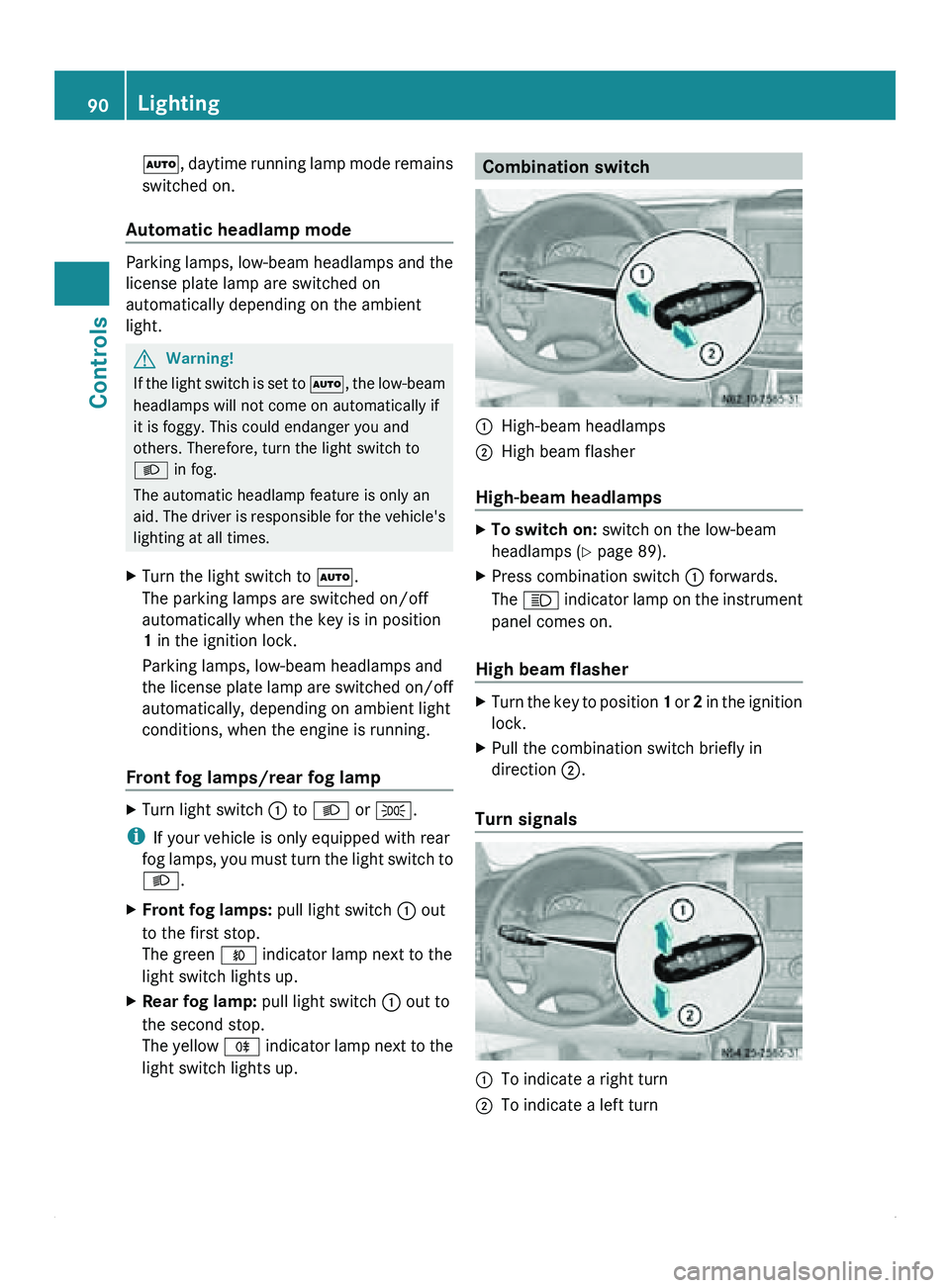
light switch lights up. Combination switch
0046
High-beam headlamps
0047 High beam flasher
High-beam headlamps X
To switch on: switch on the low-beam
headlamps ( Y page 89).
X Press combination switch
0046 forwards.
The 0063 indicator lamp
on the instrument
panel comes on.
High beam flasher X
Turn the key to position 1 or 2
in the ignition
lock.
X Pull the combination switch briefly in
direction 0047.
Turn signals 0046
To indicate a right turn
0047 To indicate a left turn90
Lighting
Controls
Page 93 of 292

X
To indicate: press the combination switch
in desired direction 0046 or 0047, until it
engages.
The combination switch automatically
returns to its original position after large
steering movements.
X To indicate briefly: press the
combination
switch briefly in desired direction 0046
or 0047.
The corresponding turn signal flashes three
times. Cornering light function (vehicles
with Bi-Xenon headlamps)
When the low-beam
headlamps are switched
on, the cornering light function improves the
illumination of the road in the direction you
are turning.
The cornering light function switches on
automatically, if:
R you are traveling at a speed of less than
25 mph (40 km/h) and you switch on the
indicator lamp or turn the steering wheel.
R you are traveling at a speed of between
25 mph (40 km/h) and 43 mph
(70 km/h) and you turn the steering wheel.
The cornering light may continue to be lit for
a short time, but is deactivated automatically
after a maximum of three minutes. Hazard warning lamps
The hazard warning lamps work even when
the ignition is
switched off. They are activated
automatically when an air bag is deployed or
after heavy brake application from a speed of
more than 43 mph (70 km/h) that brings the
vehicle to a standstill. X
To switch on/off: press button 0046.
i If you have indicated a turn while the
hazard warning lamps
are switched on, only
the turn signal lamps on the side of the
vehicle selected will light up.
If the hazard warning lamps have been
switched on automatically, press the
hazard warning lamp switch to switch them
off. G
Warning
If you open the rear doors 90° (detent
position) or fold
down the platform tailgate on
vehicles with a platform, the rear lights are
covered.
The vehicle will then be unsafe as its rear
lights will not be visible for approaching
traffic. Other road users may not realize until
too late that it is an obstruction. This could
lead to an accident.
You should ensure that the vehicle is visible
from the rear in accordance with the relevant
national regulations, by using the warning
triangle for instance. Lighting
91
Controls Z
Page 94 of 292

Front interior lighting
Standard front interior lighting 0046
To switch on the interior lighting
0047 Automatic control
008A To switch off the interior lighting
Front interior lighting with overhead
control panel 0046
To switch the left-hand reading lamp on/
off
0047 To switch the right-hand reading lamp on/
off
008A Right-hand reading lamp
0088 Interior light
0086 To switch the automatic control system
on/off
0087 To switch the interior lighting on/off
006E Left-hand reading lamp
If you switch on interior lights or the reading
lamps manually,
they
switch off automatically
after about twenty minutes. Automatic control
The interior lighting comes on when you:
R
unlock the vehicle
R open a door
R remove the key from the ignition lock
The interior lighting switches off
automatically. If a door is left open, the
interior lighting switches off after
approximately 20 minutes. Rear interior lighting
Switching the standard
interior lighting
on/off In cargo
vans/passenger vans equipped with
standard interior lighting, the switch for the
interior lighting is
located on the rear lights in
the cargo compartment/vehicle interior. Interior light with switch
0046
To switch on the interior lighting
0047 To switch off the interior lighting
008A Automatic control
Switching convenience
interior lighting
on/off In passenger vans equipped with
convenience interior lighting, the central
control switch for the rear interior lighting is
located between the steering wheel and the
ignition lock.
In addition, there is also a switch on each
interior light,
which
can be used to switch the92
Lighting
Controls
Page 95 of 292

lights on/off separately, depending on the
position of the central control switch.
Central control switch for the rear interior lighting
0046
To switch on the interior lighting
0047 Automatic control
008A To switch off the interior lighting
X To activate: press
upper section 0046 on the
switch.
The interior lights are switched on if the
switches on the interior lights (Y page 92)
have not been switched to off 0047.
X To deactivate: press lower section 008A of
the switch.
The interior lights are all switched off,
regardless of the position of the switch on
the interior light.
Automatic control
X To switch on: move the central control
switch for the rear interior lighting to
position 0047.
If the switches on the interior lights
(Y page 92) are set to automatic control
008A, the interior lights come on as soon as
you open a door or unlock the vehicle.
i The interior
lights
switch off automatically
after twenty minutes.
In order to switch the interior lights on
again, you must:
R open a door
R switch on the ignition again Cargo compartment motion detector The interior lighting is also switched on by the
motion detector
in
the cargo compartment on
cargo vans equipped with this feature. G
Warning
Motion detectors use the invisible infrared
radiation emitted by LEDs (light emitting
diodes).
Do not view invisible infrared radiation, laser
class 1M, directly using optical instruments,
such as eyeglasses.
Your eyes could be injured.
If
the motion detector detects a movement in
the cargo compartment when the vehicle is
stationary, the interior lighting switches on
for approximately two minutes.
The interior lighting can be switched on by the
motion detector within four seconds if:
R the interior light switch (Y page 92) is set
to "Automatic control"
R the vehicle is stationary, the parking brake
is applied and the brake pedal is not being
depressed
or
R the selector lever is in position P on
vehicles with automatic transmission and
the brake pedal is not being depressed and
R the vehicle has not been locked from the
outside using the key
The motion detector switches off
automatically if no change is detected in the
vehicle for several hours, e.g. door opened,
ignition key turned, etc. This prevents the
battery from becoming discharged. Lighting
93
Controls Z