2012 MERCEDES-BENZ SL ROADSTER USB
[x] Cancel search: USBPage 7 of 637
1, 2, 3 ...
12 V socket see Sockets A
ABS (Anti-lock Braking System) Display message ............................ 248
Function/notes ................................ 71
Important safety notes .................... 71
Warning lamp .................................2 75
Access data of the mobile phone
network provider ...... 435, 437, 439, 440
Deleting ......................................... 440
Editing .......................................... .439
Making entries ............................... 437
Selecting ........................................ 435
Activating/deactivating air-recir-
culation mode ................................... .148
Activating/deactivating cooling
with air dehumidification ................. 142
Activating/deactivating Night
View Assist Plus
With spotlight function ................... 219
Active Blind Spot Assist
Activating/deactivating (on-
board computer) ............................ 238
Display message ............................ 263
Function/notes ............................ .220
Active Body Control (AMG vehi-
cles)
Display message ............................ 260
Driving conditions menu in the
COMAND display (AMG vehicles) ... 204
Function/notes ............................ .202
Active Body Control (except AMG
vehicles)
Display message ............................ 260
Driving conditions menu in the
COMAND displa y........................... 201
Function/note s............................. 199
Active Driving Assistance package .. 220
Active Lane Keeping Assist
Activating/deactivating (on-
board computer) ............................ 238
Display message ............................ 263
Function/note s............................. 223 Active light function
......................... 131
Active Parking Assist
Display message ............................ 264
Function/note s............................. 207
Important safety notes .................. 207
Active partition (USB mass storage
devices only)
Selecting ........................................ 478
ADAPTIVE BRAKE ................................. 77
Adaptive brake lights .......................... 73
Adaptive Damping System
Function/note s............................. 199
Adaptive Highbeam Assist
Display message ............................ 257
Function/note s............................. 132
Switching on/of f........................... 133
Additives (engine oil) ........................ 626
Address book .................... 412, 416, 417
Browsing ........................................ 412
Calling up ....................................... 412
Changing an entry .......................... 414
Connecting a call ........................... 415
Creating an entry ........................... 413
Deleting an entry ........................... 413
Deleting contacts ........................... 418
Details about an entry ................... 414
Entering characters ....................... 303
Entry as a home address ............... 368
Hiding contact details .................... 419
Importing contacts ........................ 417
Introduction ................................... 411
Receiving vCards ........................... 418
Searching for an entry ................... 413
Starting route guidance ................. 415
Voice tag ....................................... 416
Address entry menu .......................... 326
...................................................... 326
Adjusting the balance ....................... 300
Adjusting the bass ............................ 300
Adjusting the brightness (TV,
video) .................................................. 502
Adjusting the colour (TV, video) ...... 502
Adjusting the contrast (TV, video) ... 502
Adjusting the sound settings
Balance .......................................... 300
Treble and bass ............................. 300
Adjusting the treble (sound) ............ 3004
Index
Page 12 of 637
Problem with the rear window
heating .......................................... 148
Problems with cooling with air
dehumidification ............................1 44
Setting the air distribution ............. 145
Setting the air vents ..................... .150
Setting the airflow ......................... 146
Setting the temperature ................ 145
Switching air-recirculation mode
on/off ............................................ 148
Switching on/off ........................... 142
Switching residual heat on/off ...... 149
Switching the rear window heat-
ing on/off ...................................... 147
Switching the ZONE function on/
off ................................................. .146
THERMOTRONIC (2-zone) auto-
matic climate control ..................... 141
Cockpit
Overview .......................................... 38
see Instrument cluster
Collapsible emergency spare
wheel
see Emergency spare wheel
COMAND control panel ..................... 294
...................................................... 294
COMAND controller ........................... 296
COMAND display ............................... 293
Cleaning ......................................... 572
Cleaning instructions ..................... 293
Driving conditions menu (AMG
vehicles) ........................................ 204
Driving conditions menu (except
AMG vehicles) ................................ 201
Setting .......................................... .310
Switching on/off ........................... 293
COMAND Online ........................ 446, 461
Active multicontour seat ................ 319
Basic functions .............................. 298
Calling up drive status regulator
(ABC) ............................................. 318
Display .......................................... .289
Emergency call system displays .... 432
Examples of operation ................... 296
Importing POIs ............................... 446
Menu overview .............................. 291
Multicontour seat .......................... 319
Seat functions ............................... 318 Settings ......................................... 461
Switching on/off ........................... 298
COMAND Online and Internet
see Online and Internet functions
Combination switch .......................... 129
Compass function .............................381
Connecting a USB device ................. 472
Consumption statistics (on-board
computer) .......................................... 231
Contacts
Deleting ......................................... 418
Importing ....................................... 417
Convenience closing feature ............ 101
Convenience opening feature
see Side windows
Convenience opening/closing (air-
recirculation mode) ........................... 148
Coolant (engine)
Checking the level ......................... 565
Display message ............................ 258
Important safety notes .................. 627
Temperature (on-board com-
puter) ............................................. 244
Temperature gauge ........................ 228
Warning lamp ................................. 281
Cooling
see Climate control
Copy protection (CD/DVD) ...............480
Copyright ............................................. 36
Cornering light function
Display message ............................ 255
Function/notes ............................ .131
Country-specific information (nav-
igation) ............................................... 382
Crash-responsive emergency light-
ing ....................................................... 135
Cruise control
Cruise control lever ....................... 182
Deactivating ................................... 184
Display message ............................ 265
Driving system ............................... 182
Important safety notes .................. 182
LIM indicator lamp ......................... 182
Selecting ........................................ 183
Setting a speed .............................. 184
Storing and maintaining current
speed ............................................. 183 Index
9
Page 18 of 637

Harman/kardon® Logic 7® sur-
round sound system
see Surround sound (harman/
kardon® surround sound system)
Hazard warning lamps
Display message ............................ 272
Switching on/off ........................... 130
Head level heating (AIRSCARF) ........ 117
Head restraints
Adjusting ....................................... 115
see NECK-PRO head restraints
Headbag
Display message ............................ 255
Operation ........................................ .55
Heading up (navigation) ................... 374
Headlamp
Cleaning system (function) ............ 131
Cleaning system (notes) ............... .628
Headlamps
Misting up ...................................... 133
Topping up the cleaning system .... 566
see Automatic headlamp mode
Headphones
Changing batteries ........................ 523
Heating
see Climate control
High-pressure cleaners .................... 569
Hill start assist .................................. 158
HOLD function
Activating ....................................... 197
Deactivating ................................... 197
Display message ............................ 262
Function/notes ............................ .196
Home address ........................... 330, 332
Entering and saving ....................... 330
Selecting from the destination
memory ......................................... 332 I
Ignition lock see Key positions
Immobiliser .......................................... 79
Indicator and warning lamps
Coolant .......................................... 281
DISTRONIC PLUS ........................... 283
Engine diagnostics ......................... 280
SPORT handling mode ................... 278 Indicator lamp
................................... 523
Remote control .............................. 523
Indicator lamps
Display message ............................ 256
see Warning and indicator lamps
Indicators
see Turn signals
Inspection
see ASSYST PLUS
Instrument cluster
Overview .......................................... 40
Warning and indicator lamps ........... 42
Instrument cluster lighting .............. 228
Intelligent Light System
Activating/deactivating ................. 240
Display message ............................ 257
Overview ........................................ 131
Setting the dipped-beam head-
lamps for driving on the right/left .. 240
Interface (USB, iPod®)
see Media Interface
Interior lighting ................................. 134
Automatic control system .............. 134
Delayed switch-off (on-board
computer) ...................................... 241
Emergency lighting ........................ 135
Manual control ............................... 135
Overview ........................................ 134
Reading lamp ................................. 134
Setting the ambient lighting
brightness (on-board computer) .... 241
Setting the ambient lighting col-
our (on-board computer) ................ 241
Interior motion sensor
Deactivating ..................................... 81
Function .......................................... .80
Priming ............................................ 80
Switching off .................................... 81
Inter-
net ......................4 54, 457, 458, 459, 460
Calling up the carousel view .......... 454
Conditions for access .................... 432
Creating a favourite ....................... 459
Entering the URL ............................ 454
Favourites manager ....................... 459
Favourites menu ............................ 460
Menu functions .............................. 457
Opening favourites ......................... 458 Index
15
Page 20 of 637
Switching the surround lighting
on/off (on-board computer) .......... 241
Turn signals ................................... 129
see Interior lighting
see Replacing bulbs
LIM indicator lamp
Cruise control ................................ 182
DISTRONIC PLUS ........................... 186
Variable SPEEDTRONIC ................. 194
Limiting the speed
see SPEEDTRONIC
LINGUATRONIC .................................. 312
Setting s......................................... 312
List of access data ............................ 437
New provider ................................. 437
List of mobile phone network pro-
viders ......................................... 434, 435
Calling up ....................................... 434
Empty ............................................ 434
With the selected provider ............. 435
Load/eject button ............................. 469
Loading aid (boot)
Raising/lowering the roof .............. 546
Locking
see Central locking
Locking (doors)
Automatic ........................................ 92
Emergency locking ........................... 93
From inside (central locking but-
ton) .................................................. 92
Locking centrally
see Central locking
Locking verification signal (on-
board computer) ............................... 242
Luggage cover
see Boot separator
Lumbar support
Adjusting (COMAND Online) .......... 319 M
M+S tyres ........................................... 598
MAGIC SKY CONTROL ....................... 109
Main-beam headlamps
Display message ............................ 256
Switching on/of f........................... 130
Map (navigation)
Adjusting the scale ........................ 372 Arrival time/distance to the des-
tination .......................................... 375
City model ..................................... 376
Geo-coordinate display .................. 375
Heading ......................................... 374
Information in the display .............. 375
Map settings .................................. 373
Moving ........................................... 373
North orientation ........................... 374
Notes ............................................. 372
POI symbols ................................... 374
RDS-TMC display
s......................... 365
Road display .................................. 375
Saving the crosshair position ......... 373
Showing the map data version ....... 382
Topographical map ........................ 376
Updating ........................................ 382
Updating process ........................... 383
Matt finish (cleaning instructions) .. 570
Media Inter-
fac
e ........................... 494, 495, 496, 497, 499
Alphabetical track selection .......... 498
Basic menu .................................... 495
Connecting an external audio
source ............................................ 494
Connecting an external video
source ............................................ 516
Connection options ....................... 494
iPod® ............................................ 494
Mode ............................................. 494
MP3 player .................................... 494
Notes for the MP3 player ............... 499
Playback options ........................... 499
Selecting categories ...................... 497
Selecting folders ............................ 497
Selecting music files ...................... 496
Selecting playlists .......................... 497
Switching on .................................. 495
USB mass storage device .............. 494
see Separate operating instructions
Media list ........................................... 474
Memory card (audio) ......................... 234
Memory function ............................... 123
Mercedes-Benz Contact .................... 427 Index
17
Page 31 of 637
Further options .............................. 509
Information about the current pro-
gramme ......................................... 506
Operating (on-board computer) ..... 235
Picture setting s.............................. 502
Programme preview ....................... 506
Reception quality ........................... 502
Selecting channels (COMAND
Online) ........................................... 503
Selecting channels (Rear Seat
Entertainment System) .................. 532
Selecting language and subtitles ... 509
Setting the reception regio n.......... 507
Showing/hiding the menu ............. 503
Showing/hiding the navigation
menu ............................................. 503
Sound settings (balance, bass,
treble) ............................................ 299
Storing channels (COMAND
Online) ........................................... 505
Storing channels (Rear Seat
Entertainment System) .................. 533
Switching on .................................. 502
Teletext .......................................... 508
Two-way radio
Frequencies ................................... 620
Installation ..................................... 620
Transmission output (maximum) .... 620
Type identification plate
see Vehicle identification plate
Tyre pressure
Calling up (on-board computer) ..... 602
Display message ............................ 267
Important safety notes .................. 602
Not reached (TIREFIT) .................... 581
Reached (TIREFIT) .......................... 581
Recommended ............................... 600
Tyre pressure loss warning
General notes ................................ 601
Important safety notes .................. 601
Restarting ...................................... 601
Tyre pressure monitor
Checking the tyre pressure elec-
tronically ........................................ 603
Function/note s............................. 602
General notes ................................ 602
Important safety notes .................. 602 Radio type approval for the tyre
pressure monitor ........................... 605
Restarting ...................................... 604
Warning lamp ................................. 284
Warning message .......................... 604
Tyres
Changing a whee l.......................... 605
Checking ........................................ 597
Direction of rotation ...................... 605
Display message ............................ 267
Important safety notes .................. 596
M+S tyre s...................................... 598
MOExtended tyre s......................... 598
Overview ........................................ 596
Replacing ....................................... 605
Service life ..................................... 597
Storing ........................................... 606
Summer tyre s................................ 598
Tyre size (data) .............................. 610
Tyre tread ...................................... 597
Wheel and tyre combinations ........ 612
see Flat tyre U
Umbrella holder ................................. 545
Unlocking
Emergency unlocking ....................... 93
From inside the vehicle (central
unlocking button) ............................. 92
Updating the digital map .................. 382
USB
see Media Interface V
Vanity mirror (in sun visor) .............. 549
Variable SPEEDTRONIC
see SPEEDTRONIC
Vehicle
Correct use ...................................... 34
Data acquisition ....................... 35, 287
Display message ............................ 269
Electronics ..................................... 620
Equipment ....................................... 32
Implied warranty .............................. 35
Individual settings .......................... 239
Leaving parked up ......................... 178 28
Index
Page 294 of 637
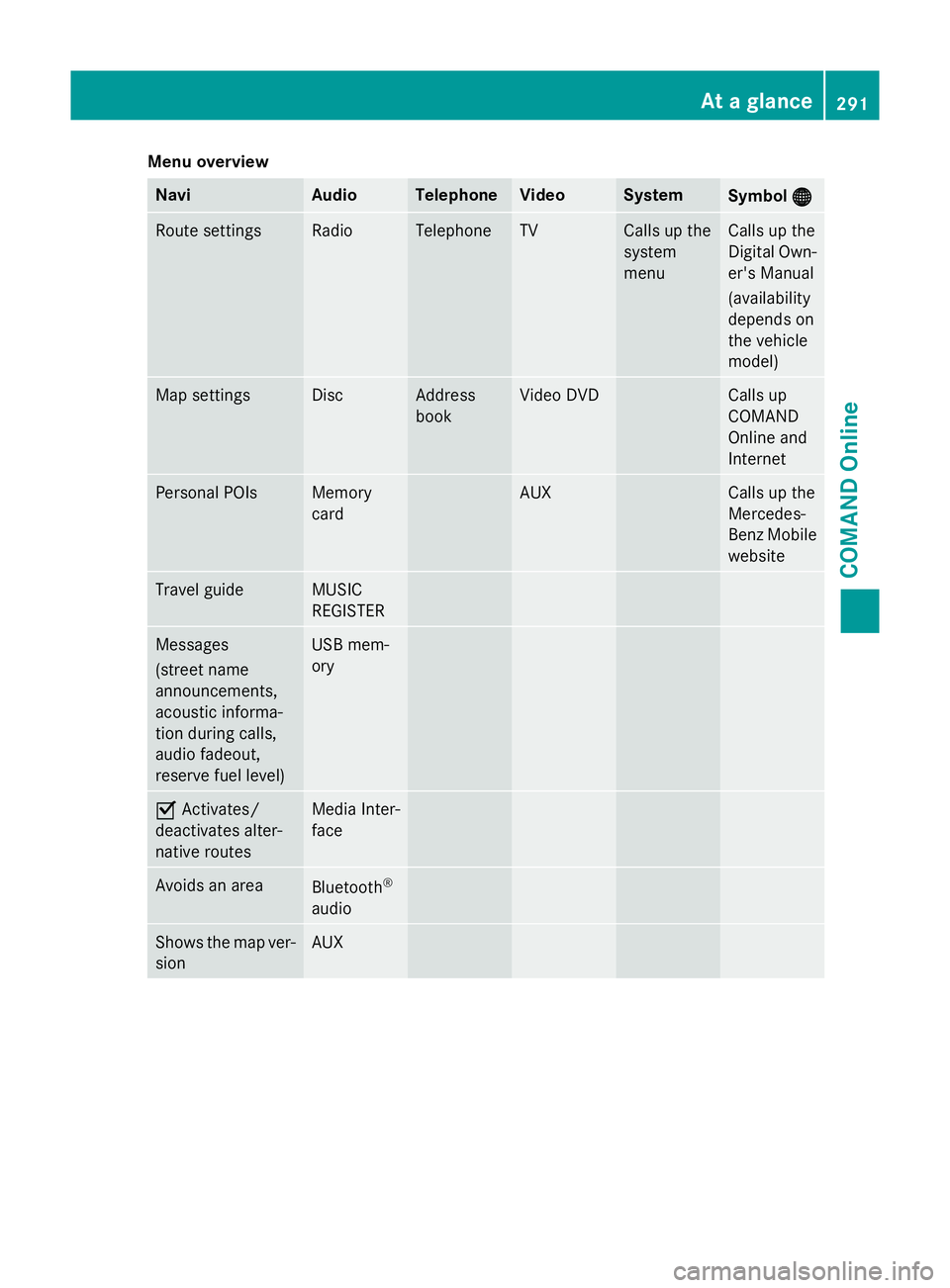
Menu overview
Navi Audio Telephone Video System
Symbol
®
® Route settings Radio Telephone TV Calls up the
system
menu Calls up the
Digital Own-
er's Manual
(availability
depends on
the vehicle
model) Map settings Disc Address
book Video DVD Calls up
COMAND
Online and
Internet
Personal POIs Memory
card AUX Calls up the
Mercedes-
Benz Mobile
website Travel guide MUSIC
REGISTER
Messages
(street name
announcements,
acoustic informa-
tion during calls,
audio fadeout,
reserve fuel level) USB mem-
ory
O
Activates/
deactivates alter-
native routes Media Inter-
face
Avoids an area
Bluetooth
®
audio Shows the map ver-
sion AUX At a glance
291COMAND Online Z
Page 297 of 637
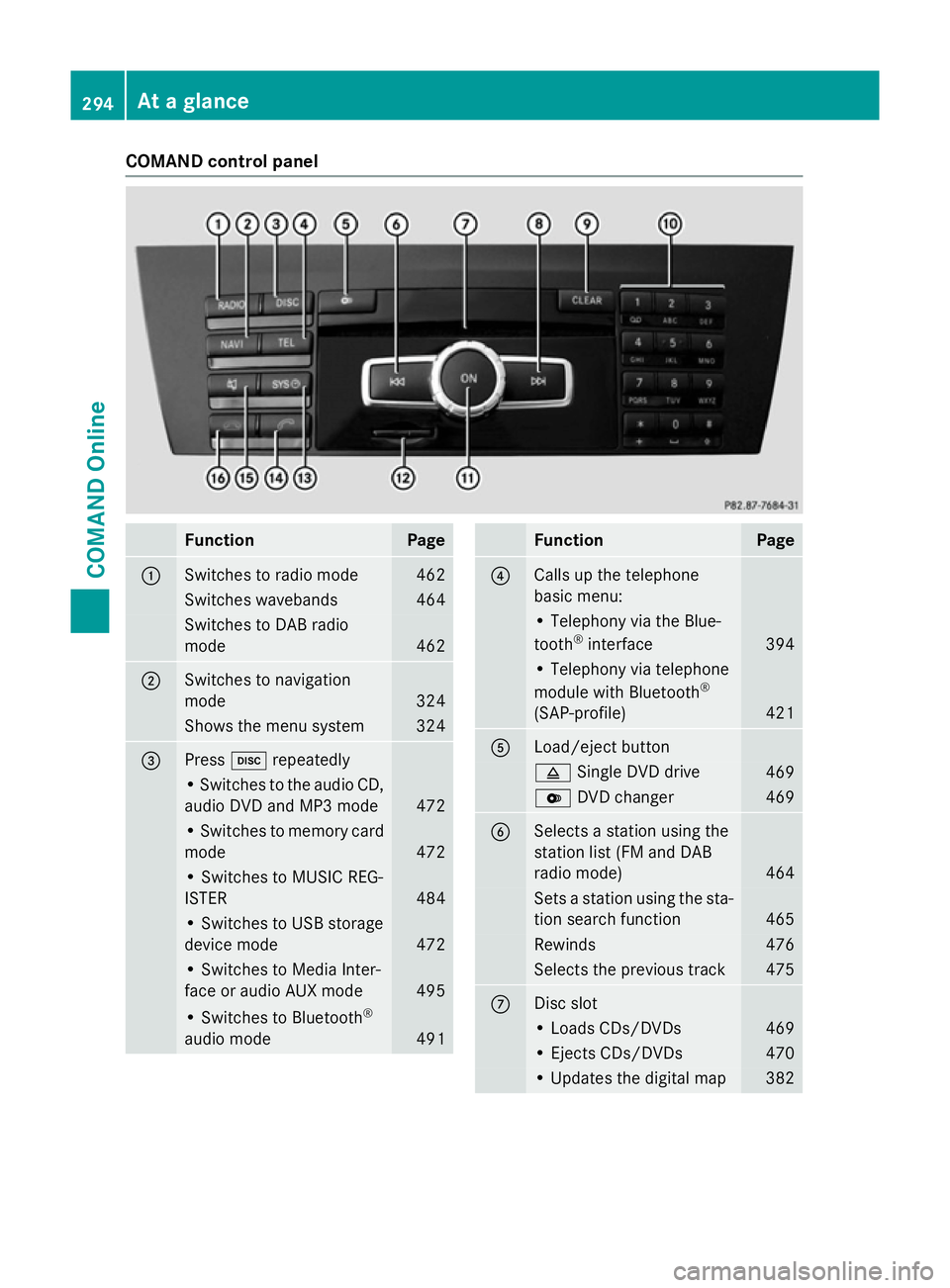
COMAND control panel
Function Page
:
Switches to radio mode 462
Switches wavebands 464
Switches to DAB radio
mode
462
;
Switches to navigation
mode
324
Shows the menu system 324
=
Press
hrepeatedly • Switches to the audio CD,
audio DVD and MP3 mode 472
• Switches to memory card
mode 472
• Switches to MUSIC REG-
ISTER
484
• Switches to USB storage
device mode
472
• Switches to Media Inter-
face or audio AUX mode
495
• Switches to Bluetooth
®
audio mode 491 Function Page
?
Calls up the telephone
basic menu:
• Telephony via the Blue-
tooth
®
interface 394
• Telephony via telephone
module with Bluetooth
®
(SAP-profile) 421
A
Load/eject button
8
Single DVD drive 469
V
DVD changer 469
B
Selects a station using the
station list (FM and DAB
radio mode)
464
Sets a station using the sta-
tion search function 465
Rewinds 476
Selects the previous track 475
C
Disc slot
• Loads CDs/DVDs 469
• Ejects CDs/DVDs 470
• Updates the digital map 382294
At a glanceCOMAND Online
Page 303 of 637
X
Press the $button.
The radio display appears. You will hear the
last station played on the last waveband
selected.
X Select Sound
Sound by sliding VÆand turning
cVd the COMAND controller and press W
to confirm.
You can now set the treble, bass and bal-
ance for radio mode.
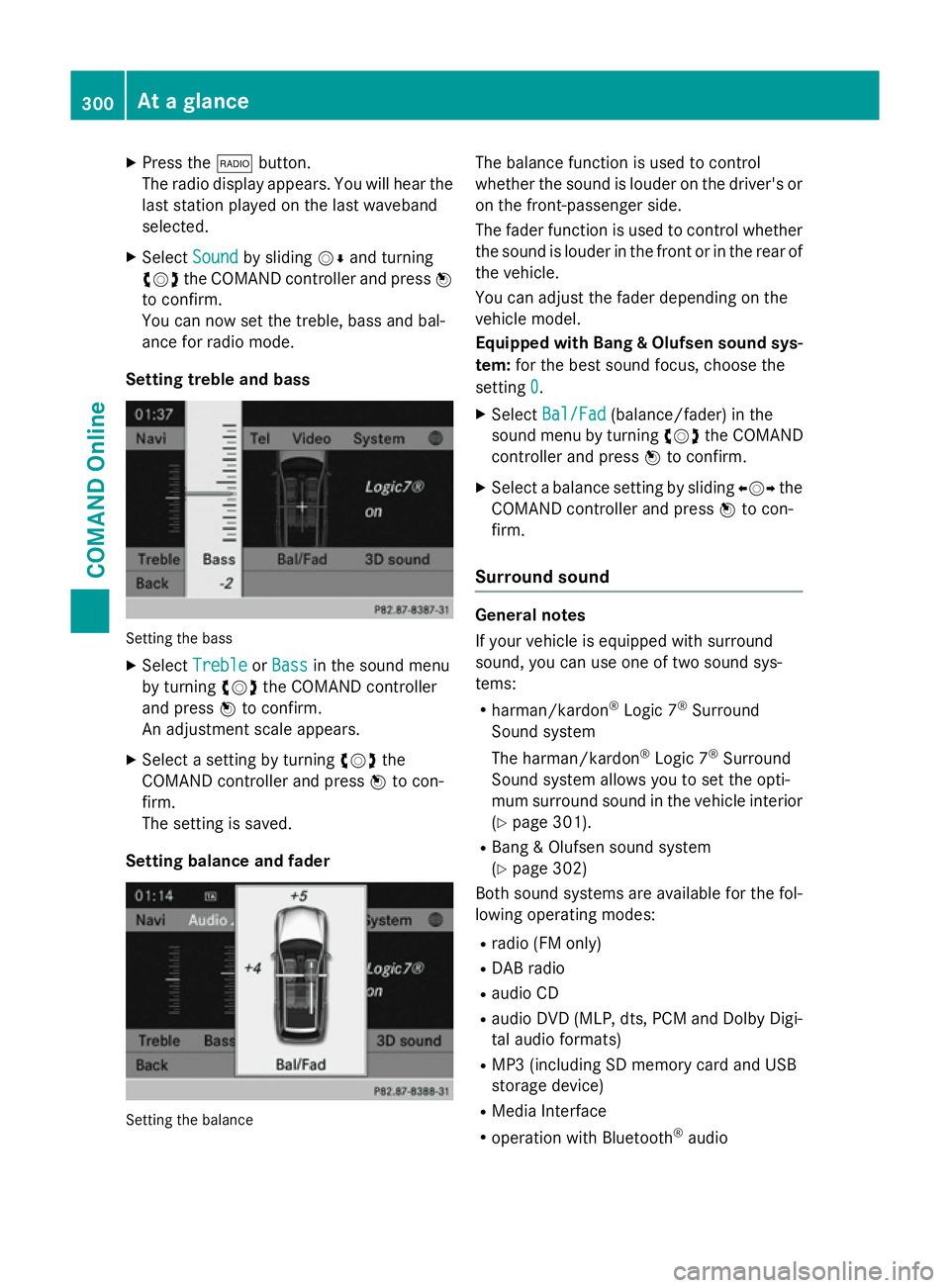
Setting treble and bass Setting the bass
X Select Treble Treble orBass
Bass in the sound menu
by turning cVdthe COMAND controller
and press Wto confirm.
An adjustment scale appears.
X Select a setting by turning cVdthe
COMAND controller and press Wto con-
firm.
The setting is saved.
Setting balance and fader Setting the balance The balance function is used to control
whether the sound is louder on the driver's or
on the front-passenger side.
The fader function is used to control whether
the sound is louder in the front or in the rear of the vehicle.
You can adjust the fader depending on the
vehicle model.
Equipped with Bang & Olufsen sound sys-
tem: for the best sound focus, choose the
setting 0 0.
X Select Bal/Fad
Bal/Fad (balance/fader) in the
sound menu by turning cVdthe COMAND
controller and press Wto confirm.
X Select a balance setting by sliding XVYthe
COMAND controller and press Wto con-
firm.
Surround sound General notes
If your vehicle is equipped with surround
sound, you can use one of two sound sys-
tems:
R harman/kardon ®
Logic 7 ®
Surround
Sound system
The harman/kardon ®
Logic 7 ®
Surround
Sound system allows you to set the opti-
mum surround sound in the vehicle interior
(Y page 301).
R Bang & Olufsen sound system
(Y page 302)
Both sound systems are available for the fol-
lowing operating modes:
R radio (FM only)
R DAB radio
R audio CD
R audio DVD (MLP, dts, PCM and Dolby Digi-
tal audio formats)
R MP3 (including SD memory card and USB
storage device)
R Media Interface
R operation with Bluetooth ®
audio 300
At a glanceCOMAND Online