2012 MERCEDES-BENZ S-CLASS SEDAN stop start
[x] Cancel search: stop startPage 378 of 536

?%Press briefly:
Back
Switches off the Voice Control
System; see the separate operating
instructions
Hides display messages or calls up
the last Trip menu function used% Press and hold:
Calls up the standard display in the
Trip menuA=;
Selects a menu9: Press briefly:
Selects a function or scrolls through
lists
In the Audio menu: selects a stored
station, an audio track or a video
scene
In the Telephone menu: switches to
the phone book and selects a name
or a telephone number9: Press and hold:
In the Audio menu: selects a station
from the alphabetical list of stations,
starts station search or starts rapid
scrolling through an audio/video
disc
In the Telephone menu: starts rapid
scrolling through the phone booka
Confirms selections and display
messages
In the Telephone menu: switches to
the phone book and starts dialing
In the Audio menu: stops the station
search function at the desired stationMultifunction display
Values and settings as well as display
messages are shown in the multifunction
display.:Menu bar;Description field376Displays and operationOn-board computer and displays
Page 384 of 536
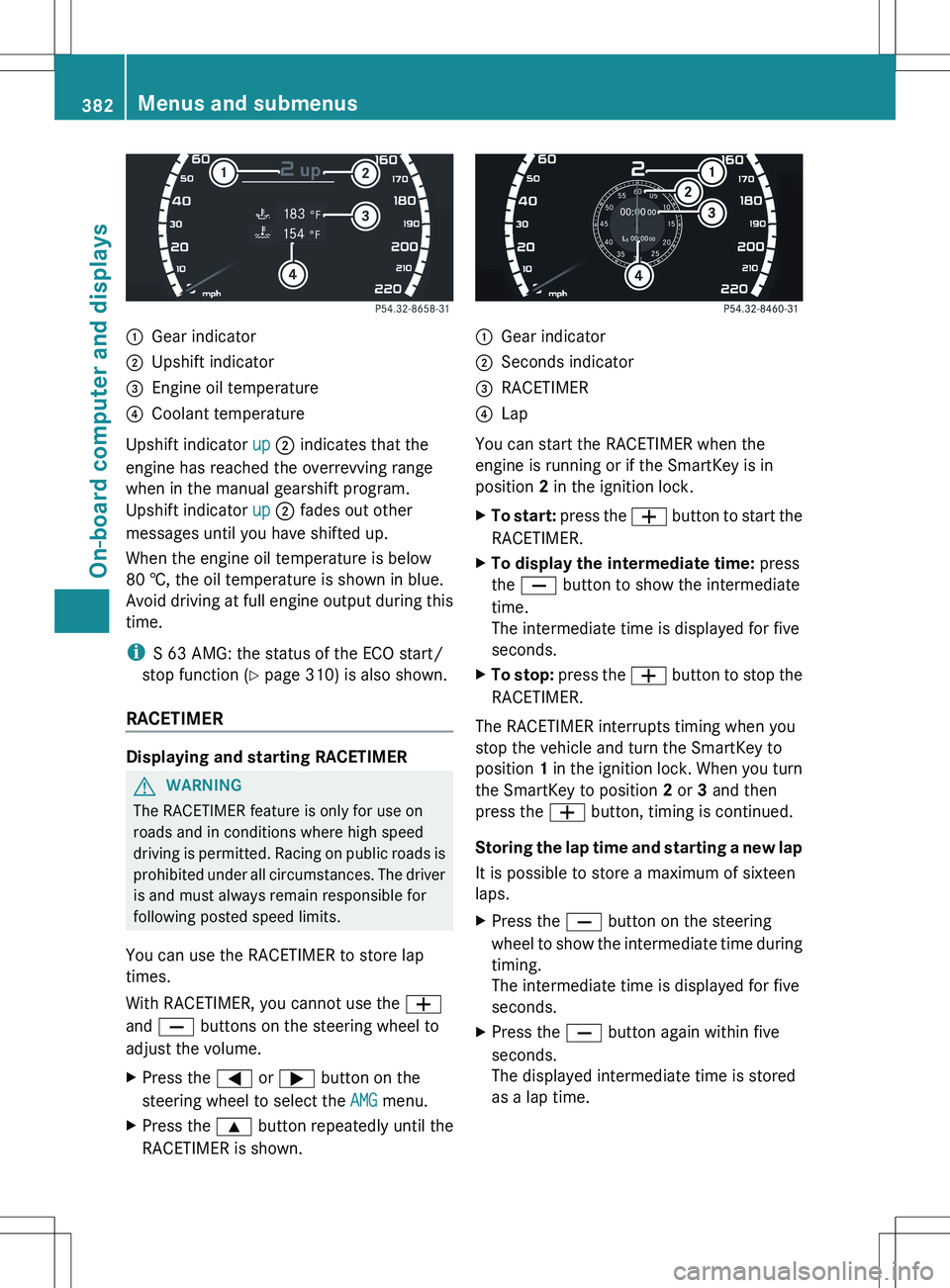
:Gear indicator;Upshift indicator=Engine oil temperature?Coolant temperature
Upshift indicator up ; indicates that the
engine has reached the overrevving range
when in the manual gearshift program.
Upshift indicator up ; fades out other
messages until you have shifted up.
When the engine oil temperature is below
80 †, the oil temperature is shown in blue.
Avoid driving at full engine output during this
time.
i S 63 AMG: the status of the ECO start/
stop function ( Y page 310) is also shown.
RACETIMER
Displaying and starting RACETIMER
GWARNING
The RACETIMER feature is only for use on
roads and in conditions where high speed
driving is permitted. Racing on public roads is
prohibited under all circumstances. The driver
is and must always remain responsible for
following posted speed limits.
You can use the RACETIMER to store lap
times.
With RACETIMER, you cannot use the W
and X buttons on the steering wheel to
adjust the volume.
XPress the = or ; button on the
steering wheel to select the AMG menu.XPress the 9 button repeatedly until the
RACETIMER is shown.:Gear indicator;Seconds indicator=RACETIMER?Lap
You can start the RACETIMER when the
engine is running or if the SmartKey is in
position 2 in the ignition lock.
XTo start: press the W button to start the
RACETIMER.XTo display the intermediate time: press
the X button to show the intermediate
time.
The intermediate time is displayed for five
seconds.XTo stop: press the W button to stop the
RACETIMER.
The RACETIMER interrupts timing when you
stop the vehicle and turn the SmartKey to
position 1 in the ignition lock. When you turn
the SmartKey to position 2 or 3 and then
press the W button, timing is continued.
Storing the lap time and starting a new lap
It is possible to store a maximum of sixteen
laps.
XPress the X button on the steering
wheel to show the intermediate time during
timing.
The intermediate time is displayed for five
seconds.XPress the X button again within five
seconds.
The displayed intermediate time is stored
as a lap time.382Menus and submenusOn-board computer and displays
Page 385 of 536
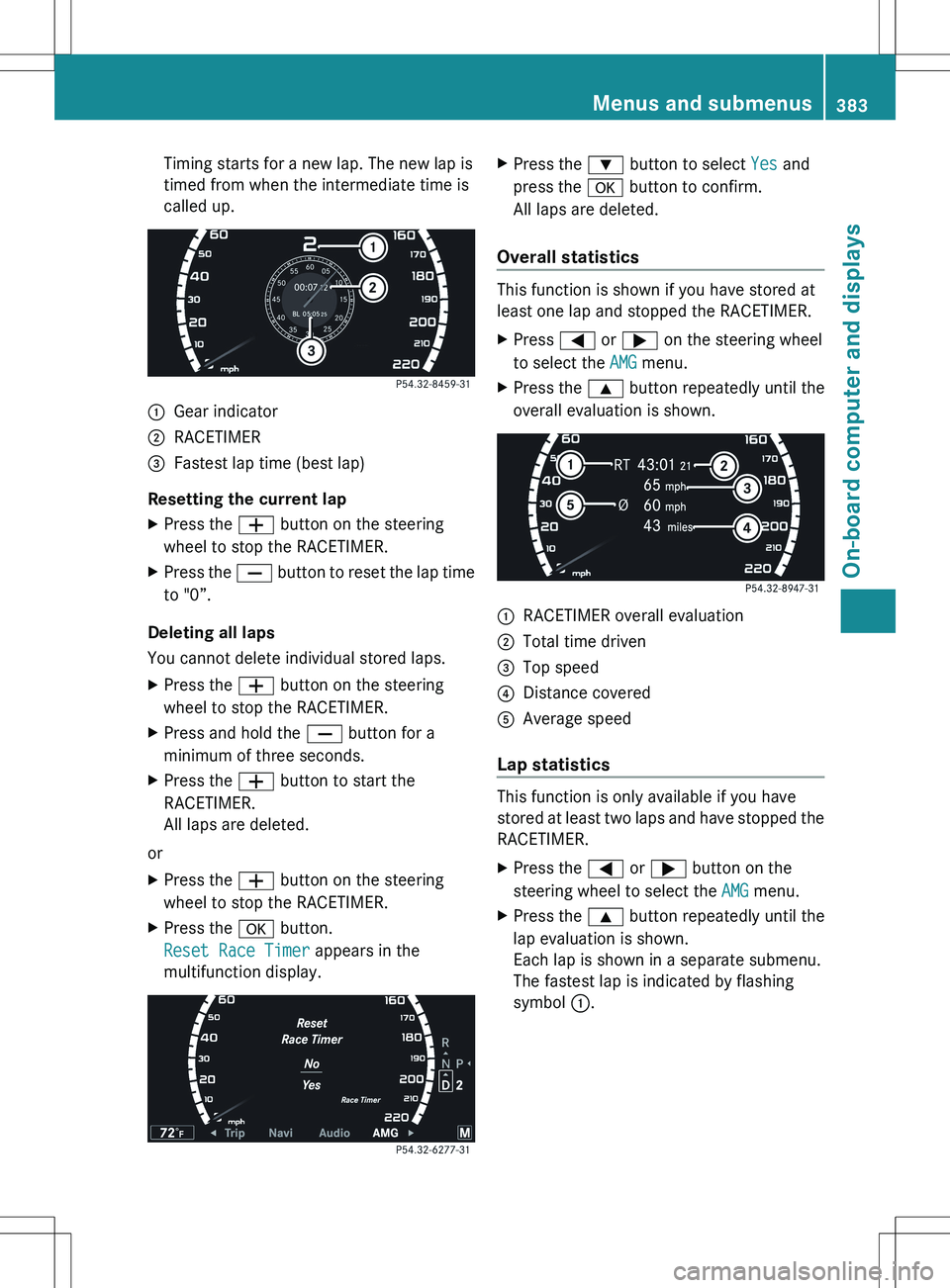
Timing starts for a new lap. The new lap is
timed from when the intermediate time is
called up.:Gear indicator;RACETIMER=Fastest lap time (best lap)
Resetting the current lap
XPress the W button on the steering
wheel to stop the RACETIMER.XPress the X button to reset the lap time
to "0”.
Deleting all laps
You cannot delete individual stored laps.
XPress the W button on the steering
wheel to stop the RACETIMER.XPress and hold the X button for a
minimum of three seconds.XPress the W button to start the
RACETIMER.
All laps are deleted.
or
XPress the W button on the steering
wheel to stop the RACETIMER.XPress the a button.
Reset Race Timer appears in the
multifunction display.XPress the : button to select Yes and
press the a button to confirm.
All laps are deleted.
Overall statistics
This function is shown if you have stored at
least one lap and stopped the RACETIMER.
XPress = or ; on the steering wheel
to select the AMG menu.XPress the 9 button repeatedly until the
overall evaluation is shown.:RACETIMER overall evaluation;Total time driven=Top speed?Distance coveredAAverage speed
Lap statistics
This function is only available if you have
stored at least two laps and have stopped the
RACETIMER.
XPress the = or ; button on the
steering wheel to select the AMG menu.XPress the 9 button repeatedly until the
lap evaluation is shown.
Each lap is shown in a separate submenu.
The fastest lap is indicated by flashing
symbol :.Menus and submenus383On-board computer and displaysZ
Page 387 of 536
While the on-board computer reads in the SIM
card:
R you can dial a telephone number from the
redial list ( Calls Dialed list).
R you can dial a telephone number from the
telephone book stored in COMAND.
R the multifunction display shows the
Reading data... display message below
the phone book entries.
When the multifunction display shows the
Updating data... display message,
COMAND has finished importing data. The
multifunction display then shows all the
phone book entries in COMAND and the
mobile phone.XPress the = or ; button on the
steering wheel to select the Telephone
menu.XPress the 9, : or a button to call
up the phone book.XPress the 9 or : button to select the
desired name.
To scroll rapidly, press and hold the :
or 9 button for longer than one second.
After skipping eight entries, the rapid scroll
speeds up.
Rapid scrolling stops when you release the
button or reach the end of the list.XIf only one telephone number is stored
for a name: press the 6 or a button
to start dialing.
or
XIf there is more than one number for a
particular name: press the 6 or a
button to display the numbers.XPress the 9 or : button to select the
number you want to dial.XPress the 6 or a button to start
dialing.
or
XIf you do not want to make a call: press
the ~ or % button.Redialing
The on-board computer saves the last names
or numbers dialed in the redial memory
( Calls Dialed list).
XPress the = or ; button on the
steering wheel to select the Telephone
menu.XPress the 6 button to switch to the
redial memory.XPress the 9 or : button to select the
desired name or number.
To scroll rapidly, press and hold the :
or 9 button for longer than one second.XPress the 6 or a button to start
dialing.
or
XIf you do not want to make a call: press
the ~ or % button.
Assistance menu
Showing the distance display
This function is only available with
DISTRONIC PLUS.
XPress the = or ; button on the
steering wheel to select the DriveAssist
menu.XPress the 9 or : button to select
Distance Display .XPress a.
The DISTRONIC PLUS distance display
( Y page 343) appears in the multifunction
display.Menus and submenus385On-board computer and displaysZ
Page 396 of 536

Display messagesPossible causes/consequences and M SolutionsT !
÷
Inoperative See
Oper. Manual GRisk of accident
EBD (electronic brake force distribution), ABS, ESP ®
, BAS, PRE-
SAFE ®
, the HOLD function and hill start assist are unavailable due
to a malfunction.
BAS PLUS and PRE-SAFE ®
Brake may also have failed.
In addition, the ÷, å and ! warning lamps light up in
the instrument cluster and a warning tone sounds.
ATTENTION ASSIST 19
is deactivated.
The brake system continues to function normally, but without the
functions listed above. The wheels could therefore lock if you
brake hard, for example.
XDrive on carefully.XVisit a qualified specialist workshop immediately.#
Check Brake Pad
WearThe brake pads/linings have reached their wear limit.XVisit a qualified specialist workshop.F (USA only)
! (Canada only)
Please Release
Parking BrakeThe red F (USA only)/ ! (Canada only) indicator lamp
flashes and a warning tone sounds.
You are driving with the electric parking brake applied.XRelease the electric parking brake.
or
XPull away carefully ( Y page 328).The red F (USA only)/ ! (Canada only) indicator lamp
flashes and a warning tone sounds.
You are making an emergency stop using the electric parking
brake ( Y page 328).XAfter the emergency stop: release the electric parking brake
lever.19 Not available on hybrid vehicles.394Display messagesOn-board computer and displays
Page 401 of 536

Display messagesPossible causes/consequences and M SolutionsPRE-SAFE
Functions
Currently Limited
See Operator's
ManualGRisk of accident
PRE-SAFE ®
Brake is temporarily inoperative. Possible causes are:
R the DISTRONIC PLUS cover in the radiator grill is dirty.
R function is impaired due to heavy rain or snow.
R the sensors in the bumpers are dirty.
R the radar sensor system is temporarily inoperative, e.g. due to
electromagnetic radiation emitted by nearby TV or radio
stations or other sources of electromagnetic radiation.
R the system is outside the operating temperature range.
R the on-board voltage is too low.
If the display message does not disappear:
XPull over and stop the vehicle safely as soon as possible, paying
attention to road and traffic conditions.XApply the electric parking brake.XClean the DISTRONIC PLUS cover in the radiator grill
( Y page 470).XClean the bumpers ( Y page 470).XRestart the engine.
If the system detects that the sensors are fully operational, the
display message disappears.
PRE-SAFE ®
Brake is operational again.
PRE-SAFE
Function Limited
See Oper. ManualGRisk of accident
PRE-SAFE ®
Brake is defective. BAS PLUS or the distance warning
signal may also have failed.
XVisit a qualified specialist workshop.6
SRS Malfunction
Service RequiredGRisk of injury
There is a malfunction in the SRS (Supplemental Restraint
System). The 6 warning lamp also lights up in the instrument
cluster.
XVisit a qualified specialist workshop.6
Front Left SRS
Malfunction
Service Required
or Front Right SRS
Malfunction
Service RequiredGRisk of injury
SRS has malfunctioned at the front on the left or right. The 6
warning lamp also lights up in the instrument cluster.
XVisit a qualified specialist workshop.Display messages399On-board computer and displaysZ
Page 408 of 536

Display messagesPossible causes/consequences and M Solutionsb
Please Switch Off
LightsThe lights are still switched on when you leave the vehicle. A
warning tone also sounds.XTurn the light switch to $ or c .
or
XIf the rear fog lamp is switched on: press the light switch in to
the stop.Adaptive High-beam
Assist InoperativeAdaptive Highbeam Assist is faulty.XVisit a qualified specialist workshop.
Engine
Display messagesPossible causes/consequences and M Solutions+
Check Coolant
Level See Oper.
ManualThe coolant level is too low.XAdd coolant, observing the warning notes when doing so
( Y page 463).XIf coolant needs to be added more often than usual, have the
engine coolant system checked at a qualified specialist
workshop.GWARNING
Do not spill antifreeze on hot engine parts. Antifreeze contains ethylene glycol which may burn
if it comes into contact with hot engine parts. You could be seriously burned.
! The coolant level is too low. Avoid making long journeys with too little coolant in the cooling
system. The engine will otherwise be damaged.
The display messages and the corresponding symbol that indicate that the coolant level is
too low must not be ignored.
Display messagesPossible causes/consequences and M Solutions?
Coolant Low Stop
Vehicle Turn
Engine OffThe coolant is too hot.XPull over and stop the vehicle safely and switch off the engine,
paying attention to road and traffic conditions.XMake sure that the air supply to the engine radiator is not
blocked, e.g. by snow, slush or ice.XWait until the display message disappears before restarting the
engine. Otherwise, the engine could be damaged.XPay attention to the coolant temperature display.XIf the temperature increases again, visit a qualified specialist
workshop immediately.406Display messagesOn-board computer and displays
Page 416 of 536
Display messagesPossible causes/consequences and M SolutionsBlind Spot Assist
Currently
Unavailable See
Oper.
Manual or Active
Blind Spot Assist
Currently
Unavailable See
Oper. ManualBlind Spot Assist or Active Blind Spot Assist is temporarily
inoperative. Possible causes are:
R the sensors are dirty.
R function is impaired due to heavy rain or snow.
R the radar sensor system is outside the operating temperature
range.
R the radar sensor system is temporarily inoperative, e.g. due to
electromagnetic radiation emitted by nearby TV or radio
stations or other sources of electromagnetic radiation.
The yellow 9 indicator lamps also light up in the exterior
mirrors.
If the display message does not disappear:XPull over and stop the vehicle safely as soon as possible, paying
attention to road and traffic conditions.XApply the electric parking brake.XClean the sensors ( Y page 470).XRestart the engine.
If the system detects that the sensors are fully operational, the
display message disappears.
Blind Spot Assist or Active Blind Spot Assist is operational again.
Blind Spot Assist
Inoperative or Activ
e Blind Spot
Assist InoperativeBlind Spot Assist or Active Blind Spot Assist is defective.
The yellow 9 indicator lamps also light up in the exterior
mirrors.XVisit a qualified specialist workshop.Parking Guidance
InoperativeParking Guidance is malfunctioning ( Y page 353).XRestart the engine.
If the display message continues to be displayed:
XVisit a qualified specialist workshop.414Display messagesOn-board computer and displays