2012 MERCEDES-BENZ S-CLASS SEDAN service
[x] Cancel search: servicePage 414 of 536
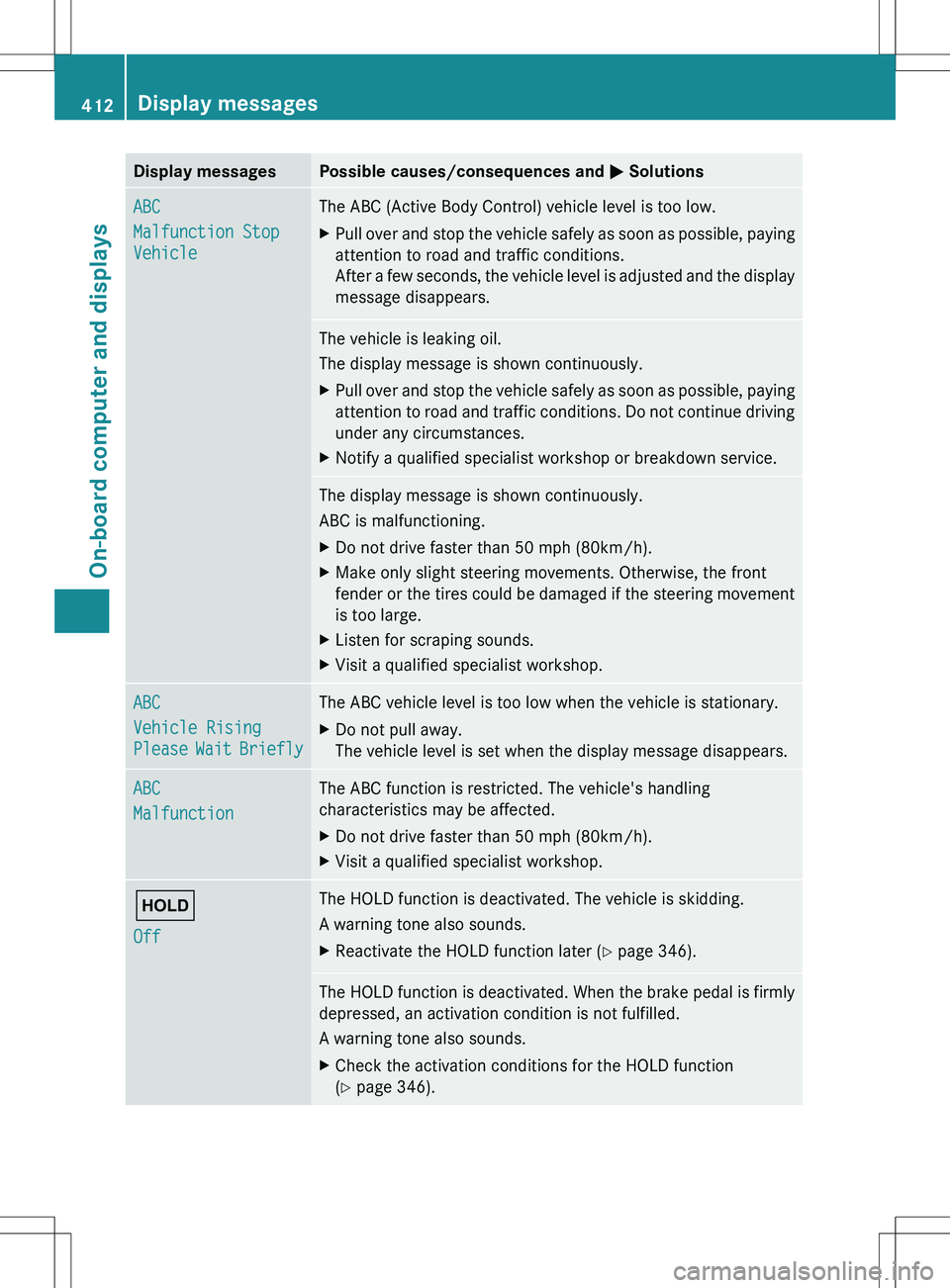
Display messagesPossible causes/consequences and M SolutionsABC
Malfunction Stop
VehicleThe ABC (Active Body Control) vehicle level is too low.XPull over and stop the vehicle safely as soon as possible, paying
attention to road and traffic conditions.
After a few seconds, the vehicle level is adjusted and the display
message disappears.The vehicle is leaking oil.
The display message is shown continuously.XPull over and stop the vehicle safely as soon as possible, paying
attention to road and traffic conditions. Do not continue driving
under any circumstances.XNotify a qualified specialist workshop or breakdown service.The display message is shown continuously.
ABC is malfunctioning.XDo not drive faster than 50 mph (80km/h).XMake only slight steering movements. Otherwise, the front
fender or the tires could be damaged if the steering movement
is too large.XListen for scraping sounds.XVisit a qualified specialist workshop.ABC
Vehicle Rising
Please Wait BrieflyThe ABC vehicle level is too low when the vehicle is stationary.XDo not pull away.
The vehicle level is set when the display message disappears.ABC
MalfunctionThe ABC function is restricted. The vehicle's handling
characteristics may be affected.XDo not drive faster than 50 mph (80km/h).XVisit a qualified specialist workshop.ë
OffThe HOLD function is deactivated. The vehicle is skidding.
A warning tone also sounds.XReactivate the HOLD function later ( Y page 346).The HOLD function is deactivated. When the brake pedal is firmly
depressed, an activation condition is not fulfilled.
A warning tone also sounds.XCheck the activation conditions for the HOLD function
( Y page 346).412Display messagesOn-board computer and displays
Page 422 of 536

Display messagesPossible causes/consequences and M SolutionsService Required
Do Not Shift GearsYou cannot change the transmission position due to a malfunction.
A warning tone also sounds.
If transmission position D is selected:XDrive to a qualified specialist workshop without shifting the
transmission from position D.
If transmission position R, N or P is selected:
XNotify a qualified specialist workshop or breakdown service.Only Shift to
Position 'P' When
Vehicle Is
StationaryThe vehicle is moving.XPull over and stop the vehicle safely as soon as possible, paying
attention to road and traffic conditions.XShift the transmission to position P.NThe trunk lid is open.XClose the trunk lid.MGRisk of accident
The hood is open.
XPull over and stop the vehicle safely as soon as possible, paying
attention to road and traffic conditions.XApply the electric parking brake.XClose the hood.CAt least one door is open.XClose all the doors.D
Power Steering
Malfunction See
Oper. ManualGRisk of accident
The power steering is malfunctioning.
You will need to use more force to steer.
XCheck whether you are able to apply the extra force required.XIf you are able to steer safely: carefully drive on to a qualified
specialist workshop.XIf you are unable to steer safely: do not drive on. Contact the
nearest qualified specialist workshop.¥
Check Washer FluidThe washer fluid level in the washer fluid reservoir has dropped
below the minimum.Xadd washer fluid ( Y page 464).420Display messagesOn-board computer and displays
Page 447 of 536
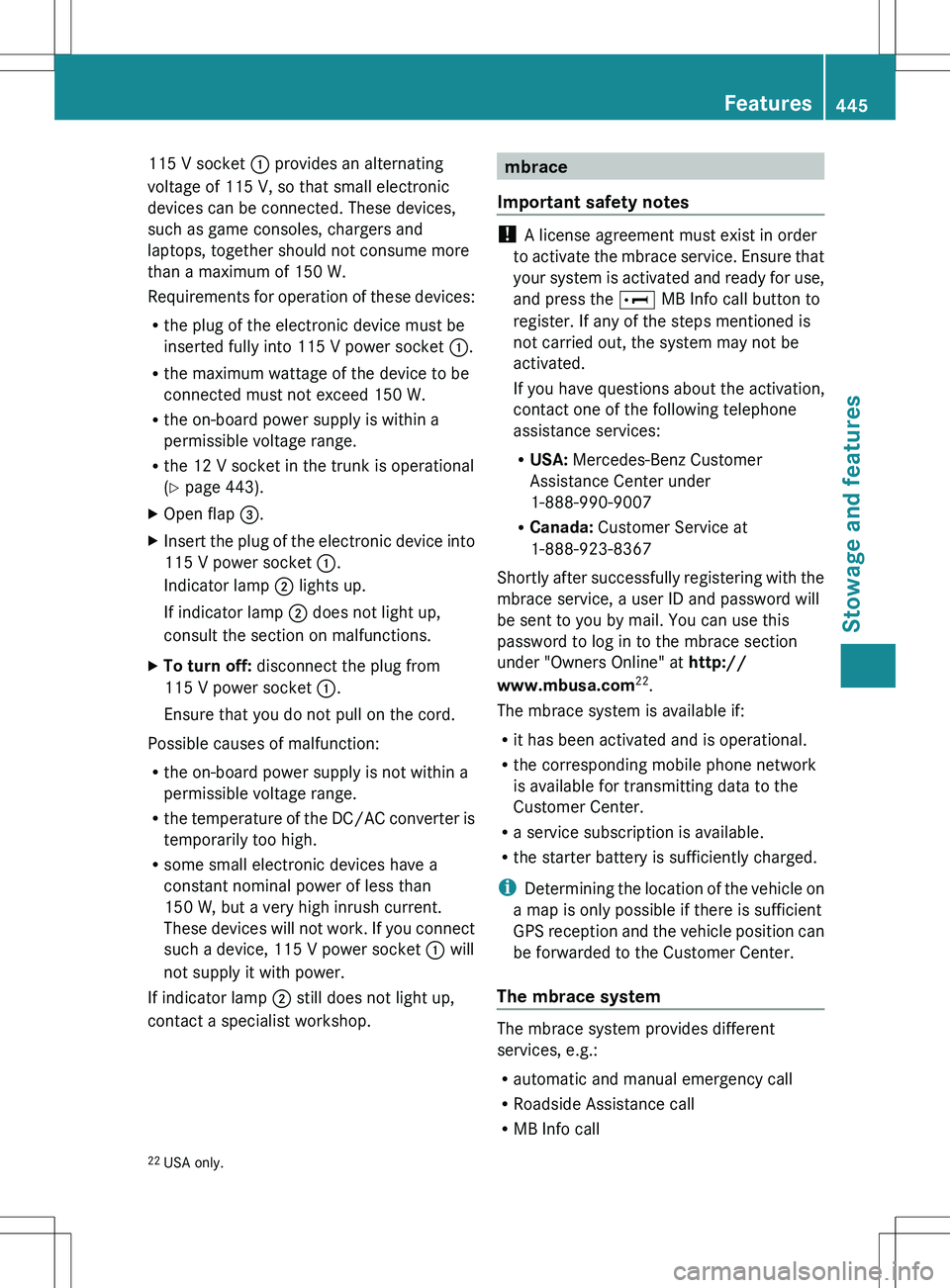
115 V socket : provides an alternating
voltage of 115 V, so that small electronic
devices can be connected. These devices,
such as game consoles, chargers and
laptops, together should not consume more
than a maximum of 150 W.
Requirements for operation of these devices:
R the plug of the electronic device must be
inserted fully into 115 V power socket :.
R the maximum wattage of the device to be
connected must not exceed 150 W.
R the on-board power supply is within a
permissible voltage range.
R the 12 V socket in the trunk is operational
( Y page 443).XOpen flap =.XInsert the plug of the electronic device into
115 V power socket :.
Indicator lamp ; lights up.
If indicator lamp ; does not light up,
consult the section on malfunctions.XTo turn off: disconnect the plug from
115 V power socket :.
Ensure that you do not pull on the cord.
Possible causes of malfunction:
R the on-board power supply is not within a
permissible voltage range.
R the temperature of the DC/AC converter is
temporarily too high.
R some small electronic devices have a
constant nominal power of less than
150 W, but a very high inrush current.
These devices will not work. If you connect
such a device, 115 V power socket : will
not supply it with power.
If indicator lamp ; still does not light up,
contact a specialist workshop.
mbrace
Important safety notes
! A license agreement must exist in order
to activate the mbrace service. Ensure that
your system is activated and ready for use,
and press the E MB Info call button to
register. If any of the steps mentioned is
not carried out, the system may not be
activated.
If you have questions about the activation,
contact one of the following telephone
assistance services:
R USA: Mercedes-Benz Customer
Assistance Center under
1-888-990-9007
R Canada: Customer Service at
1-888-923-8367
Shortly after successfully registering with the
mbrace service, a user ID and password will
be sent to you by mail. You can use this
password to log in to the mbrace section
under "Owners Online" at http://
www.mbusa.com 22
.
The mbrace system is available if:
R it has been activated and is operational.
R the corresponding mobile phone network
is available for transmitting data to the
Customer Center.
R a service subscription is available.
R the starter battery is sufficiently charged.
i Determining the location of the vehicle on
a map is only possible if there is sufficient
GPS reception and the vehicle position can
be forwarded to the Customer Center.
The mbrace system
The mbrace system provides different
services, e.g.:
R automatic and manual emergency call
R Roadside Assistance call
R MB Info call
22USA only.Features445Stowage and featuresZ
Page 448 of 536

To adjust the volume during an mbrace call,
proceed as follows:XPress the W or X button on the
multifunction steering wheel.
or
XUse the H volume controller of
COMAND ( Y page 123).
You can find further information and a
description of all available features under
"Owners Online" at http://
www.mbusa.com 23
.
System self-test
After you have switched on the ignition, the
system carries out a self-diagnosis.
GWARNING
A malfunction in the system has been
detected if one of the following conditions
occurs:
R the indicator lamp in the SOS button does
not light up during the system self-
diagnosis.
R the indicator lamp in the º Roadside
Assistance button does not light up during
the system self-diagnosis.
R the indicator lamp in the E information
button does not light up during the system
self-diagnosis.
R the indicator lamp in the SOS button,
º Roadside Assistance button or E
information button continues to be lit red
after the system self-diagnosis.
R the Tele Aid inoperative or Tele Aid
not activated message appears on the
multifunction display after the system self-
diagnosis.
If a malfunction is indicated as outlined above,
the system may not operate as expected. In
the event of an emergency, assistance must
be summoned by other means.
Have the system checked at the nearest
authorized Mercedes-Benz Center or contact
the following service hotlines:
R USA: Response Center at
1-888-990-9007
R Canada: Customer Service at
1-888-923-8367
Emergency call
Important safety notes
! A license agreement must exist in order
to activate the mbrace service. Ensure that
your system is activated and ready for use,
and press the E MB Info call button to
register. If any of the steps mentioned is
not carried out, the system may not be
activated.
If you have questions about the activation,
contact one of the following telephone
assistance services:
R USA: Mercedes-Benz Customer
Assistance Center under
1-888-990-9007
R Canada: Customer Service at
1-888-923-8367
An emergency call is dialed automatically if
an air bag or Emergency Tensioning Device is
triggered.
i An mbrace emergency call that has been
initiated automatically cannot be
terminated by the customer.
An emergency call can also be initiated
manually.
As soon as the emergency call has been
initiated, the indicator lamp in the SOS button
flashes. The Connecting Call message
appears on the multifunction display.
The COMAND display shows the Emergency
Call Activated message. The audio output
is muted.
23 USA only.446FeaturesStowage and features
Page 450 of 536
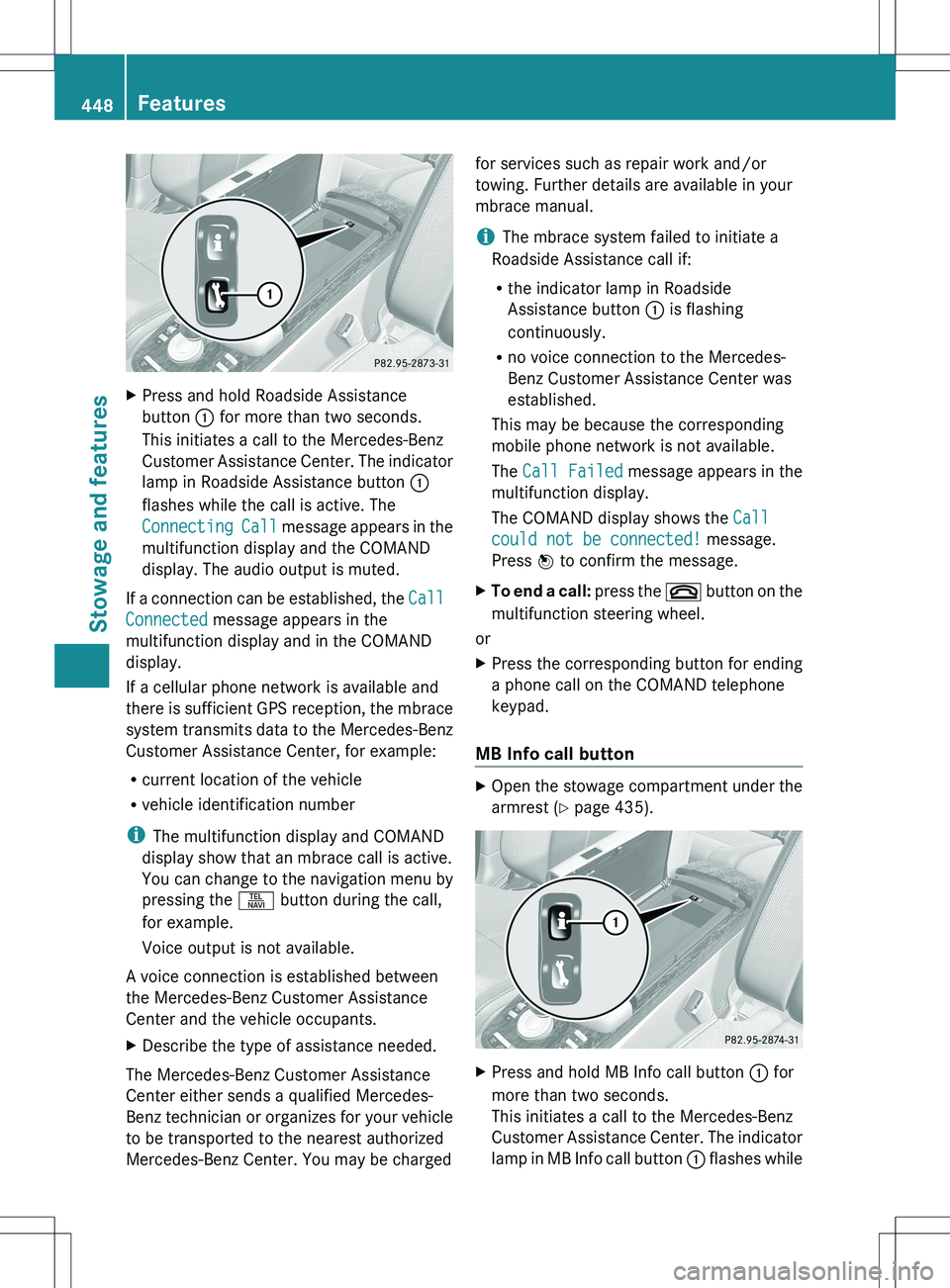
XPress and hold Roadside Assistance
button : for more than two seconds.
This initiates a call to the Mercedes-Benz
Customer Assistance Center. The indicator
lamp in Roadside Assistance button :
flashes while the call is active. The
Connecting Call message appears in the
multifunction display and the COMAND
display. The audio output is muted.
If a connection can be established, the Call
Connected message appears in the
multifunction display and in the COMAND
display.
If a cellular phone network is available and
there is sufficient GPS reception, the mbrace
system transmits data to the Mercedes-Benz
Customer Assistance Center, for example:
R current location of the vehicle
R vehicle identification number
i The multifunction display and COMAND
display show that an mbrace call is active.
You can change to the navigation menu by
pressing the S button during the call,
for example.
Voice output is not available.
A voice connection is established between
the Mercedes-Benz Customer Assistance
Center and the vehicle occupants.
XDescribe the type of assistance needed.
The Mercedes-Benz Customer Assistance
Center either sends a qualified Mercedes-
Benz technician or organizes for your vehicle
to be transported to the nearest authorized
Mercedes-Benz Center. You may be charged
for services such as repair work and/or
towing. Further details are available in your
mbrace manual.
i The mbrace system failed to initiate a
Roadside Assistance call if:
R the indicator lamp in Roadside
Assistance button : is flashing
continuously.
R no voice connection to the Mercedes-
Benz Customer Assistance Center was
established.
This may be because the corresponding
mobile phone network is not available.
The Call Failed message appears in the
multifunction display.
The COMAND display shows the Call
could not be connected! message.
Press W to confirm the message.XTo end a call: press the ~ button on the
multifunction steering wheel.
or
XPress the corresponding button for ending
a phone call on the COMAND telephone
keypad.
MB Info call button
XOpen the stowage compartment under the
armrest ( Y page 435).XPress and hold MB Info call button : for
more than two seconds.
This initiates a call to the Mercedes-Benz
Customer Assistance Center. The indicator
lamp in MB Info call button : flashes while448FeaturesStowage and features
Page 451 of 536

the connection is being established. The
Connecting Call message appears in the
multifunction display. The COMAND
display shows the Information Call
Activated message. The audio output is
muted.
If a connection can be established, the Call
Connected message appears in the
multifunction display.
The COMAND display shows the
Information Call Activated message.
If a cellular phone network is available and
there is sufficient GPS reception, the mbrace
system transmits data to the Mercedes-Benz
Customer Assistance Center, for example:
R current location of the vehicle
R vehicle identification number
i The COMAND display shows that an
mbrace call is active. You can change to the
navigation menu by pressing the S
button during the call, for example.
Voice output is not available.
A voice connection is established between
the Mercedes-Benz Customer Assistance
Center and the vehicle occupants. You can
obtain information on how to operate your
vehicle's systems, on the location of the
nearest authorized Mercedes-Benz Center,
and on further products and services offered
by Mercedes-Benz USA.
Further details on the mbrace system can be
found under http://www.mbusa.com 24
.
Log in under "Owners Online".
i The mbrace system failed to initiate an
MB Info call if:
R the indicator lamp in MB Info call
button : is flashing continuously.
R no voice connection to the Mercedes-
Benz Customer Assistance Center was
established.
This may be because the corresponding
mobile phone network is not available.
The Call Failed message appears in the
multifunction display.
The COMAND display shows the Call
could not be connected! message.
Press W to confirm the message.XTo end a call: press the ~ button on the
multifunction steering wheel.
or
XPress the corresponding button for ending
a phone call on the COMAND telephone
keypad.
Call priority
When service calls are active, e.g. Roadside
Assistance or MB Info calls, an emergency
call can still be initiated. In this case, an
emergency call will take priority and override
all other active calls.
The indicator lamp of the respective button
flashes until the call is ended. An emergency
call can only be terminated by the Mercedes-
Benz Customer Assistance Center. All other
calls can be ended by pressing the ~
button on the multifunction steering wheel or
the corresponding button for ending a
telephone call on the COMAND telephone
keypad.
Downloading destinations in COMAND
i The components and operating principles
of COMAND can be found on
( Y page 122).
i You can only use the Destination
Download function if the vehicle is
equipped with a navigation system.
Destination Download gives you access to a
database with over 15 million points of
interest (POIs)/important destinations that
can be downloaded onto the navigation
system of your vehicle. If you know the
destination, you can download the address or
obtain the location of points of interest
24 USA only.Features449Stowage and featuresZ
Page 452 of 536
(POIs)/important destinations in the
surrounding area.
You are prompted to confirm route guidance
to the address entered.XSlide XVY and turn cVd the COMAND
controller to select Yes and confirm by
pressing W.
The system calculates the route and
subsequently starts the route guidance with
the address entered.
i If you select No, the address can be stored
in the address book.
i The Destination Download function is
available if the corresponding mobile
phone network is available and data
transfer is possible.
Route Assistance
This service is part of the mbrace PLUS
Package and cannot be purchased
separately.
i You can also use the Route Assistance
function if your vehicle is not equipped with
a navigation system.
Within the framework of this service, you
receive a professional and reliable form of
navigation support without having to leave
your vehicle.
The customer service representative
determines a suitable driving route based on
your current vehicle position and the desired
destination and guides you live through the
current sections of the route.
Search & Send
Points to observe before use
i To use Search & Send, your vehicle must
be equipped with mbrace and a navigation
system. You must also have an mbrace
service subscription.
"Search & Send" is a destination entry
service. A destination which is determined by
Google Maps ®
or Yahoo Local Maps ®
can be
forwarded directly to your vehicle's
navigation system using TELEAID.
Specifying and sending the destination
address
i Information about specific commands
such as address entry or sending an
address can be found on (either of) the
website(s). Each website works differently
and is subject to change.XGo to either http://
www.maps.google.com or http://
www.maps.yahoo.com and enter a
destination address in the entry field.XPress the relevant button on the website to
send the destination address to the e-mail
address of your mbrace account.XWhen the "Send" dialog window appears:
In the relevant field, enter the e-mail
address which you specified when
activating your mbrace account.XClick on "Send".
Calling up destination addresses
XPress the MB Info call button to load the
destination address to your vehicle's
navigation system.
A display message appears, asking
whether navigation should be started.XSlide XVY and turn cVd the COMAND
controller to select Yes and confirm by
pressing W.
The system calculates the route and
subsequently starts the route guidance
with the address entered.
i If you select No, the address can be stored
in the address book.
i If you have sent more than one
destination address, you have to make an
info call to load each individual address.
i Destination addresses are loaded in the
same order as the order in which they were
sent. If you own multiple Mercedes-Benz
vehicles with mbrace and activated mbrace
accounts:
450FeaturesStowage and features
Page 453 of 536
Each destination address sent can be
accessed by every vehicle which is
connected with the relevant e-mail
address.
Vehicle remote opening
If you have unintentionally locked your
vehicle (e.g. the SmartKey is still in the
vehicle) and a replacement SmartKey is not
available, the vehicle can be opened by a
Mercedes-Benz Customer Assistance Center.
The vehicle can be opened remotely up to four
days after the ignition was last switched off.
XContact the following service hotlines:
R USA: Mercedes-Benz Customer
Assistance Center at
1-800-FOR-MERCedes
(1-800-367-6372) or 1-888-990-9007
R Canada: Customer Service at
1-888-923-8367
You will be asked for your password.XReturn to your vehicle at the time agreed
upon with the Mercedes-Benz Customer
Assistance Center.XPull on the trunk lid handle for at least
20 seconds until the indicator lamp in the
SOS button ( Y page 446) flashes.
The Connecting Call message appears
on the multifunction display.
Alternatively, the vehicle can also be opened
via the Internet or an iPhone in the "Owners
Online" section using your ID number and
password 25
.
i Vehicle remote unlocking is only possible
if the corresponding mobile phone network
is accessible.
The SOS button flashes and the
Connecting Call message appears in the
multifunction display to confirm that the
command for vehicle remote unlocking has
been received.
If you pull on the trunk handle for more than
20 seconds before receiving authorization
for remote unlocking, you must wait
15 minutes before you can pull on the trunk
lid handle again.
Vehicle remote closing
If you forget to lock your vehicle but are no
longer in the vicinity of the vehicle, it can be
locked for you by the Mercedes-Benz
Customer Assistance Center.
The vehicle can be locked remotely up to four
days after the ignition was last switched off.
XContact the following service hotlines:
R USA: Mercedes-Benz Customer
Assistance Center under 1-800-FOR-
MERCedes(1-800-367-6372) or
1-888-990-9007
R Canada: Customer Service at
1-888-923-8367
You will be asked for your PIN.
The next time you are in your vehicle and
switch on the ignition, the Tele Aid Doors
Locked Remotely message appears in the
multifunction display.
Alternatively, the vehicle can also be locked
via the Internet or an iPhone in the "Owners
Online" section using your ID number and
password.
i The vehicle valet locking feature is
available when the relevant mobile phone
network is available and data connection is
possible.
Automatic vehicle data retrieval for the
service due date
Your vehicle comes with a function which
improves the servicing of the vehicle
considerably. Shortly before the service due
date, mbrace sends important vehicle
maintenance information to the Mercedes-
Benz Customer Assistance Center. The
Mercedes-Benz Customer Assistance Center
then informs your authorized Mercedes-Benz
Service Center of the work required. This
25 USA only.Features451Stowage and featuresZ