2012 MERCEDES-BENZ GLK SUV high beam
[x] Cancel search: high beamPage 7 of 381

1, 2, 3 ...
12-button multifunction steering
wheel Operating the on-board computer .228
Overview .......................................... 36
12 V socket
see Socket
4-button multifunction steering
wheel
Operating the on-board computer .225
Overview .......................................... 35
4ETS
see ETS/4ETS (Electronic Trac-
tion System)
4MATIC (permanent four-wheel
drive) .................................................. 213A
ABS (Anti-lock Braking System) Display message (12-button mul-
tifunction steering wheel) ..............252
Display message (4-button multi-
function steering wheel) ................247
Function/notes ................................ 65
Important safety notes ....................65
Warning lamp ................................. 286
Activating/deactivating air-recir-
culation mode .................................... 135
Activating/deactivating cooling
with air dehumidification .................131
Active Blind Spot Assist Function/notes ............................. 207
Switching on/off (on-board com-
puter, 12-button multifunction
steering wheel) .............................. 237
Towing a trailer .............................. 210
Active Driving Assistance package .207
Active Lane Keeping Assist Display message (12-button mul-
tifunction steering wheel) ..............273
Function/notes ............................. 210
Switching on/off (on-board com-
puter, 12-button multifunction
steering wheel) .............................. 238
Towing a trailer ......................207, 213
Active light function .........................114Active Park Assist
Display message ............................ 273
Active Parking Assist
Important safety notes ..................192
Towing a trailer .............................. 196
Active Service System
see ASSYST PLUS
Adaptive brake lamps .........................67
Adaptive Highbeam Assist Display message (12-button mul-
tifunction steering wheel) ..............263
Function/notes ............................. 116
Adaptive Main-beam Assist
Switching on/off (on-board com-
puter) ............................................. 240
AdBlue ®
Display message (12-button mul-
tifunction steering wheel) ..............269
Display message (4-button multi-
function steering wheel) ................266
Filling capacity ............................... 369
Notes ............................................. 368
Service indicator ............................ 313
AdBlue ®
service indicator ................313
Additional speedometer ...................239
Additives (engine oil) ........................370
Adjusting the headlamp range .........112
Airbags Front airbag (driver, front
passenger) ....................................... 46
Important safety guidelines .............44
Kneebag .......................................... .46
Pelvis airbag .................................... 47
Sidebag ............................................ 47
Triggering ......................................... 43
Windowba g...................................... 48
Air-conditioning system
see Climate control
Air filter
Display message (12-button mul-
tifunction steering wheel) ..............268
Display message (4-button multi-
function steering wheel) ................265
Air pressure
see Tyre pressure 4
Index
Page 10 of 381

Bulbs
see Changing bulbs C
Calling up a fault see Display messages
Car
see Vehicle
Care
Automatic car wash .......................318
Carpets .......................................... 323
Display ........................................... 322
Exterior lighting ............................. 320
Gear or selector lever ....................322
High-pressure cleaner .................... 318
Interior ........................................... 322
Matt paintwork .............................. 319
Notes ............................................. 317
Paint .............................................. 319
Plastic trim .................................... 322
Reversing camera ..........................321
Roof lining ...................................... 323
Seat belt ........................................ 323
Seat cover ..................................... 323
Sensors ......................................... 321
Steering wheel ............................... 322
Tail pipes ....................................... 321
Trim pieces .................................... 323
Washing by hand ........................... 318
Wheels ........................................... 319
Windows ........................................ 320
Wiper blades .................................. 320
Wooden trim .................................. 323
Car wash (care) ................................. 318
CD player/CD changer (12-button
multifunction steering wheel) .......... 233
Central locking Automatic locking (on-board com-
puter) ............................................. 241
Locking/unlocking (key) ..................76
Centre console
Lower section .................................. 38
Upper section .................................. 37
Changing bulbs
Cornering light function .................121
Dipped-beam headlamps ...............120
Important safety notes ..................118Main-beam headlamps ................... 120
Overview of bulb type
s.................. 119
Parking lamps (front) .....................120
Reversing lamps ............................ 121
Standing lamps .............................. 120
Turn signals (front) ......................... 120
Turn signals (rear) ..........................121
Child-proof locks
Important safety notes ....................64
Rear doors ....................................... 64
Children
In the vehicle ................................... 54
Restraint systems ............................ 54
Child seat
Automatic recognition .....................56
ISOFIX .............................................. 57
On the front-passenger sea t............ 55
Problem (malfunction) .....................60
Recommendations ...........................62
Suitable positions ............................ 60
Top Tether ....................................... 58
Cigarette lighter ................................ 307
Cleaning Mirror turn signal ........................... 320
Trailer tow hitch ............................. 321
Climate control
Auxiliary heating/ventilation .......... 137
Controlling automatically ...............132
Convenience opening/closing
(air-recirculation mode )................. 136
Cooling with air dehumidification ..131
Demisting the windows .................. 134
Demisting the windscreen .............134
Important safety notes ..................128
Indicator lamp ................................ 132
Information on using
THERMOTRONIC automatic cli-
mate control .................................. 131
Notes on using THERMATIC auto-
matic climate control .....................129
Overview of systems ......................128
Problems with cooling with air
dehumidification ............................ 132
Problem with the rear window
heating .......................................... 135
Rear control panel .........................130
Setting the air distribution .............133
Setting the airflow .........................134 Index
7
Page 17 of 381

J
Jack Storage location ............................ 327
Using ............................................. 333
Jump start (engine)
see Jump starting (engine)
Jump starting (engine) ......................341 K
Key Changing the battery .......................79
Checking the battery .......................79
Convenience closing feature ............90
Convenience opening feature ..........90
Display message (4-button multi-
function steering wheel) ................281
Door central locking/unlocking .......76
Emergency key element ................... 78
Important safety notes ....................76
Loss ................................................. 81
Modifying the programming .............78
Positions (ignition lock) .................147
Problem (malfunction) .....................81
Starting the engine ........................148
KEYLESS-GO
Convenience closing ........................90
Display message (12-button mul-
tifunction display) ..........................283
Display message (4-button multi-
function display) ............................ 281
Locking ............................................ 77
Start/Stop button .......................... 147
Starting the engine ........................149
Unlocking ......................................... 77
Key positions
Key ................................................ 147
KEYLESS GO .................................. 147
Keys
Display message (12-button mul-
tifunction steering wheel) ..............283
Kickdown
Driving tips .................................... 158
Manual drive program ....................160
Kneebag ............................................... 46 L
Lamps see Warning and indicator lamps
Lane Keeping Assist
Activating/deactivating .................238
Display message (12-button mul-
tifunction steering wheel) ..............273
Function/informatio n.................... 205
Lane package ..................................... 203
Lashing eyelets ................................. 299
Licence plate lighting Display message (12-button mul-
tifunction steering wheel) ..............262
Display message (4-button multi-
function steering wheel) ................259
Lighting
see Lights
Lights
Activating/deactivating the exte-
rior lighting delayed switch-off
(12-button multifunction steering
wheel) ............................................ 240
Activating/deactivating the inte-
rior lighting delayed switch-off
(12-button multifunction steering
wheel) ............................................ 241
Active light function .......................114
Automatic headlamp mode ............111
Cornering light function .................115
Dipped-beam headlamps ...............111
Driving abroad ............................... 110
Foglamps ....................................... 112
Foglamps (extended range) ...........115
Hazard warning lamps ...................114
Headlamp flasher ........................... 113
Headlamp range ............................ 112
Light switch ................................... 111
Main-beam headlamps ................... 113
Motorway mode ............................. 115
Off-road lights ................................ 115
Parking lamps ................................ 112
Rear foglamp ................................. 112
Setting brightness for display/
switches (on-board computer) .......239
Side lamps ..................................... 112
Switching Adaptive Highbeam
Assist on/off ................................. 24014
Index
Page 18 of 381

Switching the daytime driving
lights on/off (12-button multi-
function steering wheel)
................239
Switching the daytime driving
lights on/off (4-button multifunc-
tion steering wheel) .......................227
Switching the daytime driving
lights on/off (switch) .....................111
Switching the surround lighting
on/off (12-button multifunction
steering wheel) .............................. 240
Turn signals ................................... 113
see Changing bulbs
see Interior lighting
Light sensor
Display message (12-button mul-
tifunction steering wheel) ..............263
Display message (4-button multi-
function steering wheel) ................260
LIM indicator lamp
Cruise control ................................ 174
DISTRONIC PLUS ........................... 179
Variable SPEEDTRONIC .................176
Limiting the speed
see SPEEDTRONIC
Loading guidelines ............................296
Locking see Central locking
Locking (doors)
Automatic ........................................ 83
Emergency locking ........................... 84
From inside (central locking but-
ton) .................................................. 83
Locking centrally
see Central locking
Locking verification signal (on-
board computer) ............................... 242
Luggage compartment cover ...........300
Luggage compartment enlarge-
ment ................................................... 298
Luggage compartment floor opening/closing ............................ 303
stowage well, unde r....................... 303
Lumbar support
Adjusting ....................................... 100
Adjusting the 4-way lumbar sup-
port ................................................ 100 M
M+S tyres ........................................... 352
Main beam Display message (4-button multi-
function steering wheel) ................259
Main-beam headlamps
Changing bulbs .............................. 120
Display message (12-button mul-
tifunction steering wheel) ..............262
Switching Adaptive Highbeam
Assist on/off ................................. 116
Switching on/off ........................... 113
Manual transmission
Engaging reverse gear ...................155
Gear leve r...................................... 154
Pulling away ................................... 149
Shifting to neutral ..................154, 155
Shift recommendatio n................... 155
Matt finish (cleaning instructions) ..319
Memory card (audio) .........................233
Memory function ............................... 106
Mercedes-Benz Service Centre see Qualified specialist workshop
Message memory
12-button multifunction steering
wheel ............................................. 246
4-button multifunction steering
wheel ............................................. 245
Messages
see Display messages
Mirror
see Vanity mirror (in sun visor)
Mirrors
see Exterior mirrors
see Rear-view mirror
Mobile phone
Frequencies ................................... 363
Installation ..................................... 363
Menu (on-board computer) ............234
Notes/placing in the bracket ......... 308
Transmission output (maximum) .... 363
Mobile telephone
Pre-installed bracket ......................310
Modifying the programming (key) .....78
Motorway mode ................................ 115 Index
15
Page 119 of 381
When the Off-road-Lights are switched on,
the active light function is deactivated and
the headlamp range adjustment is set to the
static mode. Adaptive Highbeam Assist
G
WARNING
Adaptive Highbeam Assist is only an aid
designed to assist driving. The driver is
responsible for adjusting the vehicle's lighting
to the prevailing light, vision and traffic con-
ditions.
The system may be impaired or deactivated:
R if there is poor visibility, e.g. due to snow,
rain, fog or spray
R if the area of the windscreen around the
optical sensor is dirty, misted up or covered
up, e.g. by a sticker
The system may not recognise the following
road users:
R road users that have no lighting, e.g. pedes-
trians
R road users that have poor lighting, e.g.
cyclists
R road users whose lighting is not clearly visi-
ble, e.g. road users behind a crash barrier
R on rare occasions: road users that have
lights that may be recognised too late or not
at all
The automatic main-beam headlamps will not
be deactivated, or they may be activated
despite road users travelling in front of or
approaching the vehicle.
Thus, you could cause an accident and injure
yourself and others. Always observe traffic
conditions and, if necessary, dip the lights
manually.
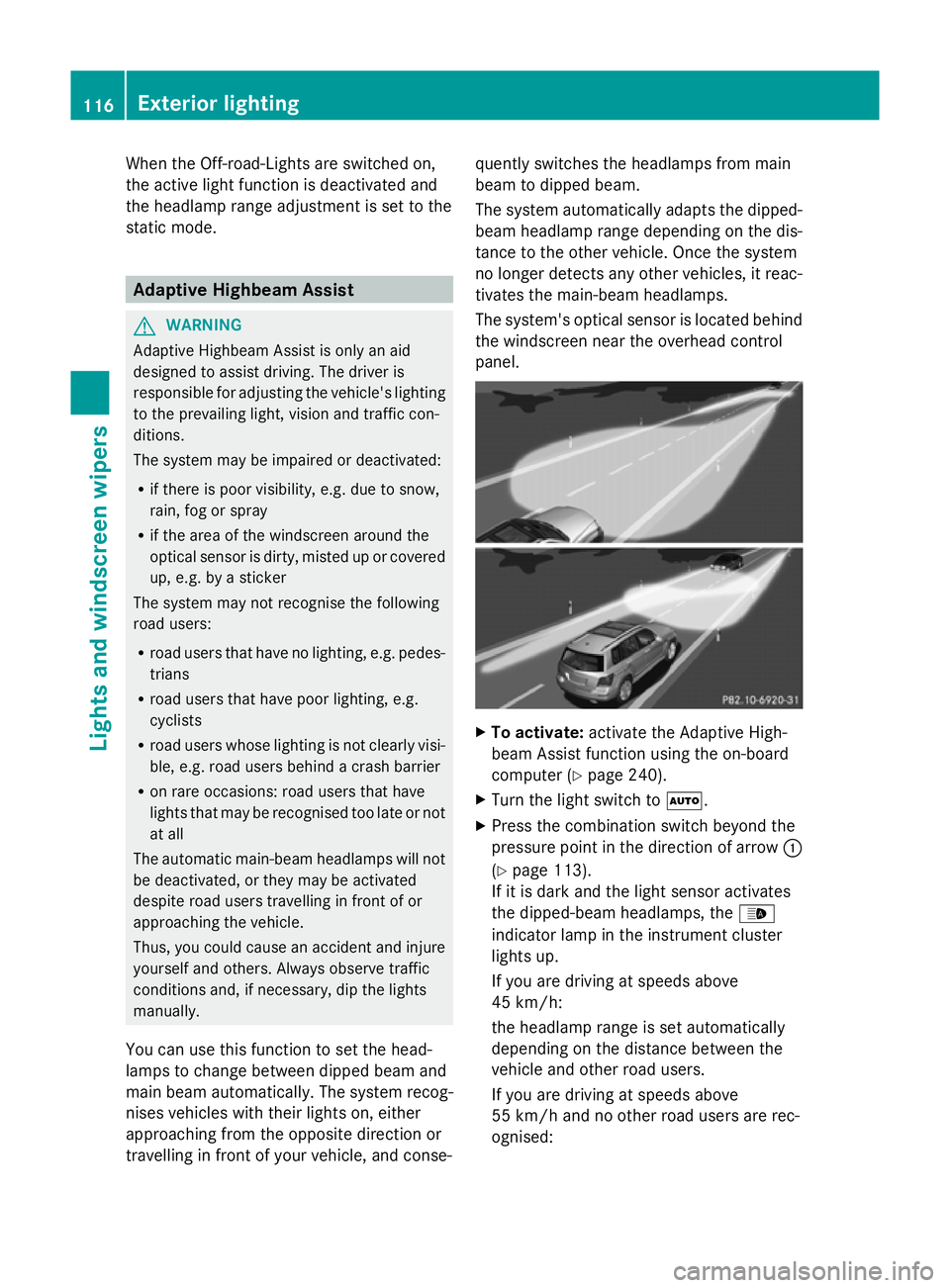
You can use this function to set the head-
lamps to change between dipped beam and
main beam automatically. The system recog-
nises vehicles with their lights on, either
approaching from the opposite direction or
travelling in front of your vehicle, and conse- quently switches the headlamps from main
beam to dipped beam.
The system automatically adapts the dipped-
beam headlamp range depending on the dis-
tance to the other vehicle. Once the system
no longer detects any other vehicles, it reac-
tivates the main-beam headlamps.
The system's optical sensor is located behind
the windscreen near the overhead control
panel. X
To activate: activate the Adaptive High-
beam Assist function using the on-board
computer (Y page 240).
X Turn the light switch to Ã.
X Press the combination switch beyond the
pressure point in the direction of arrow :
(Y page 113).
If it is dark and the light sensor activates
the dipped-beam headlamps, the _
indicator lamp in the instrument cluster
lights up.
If you are driving at speeds above
45 km/h:
the headlamp range is set automatically
depending on the distance between the
vehicle and other road users.
If you are driving at speeds above
55 km/h and no other road users are rec-
ognised: 116
Exterior lightingLights and windscreen wipers
Page 120 of 381
the main-beam headlamps are switched on
automatically. The
Kindicator lamp in
the instrument cluster also lights up.
If you are driving at speeds below
45 km/h or other road users are recog-
nised or the roads are adequately lit:
the main-beam headlamps are switched off
automatically. The Kindicator lamp in
the instrument cluster goes out. The _
indicator lamp in the instrument cluster
stays on.
X To deactivate: move the combination
switch back to its normal position.
The _ indicator lamp in the instrument
cluster goes out. Headlamps misted up on the inside
The headlamps may mist up on the inside if
there is high atmospheric humidity.
X Switch on the lights and drive off.
The level of moisture diminishes, depend-
ing on the length of the journey and the
weather conditions (humidity and temper-
ature).
If the level of moisture does not diminish:
X Have the headlamps checked at a qualified
specialist workshop. Interior lighting
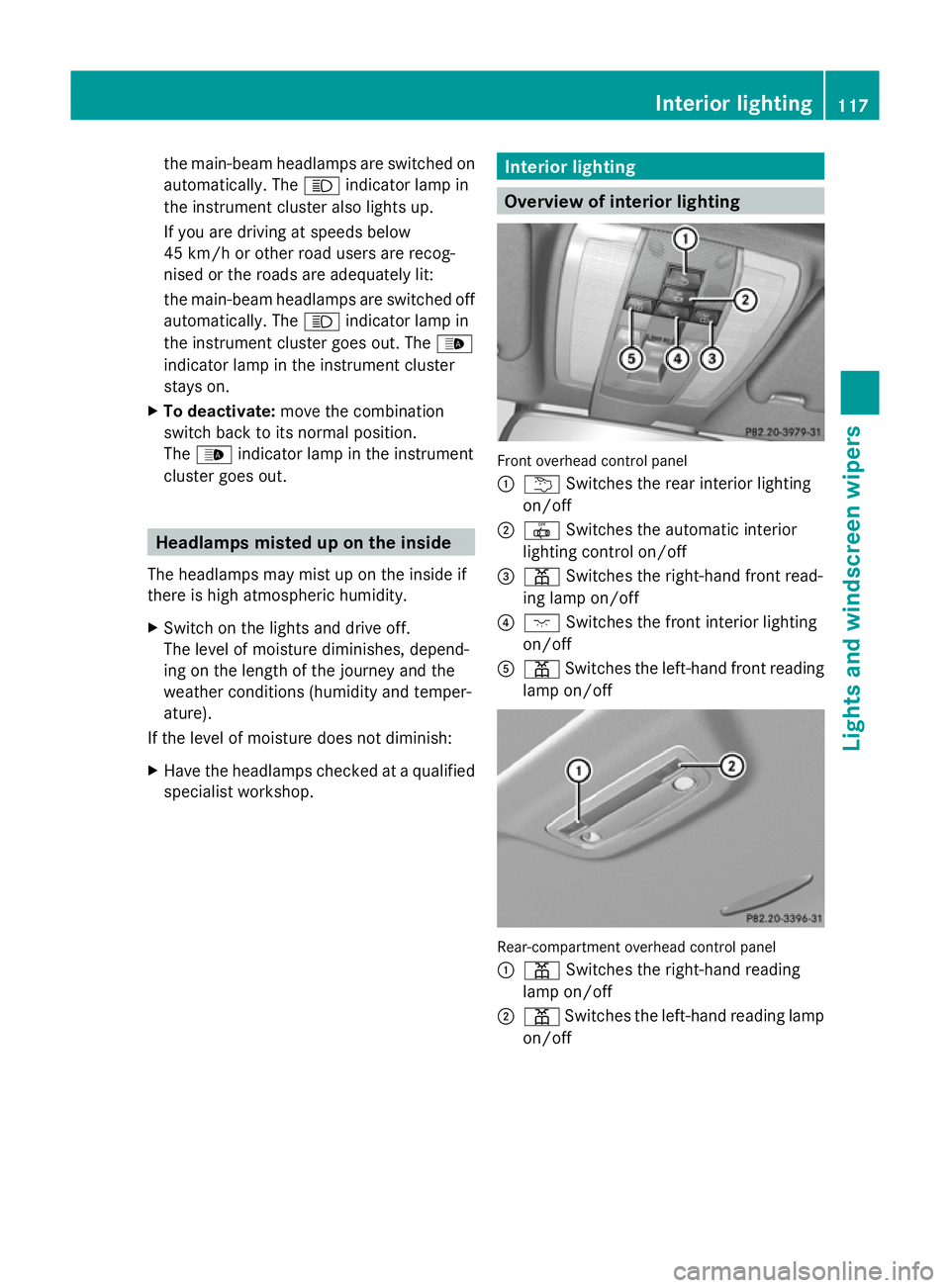
Overview of interior lighting
Front overhead control panel
:
u Switches the rear interior lighting
on/off
; | Switches the automatic interior
lighting control on/off
= p Switches the right-hand front read-
ing lamp on/off
? c Switches the front interior lighting
on/off
A p Switches the left-hand front reading
lamp on/off Rear-compartment overhead control panel
:
p Switches the right-hand reading
lamp on/off
; p Switches the left-hand reading lamp
on/off Interior lighting
117Lights andwindscreen wipers Z
Page 230 of 381
The approximate range which can be covered
depends on the fuel level and your current
driving style. If there is only a small amount
of fuel left in the fuel tank, the display shows
a vehicle being refuelled Cinstead of the
range. Switching the daytime driving lights
on/off
If you have activated the Day. driv.
Day. driv.
lights: lights: function and the light switch is in the
à position, the daytime driving lights are
switched on automatically when the engine is
running. When it is dark, the side lamps and
the dipped-beam headlamps are switched on
automatically.
On vehicles with daytime driving lamps, the
factory setting is on
on.
If you want to change the setting for the Day. Day.
driv. lights:
driv. lights: function, you have to turn
the key in the ignition lock to position 1.
X Press the Vbutton on the steering
wheel repeatedly until the Day. driv.
Day. driv.
lights:
lights: menu appears.
You will see the selected setting: on
onor
off
off.
X Press the WorX button to change
the setting. Time/date
i Depending on your vehicle's equipment,
the time can be set using the on-board
computer or the audio system/COMAND,
see the separate operating instructions.
X Press the Vbutton on the steering
wheel repeatedly until the "Time/date"
menu appears.
X To set: use the Cbutton to select the
display you want to change: hour, minutes,
day, month, year. X
Press WorX to set the selected dis-
play.
X To save: press the Cbutton.
The next display is selected. Displays and operation (12-button
multifunction steering wheel)
Coolant temperature gauge
The coolant temperature gauge is in the
instrument cluster on the left-hand side.
Under normal operating conditions and with
the specified coolant level, the coolant tem-
perature may rise to 120 †.
At high outside temperatures and when driv-
ing uphill, the coolant temperature may rise
to the end of the scale. Rev counter
The red band in the rev counter indicates the
engine's overrevving range.
! Do not drive in the overrevving range.
Doing so will damage the engine.
The fuel supply is interrupted to protect the
engine when the red band is reached. Outside temperature display
The outside temperature display is in the mul-
tifunction display (Y page 229). G
WARNING
At temperatures just above freezing point, the
street may be icy, especially in wooded areas
or on bridges. If you do not adapt your driving
style to the conditions, the vehicle could skid.
For this reason, adapt your driving style and
speed to the weather conditions.
Changes in the outside temperature are dis-
played after a short delay. Displays and operation (12-button multifunction steering wheel)
227On-board computer and displays Z
Page 243 of 381
X
Press the :or9 button to select the
Brightness Display/Switches:
Brightness Display/Switches: func-
tion.
You will see the selected setting.
X Press ato confirm.
X Press the :or9 button to adjust the
brightness to any level from Level 1 Level 1to
Level 5
Level 5 (bright).
X Press the aor% button to save the
setting.
Switching the Intelligent Light System
on/off
X Press the =or; button on the steer-
ing wheel to select the Settings
Settings menu.
X Press the :or9 button to select the
Light
Light submenu.
X Press ato confirm.
X Press the :or9 button to select the
Intell. Light Sys.
Intell. Light Sys. function.
If the Intell. Light Sys. Intell. Light Sys. function has
been switched on, the cone of light and the
L symbol in the multifunction display
are shown in red.
X Press the abutton to save the setting.
When you activate Intell. Light Sys.
Intell. Light Sys.,
you activate the following functions:
R motorway mode
R active light function
R cornering light function
R extended range foglamps
If you set the dipped-beam headlamps for
driving on the right/left, the multifunction
display shows the Intell. Intell.Light
LightSystem:
System:
System inoperative Inactive for
System inoperative Inactive for
left-side traffic left-side traffic orIntell. Light
Intell. Light
System:
System: System
Systeminoperative
inoperative Inactive
Inactive
for
for right-side
right-side traffic
trafficdisplay message
instead of the Intell.
Intell. Light
LightSys.
Sys.function
in the Light
Light submenu.
Further information on the Intelligent Light
System (Y page 114). Switching Adaptive Highbeam Assist on/
off
X
Press the =or; button on the steer-
ing wheel to select the Settings
Settings menu.
X Press the :or9 button to select the
Light Light submenu.
X Press ato confirm.
X Press the :or9 button to select the
Adapt. main beam
Adapt. main beam function.
If the Adapt. main beam
Adapt. main beam function has
been switched on, the cone of light and the
_ symbol in the upper multifunction
display are shown in red.
X Press the abutton to save the setting.
For further information about Adaptive High-
beam Assist, see (Y page 116).
Activating/deactivating the surround
lighting and exterior lighting delayed
switch-off
X Press the =or; button on the steer-
ing wheel to select the Settings
Settings menu.
X Press the :or9 button to select the
Light Light submenu.
X Press ato confirm.
X Press the :or9 button to select the
Surround lighting
Surround lighting function.
When the Surround lighting
Surround lighting function is
activated, the light cone and the area
around the vehicle are displayed in red in
the multifunction display.
X Press the abutton to save the setting.
Deactivating delayed switch-off of the exte-
rior lighting temporarily:
X Before leaving the vehicle, turn the key to
position 0in the ignition lock.
X Turn the key to position 2in the ignition
lock.
The exterior lighting delayed switch-off is
deactivated.
Delayed switch-off of the exterior lighting is
reactivated the next time you start the
engine. 240
Displays and operation (12-button multifunction steering wheel)On-board computer and displays