2012 MERCEDES-BENZ GL-Class Mp3
[x] Cancel search: Mp3Page 166 of 210
X
Adju stthe brightne ssusing the 9:
bu ttons andpressthe 9button toconfi rm.
The brightne ssbarm oves upordown. The
picture becomes lighterordarker in
accordanc ewith thescale. Showing/hiding
thepictur e
X To hide thepictur e:select Display Off in
the system menuusingthe:;
button sand press the9button toconf irm.
The picture ishidden.
X To display thepictur e:press the9
button . Audio
CD/DVDand MP3 mode Import
antsafety notes G
WARNIN
G
The CD/D VDdrive isaclass 1laser product.
Nev eropen thehousi ng.There isarisk of
exposure toinvisible laserradiation ifthe
housing isopened, orifthe casing isfaulty or
damaged.
The Rear SeatEntertainment Systemcontains
no parts which youcan repair yourself. For
safety reasons, allmaintenanc ework must be
carried outbyqual ified aftersales
techn icians. G
WARNING
The driver should notwear aRear Seat
Ent ertainment headsetwhileoperating the
vehicle underanycircumstan ces.Theuseof
a headset whiledriving thevehicle could
drastically impairtheabili tyto react toaudi ble
traffic conditions (e.g.emergency sirensfrom
<0010000F000C0009000300050024000600090012000500240001000D00020015
000C0001000E000300050035> anothercar'shorn,
etc. ). G
WARNING
When notinuse, headsets orextern alvideo
sources shouldbestored inas afe locatio n
(e. g.on eof theveh icle'sstorag e com
partmen ts)so that they are notloose
within thepassenger compartmentduring
braking, vehiclemaneuvers oratraffic
accident .Object smoving withinthe
passenger compartmentcould cause serious
personal injurytovehicle occupant s. G
WARNING
Due toapotent ialchokin ghazar d,wired
heads etusage bychildre nshould onlyoccur
with adultsuper vision . Gener
alnot es
You willfindinf orm ationonthe following
topics inthe "Audio" section:
R notes onCDs/DV Ds(Ypage 137)
R notes onMP3 mode (Ypage 136)
R notes oncopyright (Ypage 137) Inserting
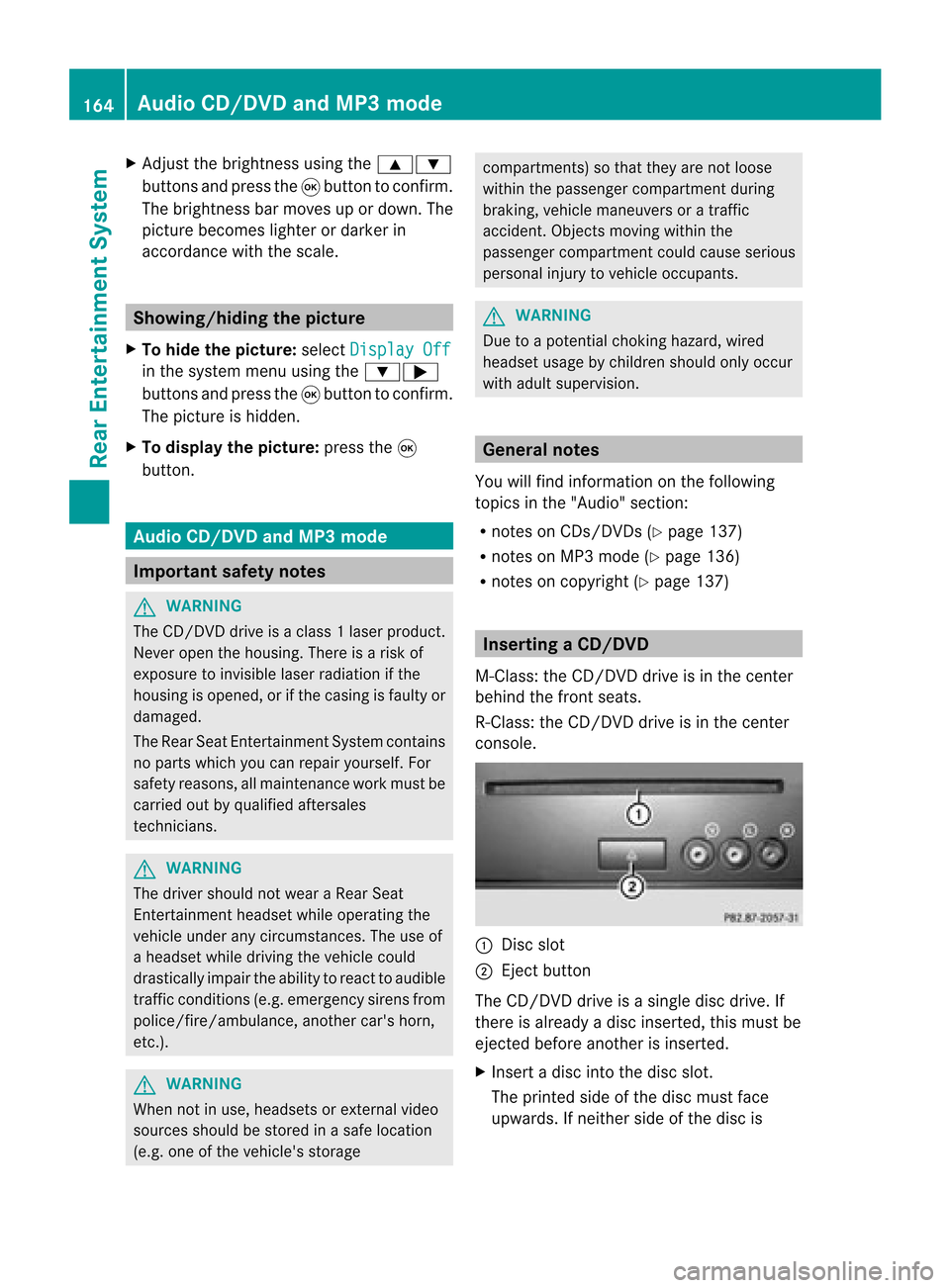
aCD/DVD
M- Class :th eCD /DVD drive isin thece nter
beh ind th efron tseats.
R-Class: theCD/D VDdrive isin the center
con sole. :
Disc slot
; Eject button
The CD/D VDdrive isasingle discdrive. If
ther eis already adisc insert ed,this must be
ejec tedbefore anotherisinsert ed.
X Inser tadisc intothe disc slot.
The print edside ofthe disc must face
upwards. Ifneit her side ofthe disc is 164
Audio
CD/DVDand MP3 modeRear Entert ainmentSyst em
Page 167 of 210
print
ed,the side youwish toplay must face
downwards.
The CD/D VDdrive draws inthe disc. The
CD/D VDdrive plays thedisc:
R ifit has been insert edcorr ectlyand isa
permissible disc,and
R ifyou have switchedtodisc mode (audio
CD, audio DVDandMP3 mode)
(Y page 165)
Dat aon anMP3 CDfirst needs tobe loaded
by the drive. Loading maytakesome time,
dependin gon the number offolders and
trac ks. Removing
aCD/DV D
X Press theþ ejec tbut ton.
The drive ejec ts thedis c.
X Tak eth edis co utofthes lot.
If you donot takethe disc outofthe slot,
the drive willdraw itin again autom atically
aft erashor twhile. Switching
toaudio CD,audio DVDor
MP3 mode
X Insert aCD/DV D(Y page 164).
The Rear SeatEntertainment Systemloads
the inserted disc.
X Select Disc in
the menu usingthe
9=; buttonsonthe remote cont
roland confirm bypressing the9
button.
The corresponding modeisswitched on.
The Rear SeatEntertainment Systemplays
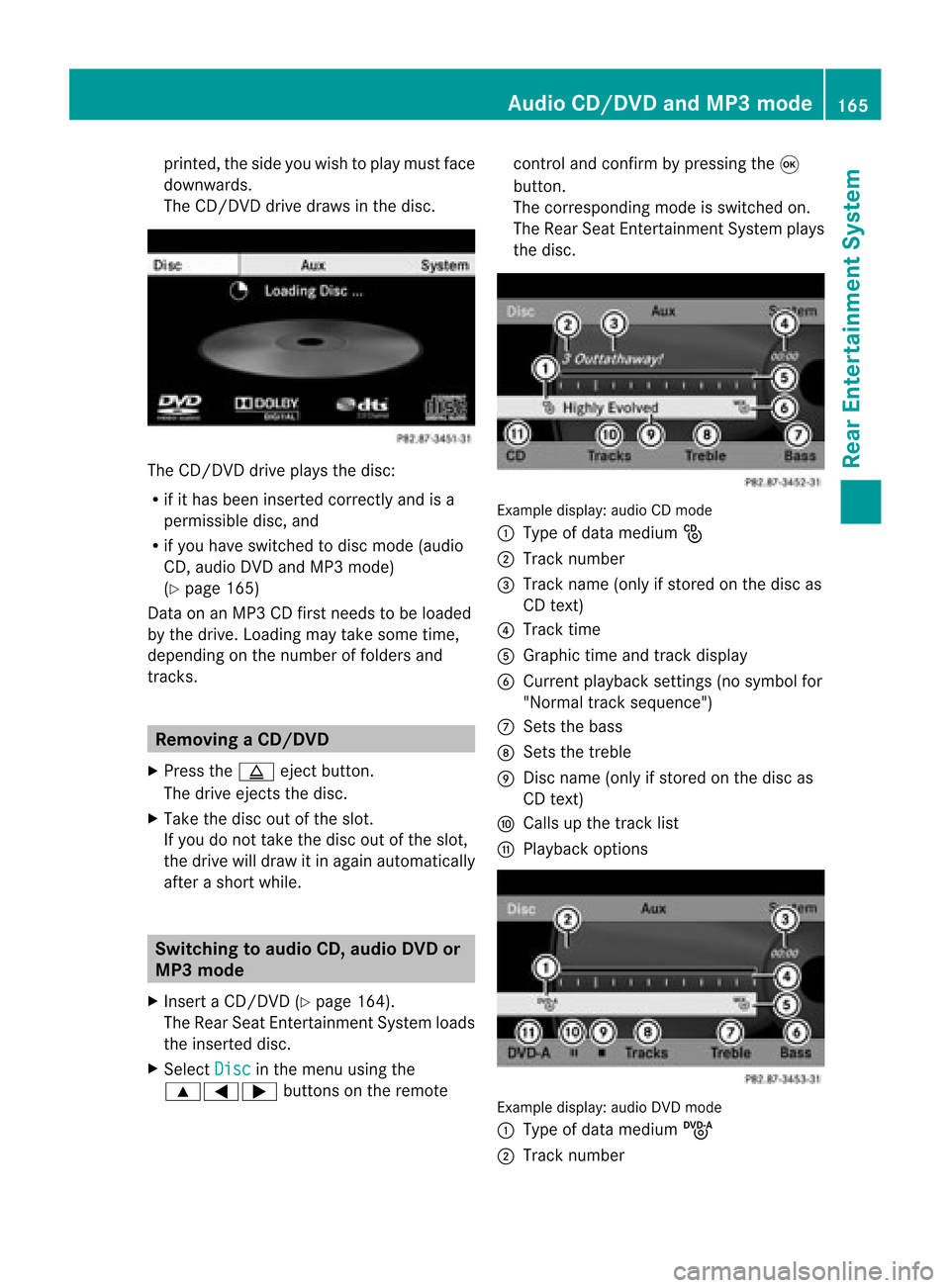
the disc. Example
display:audio CDmod e
: Type ofdat amedi um_
; Trac knum ber
= Trac kname (onlyifstore don thedisc as
CD text)
? Trac ktim e
A Graph ictim eand track displ ay
B Curr entp layback settings (no symbol for
"Norm altrack sequen ce")
C Setsthe bass
D Setsthe treble
E Disc name (onlyifstored onthe disc as
CD text)
F Calls upthe track list
G Playback options Ex
ample display: audioDVDmode
: Type ofdata medium ü
; Trac knumb er Audio
CD/DVD andMP3 mode
165Rea rEnter tainment System Z
Page 168 of 210
=
Track time
? Graphic timeandtrack display
A Current playbacksett ings (nosymbol for
"Normal tracksequence")
B Sets thebass
C Sets thetreble
D Calls upthe track list
E Stop funct ion
F Pause function
G Playba ckoptions Example
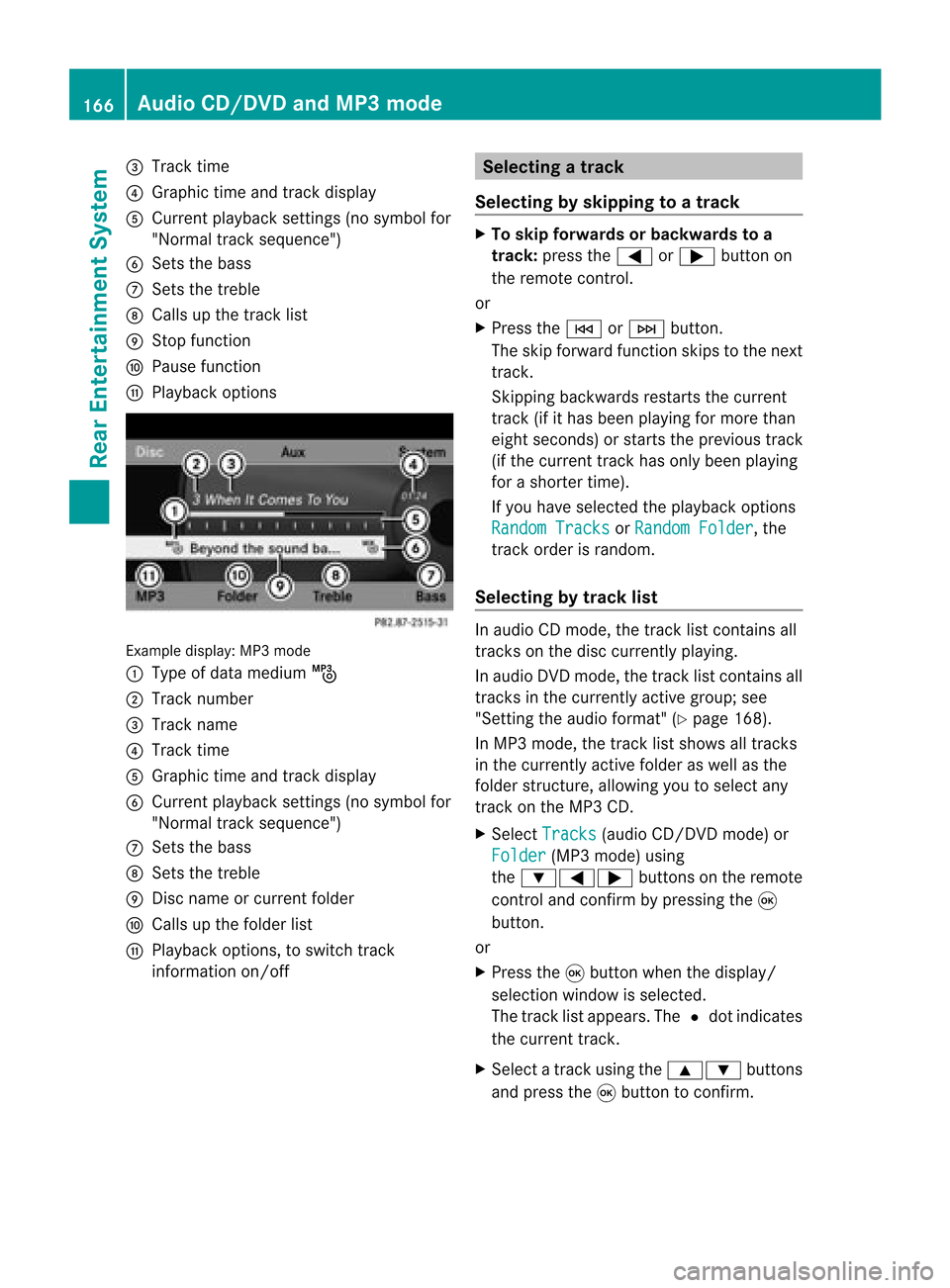
display:MP3mode
: Type ofdata medium þ
; Track number
= Track name
? Track time
A Graphic timeandtrack display
B Current playbacksett ings (nosymbol for
"Normal tracksequence")
C Sets thebass
D Sets thetreble
E Disc name orcurren tfolder
F Calls upthe folder list
G Playba ckoptions, toswitch track
inform ationon/of f Selecting
atrac k
Se lecti ng byskippin gto atrac k X
To skipfo rwa rds orbac kwards toa
trac k:pre ssthe = or; button on
the rem otecontr ol.
or
X Pre ssthe E orF button.
Th eski pfor wa rdfunctio nskip sto the next
tra ck.
Skip ping backwa rdsrestartsthe current
tra ck (ifi th as been playin gfor mor eth an
eigh tsecon ds)orstart sthe previous track
(if the curren ttrack hasonly been playing
for ashorter time).
If you have selected theplayba ckoptions
Random Tracks or
Random Folder ,
the
track order israndom.
Sel ecting bytrack list In
audio CDmode, thetrack listcontains all
tracks onthe disc currently playing.
In au dio DVD mode, thetrack listcontains all
tracks inthe currently activegroup;see
"Setting theaudio format" (Ypag e168).
In MP3 mode, thetrack listshow sall tracks
in the currently activefolderaswell asthe
folder structure,allow ingyou toselect any
track onthe MP3 CD.
X Select Tracks (au
dio CD/DVD mode)or
Folder (MP3
mode) using
the :=; buttonsonthe remote
cont roland confirm bypressing the9
button.
or
X Press the9button whenthedispla y/
selection windowisselected.
The track listappea rs.The #dot indicates
the current track.
X Select atrack using the9: buttons
and press the9button toconfirm. 166
Audio
CD/DVD andMP3 modeRear Entertainm entSystem
Page 169 of 210

Making
aselection byenter ingthetr ack
num berdirectly X
Pres sth eh buttonontherem ote
con trol.
The track entrydisplay appears .
Ex ample: track 2
X Pres sth el numberkey.
Ex ample: track 12
X Pres sth ecor respon ding numberkeys in
rapid successio n.
i Itis no tp ossible toenter numbers that
exceed thenumber oftrack son the CDor
in the current lyactive folder.
X Wait forapproximately threeseconds after
making anentr y.
You willhear thetrack which hasbeen
enter ed.The correspon dingbasic menu
then reappears. Fast
forward ing/rewinding
X With thedisplay /select ionwindow active,
press the= or; button onthe
remote controlrepeatedly untilyoureach
the desired position.
or
X Press andhold theE orF button
until thedesired position isreached. Selecting
afolder
This function ison lyavailable inMP3 mode .
X Sele ctFol der usin
gth e:=;
butt onson therem otecon trol and pres s
th e9 butt ontocon firm.
or
X Pres sth e9 butt onwhen thedisplay/
selec tionw indow isselec ted.
The folder contentappears. :
Folder selectionsymbol
; Current foldername
= Track symbol
X To switc hto the nextfolder up:select
symbol :.
The display showsthenext folder up. :
Folder selection symbol
; Folder icon
X Select afolder usingthe9: buttons
and press the9button toconf irm.
You willsee thetrack sin the folder.
X Select atrack using the9: buttons
and press the9button toconf irm.
The track isplaye dand thecorrespon ding
folder isnow theactive folder. Pause
function
This funct ionisonly availa bleinaudio DVD
mode. Audio
CD/DVD andMP3 mode
167RearEntert ainment System Z
Page 170 of 210

X
To paus eplay back:sel ect «using
the :=; buttons onthe rem ote
contro land pressthe 9button toconfi rm.
The «displ aycha nge sto M.
X To conti nue play back:sel ect Mand press
the 9button toconfi rm.
The Mdispl aycha nge sto «. Sto
pfuncti on
This function isonly available inaudio DVD
mode.
X To inte rrupt playbac k:sele ct± using
the :=; buttonsonthe remote
control andpress the9button toconfirm.
The «disp laychange sto M.
X To continue playbac k:sele ctM and press
the 9button toconfirm.
Pla yback continues fromthepointwhe reit
wa sinterrup ted.
X To stop playbac k:whi lepla yback is
interrup ted,select± aga inand press the
9 button toconfirm.
Pla yback stops andreturns tothe
begi nning ofthe DVD. Mishigh lighted.
X To restart playbac k:sele ctM and press
the 9button toconfirm.
Pla yback starts fromthebegi nning ofthe
DVD. Settin
gthe audio format
Further informationonaudio formats is
ava ilable inthe "Aud io"section
(Y pag e135).
X Select DVD-A usi
ng the :=;
buttons onthe remote controlandpress
the 9button toconfirm.
X Select Group usi
ng the 9: buttons
and press the9button toconfirm.
The listo favail ableau dio formats appears.
The #dot indica testhe format currently
sele cted. X
Select anaudio format using the
9: buttonsandpress the9button
to confirm.
X To exit themenu: pressthe= or;
button. Playbac
koptio ns
Fur ther informa tion onplay ba ck opti ons is
ava ilab lein the "Audio" secti on
(Y page 135) .
X Sel ect CD ,
DVD -A or
MP3 us
ing
the :=; buttons onthe remo te
control andpressthe 9button toconfi rm.
The options list appe ars .The # dot
indicates theoption current lyselected.
X Select Normal Track Sequence ,
Random Tracks or
Random Folder using
the
9: buttonsandpress the9button
to confirm .
The option isswitched on.For alloptions
except Normal TrackSequence ,
you will
see acorresponding displayin the displa y/
selection window.
i Ifyou change thedisc, theNormal Track
Sequence option
isactivated
automatically .Ifa no ption isselect ed,it
remains selectedafter theRear Seat
En tert ainmen tSyst emisswitc hedonor
off. Switching
track inform ationon/off
(MP3 mode only)
If the func tionisswitc hedon,folder andtrack
names aredisplayed.
If the func tion isswitc hedoff,disc andfile
names aredisplayed.
X Select Displa yTrack Information using
the9: buttonsonthe remot e
con troland press the9butt ontocon firm.
The func tion isswitc hedonO oroff ª,
dependin gon the previous status. 168
Audio
CD/DVDand MP3 modeRear Entert ainmentSyst em
Page 171 of 210

Vide
oDVD mode Gen
eral notes
Here youwi llfind further informa tionon the
fol lowi ng topi cs:
R sa fety notes (Ypage 126)
R notes onCDs /DVDs (Ypage 137) DVD
playbackcondit ions
Playback problems mayoccurwhen playing
cop ieddisc s.Ther eis alarge varietyof disc s,
DV Da uth oring sof twar e,writ ingsoftwar eand
writ ersavailab le.This varietymean sth at
th ere isno guaran teeth at theRear Seat
En tertainm entS yst em will beable toplay
vid eo DVDs that you havecopied yourself.
You willfind further informationinthe "Video"
section (Ypage 151). Information regarding
COMAND alsoapplies tothe Rear Seat
En tert ainment System. Function
restrictions
Dependin gon the DVD ,it is possible that
cert ainfunct ionsoractions described inthis
section willbetemporarily blockedormay not
funct ionatall. Assoon asyou trytoactivate
these functionsoractions ,you willsee the
K symbol inthe display . Inserting
andremoving aCD/DV D
X Proc eed asdes cribed inthe"Au dio CD/
DV Da ndMP3 mode"sec tion
(Y page 127) . Sw
itchin gto video DVD mode
X Inse rtavid eo DVD.
The RearSea tEnterta inmentSys tem load s
the disc.
If disc mod ewa sthe last mod esel ecte d,it
wi llnow beacti ve. If
it wa snot, switch onvideo DVD modeas
de scri bedin the followi ng instructio n.
X Sel ect Disc us
ing the 9=;
bu ttons onthe rem otecontro land press
the 9button toconfi rm.
If the video DVD fulfills the play ba ck
cri teri a,the filme ithe rstar tsautoma tically
or the menu saved onthe DVD appe ars. If
the DVD menu appe ars, yo umu ststa rtthe
fi lm ma nua lly.
X Sel ect the corr espo ndi ngmenu itemi nthe
DVD menu (Ypage 171). Hiding/show
ingthe navigation menu
X To show: pressthe9 or: button.
X To hide: press the9 or: button.
or
X Wait forapproximately eightseconds. Navigation
menu
: Disc type
; Current track
= Current scene
? Track time
A Shows themenu Video
DVDmode
169RearEnterta inment System Z
Page 200 of 210

DVD
Changer G
WAR
NING
Plea sedev oteyour atte nt ion first and
fo rem osttothetraff icsit uat ion you arein.
Be fore your journ ey, plea sefam iliarize
your selfw ith the disc functions.
Only usetheVoic eCont rolSyst emwhen road
and traffic condition sperm ityou todo so.
Oth erwise youcould beinvolved inan
acc ident inwhich youoroth ers could be
inj ured. Oper
ation
You canusevoicecon trol to:
R selec ta CD/ DVD
R selec ta track
R selec tadirectory inMP3 operation
R select agroup inAudio DVDoperation
i Onthe comm and“Next /prev iousCD/
DVD ”,the DVD chang erchang esfrom one
CD/ DVD tothe next,skippin gany empty
compart ments.Ifyou select anempty
compart mentwiththe“CD/D VD1to CD/
DVD 6”comm and,thecurren t
compart mentremains selectedand the
system respondswith “Noaudio CD”.
To select theCDapp lication:
X Vehicles withVoice Control buttonson
the Mult i-function SteeringWheel: Press
the ? button.
or
X Vehicles withLever forVoice Control:
Pull theVoice Controllever toward you.
X Say one ofthe following commands:
R “CD player/CD changer”
R “DVD audio” R
“DVD video”
R “MP3”
X Vehicles withVoice Control buttonson
the Mult i-function SteeringWheel: Press
the ? button.
or
X Vehicles withLever forVoice Control:
Pull theVoice Controllever toward you.
X Give oneofthe CDorDVD comm ands
explained below. Comma
nds
“Help CD”/“Help DVD”/“Help MP3” With
thecomm ands:
R “Help CD”
R “Help DVDaudio”
R “Help DVDvideo”
R “Help MP3”
you can have allthe comm andsforthe CD,
DVD orMP3 readout.
“Next CD/DVD” With
the“Next CD”/“N extDVD ”commands,
you can select thenext audio CD/DVD from
your DVD changer.
“Tr ack 1”to“Tr ack 99” With
the“Track 1”to“Track 99”comman ds,
you can select atrack number fromthe
insert edCD/D VD.
“Next Track” You
canusethe“Next track”comman dto
select thenext track .
“Previous Track” With
the“Previous track”or“Repeat track ”
co mm ands,you can haveth etrack just
played repeated. Ifth eco mm and isspo ken
as thefir st few seconds ofthetrack are
played ,th epre vious track issele cted. 198
DVD
ChangerVoiceCont rol
Page 201 of 210

“Group
1”to“Group 9” With
the“Group 1”to“Group 9”comman ds,
you can select agroup onaninsert edaudio
DVD .
“Next Group”/“Previous Group” With
the“Next group”/“Previous group”
comman ds,you can select thenext or
previous grouponthe insert edaudio DVD.
“Next <003D000F000C00040005001200180022004700460012000500160009000F0015
0013B Folder”With
the“Next <0006000F000C00040005001200180024005400530012000500160009000F0015
0013> folder”
comman ds,you can select afolder onthe
insert edCD/D VDinMP3 mode.
“Memory Card” With
the“Memory card”comman d,you can
switch tothe SDcard onthe COMAND
system.
“DVD Video” With
the“DVD video” comman d,you can start
a video DVDonthe COMAND system.
“Har dDisk” With
the“Hard disk”comman d,you can
change tothe inter nalhard disk(Music
Register) ofCOMAND . External
Equipment(Aux) "Audio
Aux"
You canusethe"Audio Aux"comman dto
activate theAux input. Command
List
In the Command listsection ,you willfind all
the main comman dsfor operating voice
cont rol.The comman dsavaila bletoyou
depend onthe vehicle’s equipment. i
Some functionshave several voice
comman dstofacilitate operation. These
are grouped togetherbetween the
separator linesinthe listand canbeused
inter changeably.
Some comman dsare enclosed inangular
bracket s<>. This signifies thatthe
enclosed commandis avoice name, which
you can determin eyourself andattach to
address bookentries, radio station s,
program categories etc. General
Command s R
Yes
R Correct
R Okay R
Cancel R
No R
Pause R
Address book R
MP3 R
CD changer R
CD R
Navigation
R Route guidance
R Nav R
DVD video R
DVD audio R
Radio R
Satellite radio/Sirius R
Phon e R
Message s R
Video Comm
andList
199Voice Control Z