2012 MERCEDES-BENZ GL-Class Mp3
[x] Cancel search: Mp3Page 135 of 210

Selec
tingbytrack list X
Select Title or
Track list in
audi oCD/
DVD mode andpress the9button to
conf irm.
or
X Press the9button inMP3 mode whenthe
display /selection windowisactive.
The track listappears. The#dot indicates
the current track.
X Select atrack using the9: buttons
and press the9button toconf irm.
i InMP3 mode, thelistshows allthe track s
in alphab eticalorder.
Selec tingatrac kusing thenumber
keypa d X
Press theU button onthe number
keypad.
An umer icalentry fiel dappear s.The
num berofposi tion soff ere dcorresponds to
the number oftrack sonthe CD/DV D.Onl y
num bers tha tcorr espond toatrac k
num beron the CD/DV Dcan beente red.
X Enter thedesired trac knum berus ing the
num berk eys.
X To complete entry:press the9button .
i Pressin gand holding anumber buttonfor
2s econ dsormore alsocomplet esent ry
and thecorr espondin gtrac kisplay ed.
Selec tingusing themultifunction
steering wheel X
Switch onaudi oCD/DVD ,MP3 orSD
memory cardmode onCOMAND.
X Use theV orU button onthe
multifunction steeringwheeltoselect the
DISC displa y.
X Press the9 or: button onthe
multifunction steeringwheel.
You willhear theprevious ornext track. The
skip back function skipstothe beginning of
the current trackifthe track hasbeen
play ingformore thaneight seconds. Ifthe track
hasbeen playingforless than eight
seconds, itskips tothe start ofthe previous
track . Fast
<0006000F001200170001001200040009000E000700220012000500170009000E
00040009000E0007B
Selec tingusing COMAND X
With thedispla y/selection windowactive,
press the= or; button repeatedly
until youreach thedesired position.
or
X Press andhold theE orF button
until thedesired position isreached.
Selec tingusing themultifunction
steering wheel X
Press andhold the9 or: button on
the multifunction steeringwheeluntilthe
desired position hasbeen reached. Selec
tingafolder
This function ison lyavailable inMP3 mode .
X Swit chon MP3 mode (Ypage 129).
X Sele ctFol der usin
gth e:=;
butt onsand pres sth e9 butt ontocon firm.
or
X Pres sth e9 butt onwhen thedisplay/
selec tionw indow isselec ted.
The folder contentappears. Audio
CD/DVDand MP3 mode
133Audio Z
Page 136 of 210
:
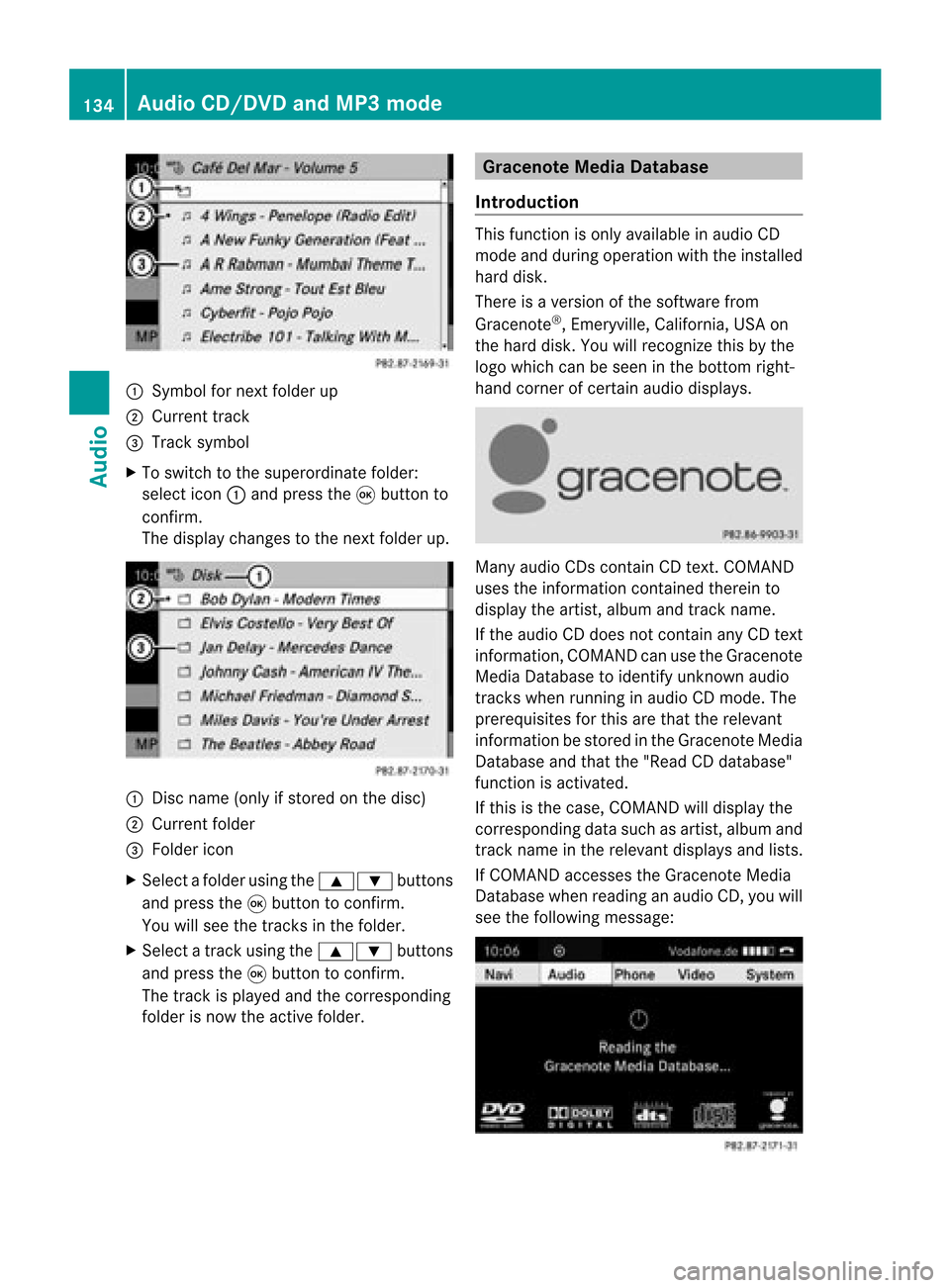
Sym bolfornext folderup
; Current track
= Tracksymbo l
X To switch tothe supe rord inatefolder:
sel ect icon: and pressthe 9button to
confi rm.
The displ aycha nges tothe next folderu p. :
Disc name (onlyifstor edon the disc)
; Current folder
= Folder icon
X Select afolder usingthe9: buttons
and press the9butt ontocon firm.
You willsee thetrac ksinthe folder.
X Select atrac kusing the9: buttons
and press the9button toconfirm.
The track isplay edand thecorresponding
folder isnow theactive folder. Gracenote
MediaDatabase
Introduction This
function isonly available inaudi oCD
mode andduring operation withtheinstalled
hard disk.
There isaversion ofthe software from
Gracenote ®
,Emeryville, California, USAon
the hard disk. Youwillrecognize thisbythe
logo which canbeseen inthe bottom right-
hand corner ofcertain audiodispla ys. Many
audioCDs containCD text .COMAND
uses theinformation contained therein to
displa ythe artist, albumandtrac kname.
If th eaudio CDdoes notc ont ain any CDtext
inform ation,COMAND canusetheGracenote
Media Database toidentify unknownaudio
track swhen runnin gin audio CDmode. The
prerequisites forthis arethat therelevant
inform ationbestored inthe Gracenote Media
Database andthat the"Rea dCDd atab ase"
fun ction isact ivat ed.
If th is is thecas e,COMA NDwill displ aythe
co rrespo nding datasuc has artist,album and
tr ack nam ein therele vantdisplays andlists.
If COMA NDaccesses theGracen oteMedia
Dat abase whenreadin gan audio CD,youwill
see thefollowin gmess age: 134
Audio
CD/DVD andMP3 modeAudio
Page 137 of 210

"Read
CDdata base" function X
Switch onaudi oCD mode (Ypage 129).
X Select CD using
the=;9:
buttons andpress the9button toconfirm.
X Select ReadCDdatabase using
the
9: buttonsandpress the9button
to confirm.
The function isswitched onO oroff ª,
depending onthe previous status.
Updat ingGracenote ®
music
recogn itiontechnolo gyand the
Gracenote MediaDatabase The
digital dataonthe Gracenote Media
Database becomesobsoleteduetothe
release ofnew CDs. Optimum functionality
can only beattained withup-to-date
Gracenote ®
music recognition technology.
Information aboutnew versions canbe
obtained fromanauthorized Mercedes-Benz
Center.
You canhave yourmusic recognition
software updatedthere withaDVD, oryou
can upda teityou rself.
i The Gracenote MediaDatabase is
upda tedatthe same timeasthe map
software. Setting
theaudio format
You canonly setthe audioformat inaud io
DVD mode. Thenumber ofaud ioformats
avai labledepends onthe DVD. Theconten tof
an audio DVDiscalled an"album", andthis
can bedivided intouptonine groups. Agroup
can contain musicind iffe ren tsound qualities
(stereo andmultichann elformats ,for
example), orbonus tracks.Each group can
cont ainupto99 track s.Ifan audio DVDonly
cont ains oneaudio format, the"Group" menu
item(s) cannotbe selected.
X Switch onaudio DVDmode (Ypage 129).
X Select DVD-A using
the:=;
button sand press the9button toconf irm. X
Select Group using
the9: buttons
and press the9button toconf irm.
The listofavaila bleaudio formats appears.
The #dot indicates theformat currently
selected.
X Select anaudio format usingthe
9: buttonsand press the9button
to conf irm.
X To exit themenu: pressthe=
or ; button . Playback
options
The following optionsareavaila bletoyou:
R Normal tracksequence The
track sare playe din the normal order
(e.g. track 1,2,3, etc. ).
In MP3 mode, thetrack order isdetermin ed
by the order inwhich thetrack sare written
to the MP3 datacarrier whenitis created.
Alphabetical orderisthe most common .
Once allthe track sin afolder havebeen
playe d,the track sin the next folder are
playe d.
R Random tracks All
the track son the medium areplaye din
random order(e.g.track 3,8, 5etc. ).
R Random folder (MP3
mode only)
The track sin the current lyactive folderare
playe din random order.
X To select options: switchonaudio CD/
DVD orMP3 mode (Ypage 129).
X Select CD ,
DVD-A or
MP3 using
the :=; buttonsand press the
9 button toconf irm.
The options listappears. The#dot
indicates theoption selected.
X Select anoption usingthe9 or:
button andpress the9button toconf irm.
The option isswitched on.For alloptions
except "Normal tracksequence", youwill
see acorrespon dingdisplay inthe display /
selection window.Seeexample ofdisplay :
audio CDmode (Ypage 130), itemB. Audio
CD/DVD andMP3 mode
135Audio Z
Page 138 of 210

i
The "Normal tracksequence" optionis
automatically selectedwhenyouchange
the medium youarecurren tlylistenin gto
or when youselect adifferent medium. If
an option isselected, itremains selected
after COMAND isswitched onoroff. Notes
onMP3 mode
Permissible discs R
CD-R andCD-RW
R DVD -Rand DVD -RW
R DVD +Rand DVD +RW
R SD memory card:
i COMAND doesnotsupport the"SD- HC
2.0 Standard" SDcard format .Mercedes-
Benz recomm endsusing SDmemory cards
with astorage capacity ofup to4G B.
Pe rmiss ible filesys tems R
ISO 9660/J oliet stand ardforCDs
R UDF foraudio and video DVDs
R FAT16 forSD memo rycard swi th stora ge
med ium
Multi sessi on CDs For
multisession CDs, thecontent ofthe first
ses siond eterm ineshow COMAND will
process theCD. COMAND playsonlyone
session andgives priority tothe audio CD
session.
If possible, useCOMAND toplay only CDs
which havebeen writteninone session.
File structur eof adat acarr ier When
youcreat eadisc with compr essed
music files,thetrac kscan beorganiz edin
folders. Afolder mayalsocontainsubfolders.
A disc cancont ainam axim umof25 5fold ers.
Eac hfold ercan contain amax imum of
25 5track sand 255subf older s.Adisc can
co ntain amax imum of12 00 track s. The
disc may contain nomor eth an eigh t
dire ctory leve ls.File sbeyon dth eeigh thleve l
will notb erecogn izedbythe system.
Tr ack and filenames When
youcreat eadisc with compr essed
music files,youcan assign names tothe
trac ksand folders.
COMAND usesthese names accordingly for
the display. Folderswhichcontain data other
than MP3 orWMA tracksare not displayed by
COMAND .
If MP3 orWMA filesarestor edinthe root
direct oryitself, theroot direct orywill also be
treat edasafolder. COMAND willthen show
the name ofthe root direct oryasthe folder
name.
You must observe thefollowing when
assigning tracknames :
R track nam esmust haveatleast one
ch arac ter.
R track nam esmust havetheex tens ion
"mp3 "or "wma".
R there must beafull stop bet ween thetrack
nam eand theex tens ion .
Ex ample ofaco rrect track nam e:
"Trac k1.m p3".
i COMA NDdoes notsuppor tID3 tags.
Pe rmis sibl efo rmats CO
MAND supp orts thefollowi ng forma ts:
R MP EG1 AudioLayer3( MP3)
R Microsoft WindowsMediaAudioV2,V7,V8
and V9(WMA) without copyprotect ion
Permissible bitand samp lingrates MP3
COMAND supportsMP3filesofthe following
types:
R const antand variable bitrates from
32 kbit/s to320 kbit/s
R sampling ratesof8kHz to48 kHz 136
Audio
CD/DVD andMP3 modeAudio
Page 139 of 210

WMA
COMAND supports WMA filesof the followi ng
types :
R fixed bitrates of8kbit/s upto
384 kbit/s
R samp lingrates of8kHz to48 kHz
COMAND doesnotsupport WMA filesof the
foll owi ngtypes :
R DRM (DigitalRights Mana gement)
encrypted files
R vari ablebit rate
R WMA Pro
R 5.1 Surrou nd
i Only usetracks withabit rate ofat lea st
128 kbit/s andasamp lingrate ofat lea st
44.1 kHz.Lowe rrates cancaus ea
noticeab ledeteri oratio ninq ualit y.This is
espe ciallythecas eif you have activat eda
surr oundsoun dfun ction .
Not eson copy right MP3
orWMA track sth at you creat eor play
bac karegenera llysub ject tocopyri ght
protection inaccorda ncewith theapplicable
internationa land national regulations.
In many countries, reproductions, evenfor
priva teuse ,are not permi ttedwitho utthe
prior consent ofthe copyri ghthold er.
Make surethatyouknow aboutthe app licable
copyri ghtregu lations and that youcomply
with these.
If you own these rights yourself, e.g.foryou r
own composi tionsandrecordi ngs,orifthe
copyri ghthold erhas granted youpermi ssion,
these restrictions donot apply.
Notes onCDs/D VDs Discs
withcopy protection arenot
compati blewith theaudio CDstandard and
therefore maynotbeabletobe playe dby
COMAND.
Playba ckproblems mayoccur whenplaying
copied discs.Thereisawide range ofdata carriers,
disc-writingsoftware andwriters
availa ble.This variety meansthatthere isno
guarantee thatthesystem willbeable toplay
discs thatyouhave copied yourself.
There maybeplayb ackproblems ifyou play
CDs thatyouhave copied yourself witha
storage capacity ofmore than700MB.CDs
of this type donot conf orm tothe current ly
applicabl estandards.
i Onmany DVDaudio discs, thelast track
does notcont ainany music andCOMAND
then switches tothe next disc. Thisis
normal system behavior anddoes notmean
that there isamalfunct ion.
! Donot affix stick ersorlabels tothe discs.
They could peeloffand damage thedrive.
The drive isdesigned tohold discs which
comply withtheEN6090 8standard.
Therefore, youcan only usediscs witha
maximum thickness of1.3 mm.
If you insert thickerdiscs, e.g.those that
cont aindata onboth sides (DVD onone
side andaudio dataonthe other), they
cann otbe eject edand candamage the
drive.
Do not use discs withadiameter of8cm,
even withanadapter. Onlyuseround discs
with adiameter of12 cm.
i COMAND canplay back audio CDswith
the high-resolution surroundformat. MUSIC
REGISTER General
information
This funct ionisavaila bleifCOMAND features
an integr atedhard disk.
To protec tthe hard drive fromdamage,
COMAND switchesitoff atvery high
temperatures. TheMUSIC REGISTER willthen
be temporarily unavailable.
You canstore music filesinMP3 orWMA
format inthe MUSIC REGISTER. Thememory
has acapacity of4G B. MUS
ICREGI STER
137Audio Z
Page 140 of 210

!
Retain theoriginal musicfilesinasecure
location. Anerror inCOMAND mightresult
in the loss ofthe music filesstored inthe
MUSIC REGISTER. Mercedes-Benz isnot
liab lefor any loss ofdata. Switchin
gto MUSIC REGISTER
Option 1 X
Press theh function buttonrepeatedly
until theMUSIC REGISTER isswitched on.
If there areany music files,youwillhear the
first track inthe first folder foundor
play back willbegin atthe point itwas last
interrupted.
If there arenomusic files,youwillsee a
message tothis effect.
By pressing theh function button
repeatedly ,you can switch modes inthe
followi ngorder:
R audi oCD/DVD /MP3(disc)
R SD memory cardmode
R MUSIC REGISTER
R Media Interfacemode
X You first need tocopy music filestothe
MUSIC REGISTER (Ypage 138).
Option 2 X
Select Audio in
the main function barusing
the 9=; buttonsandpress the
9 button toconfirm.
If MUSIC REGISTER wasthelast mode
selected, itis now switched on.
If another audiosource isswitched on,you
can now switch onthe MUSIC REGISTER in
the audi omenu.
X Select Audio using
the9 button and
press the9button toconfirm.
The audi omenu appears.
X Select Music Register and
press the9
button toconfirm. Option
3 X
Press ther number button.
The MUSIC REGISTER isswitched on. Example
display:MUSIC REGISTER
: Type ofdata carrier: MUSICREGISTER
; Track number
= CD orDVD inserted
? Track name
A Track time
B Graphi ctime and track display
C Curren tplayback settings (no symbol for
"Norm altrack sequen ce")
D Soun dset tings
E Media selection
F Curren tfolder
G Folder functions
H Data carrier position inthe media list
I Tocall upthe MUSIC REGISTER menu Copying
musicdatato the MUSIC
REGISTER
Introdu ction You
cancopy music filesfrom discs inthe
DVD changer orfrom thememory card,as
long asthey areinMP3 and/or WMAformat.
i While copying, severalfunctionswillnot
be availa ble.Ifthis isthe case, youwillsee
a message tothis effect . 138
MUSIC
REGISTERAudio
Page 143 of 210
:
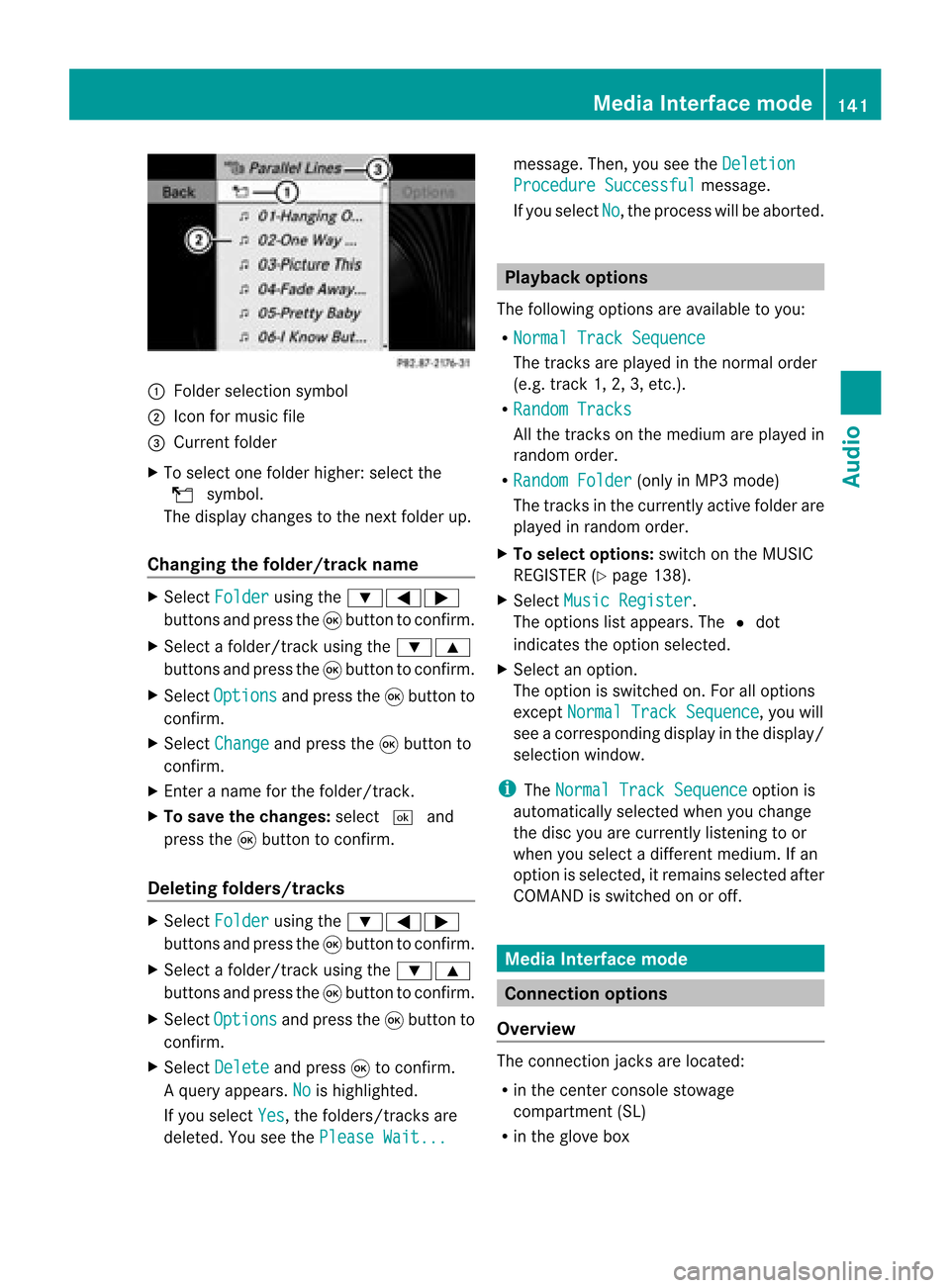
Fold ersel ectio nsymbo l
; Icon formus icfile
= Curr entfolder
X To select onefolder higher: selectthe
U symbol.
The display changes tothe next folder up.
Changing thefolder/tr ackname X
Select Folder using
the:=;
button sand press the9button toconf irm.
X Select afolder/t rackusing the:9
button sand press the9button toconf irm.
X Select Options and
press the9button to
conf irm.
X Select Change and
press the9button to
conf irm.
X En ter aname forthe folder/t rack.
X To save thechanges: select¬and
press the9button toconf irm.
Dele ting folders/tr acks X
Select Folder using
the:=;
button sand press the9button toconf irm.
X Select afolder/t rackusing the:9
button sand press the9button toconf irm.
X Select Options and
press the9button to
conf irm.
X Select Delete and
press 9toconf irm.
Aq uery appear s.No is
high light ed.
If you selectYes ,
th efol der s/track sare
delet ed.You seethePle ase Wait... mes
sage .Then, youseetheDeletion Procedure
Successful message.
If you select No ,
the process willbeaborted. Playback
options
The following optionsareavaila bletoyou:
R Normal TrackSequence The
track sare play edinthe normal order
(e.g. track 1,2,3, etc. ).
R Random Tracks All
the track son the medium areplay edin
random order.
R Random Folder (only
inMP3 mode)
The track sin the current lyactive folderare
play edinrandom order.
X To selec toptio ns:switch onthe MUSIC
REG ISTER (Ypage 138).
X Sel ect Musi cRegi ster .
The options list appea rs.The #dot
ind icates the optionselected .
X Sel ect anopti on.
The optionisswi tched on.For allopti ons
excep tNorm alTrac kSequ ence ,
yo uwi ll
see acorre spondingdispl ayinthe displ ay/
sel ectio nwindow.
i The Norm alTrac kSequ ence opt
ion is
autom atically selec tedwhen youchan ge
the disc youarecurr entlylist enin gto or
when youselec tadifferent medium.Ifan
option isselect ed,itremains selectedafter
COMAND isswitc hedonoroff. Media
Interfacemode Connection
options
Overview The
connection jacksare located:
R in the centercon sole stowage
compart ment(SL)
R in the glove box Media
Interfacemod e
141Audio Z
Page 144 of 210

To
conn ectexter naldevices tothe Media
Int erface, yourequire device-spec ificadapter
cables whichareincluded inthe Media
Int erface scopeofdelivery.
i Stow the individual partsinasecure
location.
Use only genuine Mercedes- Benz
conn ectin gcables.
You canconn ectthe following datacarriers
to COMAND viathe Media Interface:
R iPod ®
R USB devices (USBsticks,USB hard drives)
i iPod ®
is aregistered trademark ofApple
Inc .,Cupertino, California,USA.
Supp orted iPod®
varia nts The
following areexamples ofsupported
iPod ®
variants:
R iPod ®
mini
R iPod ®
nano
R iPod ®
classic
R iPod ®
touch
Supp orted USBdevices The
following USBdevices aresupported:
R USB sticks(flash memory)
R USB hard drives requiring astart up/
permanen tcurren tof max. 800mA(itmay
be necess arytoconn ectaseparate power
supply)
R cert ainMP3 players
i The Media Interface supports USB
storage mediaof"USB Device Subclass 6".
Infor mation concernin gUSB Device
Subclass 6isavail able from theequip ment
manufacturer.
For further detailsandalist ofsupported
devices, pleasecontactanauthorized
Mercedes-Benz Centerorvisit http://
www .mercedes-be nz.com/conne ctand proceed
asdescribed under"Media
Interf ace". Conne
ctinganexternal device
i Donot leave extern aldevices inthe
vehicle, asatextreme temperatures (e.g.in
direct sunlight orextremely lowoutside
temperatures) theycannot beguara nteed
to function correctly(see theoperating
instruct ionsforthe respective device).
Mercedes-Benz doesnottake
responsibili tyfor any damage toextern al
devices.
Never connectmore thanonedevice ata
time. Youwillotherwise notbeable toplay
back fromtheextern aldevice. :
Four-pin socketfor3.5 mm stereo jack,
e.g. forMP3 players(audio and video)
; iPod socket ,to conn ectaniPod ®
= USB socket ,to conn ectaUSBdevice
? Examp leof device (iPod ®
)
X Co nnect theexter naldevice with suita ble
socke t:, ;or=.
CO MAND activate sthe device .
If yo uremo veade vice ,the No Device Connected message
appears.
i Aconn ected iPod®
or MP3 playershould
not besimultaneously operatedviathe
Media Interface andtheremote control
(e.g. Bluetooth ®
remote control)asthis
may produce unpredictable results.142
Media
Interface modeAudio