2012 MERCEDES-BENZ B-CLASS ABS
[x] Cancel search: ABSPage 6 of 340

1, 2, 3 ...
12 V socket see Sockets A
ABS (Anti-lock Braking System) Display message ............................ 201
Function/notes ................................
59
Important safety notes .................... 59
Warning lamp ................................. 225
Activating/deactivating cooling
with air dehumidification ................. 123
Active Parking Assist Canceling ....................................... 176
Detecting parking spaces .............. 173
Display message ............................ 216
Exiting a parking space .................. 175
Function/notes ............................. 173
Important safety notes .................. 172
Parking .......................................... 174
ADAPTIVE BRAKE ................................. 64
Adaptive Brake Assist Function/notes ................................ 61
Adaptive brake lamps .........................62
Adaptive Highbeam Assist Display message ............................ 212
Function/notes ............................. 102
Switching on/off (on-board
computer) ...................................... 197
Additional speedometer ................... 196
Additives (engine oil) ........................332
Air bags Deployment ..................................... 39
Front air bag (driver, front
passenger) ....................................... 42
Important safety notes .................... 41
Knee bag .......................................... 44
Safety guidelines ............................. 40
Side impact air bag .......................... 44
Window curtain air bag ....................45
Air-conditioning system
see Climate control
Air vents
Important safety notes .................. 130
Rear ............................................... 131
Setting ........................................... 130Setting the center air vents
...........130
Setting the side air vents ............... 130
Alarm system
see ATA (Anti-Theft Alarm system)
Ambient lighting
Setting the brightness (on-board
computer) ...................................... 197
Anti-lock braking system
see ABS (Anti-lock Braking System)
Anti-theft alarm system
see ATA (Anti-Theft Alarm system)
Ashtray ............................................... 249
Assistance menu (on-board
computer) .......................................... 194
ASSYST PLUS Displaying a service message ........ 270
Hiding a service message .............. 270
Notes ............................................. 270
Resetting the service interval
display ........................................... 270
Service message ............................ 270
Special service requirements ......... 271
ATA (Anti-Theft Alarm system)
Activating/deactivating ................... 65
Function ........................................... 65
Switching off the alarm .................... 65
ATTENTION ASSIST
Activating/deactivating ................. 195
Display message ............................ 215
Function/notes ............................. 180
Audio menu (on-board computer) .... 192
Audio system see separate operating instructions
Authorized Centers
see Qualified specialist workshop
Authorized Mercedes-Benz Center
see Qualified specialist workshop
Authorized workshops
see Qualified specialist workshop
AUTO lights
Display message ............................ 211
see Lights
Automatic engine start (ECO start/
stop function) .................................... 137
Automatic engine switch-off (ECO
start/stop function) .......................... 137
Automatic headlamp mode ................994
Index
ProCarManuals.com
Page 7 of 340

Automatic transmission
Automatic drive program ............... 144
Changing gear ............................... 143
DIRECT SELECT lever .....................140
Display message
............................ 220
Drive program display ....................141
Driving tips .................................... 143
Emergency running mode ..............147
Engaging drive position .................. 142
Engaging neutral ............................ 141
Engaging reverse gear ................... 141
Engaging the park position ............ 141
Holding the vehicle stationary on
uphill gradients .............................. 143
Kickdown ....................................... 143
Manual drive program ....................144
Overview ........................................ 140
Problem (malfunction) ...................147
Program selector button ................143
Pulling away ................................... 136
Starting the engine ........................ 135
Steering wheel paddle shifters ...... 144
Transmission position display ........ 141
Transmission positions .................. 142
Automatic transmission
emergency mode ............................... 147B
Backup lamp Changing bulbs .............................. 109
Display message ............................ 211
Bag hook
............................................ 243
BAS (Brake Assist System) ................. 59
Battery (SmartKey) Checking .......................................... 70
Important safety notes .................... 70
Replacing ......................................... 70
Battery (vehicle)
Charging ........................................ 288
Display message ............................ 213
Important safety notes .................. 285
Jump starting ................................. 289
Belt force limiter
Activation ......................................... 49
Function ........................................... 49
Blinds
see Roller sunblind Blind Spot Assist
Activating/deactivating .................195
Display message
............................ 216
Notes/function .............................. 181
Brake Assist
see BAS (Brake Assist System)
Brake fluid
Display message ............................ 207
Notes ............................................. 332
Brake lamps
Adaptive ........................................... 62
Changing bulbs .............................. 109
Display message ............................ 209
Brakes
ABS .................................................. 59
Adaptive Brake Assist ......................61
BAS .................................................. 59
Brake fluid (notes) .........................332
Display message ............................ 201
Driving tips .................................... 154
Important safety notes .................. 154
Maintenance .................................. 155
Parking brake ................................ 150
Warning lamp ................................. 225
Breakdown
see Flat tire
see Towing away/tow-starting
Bulbs
see Changing bulbs C
Calling up a malfunction see Display messages
Car
see Vehicle
Care
Carpets .......................................... 277
Car wash ........................................ 271
Display ........................................... 275
Exhaust pipe .................................. 275
Exterior lights ................................ 274
Gear or selector lever ....................276
Interior ........................................... 275
Matte finish ................................... 273
Notes ............................................. 271
Paint .............................................. 273
Plastic trim .................................... 276 Index
5
ProCarManuals.com
Page 10 of 340

Distance recorder
............................. 189
see Odometer
see Trip odometer
Distance warning function
Activating/deactivating ................. 195
Function/notes ................................ 60
Warning lamp ................................. 233
DISTRONIC PLUS
Activation conditions .....................161
Cruise control lever .......................161
Deactivating ................................... 165
Display message ............................ 217
Displays in the multifunction
display ........................................... 163
Driving tips .................................... 166
Function/notes ............................. 160
Important safety notes .................. 159
Setting the specified minimum
distance ......................................... 165
Warning lamp ................................. 233
Doors
Automatic locking (on-board
computer) ...................................... 198
Automatic locking (switch) ............... 74
Central locking/unlocking
(SmartKey) ....................................... 68
Control panel ................................... 35
Display message ............................ 222
Emergency locking ........................... 75
Emergency unlocking .......................75
Important safety notes .................... 73
Opening (from inside) ......................73
Drinking and driving .........................152
Drive program Automatic ...................................... 144
Display (DIRECT SELECT lever) ...... 141
Manual ........................................... 144
Driver's door
see Doors
Driving abroad
Mercedes-Benz Service .................271
Symmetrical low beam .................... 98
Driving on flooded roads ..................156
Driving safety systems ABS (Anti-lock Braking System) ....... 59
ADAPTIVE BRAKE ............................. 64
Adaptive Brake Assist ......................61
Adaptive brake lamps ...................... 62BAS (Brake Assist System)
..............59
COLLISION PREVENTION ASSIST ....60
Distance warning function
............... 60
Electronic brake force distribution ... 64
ESP ®
(Electronic Stability
Program) .................................... 62, 63
ETS (Electronic Traction System) ..... 62
Important safety information ........... 59
Overview .......................................... 58
STEER CONTROL ............................. 64
Driving systems
Active Parking Assist .....................172
ATTENTION ASSIST ........................ 180
Blind Spot Assist ............................ 181
Cruise control ................................ 157
Display message ............................ 215
DISTRONIC PLUS ........................... 159
HOLD function ............................... 167
Lane Keeping Assist ...................... 183
Lane Tracking package .................. 181
PARKTRONIC ................................. 169
Rear view camera .......................... 176
Driving tips
Automatic transmission ................. 143
Brakes ........................................... 154
Break-in period .............................. 134
Checking brake lining thickness ....155
DISTRONIC PLUS ........................... 166
Downhill gradient ........................... 154
Drinking and driving .......................152
Driving abroad ................................. 98
Driving in winter ............................. 157
Driving on flooded roads ................156
Driving on wet roads ...................... 156
Exhaust check ............................... 152
Fuel ................................................ 152
General .......................................... 152
Hydroplaning ................................. 156
Icy road surfaces ........................... 157
Limited braking efficiency on
salted roads ................................... 154
Snow chains .................................. 301
Symmetrical low beam .................... 98
Wet road surface ........................... 154
DVD audio (on-board computer) ...... 192
DVD video (on-board computer) ......1938
Index
ProCarManuals.com
Page 20 of 340

Wear indicator (definition)
.............318
Wheel rim (definition) ....................316
see Flat tire
Top Tether ............................................ 55
Towing Important safety guidelines ...........291
Installing the towing eye ................ 292
Removing the towing eye ...............292
Towing away
With both axles on the ground ....... 293
With front axle raised ..................... 293
Tow-starting
Emergency engine starting ............ 294
Important safety notes .................. 291
Installing the towing eye ................ 292
Removing the towing eye ...............292
Traction control ................................... 62
Transmission see Automatic transmission
Transmission position display .........141
Transporting the vehicle .................. 293
Trim pieces (cleaning instructions) . 276
Trip computer (on-board computer) 189
Trip odometer Calling up ....................................... 189
Resetting (on-board computer) ...... 190
Trunk
see Tailgate
Turn signals
Changing bulbs (front) ................... 108
Changing bulbs (rear) .................... 109
Display message ............................ 209
Switching on/off ........................... 100
Type identification plate
see Vehicle identification plate U
Unlocking Emergency unlocking .......................75
From inside the vehicle (central
unlocking button) ............................. 74 V
Vanity mirror (in the sun visor) ........ 249
Vehicle Correct use ...................................... 24
Data acquisition ............................... 25
Equipment
....................................... 21
Individual settings ..........................196
Limited Warranty ............................. 25
Loading .......................................... 306
Locking (in an emergency) ............... 75
Locking (SmartKey) .......................... 68
Lowering ........................................ 322
Maintenance .................................... 22
Parking for a long period ................ 152
Pulling away ................................... 136
Raising ........................................... 320
Reporting problems .........................24
Securing from rolling away ............320
Towing away .................................. 291
Tow-starting ................................... 291
Transporting .................................. 293
Unlocking (in an emergency) ........... 75
Unlocking (SmartKey) ......................68
Vehicle data ................................... 335
Vehicle data ....................................... 335
Vehicle dimensions ...........................335
Vehicle emergency locking ................75
Vehicle identification number see VIN
Vehicle identification plate ..............328
Vehicle tool kit .................................. 280
Video (DVD) ........................................ 193
VIN ...................................................... 328 W
Warning and indicator lamps ABS ................................................ 225
Brakes
........................................... 225
Check Engine ................................. 231
Coolant .......................................... 231
Distance warning ........................... 233
DISTRONIC PLUS ........................... 233
ESP ®
.............................................. 227
ESP ®
OFF ....................................... 228
Fuel tank ........................................ 231
Overview .......................................... 3018
Index
ProCarManuals.com
Page 32 of 340

Warning and indicator lamps
Function Page
:
L Low-beam
headlamps
99
;
T Parking lamps
100
=
K High-beam
headlamps
100
?
÷ ESP
® 227
A
! Electric parking brake
(red)
230
B
!
Electric parking brake
(yellow) 230
C
· Distance warning
233
D
#! Turn signals
100 Function Page
E
6 SRS
230
F
ü Seat belt
224
G
? Coolant
231
H
R Rear fog lamp
100
I
N Front fog lamps
99
J
; Check Engine
231
K
æ Reserve fuel
231
L
å ESP
®
OFF 227
M
! ABS
225
N
J Brakes
22530
Instrument clusterAt a glance
ProCarManuals.com
Page 60 of 340
such as seat adjustment, steering wheel
adjustment, or the memory function
If children open
a door, they could injure other
persons or get out of the vehicle and injure
themselves or be injured by following traffic.
Do not expose the child restraint system to
direct sunlight. The child restraint system's
metal parts, for example, could become very
hot, and the child could be burned on these
parts.
Child-proof locks for the rear doors G
WARNING
Children could open a rear door from inside
the vehicle. This could result in serious
injuries or an accident. Therefore, when
children ride in
the rear always secure the rear
doors with the child-proof locks. You can secure each door individually with
the child-proof
locks
on the rear doors. A door
secured with a child-proof lock cannot be
opened from inside the vehicle. When the
vehicle is unlocked, the door can be opened
from the outside.
X To activate: press the child-proof lock
lever up in the direction of arrow :.
X Make sure that the child-proof locks are
working properly.
X To deactivate: press the child-proof lock
lever down in the direction of arrow ;. Override feature for the rear side
windows G
WARNING
When children ride on the vehicle's rear seats,
activate the override switch. Otherwise, the
children could be injured, e.g. by trapping
themselves in the rear side window. X
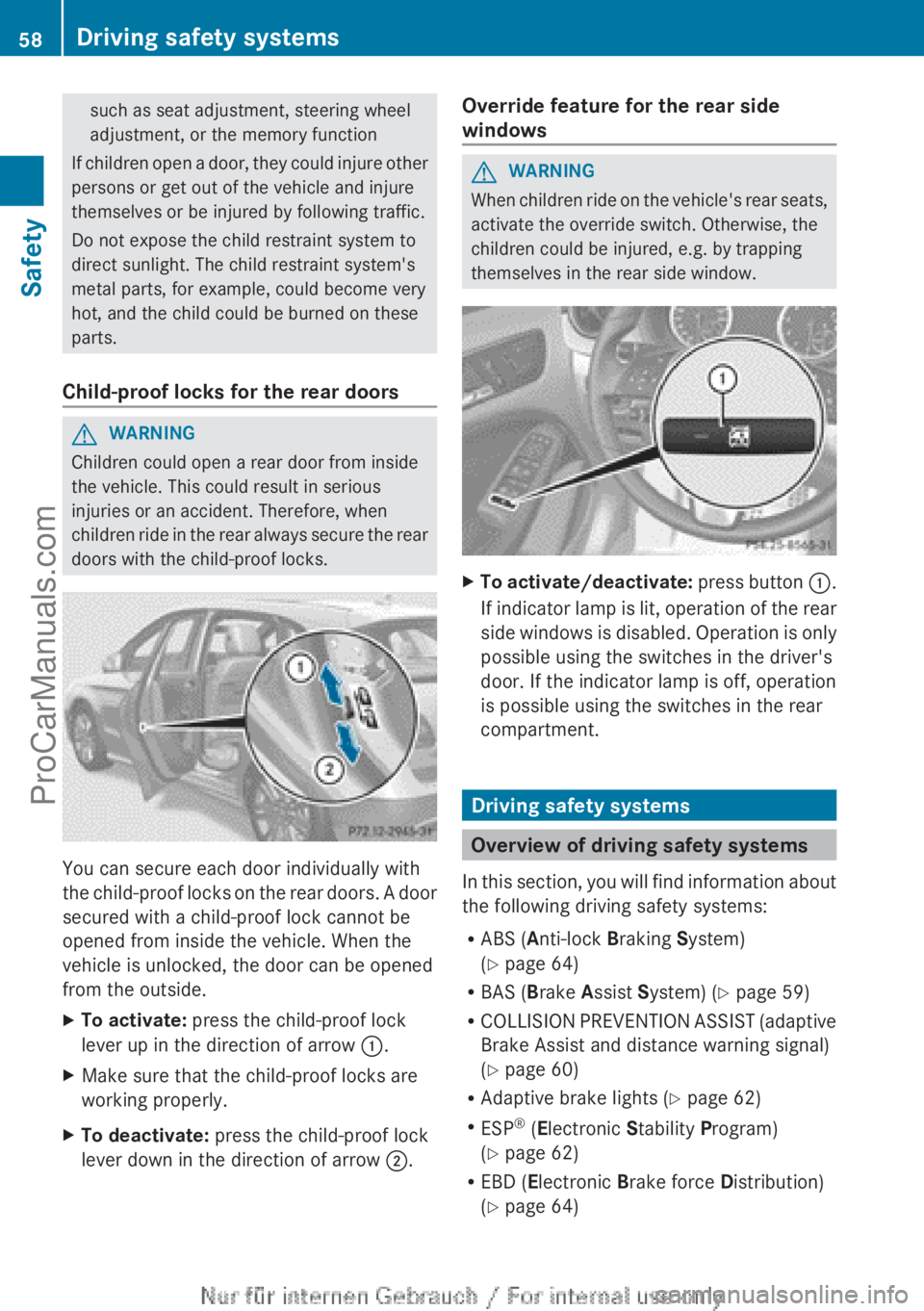
To activate/deactivate: press button :.
If
indicator lamp is lit, operation of the rear
side windows is disabled. Operation is only
possible using the switches in the driver's
door. If the indicator lamp is off, operation
is possible using the switches in the rear
compartment. Driving safety systems
Overview of driving safety systems
In this section,
you will find information about
the following driving safety systems:
R ABS ( Anti-lock Braking System)
(Y page 64)
R BAS ( Brake Assist System) ( Y page 59)
R COLLISION PREVENTION ASSIST (adaptive
Brake Assist and distance warning signal)
(Y page 60)
R Adaptive brake lights ( Y page 62)
R ESP ®
(Electronic Stability Program)
(Y page 62)
R EBD ( Electronic Brake force Distribution)
(Y page 64) 58
Driving safety systems
Safety
ProCarManuals.com
Page 61 of 340

R
ADAPTIVE BRAKE ( Y
page 64)
(Y page 64)
R STEER CONTROL ( Y page 64)Important safety notes
If you fail to adapt your driving style or
become distracted, the driving safety
systems can neither reduce the risk of
accident nor override the laws of physics.
Driving safety systems are merely aids
designed to assist driving. You are
responsible for the distance to the vehicle in
front, for vehicle speed and for braking in
good time. Always
adapt your driving style to
suit the prevailing road, weather and traffic
conditions and maintain a safe distance from
the vehicle in front. Drive carefully.
i The driving safety systems described only
work as effectively as possible when there
is adequate contact between the tires and
the road surface. Pay particular attention
to the information regarding tires,
recommended minimum tire tread depths
etc. in the "Wheels and tires" section
(Y page 298).
In wintry driving conditions, always use
winter tires (M+S tires) and if necessary,
snow chains. Only in this way will the
driving safety systems described in this
section work as effectively as possible. ABS (Anti-lock Braking System)
Important safety notes i
Observe the "Important safety notes"
section for driving safety systems
(Y page 59). G
WARNING
If ABS is faulty, the wheels could lock when
braking. The steerability and braking
characteristics may be severely impaired.
Additionally, further driving safety systems are deactivated. There is an increased danger
of skidding and accidents.
Drive on carefully. Have ABS checked
immediately at a qualified specialist
workshop.
When ABS is malfunctioning, other systems,
including driving safety systems, will also
become inoperative. Observe
the information
on the ABS warning lamp ( Y page 225) and
display messages which may be shown in the
instrument cluster (Y page 201).
ABS regulates brake pressure in such a way
that the wheels do not lock when you brake.
This allows you to continue steering the
vehicle when braking.
ABS works from a speed of about 5 mph
(8 km/h) upwards, regardless of road-surface
conditions. ABS works on slippery roads,
even if you only brake gently.
The ! ABS warning lamp in the instrument
cluster lights up when the ignition is switched
on. It goes out when the engine is running.
Braking X
If ABS intervenes: continue to
depress the
brake pedal vigorously until the braking
situation is over.
X To make a full brake application:
depress the brake pedal with full force.
If ABS intervenes when braking, you will feel
a pulsing in the brake pedal.
The pulsating brake pedal can be an
indication of hazardous road conditions, and
functions as a reminder to take extra care
while driving. BAS (Brake Assist System)
i Observe the "Important safety notes"
section ( Y page 59). Driving safety systems
59
Safety Z
ProCarManuals.com
Page 62 of 340

G
WARNING
If BAS is malfunctioning, the braking distance
in an emergency braking situation is
increased. There is a risk of an accident.
In an emergency braking situation, depress
the brake pedal with full force. ABS prevents
the wheels from locking.
BAS operates in emergency braking
situations. If you depress the brake pedal
quickly, BAS automatically
boosts the braking
force, thus shortening the stopping distance.
The brakes will function as usual once you
release the brake pedal. BAS is deactivated. COLLISION PREVENTION ASSIST
General notes COLLISION PREVENTION ASSIST consists of
the Adaptive Brake Assist and the distance
warning function, which are described in the
following.
Distance warning function
Important safety notes
i
Observe the "Important safety notes"
section for driving safety systems
(Y page 59). G
WARNING
The distance warning function does not react:
R to people or animals
R to oncoming vehicles
R to crossing traffic
R when cornering
Thus, the distance warning function cannot
provide a warning in all critical situations.
There is a risk of an accident.
Always pay careful attention to the traffic
situation and be ready to brake.
The distance warning
function cannot always
clearly identify objects and complex traffic
situations. In such cases, the distance warning function
may:
R
give an unnecessary warning
R not give a warning
Always pay careful attention to the traffic
situation and do not rely solely on the
distance warning function.
Function
X To activate/deactivate: activate or
deactivate the distance
warning function in
the on-board computer (Y page 195).
If the distance warning function is activated,
the Ä symbol appears
in the multifunction
display unless the HOLD function is active
(Y page 168).
On vehicles with Active Parking Assist, the
Ä symbol is displayed when P is engaged
or you are driving faster than 22 mph
(35 km/h).
The distance warning function can help you
to minimize the risk of a front-end collision
with a vehicle ahead or reduce the effects of
such a collision. If the distance warning
function detects that there is a risk of a
collision, you will be warned visually and
acoustically. The distance warning function
cannot prevent a collision without your
intervention.
Starting at a speed of around 20 mph
(30 km/h), this function warns you if you
rapidly approach a vehicle in front. An
intermittent warning tone will then sound and
the · distance warning lamp will light up
in the instrument cluster.
X Brake immediately in order to increase the
distance from the vehicle in front.
or
X Take evasive action provided it is safe to do
so.
For the distance warning function to assist
you when driving, the function must be
activated in the on-board computer and be
operational ( Y page 195).60
Driving safety systems
Safety
ProCarManuals.com