2012 MERCEDES-BENZ A CLASS heating
[x] Cancel search: heatingPage 226 of 356

X
Press the 9 or : button to select
Radar sensor (See Owner's Man.).
You will see the selected setting: Activa‐
ted or Deactivated.
X Press the a button to save the setting.
i In some countries you must deactivate
the radar sensor system. For further infor-
mation, see ( Y page 350).
If the radar sensor system is switched off,
Blind Spot Assist is deactivated
(Y page 197).
Heating Changing the departure time
X
Press the = or ; button on the steer-
ing wheel to select the Settings menu.
X Press the : or 9 button to select
theHeating submenu.
X Press a to confirm.
You will see the selected setting.
X Press a to confirm.
X Press the : or 9
button to select A,
B or Change C.
X Press a to confirm.
You can now change the departure time.
X Press the =
or ; button to select the
display to be changed: hours, minutes.
X Press the : or 9 button to set the
selected display.
X Press the a button to store the entry.
The yellow indicator lamp on the auxiliary
heating button lights up.
Selecting the departure time or deactivat-
ing a selected departure time
X Press the =
or ; button on the steer-
ing wheel to select the Settings menu.
X Press the :
or 9 button to select the
Heating submenu.
X Press a to confirm.
You will see the selected setting.
X Press a to confirm. X
Press : or 9 to select one of the
three departure times or Timer off (no
timer active).
X Press a to confirm.
If a departure time is selected, the yellow
indicator lamp lights up on the auxiliary
heating button.
Changing the departure time
Only vehicles with auxiliary heating
(Y page 134) have this function.
In the Heating submenu, you can select a
stored
departure time or change a departure
time.
The auxiliary heating timer function calcu-
lates the switch-on time according to the out-
side temperature so that the vehicle is pre-
heated by the departure time. When the
departure time is reached, the auxiliary heat-
ing continues to heat for a further five
minutes and then switches off. The auxiliary
heating adopts the THERMATIC or
THERMOTRONIC temperature setting.
You can switch off the auxiliary heating by
using the remote control or the auxiliary heat-
ing button on the centre console. G
DANGER
If the exhaust pipe is blocked or sufficient
ventilation is not possible, toxic exhaust
fumes can enter the vehicle, especially car-
bon monoxide. This is the case, e.g. in
enclosed spaces, or if the vehicle is stuck in
snow. There is a risk of fatal injuries.
You should switch off the auxiliary heating in
enclosed
spaces which do not have an extrac-
tion system, e.g. a garage. If the vehicle is
stuck in snow and you must leave the auxiliary
heating running, keep the exhaust pipe and
the area around the vehicle clear of snow. To
guarantee a sufficient supply of fresh air, open
a window on the side of the vehicle away from
the wind. G
WARNING
When the auxiliary heating is switched on,
parts of the vehicle can become very hot. 224
Menus and submenus
On-board computer and displays
Page 227 of 356

Flammable material such as leaves, grass or
twigs
may ignite if they come into contact with
hot parts of the exhaust system for extended
periods. There is a risk of fire.
When the auxiliary heating is switched on,
make sure that no flammable material can
come into contact with hot vehicle compo-
nents.
! Operating the auxiliary heating/ventila-
tion draws on the vehicle battery. After you
have heated or ventilated the vehicle a
maximum of two times, drive for a longer
distance.
i Switch the auxiliary heating on regularly
once a month for about ten minutes.
Comfort Switching belt adjustment on/off
X
Press the =
or ; button on the steer-
ing wheel to select the Settings menu.
X Press the :
or 9 button to select the
Convenience submenu.
X Press a to confirm.
X Press the :
or 9 button to select the
Belt adjustment function.
If the Belt adjustment function is activa-
ted, the vehicle seat belt is shown in orange
in the multifunction display.
X Press the a button to save the setting.
For further information on belt adjustment,
see ( Y page 47).
Switching the fold in mirrors when lock-
ing function on/off
This
function is only available on vehicles with
a memory function (Y page 101).
When you activate the Auto. fold-in mir‐
rors function, the exterior mirrors are folded
in when the vehicle is locked.
When you unlock the vehicle and then open a
door, the exterior mirrors fold out again.
If you have switched on the Auto. fold-in
mirrors function and you fold in the exterior mirrors using the button on the door
(Y page 99), they will not fold out automati-
cally. The exterior mirrors can then only be
folded out using the button on the door.
X
Press the =
or ; button on the steer-
ing wheel to select the Settings menu.
X Press the :
or 9 button to select the
Convenience submenu.
X Press a to confirm.
X Press the :
or 9 button to select the
Auto. fold-in mirrors function.
If the Auto. fold-in mirrors function is
activated, the vehicle's exterior mirror is
displayed in orange in the multifunction
display.
X Press the a button to save the setting.
Resetting to factory settings X
Press the =
or ; button on the steer-
ing wheel to select the Settings menu.
X Press the :
or 9 button to select the
Factory setting submenu.
X Press a to confirm.
The Reset all settings? message
appears.
X Press the : or 9 button to select
No or Yes.
X Press the a
button to confirm the selec-
tion.
If you have selected Yes , the multifunction
display shows a confirmation message.
For safety reasons, not all functions are reset:
the Limit speed (winter tyres): func-
tion
in permanent SPEEDTRONIC can only be
set in the VEHICLE submenu. If you want to
reset the Daytime driving lights: in the
Light submenu, you must turn the key in the
ignition lock to position 1. Menus and submenus
225
On-board computer and displays Z
Page 247 of 356

Display messages Possible causes/consequences and
M Solutions4
Check eng. oil
lev. when next
refuelling The engine oil level has dropped to the minimum level.
A warning tone also sounds.
X
Check the oil level when next refuelling, at the latest
(Y page 286).
X If necessary, top up the engine oil (Y page 287).
X Have the engine checked at a qualified specialist workshop if
the engine oil needs topping up more often than usual. æ
Reserve fuel level The fuel level has dropped into the reserve range.
The auxiliary heating cannot be operated.
X
Refuel at the nearest filling station. ç There is very little fuel in the fuel tank.
The auxiliary heating cannot be operated.
X
Refuel at the nearest filling station without fail. ¸
Replace
air cleaner Vehicles with a diesel engine: the engine air filter is dirty and must
be replaced.
X
Visit a qualified specialist workshop.
i This message does not appear for the 180 CDI BlueEFFI-
CIENCY, manual transmission model A. !
Clean
the fuel fil‐
ter Vehicles with a diesel engine: there is water in the fuel filter. The
water must be drained off.
X
Visit a qualified specialist workshop. Driving systems
Display messages Possible causes/consequences and
M SolutionsÀ
Attention Assist:
Drowsiness detec‐
ted Based on certain criteria, ATTENTION ASSIST has detected fatigue
or
a lack of concentration on the part of the driver. A warning tone
also sounds.
X If necessary, take a break.
During long journeys, take regular breaks in good time so that you
get enough rest. À
Attention Assist
inoperative ATTENTION ASSIST is inoperative.
X
Visit a qualified specialist workshop. Display messages
245
On-board computer and displays Z
Page 257 of 356

Display messages Possible causes/consequences and
M Solutionsj
Check trailer
hitch lock The trailer tow hitch is not correctly engaged.
A warning tone also sounds.
X
Stop the vehicle immediately, paying attention to road and traf-
fic conditions, and switch off the engine.
X Apply the electric parking brake.
X Engage the trailer coupling's ball coupling in the end position
(Y page 203).
Otherwise, the trailer may detach itself. Ð
Power
steering mal‐
function See Own‐
er's Manual The power steering assistance is faulty.
A warning tone also sounds.
G WARNING
You will need to use more force to steer.
There is a risk of an accident.
X Check whether you are able to apply the extra force required.
X If you are able to steer safely:
carefully drive on to a qualified
specialist workshop.
X If you are unable to steer safely:
do not drive on. Contact the
nearest qualified specialist workshop. &
inoperative Bat‐
tery low You have attempted to switch on the auxiliary heating or to acti-
vate
a departure time using the on-board computer after operating
the auxiliary heating twice.
X Let the engine run for 10 seconds.
The auxiliary heating is operational again. The on-board voltage is too low. The auxiliary heating has switched
itself off or cannot be switched on
(Y page 134).
X Drive for a longer distance.
The
battery is being charged. The auxiliary heating is operational
again as soon as the on-board electrical system voltage is suf-
ficient. &
inoperative
Refuel
vehicle There is too little fuel in the fuel tank. The auxiliary heating cannot
be switched on (
Y page 134).
X Refuel at the nearest filling station. Display messages
255
On-board computer and displays Z
Page 258 of 356

Display messages Possible causes/consequences and
M Solutions&
inoperative See
Owner's Man. The auxiliary heating has a temporary malfunction or is faulty.
X
When the vehicle is on a level surface and the engine has cooled
down,
make up to four attempts to switch on the auxiliary heat-
ing, waiting several minutes between each attempt
(Y page 134).
X If the auxiliary heating does not switch on, consult a qualified
specialist workshop. Telephone No
service Your vehicle is outside the network provider's transmitter/
receiver range.
X
Wait until the mobile phone operational readiness symbol
appears in the multifunction display. ¥
Top
up washer fluid The washer fluid level in the washer fluid reservoir has dropped
below the minimum.
i
If, during the winter months, you do not add antifreeze to the
washer
fluid, it may freeze in the washer fluid container. In this
case, the Top up washer fluid display message may appear
in the multifunction display.
X Top up the washer fluid ( Y page 289).Wiper malfunction‐
ing The windscreen wipers are defective.
X
Visit a qualified specialist workshop. Hazard warning
lamps malfunction‐
ing The hazard warning lamps are faulty.
X
Visit a qualified specialist workshop. Key
Display messages Possible causes/consequences and
M Solutions+
Key does not
belong to vehicle You have put the wrong key in the ignition lock.
X
Use the correct key. +
Replace key The key needs to be replaced.
X
Visit a qualified specialist workshop.256
Display messages
On-board computer and displays
Page 266 of 356
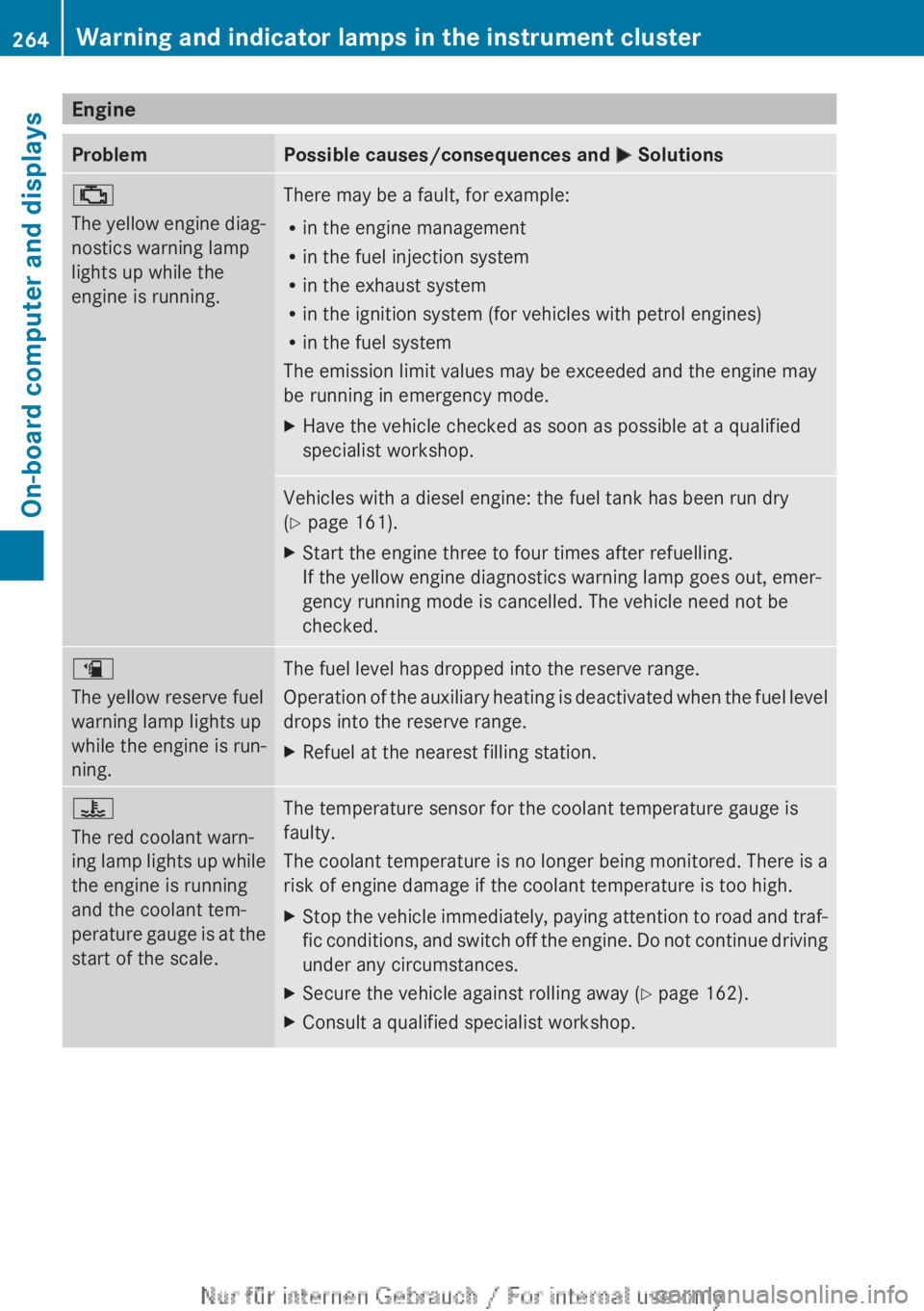
Engine
Problem Possible causes/consequences and
M Solutions;
The
yellow engine diag-
nostics warning lamp
lights up while the
engine is running. There may be a fault, for example:
R
in the engine management
R in the fuel injection system
R in the exhaust system
R in the ignition system (for vehicles with petrol engines)
R in the fuel system
The emission limit values may be exceeded and the engine may
be running in emergency mode.
X Have the vehicle checked as soon as possible at a qualified
specialist workshop. Vehicles with a diesel engine: the fuel tank has been run dry
(Y page 161).
X
Start the engine three to four times after refuelling.
If the yellow engine diagnostics warning lamp goes out, emer-
gency running mode is cancelled. The vehicle need not be
checked. æ
The yellow reserve fuel
warning lamp lights up
while the engine is run-
ning.
The fuel level has dropped into the reserve range.
Operation
of the auxiliary heating is deactivated when the fuel level
drops into the reserve range.
X Refuel at the nearest filling station. ?
The red coolant warn-
ing
lamp lights up while
the engine is running
and the coolant tem-
perature gauge is at the
start of the scale. The temperature sensor for the coolant temperature gauge is
faulty.
The
coolant temperature is no longer being monitored. There is a
risk of engine damage if the coolant temperature is too high.
X Stop the vehicle immediately, paying attention to road and traf-
fic
conditions, and switch off the engine. Do not continue driving
under any circumstances.
X Secure the vehicle against rolling away ( Y page 162).
X Consult a qualified specialist workshop.264
Warning and indicator lamps in the instrument cluster
On-board computer and displays
Page 280 of 356

Rear-compartment ashtray
X
To open: pull cover = out by its top edge.
X To remove: pull insert ; by recess : in
the direction of arrow ? until it audibly
releases.
X Lift insert ; up and out.
X To fit the insert: fit insert ; from above
into the holder and press down into the
holder until it engages. Cigarette lighter
G
WARNING
You can burn yourself if you touch the hot
heating
element or the socket of the cigarette
lighter.
In addition, flammable materials can ignite if:
R the hot cigarette lighter falls
R a child holds the hot cigarette lighter to
objects, for example
There is a risk of fire and injury.
Always hold the cigarette lighter by the knob.
Always make sure that the cigarette lighter is
out of reach of children. Never leave children
unattended in the vehicle.
Your attention must always be focused on the
traffic conditions. Only use the cigarette
lighter when road and traffic conditions per-
mit. Example: vehicles with a stowage compartment
cover
X
Turn the key to position 2 in the ignition
lock (Y page 143).
X To open: push the lower section of
cover :.
The stowage compartment opens.
X Press in cigarette lighter ;.
Cigarette lighter ; will pop out automati-
cally when the heating element is red-hot. 12 V sockets
Points to observe before use X
Turn the key to position 1 in the ignition
lock (Y page 143).
The sockets can be used for accessories with
a maximum draw of
180 W (15 A). Accesso-
ries include such items as lamps or chargers
for mobile phones.
If you use the sockets for long periods when
the engine is switched off, the battery may
discharge.
i An emergency cut-off ensures that the on-
board voltage does not drop too low. If the
on-board voltage is too low, the power to
the sockets is automatically cut. This
ensures that there is sufficient power to
start the engine. 278
Features
Stowing and features
Page 286 of 356

Useful information
i This Owner's Manual describes all mod-
els,
series and optional equipment for your
vehicle that were available at the time of
going to press. National variations are pos-
sible. Note that your vehicle may not be
equipped with all of the functions descri-
bed. This is also the case for systems and
functions relevant to safety.
i Read the information on qualified special-
ist workshops: (Y page 24). Engine compartment
Bonnet
Important safety notes G
WARNING
An unlocked bonnet may open while driving
and
block your view. There is a risk of an acci-
dent.
Never unlock the bonnet while driving. G
WARNING
When being opened and closed, the bonnet
may suddenly fall into the closed position.
There
is a risk of injury to persons in the range
of movement of the bonnet.
Open and close the bonnet only when nobody
is in the range of movement. G
WARNING
Certain components in the engine compart-
ment could be very hot, e.g. the engine, the
radiator and parts of the exhaust system.
There is a risk of injury when accessing the
engine compartment.
As far as possible, allow the engine to cool
down and only touch the following compo-
nents. G
WARNING
If you open the bonnet while the engine is
overheating or while there is a fire in the engine compartment, you could come into
contact with hot gases or other leaking
service products. There is a danger of injury.
Allow an overheating engine to cool down
before
opening the bonnet. If there is a fire in
the engine compartment, leave the bonnet
closed and notify the fire brigade. G
WARNING
There are parts in the engine compartment
that
move. Certain components may continue
to run even if the ignition is switched off or
may suddenly start again, e.g. the radiator
fan. There is a danger of injury.
If you need to access the engine compart-
ment:
R switch off the ignition
R never enter the danger area of moving com-
ponents, e.g. the rotation area of the fan
R keep items of clothing away from moving
parts G
WARNING
The ignition system and the fuel injection sys-
tem operate with a high voltage. If you touch
the live components, you could receive an
electric shock. There is a danger of injury.
Never touch components of the ignition sys-
tem or the fuel injection system when the
ignition is switched on.
Active bonnet (pedestrian protection) Operating principle
!
Once
triggered, an active bonnet must be
reset at a qualified specialist workshop,
e.g. a Mercedes-Benz Service Centre. The
active bonnet function will then be availa-
ble again. The additional pedestrian pro-
tection provided by the active bonnet will
then be restored.
The active bonnet is only available in certain
countries.
The active bonnet can reduce the risk of injury
to pedestrians in certain accident situations. 284
Engine compartment
Maintenance and care