2012 Lexus LFA brake pad
[x] Cancel search: brake padPage 11 of 128

9
Basic operations
1 Reverse selector switch
Pull the switch to select Reverse (R).
2 Paddle shift switches ("P. 40)
Pull the right paddle shift switch to upshift and the left paddle shift switch to
downshift. Pull both paddle shift switches at once to select Neutral (N).
3 Control pad ("P. 66)
4 “ENGINE START” switch
5 Driving mode selector switch ("P. 26)
6 AUTO driving mode button ("P. 27)
7 Shift speed selector ("P. 41)
Allows the driver to choose their desired shift speeds for the manually shifted
SPORT, NORMAL, and WET driving modes.
8 Parking brake switch
9 Ignition switch
10 Accelerator pedal ("P. 32)
11 Tilt and telescopic steering lock release lever
12 Brake pedal ("P. 50)
13 Hood release lever ("P. 12)
14 Rear hatch opener switch ("P. 12)
15 Fuel filler door opener switch ("P. 12)
16 Outside rear view mirror switches
17 VSC off switch
Turns VSC and TRAC off. Press the switch again to turn VSC and TRAC back on.
Page 12 of 128

10
■
■Driving position adjustment
1 Insert the key into the ignition switch
and then turn the key to the “ACC”
position.
2 Use the seat adjustment switches (A)
to move the driver seat. You should
be able to fully depress the brake
pedal with your knees slightly bent.
3 Adjust the height of the seat and the
position of the steering wheel. You
should be able to grip the top of the steering wheel with your elbows slightly bent
and your back at a comfortable angle.
4 If necessary, readjust the seat position.
5 Adjust the mirrors to ensure that you have a good view of the area behind the
vehicle.
■
■Starting the engine
1 With the brake pedal depressed, turn the key to the “ON” position.
2 Pull both paddle shift switches at the same time to select Neutral.
3 Press the “ENGINE START” switch to start the engine.
(A)
Page 13 of 128
11
Basic operations
■
■Starting off
1 With the brake pedal depressed, pull the right paddle shift switch to select 1st gear.
2 Pull the parking brake switch to release the parking brake.
3 Release the brake pedal and then slowly depress the accelerator pedal.
■
■Reversing
1 With the vehicle stationary, depress the brake pedal and check the gear indicator
in the meter to ensure that Neutral is selected.
2 Pull the reverse selector switch to select Reverse.
3 Release the brake pedal and then slowly depress the accelerator pedal.
It is not possible to change directly from Reverse to any of the forward gears. Select Neutral first
and then select a forward gear.
■
■Parking
1 Depress the brake pedal until the vehicle comes to a complete stop.
2 Press the parking brake switch to set the parking brake.
3 Ensure that “D1”, “1” or “R” is displayed on the gear indicator.
4 Push in the key and turn it to the “LOCK” position to stop the engine.
The “ENGINE START” switch is for starting the engine. It cannot be used to stop the engine.
Page 54 of 128
52
■
■Brake caliper
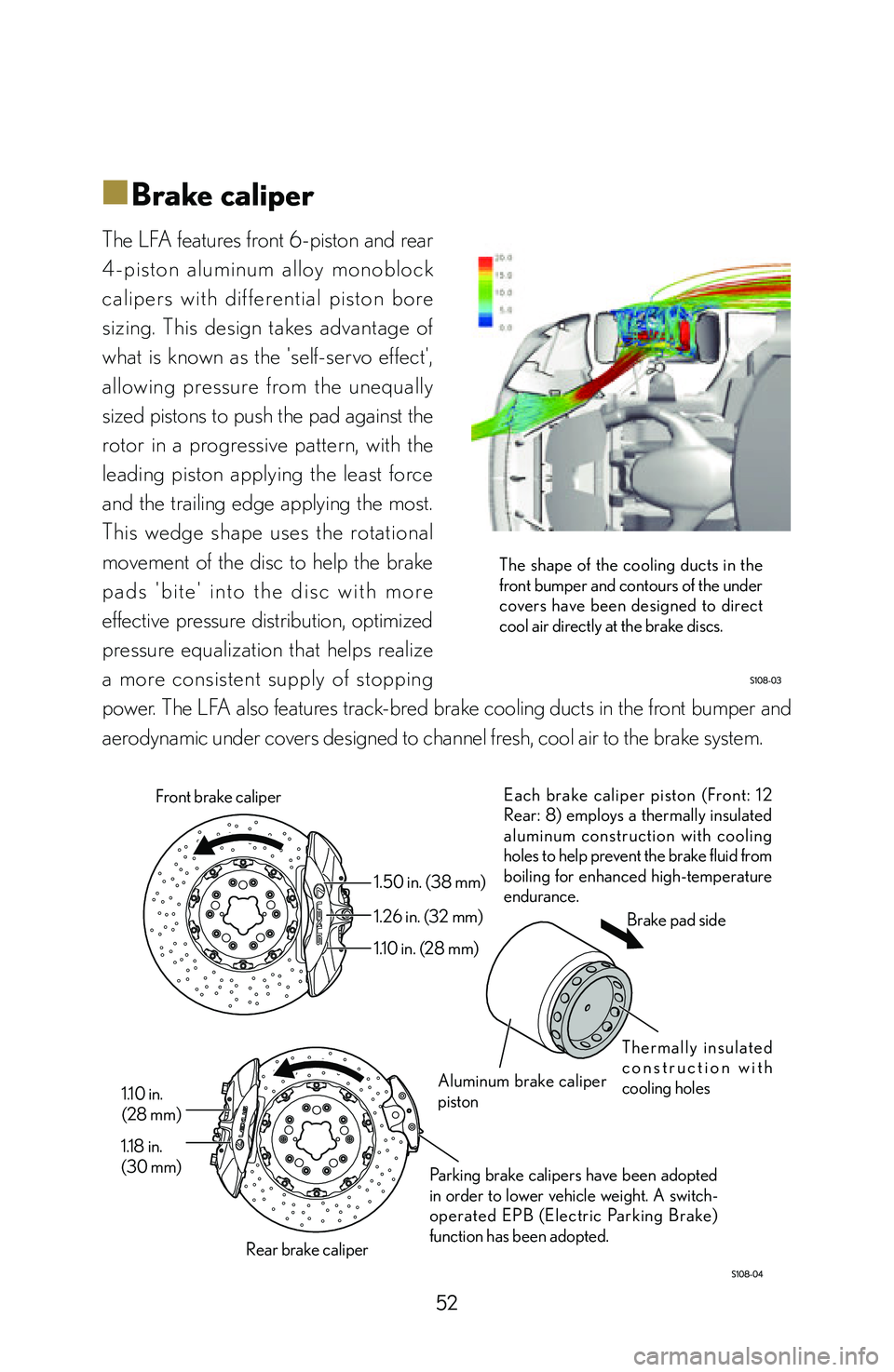
The LFA features front 6-piston and rear
4-piston aluminum alloy monoblock
calipers with dif ferential piston bore
sizing. This design takes advantage of
what is known as the 'self-servo effect',
allowing pressure from the unequally
sized pistons to push the pad against the
rotor in a progressive pattern, with the
leading piston applying the least force
and the trailing edge applying the most.
This wedge shape uses the rotational
movement of the disc to help the brake
p a d s ' b i t e ' i n t o t h e d i s c w i t h m o r e
effective pressure distribution, optimized
pressure equalization that helps realize
a more consistent supply of stopping
power. The LFA also features track-bred brake cooling ducts in the front bumper and
aerodynamic under covers designed to channel fresh, cool air to the brake system.
Each brake caliper piston (Front: 12
Rear: 8) employs a thermally insulated
aluminum construction with cooling
holes to help prevent the brake fluid from
boiling for enhanced high-temperature
endurance.
Parking brake calipers have been adopted
in order to lower vehicle weight. A switch-
operated EPB (Electric Parking Brake)
function has been adopted.
1.50 in. (38 mm)
1.26 in. (32 mm)
1.10 in. (28 mm)
1.10 in.
(28 mm)
1.18 in.
(30 mm) Front brake caliper
Rear brake caliper Aluminum brake caliper
piston
T h e r m a l l y i n s u l a t e d
c o n s t r u c t i o n w i t h
cooling holesBrake pad side
The shape of the cooling ducts in the
front bumper and contours of the under
covers have been designed to direct
cool air directly at the brake discs.
Page 55 of 128

53
Braking
■
■Brake discs
Each brake disc is made from CCM (Carbon Ceramic Material) and features a two-
piece floating construction with an aluminum center hat. With this construction, disc
deformation due to expansion at high temperatures is more effectively mitigated;
thereby enabling a more consistent application of pressure from the brake pads for
stable and confidence-inspiring brake performance under any circumstances.
CCM discs provide the high stopping
power and thermal capacity needed
to provide consistent braking at high
speeds.
The discs are impregnated with silicone
material to ensure outstanding stopping
power and endurance when they are not
yet at optimal operating temperature or
in wet conditions. However, one should
avoid spraying water directly onto a hot
brake disc. Fur thermore, CCM discs
are susceptible to microscopic cracking
and local damage resulting from a direct
impact. Care is required when installing a
tire and wheel as accidental contact may
result in damage.
Bedding-in new brake pads or rotors:
In order to ensure maximum performance from a set of replacement CCM discs
or brake pads, it is necessary to bed them in. Please consult your Lexus dealer
regarding the appropriate bedding procedure. The LFA is shipped from the factory
with pre-bedded CCM discs and brake pads.
The disc diameters are 15.35 in. (390
mm) for the front and 14.17 in. (360 mm)
for the rear. Both front and rear discs are
ventilated with 0.20 in. (5 mm) diameter
d r i l l e d c o o l i n g h o l e s . T h e a d o p t i o n o f
CCM as opposed to conventional cast-iron
results in a reduction in unsprung weight of
approximately 11.03 lb. (5 kg) per wheel.
Page 116 of 128

114
Index
AAccelerating 32
Accelerator pedal mechanism 32
Active rear wing (maintenance) 80
Active rear wing
(manual operation) 80
Active rear wing (operation) 28
Adding fuel 12
Adding gasoline 12
Adding petrol 12
Adjusting the steering wheel
position 23
Advice for long-term storage 92
Alcantara® care 85
Alcantara® cleaning 85
Alcantara® maintenance 85
Alignment 47
Aluminum center hat 53
Analog gauge 59
Approach angle 100
AUTO mode 58
AUTO mode
(control characteristics) 26
AUTO mode (selection) 27
Automated car-wash 79
Automatic 41
Automatic downshift control 40
BBack door 12
Backing up 11
Battery
(vehicle long-term storage) 93
Battery dark current 93
Battery terminal disconnection 99
Bedding-in new brake pads
or rotors 53
Blipping control 40
Bonnet 12
Bonnet stay 12
Boot 12
Brake caliper 52
Brake discs 53
Brake override system 50
Brake pad bedding 53
Brake pad bed-in 53
Brake pad replacement 53
Brake pedal 51
Brake rotors 53
Brake system 50
Braking 50
Break-over angle 100
Brightness 67
CCarbon fiber care 86
Carbon fiber cleaning 86
Cardan shaft 38
CCM (Carbon Ceramic
Material) discs 53
Ceramic brake discs 53
Ceramic brake rotors 53
CFRP (Carbon Fiber Reinforced
Plastics) maintenance 86
Changing gears 36
Page 117 of 128

115
Index
Checking the oil level 69
Clock 67
Clutch 37
Clutch disc 37
Cold starting restrictions 17
Combination meter 57
Connecting an external battery
to start the engine 98
Control characteristics
depending on driving mode 23
Control pad 66
Coolant temperature 60
Coolant temperature gauge 60
Crankshaft 38
Creep phenomenon 37
DDark current (parasitic current) 93
Dead battery 94
Default shift speed setting 41
Departure angle 100
Diaphragm spring 37
Differential 39
Differential oil cooler 39
Digital display 56
Disabling the theft deterrent
system 102
Disabling the tilt sensor 102
Discharged battery 94
Disconnecting the negative (-)
battery terminal 99
Door mirror switches 9
Double wishbone front
suspension 47
Downshift 40
Driving mode 58
Driving mode selection 27
Driving mode selector switch 41
Driving mode selector switch
operation 23
Driving mode-linked variable
throttle response 33
Driving position 20
Driving position adjustment 10
Dry single-plate clutch 37
Dual shaft transmission 39
EECB (Electronically
Controlled Brake) 50
Emergency brake 9
Engine 56
Engine code 16
Engine coolant 60
Engine coolant temperature
gauge 60
Engine coolant temperature
sensor 60
Engine limiters 16
Engine oil pressure 62
Engine oil pressure gauge 62
Engine oil temperature gauge 61
Engine overspeed 70
Engine protection mechanisms 16
Page 120 of 128

118
NNeedle 67
Negative battery terminal
structure 99
NORMAL mode 58
NORMAL mode
(control characteristics) 26
NORMAL mode (selection) 27
OOil change interval 67
Oil inspection 67
Oil level 67, 68
Oil level gauge 68, 69
Oil level sensor 68
Oil Maintenance 67
Oil pressure sensor 62
Oil replacement 67
Oil tank 68
Oil temperature sensor 61
Operating the driving mode
selector switch 26
Optimum driving position 20
Outer rear view mirror switches 9
Outside rear view mirror switches 9
Overall gear ratio 46
Over-rev 70
PPaddle shift switches 40, 4 1
Paddle shifters 40, 41
Parasitic current (dark current) 93
Parking 11
Parking brake 9, 52
Parking brake (vehicle long-term
storage) 92
Parking brake calipers 52
Parking brake switch 9
Partition glass care 87
Partition glass cleaning 87
Partition glass maintenance 87
Peak-hold 67
Pedal anti-slip pattern 51
Pedal texture 51
Petrol 63
Petrol filler door 12
Petrol level units selection 67
Petrol tank 63
Petrol tank cap 12
Petrol tank volume 12
Petrol type 12
Polycarbonate resin glass
maintenance 87
Powertrain 56
Propeller shaft 38
RRack and pinion gearbox 46
Rear brake caliper 52
Rear brake rotor 53
Rear disc 53
Rear hatch 12
Rear hatch access 95
Rear hatch manual unlock 95
Rear quarter window care 80