Page 290 of 413
SECTION9
REAR VIEW MONITOR SYSTEM
289
REAR VIEW MONITOR SYSTEM
DRear view monitor system 290 ..............................
11 08.03HS250h_NAVI_U
75051U
9
Page 291 of 413

REAR VIEW MONITOR SYSTEM
290
The rear view monitor system assists
the driver by displaying an image of the
view behind the vehicle while backing
up. The image is displayed in reverse
on the screen. This allows the image to
appear in the same manner as that of
the rear view mirror.
To display the rear view image on the
screen, shift the shift position to “R”
when the “POWER” switch is in ON
mode.
If you move the shift position out of the “R”,
the screen returns to the previous screen.
Operating another function of the naviga-
tion system will display another screen.
Vehicles with intuitive parking assist−
sensor — when the intuitive parking as-
sist− sensors are turned on and an ob-
stacle is detected in front of or behind
your vehicle, a warning appears on the
right top of the rear view monitor. For
details, see “Intuitive parking assist” on
page 304.
The rear view monitor system is a supple-
ment device intended to assist back up.
When backing up, be sure to check behind
and all around the vehicle visually.CAUTION
DNever depend on the rear view
monitor system entirely when
backing up. Always make sure
your intended path is clear.
Use caution, just as you would
when backing up any vehicle.
DNever back up while looking only at
the screen. The image on the
screen is different from actual
conditions. Depicted distances
between objects and flat surfaces
will differ from actual distance. If
you back up while looking only at
the screen, you may hit a vehicle, a
person or an object. When backing
up, be sure to check behind and all
around the vehicle visually and
with mirrors before proceeding.
DDo not use the system when the
trunk is not completely closed.
DUse your own eyes to confirm the
vehicle’s surroundings, as the dis-
played image may become faint or
dark, and moving images will be
distorted, or not entirely visible
when the outside temperature is
low. When backing up, be sure to
check behind and all around the ve-
hicle visually and with mirror be-
fore proceeding.
DDo not use the system in the follow-
ing cases:
DOn icy or slick road surfaces, or
in snow.
DWhen using tire chains or emer-
gency tires.
DOn an uneven or indirect road,
such as a slope or curve.
11 08.03HS250h_NAVI_U
75051U
Rear view monitor system
Page 292 of 413
REAR VIEW MONITOR SYSTEM
291
NOTICE
DIf the back of the vehicle is hit, the
position and mounting angle of the
camera may change. Be sure to
have the camera’s position and
mounting angle checked at your
Lexus dealer.
DAs the camera has a water proof
construction, do not detach, disas-
semble or modify it. This may
cause incorrect operation.
DIf the temperature changes rapidly,
such as when hot water is poured
on the vehicle in cold weather, the
system may not operate normally.
DDo not strongly rub the camera
lens. If the camera lens is
scratched, it can not transmit a
clear image.
DDo not allow organic solvent, car
wax, window cleaner or glass coat
to adhere to the camera. If this
happens, wipe it off as soon as
possible.
DIf the tire size is changed, the area
displayed on the screen may
change.
DWhen washing the vehicle, do not
apply intensive bursts of water to
the camera or camera area. Doing
so may result in the camera mal-
functioning.
INFORMATION
If the camera lens becomes dirty, it
cannot transmit a clear image. If wa-
ter droplets, snow, or mud adhere to
the lens, rinse with water and wipe
with a soft cloth. If the lens is ex-
tremely dirty, wash it with a mild
cleanser and rinse.
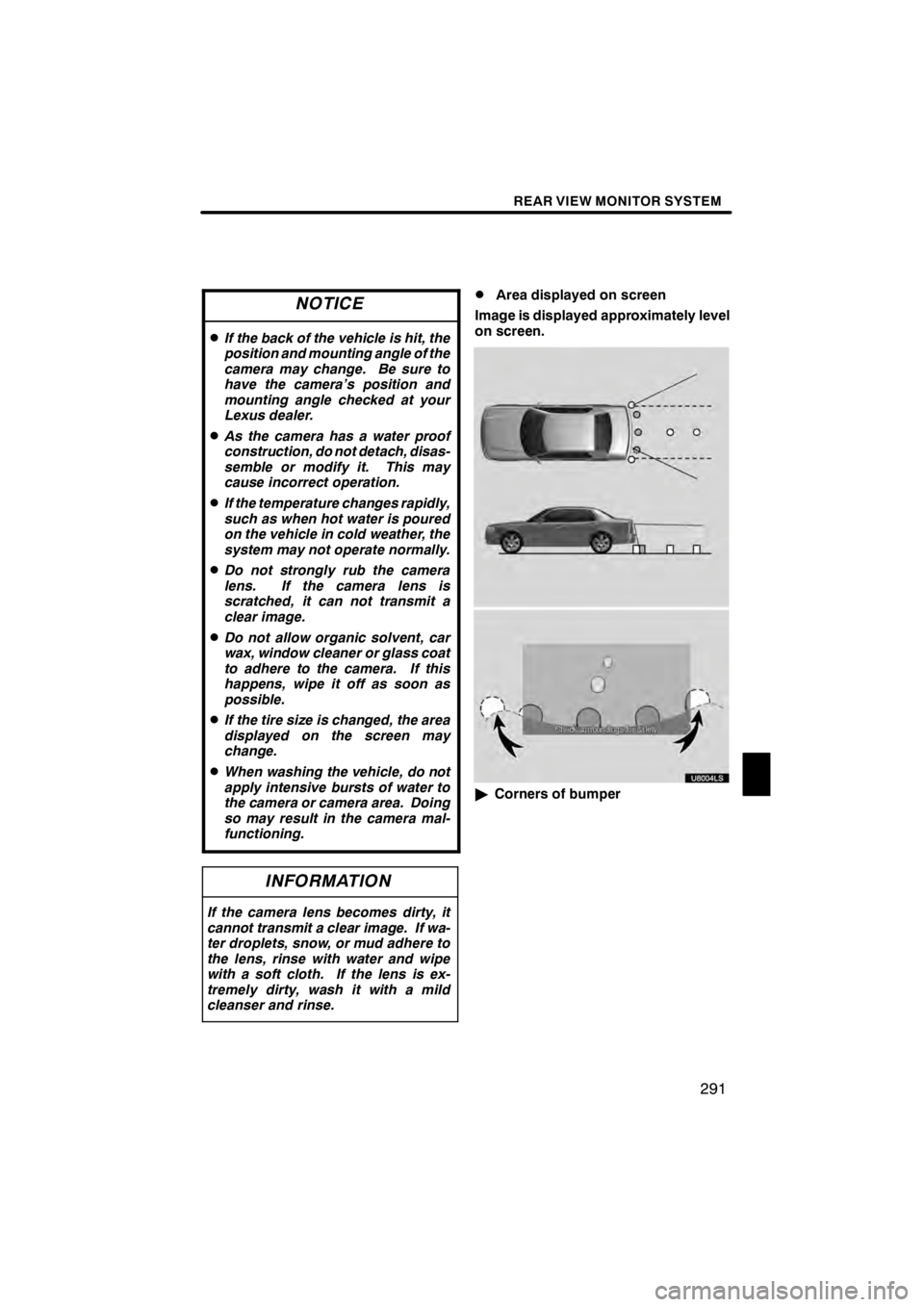
DArea displayed on screen
Image is displayed approximately level
on screen.
U8004LS
" Corners of bumper
11 08.03HS250h_NAVI_U
75051U
9
Page 293 of 413
REAR VIEW MONITOR SYSTEM
292
U8002LS
NOTICE
DThe area detected by the camera is
limited. The camera does not de-
tect objects which are close to ei-
ther corner of the bumper or under
the bumper.
DThe area displayed on the screen
may vary according to vehicle ori-
entation or road conditions.
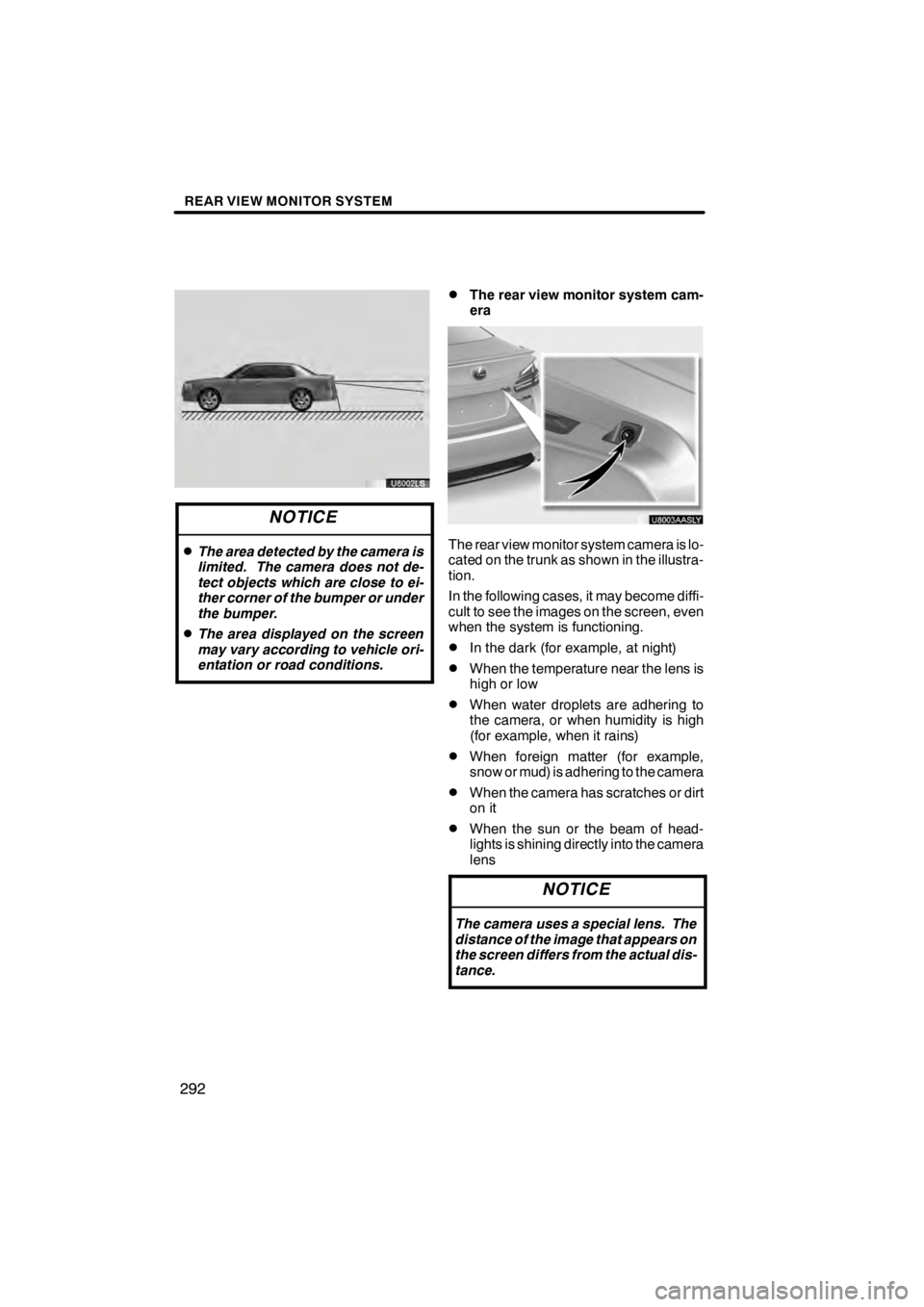
DThe rear view monitor system cam-
era
U8003AASLY
The rear view monitor system camera is lo-
cated on the trunk as shown in the illustra-
tion.
In the following cases, it may become diffi-
cult to see the images on the screen, even
when the system is functioning.
DIn the dark (for example, at night)
DWhen the temperature near the lens is
high or low
DWhen water droplets are adhering to
the camera, or when humidity is high
(for example, when it rains)
DWhen foreign matter (for example,
snow or mud) is adhering to the camera
DWhen the camera has scratches or dirt
on it
DWhen the sun or the beam of head-
lights is shining directly into the camera
lens
NOTICE
The camera uses a special lens. The
distance of the image that appears on
the screen differs from the actual dis-
tance.
11 08.03HS250h_NAVI_U
75051U
Page 294 of 413
REAR VIEW MONITOR SYSTEM
293
U8003LS
If a bright light (for example, sunlight re-
flected off the vehicle body) is picked up by
the camera, the smear effect
∗peculiar to
the camera may occur.
∗: Smear effect—A phenomenon that oc-
curs when a bright light (for example, sun-
light reflected off the vehicle body) is
picked up by the camera; when trans-
mitted by the camera, the light source ap-
pears to have a vertical streak above and
below it.
When the camera is used under fluores-
cent lights, sodium lights, or mercury lights
etc., the lights and the illuminated areas
may appear to flicker.
11 08.03HS250h_NAVI_U
75051U
9
Page 295 of 413
REAR VIEW MONITOR SYSTEM
294
11 08.03HS250h_NAVI_U
75051U
Page 305 of 413
INTUITIVE PARKING ASSIST
304
The distance to obstacles measured by
the sensors is communicated via the dis-
play and a buzzer when parallel parking or
maneuvering into a garage. Always check
the surrounding area when using this sys-
tem.
DTypes of sensors
UA001AASLY
1Front corner sensors
2Rear corner sensors
3Rear center sensors
DSetting the intuitive parking assist
mode
1Menu switch
2“ENTER” switch
1. Push the menu switch.
The multi− information display will change
modes to electronic features control mode.
2. Push the “ENTER” switch upwards
or downwards until the intuitive park-
ing assist− sensor mark appears in the
multi− information display.
11 08.03HS250h_NAVI_U
75051U
Intuitive parking assist —
Page 306 of 413
INTUITIVE PARKING ASSIST
305
UA003AASLY
3. Push the “ENTER” switch to select
“ON”.
The intuitive parking assist−sensor indica-
tor will be displayed.
Each pushing of the switch turns the intu-
itive parking assist −sensor on and off.
To turn on: Push the switch. The buzzer
sounds to inform the driver that the system
is operational.
To turn off: Push the switch again.
Push the menu switch to change to the
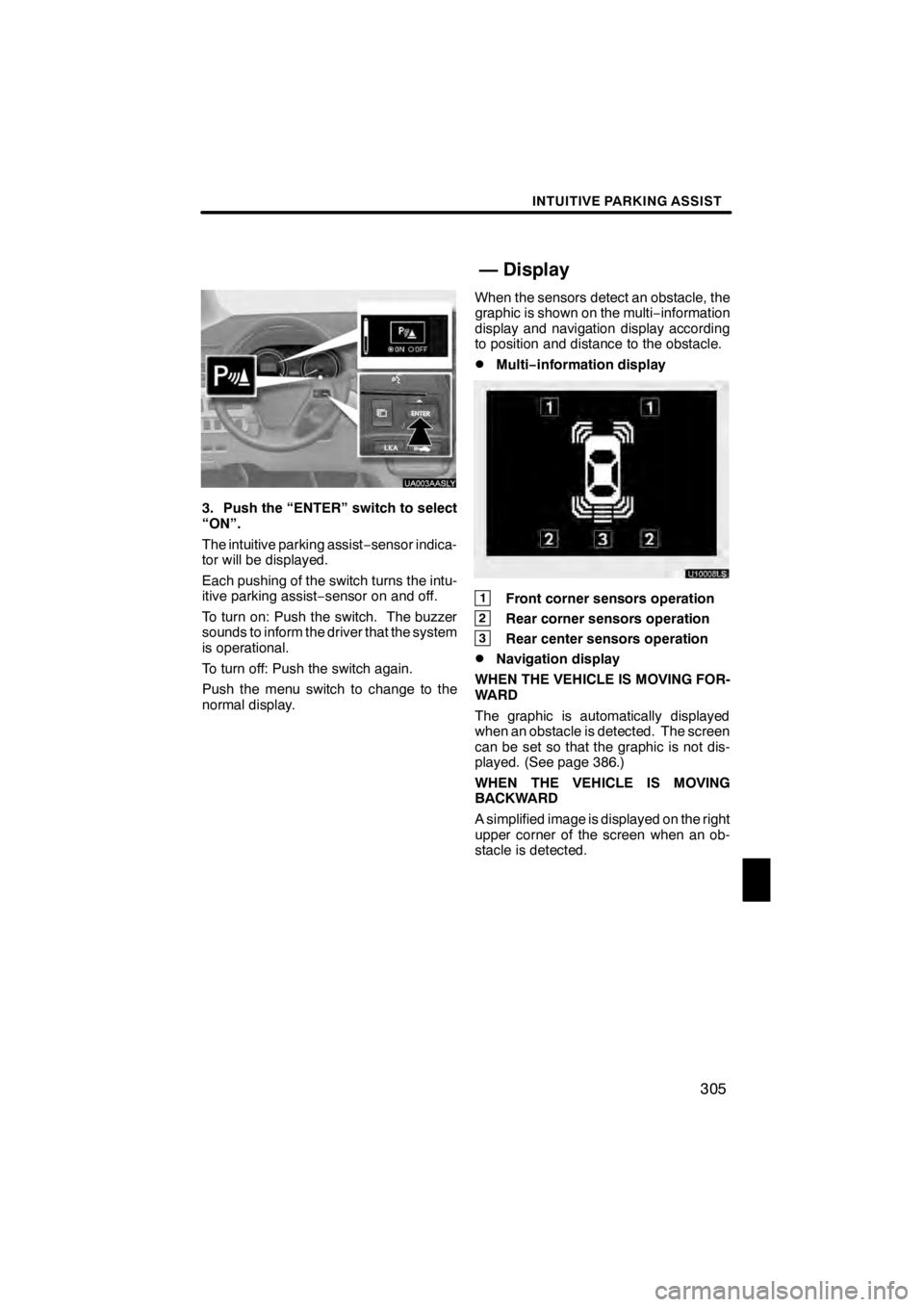
normal display. When the sensors detect an obstacle, the
graphic is shown on the multi
−information
display and navigation display according
to position and distance to the obstacle.
DMulti− information display
U10008LS
1Front corner sensors operation
2Rear corner sensors operation
3Rear center sensors operation
DNavigation display
WHEN THE VEHICLE IS MOVING FOR-
WARD
The graphic is automatically displayed
when an obstacle is detected. The screen
can be set so that the graphic is not dis-
played. (See page 386.)
WHEN THE VEHICLE IS MOVING
BACKWARD
A simplified image is displayed on the right
upper corner of the screen when an ob-
stacle is detected.
11 08.03HS250h_NAVI_U
75051U
— Display
11


