Page 618 of 914
6035-4. Using the hands-free phone system (for cellular phone)
5
Interior features
GS350/250_EE (OM30C36E)Input the passcode
displayed on the screen into
the Bluetooth
® device.
A passcode is not required for
SSP (Secure Simple Pairing)
compatible Bluetooth
® devices.
Depending on the type of Blue-
tooth
® phone being connected, a
message confirming registra-
tion may be displayed on the
Bluetooth
® phone’s screen.
Respond and operate the Blue-
tooth
® phone according to the
confirmation message.
For the operation of the
Bluetooth
® device, see the man-
ual that comes with it.
If you want to cancel it, select
“Cancel”.
If a completion message is dis-
played, registration is complete.
If an error message is displayed,
follow the guidance on the
screen to try again.
4
Page 622 of 914
6075-4. Using the hands-free phone system (for cellular phone)
5
Interior features
GS350/250_EE (OM30C36E)
Editing the “Device name”
If you change a device name, the name registered in your cellular phone is
not changed.
About “Device address”
The address peculiar to the system. It cannot be changed. If you have regis-
tered two Bluetooth
® phones with the same device name and you cannot dis-
tinguish one from the other, refer to this address.
“My telephone no.”:
The phone number of the Bluetooth
® phone is displayed on the screen.
Depending on the type of phone, the phone number may not be displayed.
“Profiles”:
The compatibility profile of the Bluetooth
® device is displayed on the screen.
“Connect portable player from”:
There are 2 portable player connection settings available; “Vehicle” and
“Portable Player”.
When you delete a Bluetooth® phone
The phonebook data will be deleted at the same time.
Page 625 of 914
6105-4. Using the hands-free phone system (for cellular phone)
GS350/250_EE (OM30C36E)You can confirm and change the Bluetooth
® settings.
To display the screen above, follow the steps below.
Display the “Bluetooth
*” screen. (P. 601)
Select “Detailed Bluetooth* settings” on the “Bluetooth
*”
screen.
*: Bluetooth is a registered trademark of Bluetooth SIG. Inc.
Detailed Bluetooth settings
Page 1Page 2
Changing the device connection status
Changing the name of the connected device.
Changing the passcode that you registered your Bluetooth
®
device in the system
The address peculiar to the system
You cannot change this address. If the same device name is displayed on
the screen of your device, refer to it.
The compatibility profile of the Bluetooth® device
1
2
3
4
5
1
2
Page 639 of 914
621
5 5-6. Using the storage features
Interior features
GS350/250_EE (OM30C36E)
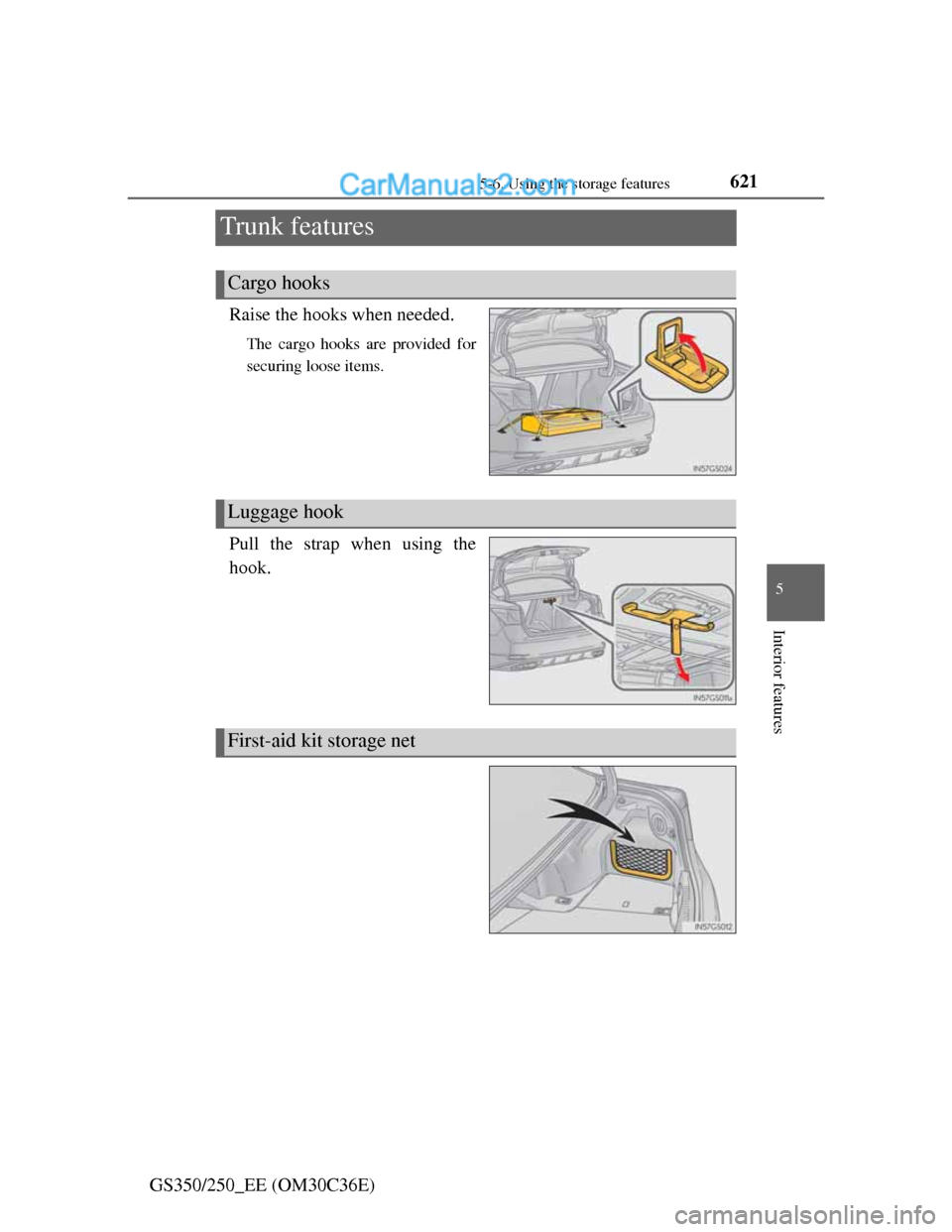
Trunk features
Raise the hooks when needed.
The cargo hooks are provided for
securing loose items.
Pull the strap when using the
hook.
Cargo hooks
Luggage hook
First-aid kit storage net
Page 679 of 914
661 6-3. Do-it-yourself maintenance
6
Maintenance and care
GS350/250_EE (OM30C36E)
Removing the engine compartment cover
Right-hand side
Center
Installing the clips
Push up center portion
Insert
Press
Engine compartment cover
1
2
3
NOTICE
Checking the engine compartment cover after installation
Make sure that the cover is securely installed in its original position.
Page 686 of 914
6686-3. Do-it-yourself maintenance
GS350/250_EE (OM30C36E)
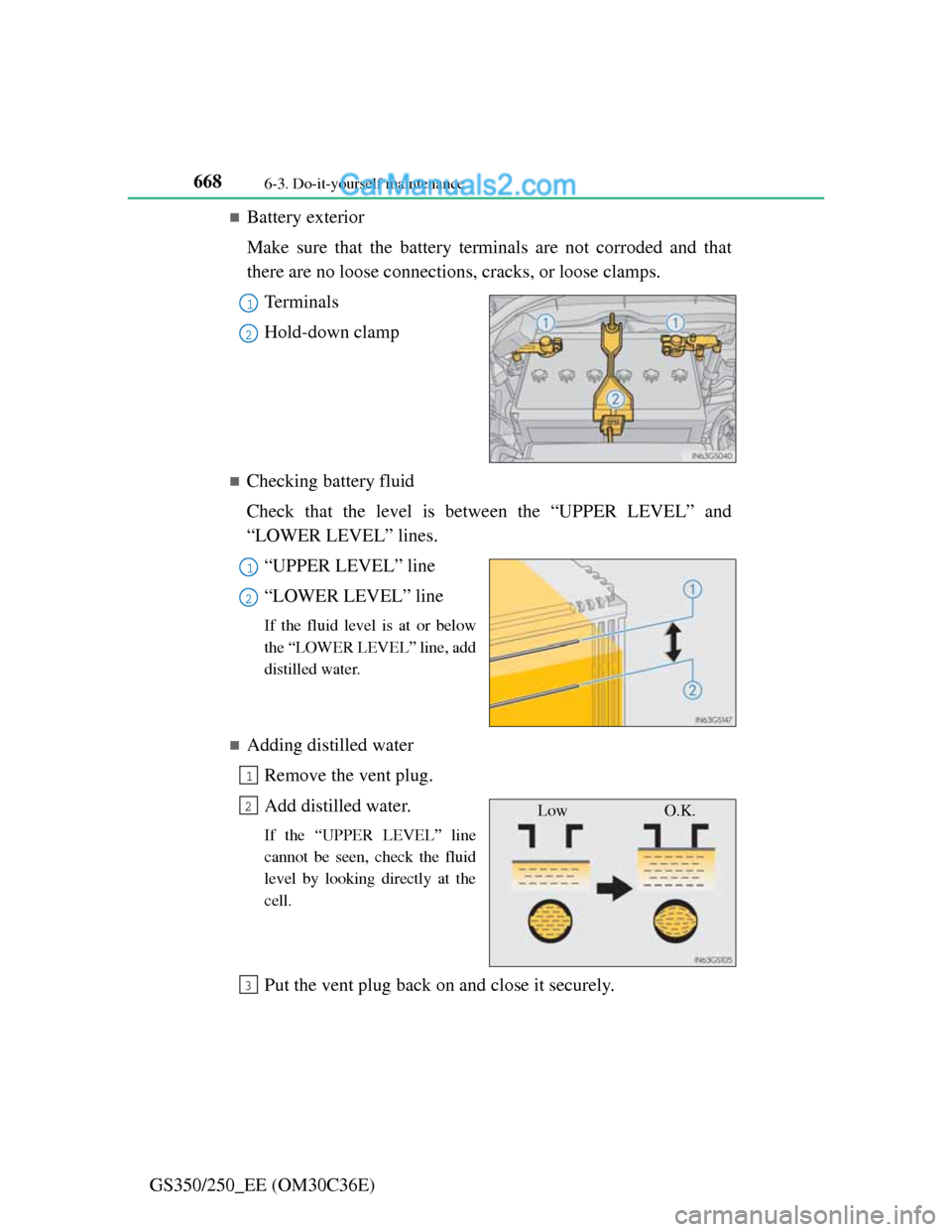
Battery exterior
Make sure that the battery terminals are not corroded and that
there are no loose connections, cracks, or loose clamps.
Te r m i n a l s
Hold-down clamp
Checking battery fluid
Check that the level is between the “UPPER LEVEL” and
“LOWER LEVEL” lines.
“UPPER LEVEL” line
“LOWER LEVEL” line
If the fluid level is at or below
the “LOWER LEVEL” line, add
distilled water.
Adding distilled water
Remove the vent plug.
Add distilled water.
If the “UPPER LEVEL” line
cannot be seen, check the fluid
level by looking directly at the
cell.
Put the vent plug back on and close it securely.
1
2
1
2
1
Low O.K.2
3
Page 724 of 914
7066-3. Do-it-yourself maintenance
GS350/250_EE (OM30C36E)
8MPX-B10
Smart entry & start system, electric tilt
and telescopic steering column, power
seats, head-up display, front right-hand
door ECU, gauges and meters, steering
sensor, yaw rate and G sensor, overhead
module, front left-hand door ECU,
power trunk lid, RR CTRL SW, clock,
body ECU, CAN gateway ECU
9DOME7.5
Personal lights, ornament lights, trunk
light, footwell lights, door courtesy
lights, vanity lights, rear door inside han-
dle illuminations, power trunk lid
10EPS80EPS
11ARS80No circuit
12HTR50Air conditioning system
13ABS NO.140VDIM
14LUG J/B ALT50Luggage compartment junction block
15PTC NO.150PTC heater
16PTC NO.250PTC heater
17ABS NO.250VDIM
18ST30Starting system
19H-LP LO30Headlights, H-LP RLY
20D/C CUT30DOME, MPX-B
21DCM7.5DCM
22ECU-B7.5Smart entry & start system
23ALT-S7.5Charging system
FuseAmpereCircuit
Page 727 of 914

709 6-3. Do-it-yourself maintenance
6
Maintenance and care
GS350/250_EE (OM30C36E)
16MPX-B10
Smart entry & start system, electric tilt
and telescopic steering column, power
seats, head-up display, front right-hand
door ECU, gauges and meters, steering
sensor, yaw rate and G sensor, overhead
module, front left-hand door ECU,
power trunk lid, clock, body ECU, RR
CTRL SW, CAN gateway ECU
17FILTER10Condenser
18A/C COMP7.5Air conditioning system
19H-LP CLN30Headlight cleaner
20FAN NO.240Electric cooling fans
21LH J/B ALT60Left-hand junction block
22FAN NO.180Electric cooling fans
23P/I-B NO.150H-LP HI RH, H-LP HI LH, DRL, emer-
gency brake signal
24EPB30Parking brake
25LUG J/B-B40Luggage compartment junction block
26R/B-B20EPS-B, TV
27HORN10Horn
28ETCS10Multiport fuel injection system/sequen-
tial multiport fuel injection system
29ALT-S7.5Charging system
30ECU-B7.5Smart entry & start system
31DCM7.5DCM
32D/C CUT30DOME, MPX-B
33ABS NO.250VDIM
34ST30Starting system
35H-LP LO30Headlights, H-LP RLY
FuseAmpereCircuit