Page 210 of 914

2064-1. Before driving
GS350/250_EE (OM30C36E)
Increasing vehicle-to-vehicle distance
At a speed of 10 km/h (6 mph), the distance to the vehicle run-
ning ahead of you should be equivalent to or greater than the
combined length of your vehicle and trailer. Avoid sudden brak-
ing that may cause skidding. Otherwise, the vehicle may spin out
of control. This is especially true when driving on wet or slippery
road surfaces.
Sudden acceleration/steering input/cornering
Executing sharp turns when towing may result in the trailer col-
liding with your vehicle. Decelerate well in advance when
approaching turns and take them slowly and carefully to avoid
sudden braking.
Important points regarding turning
The wheels of the trailer will travel closer to the inside of the
curve than the wheels of the vehicle. To make allowance for this,
take the turns wider than you would normally do.
Important points regarding stability
Vehicle movement resulting from uneven road surfaces and
strong crosswinds will affect handling. The vehicle may also be
rocked by passing buses or large trucks. Frequently check behind
when moving alongside such vehicles. As soon as such vehicle
movement occurs, immediately start to decelerate smoothly by
slowly applying the brakes. Always steer the vehicle straight
ahead while braking.
Passing other vehicles
Consider the total combined length of your vehicle and trailer
and ensure that the vehicle-to-vehicle distance is sufficient
before executing lane changes.
Transmission information
To maintain engine braking efficiency, when using engine brak-
ing, when driving on a long steep downgrade, do not use the
Page 217 of 914

2114-2. Driving procedures
4
Driving
GS350/250_EE (OM30C36E)
Auto power off function
If the vehicle is left in ACCESSORY mode for more than 20 minutes or
IGNITION ON mode (the engine is not running) for more than an hour with
the shift lever in P, the engine switch will automatically turn off. However,
this function cannot entirely prevent battery discharge. Do not leave the vehi-
cle with the engine switch in ACCESSORY or IGNITION ON mode for long
periods of time when the engine is not running.
Electronic key battery depletion
P. 1 3 4
Conditions affecting operation
P. 1 3 0
Notes for the entry function
P. 1 3 1
If the engine does not start
The engine immobilizer system may not have been deactivated. (P. 8 0 )
Contact any authorized Lexus dealer or repairer, or another duly qualified
and equipped professional.
Check that the shift lever is securely set in P. The engine may not start if the
shift lever is displaced out of P. “Shift to P position to Start” will be dis-
played on the multi-information display.
Steering lock
After turning the engine switch off and opening and closing the doors, the
steering wheel will be locked due to the steering lock function. Operating the
engine switch again automatically cancels the steering lock.
Page 237 of 914
2304-3. Operating the lights and wipers
GS350/250_EE (OM30C36E)AFS (Adaptive Front-lighting System) secures excellent visibility
at intersections and on curves by automatically adjusting the direc-
tion of the light axis of the headlights according to vehicle speed
and the degree of the tire’s angle as controlled by steering input.
AFS operates at speeds of 10 km/h (6 mph) or higher.
Deactivating AFS
Turn on the AFS OFF switch.
The indicator turns on when the
AFS is deactivated.
AFS (Adaptive Front-lighting System) (if equipped)
Page 246 of 914
239
4 4-3. Operating the lights and wipers
Driving
GS350/250_EE (OM30C36E)
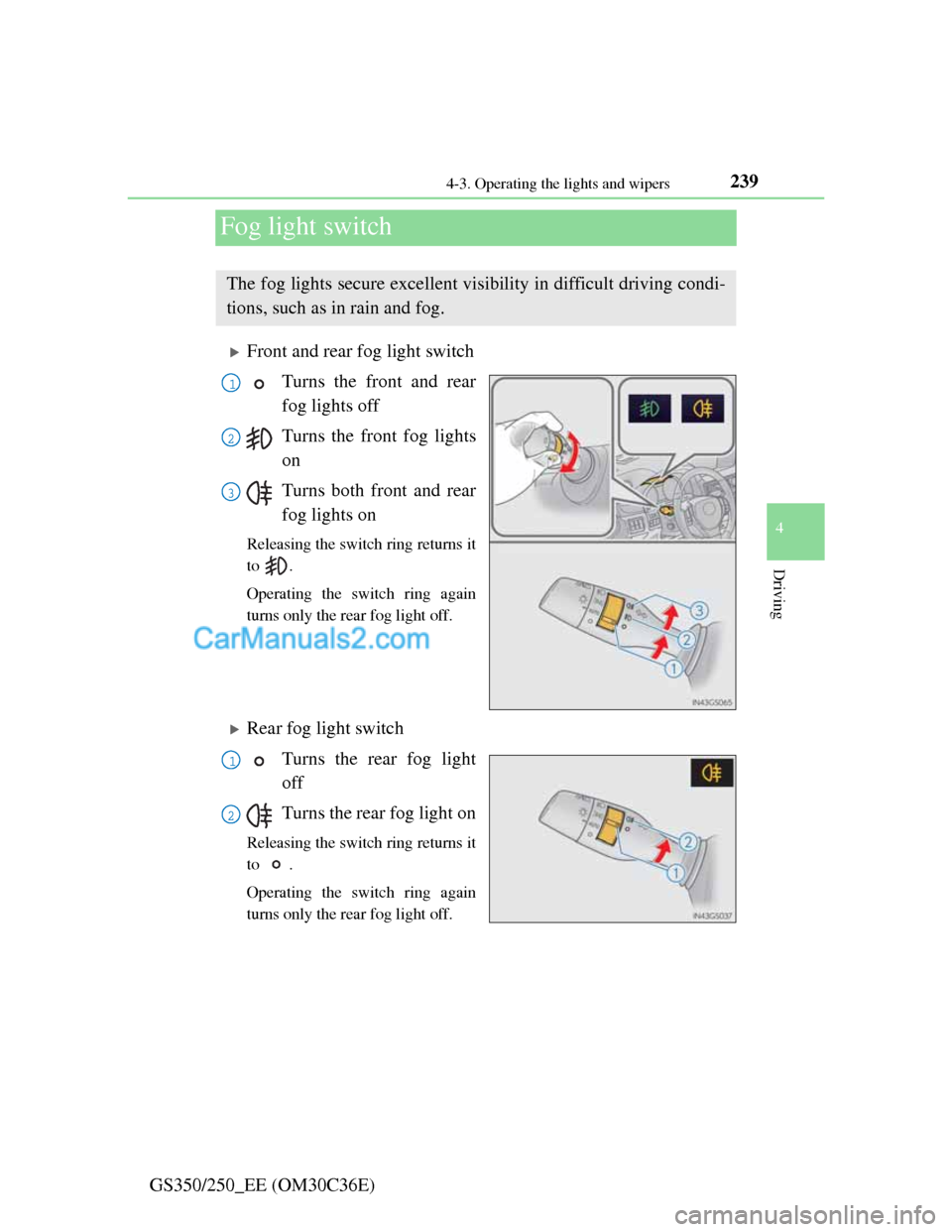
Fog light switch
Front and rear fog light switch
Turns the front and rear
fog lights off
Turns the front fog lights
on
Turns both front and rear
fog lights on
Releasing the switch ring returns it
to .
Operating the switch ring again
turns only the rear fog light off.
Rear fog light switch
Turns the rear fog light
off
Turns the rear fog light on
Releasing the switch ring returns it
to .
Operating the switch ring again
turns only the rear fog light off.
The fog lights secure excellent visibility in difficult driving condi-
tions, such as in rain and fog.
1
2
3
1
2
Page 257 of 914
2504-4. Refueling
GS350/250_EE (OM30C36E)
CAUTION
When refueling the vehicle
Observe the following precautions while refueling the vehicle. Failure to do
so may result in death or serious injury.
After exiting the vehicle and before opening the fuel door, touch an
unpainted metal surface to discharge any static electricity. It is important
to discharge static electricity before refueling because sparks resulting
from static electricity can cause fuel vapors to ignite while refueling.
Always hold the grips on the fuel tank cap and turn it slowly to remove it.
A whooshing sound may be heard when the fuel tank cap is loosened.
Wait until the sound cannot be heard before fully removing the cap. In hot
weather, pressurized fuel may spray out the filler neck and cause injury.
Do not allow anyone that has not discharged static electricity from their
body to come close to an open fuel tank.
Do not inhale vaporized fuel.
Fuel contains substances that are harmful if inhaled.
Do not smoke while refueling the vehicle.
Doing so may cause the fuel to ignite and cause a fire.
Do not return to the vehicle or touch any person or object that is statically
charged.
This may cause static electricity to build up, resulting in a possible igni-
tion hazard.
When refueling
Observe the following precautions to prevent fuel overflowing from the
fuel tank:
Securely insert the fuel nozzle into the fuel filler neck.
Stop filling the tank after the fuel nozzle automatically clicks off.
Do not top off the fuel tank.
NOTICE
Refueling
Do not spill fuel during refueling.
Doing so may damage the vehicle, such as causing the emission control
system to operate abnormally or damaging fuel system components or the
vehicle’s painted surface.
Page 364 of 914
3574-5. Using the driving support
4
Driving
GS350/250_EE (OM30C36E)
Conditions under which the Blind Spot Monitor system may not function cor-
rectly
The Blind Spot Monitor system may not detect vehicles correctly in the fol-
lowing conditions:
• During bad weather such as heavy rain, fog, snow etc.
• When ice or mud etc. is attached to the rear bumper
• When driving on a road surface that is wet due to rain, standing water
etc.
• When there is a significant difference in speed between your vehicle and
the vehicle that enters the detection area
• When a vehicle is in the detection area from a stop and remains in the
detection area as your vehicle accelerates
• When driving up or down consecutive steep inclines, such as hills, a dip
in the road etc.
• When multiple vehicles approach with only a small gap between each
vehicle
• When vehicle lanes are wide, and the vehicle in the next lane is too far
away from your vehicle
• When the vehicle that enters the detection area is traveling at about the
same speed as your vehicle
• When there is a significant difference in height between your vehicle and
the vehicle that enters the detection area
• Directly after the BSM switch is set to on
• When your vehicle is towing a trailer
Instances of the Blind Spot Monitor unnecessarily detecting a vehicle and/
or object may increase under the following conditions:
• When there is only a short distance between your vehicle and a guardrail,
wall etc.
• When there is only a short distance between your vehicle and a following
vehicle
• When vehicle lanes are narrow and a vehicle driving 2 lanes across from
your vehicle enters the detection area
The outside rear view mirror indicators visibility
When under strong sunlight, the outside rear view mirror indicator may be
difficult to see.
When there is a malfunction in the system
If a system malfunction is detected due to any of the following reasons,
warning messages will be displayed: (P. 762, 768)
There is a malfunction with the sensors
The sensors have become dirty
Page 418 of 914

4085-1. Remote Touch screen
GS350/250_EE (OM30C36E)
Speech command system
Commands that are not displayed in the “Shortcuts” screen can be operated
from the “Main menu” screen.
If the system does not respond or the confirmation screen does not disap-
pear, press and try again.
Speech guidance can be canceled by setting voice prompts to off. Use this
setting when it is desirable to say a command immediately after pressing
and hearing a beep.
If a speech command cannot be recognized
If a speech command cannot be recognized within 6 seconds, voice guid-
ance will say “Pardon?” (“Command not recognized.” will be displayed on
the screen) and speech command reception will restart.
If a speech command cannot be recognized 2 consecutive times, the speech
command guidance system will say “Paused. To restart voice recognition,
push the talk switch. To cancel voice recognition, push and hold the talk
switch.” Voice recognition will then be suspended. Select “Cancel” or “Go
back”, or press .
When selecting “Voice Prompts”
The voice recognition prompt can be set to on or off. This setting can also
be changed on the “Voice settings” screen. (P. 398)
Voice recognition will be temporarily suspended. Press again.
Page 572 of 914
5575-4. Using the hands-free phone system (for cellular phone)
5
Interior features
GS350/250_EE (OM30C36E)You can register up to 5 phones in the system.
Display the “Telephone” screen. (P. 556)
Select “Yes”.
If 5 Bluetooth® devices have
already been registered, a regis-
tered device needs to be deleted.
(P. 561)
Input the passcode dis-
played on the screen into
your phone.
For the operation of the phone,
see the manual that comes with
your cellular phone.
A passcode is not required for
SSP (Secure Simple Pairing)
compatible Bluetooth
® phones.
Depending on the type of Blue-
tooth
® phone being connected, a
message confirming registra-
tion may be displayed on the
Bluetooth
® phone’s screen.
Respond and operate the Blue-
tooth
® phone according to the
confirmation message.
If you want to cancel it, select
“Cancel”.
If a completion message is dis-
played, registration is complete.
Registering a Bluetooth® phone
1
2
3