Page 322 of 914
3154-5. Using the driving support
4
Driving
GS350/250_EE (OM30C36E)
Area displayed on screen
The parking assist monitor
displays an image of the view
from the bumper of the rear
area of the vehicle.
To adjust the image on the
parking assist monitor screen.
(P. 372)
• The area displayed on the screen
may vary according to vehicle
orientation conditions.
• Objects which are close to either
corner of the bumper or under
the bumper cannot be seen on
the screen.
• The camera uses a special lens.
The distance of the image that
appears on the screen differs
from the actual distance.
• Items which are located higher
than the camera may not be dis-
played by the monitor.
Lexus parking assist monitor precautions
Corners of bumper
Page 330 of 914

3234-5. Using the driving support
4
Driving
GS350/250_EE (OM30C36E)
Guide lines are not dis-
playedThe trunk lid is open.
Close the trunk lid.
If this does not resolve
the symptom, have the
vehicle inspected by
any authorized Lexus
dealer or repairer, or
another duly qualified
and equipped profes-
sional.
“System is initializ-
ing.” is displayed
• The battery has been
reinstalled.
• The steering wheel
has been moved
while the battery was
being reinstalled.
• Battery power is low.
• The steering sensor
has been reinstalled.
• There is a malfunc-
tion in the signals
being output by the
steering sensor.
Stop the vehicle, and
turn the steering wheel
as far as it will go to
the left and right.
If this does not resolve
the symptom, have the
vehicle inspected by
any authorized Lexus
dealer or repairer, or
another duly qualified
and equipped profes-
sional.
• On the system initial-
ization screen, select
the “?” button to dis-
play the operating
procedure.
SymptomLikely causeSolution
Page 332 of 914

3254-5. Using the driving support
4
Driving
GS350/250_EE (OM30C36E)
CAUTION
In low temperatures, the screen may darken or the image may become
faint. The image could distort when the vehicle is moving, or you may
become unable to see the image on the screen. Be sure to check direct
visually and with mirror all around the vehicle before proceeding.
If the tire sizes are changed, the position of the guide lines displayed on
the screen may change.
The camera uses a special lens. The distances between objects and pedes-
trians that appear in the image displayed on the screen will differ from the
actual distances. (P. 316)
When using the perpendicular parking assist screen
The position of the guide lines displayed on the screen may change in
accordance with the number of passengers, the amount of cargo etc. Be
sure to check behind and all around the vehicle direct visually and with
mirror before proceeding.
Estimated course line display mode: If the steering wheel is straight and
the vehicle width extension guide lines and the estimated course lines are
not in alignment, have the vehicle inspected by any authorized Lexus
dealer or repairer, or another duly qualified and equipped professional.
The vehicle width extension guide lines are wider than the actual width of
the vehicle. When backing up, be sure to check behind and all around the
vehicle direct visually and with mirror before proceeding.
When using the parallel parking assist screen
Do not use the system if the display is incorrect due to an uneven (curvy/
hilly) road or a non-straight road.
Make sure to operate the steering wheel only when the vehicle is stopped.
Be sure to check that there are no obstacles inside the blue outline.
If there are any obstacles inside the blue outline, do not use the parallel
parking assist.
When positioning the blue outline over the parking space, be sure to posi-
tion it so that the extended blue line may not cross the tire of the vehicle
parked in front of the empty space.
Page 335 of 914
3284-5. Using the driving support
GS350/250_EE (OM30C36E)
Driving mode select switch
Normal mode
For normal driving
Press the switch to change the driving mode to normal mode when
selected to Eco mode or sport mode.
Eco drive mode
Use Eco mode to help achieve low fuel consumption during trips
that involve frequent accelerating.
When the driving mode select switch is turned left, the “ECO MODE”
indicator comes on in the multi-information display.
The driving modes can be selected to suit driving condition.
Vehicles without AVS
1
2
Page 336 of 914
3294-5. Using the driving support
4
Driving
GS350/250_EE (OM30C36E)Sport mode
Improves acceleration response by controlling the transmission
and steering. Suitable for when precise handling is desirable, for
example when driving on mountain roads.
When the driving mode select switch is turned right, the “SPORT” indica-
tor comes on in the instrument cluster.
Also, on vehicles equipped with a
12.3-inch display, the driving
mode is also automatically dis-
played on the “Side Display”.
(P. 370)
3
Page 337 of 914
3304-5. Using the driving support
GS350/250_EE (OM30C36E)Normal mode
For normal driving.
Press the switch to change the driving mode to normal mode when
selected to Eco mode or sport mode.
Eco drive mode
Use Eco mode to help achieve low fuel consumption during trips
that involve frequent accelerating.
When the driving mode select switch is turned left, the “ECO MODE”
indicator comes on in the multi-information display.
Vehicles with AVS
1
2
Page 338 of 914

331
4 4-5. Using the driving support
Driving
GS350/250_EE (OM30C36E)Sport mode
• SPORT S mode
Improves acceleration response by controlling the transmis-
sion. Suitable for when precise handling is desirable, for
example when driving on mountain roads.
When the driving mode select switch is turned right while a made other
than SPORT S mode is selected, the “SPORT S” indicator comes on in
the instrument cluster.
Also, on vehicles equipped with
a 12.3-inch display, the driving
mode is also automatically dis-
played on the “Side Display”.
(P. 370)
• SPORT S+ mode
Improves steering performance and driving stability by simul-
taneously controlling the steering and suspension in addition
to the transmission. Suitable for sporty driving.
When the driving mode select switch is turned right while SPORT S
mode is selected, the “SPORT S+” indicator comes on in the instrument
cluster.
Also, on vehicles equipped with
a 12.3-inch display, the driving
mode is also automatically dis-
played on the “Side Display”.
(P. 370)
3
Page 343 of 914
3364-5. Using the driving support
GS350/250_EE (OM30C36E)
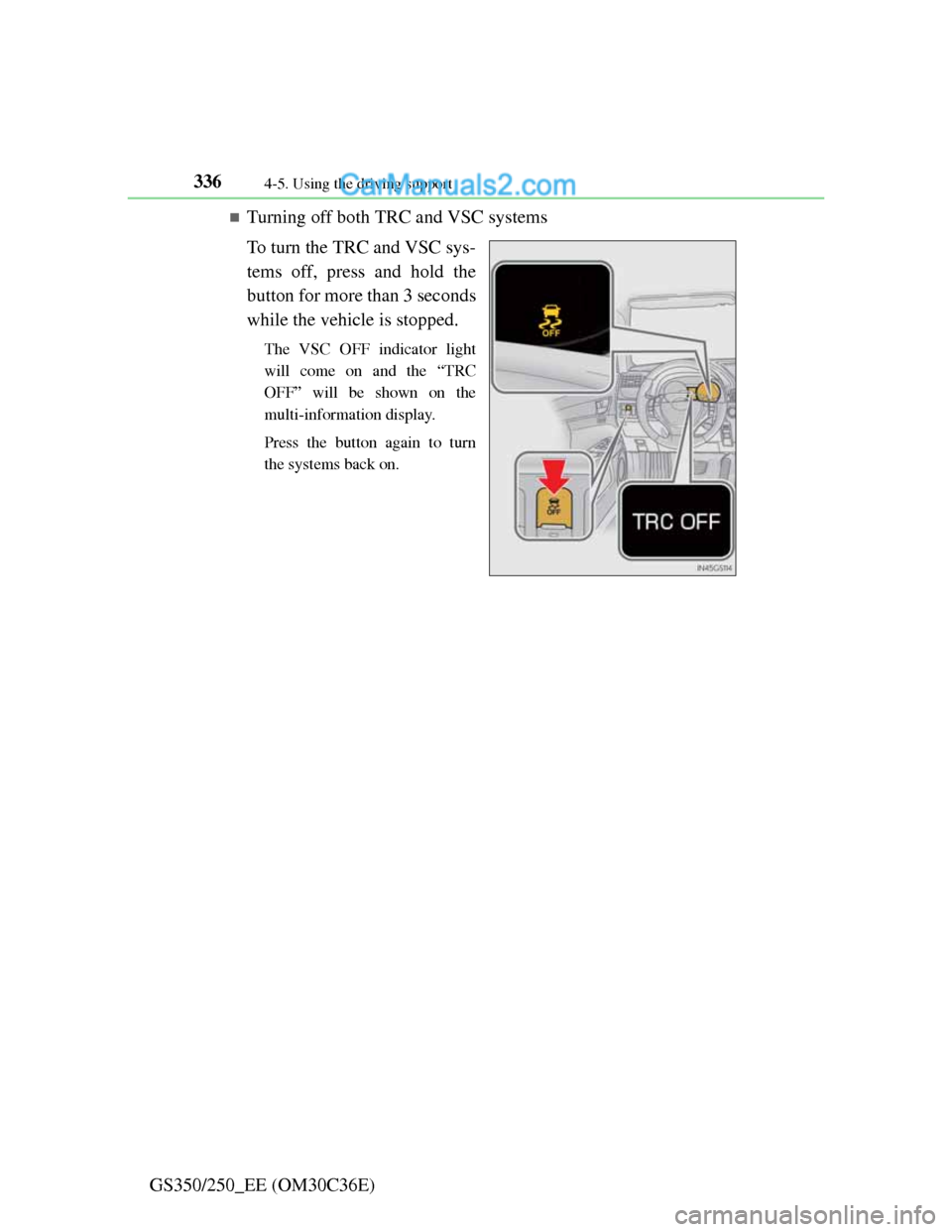
Turning off both TRC and VSC systems
To turn the TRC and VSC sys-
tems off, press and hold the
button for more than 3 seconds
while the vehicle is stopped.
The VSC OFF indicator light
will come on and the “TRC
OFF” will be shown on the
multi-information display.
Press the button again to turn
the systems back on.