Page 287 of 914

2804-5. Using the driving support
GS350/250_EE (OM30C36E)
After the vehicle has been parked in the sun
The LKA system functions may not be available and a warning message
(P. 767) will be displayed for a while after driving has started. In such
cases, turn the LKA system off and turn it on again after normal temperature
returns. When the temperature in the cabin decreases and the temperature
around the camera sensor (P. 274) becomes suitable for its operation, the
functions will begin to operate.
If there are lane markers on only one side of the vehicle
The lane keeping assist function will not operate. Also, the lane departure
warning will not operate for the side on which lane markers could not be rec-
ognized.
Conditions in which the function may not operate correctly
In the following conditions, the LKA system functions may not operate, or it
may not be possible to ensure adequate performance. Also, the camera sensor
may be unable to recognize lane lines causing the lane departure warning
function to operate incorrectly, or the lane keeping assist function may not
operate properly. However, this does not indicate a malfunction.
When driving through an area with no lane markers, such as a tollbooth, a
crossing or before a ticket checkpoint
When driving on a sharp curve
When lanes are extremely narrow or extremely wide
When the vehicle leans to one side an unusual amount due to a heavy load
or improper tire inflation pressure
When the following distance between your vehicle and the vehicle ahead is
extremely short
When the lane markers are yellow (These may be more difficult for the sys-
tem to recognize compared to white markers.)
When the lane markers are broken, “Raised pavement marker” or stones
When lane markers are obscured or partially obscured by sand, dirt, etc.
When there are shadows on the road running parallel with lane markers, or
if a shadow covers the lane markers
When driving on a particularly bright road surface, such as concrete
When driving on a road surface that is bright due to reflected light
When driving in a location where the light level changes rapidly, such as the
entrance to or exit from a tunnel
When sunlight or the headlights of oncoming vehicles are shining directly
into the camera lens
Page 291 of 914
2844-5. Using the driving support
GS350/250_EE (OM30C36E)
Lexus parking assist-sensor
Types of sensors
: If equipped
The distance from your vehicle to nearby obstacles when parallel
parking or maneuvering into a garage is measured by the sensors
and communicated via the multi-information display, Remote
Touch screen and a buzzer. Always check the surrounding area
when using this system.
Front center sensors
Front corner sensors
Rear corner sensors
Rear center sensors1
2
3
4
Page 293 of 914
2864-5. Using the driving support
GS350/250_EE (OM30C36E)When the sensors detect an obstacle, a graphic is shown on the
multi-information display and Remote Touch screen depending on
the position and distance to the obstacle.
Multi-information display
Front corner sensor detec-
tion
Front center sensor detec-
tion
Rear corner sensor detection
Rear center sensor detection
Display
1
2
3
4
Page 294 of 914
2874-5. Using the driving support
4
Driving
GS350/250_EE (OM30C36E)
Remote Touch screen
For 8-inch display
When the parking assist
monitor system is not dis-
played
A graphic is automatically dis-
played when an obstacle is
detected. The screen can be set
so that the graphic is not dis-
played. (P. 292)
When the rear view monitor
system is displayed (insert
display)
A simplified image is displayed
on the right upper corner of the
Remote Touch screen when an
obstacle is detected.
For 12.3-inch display
A graphic will be shown on
the side display
A graphic is automatically dis-
played when an obstacle is
detected. The screen can be set
so that the graphic is not dis-
played. (P. 292)
1
2
Page 295 of 914
2884-5. Using the driving support
GS350/250_EE (OM30C36E)
Front center sensor
Sensor detection display, obstacle distance
Approximate
distance to obsta-
cleMulti-
information
display
Remote Touch screen
8-inch
display
8-inch
display
(insert
display)
12.3-inch
display
100 cm (3.3 ft.) to
50 cm (1.6 ft.)
(continuous)(continuous)(blinking
slowly)(continuous)
50 cm (1.6 ft.) to
37.5 cm (1.2 ft.)
(continuous)(continuous)(blinking)(continuous)
37.5 cm (1.2 ft.)
to
30 cm (1.0 ft.)
(continuous)(continuous)(blinking
rapidly)(continuous)
Less than
30 cm (1.0 ft.)
(blinking)(continuous)(continuous)(continuous)
Page 296 of 914
2894-5. Using the driving support
4
Driving
GS350/250_EE (OM30C36E)
Corner sensors
Approximate
distance to obsta-
cleMulti-
information
display
Remote Touch screen
8-inch
display
8-inch
display
(insert
display)
12.3-inch
display
60 cm (2.0 ft.) to
45 cm (1.5 ft.)
(continuous)(continuous)(blinking)(continuous)
45 cm (1.5 ft.) to
30 cm (1.0 ft.)
(continuous)(continuous)(blinking
rapidly)(continuous)
Less than
30 cm (1.0 ft.)
(blinking)(continuous)(continuous)(continuous)
Page 297 of 914
2904-5. Using the driving support
GS350/250_EE (OM30C36E)
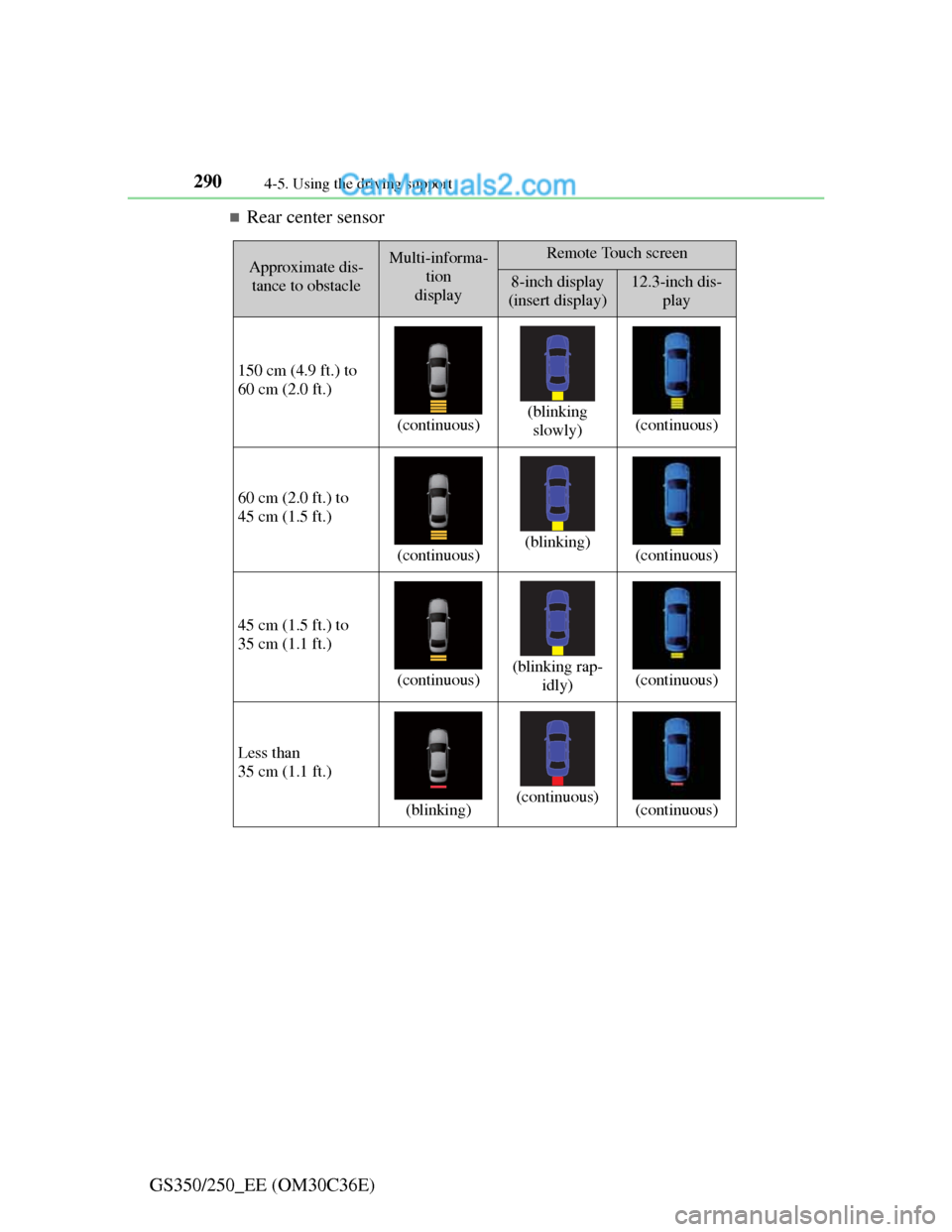
Rear center sensor
Approximate dis-
tance to obstacleMulti-informa-
tion
displayRemote Touch screen
8-inch display
(insert display)12.3-inch dis-
play
150 cm (4.9 ft.) to
60 cm (2.0 ft.)
(continuous)(blinking
slowly)(continuous)
60 cm (2.0 ft.) to
45 cm (1.5 ft.)
(continuous)(blinking)(continuous)
45 cm (1.5 ft.) to
35 cm (1.1 ft.)
(continuous)(blinking rap-
idly)(continuous)
Less than
35 cm (1.1 ft.)
(blinking)(continuous)(continuous)
Page 299 of 914
2924-5. Using the driving support
GS350/250_EE (OM30C36E)You can change the warning beep volume and Remote Touch
screen operating conditions.
Press the “MENU” button on the Remote Touch. (P. 368)
Select “Setup” on the “Menu” screen.
Select “Vehicle” on the “Setup” screen.
Select “Lexus park assist” on the “Vehicle settings” screen.
Alert volume setting
Display on/off
Alert distance setting
Make sure to save after changing
settings.
Setting up Lexus parking assist-sensor
1
2
3
4
1
2
3