2012 INFINITI G-COUPE AUX
[x] Cancel search: AUXPage 240 of 490

When the DISC·AUX or DISC button is
pushed with the CD loaded and the radio
playing, the radio will automatically be
turned off and the CD will start to play.
Menu (models with navigation system):
When the“Menu”key on the display is
selected while the CD is being played, the
menu screen will be displayed. The follow-
ing menu options are available.
. Folder List (for CD with compressed
audio files)
Displays the folder list.
. Track List
Displays the track list.
. Play Mode
Select a play mode from the following
items.
— Normal
— 1 Folder Repeat (for CD with com-
pressed audio files)
— 1 Track Repeat
— 1 Disc Random
— 1 Folder Random (for CD with
compressed audio files)
. Record to Music Box
®(for CD)
Select to choose specific songs on the
CD to record to the Music Box
®. .
Title Text Priority (for CD)
Set the priority to CDDB (Compact Disc
Data Base) to acquire track information
from the Gracenote Database, or set
the priority to CD-TEXT to acquire the
information from CDs.
. Automatic Recording (for CD)
When this item is turned to ON, the
Music Box
®hard drive/flash memory
automatically starts recording when a
CD is inserted.
. Recording Quality (for CD)
The larger number (132) will increase
the recorded sound quality while taking
up more space on the Music Box
®
leaving less room for more songs.
For the details of Music Box®, see “Music
Box®” (P.4-77).
Text (models without navigation system):
When the “Text”key is selected in the
screen using the INFINITI controller and
then the ENTER button is pushed while the
CD is being played, the music information
below will be displayed on the screen.
CD:
. Disc title
. Track title CD with compressed audio files:
.
Folder title
. File title
. Song title
. Album title
. Artist
Next/Previous Track and Fast
Forward/Rewind:
When the
orbutton is pushed for
more than 1.5 seconds while the CD is
being played, the CD will play while fast
forwarding or rewinding. When the button
is released, the CD will return to normal
play speed.
When the
orbutton is pushed for
less than 1.5 seconds while the CD is being
played, the next track or the beginning of
the current track on the CD will be played.
When the REW button is pushed for less
than 1.5 seconds within 3 seconds after
the current track started playing, the
previous track will be played.
When the REW button is pushed for less
than 1.5 seconds after 3 seconds from
when the current track started playing, the
beginning of the current track will be
played.
Monitor, climate, audio, phone and voice recognition systems4-61
Page 242 of 490
player does not guarantee complete
functionality of all VIDEO-CD formats.
Display settings
To adjust the front display mode, push the
SETTING button while the DVD is being
played, select the“Others”key and then
select the “Display”key.
To adjust the display ON/OFF, brightness,
tint, color and contrast, select the “Display
Adjustment” key and then select each key.
Then you can adjust each item using the
INFINITI controller. After changes have
been made push the BACK button to save
the setting.
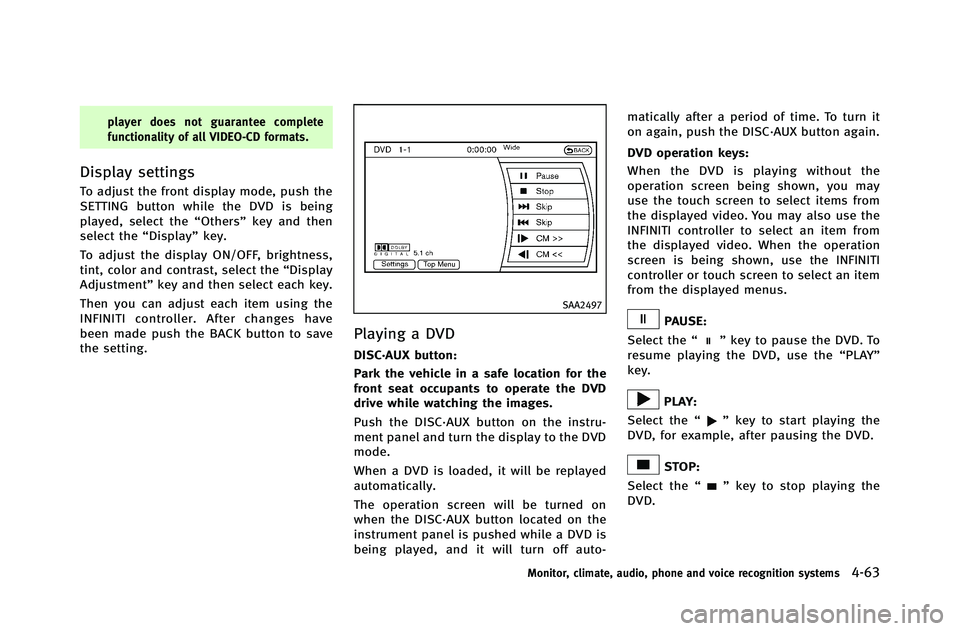
SAA2497
Playing a DVD
DISC·AUX button:
Park the vehicle in a safe location for the
front seat occupants to operate the DVD
drive while watching the images.
Push the DISC·AUX button on the instru-
ment panel and turn the display to the DVD
mode.
When a DVD is loaded, it will be replayed
automatically.
The operation screen will be turned on
when the DISC·AUX button located on the
instrument panel is pushed while a DVD is
being played, and it will turn off auto- matically after a period of time. To turn it
on again, push the DISC·AUX button again.
DVD operation keys:
When the DVD is playing without the
operation screen being shown, you may
use the touch screen to select items from
the displayed video. You may also use the
INFINITI controller to select an item from
the displayed video. When the operation
screen is being shown, use the INFINITI
controller or touch screen to select an item
from the displayed menus.
PAUSE:
Select the “
”key to pause the DVD. To
resume playing the DVD, use the “PLAY”
key.
PLAY:
Select the “
”key to start playing the
DVD, for example, after pausing the DVD.
STOP:
Select the “
”key to stop playing the
DVD.
Monitor, climate, audio, phone and voice recognition systems4-63
Page 245 of 490

4-66Monitor, climate, audio, phone and voice recognition systems
USB INPUT OPERATION (if so
equipped)
Audio main operation
Open the console lid and connect a USB
memory
*1as illustrated. Then, push the
DISC·AUX or AUX button repeatedly to
switch to the USB memory mode.
If the system has been turned off while the
USB memory was playing, pushing the
ON·OFF/VOL control knob will start the USB
memory.
SAA2500
File selection (models with naviga-
tion system)
When there are both audio and movie files
in the USB memory, the mode select
screen is displayed. Select the preferred
contents to play.
When there is only one type of file, the
audio or movie operation screen is dis-
played and starts to play.
If a video file restricts the number of
playbacks, a pop-up screen will appear to
confirm it is ok to play. Answer yes or no as
requested by the display.
SAA2501
Models with navigation system
SAA2611
Models without navigation system
Page 246 of 490

Audio file operation
orPLAY:
When the DISC·AUX or AUX button is
pushed with the system off and the USB
memory inserted, the system will turn on.
If another audio source is playing and a
USB memory is inserted, push the
DISC·AUX or AUX button repeatedly until
the center display changes to the USB
memory mode.
Next/Previous File and Fast
Forward/Rewind:
When the
orbutton is pushed for
more than 1.5 seconds while a USB
memory is being played, the USB memory
will play while forwarding or rewinding.
When the button is released, the USB
memory will return to normal play speed.
When the
orbutton is pushed for
less than 1.5 seconds while the USB
memory is being played, the next track or
the beginning of the current track on the
USB memory will be played.
When the REW button is pushed for less
than 1.5 seconds within 3 seconds after
the current track started playing, the previous track will be played.
When the REW button is pushed for less
than 1.5 seconds after 3 seconds from
when the current track started playing, the
beginning of the current track will be
played.
The INFINITI controller can also be used to
select tracks when the USB memory is
being played.
Folder selection:
To change to another folder in the USB
memory, turn the folder selector or choose
a folder displayed on the screen using the
INFINITI controller.
REPEAT (RPT), RANDOM (RDM):
When the RPT button is pushed while the
USB memory is played, the play pattern
can be change as follows.
To change the play mode, push the RPT
button repeatedly and the mode will
change as follows.
Normal ?1 Folder Repeat ?1 Track
Repeat ?All Random ?1 Folder Random
? Normal Text (models without navigation system):
When the “Text”key is selected on the
screen using the INFINITI controller and
then the ENTER button is pushed while a
USB memory is being played, the music
information listed below will be displayed
on the screen.
. Folder title
. File title
. Song title
. Album Title
. Artist
Monitor, climate, audio, phone and voice recognition systems4-67
Page 247 of 490

4-68Monitor, climate, audio, phone and voice recognition systems
SAA2502
Menu (models with navigation system):
There are some options available during
playback. Select one of the following
options that are displayed on the screen
if necessary. Refer to the following infor-
mation for each item.
.Movie Playback
Switch to the movie playback mode.
This item is displayed only when a USB
memory contains movie files.
. Folder List/Track List
Displays the folder or track list. The
“Movie Playback” key is also displayed
in this list screen, and enables switch- ing to the movie playback mode.
. Play Mode
Select the preferred play mode.
SAA2503
Movie file operation (models with
navigation system)
Park the vehicle in a safe location for the
front seat occupants to operate the USB
memory while watching the images.
PLAY:
When the DISC·AUX button is pushed with
the system off and the USB memory
inserted, the system will turn on.
If another audio source is playing and a
USB memory is inserted, push the
DISC·AUX button repeatedly until the cen-
ter display changes to the USB memory
Page 252 of 490

SAA2510
Audio main operation
Push the ignition switch to the ACC or ON
position. Then, push the DISC·AUX button
repeatedly to switch to the Bluetooth
®
audio mode. If the system has been turned
off while the Bluetooth®audio device was
playing, pushing the ON·OFF/VOL control
knob will start the Bluetooth
®audio
device.
The ability to pause, change tracks, fast
forward, rewind, randomize and repeat
music may be different between devices.
Some or all of these functions may not be
supported on each device.
DISC·AUX button:
When the DISC·AUX button is pushed with
the system off and the Bluetooth
®audio
device connected, the system will turn on.
If another audio source is playing and the
Bluetooth
®audio device is connected,
push the DISC·AUX button repeatedly until
the display changes to the Bluetooth
®
audio mode.
Next/Previous Track and Fast
Forward/Rewind:
When the
orbutton is pushed for
more than 1.5 seconds while a Bluetooth®
audio file is being played, the Bluetooth®
audio device will play while forwarding or
rewinding. When the button is released,
the Bluetooth
®audio device will return to
normal play speed.
When the
orbutton is pushed for
less than 1.5 seconds while a Bluetooth®
audio file is being played, the next track or
the beginning of the current track on the
Bluetooth
®audio device will be played.
The INFINITI controller can also be used to
select tracks when the Bluetooth
®audio
play mode screen is shown on the display.
(“Bluetooth audio” will be indicated on the header of the screen.)
REPEAT (RPT), RANDOM (RDM):
To change the play mode, push the
button repeatedly and the mode changes
as follows.
Normal ?Shuffle All Tracks ?Shuffle
Group ?Repeat 1 Track ?Repeat All
Tracks ?Repeat Group ?Normal
Operation keys: To operate a Bluetooth
®audio device,
select a key displayed on the operation
screen using the INFINITI controller.
Play
Select the “
”key to start playing when
pausing. Select this key again to pause the
audio play.
Pause
Select the “
”key to pause the Blue-
tooth®audio device. Select this key again
to resume playing.
Play Mode:
The play mode setting display will appear
when the “Menu”key is selected.
Choose the preferred play mode from the
Monitor, climate, audio, phone and voice recognition systems4-73
Page 255 of 490

4-76Monitor, climate, audio, phone and voice recognition systems
.Second generation iPod touch®(version
1.2.3 or later)
. First generation iPod nano
®(version
1.3.1 or later)
. Second generation iPod nano
®(version
1.1.3 or later)
. Third generation iPod nano
®(version
1.1 or later)
. Fourth generation iPod nano
®(version
1.0.2 or later)
Models without navigation system:
. Fifth generation iPod
®(firmware ver-
sion 1.3)
. First generation iPod Classic
®(firmware
version 1.1.2 PC)
. Second generation iPod Classic
®(firm-
ware version 2.0 PC)
. First generation iPod touch
®(firmware
version 2.1)
. Second generation iPod touch
®(firm-
ware version 2.1.1)
. First generation iPod nano
®(firmware
version 1.3.1)
. Second generation iPod nano
®(firm-
ware version 1.1.3)
. Third generation iPod nano
®(firmware
version 1.1 PC) .
Third generation iPhone
®(firmware
version 2.1)
Make sure that the iPod
®version is
updated.
Audio main operation
Push the ignition switch to the ACC or ON
position. Then, push the DISC·AUX or DISC
button repeatedly to switch to the iPod
®
mode.
If the system has been turned off while the
iPod
®was playing, pushing the ON·OFF
button will start the iPod®.
orPLAY:
When the DISC·AUX or AUX button is
pushed with the system off and the iPod
®
connected, the system will turn on. If
another audio source is playing and the
iPod
®is connected, push the DISC·AUX or
AUX button repeatedly until the center
display changes to the iPod
®mode.
Interface:
The interface for iPod
®operation shown on
the vehicle center display is similar to the
iPod
®interface. Use the INFINITI controller
and the ENTER or BACK button to play the
iPod
®with your favorite settings. The following items can be chosen from the
menu list screen. For further information
about each item, see the iPod
®Owner’s
Manual.
. Now Playing
. Playlists
. Artists
. Albums
. Songs
. Podcasts
. Genres
. Composers
. Audiobooks
. Shuffle Songs
The following touch-panel buttons shown
on the screen are also available:
.
: returns to the previous screen.
.
: plays/pauses the music selected.
Next/Previous Track and Fast
Forward/Rewind:
When the
orbutton is pushed for
more than 1.5 seconds while the iPod®is
playing, the iPod®will play while fast
forwarding or rewinding. When the button
is released, the iPod
®will return to the
normal play speed.
Page 259 of 490

4-80Monitor, climate, audio, phone and voice recognition systems
Playing recorded songs
Select the Music Box®audio system by
using one of the following methods.
. Push the audio source switch on the
steering wheel repeatedly until the
center display changes to the Music
Box
®mode. (See “Steering-wheel-
mounted controls for audio” (P.4-87).)
. Push the DISC·AUX or DISC button
repeatedly until the center display
changes to the Music Box
®mode.
. Give voice commands (models with
navigation system). (See “INFINITI Voice
Recognition system (models with navi-
gation system)” (P.4-114).)
Stopping playback:
The system stops playing when: a. another mode (radio, CD, DVD, USB memory or iPod) is selected.
b. the audio system is turned off.
c. the ignition switch is pushed to the LOCK position.
Next/Previous Track and Fast
Forward/Rewind:
When the
orbutton is pushed for
more than 1.5 seconds while a track is being played, the track will play while fast
forwarding or rewinding. When the button
is released, the track will return to the
normal play speed.
When the
orbutton is pushed for
less than 1.5 seconds while a track is
being played, the next track or the begin-
ning of the current track will be played.
When the REW button is pushed for less
than 1.5 seconds within 3 seconds after
the current track started playing, the
previous track will be played.
When the REW button is pushed for less
than 1.5 seconds after 3 seconds from
when the current track started playing, the
beginning of the current track will be
played.
The INFINITI controller can also be used to
select tracks when a track is being played.
Play mode selection:
The TUNE/FOLDER knob will skip from
album to album unless it is playing “All
Songs” from the Music Library menu. When
playing “All Songs”, the knob will change
the track instead of the album. The upper
right corner of the main screen will indicate
if the TUNE knob is changing by track or
album.
REPEAT (RPT), RANDOM (RDM):
When the RPT·RDM button is pushed while
a track is being played, the play pattern
can be changed as follows:
(Normal) ?1 Album Repeat ?1 Track
Repeat ?1 Album Random ?All Random
? (Normal)
Tag Track (models with navigation sys-
tem):
Select “Tag Track” key on the screen when
a track is being played. A menu will show
the 5 available playlists. Select one of the
playlists to add the current song to that
playlist. If a playlist is not selectable (text
is grayed out), it means the song already
exists in that playlist.