2012 HYUNDAI VELOSTER smart key
[x] Cancel search: smart keyPage 94 of 385
415
Features of your vehicle
THEFT-ALARM SYSTEM (IF EQUIPPED)
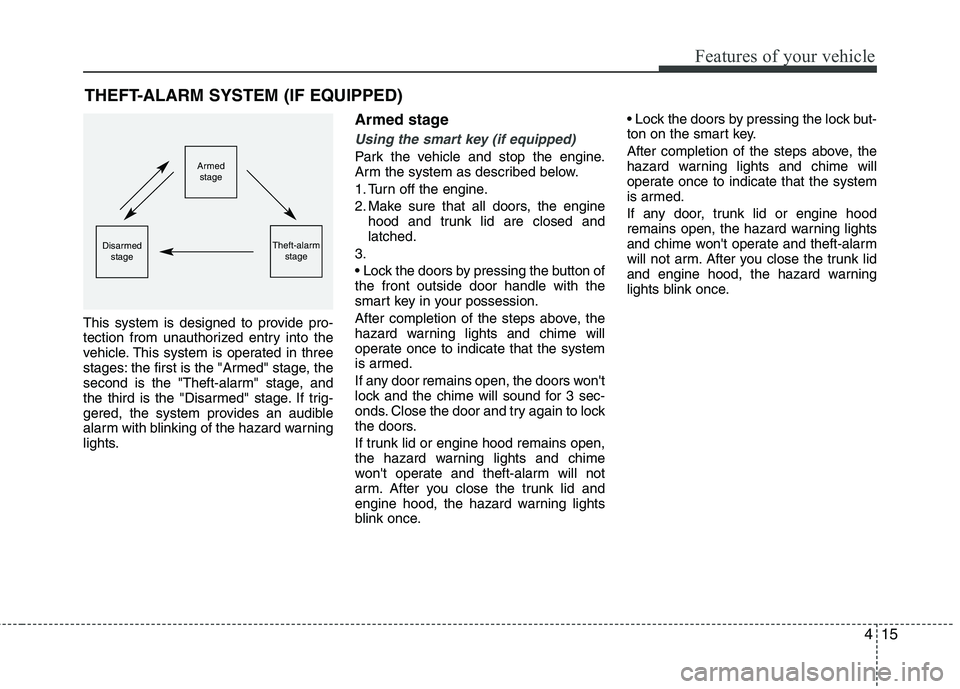
This system is designed to provide pro-
tection from unauthorized entry into the
vehicle. This system is operated in three
stages: the first is the "Armed" stage, the
second is the "Theft-alarm" stage, and
the third is the "Disarmed" stage. If trig-
gered, the system provides an audible
alarm with blinking of the hazard warning
lights.
Armed stage
Using the smart key (if equipped)
Park the vehicle and stop the engine.
Arm the system as described below.
1. Turn off the engine.
2. Make sure that all doors, the engine
hood and trunk lid are closed and
latched.
3.
the front outside door handle with the
smart key in your possession.
After completion of the steps above, the
hazard warning lights and chime will
operate once to indicate that the system
is armed.
If any door remains open, the doors won't
lock and the chime will sound for 3 sec-
onds. Close the door and try again to lock
the doors.
If trunk lid or engine hood remains open,
the hazard warning lights and chime
won't operate and theft-alarm will not
arm. After you close the trunk lid and
engine hood, the hazard warning lights
blink once.
ton on the smart key.
After completion of the steps above, the
hazard warning lights and chime will
operate once to indicate that the system
is armed.
If any door, trunk lid or engine hood
remains open, the hazard warning lights
and chime won't operate and theft-alarm
will not arm. After you close the trunk lid
and engine hood, the hazard warning
lights blink once.Armed
stage
Theft-alarm
stageDisarmed
stage
Page 96 of 385
417
Features of your vehicle
Theft-alarm stage
The alarm will be activated if any of the
following occurs while the system is
armed.
A door is opened without using the
transmitter (or smart key or mechani-
cal key).
The trunk is opened without using the
transmitter (or smart key).
The engine hood is opened.
The horn will sound and the hazard
warning lights will blink continuously for
approximately 30 seconds. The alarm will
repeat once more unless the system is
disarmed. To turn off the system, unlock
the doors with the mechanical key or
transmitter or smart key.
Opening the trunk with the alarm
armed (if equipped)
When the alarm is armed, the alarm will
not sound if the trunk lid is opened with
the transmitter (or smart key).
Once the trunk is opened and then
closed, the trunk will be locked automati-
cally and the system will be armed again.
Also, if any of the doors or hood is
opened while the trunk lid is open and
the alarm is armed, the alarm will sound.
Disarmed stage
Using the smart key (if equipped)
The system will be disarmed when the
doors are unlocked by pressing the
unlock button on the smart key or press-
ing the lock/unlock button of the front out-
side door handle with the smart key in
your possession.
After unlocking the doors, the hazard
warning lights and chime will operate
twice to indicate that the system is dis-
armed.
After unlocking the doors, if any door is
not opened within 30 seconds, the sys-
tem will be rearmed.
Using the transmitter (if equipped)
The system will be disarmed when the
doors are unlocked by pressing the
unlock button on the transmitter.
After unlocking the doors, the hazard
warning lights will blink twice to indicate
that the system is disarmed.
After unlocking the doors, if any door is
not opened within 30 seconds, the sys-
tem will be rearmed.
Page 98 of 385
419
Features of your vehicle
Operating door locks from out-
side the vehicle
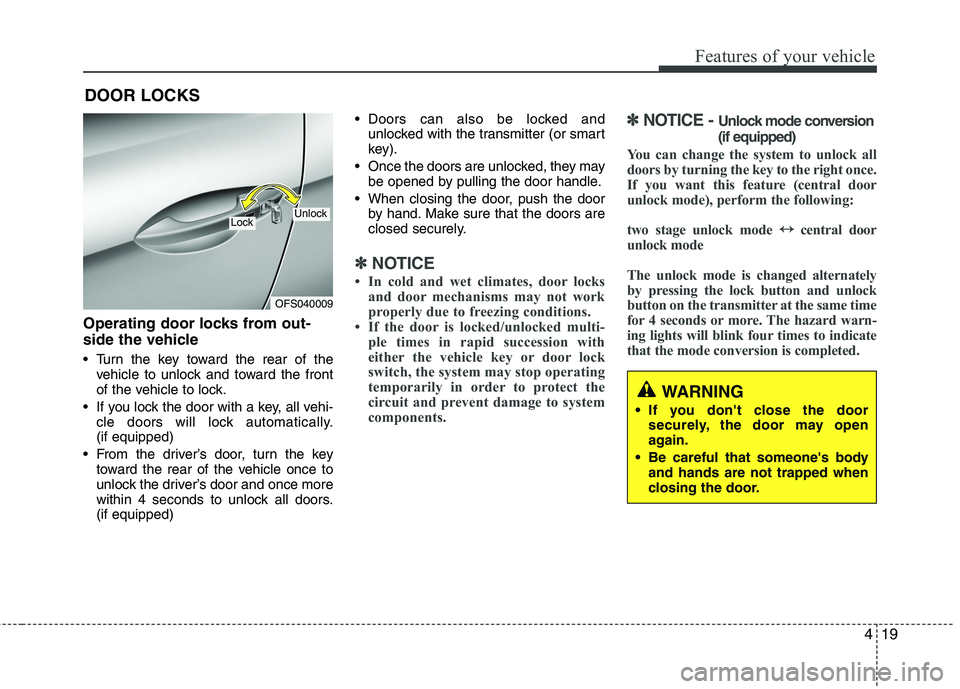
Turn the key toward the rear of the
vehicle to unlock and toward the front
of the vehicle to lock.
If you lock the door with a key, all vehi-
cle doors will lock automatically.
(if equipped)
From the driver’s door, turn the key
toward the rear of the vehicle once to
unlock the driver’s door and once more
within 4 seconds to unlock all doors.
(if equipped) Doors can also be locked and
unlocked with the transmitter (or smart
key).
Once the doors are unlocked, they may
be opened by pulling the door handle.
When closing the door, push the door
by hand. Make sure that the doors are
closed securely.
✽ ✽
NOTICE
• In cold and wet climates, door locks
and door mechanisms may not work
properly due to freezing conditions.
• If the door is locked/unlocked multi-
ple times in rapid succession with
either the vehicle key or door lock
switch, the system may stop operating
temporarily in order to protect the
circuit and prevent damage to system
components.
✽ ✽
NOTICE - Unlock mode conversion
(if equipped)
You can change the system to unlock all
doors by turning the key to the right once.
If you want this feature (central door
unlock mode), perform the following:
two stage unlock mode ↔ ↔
central door
unlock mode
The unlock mode is changed alternately
by pressing the lock button and unlock
button on the transmitter at the same time
for 4 seconds or more. The hazard warn-
ing lights will blink four times to indicate
that the mode conversion is completed.
DOOR LOCKS
WARNING
If you don't close the door
securely, the door may open
again.
Be careful that someone's body
and hands are not trapped when
closing the door.
OFS040009
UnlockLock
Page 99 of 385

Features of your vehicle
20 4
In case of an emergency
If the power door lock switch does not
operate electrically, the only way to lock
the door(s) is with the ignition key from
the outside key hole.
Doors without the outside key hole, you
can lock the door as follows:
1. Open the door.
2. Lock doors by pushing each lock but-
ton.
3. Close the door securely.
Once the tailgate is closed when the
power door lock switch does not operate
electrically, you will not be able to open
the tailgate.
✽ ✽
NOTICE
Always remove the ignition key, engage
the parking brake, close all windows
and lock all doors when leaving your
vehicle unattended.
Operating door locks from inside
the vehicle
With the door lock button
To unlock a door, push the door lock
button (1) to the “Unlock” position. The
red mark (2) on the button will be visi-
ble.
To lock a door, push the door lock but-
ton (1) to the “Lock” position. If the door
is locked properly, the red mark (2) on
the button will not be visible.
To open a door, pull the door handle
(3) outward.
If the inner door handle on either front
door is pulled when the door lock but-
ton is in the locked position, the door
will unlock and open. Front door cannot be locked if the igni-
tion key is in the ignition switch and the
door is open.
A door cannot be locked if the smart
key is in the vehicle and any door is
open.
WARNING - Door lock mal-
function
If a power door lock ever fails to
function while you are in the vehi-
cle, try one or more of the following
techniques to exit:
Operate the door unlock feature
repeatedly (both electronic and
manual) while simultaneously
pulling on the door handle.
Operate the other door locks and
handles, front and rear.
Lower a front window and use the
key to unlock the door from out-
side.
OFS040011
Page 100 of 385
421
Features of your vehicle
With central door lock switch
(if equipped)
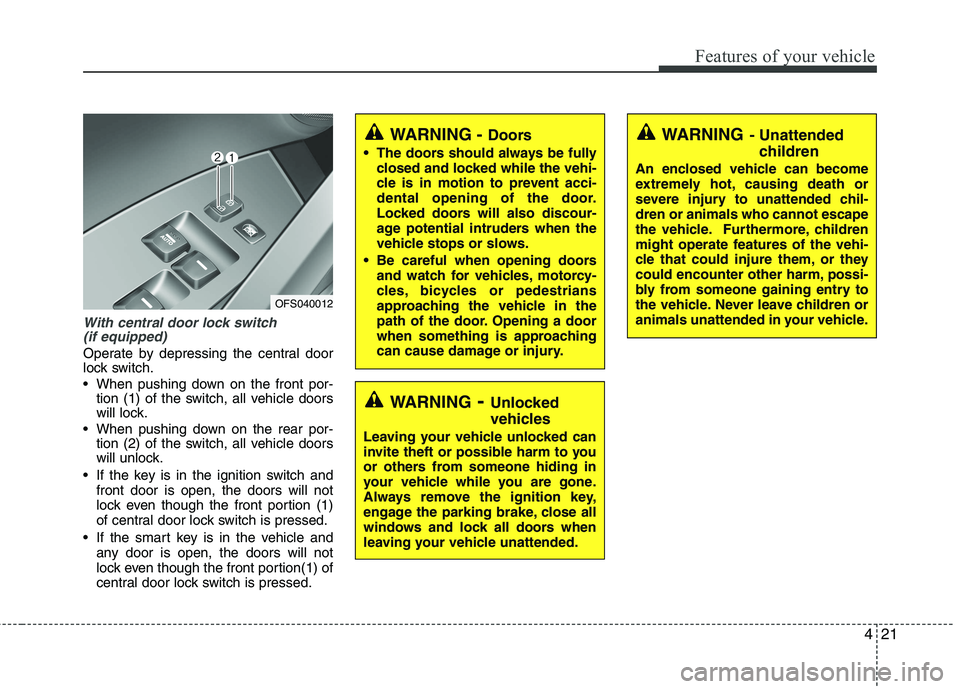
Operate by depressing the central door
lock switch.
When pushing down on the front por-
tion (1) of the switch, all vehicle doors
will lock.
When pushing down on the rear por-
tion (2) of the switch, all vehicle doors
will unlock.
If the key is in the ignition switch and
front door is open, the doors will not
lock even though the front portion (1)
of central door lock switch is pressed.
If the smart key is in the vehicle and
any door is open, the doors will not
lock even though the front portion(1) of
central door lock switch is pressed.
WARNING- Unlocked
vehicles
Leaving your vehicle unlocked can
invite theft or possible harm to you
or others from someone hiding in
your vehicle while you are gone.
Always remove the ignition key,
engage the parking brake, close all
windows and lock all doors when
leaving your vehicle unattended.
WARNING- Unattended
children
An enclosed vehicle can become
extremely hot, causing death or
severe injury to unattended chil-
dren or animals who cannot escape
the vehicle. Furthermore, children
might operate features of the vehi-
cle that could injure them, or they
could encounter other harm, possi-
bly from someone gaining entry to
the vehicle. Never leave children or
animals unattended in your vehicle.
WARNING - Doors
The doors should always be fully
closed and locked while the vehi-
cle is in motion to prevent acci-
dental opening of the door.
Locked doors will also discour-
age potential intruders when the
vehicle stops or slows.
Be careful when opening doors
and watch for vehicles, motorcy-
cles, bicycles or pedestrians
approaching the vehicle in the
path of the door. Opening a door
when something is approaching
can cause damage or injury.
OFS040012
Page 102 of 385

423
Features of your vehicle
Opening the tailgate
The tailgate is locked or unlocked
when all doors are locked or unlocked
with the key, transmitter, smart key or
central door lock/unlock switch.
When all doors are lock if the tailgate
unlock button on the smart key is
pressed for more than 1 second, the
tailgate is unlocked. Once the tailgate
is opened and then closed, the tailgate
is locked automatically.
If unlocked, the tailgate can be opened
by pressing the handle and pulling it
up.
✽ ✽
NOTICE
• In cold and wet climates door lock and
door mechanisms may not work prop-
erly due to freezing conditions.
• When jacking up the vehicle to
change a tire or repair the vehicle, do
not operate the tailgate. This could
cause the tailgate to close improperly.
TAILGATE
OFS040014
WARNING
Do not put any object on the cov-
ering shelf. If the vehicle sudden-
ly stops or makes a curve, the
object may injure passengers.
Watch out for the edge of the cov-
ering shelf, when you are using
the luggage room. You may injure
yourself.
While operating the engine or
when you turn off the engine, be
careful not to damage when you
open the tailgate. The bumper
may be heated by exhaust gas.
CAUTION
Do not put any heavy object on the
covering shelf. It may damage the
covering shelf.
Page 109 of 385
Features of your vehicle
30 4
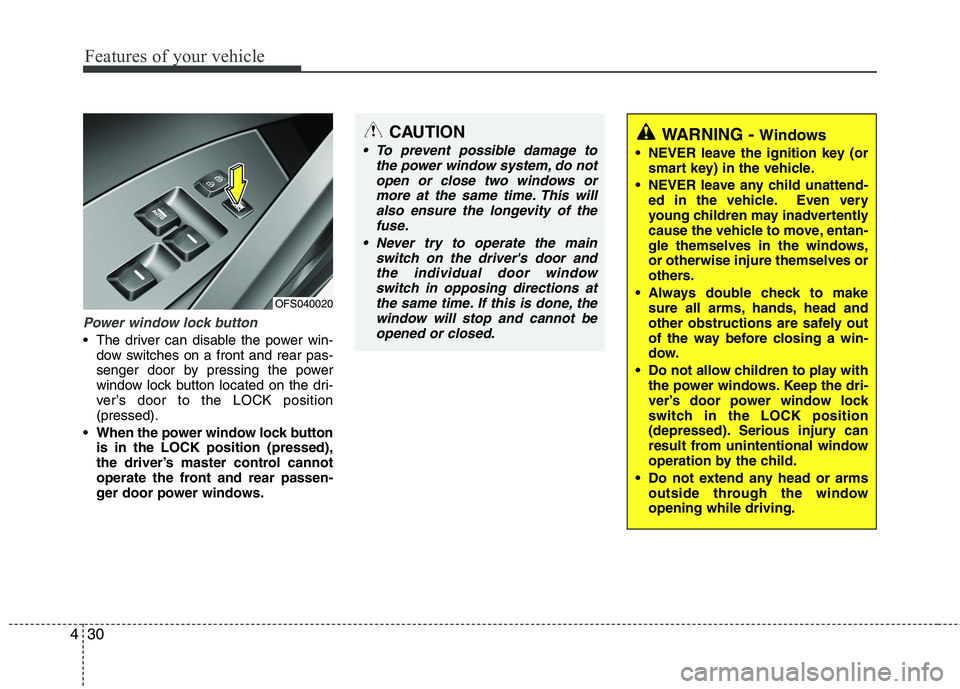
Power window lock button
The driver can disable the power win-
dow switches on a front and rear pas-
senger door by pressing the power
window lock button located on the dri-
ver’s door to the LOCK position
(pressed).
When the power window lock button
is in the LOCK position (pressed),
the driver’s master control cannot
operate the front and rear passen-
ger door power windows.
CAUTION
To prevent possible damage to
the power window system, do not
open or close two windows or
more at the same time. This will
also ensure the longevity of the
fuse.
Never try to operate the main
switch on the driver's door and
the individual door window
switch in opposing directions at
the same time. If this is done, the
window will stop and cannot be
opened or closed.WARNING - Windows
NEVER leave the ignition key (or
smart key) in the vehicle.
NEVER leave any child unattend-
ed in the vehicle. Even very
young children may inadvertently
cause the vehicle to move, entan-
gle themselves in the windows,
or otherwise injure themselves or
others.
Always double check to make
sure all arms, hands, head and
other obstructions are safely out
of the way before closing a win-
dow.
Do not allow children to play with
the power windows. Keep the dri-
ver’s door power window lock
switch in the LOCK position
(depressed). Serious injury can
result from unintentional window
operation by the child.
Do not extend any head or arms
outside through the window
opening while driving.
OFS040020
Page 134 of 385
455
Features of your vehicle
Auto door unlock (if equipped)
Off - The auto door unlock operation will
be canceled.
Key Out - All doors will be automatically
unlocked when the ignition key
is removed from ignition switch
(or smart key is removed from
the smart key holder).
Shift Lever - All doors will be automati-
cally unlocked if the shift
lever is shifted to the
P(Park) position.
AVG fuel economy
Auto Reset - The average fuel economy
will reset automatically
when you drive after refuel-
ing.
Manual Reset - The average fuel econo-
my will not reset auto-
matically when you drive
after refueling.
Headlamp escort
On - If you turn the ignition switch to the
ACC or OFF position with the head-
lamp ON, the headlamp remain on
for about 20 minutes. And the head
lamp welcome operation will be
activated. Refer to the [LIGHTING]
in this chapter.
Off - The headlamp escort and head-
lamp welcome operation will be
canceled.✽ ✽
NOTICE
• If the vehicle is not on level ground or
the battery power has been interrupt-
ed, the “Distance to empty” function
may not operate correctly.
The trip computer may not register
additional fuel if less than 1.6 gallons (6
liters) of fuel are added to the vehicle.
• The fuel consumption and distance to
empty values may vary significantly
based on driving conditions, driving
habits, and condition of the vehicle.
• The distance to empty value is an esti-
mate of the available driving distance.
This value may differ from the actual
driving distance available.